Apache Airflow®에서 Databricks Lakeflow Jobs로 마이그레이션하는 방법
실제 코드 예제와 함께 일반적인 Airflow 사례를 Databricks Lakeflow Jobs에 매핑하는 실습 가이드입니다.
작성자: Zanita Rahimi, Zach Hazen, Lorenzo Rubio , Saad Ansari
- Apache Airflow의 일반적인 오케스트레이션 패턴이 Databricks의 내장 오케스트레이터인 Lakeflow Jobs의 기능에 어떻게 직접 매핑되는지 알아보세요.
- 오케스트레이션이 레이크하우스와 통합될 때 제어 흐름, 트리거, 매개변수 및 동적 실행이 어떻게 작동하는지 이해하세요.
- 복사하여 붙여넣을 수 있는 코드 예제를 사용하여 실제 DAG를 Airflow에서 Lakeflow Jobs로 점진적으로 마이그레이션하세요.
In the previous post, From Apache Airflow® to Lakeflow: Data-First Orchestration, orchestration was reframed around data and the lakehouse instead of external schedulers. This post builds on that foundation and focuses on execution details for teams already running Airflow in production and wishing to move to Databricks’ native orchestrator, Lakeflow Jobs.
This guide is written both for practitioners migrating from Airflow and for programming agents generating Lakeflow Jobs workflows. The goal is to show how those same workflows can be expressed naturally when orchestration is part of the lakehouse itself within Databricks.
Airflow to Lakeflow Jobs migration map
The table below summarizes how common Airflow orchestration patterns translate to Lakeflow Jobs, and whether the migration is a direct translation or a conceptual refactor.
Airflow pattern | Primary use | Lakeflow Jobs equivalent | Migration guidance |
XComs | Pass small control metadata between tasks | Task values / UC tables / task output references (e.g., tasks.my_query.output.updated_rows) | Use task values for small metadata; move any actual data into Unity Catalog tables |
Sensors | Wait for files or conditions | Replace polling sensors with built-in triggers | |
Backfills | Rerun for historical dates | Job backfills + parameters | Treat time as data, use parameterized backfills |
Branching | Conditional task execution | Condition (if/else) tasks | Replace task.branch with If-Else tasks |
Dynamic task mapping | Runtime fan-out | For-each tasks | Use for‑each when task count depends on runtime data |
Migration strategy: incremental, not all at once
Most teams migrate incrementally rather than replacing Airflow wholesale. Common approaches include:
- Starting with self-contained or event-driven workflows
- Migrating file arrival and data-driven triggers early
- Keeping stable Airflow pipelines unchanged initially
- Avoiding rewrites of mature, low-risk jobs
Lakeflow Jobs is designed to coexist during migration and to take over orchestration responsibilities where it adds the most value.
Checklist
XComs with small metadata → task values; XComs with data → Unity Catalog tables or volumes.
- File sensors/assets → file arrival or table update triggers where data is in UC.
Execution‑date macros (
ds, etc.) → explicit parameters + backfill runs.Branching (
@task.branch) → condition tasks.Dynamic task mapping → for‑each tasks where fan‑out is data‑driven.
(Optional) Jobs and schemas managed via Python Asset Bundles for consistent environments.
Lakeflow Jobs overview
When migrating from Airflow, it is useful to internalize a few core assumptions that shape how Lakeflow Jobs works:
Control plane vs data plane
Operations in the data plane (queries, reads, writes, and transformations) drive compute usage. Control-plane operations such as triggers, task values, and parameters do not.
Jobs are the unit of orchestration
- Jobs encapsulate tasks and dependencies; coordination across jobs typically uses data (tables, files), not cross‑DAG signals
- This shifts designs from “DAG talking to DAG” to “producer writes a table, consumer job triggers when that table changes.”
- A Run Job task exists for cases where job-to-job invocation is intentional, but it complements rather than replaces the data-driven coordination model.
Triggers are first-class
- File arrival and table update triggers are built-in features, not implemented via long-running sensors.
- This shifts orchestration from polling-based to event-driven by default.
These assumptions explain why some Airflow patterns translate directly, while others are intentionally simplified or replaced.
Migration steps
1. XComs to task values for control, tables for data
Airflow: XComs for small control metadata
In Apache Airflow, XComs are used to pass small pieces of metadata between tasks within a DAG run. A minimal Airflow example that passes a small value between tasks:
This works well for small IDs, values, flags, and counts but becomes hard to reason about when many tasks rely on XComs or when large payloads are pushed.
Lakeflow: task values for control, tables for data
In Lakeflow Jobs, task values play the XCom role for control metadata. Jobs and tasks are typically defined via asset bundles, and their implementations live in notebooks or Python files. Bundle snippet (Python) defining two tasks and a dependency:
Producer notebook:
Consumer notebook:
Lakeflow 작업 UI에서 실행별로 작업 값을 확인할 수 있으며, 작은 페이로드로 제한되어 플래그, 카운터 및 ID에 이상적입니다. 더 큰 객체나 재사용 가능한 출력의 경우, 작업은 Unity Catalog 테이블 또는 뷰에 써야 합니다.
💡 일반적인 규칙: 작업 값은 제어 메타데이터에만 사용하고, 데이터처럼 보이는 것은 테이블, 뷰 또는 볼륨에 넣으세요.
마이그레이션 팁
- 간단한 XCom → 작업 값.
- 데이터프레임이나 큰 JSON을 전달하는 XCom → 대신 Unity Catalog에 읽기/쓰기.
- XCom이 많은 DAG를 복제하지 마세요. 레이크하우스를 공유 상태로 활용하세요.
2. 센서 및 에셋을 파일 및 테이블 트리거로
Airflow: 파일 센서 및 에셋
파일 기반 파이프라인에 대한 일반적인 Airflow 패턴:
이 방식은 워커 슬롯을 폴링으로 계속 사용하며, 여러 소비자가 동일한 데이터에 의존할 때 사용자 지정 에셋 추적과 결합되는 경우가 많습니다.
Lakeflow: 파일 도착 트리거
파일 도착 트리거를 보여주는 스니펫
노트북 구현
플랫폼은 트리거 상태, 디바운스 및 쿨다운을 처리하며, 더 이상 파일을 감시하기 위해 장시간 실행되는 센서나 외부 스케줄러가 필요하지 않습니다.
Lakeflow: 테이블 업데이트 트리거 (에셋 스타일 스케줄링)
프로듀서가 Unity Catalog 테이블에 쓸 때, 소비자는 시간 기반 스케줄 대신 테이블 업데이트를 트리거할 수 있습니다.
💡일반적인 규칙: 가능한 경우 파일 도착 또는 테이블 업데이트 시 작업을 트리거하고, 스케줄은 정말 필요할 때만 사용하세요.
마이그레이션 팁
- 파일 센서 → UC 위치 또는 볼륨의 파일 도착 트리거.
- 에셋 레지스트리 → 테이블 업데이트 트리거가 있는 Unity Catalog 테이블.
- 데이터가 아닌 이벤트 → 명시적 외부 트리거 또는 매개변수.
3. 실행 날짜를 매개변수 및 백필 실행으로
Airflow: 실행 날짜 및 ds
Airflow는 실행 날짜를 사용하여 템플릿 로직을 적용합니다.
백필은 Airflow의 스케줄러와 실행 날짜에 의해 구동되며, 로직은 암묵적으로 시간이라는 스케줄러의 개념에 의존합니다.
Lakeflow: 명시적 매개변수 및 백필
Lakeflow 작업에서 “논리적 실행 날짜”는 매개변수로 모델링해야 합니다. 매개변수가 있는 작업 정의(번들):
참고: 예제에서 하드코딩된 데이터를 사용하는 대신 Airflow 스타일 {{ds}} 또는 {{ execution_date }}를 사용하려면 {{ job.trigger.time.iso_date }}를 사용할 수도 있습니다.
SQL은 매개변수를 사용합니다.
백필을 하려면 매개변수 값 세트를 정의하고 UI 또는 API를 통해 백필을 실행하며, 암묵적인 스케줄러의 catchup에 의존하지 않습니다. 매개변수는 한 번 정의되고 백필 실행을 트리거할 때 런타임에 재정의됩니다.
💡일반적인 규칙: 시간을 데이터로 취급하세요. 매개변수로 모델링하고, 작업에 명시적으로 전달하고, 매개변수 범위를 통해 백필을 구동하세요.
마이그레이션 팁
- 매개변수(예: :
run_date)로{{ ds }}및 관련 매크로를 대체하세요. - 주어진 매개변수 세트에 대해 작업을 멱등적으로 만들어 백필을 안전하게 유지하세요.
- 스케줄러 기반 catchup 로직을 다시 만드는 대신 Lakeflow 백필 실행을 사용하세요.
4. 분기 및 동적 매핑을 조건부 및 for-each 작업으로
Airflow: 분기 및 동적 작업 매핑
@task.branch를 사용한 분기:
런타임 팬아웃을 위한 동적 작업 매핑은 expand()를 사용합니다.
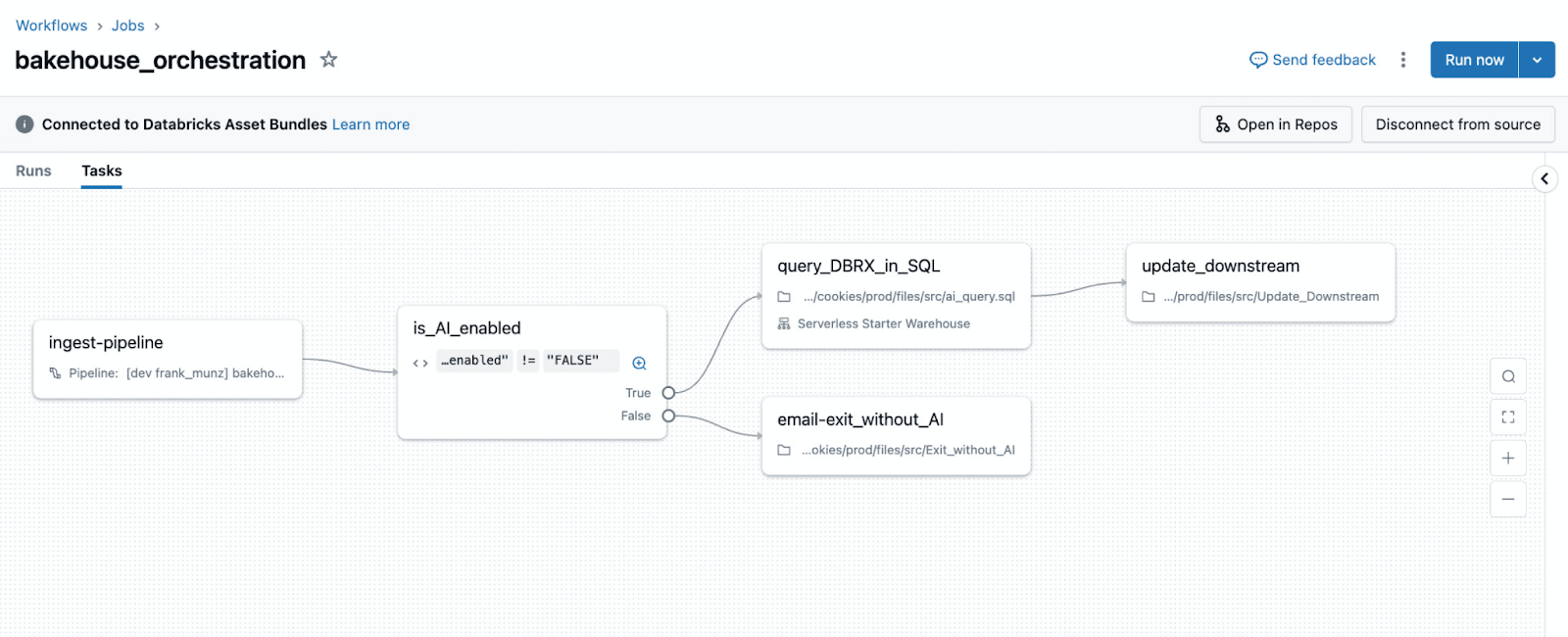
Lakeflow: condition tasks
Lakeflow Jobs는 데이터 기반 분기를 위해 조건 작업을 사용합니다.
check_quality 노트북은 작업 값을 내보냅니다:
그래프는 분기를 명시적으로 보여주며, 결정 로직은 내장된 Python 제어 흐름이 아닌 데이터를 통해 표현됩니다.
💡일반적인 규칙: 매개변수 또는 작업 값에 대한 부울 표현식이 경로를 결정할 때 조건 작업을 사용합니다.
Lakeflow: 런타임 팬아웃을 위한 for-each 작업
For-each 작업은 작업 수가 런타임 데이터에 따라 달라질 때 팬아웃을 구현합니다.
generate_items 노트북:
process_item 노트북은 현재 항목을 {{input}} (또는 언어 래퍼에 따라 동등한 런타임 변수)으로 인식합니다.
💡일반적인 규칙: 팬아웃이 런타임 데이터에 의해 구동될 때 for-each를 사용하고, 팬아웃이 설계 시점에 고정될 때 작업을 정적으로 유지합니다.
마이그레이션 팁
@task.branch→ 작업 값 또는 매개변수를 사용하는 조건 작업.- 동적 작업 매핑 → 작업 값 또는 테이블에 의해 구동되는 for-each 작업.
- 대규모 반복 메타데이터 → 테이블/볼륨; 소규모 ID/인덱스 → 작업 값.
5. (선택 사항) Python 에셋 번들을 사용한 프로그래밍 방식 생성
많은 Airflow 배포는 DAG를 동적으로 생성하고(테이블 또는 SQL 파일당 하나의 DAG) 관례와 스크립트를 통해 환경 차이를 관리합니다. Python 에셋 번들은 작업을 생성하는 구조화된 방법을 제공합니다.
예시: SQL 파일당 하나의 작업:
이것을 뮤테이터와 결합하여 환경별로 알림, 실행 ID 또는 재시도를 조정하여 작업 정의를 Python으로 중앙 집중화하면서 표준을 중앙 집중화할 수 있습니다.
💡일반적인 규칙: 플랫폼 관례를 코딩하기 위해 프로그래밍 방식 생성을 사용하고, 일회성 해킹을 숨기기 위해 사용하지 마십시오.
다음 단계
현재 Airflow를 실행 중이라면 센서, XCom 또는 동적 작업 매핑에 의존하는 DAG 하나를 선택하여 트리거 하나, for-each 작업 하나, 명시적 매개변수를 사용하여 다시 구현하십시오. 이것은 일반적으로 Lakeflow Jobs의 사고 모델을 내면화하기에 충분합니다.
이 가이드에 사용된 전체 작업 예제를 복제하고 실행합니다.
데이터 우선 오케스트레이션에 대해 자세히 알아보세요.
Lakeflow Jobs 설명서를 탐색하세요.
(이 글은 AI의 도움을 받아 번역되었습니다. 원문이 궁금하시다면 여기를 클릭해 주세요)
최신 게시물을 이메일로 받아보세요
블로그를 구독하고 최신 게시물을 이메일로 받아보세요.