How to move from Apache Airflow® to Databricks Lakeflow Jobs
A hands-on guide mapping common Airflow practices to Databricks Lakeflow Jobs with side-by-side code examples.
by Zanita Rahimi, Zach Hazen, Lorenzo Rubio and Saad Ansari
- Learn how common Apache Airflow orchestration patterns map directly to Lakeflow Jobs, Databricks’ built-in orchestrator, capabilities.
- Understand how control flow, triggers, parameters, and dynamic execution work when orchestration is integrated with the lakehouse.
- Use copy‑pasteable code examples to migrate real DAGs from Airflow to Lakeflow Jobs incrementally
In the previous post, From Apache Airflow® to Lakeflow: Data-First Orchestration, orchestration was reframed around data and the lakehouse instead of external schedulers. This post builds on that foundation and focuses on execution details for teams already running Airflow in production and wishing to move to Databricks’ native orchestrator, Lakeflow Jobs.
This guide is written both for practitioners migrating from Airflow and for programming agents generating Lakeflow Jobs workflows. The goal is to show how those same workflows can be expressed naturally when orchestration is part of the lakehouse itself within Databricks.
Airflow to Lakeflow Jobs migration map
The table below summarizes how common Airflow orchestration patterns translate to Lakeflow Jobs, and whether the migration is a direct translation or a conceptual refactor.
Airflow pattern | Primary use | Lakeflow Jobs equivalent | Migration guidance |
XComs | Pass small control metadata between tasks | Task values / UC tables / task output references (e.g., tasks.my_query.output.updated_rows) | Use task values for small metadata; move any actual data into Unity Catalog tables |
Sensors | Wait for files or conditions | Replace polling sensors with built-in triggers | |
Backfills | Rerun for historical dates | Job backfills + parameters | Treat time as data, use parameterized backfills |
Branching | Conditional task execution | Condition (if/else) tasks | Replace task.branch with If-Else tasks |
Dynamic task mapping | Runtime fan-out | For-each tasks | Use for‑each when task count depends on runtime data |
Migration strategy: incremental, not all at once
Most teams migrate incrementally rather than replacing Airflow wholesale. Common approaches include:
- Starting with self-contained or event-driven workflows
- Migrating file arrival and data-driven triggers early
- Keeping stable Airflow pipelines unchanged initially
- Avoiding rewrites of mature, low-risk jobs
Lakeflow Jobs is designed to coexist during migration and to take over orchestration responsibilities where it adds the most value.
Checklist
XComs with small metadata → task values; XComs with data → Unity Catalog tables or volumes.
- File sensors/assets → file arrival or table update triggers where data is in UC.
Execution‑date macros (
ds, etc.) → explicit parameters + backfill runs.Branching (
@task.branch) → condition tasks.Dynamic task mapping → for‑each tasks where fan‑out is data‑driven.
(Optional) Jobs and schemas managed via Python Asset Bundles for consistent environments.
Lakeflow Jobs overview
When migrating from Airflow, it is useful to internalize a few core assumptions that shape how Lakeflow Jobs works:
Control plane vs data plane
Operations in the data plane (queries, reads, writes, and transformations) drive compute usage. Control-plane operations such as triggers, task values, and parameters do not.
Jobs are the unit of orchestration
- Jobs encapsulate tasks and dependencies; coordination across jobs typically uses data (tables, files), not cross‑DAG signals
- This shifts designs from “DAG talking to DAG” to “producer writes a table, consumer job triggers when that table changes.”
- A Run Job task exists for cases where job-to-job invocation is intentional, but it complements rather than replaces the data-driven coordination model.
Triggers are first-class
- File arrival and table update triggers are built-in features, not implemented via long-running sensors.
- This shifts orchestration from polling-based to event-driven by default.
These assumptions explain why some Airflow patterns translate directly, while others are intentionally simplified or replaced.
Migration steps
1. XComs to task values for control, tables for data
Airflow: XComs for small control metadata
In Apache Airflow, XComs are used to pass small pieces of metadata between tasks within a DAG run. A minimal Airflow example that passes a small value between tasks:
This works well for small IDs, values, flags, and counts but becomes hard to reason about when many tasks rely on XComs or when large payloads are pushed.
Lakeflow: task values for control, tables for data
In Lakeflow Jobs, task values play the XCom role for control metadata. Jobs and tasks are typically defined via asset bundles, and their implementations live in notebooks or Python files. Bundle snippet (Python) defining two tasks and a dependency:
Producer notebook:
Consumer notebook:
Task values are visible in the Lakeflow Jobs UI per run and are limited to small payloads, making them ideal for flags, counters, and IDs. For larger objects or reusable outputs, tasks should write to Unity Catalog tables or views:
💡 Rule of thumb: Use task values only for control metadata; put anything that looks like data into tables, views, or volumes.
Migration tips
- Simple XComs → task values.
- XComs that carry dataframes or large JSON → reads/writes to Unity Catalog instead.
- Avoid reproducing XCom‑heavy DAGs; lean on the lakehouse as the shared state.
2. Sensors and assets to file and table triggers
Airflow: file sensors and assets
Typical Airflow pattern for a file‑driven pipeline:
This keeps a worker slot busy polling and often combines with custom asset tracking when multiple consumers depend on the same data.
Lakeflow: file arrival triggers
Snippet showing a file arrival trigger
Notebook implementation
The platform handles trigger state, debounce, and cooldown, and you no longer need long‑running sensors or external schedulers to watch for files.
Lakeflow: table update triggers (asset‑style scheduling)
When producers write to Unity Catalog tables, consumers can trigger on table updates instead of time‑based schedules.
💡Rule of thumb: Trigger jobs on file arrivals or table updates whenever possible; use schedules only when you truly need them.
Migration tips
- File sensors → file arrival triggers on UC locations or volumes.
- Asset registries → Unity Catalog tables with table update triggers.
- Non‑data events → explicit external triggers or parameters.
3. Execution dates to parameters and backfill runs
Airflow: execution date and ds
Airflow encourages templating logic with execution dates:
Backfills are driven by Airflow’s scheduler and execution dates; logic implicitly depends on the scheduler’s concept of time.
Lakeflow: explicit parameters and backfill
In Lakeflow Jobs, “logical run date” should be modeled as a parameter. Job definition (bundles) with a parameter:
Note: you can also use {{ job.trigger.time.iso_date }} if you want to use the Airflow style {{ds}} or {{ execution_date }} instead of hard-coded data in the example above.
SQL uses the parameter:
To backfill, you define a set of parameter values and run backfills over them in the UI or via API, rather than relying on implicit scheduler catchup. Parameters are defined once and overridden at runtime when triggering a backfill run
💡Rule of thumb: Treat time as data; model it as a parameter, pass it explicitly into tasks, and drive backfills via parameter ranges.
Migration tips
- Replace
{{ ds }}and related macros with parameters (e.g., :run_date). - Make tasks idempotent for a given parameter set so backfills stay safe.
- Use Lakeflow backfill runs rather than re‑creating scheduler‑driven catchup logic.
4. Branching and dynamic mapping to condition and for‑each tasks
Airflow: branching and dynamic task mapping
Branching with @task.branch:
Dynamic task mapping for runtime fan‑out using expand():
Lakeflow: condition tasks
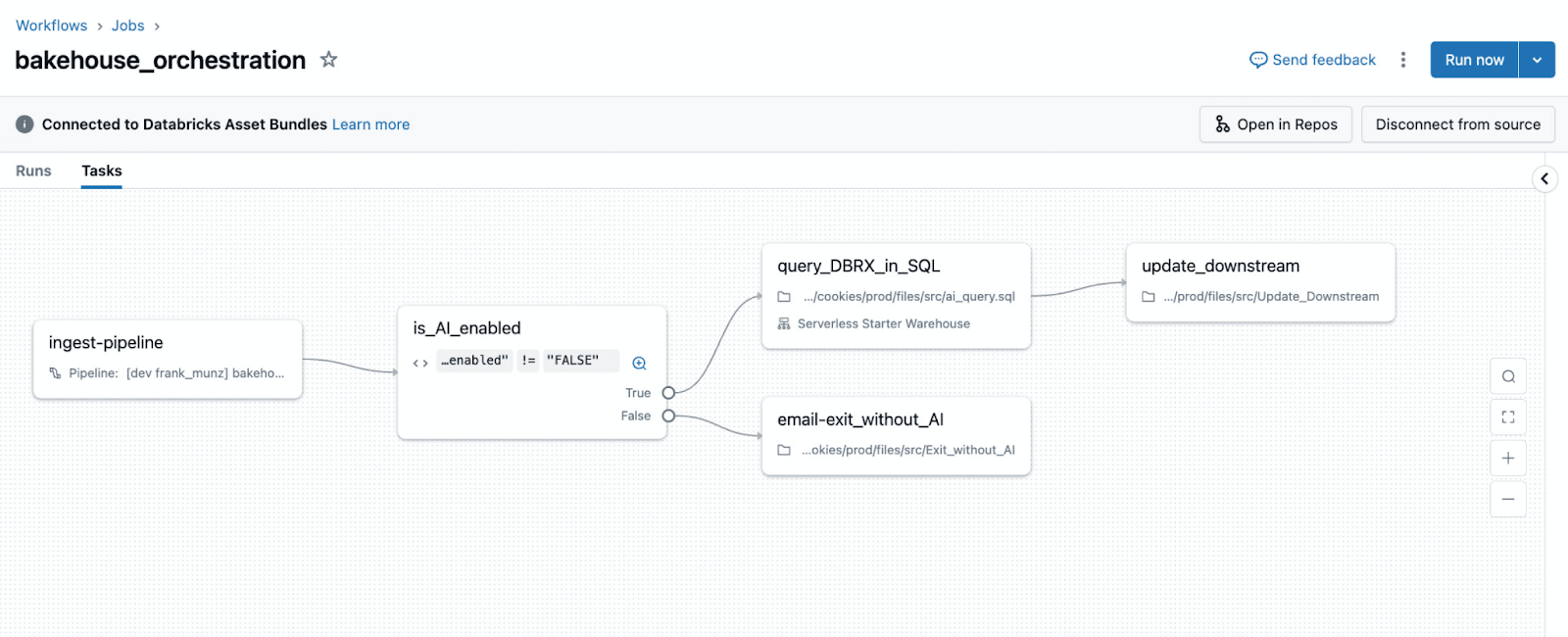
Lakeflow Jobs uses condition tasks for data‑driven branching
check_quality notebook emits a task value:
The graph shows the branch explicitly, and the decision logic is expressed via data (task values) rather than embedded Python control flow.
💡Rule of thumb: Use condition tasks when a boolean expression over parameters or task values determines the path.
Lakeflow: for‑each tasks for runtime fan‑out
For‑each tasks implement fan‑out when task count depends on runtime data.
generate_items notebook:
process_item notebook sees the current item as {{input}} (or equivalent runtime variable depending on language wrapper).
💡Rule of thumb: Use for‑each when fan‑out is driven by runtime data; keep tasks static when fan‑out is fixed at design time.
Migration tips
@task.branch→ condition tasks using task values or parameters.- Dynamic task mapping → for‑each tasks driven by task values or tables.
- Large iteration metadata → tables/volumes; small IDs/indexes → task values.
5. (Optional) Programmatic generation with Python Asset Bundles
Many Airflow deployments generate DAGs dynamically (one DAG per table or SQL file) and manage environment differences via conventions and scripts. Python Asset Bundles offer a structured way to generate jobs and related resources programmatically.
Example: one job per SQL file:
You can combine this with mutators to adjust notifications, execution identities, or retries per environment, centralizing standards while keeping job definitions in Python.
💡 Rule of thumb: Use programmatic generation to codify platform conventions, not to hide one‑off hacks.
Next steps
If you are running Airflow today, pick one DAG that relies on sensors, XComs, or dynamic task mapping and re-implement it using one trigger, one for-each task, and explicit parameters. This is usually enough to internalize the Lakeflow Jobs mental model.
Clone and run the full working examples used in this guide
Learn more about data-first orchestration
Explore Lakeflow Jobs documentation
Get the latest posts in your inbox
Subscribe to our blog and get the latest posts delivered to your inbox.