Polarfische vs. Pandas
Vergleichen Sie die leistungsstarke Parallelverarbeitung von Polars mit der vielseitigen API von Pandas für die DataFrame-basierte Datenmanipulation.
- Die Unterschiede zwischen Polars und Pandas für DataFrame-Operationen und Datenanalyse-Workflows verstehen
- Lernen, wie Polars Rust-basierte Parallelverarbeitung und verzögerte Auswertung für überragende Leistung bei großen Datensätzen nutzt
- Entdecken, wann das umfangreiche Ökosystem und die Flexibilität von Pandas gegenüber der Geschwindigkeit und Speichereffizienz von Polars vorzuziehen sind
Einführung: Optionen für DataFrame-Bibliotheken
DataFrames sind zweidimensionale Datenstrukturen, in der Regel Tabellen, ähnlich wie Tabellenkalkulationen, die es Ihnen ermöglichen, tabellarische Daten in Zeilen von Beobachtungen und Spalten von Variablen zu speichern und zu bearbeiten sowie wertvolle Informationen aus dem gegebenen Datensatz zu extrahieren. DataFrame-Bibliotheken sind Software-Toolkits, die eine tabellenkalkulationsähnliche Struktur für die Arbeit mit Daten in Code bereitstellen. DataFrame-Bibliotheken sind ein wesentlicher Bestandteil einer Datenanalyseplattform, da sie die Kernabstraktion bereitstellen, die das Laden, Bearbeiten, Analysieren und Verstehen von Daten vereinfacht – und eine Brücke zwischen der Rohdatenspeicherung und übergeordneten Analyse-, Machine-Learning- und Visualisierungstools schlägt.
Polars und pandas sind die führenden Python-DataFrame-Bibliotheken für Datenanalyse und -manipulation, sie sind jedoch für unterschiedliche Anwendungsfälle und Arbeitsumfänge optimiert.
pandas ist eine Open-Source-Bibliothek für die Programmiersprache Python, die schnelle und flexible Datenstrukturen und Datenanalysetools bereitstellt. Es ist die am weitesten verbreitete DataFrame-Bibliothek in Python. Sie ist ausgereift, feature-reich und verfügt über ein umfangreiches Ökosystem mit vielen Integrationen. Pandas bietet eine umfangreiche Dokumentation, Community-Support und ausgereifte Plotting-Bibliotheken. Es ist beliebt für kleine bis mittelgroße Datasets und explorative Analysen.
Polars ist eine schnelle, Rust-basierte, spaltenorientierte DataFrame-Bibliothek mit einer Python-API. Sie ist auf Geschwindigkeit ausgelegt und verfügt über integrierte Parallelität und „Lazy Execution“ (nicht sofortige Ausführung) für Workloads, die größer als der Arbeitsspeicher sind.
Je nach Ihren Anforderungen an die Datenverarbeitung eignet sich Pandas für Data Science bei Datasets mit bis zu einigen Millionen Zeilen gut. Wenn Sie ETL oder Analysen durchführen oder mit großen Tabellen arbeiten, ist Polars im Allgemeinen effizienter.
Wann Sie pandas für Ihren Workflow verwenden sollten
Pandas brilliert, wenn Flexibilität, Iterationsgeschwindigkeit und Kompatibilität mit dem Ökosystem wichtiger sind als extreme Scale. Es ist die De-facto-Standard-DataFrame-Bibliothek. Es priorisiert Flexibilität und bietet tiefe Integrationen mit Scikit-learn. NumPy, Matplotlib, statsmodels und viele Machine-Learning-Tools.
Es funktioniert mit Legacy-Codebasen und ist Datenverarbeitungsteams vertraut, die es für interaktive Analysen und explorative Datenarbeit verwenden, bei denen Flexibilität am wichtigsten ist. Sein zeilenbasiertes Format eignet sich hervorragend für kleinere bis mittelgroße Datensätze für Ad-hoc-Analysen, Notebook-basierte Workflows und schnelles Prototyping.
Mit pandas kann man jede Python-Funktion ausführen, während Polars dringend von der Ausführung beliebigen Python-Codes abrät. Bei pandas sind In-Place-Änderungen und eine schrittweise Bearbeitung üblich, was es Benutzern ermöglicht, den Zustand im Laufe der Zeit zu verändern. Bei Polars sind DataFrames praktisch unveränderlich.
Sie können die pandas-API auf Apache Spark 3.2 ausführen. Auf diese Weise können Sie die pandas-Workloads gleichmäßig verteilen und so sicherstellen, dass alles wie gewünscht erledigt wird.
Für die explorative Datenanalyse bietet pandas schnelle, interaktive Operationen, einfaches Slicing/Filtern/Gruppieren und schnelle visuelle Überprüfungen. Es wird oft zur Datenvalidierung/-prüfung und zur Bereinigung von Rohdaten von fehlenden Werten, inkonsistenten Formaten, Duplikaten oder gemischten Datentypen verwendet.
Für Business Analytics und Reporting, wo Datenteams Metriken in einem festgelegten Zeitrahmen generieren müssen, vereinfacht pandas Groupby- und Aggregationsvorgänge durch einfaches Reshaping und gibt die Daten direkt im CSV-/Excel-Format aus.
Wenn Data-Science-Teams Daten für ML-Modelle vorbereiten, vereinfacht pandas das Experimentieren durch die natürliche, spaltenbasierte Erstellung von Features und die enge Integration mit scikit-learn. Es wird häufig für Rapid Prototyping und Proofs of Concept (PoC) verwendet, bevor die Logik in SQL-, Spark- oder Produktions-Pipelines geschrieben wird.
Sogar Finanz- und nicht-technische Geschäftsteams verwenden pandas, um Excel-basierte Arbeitsabläufe zu automatisieren.
Weitere Informationen:
Arbeiten mit Pandas-DataFrames
Wann Sie Polars für Ihren Workflow verwenden sollten
Polars glänzt, wenn Performance, Skalierbarkeit und Zuverlässigkeit wichtiger sind als Ad-hoc-Flexibilität. Dank seiner Rust-Engine, Multithreading, dem spaltenbasierten Speichermodell und der Lazy-Execution-Engine kann Polars überraschend große ETL -Workloads auf einer einzigen Maschine bewältigen, bei der Speichereffizienz entscheidend ist. Lazy Execution bedeutet, dass Operationen nicht sofort ausgeführt, sondern aufgezeichnet, optimiert und erst dann ausgeführt werden, wenn eine Ausgabe explizit angefordert wird. Dies kann zu enormen Leistungssteigerungen führen, da ein optimierter Ausführungsplan erstellt wird, anstatt jede Operation Schritt für Schritt auszuführen. Datentransformationen werden zuerst geplant und später ausgeführt, wodurch das System die gesamte Pipeline für maximale Geschwindigkeit und Effizienz optimieren kann.
Für Produktions-Datenpipelines, die eine konstant hohe Performance und geschwindigkeitskritische Workflows erfordern, ist Polars standardmäßig multithreading-fähig, um alle verfügbaren CPU-Kerne zu nutzen und jeden Chunk des DataFrames in einem anderen Thread zu verarbeiten. Dadurch ist es dramatisch schneller als herkömmliche Single-Threaded-DataFrame-Bibliotheken wie pandas.
Bei der Durchführung von Joins über zig Millionen von Zeilen, wie dem Verbinden von Clickstream-Logs mit Benutzermetadaten, sind die Joins von Polars multithreaded und die spaltenbasierten Daten reduzieren unnötiges Kopieren im Speicher.
In Anwendungsszenarien mit großen Datensätzen, komplexen Transformationen oder mehrstufigen Pipelines profitiert Polars von der parallelen Verarbeitung, bei der jede Zeile unabhängig verarbeitet, Join-Operationen auf mehrere Kerne aufgeteilt und Hash-Partitionierungen parallel durchgeführt werden können. Bei mehrstufigen Abfrage-Pipelines mit vielen Transformationen kann Polars die gesamte Pipeline optimieren und parallel ausführen. Die Verwendung von parallelem Streaming und Lazy Evaluation ermöglicht es Polars, Datasets zu verarbeiten, die größer als der RAM sind. Parallele Verarbeitung und Lazy Evaluation unterstützen auch das Scannen großer Dateien (CSV-/Parquet-Dateien).
Polars erzielt zudem erhebliche Performancevorteile durch die Verwendung spaltenorientierter Speicherung auf Basis von Apache Arrow zur Queryoptimierung. Bei spaltenorientierter Speicherung werden die Daten spaltenweise und nicht zeilenweise gespeichert. Dies ermöglicht es Polars, nur die erforderlichen Spalten zu lesen, wodurch Festplatten-I/O und Speicherzugriffe minimiert werden, was es für die analytische Verarbeitung effizienter macht. Es kann direkt auf den kontinuierlichen Speicherpuffern von Apache Arrow arbeiten, ohne Daten zu kopieren.
Wenn Sie ML-Feature-Engineering und -Exploration auf extrem großen Datensätzen durchführen, große Faktentabellen verknüpfen, umfangreiche Aggregationen und OLAP-Analysen durchführen, Zeitreihen-Workloads, massives Scannen von Dateien, Bigger-than-Memory-Verarbeitung und Batch-Verarbeitung mit engen SLAs haben, ist Polars möglicherweise die bessere Wahl.
- Interner Link: Apache Spark (Anker: verteilte Datenverarbeitung)
- Interner Link: Datenpipelines (Anker: Aufbau skalierbarer Datenpipelines)
Datendarstellung und Architektur
Die Datenrepräsentationsmodelle und Architekturen von pandas und Polars unterscheiden sich absichtlich. Die von pandas verwendete zeilenbasierte Speicherung speichert vollständige Zeilen kontinuierlich im Speicher, während die spaltenbasierte Speicherung in Polars jede Spalte zusammenhängend speichert. Jede Methode kann die Performance beeinflussen, je nachdem, welche Arten von Abfragen Sie ausführen.
Bei analytischen Abfragen ist die spaltenorientierte Speicherung in der Regel leistungsfähiger, da die Abfrage nur die benötigten Spalten berühren muss, während zeilenorientierte Speicher ganze Zeilen lesen müssen.
Spalten haben einheitliche Typen, was zu besseren Komprimierungsraten führt, und die Vektorisierung ermöglicht eine schnelle Batch-Verarbeitung.
Für transaktionale Abfragen, wie z. B. OLTP-Workloads, wird die zeilenbasierte Speicherung bevorzugt, da eine ganze Zeile zusammen gespeichert wird, sodass das Abrufen eines vollständigen Datensatzes nur einen einzigen Lesevorgang erfordert und die Aktualisierung einer Zeile nur einen kompakten Speicherbereich ändert.
Die nachstehenden Diagramme zeigen die mittleren Leistungsverhältnisse im Vergleich von zeilenbasierten und spaltenbasierten DataFrame-Bibliotheken (in diesem Fall Koalas und Dask).
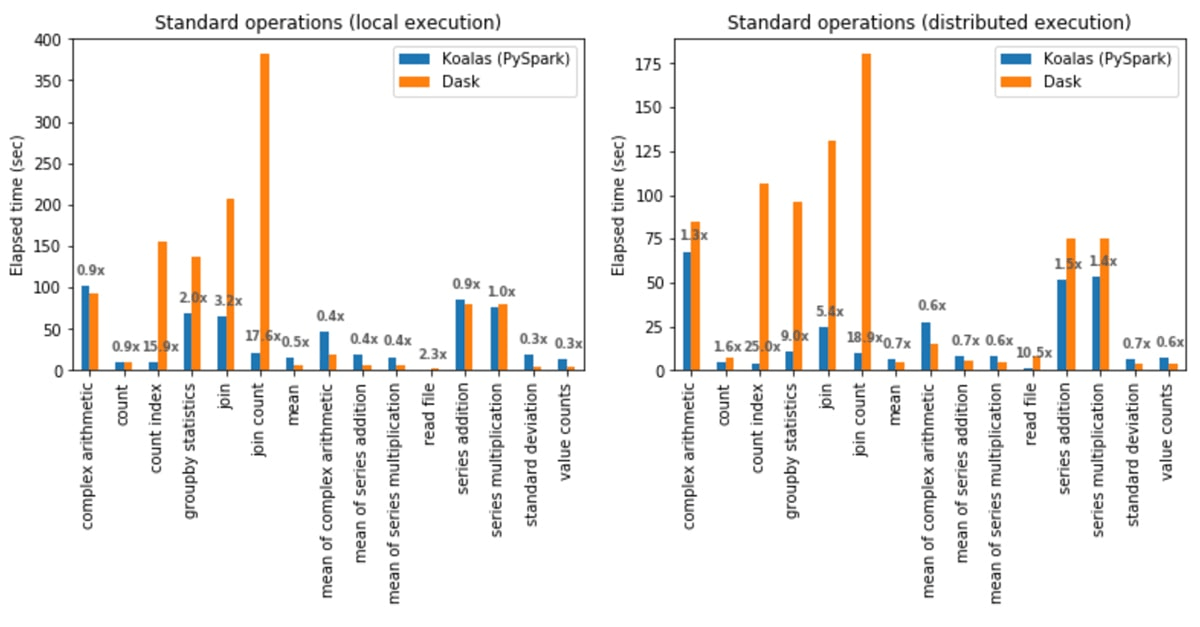
Das spaltenbasierte Format von Polars ermöglicht schnellere Aggregationen. Da jede Spalte zusammenhängend im Speicher gespeichert ist, kann sie eine einzelne Spalte streamen, ohne nicht zugehörige Daten zu scannen, und sie parallelisiert Aggregationen über CPU-Kerne. Bei großen Datasets reduziert die spaltenbasierte Speicherung die RAM-Auslastung, da nur die von der Abfrage benötigten Spalten gelesen werden.
Das spaltenorientierte Layout in Polars ermöglicht eine vektorisierte Ausführung mittels Apache Arrow, was ein Zero-Copy Data Sharing ermöglicht. Polars kann Filtern und Slicing durchführen, ohne die zugrunde liegenden Datenpuffer zu kopieren.
Das von Pandas verwendete zeilenbasierte Speichermodell bedeutet, dass jede Zeile eines DataFrame als eine Sammlung von gruppierten Python-Objekten gespeichert wird. Dieses Modell ist für Betriebe optimiert, die vollständige Datensätze abrufen oder ändern. Es kann alle Daten für einen Datensatz in einem einzigen Lookup abrufen, wodurch es besser für viele kleine Betriebe mit gemischter Arbeitslast geeignet ist als für große Vektoren. Es unterstützt heterogene Datentypen wie Python-Objekte, Strings, Zahlen, Listen und verschachtelte Daten. Solche Flexibilität ist nützlich für chaotische reale Daten, JSON in CSV-Datensätzen und gemischttypige Feature-Sets.
Bei Abfragen, die den Zugriff auf viele oder alle Spalten für eine einzelne Zeile erfordern, wie z. B. das Abrufen von Datensätzen auf Benutzerebene und die Serialisierung von Daten auf Zeilenebene für APIs, muss Pandas die Zeile nicht durch den Zugriff auf mehrere Spaltenpuffer rekonstruieren. Es ist auch schneller für Workloads mit häufigen Mutationen, da es die In-Place-Mutation von DataFrame-Zellen ermöglicht.
Wenn die Daten bequem in den Arbeitsspeicher passen, ist pandas sehr praktisch und bietet eine ausreichend schnelle Performance für kleine bis mittelgroße Datasets.
Performance: Bewertung von Geschwindigkeit und Ressourcennutzung
Polars ist im Allgemeinen schneller und ressourceneffizienter als pandas, insbesondere für Engineering-Arbeiten und wenn Datenmenge und Komplexität zunehmen. Polars ist spaltenbasiert, standardmäßig multithreaded und kann verzögerte/optimierte Abfragepläne ausführen. Pandas ist für DataFrame-Operationen meistens Single-Threaded und verwendet Eager Evaluation, bei der jede Zeile sofort ausgeführt und zwischengeschaltete DataFrames materialisiert werden. Pandas kann bei kleinen Datenmengen und einigen einfachen vektorisierten Operationen schneller sein und ist flexibler – diese Flexibilität kann jedoch CPU/Arbeitsspeicher kosten.
Der nachstehende Graph zeigt, wie die Anzahl der Threads die Performance beeinflussen kann.
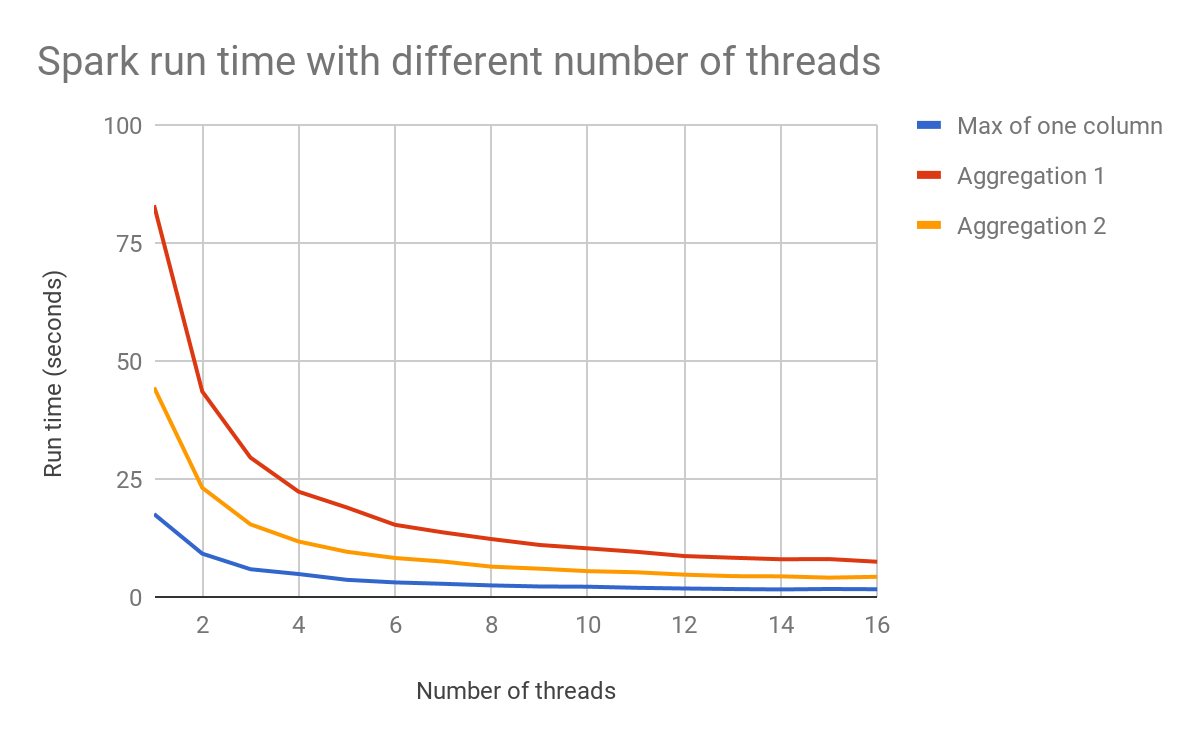
Mit der LazyFrame-Abfrageplanung und dem Optimierer von Polars erstellt Ihr Code zuerst einen Abfrageplan, den Polars dann optimiert und auf Befehl ausführt. Das allein macht den größten Teil des Geschwindigkeits- und Speichernutzungsvorteils von Polars aus.
In Pandas bedeutet Eager Evaluation, dass es sofort berechnet, ein Zwischenobjekt im Speicher erstellt und dieses Zwischenobjekt an den nächsten Schritt weitergibt, sodass Sie bei mehreren Durchläufen über die Daten an Geschwindigkeit einbüßen (oft werden dabei mehrere Zwischenprodukte in voller Größe erstellt). Da Pandas nicht die gesamte Pipeline sehen kann, kann es nicht global optimieren. Aber Pandas ist stark, wenn Daten problemlos in den Arbeitsspeicher passen, wenn Operationen klein und interaktiv sind und wenn Sie nach jeder Zeile sofortiges Feedback wünschen. Als Faustregel gilt: Wählen Sie Pandas, wenn:
- Sie führen eine schnelle EDA durch
- Datasets sind klein/mittelgroß
- Sie wünschen eine schrittweise Inspektion und Debugging
- Ihre Logik ist hochgradig angepasstes Python (zeilenweise)
Wählen Sie Polars, wenn:
- Sie wiederholbare ETL-/Analytics-Pipelines durchführen
- Datasets groß oder breit sind
- Sie read.parquet oft
- Ihnen sind Geschwindigkeit, Speicher und weniger Zwischenkopien wichtig.
Aufgrund ihrer philosophischen Unterschiede (Pandas ist auf Flexibilität und Polars auf Geschwindigkeit ausgelegt) behandeln die beiden Bibliotheken fehlende Daten und Nullwerte unterschiedlich, was sich auch auf die Performance auswirken kann.
Pandas kann mehrere verschiedene Werte als „fehlend“ behandeln, was es flexibel, aber manchmal inkonsistent macht und Operationen aufgrund der Handhabung von Python-Objekten verlangsamen kann. Polars verwendet „null“ als einzigen fehlenden Wert für alle Datentypen, um der SQL-Semantik genau zu entsprechen, was bei Skalierung schneller und speichereffizienter ist.
Wie in dem nachstehenden Graph zu sehen ist, der Laufzeitvergleiche für repräsentative Workflows zeigt, verlangsamen sich die Operationen, wenn pandas gezwungen wird, auf großen Datasets eine Ausführung auf Python-Ebene (pro Zeile) durchzuführen, da es viele Zwischenkopien erstellt.
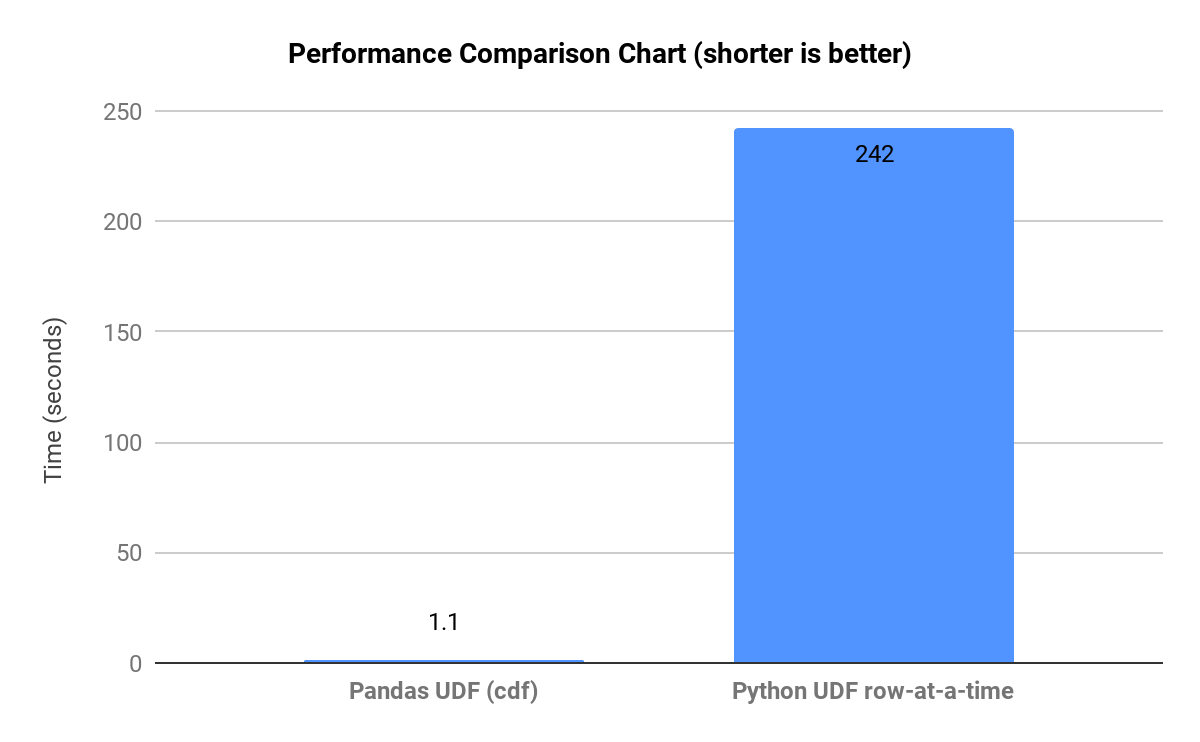
Bei Polars können auch Performance-Engpässe auftreten, wenn die Vektorisierung unterbrochen und die Abfrageoptimierung verhindert wird oder wenn der Lazy-Modus nicht für große Pipelines verwendet wird. Die Polars-Optimierung kann auch bei sehr großen Many-to-many-Joins zu Problemen führen.
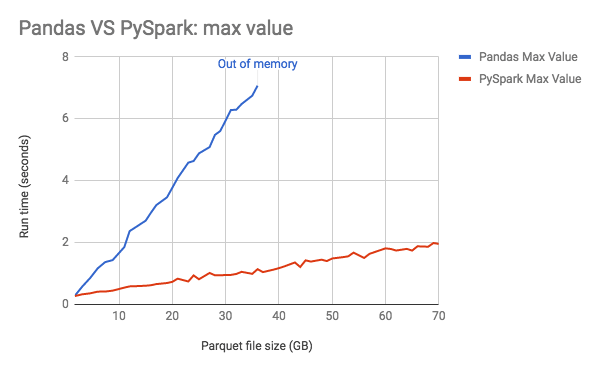
Der nachstehende Graph zeigt den Speicherverbrauch von pandas, der linear mit der Datengröße zunimmt.
Performance-Anleitung:
- Wenn Ihre Workload aus Groupby-/Join-/Scan-Vorgängen mit großen Parquet-Dateien besteht, ist Polars normalerweise überlegen.
- Wenn Ihr Workflow interaktive EDA mit viel benutzerdefinierter Python-Logik ist, ist pandas oft praktischer.
Benchmarking
Um die Performanceunterschiede zu verstehen, finden Sie hier einige Benchmarking-Ansätze, die Sie implementieren können:
Schnell und ad hoc
- Verwenden Sie
time.perf_counter()für die Gesamtlaufzeit - Mehrmals wiederholen
- Bericht
Median/p95
Wiederholbare Microbenchmarks (für ein Team / PRs)
- Verwende
pytest-benchmarkoderasv - Ausführung auf einem stabilen Rechner (oder einem fest zugeordneten CI-Runner)
- Ergebnisse über Commits hinweg speichern
Produktionsnahes Benchmarking (am aussagekräftigsten)
- Form & Größe eines echten Datasets
- Ausführungen mit kaltem vs. warmem Cache
- End-to-End-Pipeline-Timing
- Speicher- und CPU-Tracking
Um die Vergleiche fair zu gestalten, verwenden Sie dasselbe Eingabeformat, stimmen Sie die Datentypen ab, verwenden Sie dieselben Gruppierungen, Schlüssel und Ausgaben und steuern Sie das Threading (Standardverhalten oder direkter Vergleich auf einem einzigen Kern).
- Wann Performanceunterschiede bei bestimmten Anwendungsfällen am wichtigsten sind
- Reale durchschnittliche Zeitverbesserungen mit Polars bei großen Datasets
Umgang mit fehlenden Daten und Datentypen
Die Art und Weise, wie eine DataFrame-Bibliothek fehlende Daten und Datentypen handhabt, beeinflusst die Korrektheit, Datenqualität, Performance und Benutzerfreundlichkeit. Pandas bietet eine flexible, aber manchmal inkonsistente Handhabung von fehlenden Daten und dtypes, während Polars ein einziges Null-Modell mit strenger Typisierung erzwingt – was zu einem sichereren, schnelleren und vorhersagbareren Verhalten führt, insbesondere bei der Scale.
Das Modell für fehlende Daten bei Pandas behandelt mehrere Werte – NaN (Gleitkommazahl), None, NaT (datetime), pd.NA (nullable Skalar) – als fehlende Werte. Dies erhöht die Flexibilität, kann aber zu Inkonsistenzen führen, wenn verschiedene Datentypen fehlende Daten unterschiedlich behandeln. Beim Auffüllen fehlender Werte kann Pandas den Datentyp unerwartet ändern. Die mehrdeutige Null-Semantik erschwert es Pandas, Probleme mit der Datenqualität zu erkennen.
Polars verwendet einen einzigen fehlenden Wert (null) und weist bei allen Datentypen das gleiche Verhalten auf. Zudem sind alle Datentypen defaultmäßig nullable. Dies führt in der Regel zu einem vorhersagbaren Verhalten und einer besseren Performance. Beim Auffüllen mit fehlenden Werten ist Polars explizit und behält den Datentyp bei. Die konsistente Handhabung von Nullwerten in Polars führt in der Regel zu weniger Fehlern bei der Datenqualität.
Es gibt auch Überlegungen dazu, wie die verschiedenen Speichermodelle die Konvertierung von Datentypen und die Interoperabilität beeinflussen. pandas stützt sich historisch auf NumPy (zeilenartig, Python-Objekte, die gemischte Datentypen enthalten können), während Polars Arrow-nativ spaltenbasiert ist, was die Einbindung in den restlichen Python-Datenstack unkomplizierter macht.
Hier sind einige bewährte Methoden zur Wahrung der Datenintegrität bei der Verwendung beider DataFrame-Bibliotheken:
- Für beide Bibliotheken …
Erzwingen Sie Eindeutigkeit und Schlüssel-Datenbankeinschränkungen wie die Eindeutigkeit von Primärschlüsseln, die Gültigkeit von Fremdschlüsseln und erwartete Zeilenzahlen/Partitionen. Validieren Sie Joins, um stille Zeilenexplosionen zu verhindern. Verwenden Sie konsistente, deterministische Transformationen – sie sind viel einfacher zu testen und zu reproduzieren. Speichern Sie „Source-of-Truth“-Daten in Parquet mit einem stabilen Schema, um Typen beizubehalten. Und warten Sie mit der Validierung nicht bis zum Schluss. Validieren Sie an wichtigen Punkten wie nach der Aufnahme, nach größeren Transformationen und nach der Veröffentlichung.
- Mit pandas…
Legen Sie Datentypen beim Lesen wann immer möglich explizit fest und bevorzugen Sie Datentypen, die Nullwerte zulassen, wie Int64, boolesche Werte, string oder datetime64[ns] , damit pandas nicht auf object zurückfällt. Normalisieren Sie fehlende Werte frühzeitig und achten Sie auf stille Probleme wie NaN == Naan. Vermeiden Sie Kettenindizierung und zeilenweise Operationen für die Kernlogik.
- Mit Polars …
Definieren Sie Schema und Datentypen explizit und verlassen Sie sich auf die strikte Typisierung von Polars. Verwenden Sie null konsistent und bevorzugen Sie eine ausdrucksbasierte Nullwertbehandlung.
Syntax- und API-Übergänge
- Wesentliche API-Unterschiede: Polars-Verkettung vs. Pandas-Operationen
- Mit Polars erstellen Sie typischerweise eine einzelne, verkettete, ausdrucksbasierte Pipeline, und im Lazy-Modus kann Polars die gesamte Kette optimieren. In pandas schreiben Sie oft eine Abfolge von Anweisungen, die im Eager-Modus (Schritt für Schritt) Veränderungen durchführen.
- Codebeispiele im direkten Vergleich: Filtern, Gruppieren, Aggregationen
- Filtern und Auswählen (Verkettung)
- Pandas
- Filtern und Auswählen (Verkettung)
result = pdf[pdf["country"] == "US"][["user_id", "revenue"]]
- Polars
result = (
pldf
.filter(pl.col("country") == "US")
.select(["user_id", "revenue"])
)
- Gruppieren und Aggregieren:
- Pandas
rev_by_user = (
pdf
.groupby("user_id", as_index=False)["revenue"]
.sum()
)
- Polars
rev_by_user = (
pldf
.group_by("user_id")
.agg(pl.col("revenue").sum())
)
Grundlagen der Polars-Syntax:
Es gibt zwei Konzepte, die beim Erlernen von Polars am wichtigsten sind: Ausdrücke und Lazy- vs. Eager-Ausführung. Polars basiert auf Ausdrücken, einer spaltenweisen Berechnung (ähnlich wie bei SQL), die beschreibt, was Sie berechnen möchten, und einer Engine, die entscheidet, wie dies effizient berechnet wird. Ausdrücke werden nicht sofort ausgeführt. Sie sind Bausteine im „Lazy“-Betriebsmodus, in dem die Betrieb einen Abfrageplan erstellen und Ausführungen nur dann erfolgen, wenn Sie sie aufrufen.
Umgekehrt werden im Eager-Modus (Pandas-Verhalten) Operationen sofort ausgeführt, was ihn gut für Exploration und Debugging macht, aber bei groß angelegten Pipelines verlangsamt. Polars kann Eager-Ausführung für Interaktivität und Lazy-Ausführung für optimierte, groß angelegte Pipelines bieten.
Bestehenden Pandas-Code in Polars konvertieren
Konvertierung bedeutet in der Regel:
- Ersetzen Sie die Zeilen-/Spaltenindexierung
df[...]durch.filter()/.select() - Ersetzen Sie die In-Place-Zuweisung durch
.with_columns() - ersetzen Sie
.apply()durch native Ausdrücke (wann immer möglich) - Erwägen Sie den Lazy Mode für dateigestützte ETL
Beispielkonvertierung:
Ursprüngliches pandas:
df = pd.read_parquet("events.parquet")
df = df[df["country"] == "US"][["user_id", "revenue", "ts"]]
df["revenue"] = df["revenue"].fillna(0)
df["day"] = pd.to_datetime(df["ts"]).dt.date
)
out = (
df.groupby(["user_id", "day"], as_index=False)
.agg(total_revenue=("revenue", "sum"))
Polars Lazy-optimiert:
import polars as pl
out = (
pl.scan_parquet("events.parquet")
.filter(pl.col("country") == "US")
.select(["user_id", "revenue", "ts"])
.with_columns([
pl.col("revenue").fill_null(0),
pl.col("ts").dt.date().alias("day"),
])
.group_by(["user_id", "day"])
.agg(pl.col("revenue").sum().alias("total_revenue"))
.collect()
)
Wenn ein Team die Datenbibliotheken wechselt (zum Beispiel von pandas zu Polars oder Polars zusätzlich zu pandas einsetzt), geht es bei der Lernkurve weniger um die Syntax, sondern mehr um die Denkweise, die Workflows und das Risikomanagement. Die Denkweise von pandas ist imperativ, schrittweise, mit laufenden Änderungen und einer Überprüfung nach jeder Zeile. Die Denkweise von Polars ist deklarativ und ausdrucksbasiert, wobei Transformationen als Pipelines mit unveränderlichen Daten erstellt werden und eine SQL-ähnliche Abfrageplanung verwendet wird.
Die Lernherausforderung besteht darin, spaltenbasiert und deklarativ zu denken anstatt zeilenweise. Gewohnheiten beim Debuggen und bei der Überprüfung müssen sich ändern – denken Sie in Transformationen, nicht in Zuständen.
Bei Polars kann die strikte Handhabung von Datentypen feindselig wirken, wenn sie Schemakonsistenz erzwingt und bei Datentyp-Problemen schnell fehlschlägt, aber diese Fehler verhindern stille Datenqualitätsfehler. Die Herausforderung besteht darin, Datentypfehler als Signale für die Datenqualität und nicht als Ärgernis zu behandeln.
Teams können beim Wechsel zu Polars auch Lücken bei den Tools feststellen, da fast jedes Python-Datentool pandas akzeptiert und es ein riesiges pandas-Ökosystem mit Dokumentation gibt. Ziehen Sie einen hybriden Ansatz in Betracht, wenn Legacy-Tools benötigt werden: Konzentrieren Sie sich auf Polars für die aufwendige Datenaufbereitung und auf pandas für die Modellierung und das Plotten.
Es gibt API-Kompatibilitätsschichten zur Wiederverwendung von pandas-ähnlichem DataFrame-Code auf Polars. Diese Adapter unterstützen die gleichen Methodennamen/Signaturen wie pandas mit ähnlichem Verhalten und können Aufrufe in die nativen Operationen von Polars übersetzen. Aber Vorsicht, eine API-Schicht ist keine Konvertierung, und sie kann semantische Lücken einführen und Performance-Fallen verbergen.
Hier sind einige gängige Refactoring-Muster und Migrationsstrategien für den Wechsel von einem DataFrame-Stack zu einem anderen.
Gängige Refactoring-Muster (pandas zu Polars):
Ersetzen Sie die boolesche Indizierung durch .filter() und .select()
- pandas
df2 = df[df["x"] > 0][["id", "x"]]
- Polars
df2 = df.filter(pl.col("x") > 0).select(["id", "x"])
Ersetzen Sie die In-place-Mutation durch .with_columns()
- Pandas
df["y"] = df["x"] * 2
- Polars
df = df.with_columns((pl.col("x") * 2).alias("y"))
Ersetzen Sie np.where / bedingte Zuweisung durch when/then/otherwise
- Pandas
df["tier"] = np.where(df["revenue"] ">= 100, "high", "low")
- Polars
df = df.with_columns(
pl.when(pl.col("revenue") >= 100).then("high").otherwise("low").alias("tier")
)
- Schreiben Sie groupby-Aggregationen in ausdrucksbasierte .agg(...) um.
- Pandas
out = df.groupby("k", as_index=False).agg(total=("v","sum"), users=("id","nunique"))
- Polars
out = df.group_by("k").agg(
pl.col("v").sum().alias("total"),
pl.col("id").n_unique().alias("users"),
)
Bevorzugen Sie Lazy Scans für dateigestütztes ETL
- Pandas
df = pd.read_parquet("events.parquet")
- Polars
out = (
.scan_parquet("events.parquet")
.filter(pl.col("country") == "US")
.select(["user_id","revenue"])
.group_by("user_id")
.agg(pl.col("revenue").sum().alias("rev"))
.collect()
)
Ersetzen Sie .apply() mit nativen Ausdrücken (oder UDFs isolieren)
- Pandas
Die meisten pandas-Migrationen stocken bei .apply(axis=1)
- Polars
Versuchen Sie, es mit Polars-Ausdrücken (str.*, dt.*, list.*, when/then) auszudrücken.
Wenn unvermeidbar, isolieren Sie eine UDF auf eine kleine Spalte/Teilmenge und geben Sie return_dtype an.
- Interner Link: Python-Programmierung (Anker: Python für die Datenanalyse)
Das Playbook für agentenbasierte KI für Unternehmen

Integration und Ökosystem-Kompatibilität
Polars und pandas sind so konzipiert, dass sie zusammenarbeiten, aber sie basieren auf unterschiedlichen Ausführungs- und Typmodellen. Interoperabilität besteht über explizite Konvertierungspunkte, nicht über gemeinsam genutzte Interna. Da beide Bibliotheken Apache Arrow verstehen, kann Arrow eine wichtige Interoperabilitätsschicht sein, die einen effizienten spaltenweisen Transfer und eine sauberere Schemaerhaltung ermöglicht.
- Verwenden Sie Parquet- oder Arrow-Tabellen als Austauschformat
- Vermeiden Sie CSV für bibliotheksübergreifende Workflows
Die Interoperabilität ist explizit und beabsichtigt. Es gibt keine gemeinsame Ausführungs-Engine oder Indexsemantik. Es gibt auch keine Garantie für Zero-Copy. Immer validieren.
Daten zwischen Formaten konvertieren: to_pandas() und import polars:
- pandas zu Polars
- Pandas-Spalten werden in Arrow-kompatible Polars-Typen konvertiert
- Der pandas-Index wird verworfen, es sei denn, Sie resetten ihn
- Objektspalten werden überprüft und umgewandelt (oft zu Utf8 oder Fehler)
- Bewährte Vorgehensweisen
- Rufen Sie
pd_df.reset_index()auf wenn der Index wichtig ist - Normalisieren Sie zuerst die dtypes:
- Verwenden Sie string, Int64, boolesche Werte
- Vermeiden Sie Objektspalten mit gemischten Typen
- Rufen Sie
- Polars zu Pandas
- Polars-Spalten werden in Pandas konvertiert (oft Arrow-gestützt, falls verfügbar)
- Ein defaultmäßiger RangeIndex wird erstellt
- Nullwerte werden auf die Darstellungen für fehlende Werte von Pandas abgebildet
- Bewährte Vorgehensweisen
- Einmal an der Grenze konvertieren, nicht wiederholt.
- Dtypes nach der Konvertierung validieren (insbesondere bei Ints und Nullwerten)
- Faustregel: Konvertieren Sie an den Grenzen von Workflows, nicht innerhalb von Schleifen oder in Hot Paths.
Bei der Integration mit Visualisierungsbibliotheken und Plotting-Tools erwarten die meisten Python-Plotting-Bibliotheken pandas (oder NumPy-Arrays). Polars lässt sich gut integrieren, aber oft konvertiert man an der Plotting-Grenze in pandas – oder übergibt Arrays/Spalten direkt.
Für Datenbankkonnektivität und Unterstützung von Dateiformaten eignet sich Pandas am besten für Ad-hoc-Lesezugriffe und Kompatibilität mit dem Ökosystem. Polars eignet sich am besten für große Dateien, Parquet und dateizentrierte Analysen. Pandas unterstützt PostgreSQL, MySQL, SQL Server, Oracle, SQLite und jede Datenbank mit einem SQLAlchemy-Driver. Polars ist kein vollständiger Datenbank-Client. Es erwartet, dass Daten als Dateien oder Arrow-Tabellen eintreffen. Einige Datenbanken und Tools können Arrow direkt ausgeben, was Polars effizient aufnehmen kann.
Beide unterstützen das Parsen von CSV-Dateien. Polars ist sehr schnell und hat einen geringeren Speicher-Overhead, während pandas ein sehr flexibles Parsen ermöglicht und unordentliche CSV-Dateien gut verarbeitet. Das Parsen ist jedoch in der Regel CPU-intensiv und die Speichernutzung kann sprunghaft ansteigen.
Polars eignet sich besser für Parquet. Pandas kann Parquet lesen, aber die Betriebe sind im Vergleich zu Polars nur eager und haben einen begrenzten Pushdown. Mit Streaming-Ausführung und einer Arrow-nativen spaltenorientierten Engine kann Polars bei großen Datasets Ergebnisse um Größenordnungen schneller erzeugen.
Die Integration und Kompatibilität von Machine-Learning-Bibliotheken (ML) ist einer der größten praktischen Faktoren bei der Wahl zwischen pandas und Polars oder dem Betrieb beider. Die meisten ML-Bibliotheken erwarten NumPy-Arrays (X: np.ndarray, y: np.ndarray), pandas-DataFrames/Series (üblich in sklearn-Workflows) oder Arrow. Viele Bibliotheken behandeln pandas als den defaultmäßigen tabellarischen Container. Wenn Ihr ML-Stack also hauptsächlich aus sklearn und dem zugehörigen Ökosystem besteht, bleibt pandas der Weg des geringsten Widerstands.
Die meisten ML-Bibliotheken akzeptieren Polars-DataFrames noch nicht direkt als erstklassige Eingaben. Polars eignet sich hervorragend für das Feature-Engineering, aber planen Sie die Konvertierung an der Schnittstelle. Es wird empfohlen, die aufwendige Datenvorbereitung in Polars durchzuführen und für das Modell-Training und die Inferenz in Pandas oder NumPy zu konvertieren.
Hier ist eine kurze Checkliste, um Daten in ML einzuspeisen:
- Keine Spalten mit gemischten Typen
- Alle Features numerisch oder kodiert
- Umgang mit Nullwerten (imputiert/verworfen/Modell, das fehlende Werte berücksichtigt)
- Stabile Featurereihenfolge
- Feature-Namen beibehalten (falls erforderlich)
- In-Place-Schemavalidierung für Training/Inferenz
Überlegungen für den Produktivbetrieb
Wenn Sie pandas- oder Polars-Workloads von Notebooks in die Produktion überführen, sind die „Stolpersteine“ in der Regel weniger syntaktischer Natur, sondern betreffen eher Laufzeit, Packaging, Performancevorhersagbarkeit und Operabilität. Validieren Sie das Verhalten unter den tatsächlichen Speicher-/CPU-Grenzwerten Ihres Bereitstellungsziels. Wählen Sie Strategien wie Column Pruning, frühes Filtern und Streaming/Lazy Scans für dateibasierte Workloads.
Stellen Sie für Laufzeit und Packaging sicher, dass Ihre Python-Version für die Produktion mit der Version übereinstimmt, die Sie lokal testen. Polars liefert nativen Code (Rust) und pandas ist von NumPy oder optionalen Engines wie PyArrow und fastparquet abhängig. Parquet/Arrow eignet sich in der Regel am besten für die Produktion, da es eine bessere Schemastabilität, schnellere Lesevorgänge und weniger Überraschungen bei den Datentypen als CSV bietet.
Polars verwendet als default Multi-Threading. Erwägen Sie, die Thread-Nutzung in der Produktion über die Umgebungskonfiguration einzustellen oder zu steuern. Die Lazy-Optimierung von Polars kann den Durchsatz verbessern, aber bei sehr kleinen Jobs kann ein Planungs-Overhead auftreten.
Produktions-Pipelines sollten Datentypen und Nullability-Erwartungen explizit erzwingen (beide Bibliotheken erfordern, dass Sie Einschränkungen per assert festlegen). Fügen Sie Prüfungen um Joins hinzu, um stille Zeilenexplosionen zu verhindern.
Verfolgen Sie zur Beobachtbarkeit Laufzeit, Zeilenanzahl, Anzahl der Nullwerte für Schlüsselspalten und Ausgabegrößen pro Ausführung. Fügen Sie „Stop-the-line“-Prüfungen an den Schnittstellen hinzu (bevor Ausgaben veröffentlicht werden). Und stellen Sie sicher, dass Fehler mit handlungsrelevantem Kontext angezeigt werden (welche Partition/Datei/Tabelle, welche Prüfung fehlgeschlagen ist).
Validieren Sie die Ausgaben (Zeilenanzahlen, Aggregate, Null-Raten) und Leistungsbudgets (Zeit-/Speicherschwellenwerte). Führen Sie Tests in Containern aus, die dem Produktions-OS/glibc entsprechen, um Überraschungen durch native Wheels zu vermeiden.
Praktische Migrationsstrategien
Migrationsstrategien für den Umstieg eines Teams von pandas auf Polars oder für die Einführung von Polars neben pandas:
- Strangler-Pattern – Wenn Sie ein geringes Risiko und eine kontinuierliche Bereitstellung benötigen, ersetzen Sie jeweils ein Segment durch Polars, während das alte pandas weiterläuft. An den Schnittstellen konvertieren.
- Beides verwenden – Wenn Ihr Engpass bei ETL/Aggregation liegt, Sie aber nachgelagert auf Pandas-native Tools angewiesen sind, verwenden Sie Polars für I/O-Joins, Groupbys und Feature-Berechnungen; konvertieren Sie das Endergebnis für scikit-learn, Plotting- und Statistikbibliotheken in Pandas.
- Vollständiges Neuschreiben einer einzelnen Pipeline – Wenn Sie eine eindeutige Erfolgsgeschichte und wiederverwendbare Muster wünschen, wählen Sie eine Pipeline von Anfang bis Ende aus und schreiben Sie sie vollständig in Polars neu, um sie als interne Referenzimplementierung zu verwenden.
- Parität bei doppeltem Durchlauf – Wenn die Korrektheit entscheidend ist, führen Sie die pandas- und Polars-Versionen für einen bestimmten Zeitraum nebeneinander aus, vergleichen Sie Ausgaben, Metriken und Kosten und wechseln Sie, sobald die Parität nachgewiesen ist.
Performance-Profiling – Um Optimierungsmöglichkeiten zu identifizieren, beginnen Sie mit dem Tracking der Wall Time (wie lange ein Nutzer wartet), der Spitzenspeichernutzung, der Zeilen- und Spaltenanzahl sowie der Korrektheit der Ausgabe. Die meisten Pipelines haben Engpässe bei einem der folgenden Punkte: I/O, Join, groupby, sort, String-Parsing oder Python UDF. Fügen Sie um diese Phasen herum einfache Timer hinzu. Verwenden Sie pandas-(Python-)Profiler, wenn Sie Arbeit auf Python-Ebene vermuten, und Polars-Profiler, um einen Lazy-Abfrageplan zu untersuchen. Nehmen Sie eine gezielte Änderung vor und führen Sie denselben Benchmark zum Vergleich erneut aus.
Team-Training und Überlegungen zum Wissenstransfer
Ihr Ziel ist es, erfolgreich zu sein, ohne die Bereitstellung zu verzögern oder das Vertrauen in die Daten zu verlieren. Stellen Sie sicher, dass das Team die Beweggründe versteht und sie mit echten Erfolgen in Verbindung bringen kann, d. h. welches Problem/welche Probleme wir lösen, welche Workloads am meisten profitieren und was sich nicht ändern wird. Weisen Sie Verantwortlichkeiten (Migrationsleitung, Prüfer, Entscheidungsträger) zu, um die Zurechenbarkeit sicherzustellen.
Verwenden Sie echte Unternehmenspipelines als Beispiele, um Relevanz und Akzeptanz zu schaffen. Da Polars SQL ähnlicher ist, aber eine Python-Syntax verwendet, sind die größten Veränderungen konzeptionelle Umstellungen in der Denkweise:
- Von imperativ zu deklarativ
- Zeilenweise zu spaltenweise
- Vom veränderlichen Zustand zu unveränderlichen Pipelines
- Von der sofortigen Ausführung zur Lazy-Planung und -Ausführung
Strukturieren Sie das Training in Schichten, damit sich die Teams früh produktiv fühlen. Starten Sie vielleicht mit dem Filtern, Auswählen und Gruppieren, bevor Sie zu Ausdrücken, der Handhabung von Nullwerten und Unterschieden bei den Datentypen übergehen. Befassen Sie sich dann mit der Lazy Execution und der Optimierung, bevor Sie sich mit Migrations- und Produktionsmustern befassen. Richten Sie eine hybride Phase mit klaren Leitlinien dafür ein, wofür pandas verwendet werden darf, um Bedenken abzubauen. Für einen schnelleren Wissenstransfer können Sie erfahrene Polars-Benutzer mit Benutzern kombinieren, die viel mit pandas arbeiten.
Validieren Sie die Korrektheit öffentlich, um Vertrauen zu schaffen und Erfolge zu messen und zu teilen.
FAQs
- Ist Pandas besser als Polars? Keines von beiden ist universell besser; die Wahl hängt von spezifischen Workflow-Anforderungen, der Größe des Datasets und den Performance-Anforderungen ab.
- Was ist besser, Polars oder pandas? Pandas eignet sich hervorragend für interaktive Analysen und die Integration in Ökosysteme; Polars ist leistungsfähiger für große Produktions-Pipelines.
- Ist Polars ein Ersatz für pandas? Polars ergänzt pandas eher, als es zu ersetzen; beide bedienen unterschiedliche Anwendungsfälle effektiv.
- Lohnt sich der Wechsel zu Polars? Das hängt davon ab, ob Sie große Datensätze verarbeiten, bei denen der Lazy-Modus und die Abfrageoptimierung von Polars messbare Vorteile bringen.
Fazit
Bei der Entscheidung, welche DataFrame-Bibliothek für Ihre Teams sinnvoll ist, gibt es keine Pauschalantwort. Typischerweise ist pandas besser für kleine bis mittelgroße Datensätze und explorative Analysen geeignet, während Polars mit seiner Lazy-Ausführung besser für hohe Performance bei großen (sogar den Arbeitsspeicher übersteigenden) Workloads geeignet ist. Abhängig von Ihren Anwendungsfällen werden Sie am Ende vielleicht beide verwenden. Testen Sie daher kleine Teile für bestimmte Workflows mit beiden Bibliotheken und bewerten Sie sie anhand Ihrer tatsächlichen Datenverarbeitungs-Tasks.
Ihre Teams müssen die Stärken und Schwächen von spaltenorientierter im Vergleich zu zeilenorientierter Speicherung und deren Auswirkungen auf verschiedene Abfragemuster verstehen. Die Unterschiede bei der Core-API, der Syntax, dem Datenformat und den Datenbankverbindungen erfordern eine Lernkurve beim Wechsel zwischen DataFrame-Bibliotheken.
Ressourcen für weiterführendes Lernen und Experimentieren:
Erstellen skalierbarer Datenpipelines
Erhalten Sie die neuesten Beiträge in Ihrem Posteingang
Abonnieren Sie unseren Blog und erhalten Sie die neuesten Beiträge direkt in Ihren Posteingang.