AiChemy: MCP、スキル、カスタムデータによる次世代エージェントで創薬を加速
AiChemy は、MCP、Skills、AI Search、Genie を活用したマルチエージェントシステムを通じて、カスタムデータと外部データ(OpenTargets、PubChem、PubMed)を統合し、創薬を加速します。
によって Yen Low 、 Sean Zhang による投稿
- Databricks 上で、外部ナレッジベース(OpenTargets、PubChem、PubMed)を Model Context Protocol (MCP) を介して統合し、Databricks 上の構造化データおよび非構造化データと連携するマルチエージェントシステム、AiChemy を構築するためのガイド。
- 解決する課題:多様な AI エージェント間の自律的なコラボレーションを可能にし、大量の異種データセットをふるい分け、追跡可能で証拠に基づいた結果を提供する事で、学際的な創薬研究を加速します。
- 結果:研究者は疾患ターゲットの特定、候補薬の評価、詳細な特性の取得、安全性評価の実施が可能になり、より効率的な創薬とリード生成につながります。
マルチエージェントシステムが学際的な研究を加速
学際的な専門家チームのように協力し、膨大なデータセットを自律的にふるいにかけて新しいパターンや仮説を発見するマルチエージェントAIシステムを想像してみてください。これは、さまざまなデータソースやツールを簡単に統合するための新しい標準であるModel Context Protocol(MCP)を使用すると、便利に実現できます。知識ベースからレポートジェネレーターまで、成長するMCPサーバーエコシステムは無限の可能性を提供します。
AiChemyの機能
AiChemyは、OpenTargets、PubChem、PubMedなどの外部MCPサーバーとDatabricks上の独自の化学ライブラリを組み合わせて、統合された知識ベースをより良く分析および解釈できるようにするマルチエージェントアシスタントです。また、研究、規制、またはビジネスのニーズに合わせて一貫した形式でタスク固有のレポートを作成するための詳細な手順を提供するオプションのSkillsも備えています。
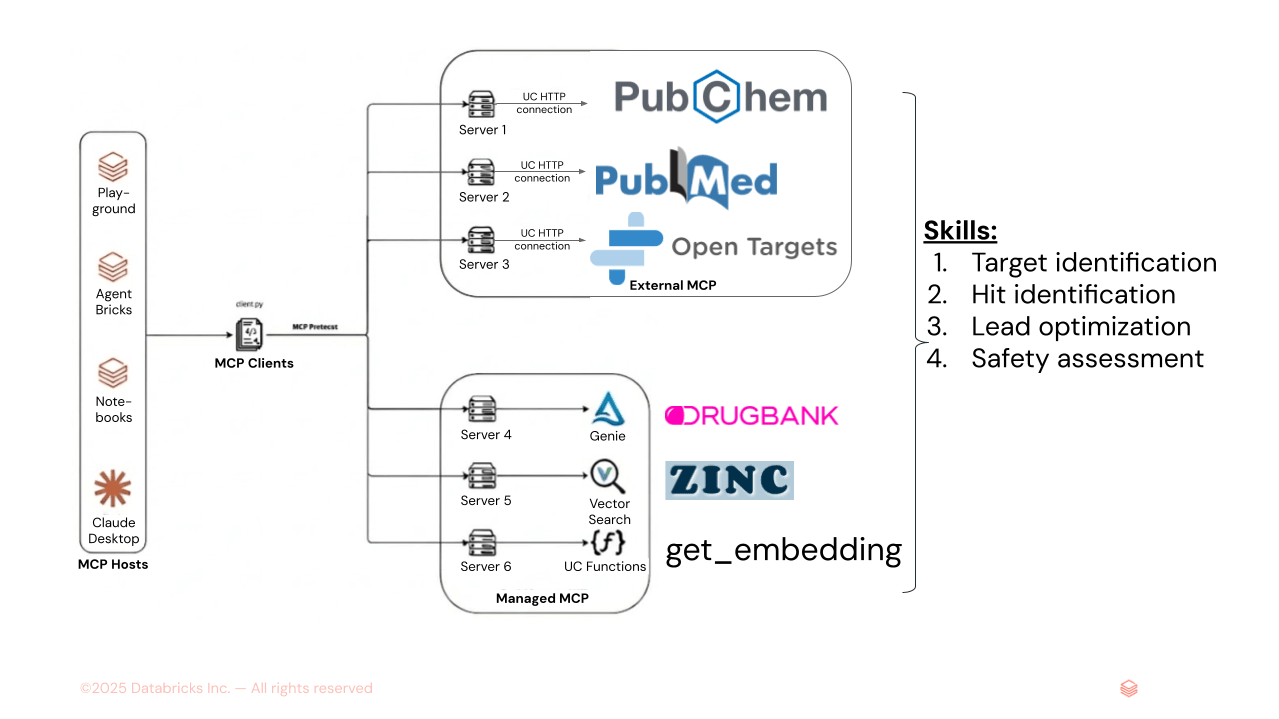
図1. AiChemyは、外部MCPサーバーのPubChem、PubMed、OpenTargets、およびGenie Space(DrugBank構造化データ用のテキストからSQLへ)とAI Search(ZINC分子埋め込みなどの非構造化データ用)のDatabricks管理MCPサーバーで構成されるマルチエージェントスーパーバイザーです。Skillsをロードして、タスクシーケンスとレポートのフォーマットおよびスタイルを指定し、一貫した出力を保証することもできます。
主な機能には、疾患ターゲットと薬剤候補の特定、詳細な化学的および薬物動態学的特性の取得、安全性と毒性評価の提供が含まれます。特に、AiChemyは、検証可能なデータソースに追跡可能なサポート証拠でその発見を裏付けており、研究に最適です。
ユースケース1:疾患メカニズムの理解、創薬ターゲットの発見、リード生成
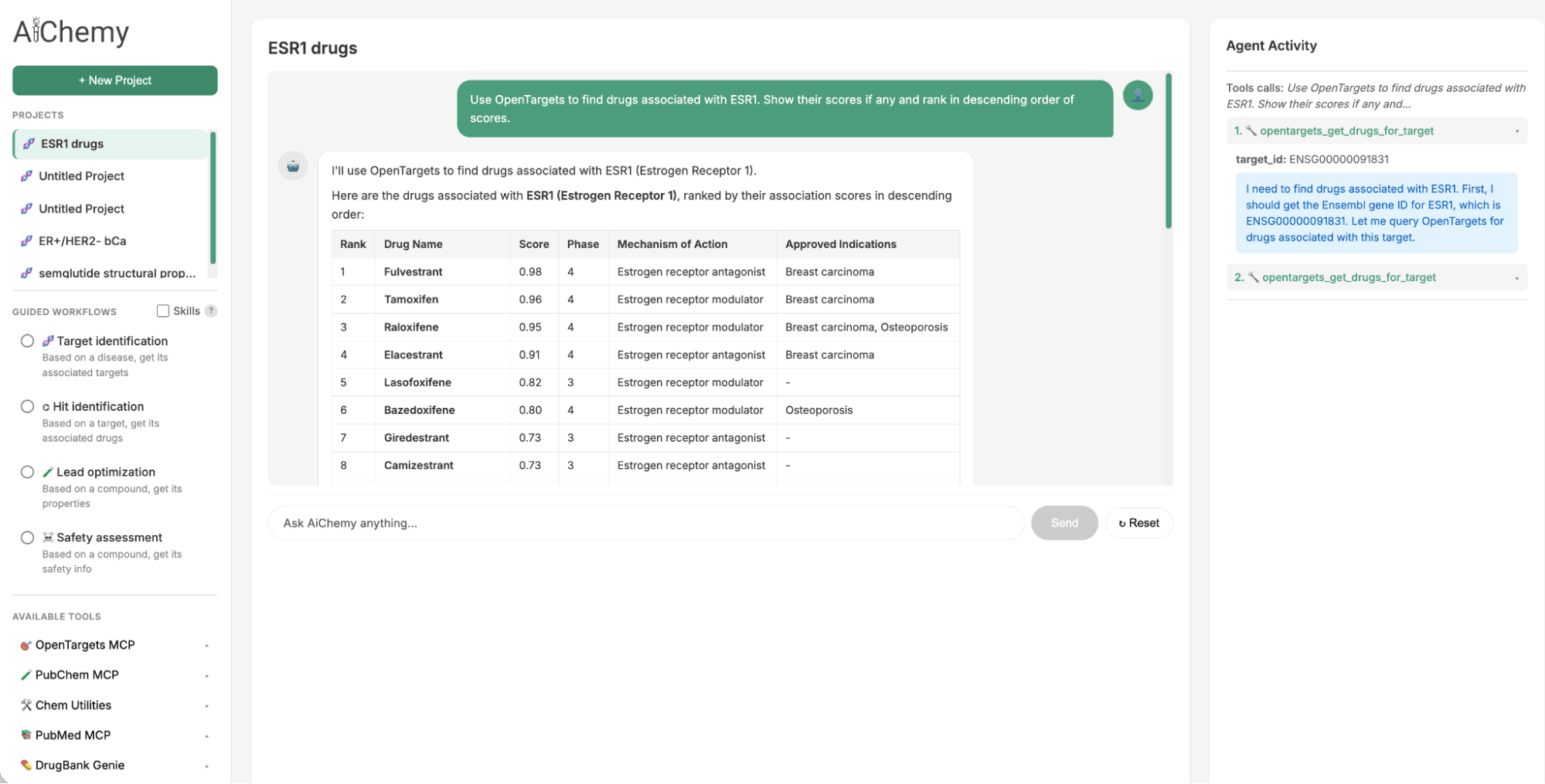
Guided Tasksパネルは、疾患→ターゲット→薬剤→文献検証という創薬ワークフローの主要ステップを実行するために必要なプロンプトとエージェントSkillsを提供します。
- 治療ターゲットの特定: エストロゲン受容体陽性(ER+)/HER2陰性(HER2-)乳がん(ERおよびHER2が主要なタンパク質バイオマーカーである)などの特定の疾患サブタイプから開始し、関連する治療ターゲット(例:ESR1)を見つけます。
- 関連薬剤の検索: 特定されたターゲット(例:ESR1)を使用して、潜在的な薬剤候補を見つけます。
- 文献による検証: 特定の薬剤候補(例:カミゼストラント)について、科学文献でサポート証拠を確認します。
ユースケース2:化学的類似性によるリード生成
2023年に承認された経口選択的エストロゲン受容体モジュレーター(SERM)であるElacestrantの後続薬を特定するために、化学的類似性を活用できます。定量的構造活性相関(QSAR)の原則が類似した特性を共有することを示唆しているため、Elacestrantと構造的に類似した薬剤様分子を大規模なZINC15化学ライブラリで検索します。これは、Databricks AI Searchにクエリを実行することで実現されます。この検索では、Elacestrantの1024ビット拡張接続性フィンガープリント(ECFP)分子埋め込み(クエリベクトルとして)を使用して、ZINCの2億5000万分子インデックス内で最も類似した埋め込みを検索します。
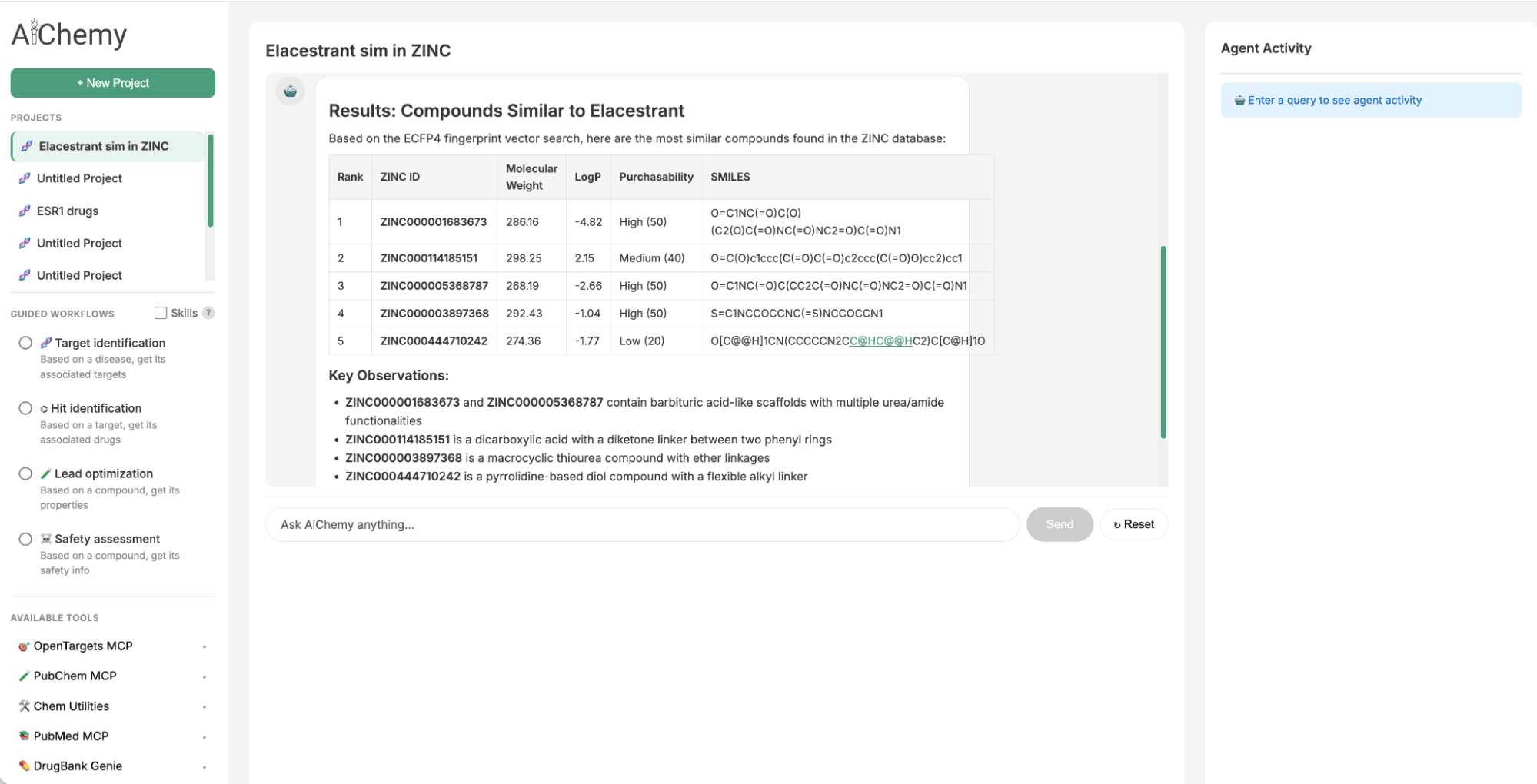
図2. AiChemyには、2億5000万の市販分子のZINCデータベースのベクトル検索が含まれています。これにより、化学的類似性によるリード化合物の生成が可能になります。このスクリーンショットでは、ECFP4分子埋め込みに基づいたElacestrantに最も類似した化合物をZINCベクトル検索で見つけるようにAiChemyに依頼しました。
独自の調査マルチエージェントスーパーバイザーを構築する
Databricks上の公開MCPサーバーとDatabricks上の独自データを統合することにより、Databricksでマルチエージェントスーパーバイザーをカスタマイズします。これを行うために、ノーコードのAgent BricksまたはNotebookのようなコーディングオプションを使用するオプションがあります。Databricks Playgroundを使用すると、エージェントの迅速なプロトタイピングとイテレーションが可能です。
ステップ1:マルチエージェントスーパーバイザーに必要なコンポーネントを準備する
マルチエージェントシステムには5つのワーカーがあります。
- OpenTargets:疾患-ターゲット-薬剤ナレッジグラフの外部MCPサーバー
- PubMed:生物医学文献の外部MCPサーバー
- PubChem:化学化合物の外部MCPサーバー
- Drug Library (Genie):構造化された薬剤特性を持つ化学ライブラリ。テキストからSQLへの機能を提供するためにGenie spaceに変換されています。
- Chemical Library (AI Search):分子フィンガープリント埋め込みを持つ非構造化化学データ独自のライブラリ。埋め込みによる類似性検索を容易にするためにベクトルインデックスとして準備されています。
ステップ1a: Unity Catalog (UC)接続を介して、UIまたはDatabricks Notebook(例:4_connect_ext_mcp_opentarget.py)で、公開MCPサーバーに安全に接続します。
ステップ1b: 構造化テーブル(例:DrugBank)が、Genie spaceに変換され、UIを使用してテキストからSQLへの機能を提供することを確認します。1_load_drugbank and descriptors.pyを参照してください。
ステップ1c: 非構造化化学ライブラリが、ベクトルインデックスとしてUIまたはNotebookで作成され、類似性検索を可能にすることを確認します。2_create VS zinc15.pyを参照してください。
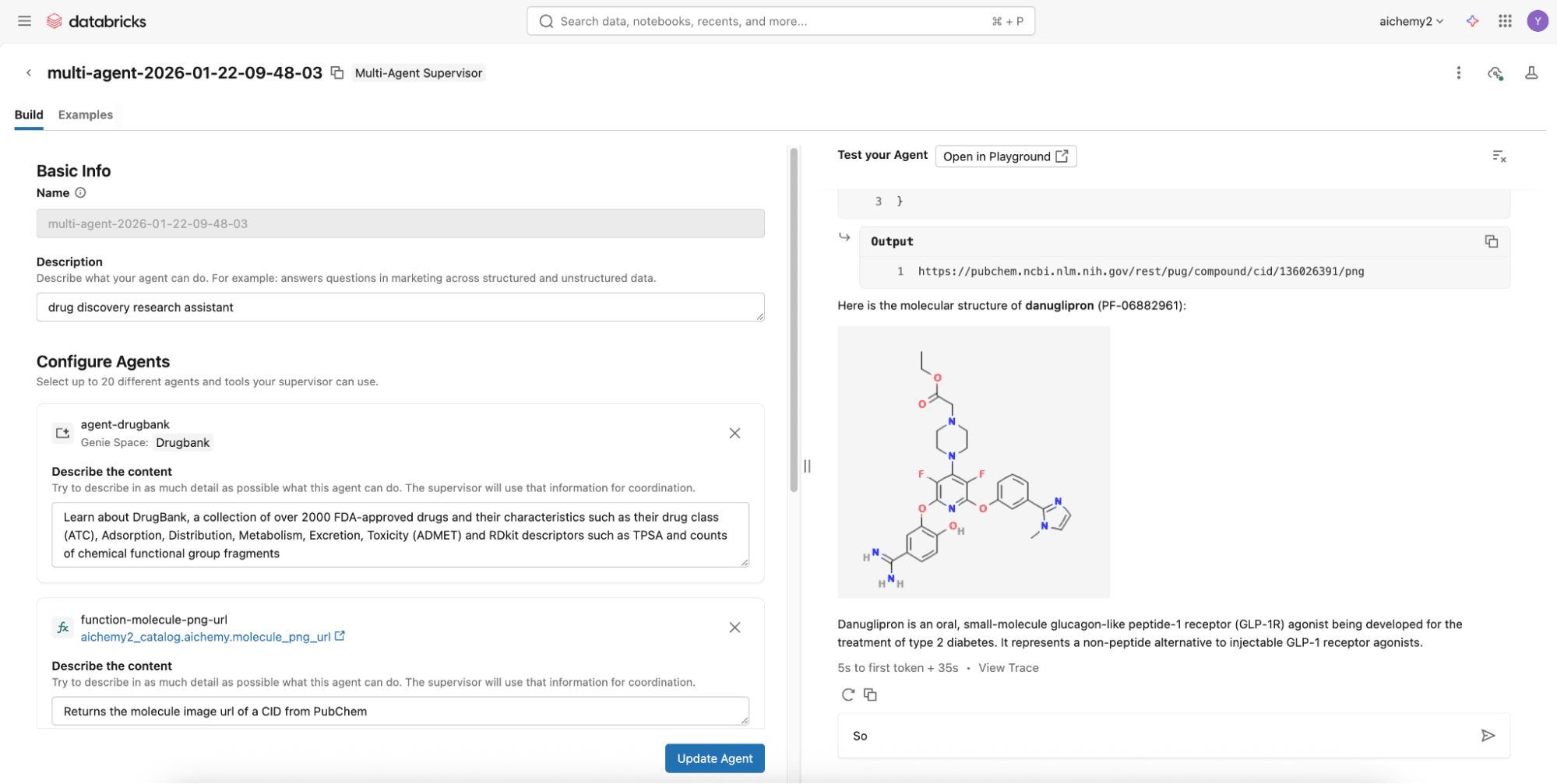
ステップ2(簡単なオプション):ノーコードのSupervisor Agentを使用して2分でマルチエージェントスーパーバイザーを構築する
To assemble them, try the no-code Agent Bricks that builds a supervisor agent with the above components via the UI and deploys it to a REST API endpoint, all in a few minutes.
Step 2 (Advanced Option): Build the multi-agent supervisor using Databricks Notebooks
For more advanced capabilities like agentic memory and Skills, develop a Langgraph supervisor on Databricks Notebooks to integrate with Lakebase, Databricks Serverless Postgres database. Check out this code repository where you can simply define the multi-agent components (see Step 1) in the config.yml.
Once config.yml is defined, you can deploy the multi-agent supervisor as a MLflow AgentServer (FastAPI wrapper) with a React web user interface (UI). Deploy them both to Databricks Apps via the UI or Databricks CLI. Set the appropriate permissions for users to use the Databricks App and for the app’s service principal to access the underlying resources (e.g. experiment for logging traces, secret scope if any).
Step 3: Evaluate and monitor your agent
Every invocation to the agent is automatically logged and traced to a Databricks MLflow experiment using OpenTelemetry standards. This enables easy evaluation of the responses offline or online to improve the agent over time. Additionally, your deployed multi-agent uses the LLM behind AI Gateway so you can enjoy the benefits of centralized governance, built-in safeguards, and full observability for production readiness.
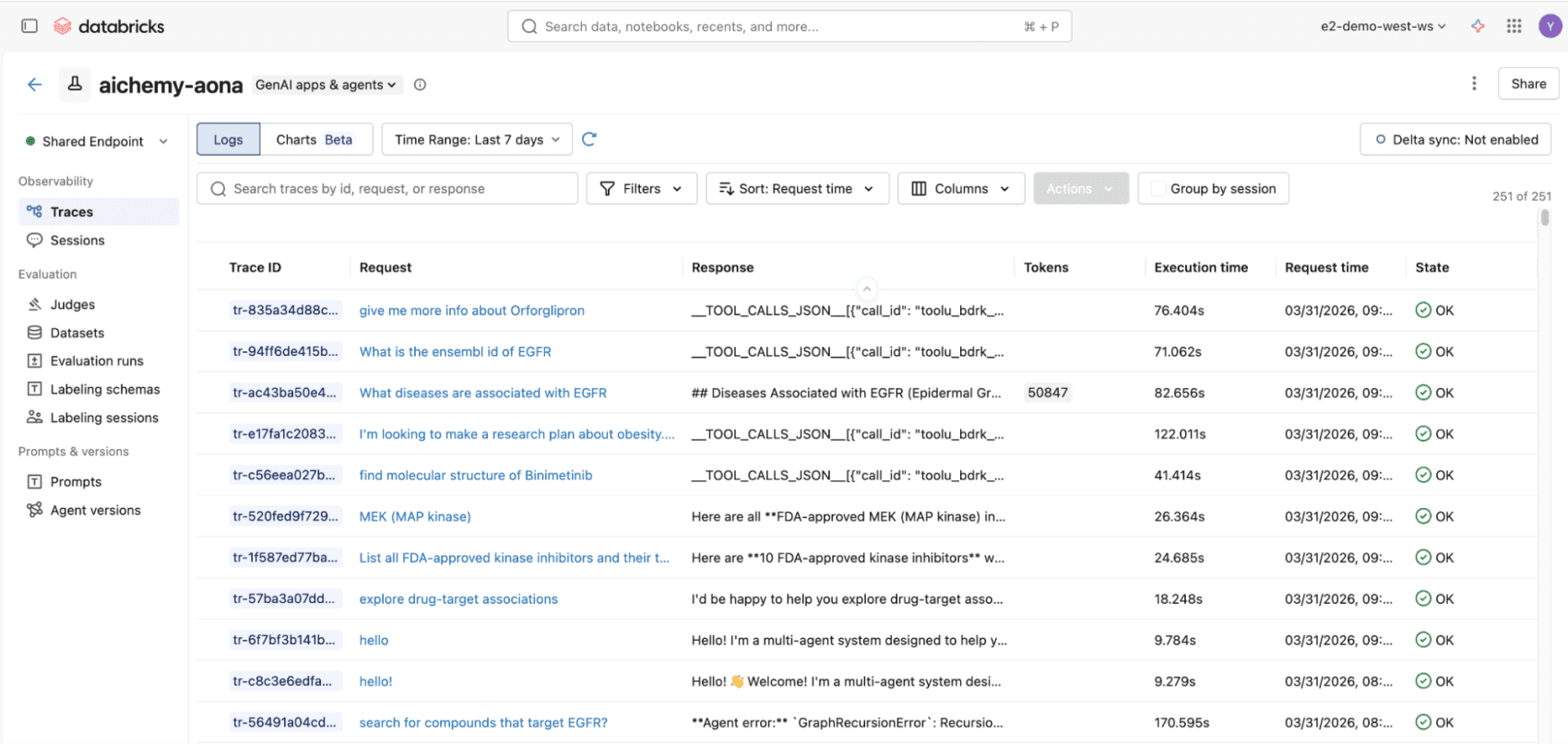
Figure 3. All invocations to the multiagent whether via React UI or REST API will be logged to MLflow traces, compliant with OpenTelemetry standards, for end-to-end observability.
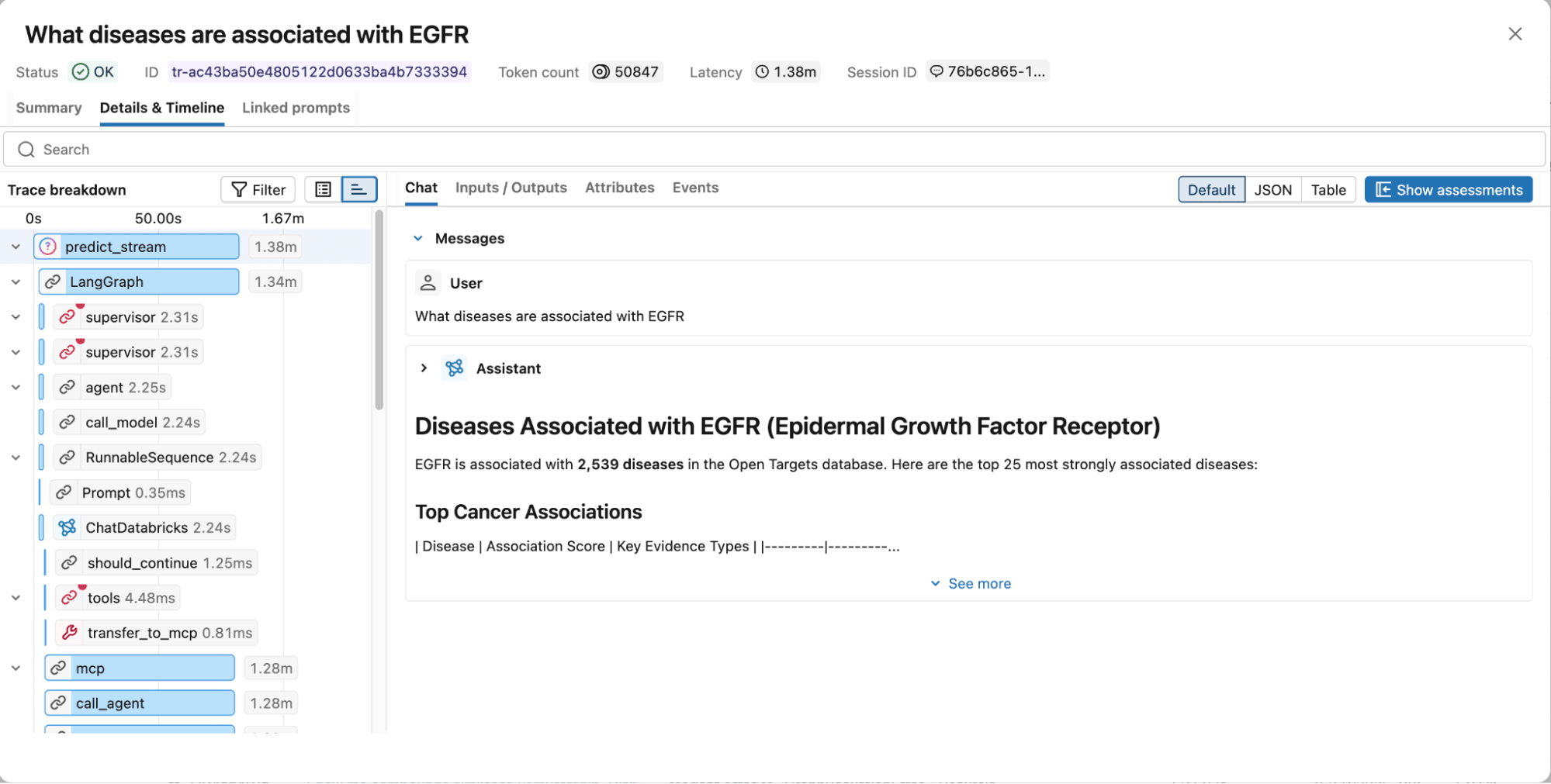
Figure 4. MLflow traces capture the full execution graph, including reasoning steps, tool calls, retrieved documents, latency, and token usage for easy debugging and optimization.
Next Steps
We invite you to explore the AiChemy web app and Github repository. Start building your custom multi-agent system with the intuitive, no-code Agent Bricks framework on Databricks so you can stop sifting and start discovering!
(このブログ記事はAI翻訳ツールを使用して翻訳されています) 原文記事
最新の投稿を受信トレイで受け取る
ブログを購読して、最新の投稿を受信トレイにお届けします。