Accelerate search queries with full-text search indexes on Databricks
Full-text search indexes can accelerate queries by 100x or more on open format tables, without changing table layouts
by Yu Xu, Yingyi Bu and Ivan Vezilić
- Databricks introduces full-text search indexes in Beta: create an index with a SQL statement and your substring and keyword queries are accelerated, without query hints or application changes needed.
- Teams running full-text search in their production environments are seeing more than a 100x speedup on substring search queries against petabyte-scale tables, which has unlocked new use cases on Databricks.
- Available now on Databricks Runtime 18.2 for Unity Catalog managed tables, with automatic index maintenance via Predictive Optimization coming in 18.3.
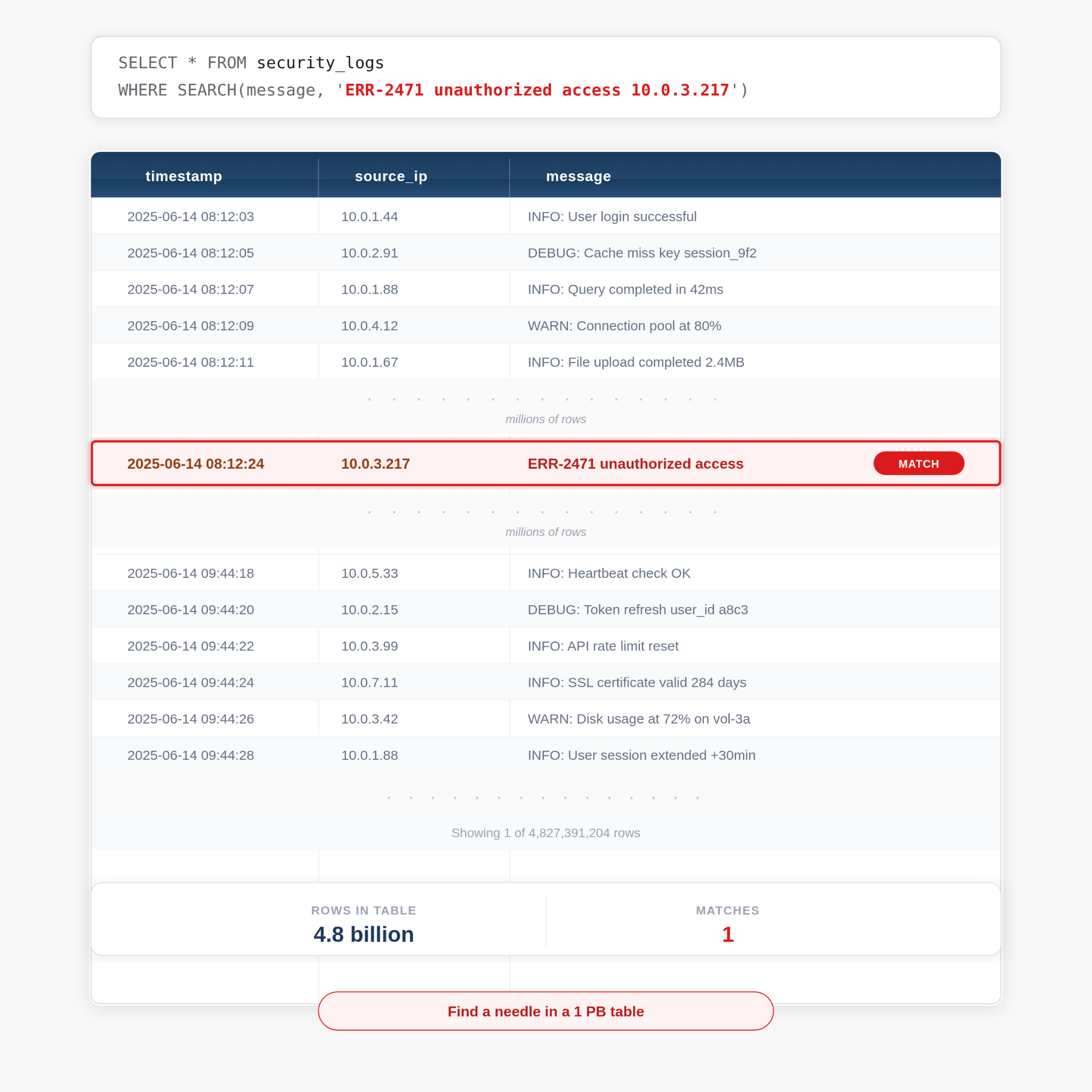
Every data team faces the same challenge as tables grow to hundreds of gigabytes or terabytes and beyond: text search queries become painfully slow, whether searching for an error message across terabytes or petabytes of application logs, finding a suspicious IP address in security data, or locating specific content in a compliance dataset. These queries can end up scanning far more data than necessary, making fast, targeted lookups a challenge at scale. Today, we’re excited to announce a solution to these challenges: full-text search indexes are available in Beta on Databricks Runtime 18.2.
Teams are often forced into workarounds: maintaining duplicate tables, building external search systems like Elasticsearch or Splunk, or over-engineering table layouts to optimize for one query pattern at the expense of others.
What are full-text search indexes?
A full-text search index accelerates substring and keyword queries across text columns. Once you create one, the query engine uses it automatically, so searches that used to scan an entire table read only a small fraction of it. (We cover how this works below.)
Full-text search indexes are ideal for high-cardinality lookups and for searching across many text columns at once. Common examples include:
- Log analytics and SIEM (Security Information and Event Management): Searching for error messages, IP addresses, or suspicious patterns across terabytes of security and application logs.
- Trust and Safety investigations: Finding specific content across massive content moderation datasets.
- Compliance auditing: Locating records containing specific terms in regulatory reporting data.
Get started with just a SQL statement:
Queries are then accelerated automatically:
The query engine discovers the search index and uses it to skip the vast majority of files, often accelerating queries by orders of magnitude.
How it works under the hood
Full-text search indexes are stored separately from the base table. When you create an index, Databricks tokenizes the text content and builds an internal index: a compact lookup structure that maps tokens to the matching rows. At query time, the engine consults this index to identify which files might contain matching rows, then reads only those files.
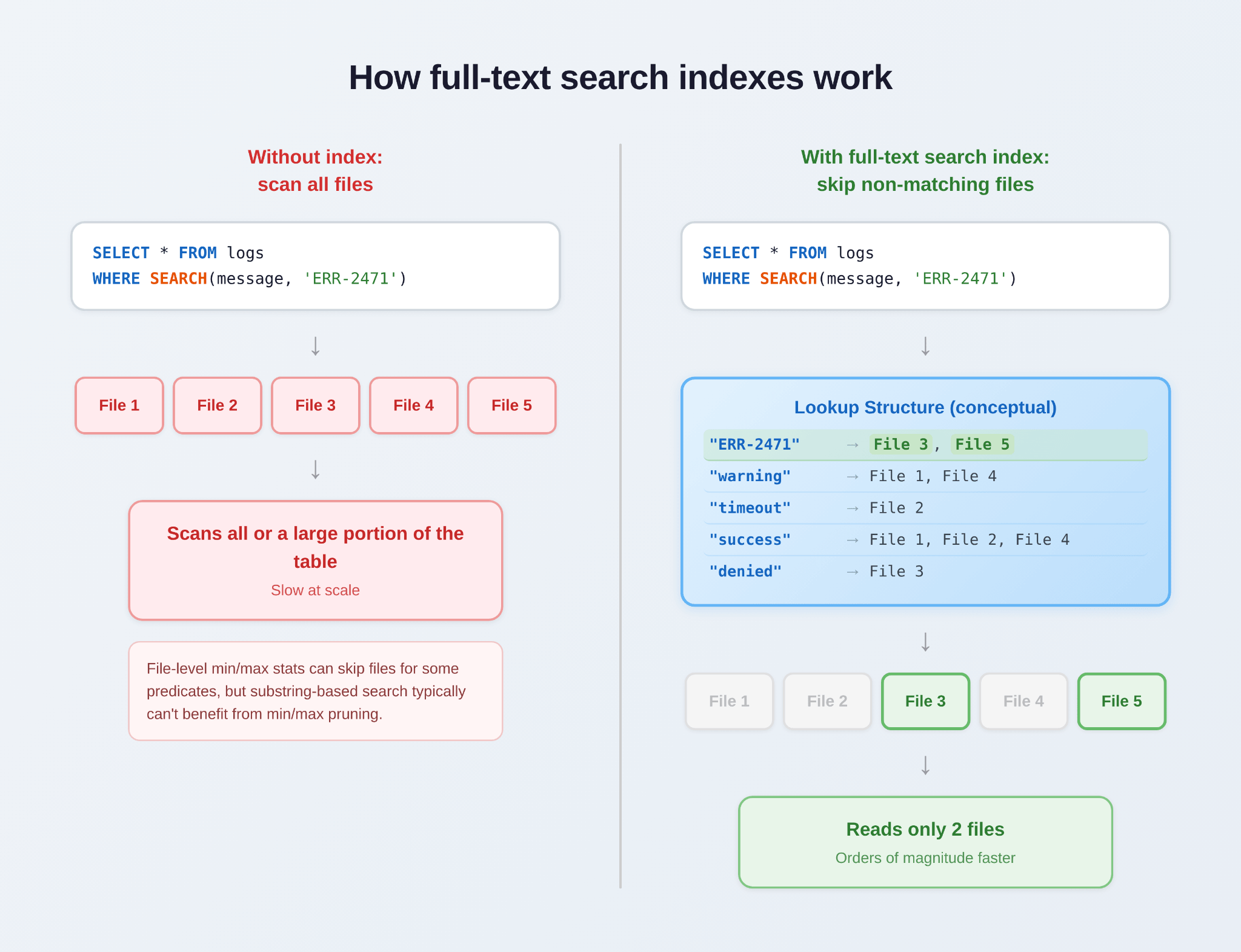
This architecture delivers several key advantages:
- Zero impact on write performance: Indexes are maintained asynchronously. Writing to the base table is never slowed down by indexing.
- Automatic query optimization: The Databricks query engine evaluates available indexes and selects the best access path, with no query hints required.
- Correctness guaranteed: Even when an index is stale (behind the base table), query correctness is preserved. Databricks scans both indexed and non-indexed portions of the table as needed, so results are always complete and accurate.
- Works with Delta and Iceberg: Full-text search indexes support Unity Catalog managed Delta and Iceberg tables on both serverless and classic compute.
How do full-text search indexes relate to Liquid Clustering?
Liquid clustering and full-text search indexes solve different problems. Liquid clustering organizes your data physically so queries that filter on the clustering key can skip large chunks of data efficiently. Clustering helps with equality and range filters on column values, but it cannot help locate a substring or keyword within a field.
Full-text search indexes, by contrast, search within the text of column values, enabling fast substring and keyword lookups. This means full-text search indexes speed up queries even on columns you've already clustered on, because clustering alone cannot find a match within a field's content.
In short, Liquid clustering optimizes filtering by column values; full-text search indexes optimize searching within column values. They complement each other and work together on the same table.
Customer performance results
A Trust and Safety team adopted full-text search indexes for investigations over a petabyte-scale table.
A substring search that previously had to scan the entire table now runs more than 100x faster, making interactive investigations practical for the first time.
We are actively working on more efficient index layouts and other optimizations to deliver even greater speedup in upcoming releases.
Getting started
Full-text search indexes are available in Beta on Databricks Runtime 18.2. To get started, see the full-text search indexes documentation.
What’s next
The next milestone for full-text search indexes is 18.3, where you can expect:
- Full Unity Catalog integration with automatic permission inheritance.
- Automatic maintenance via Predictive Optimization: No more manual REFRESH INDEX. Your indexes are kept up to date automatically.
We’re eager to hear your feedback during the Beta period. Try full-text search indexes on your workloads today and help us shape the Public Preview release.
Get the latest posts in your inbox
Subscribe to our blog and get the latest posts delivered to your inbox.