Bring Databricks into Kiro IDE with the Databricks Power
Two ways to connect Kiro IDE to the Databricks Platform: the four Databricks-managed MCP servers for a 10-minute path, or the Databricks Power and the official agent skills for the full surface area.
- Two paths to connect Kiro IDE to Databricks: the four Databricks-managed MCP servers (Genie, SQL, Unity Catalog Functions, AI Search) for a 10-minute PAT-based setup, or the Databricks Power, which installs the official Databricks agent skills with the Databricks CLI.
- AI-assisted development grounded in real workspace metadata: both paths inherit your Unity Catalog grants, row filters and column masks, so the assistant writes SQL with your actual columns and only sees what you can see.
- Pick by surface area: Path A is the lightest setup for analysts and SQL-first builders; Path B opens the full Databricks platform (pipelines, jobs, Agent Bricks, Lakebase, Declarative Automation Bundles) inside the IDE.
Why this matters
AI-assisted development falls apart the moment the assistant has to guess at column names, table layouts, or which catalogs you can read. The fix is grounding: connect the assistant to live workspace metadata via Model Context Protocol (MCP), and the SQL it writes uses the actual columns you have, dbt models join real tables, and every query inherits the Unity Catalog grants you already have in place. Access is enforced in Databricks, so the AI sees only what you can see.
Two milestones just landed that make this practical in Kiro IDE, built by AWS:
First, Kiro is now a supported agent in the Databricks CLI. Since CLI v1.20.0, databricks aitools install --agents kiro installs the official Databricks agent skills into ~/.kiro/skills/. The skills that used to ship in the Databricks AI Dev Kit are now these official skills, and the CLI installs them.
Second, the Databricks Power in the Kiro Powers catalog now installs those same official skills: it sets up the skills with the Databricks CLI and ships no MCP server. Install it from the Powers panel, and its setup skill walks you through the CLI check, sign-in, and the skills install.
Combined with the four Databricks-managed remote MCP servers that already ship inside the platform, you have two ways to wire Kiro into Databricks. Both share a common outcome: builders ship analytics, pipelines, and agent workflows faster when the assistant inherits real workspace permissions instead of guessing at schemas, columns, and grants.
Why Databricks for AI-assisted development
The two milestones above make Kiro × Databricks practical. The reason it matters is what's underneath. Four things make Databricks the substrate of choice for AI-assisted development, regardless of which path you take.
Unity Catalog grounds AI at the data level. Every call runs with your own permissions, whether it is an MCP tool on Path A or a Databricks CLI command a skill runs on Path B: table grants, row filters and column masks apply to SQL and Genie Agents, and AI Search indexes are shared individually. The assistant doesn't have a privileged view of your data; it sees what you can see. There is no separate access-control layer to manage for the assistant.
One copy of data, one set of definitions. Because Databricks is a lakehouse, the table the assistant queries through databricks-sql is the same table your dbt model writes to, the same table your Genie Agent exposes, the same table your AI/BI dashboard reads from. There is no warehouse-to-lake sync to break, no separate semantic layer to keep in sync. When the assistant grounds itself in samples.tpch.lineitem, it's grounding in the same definition every other tool uses.
The full AI stack is integrated, not bolted on. Unity Gateway routes model calls. Agent Bricks orchestrates multi-agent workflows. MLflow tracks experiments and evaluations. AI Search powers semantic retrieval. Lakebase handles transactional state. The skills cover all of these (databricks-unity-gateway, databricks-agent-bricks, databricks-mlflow-evaluation, databricks-vector-search and databricks-lakebase), all on the same Unity Catalog. You're not stitching together five products; you're using one platform.
The skills are Databricks-built. The protocols are open, but the guidance inside the skills is written by Databricks specifically for the way our customers build.
The two paths at a glance
Dimension | Path A: Managed MCP Servers | Path B: Databricks Power |
|---|---|---|
Surface area | 4 servers: Genie, SQL, Unity Catalog Functions, AI Search | Official Databricks agent skills, plus the MLflow skills |
What you get | Natural-language SQL, semantic search, governed function execution | Path A surface plus pipelines, jobs, dashboards, Lakebase, Agent Bricks, Declarative Automation Bundles, MLflow, model serving, Apps |
Hosting | Databricks-managed (remote HTTPS) | Skills installed on your machine by the Databricks CLI (databricks aitools); no MCP server |
Auth | PAT in shell env | Databricks CLI profile, OAuth U2M recommended |
Setup | Edit ~/.kiro/settings/mcp.json, export env vars | Install the Power, then its guided CLI setup |
Best for | Analysts and SQL-first builders who want a 10-minute path to ask their warehouse a question | Data engineers and platform builders who need the full Databricks surface area in one IDE |
Integration architecture at a glance
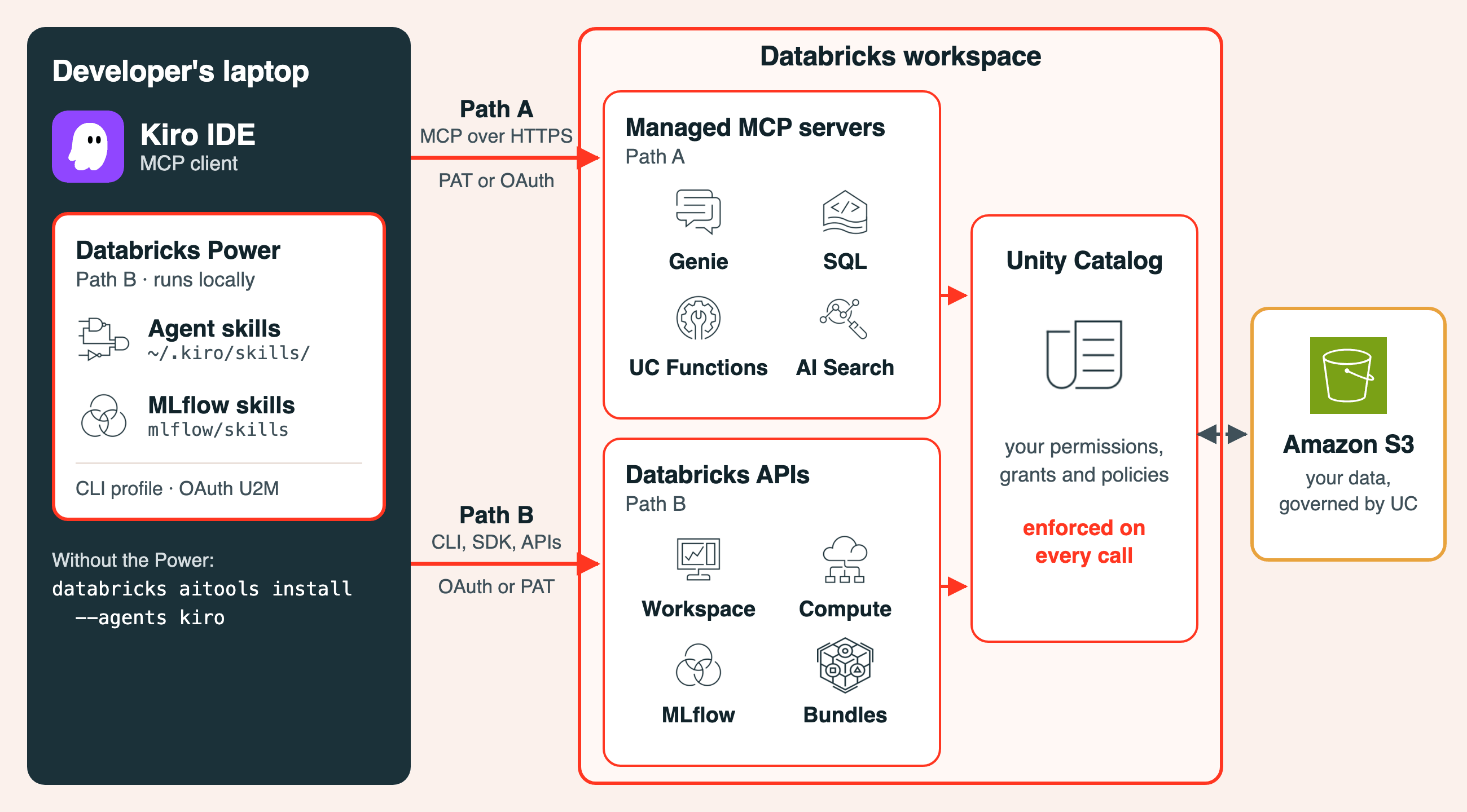
Both paths share the same back end: Unity Catalog enforcement and Databricks workspace identity. They differ in surface area and authentication model.
Path A: connect to the four managed MCP servers
This is the lightest setup. One mcp.json file, a Databricks Personal Access Token, and a shell-profile edit. In under 10 minutes Kiro is talking to Genie, SQL, Unity Catalog Functions, and AI Search.
For new integrations, Databricks now recommends the system.ai MCPs through Unity Gateway. The four /api/2.0/mcp endpoints in this path are in Public Preview and are not governed by Unity Gateway. Access still follows your permissions on the underlying resources (Genie Agents, tables, functions, indexes and SQL warehouses); what you give up is Unity Gateway's tracing and its MCP-level grants, policies and guardrails. The Genie One MCP (system.ai.genie_one_mcp) is generally available, and the Databricks Power's setup skill shows how to add it to mcp.json. See Databricks-provided MCPs for both options.
Prerequisites
- A Databricks workspace on AWS with Unity Catalog enabled.
- A workspace admin has enabled Managed MCP Servers on the workspace Previews page. Without it, the URLs below don't work.
- A Databricks Personal Access Token (PAT) or OAuth token scoped to the MCP servers you plan to use (
sql,unity-catalog,genie,ai-search). Unused PATs auto-revoke after 90 days. - Kiro installed and launched at least once so
~/.kiro/exists. - Your workspace hostname in the format
<workspace>.cloud.databricks.com.
Generate a Databricks PAT
In the Databricks workspace go to Settings, Developer, Access tokens, Manage, Generate new token. Set an expiration that aligns with your team's rotation policy. Select only the API scopes you need; least privilege beats the convenience of "everything." Copy the token immediately. Databricks does not display it again.
Where Kiro stores MCP configuration
Kiro reads MCP configuration from JSON in two scopes; workspace overrides user.
- User scope:
~/.kiro/settings/mcp.jsonapplies to every workspace. - Workspace scope:
$PWD/.kiro/settings/mcp.jsonapplies only to the current workspace and overrides the user-scope entry of the same key.
One-click install from the Kiro server directory
Open kiro.dev/docs/mcp/servers/, find the Databricks row, and click Add to Kiro. The browser launches Kiro and opens a confirmation dialog with a pre-filled config. Confirm to write the databricks-sql entry into ~/.kiro/settings/mcp.json. It arrives disabled, with a placeholder URL and a reference to the DATABRICKS_ACCESS_TOKEN variable. Next, set the URL to ${DATABRICKS_SQL_MCP_URL}, set "disabled" to false, and create both variables.
Verify (or add) the databricks-sql entry
Set the environment variables
In the shell profile that launches Kiro (typically ~/.zshrc on macOS):
Source the profile (source ~/.zshrc) before launching Kiro. Fully quit Kiro (Cmd+Q on macOS) and reopen. Reload Window does not re-read environment variables; only a process restart does.
Kiro only expands ${...} references in mcp.json for environment variables you have approved. When Kiro shows its security prompt listing the DATABRICKS_* variables, approve them, or add them yourself under Settings, Mcp Approved Env Vars.
Add Genie, Unity Catalog Functions, and AI Search
All four Databricks-managed servers connect as remote HTTP MCP. The initialize handshake succeeds even with a placeholder URL; the server validates the resource only when a tool is invoked. A connected-but-broken state, where tools/call returns RESOURCE_DOES_NOT_EXIST or PERMISSION_DENIED, is the most common failure mode. Run these pre-flight checks first:
- Genie: confirm a Genie Agent exists and you can open it. Copy its space ID from the agent's Settings tab (the UI labels it Agent ID); it is the
<genie_space_id>in the URL table below. - Unity Catalog Functions: confirm the function exists and you have
EXECUTE. List functions withSELECT * FROM system.information_schema.routines WHERE routine_type = 'FUNCTION'. - AI Search: confirm an endpoint with at least one accessible index exists.
- PAT scope: a workspace-scoped PAT can still hit
PERMISSION_DENIEDif the user lacks access to the specific resource: Can View on the Genie Agent, orSELECTon the AI Search index (plusUSE CATALOGandUSE SCHEMA). Genie Agents are shared individually.
Add the additional env vars (DATABRICKS_GENIE_MCP_URL, DATABRICKS_UC_FUNCTIONS_MCP_URL, DATABRICKS_AI_SEARCH_MCP_URL) and update mcp.json to the full configuration:
URL formats by server:
Server | URL pattern |
|---|---|
databricks-genie | https://<workspace-hostname>/api/2.0/mcp/genie/<genie_space_id> |
databricks-sql | https://<workspace-hostname>/api/2.0/mcp/sql |
databricks-uc-functions | https://<workspace-hostname>/api/2.0/mcp/functions/<catalog>/<schema>/<function_name> |
databricks-ai-search | https://<workspace-hostname>/api/2.0/mcp/ai-search/<catalog>/<schema>/<index_name> |
Quit and relaunch Kiro again. Open the MCP SERVERS section of the Kiro panel; the four databricks-* entries appear with green status indicators. Click reconnect on anything red and re-check pre-flight. Try a low-risk first query in the chat panel: "List the catalogs I have access to."
Path B: install the Databricks Power
The four managed servers cover SQL, semantic search, and natural-language analytics, which is enough for many builders. If your workflow spans pipelines, jobs, model serving, Lakebase, Declarative Automation Bundles, Agent Bricks, AI/BI dashboards, MLflow, or Databricks Apps, the four-server setup leaves you copying and pasting back to the workspace UI all day.
The Databricks Power solves that. One install sets up the official Databricks agent skills, which load on demand based on the task at hand.
What you get
Surface | Coverage |
|---|---|
SQL & Compute | Execute SQL on warehouses; run Python or Scala on clusters; manage compute lifecycle |
Pipelines & Jobs | Spark Declarative Pipelines (streaming tables, CDC, SCD Type 2, Auto Loader); multi-task job DAGs |
Unity Catalog | Tables, volumes, grants, tags, storage credentials, system tables, metric views, External Iceberg Reads |
AI/BI Dashboards | Visualizations, KPIs, analytics dashboards |
Genie Agents | Natural-language data exploration over governed datasets |
Agent Bricks | Knowledge Assistants (RAG) and Multi-Agent Supervisors |
AI Search | Semantic search and RAG with managed indexes |
Model Serving | ML models, AI agents, and pay-per-token Foundation Model APIs (FMAPI), routable through Unity Gateway |
MLflow | Experiments, evaluations, trace instrumentation, metric queries |
Lakebase | Provisioned and autoscale managed PostgreSQL for OLTP workloads |
Databricks Apps | Full-stack web apps on the Lakehouse |
Declarative Automation Bundles (formerly Databricks Asset Bundles) | Infrastructure-as-code for Databricks resources |
Install the Power
Inside Kiro (IDE 1.0.288 or later), open the Powers panel, search for databricks, and install the Databricks Power. Its setup skill then walks you through four steps:
- Check that the Databricks CLI is v1.20.0 or later, the first release with Kiro support in
databricks aitools, and install or upgrade it if needed. - Sign in the CLI with
databricks auth login, or reuse a profile you already have. - Install the skills with
databricks aitools install --agents kiro --scope global, which puts them in~/.kiro/skills/. Use--scope projectto install for one workspace only. - Add eight MLflow skills from mlflow/skills (tracing, evaluation, trace analysis, metrics), which the CLI does not carry.
Apart from its setup skill, the Power bundles no content and ships no MCP server. The CLI fetches the skills from databricks/databricks-agent-skills, and you refresh them yourself with databricks aitools update.
Authentication
The skills run Databricks CLI commands, so they use a Databricks CLI profile. For interactive use, sign in with OAuth user-to-machine: databricks auth login --host https://<your-workspace-url> --profile <profile-name> opens a browser, and the token refreshes automatically. Service principal OAuth suits automation, and personal access tokens remain an option; see Databricks CLI authentication. The setup skill lists your existing profiles without printing any secrets, and never reuses one without asking.
Verify the install
Kiro loads skills when a chat session starts, so open a new session and ask: "Using the databricks-core skill, which workspace am I connected to?" A correct answer confirms the CLI, your profile, and the skills. databricks aitools list shows the installed version of each skill.
Upgrading from the AI Dev Kit Power
If you installed the earlier Databricks AI Dev Kit Power, update the Power in Kiro, then run the skills and MLflow steps above. A few things live outside the Power and need a manual cleanup: a top-level databricks entry in mcp.json that runs databricks-mcp-server/run_server.py, and any DATABRICKS_* credential exports the old setup added to your shell profile. Optionally, remove the ai-dev-kit clone (~/.ai-dev-kit, or the directory in AIDEVKIT_HOME), but only if you don't use ai-dev-kit for other agents or projects. Delete the directory rather than running ai-dev-kit's install.sh --uninstall, which removes skill folders by name from ~/.kiro/skills/, including the ones the Databricks CLI installed. The "Migrating from the AI Dev Kit Power" section of the Power's databricks-kiro-setup skill covers all three.
How to choose between the two paths
A simple decision tree:
- Just running SQL, asking natural-language questions over governed datasets via Genie, and searching AI Search indexes? Use Path A. The four managed servers do exactly that, and the setup is 10 minutes.
- Authoring pipelines, managing jobs, deploying Declarative Automation Bundles, working with Lakebase, building Databricks Apps, or calling Agent Bricks? Use Path B. The full toolkit is too much surface area to bolt on as one-off remote MCP servers.
- Hybrid? Run both. Path A and Path B don't conflict: Path B adds skills, not MCP servers, so Path A's four servers (
databricks-genie,databricks-sql,databricks-uc-functions,databricks-ai-search) sit alongside it in Kiro's MCP panel. The Power's setup skill can also walk you through adding a Databricks-provided MCP such as Genie One, through Unity Gateway, to yourmcp.json.
For builders who plan to live in Kiro day-to-day on Databricks workloads, Path B is the better long-term answer. Path A is the right answer if you have 10 minutes and a SQL warehouse you want to chat with.
Through the lens of the builder
Both paths land differently depending on who's holding the IDE. Four personas, four pain points, four answers.
The analytics engineer. You spend half your day querying tables you've never seen and the other half copy-pasting between your editor and the workspace UI. Path A solves this in 10 minutes. The Genie and SQL servers ground every query in real schema metadata; the assistant writes against your actual columns, not guesses; and every result inherits your Unity Catalog grants. You stop tab-switching.
The data engineer. Your day is pipelines, jobs, Declarative Automation Bundles, and the cross-environment promotions that come with all three. Authoring databricks.yml by hand and running databricks bundle deploy from a terminal sidebar is the slow way. Path B is the fast way. The Power's pipelines, jobs and Declarative Automation Bundles skills produce, validate, and deploy IaC from one conversation. Spark Declarative Pipelines, CDC, SCD Type 2, Auto Loader: all generated against your actual Unity Catalog tables and ready to commit.
The AI / agent builder. You're wiring model calls, evaluation, governance, and agent orchestration across three or four tools that don't quite agree on the schema. Path B covers the full Databricks AI surface: Unity Gateway for routing and fallbacks, Agent Bricks for multi-agent supervisors and knowledge assistants, MLflow for evaluation and AI Search for retrieval, all governed by Unity Catalog end to end. Your agent inherits the same permissions as its caller, and your eval traces land in the same workspace as your training runs.
The platform builder. You manage Databricks resources as code, promote across dev/stage/prod, and answer the "did we drift?" question on a weekly cadence. Path B's Declarative Automation Bundles skill (databricks-dabs) plus the Unity Catalog management skills generate the full bundle, validate it, and show the deployment plan (databricks bundle plan) before anything changes. You stop maintaining one set of YAML manually and another in a doc.
A workflow you can run today
Whichever path you took, this exercise grounds the assistant in real workspace metadata using the samples.tpch dataset from the built-in samples catalog.
You ask: "What columns and types does samples.tpch.lineitem have, and what is the data distribution by l_shipdate year?"
Kiro returns the actual schema and a histogram from a single query. Real column names and a real distribution, grounded in your workspace.
You ask: "Draft a dbt model that joins lineitem to orders and aggregates revenue by nation per quarter."
Kiro produces SQL using the actual column names (l_extendedprice, l_discount, o_orderdate) instead of guesses. Because it queried the schema first, it knows the exact types and grain.
You ask: "Run my new aggregation against samples.tpch and compare the row count to last week's snapshot in poc.gold.revenue_by_nation_qtr."
Kiro executes both queries and surfaces the diff. When a number looks off, "Show me the lineage for gold.revenue_by_nation_qtr" pulls upstream tables from system.access.table_lineage. Once verified, Kiro generates the Databricks job JSON for the model and lists which catalogs and schemas it touches.
On Path B, the same workflow extends to "Generate a Declarative Automation Bundle for this job and deploy it to staging," or "Create an AI/BI dashboard backed by this aggregation," or "Wire this into a Unity Gateway endpoint with a fallback model," all without leaving the IDE.
Best practices, regardless of path
- Least-privilege auth. Generate a separate PAT per workstation and per scope set. On Path B, prefer OAuth U2M for interactive use over PATs.
- Never commit credentials. Store
DATABRICKS_ACCESS_TOKENin your shell profile or a secrets manager. Never put it inmcp.jsonchecked into source control. - Scope per project. Keep Genie Agent IDs and AI Search index paths in
$PWD/.kiro/settings/mcp.jsonso each project carries its own resource bindings. - Trust Unity Catalog permissions. On both paths the AI works with your effective permissions: table grants, row filters and column masks on SQL and Genie Agents, and per-resource sharing on AI Search indexes. There is no separate access-control layer to manage.
- Restart, don't reload. Kiro reads environment variables once at process start. After editing your shell profile or adding auth, fully exit (Cmd+Q on macOS) and reopen.
Troubleshooting
"Server not found" or red status on an MCP entry.
Path A: check echo $DATABRICKS_SQL_MCP_URL in the shell that launched Kiro. An empty value means Kiro can't resolve the URL. Confirm the workspace-scope mcp.json is not shadowing your user-scope config. Verify the PAT is still valid in Settings, Developer, Access tokens.
Connected to MCP but tool calls return RESOURCE_DOES_NOT_EXIST or PERMISSION_DENIED.
The most common Path A failure. The initialize handshake succeeds with a placeholder URL because the server defers resource validation until invocation. Re-run pre-flight checks for the specific server (Genie Agent exists and is shared with you, function exists and you have EXECUTE, AI Search index exists and you have SELECT on it).
Kiro doesn't use the Databricks skills (Path B).
Open a new chat session, since skills load when a session starts, and check that databricks-core/SKILL.md exists in ~/.kiro/skills/. Error: unknown agent "kiro" means the Databricks CLI is older than v1.20.0; upgrade it and re-run the install. If a skill's CLI command fails to authenticate, run databricks auth profiles and sign in again with databricks auth login.
Try it today. The Databricks Power is the fastest way to get the full platform (pipelines, jobs, Lakebase, Agent Bricks, and everything else listed above) inside Kiro. Install it from the Kiro Powers catalog at kirodotdev/powers, or install the same skills without the Power by running databricks aitools install --agents kiro with Databricks CLI v1.20.0 or later. For other coding agents, databricks aitools install detects the ones on your machine (Claude Code, Cursor, Codex, GitHub Copilot, Gemini CLI and more); run databricks aitools --help for the current list, or see databricks/databricks-agent-skills. For the four Databricks-managed MCP servers, the one-click install lives at kiro.dev/docs/mcp/servers/.
Have feedback or hit a snag? File an issue: for Power setup or packaging, kirodotdev/powers; for the agent skills, databricks/databricks-agent-skills; for the Databricks CLI and databricks aitools, databricks/cli. We read every one.
Partners, Lakebase, Genie, Unity Gateway, Agent Bricks, Unity Catalog, MCP, Developer Tools, AI Search, MLOps & LLMOps and Business Intelligence
Get the latest posts in your inbox
Subscribe to our blog and get the latest posts delivered to your inbox.