Deploy and manage coding agents at scale with the Unity Gateway CLI
Let your developers use their coding agent of choice while keeping your organization at the cost-performance frontier
In the last six months, GPT-6, Claude Opus 5.5, Gemini 3.8, and Grok 4.7 all shipped, alongside strong open-weight models like Kimi K3, GLM-5, and DeepSeek V4.1. There’s a new frontier model roughly every five days, and as the cost-performance frontier keeps moving, the model that was the best choice for a job a few months ago often has a better or cheaper alternative today.
That pace puts the teams that own developer tooling in a squeeze. Standardize on one provider, and you risk missing the better models or lower costs available elsewhere. Support many agents and providers, and you give engineers a real choice, but scatter access, budget controls, security policies, and usage logs across separate systems. What organizations actually need is both: the freedom to adopt the best option whenever it appears, and a consistent way to govern it across thousands of developers.
Today, we're introducing the Unity Gateway CLI to deliver both. In Unity Gateway, admins manage approved models, tools, and spending policies from one place. Developers keep working the way they prefer, launching any approved agent with a command like ug claude or ug codex, while Unity Gateway handles authentication and applies the published settings for them. When a better model or a more efficient workflow emerges, teams roll it out across every supported agent at once. The result is a coding setup that keeps pace with the cost-performance frontier as it moves.
New in Unity Gateway: Configure coding agents centrally and roll them out with ug
Unity Gateway now provides admins with a single place to configure coding agents, including their default models, MCP servers, skills, Smart Routing, and spending policies. Admins can manage these settings in Unity Gateway → Govern → Agent Configuration.
Once admins publish an agent configuration, developers can connect to any supported coding agent with a single command. The Unity Gateway CLI handles authentication, connects the agent to Unity Gateway, and applies the published settings before opening the agent’s familiar interface:
Developers can switch between enabled agents without configuring each one separately. Organizations can deploy ug through device management so everyone starts with the same approved setup, with settings that admins can lock.
“With the Unity Gateway CLI, we can route all coding-agent model and tool traffic through a single governed path while maintaining identity-level attribution and access to approved models and MCP tools. Since rolling it out, our coding agents have generated more than 61 billion input tokens across roughly 360,000 requests, with centralized visibility into usage and spend.” - John Xing, Chief Technology Officer, Concurrence
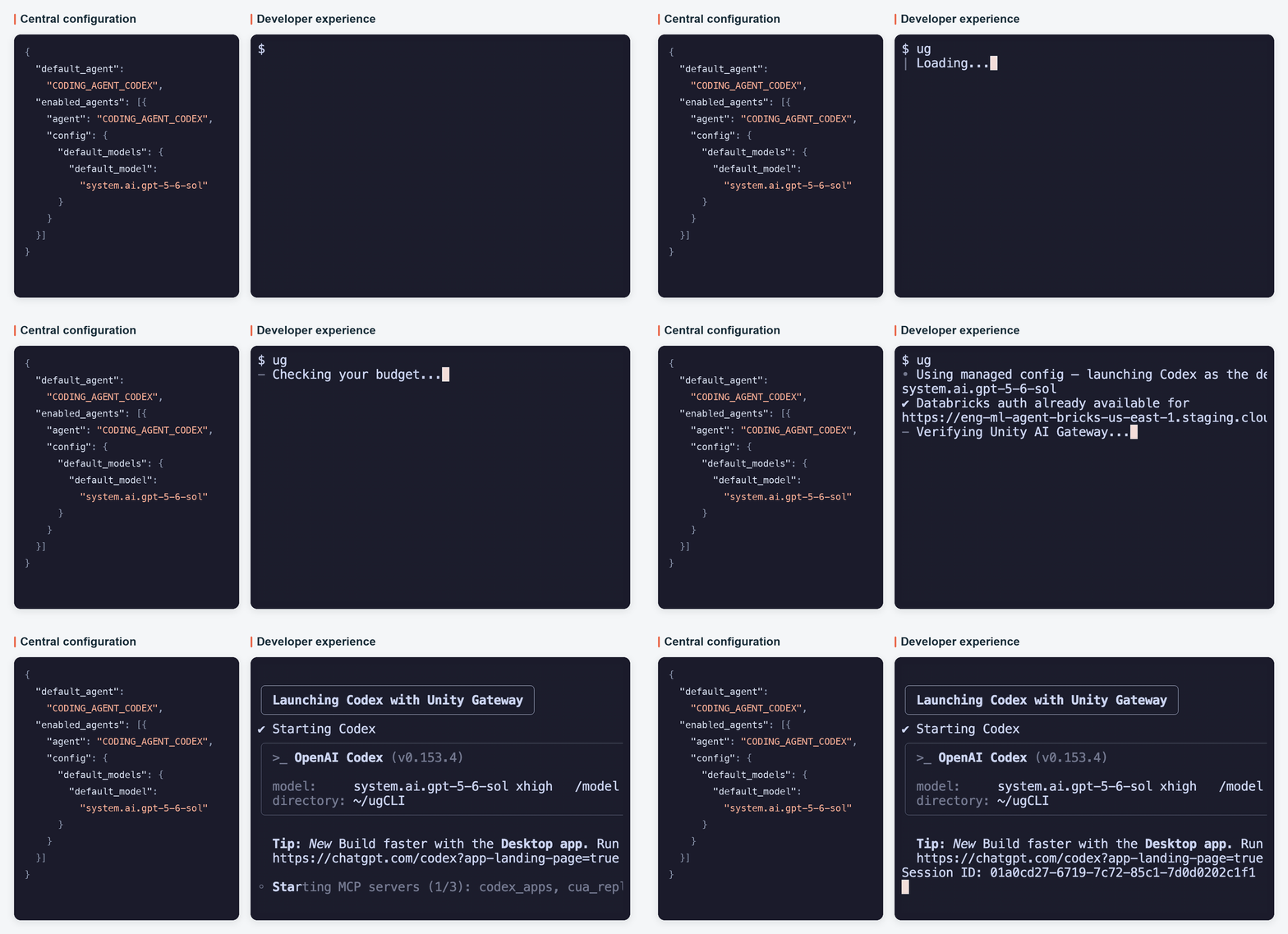
Update agent and model defaults as better options emerge
As new agents and models become available, admins can choose the setup they want developers to start with and publish it to the entire team with a single configuration change. The next time developers run ug, the CLI automatically syncs the configuration change and launches the recommended agent with the selected model in its familiar interface. Admins can update that choice as quality, cost, and team needs change. They can also set-up more sophisticated policies such as cohort-based roll outs of new models.
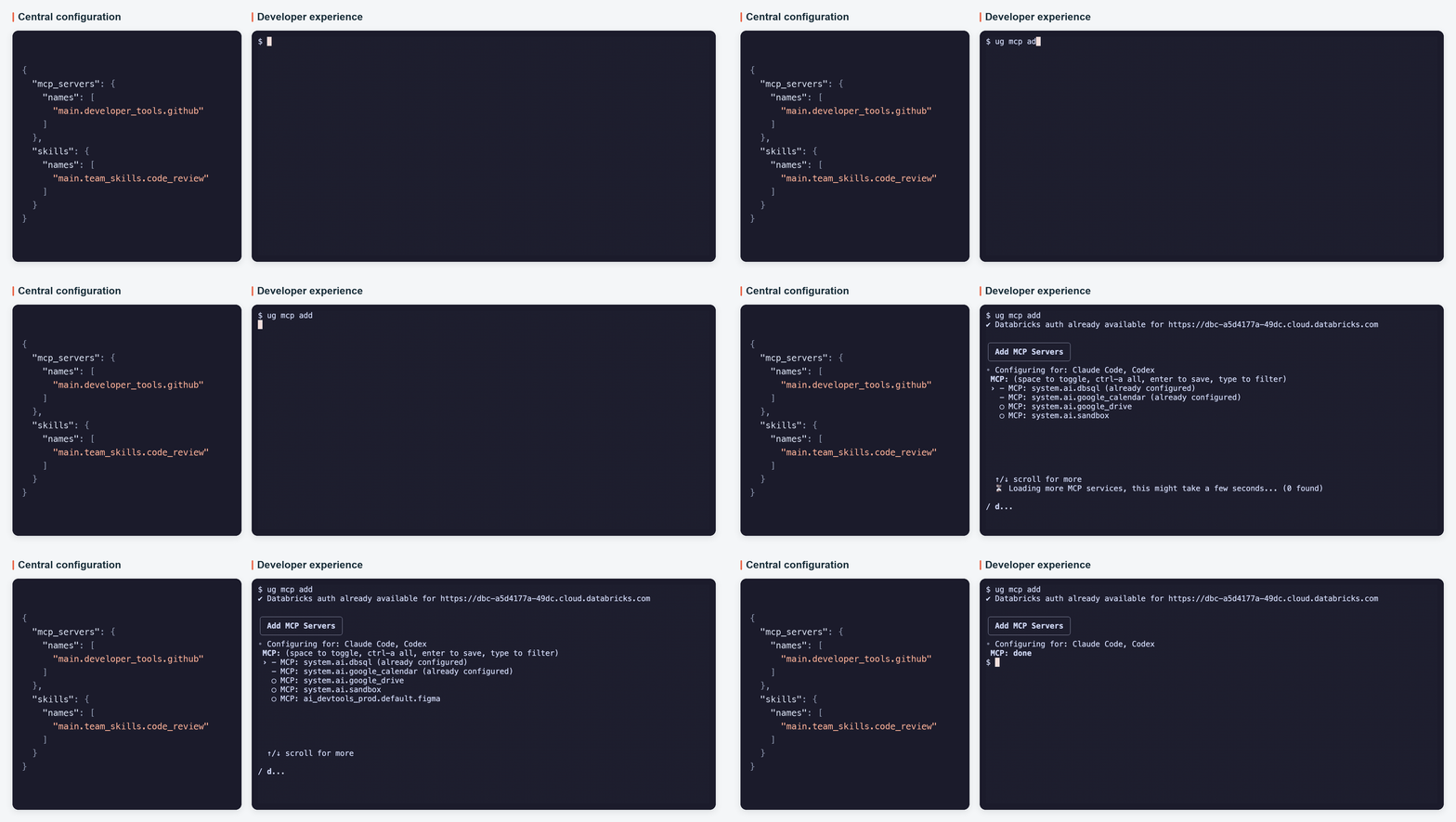
Share approved tools and skills across agents
Admins can configure shared MCP tools and skills and make them available through supported agents. Developers gain access to the approved tools and proven workflows within their configured agents, without having to set each one up separately.
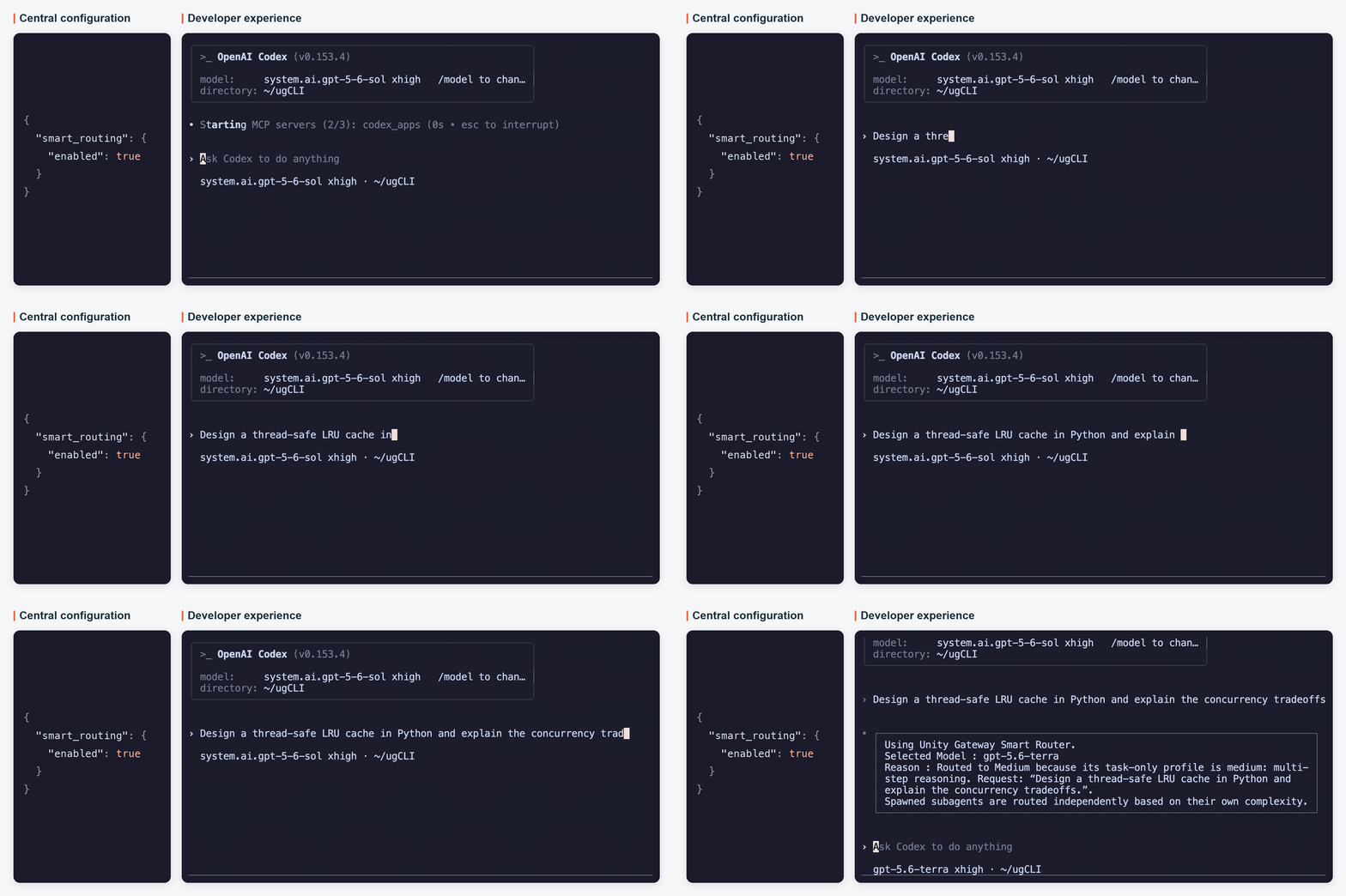
Match model cost to the task with Smart Routing
Coding tasks vary in complexity. Admins can enable Smart Routing centrally so simpler work can use less expensive models while harder work gets more capable ones. Developers stay in their preferred coding agents without having to choose the right model for each task. Smart Routing selects a model for the main session and can make a separate choice for work that the agent delegates to a subagent.
In our published Smart Routing evaluation, this approach delivered 35% cost savings on our internal coding benchmark.
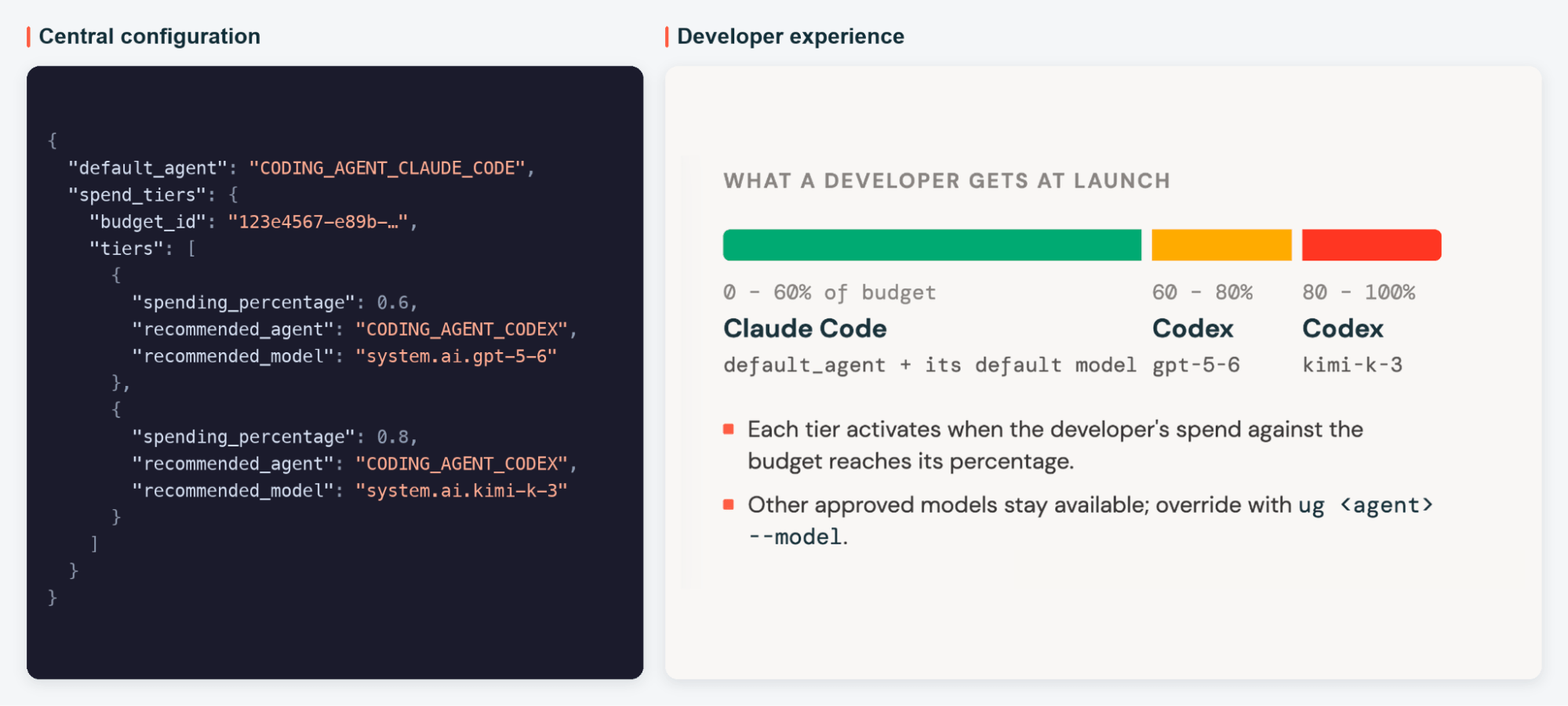
Keep spend on track with budget-aware defaults
Unity Gateway lets teams recommend lower-cost agents and models as spending reaches defined budget thresholds. These become the defaults for new launches without interrupting ongoing work. Developers can check spending and remaining budget with ug usage.
Find and fix wasted spend with tracing
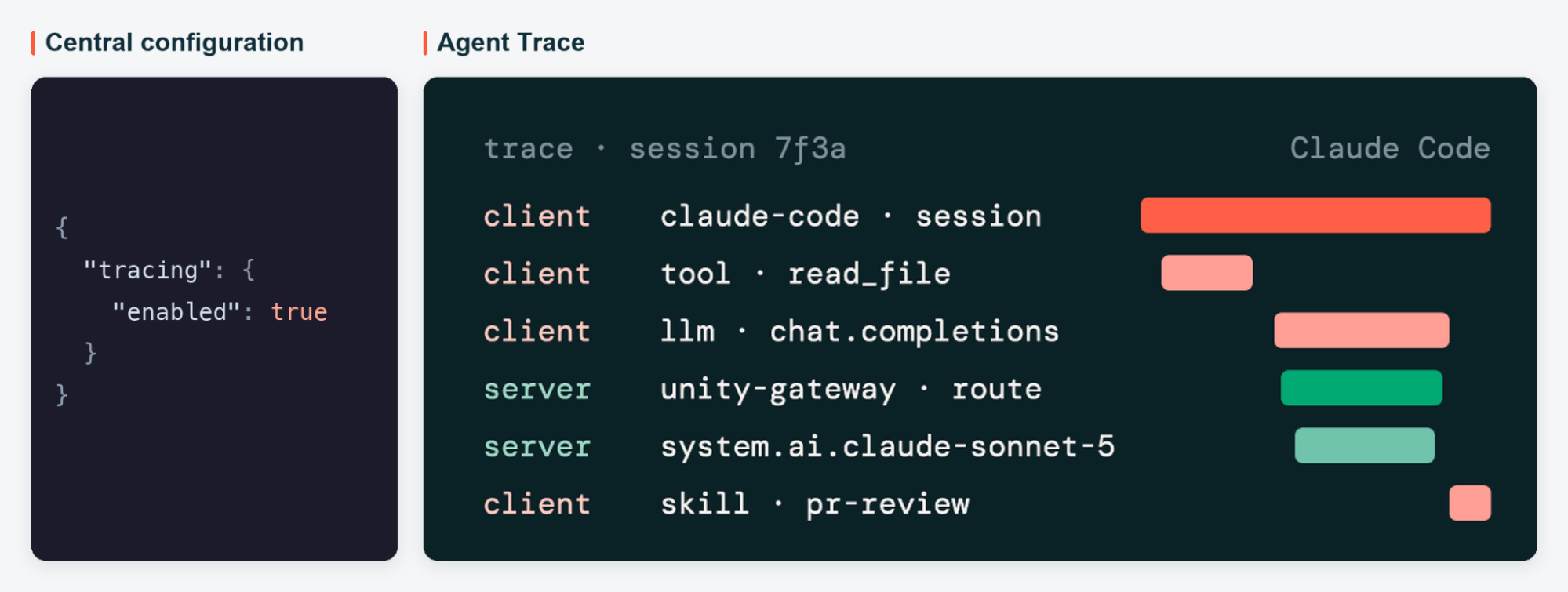
Unity Gateway can capture traces from coding agents, including local tool calls and skill invocations. Admins enable tracing centrally, and ug configures supported clients to export those traces to the lakehouse’s unified trace table. Teams can then use Genie to find repeated tool failures, oversized responses, and other sources of wasted tokens, fix them, and measure the results.
In our own engineering organization, we used Unity Gateway tracing with Genie One to find and fix seven MCP tool bugs, which saved us an estimated $1.2 million per year in wasted AI spend and lost productivity.
Get started
At Databricks, the Unity Gateway CLI helps us roll out new models and cost optimizations across our engineering organization without changing how developers work.
Get started with the Unity Gateway CLI quickstart, or dive deeper by configuring your coding agents in Unity Gateway.
Frequently Asked Questions
How do I deploy and manage AI coding agents at scale?
Databricks Unity Gateway lets organizations centrally configure and manage coding agents, including Claude Code and Codex, through the Unity Gateway CLI (ug). Admins define approved models, MCP servers, skills, Smart Routing, and spending policies in one place. Developers launch their preferred agent with a single command, such as ug claude or ug codex, while the CLI handles authentication and applies the organization's settings.
How can I control AI coding agent costs across models and tools?
Unity Gateway centralizes coding agent spending controls and supports budget-aware defaults and Smart Routing to reduce costs. As spending reaches defined thresholds, organizations can recommend lower-cost agents and models for new sessions without interrupting ongoing work. Smart Routing also matches models to task complexity, delivering 35% cost savings in Databricks' published internal coding benchmark.
How can AI tracing help identify and reduce wasted coding agent spend?
AI tracing helps organizations identify wasted tokens from repeated tool failures, oversized responses, and inefficient agent workflows. The Unity Gateway CLI can configure supported coding agents to export traces, including local tool calls and skill invocations, to a unified trace table for analysis with Genie. Databricks used this approach to identify and fix seven MCP tool bugs, saving an estimated $1.2 million annually in wasted AI spending and lost productivity.
How do I centrally roll out new AI models across coding agents?
Unity Gateway lets administrators publish new model defaults and configurations across supported coding agents from a central location. The next time developers launch an agent through the Unity Gateway CLI, it automatically synchronizes the latest settings and opens the agent with the recommended model. Organizations can also use cohort-based rollouts to test new models before expanding access across developer teams.
How do I securely govern Claude Code, Codex, and other coding agents?
Organizations can govern coding agents through Unity Gateway by centralizing model access, approved MCP tools, skills, and spending policies. The Unity Gateway CLI applies administrator-defined settings, including locked configurations, while preserving each developer's identity for access control and usage attribution. At Concurrence, this approach provides centralized visibility into coding agent usage across more than 61 billion input tokens and approximately 360,000 requests.
Get the latest posts in your inbox
Subscribe to our blog and get the latest posts delivered to your inbox.