Five ways marketers can use Genie One
Empower your marketing team to turn insights into action
by Cynthya Peranandam and Sydney Sundell
• Drive revenue impact by translating governed data into actionable marketing insights in real-time
• Improve campaign ROI by uncovering cross-channel performance trends without relying on manual reporting
• Accelerate speed-to-market for marketing strategies by empowering teams to explore customer and pipeline data independently
Every marketing team sits on a goldmine of data: campaign performance metrics, customer signals, attribution models, audience segments, pipeline analytics, and more. But the gap between having data and actually acting on it remains stubbornly wide. Analysts become bottlenecks, dashboards go stale, and by the time an insight reaches a decision-maker, the opportunity to act may have already passed.
Databricks Genie One changes that equation. It’s a data-smart AI coworker that enables marketing professionals to skip the analyst queue and take real agentic action with their governed business data. With Genie One, marketers can move from insights to action across every step of their workflow.
Need some inspiration to get started? Here are the five high-impact use cases where marketing teams are deploying Genie One today.
1. Channel and campaign performance analysis
The problem: Marketing teams need to make decisions across campaigns, but answering even a straightforward performance question can require deep understanding or even rebuilding of the context behind the numbers. Data may be spread across Salesforce, marketing automation platforms such as Marketo or HubSpot, and paid-media platforms such as Google Ads or LinkedIn Campaign Manager. Before a marketer can compare results, they need to determine which campaigns belong in the same rollup, whether to use sourced or influenced pipeline, and which audience, region, or reporting period applies.
How Genie One helps: Genie One lets you ask questions using the marketing and sales data your organization already works with. For example: “Which channels generated the most sourced pipeline last quarter?” or “Where are we spending more without seeing more qualified opportunities?”
Genie One understands your organization’s full data context, and uses your team’s existing campaign structure, metric definitions, and reporting rules so you can focus on the decision rather than reconstructing the analysis. Marketers can explore and share the data available to them, while Genie One applies the same access permissions that govern that data elsewhere in the organization. Once a team has a useful, repeatable question or report built with Genie One, they can schedule the same review to run each week and share the resulting analysis with campaign owners, demand-generation leads, or regional teams. That makes recurring performance reviews and follow-up more consistent, while leaving budget and campaign decisions with the people responsible for performance.

2. Marketing Funnel Attribution
The problem: Marketing teams are regularly asked which programs contributed to pipeline and revenue, but the answer depends on the attribution approach the team has chosen. An email nurture may help move an existing prospect forward, while a paid-search campaign or event may be associated with an opportunity’s creation. The same opportunity can receive different credit under first-touch, sourced, or multi-touch attribution, so teams need to use the same definitions when they discuss performance. Marketing analytics teams will often set up dashboards to capture overall funnel performance and allow for cohort tracking, but dashboards alone can’t answer the nuanced questions that campaign and channel owners need to answer to plan and evaluate their strategies.
How Genie One helps: Marketers can ask Genie One complex funnel questions in plain language, such as: “Which campaigns influenced the most pipeline this quarter?” or “Where did MQL-to-opportunity conversion decline by business unit?” This lets you explore a number or trend beyond a dashboard’s bounds without having to locate underlying tables, translate the question into filters, or build a separate report.
When a team uses the same question repeatedly, it can be saved as a reusable skill or configured as a shareable Genie Agent for that workflow. Campaign managers and regional teams can then start from the same question, definitions, and attribution method for every inquiry, without rebuilding your prompt. Simply share the skill instructions or Genie Agent with the people involved in the review, and schedule the recurring analysis or dashboard update for the team’s regular operating cadence.

3. 360 Customer Insights
The problem: Customer dashboards can show metrics such as product adoption, engagement, account tier, renewal timing, and pipeline. But when a marketer sees a change, such as lower usage among a particular customer segment, the dashboard might not explain which accounts are driving it, what those accounts have in common, or whether the team should respond. Answering those follow-up questions often requires new analysis or help from a data team.
How Genie One helps: Start with the customer dashboard to identify a change worth investigating, then use Genie One to explore it further. For example, you could ask, “Which enterprise accounts have seen product usage decline in the last 30 days?” Genie One can identify the relevant accounts and surface related signals in the organization’s data, such as recent engagement, adoption of key features, renewal timing, or account segment.
The analysis can be tailored to the person using it. A lifecycle marketer can ask to see customers that are eligible for an adoption campaign, while an account-based marketer may ask for a prioritized list of named accounts and the signals behind that prioritization. Based on the patterns it finds, Genie One can also help identify follow-up areas to review, such as feature adoption, recent engagement, renewal timing, or whether an account is already engaged in an active customer success motion. Those recommendations give each team a clearer place to start, while marketers retain responsibility for the decision and the campaign plan.
Teams can share the conversation as a record of the analysis, or turn it into a ready-to-share document complete with visuals right from Genie One. You can then schedule the analysis as a recurring task on a weekly, monthly, or quarterly basis to ensure proactive recommendations are ready for you on your regular planning cycle.
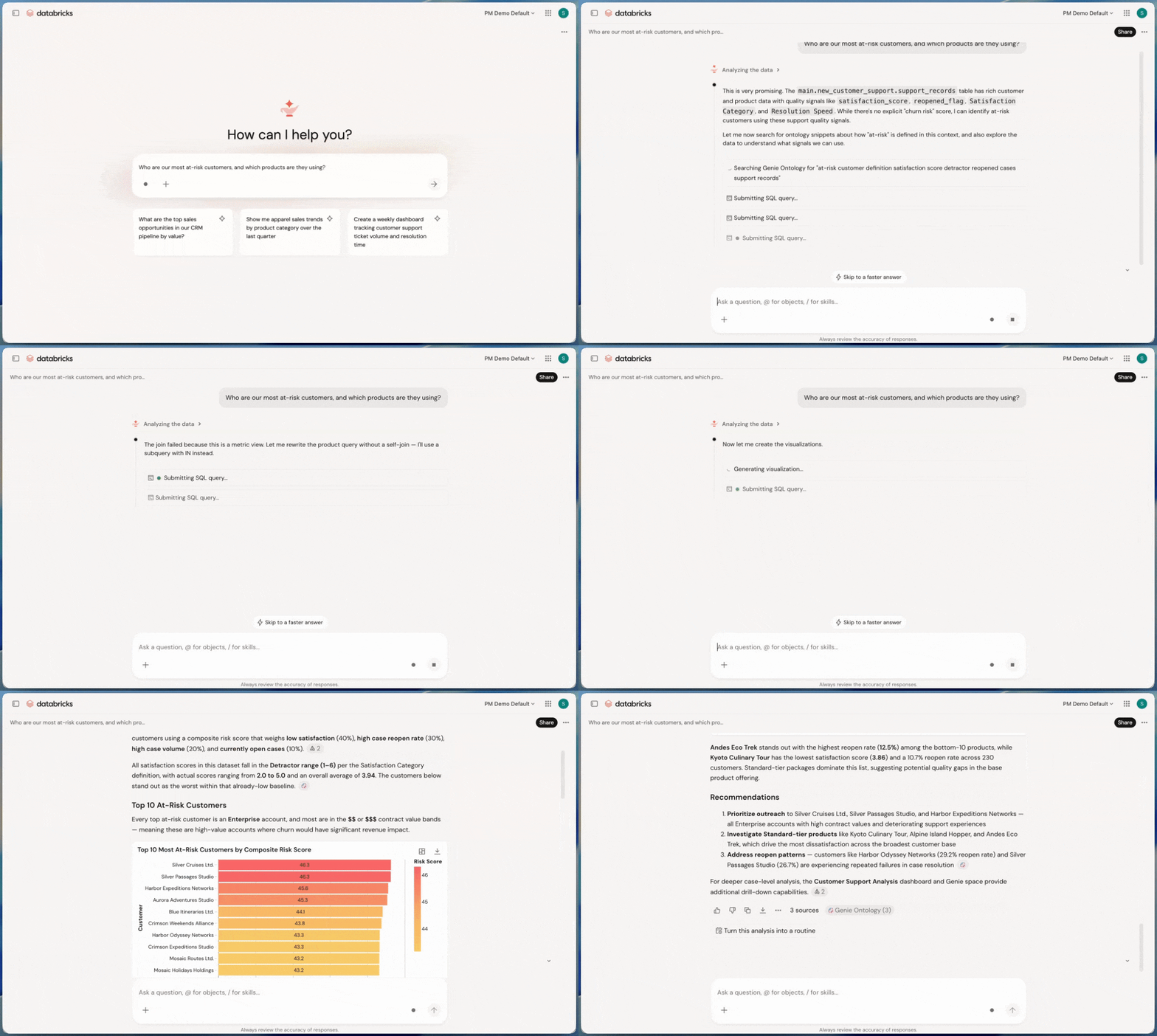
4. Omnichannel Campaign Planning
The problem: Commercial and brand teams need to understand how customers engage across channels, but the relevant information is often spread across Salesforce, media-agency reporting, web and app analytics, and customer-engagement tools. A standard dashboard can show channel-level results, but it may not answer the follow-up questions that arise in planning: Which customer segments are engaging across more than one channel? Which channels are reaching high-value customers but not moving them to the next step?
How Genie One helps: Start with an omnichannel dashboard that shows the shared view of customer engagement, campaign activity, transactions, and account or territory performance. When a team sees a pattern, it can ask Genie One to investigate further. For example: “Which channels do our highest-value customers use most often?” or “Which territories have declining repeat purchases despite stable email engagement?”
Genie One can turn the question into an analysis that considers the available customer, channel, and commercial data together. It can identify the segments or territories behind a trend, surface relevant supporting measures, and suggest follow-up questions or areas for the team to review. A brand marketer can use the result to assess where to concentrate a campaign; a field leader could use the same underlying view to identify territories that warrant attention; an executive may use it to prepare for an operating review.
The analysis can then be shared with the people who need it in the form that fits the discussion. Teams can share the conversation, schedule updates as a task for regular reviews, and download an executive-ready document as a PDF when an offline copy is useful. Access remains governed by the permissions already assigned to each user, so a field leader sees the data available to their role rather than an unrestricted customer view.

5. Business Reporting On-the-Go
The problem: Marketing leaders often need to check a number or resolve a question between meetings, before a customer conversation, or while preparing for a leadership review. The issue is not simply finding a report; it’s understanding what changed and whether it needs attention. A pipeline figure may be below plan, a launch could pace unevenly by region, or a campaign might generate responses without producing qualified opportunities.
A general-purpose AI assistant can summarize the information included in a prompt, but it doesn’t know which pipeline definition, attribution method, fiscal period, or source of truth the marketing organization uses. As a result, leaders may still need to provide that context, compare the response with other systems, or ask a team member to confirm it.
How Genie One helps: A leader can open the Genie One mobile app, then ask a focused follow-up question such as, “What changed in sourced pipeline this week?” or “Which regions are behind launch pace?” Genie One can connect the reported change to the accounts, campaigns, or regions behind it, giving the leader enough context to decide whether a follow-up is needed.
The mobile app supports questions in natural language, interactive dashboards, and follow-up analysis within a dashboard. It can also run scheduled tasks, so a leader can set up a regular summary, such as a Monday pipeline-pacing update or a pre-meeting launch-status review.
Get Started
Start with a few marketing workflows where Genie One can be useful quickly: recurring performance updates, campaign reviews, launch check-ins, pipeline analysis, or product-adoption reporting. The best initial use cases are usually repeatable questions that require information from multiple sources and some established business context—for example, a weekly report that combines campaign performance, pipeline impact, and an explanation of what changed.
As you choose those workflows, work with your data and IT teams to ensure the underlying context is available in Databricks. That includes the relevant data sources, metric definitions, attribution models, fiscal-calendar logic, and team terminology. This groundwork helps Genie One interpret questions in the same context your marketing team uses when making decisions.
Ready to learn more about how unified context through Genie Ontology sets Genie One apart from generic AI assistants? Download our e-book “The Missing Layer in Enterprise AI Coworkers.”
Get the latest posts in your inbox
Subscribe to our blog and get the latest posts delivered to your inbox.