Introducing OpenSharing SecureConnect
Databricks-managed proxy for storage access, eliminating the need for per-recipient networking configuration for sharing
by Huey Han, William Chau and Harish Gaur
SecureConnect introduces a Databricks-managed proxy for storage access.
Data providers do one-time setup and no longer need to configure network for each recipient.
Optionally, data providers can leverage NCC (Network Connectivity Configuration) for private link connectivity between the proxy and provider storage.
OpenSharing makes it simple to share live data across organizations — but when provider storage sits behind a private network, such as for highly sensitive or regulated data sharing, the networking complexity compounds. Providers must manually allowlist each recipient's IP addresses or cloud VPCs/VNets on their storage firewall. Recipients must open egress rules to the provider's storage. Both sides exchange low-level network identifiers manually, over email and Slack. Cloud infrastructure administrators become bottlenecks, and onboarding a single new recipient can take weeks. For providers sharing with dozens or hundreds of recipients, this doesn't scale and forces providers to either compromise on security in favor of simplicity, or move their data out of their own storage to a staging area — neither of which are optimal.
Introducing OpenSharing SecureConnect
OpenSharing SecureConnect is a Databricks-managed proxy that routes storage access on behalf of recipients. The setup is one-time: providers allowlist Databricks's network endpoints on their storage and enable SecureConnect. From that point forward, no per-recipient firewall changes are needed. The data remains in the provider’s storage bucket, with live data sharing directly from the source — without recipients directly connecting to the storage bucket itself. Optionally, data providers can leverage NCC (Network Connectivity Configuration) for private link connectivity between the proxy and provider storage.

"The introduction of SecureConnect has allowed us to simplify and harden the serving of data products. Whether our customers are running a governed discovery and access programme or operating a multi-party data exchange, they can move faster and serve their consumers without compromising on control." —Sebastian Drave, Director of Customer Solutions and Innovation, Harbr Data
How it works:
Provider (one-time setup):
- Configure storage access: Configure your storage to allow access from Databricks Serverless Data Plane.
- Enable SecureConnect: Enable SecureConnect for a metastore. Databricks will then route storage access to SecureConnect for new recipients.
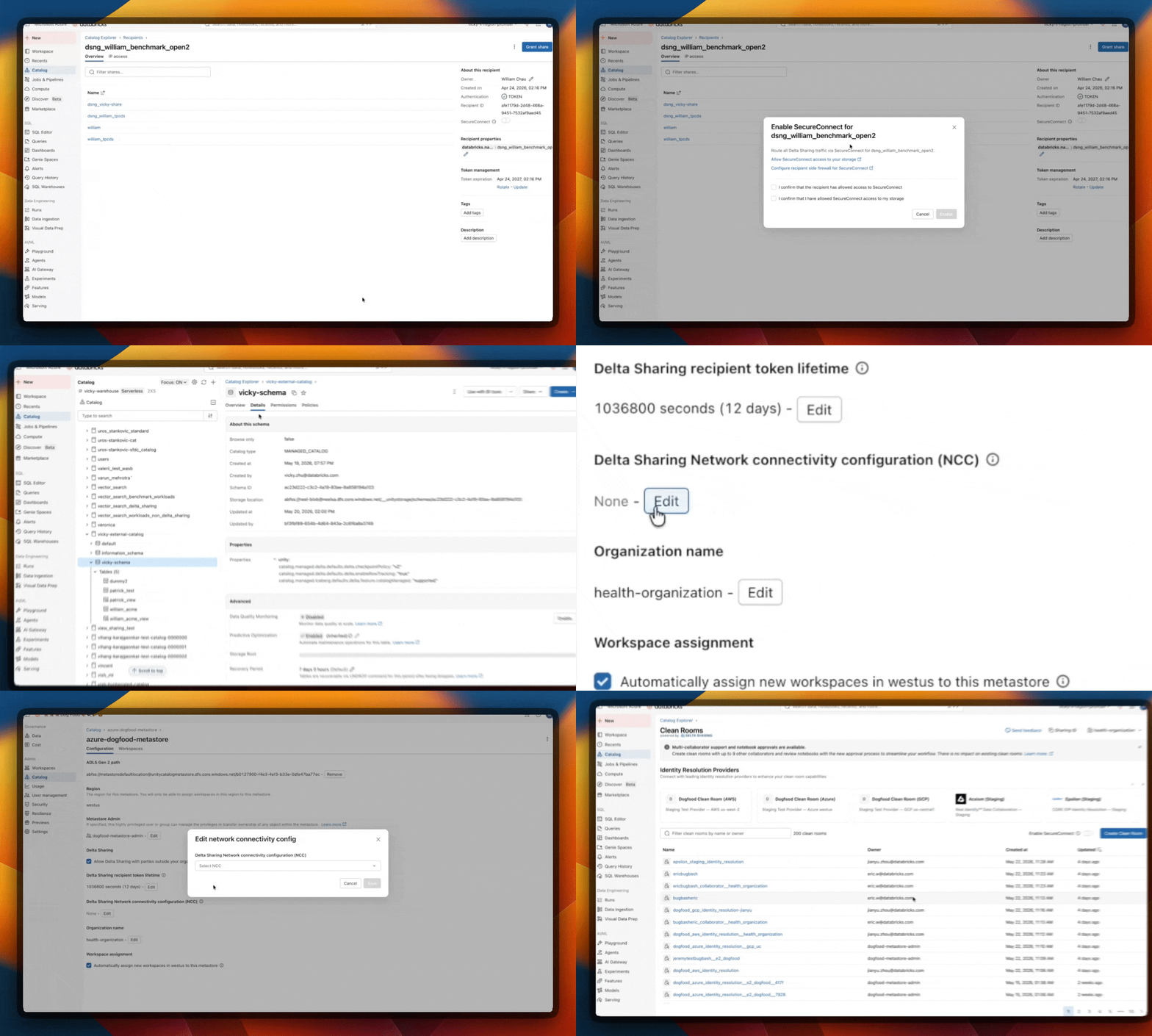
- Optional) Migrate pre-existing recipients: For backward compatibility, pre-existing recipients will continue using direct storage access by default. You can migrate them to SecureConnect individually with a toggle.
- (Optional) Private link connectivity to storage: Configure OpenSharing NCC to add private link connectivity between the Databricks-managed proxy and your storage.
Recipient:
- Serverless recipients: Zero configuration — when a data provider enables SecureConnect, storage access from serverless recipients automatically routes through SecureConnect.
- Classic and open recipients: Allowlist Databricks's stable inbound IPs, which are publicly available in Databricks documentation.
Key capabilities:
- One-time setup for data provider regardless of recipient count
- Minimal configuration for data recipients, including zero configuration for serverless recipients
- Optional private connectivity to provider storage with NCC
- Mutual TLS for enhanced security for data recipients
- Works for data sharing across different regions and clouds
- Works with both customer-managed storage and Databricks Default Storage
Hear more from Amadeus at Data + AI Summit 2026 in this session: "OpenSharing SecureConnect: Simplify Network Configuration for External Data Collaboration."
Getting started
Open Sharing SecureConnect is available in Public Preview. To enable it:
- Navigate to your Databricks workspace and open the Open Sharing settings.
- Follow the one-time SecureConnect setup.
- Share data with recipients — no additional network configuration required.
For full documentation, visit the Open Sharing SecureConnect docs.
Get the latest posts in your inbox
Subscribe to our blog and get the latest posts delivered to your inbox.