What to Look for in a Postgres Managed Service: A Technical Buyer's Checklist
Traditional managed Postgres excels at transactional workloads but compromises on analytics queries—and most evaluation checklists miss this gap. If you're evaluating Postgres as a hybrid transactional-analytical engine, you need different criteria.
- A managed Postgres service should be evaluated on what it can prove under failure, recovery, and production load, not just the features it advertises.
- The key checks include high availability, disaster recovery, PostgreSQL compatibility, security, scaling, total cost, operational control, and portability.
- A production workflow should test the provider's claims with failover, point-in-time recovery, load, and migration tests before the service is adopted.
- Lakebase Postgres provides managed, serverless Postgres with automatic high availability, autoscaling, and Databricks security and governance capabilities.
Managed is a label, not a specification. Evaluate a cloud database managed service on what it proves under failure and recovery, not on what its feature page lists.
A Postgres managed service is a PostgreSQL database where the provider operates the underlying infrastructure and automates database administration, such as patching, backups, failover and scaling. How much the provider actually manages varies by service, which makes "managed" a label rather than a complete specification. Major cloud providers, including AWS, Microsoft Azure, and Google Cloud, offer managed PostgreSQL services, as do database-focused vendors.
A provider might advertise high availability, automated backups, or enterprise security, but those claims do not tell platform engineers or DBAs what happens when a primary fails, how quickly a database can be restored, or whether a required PostgreSQL extension is supported. When a problem does surface in production, what matters is how quickly the team can find and resolve it.
Platform engineers, DBAs, data architects, and engineering managers evaluating a Postgres managed service for production. It covers the areas that tend to cause problems after migration, such as operational control, high availability, disaster recovery, scaling, and so on. Each section looks at what the provider should support, the questions worth asking during an evaluation, and how to test the answers in a pilot. If you're a DBA or platform engineer planning a move, use this article as a working checklist rather than a one-time read.
The Postgres managed service checklist at a glance
A managed Postgres evaluation should cover more than database provisioning and day-to-day administration. The table below gives teams a starting point for the capabilities to verify and the answers that should trigger a closer review.
| Area | What to verify | Red flag |
|---|---|---|
| Operational scope | Who handles patching, upgrades and tuning, and what database controls remain available | "Managed" only covers the virtual machine and operating system |
| High availability | Automatic failover, committed-transaction guarantees, and whether failover works across availability zones | No stated Recovery Point Objective (RPO) or manual promotion |
| Backups and disaster recovery | Point-in-time recovery (PITR), restore options, retention, cross-region recovery, and recovery objectives | Disaster recovery is available only through a support request with no stated RPO or Recovery Time Objective (RTO) |
| Scaling and performance | Resize behavior, read replicas, connection pooling, storage, and input/output operations per second (IOPS) model | Vertical scaling requires extended downtime |
| Security and compliance | Private connectivity, identity and access controls, customer-managed keys, audit logs, and compliance scope | Public connectivity is required or encryption keys can only be controlled by the provider |
| Compatibility and extensions | Supported PostgreSQL versions, extensions, drivers, parameters, and superuser restrictions | A critical extension or required PostgreSQL capability is unsupported |
| Migration | Supported migration paths, logical replication, and change data capture (CDC) options | Large databases can only migrate through dump and restore |
| Pricing and total cost | Compute, storage, IOPS, backups, replicas, network egress, and extended-support costs | Only the compute price is clear |
| Operations | Database metrics, logs, alerts, and access to PostgreSQL-level support | Limited database observability or no escalation to PostgreSQL experts |
| Portability and exit | Standard exports and logical replication to another PostgreSQL environment | Data can only leave through a proprietary format or support request |
1. Operational scope and control
The first thing to verify is where the provider's responsibility ends and the database team's responsibility begins. A managed service should take care of infrastructure and routine database operations without removing the PostgreSQL controls a production workload depends on. Providers referring to a service as fully managed don't always mean the same thing.
Start with maintenance. Ask whether minor version updates are automatic, whether teams can choose a maintenance window, how much notice providers give before changes, and whether updates require a restart or failover. Major version upgrades deserve separate attention. PostgreSQL supports each major version for five years, so teams should understand how long the provider supports each version and what happens when that support ends. Ask for the end-of-life date the provider uses for each version. Generally, the less notice a provider gives before updating a database, the harder it is to plan around.
Configuration access is another common source of surprises. Managed services often restrict superuser access and limit parameters or commands that could affect the underlying infrastructure. Before migrating, check which roles are available, which parameters can be changed, whether ALTER SYSTEM is supported, and which PostgreSQL commands are restricted. For example, some services let you edit a set of parameters through a console or API but block the ALTER SYSTEM command entirely.
- Ask how minor and major version upgrades work, including maintenance windows, notifications, and end-of-support policies.
- Ask which PostgreSQL roles, parameters, and commands are restricted.
- Prove it by applying a minor update in the pilot and measuring the effect on active connections and application traffic.
- A red flag is a service that calls itself fully managed while leaving patching, upgrades, or critical maintenance tasks to the database team, or one that cannot clearly document its configuration and upgrade limits.
2. High availability and automatic failover
Automatic failover in Postgres databases means that the service can automatically promote a standby in another availability zone and clearly state what happens to committed transactions during failover. High availability protects against failures within a region, but it is not the same as disaster recovery.
Ask whether the standby uses synchronous or asynchronous replication, what recovery point the provider supports, and whether the database endpoint stays the same after promotion. Applications will usually need to reconnect after existing connections drop, so the provider should document the expected behavior. In a multi-node cluster, confirm which nodes can be promoted and how applications find the new primary. Ensure your connection pools and drivers, whether in Java, Python, or another language, handle reconnects cleanly.
- Ask whether high availability uses synchronous replication and whether the standby runs in a separate availability zone.
- Ask how long failover typically takes and whether committed transactions are preserved.
- Prove it by triggering a failover, timing the recovery and checking application errors, committed writes and replication behavior.
- A red flag is manual promotion or no clear guarantee around committed transactions.
3. Backups, point-in-time recovery, and disaster recovery
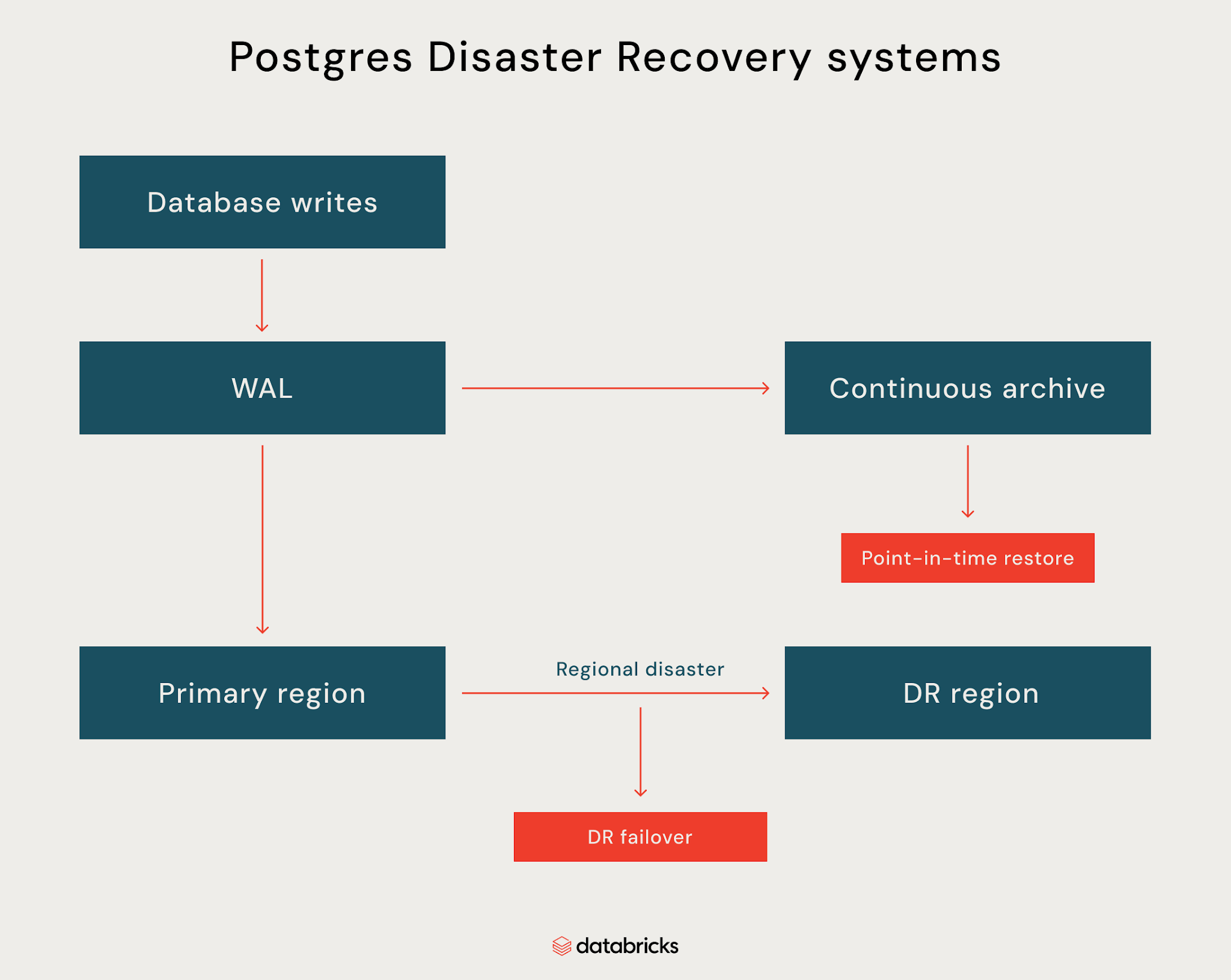
Backups and disaster recovery (DR) are important in databases. Verify that backups can restore the database to a known point in time and that the provider clearly states its recovery objectives. RPO defines how much data a workload can afford to lose. RTO defines how long the database can remain unavailable.
Ask whether the service continuously archives the Write-Ahead Log (WAL), how long point-in-time recovery remains available, and whether restores are self-service. For disaster recovery, check whether cross-region replication is continuous or periodic, whether failover is automatic or manual, and whether the provider publishes RPO and RTO targets. Automated backups combined with continuous WAL archiving are what make point-in-time recovery and reliable data restoration possible.
- Ask whether you can restore the database to a specific timestamp and how long the process typically takes.
- Validate critical records and application reads after the restore.
- Run a disaster recovery drill if the provider supports one and document the recovery steps.
- A red flag is disaster recovery that is only available through a support request or has no published RPO or RTO.
4. Scaling and performance
Verify how the service handles growth in compute, storage, connections, and read traffic. Scaling should not introduce unexpected downtime or require you to manage infrastructure manually.
Ask whether compute can scale vertically, whether read replicas are available, how storage and input/output operations per second (IOPS) scale, and whether connection pooling is built in. For services with autoscaling, check what triggers scaling, how quickly capacity changes, and whether scaling affects active connections or transactions. On most managed services, scaling CPU and RAM is typically a few clicks or a single API call, which lets teams match capacity to user growth rather than launch new infrastructure.
- Ask whether vertical scaling requires a restart or failover.
- Ask how storage grows and whether there are limits on connections, IOPS, or replicas.
- Prove it by running representative production load and testing a scale-up during active traffic.
- Measure query latency, connection errors and application behavior before and after scaling.
- A red flag is scaling that requires extended downtime or has undocumented capacity limits.
5. Security, compliance, and access control
Validate how the service protects data in transit and at rest, controls database access, and connects to the network. Security features should match the organization’s existing identity and compliance requirements rather than require a separate operating model.
Ask whether private connectivity is supported, how Identity and Access Management (IAM) integrates with database roles, and whether Customer-Managed Keys (CMK) are available. Also check audit logging, encryption controls, and the provider’s compliance scope. Ask whether applications can connect through a private IP address, a public one, or both. Most managed providers enforce encryption at rest and in transit and apply routine OS patches and security updates automatically, so confirm which compliance frameworks, such as HIPAA or GDPR, the service supports.
- Ask whether databases can run without public internet access.
- Ask how database activity, administrative actions, and authentication events are logged.
- Verify that encryption keys can be rotated or revoked without disrupting the database.
- Prove it by connecting through the intended private network path and testing access with different roles.
- A red flag is a service that requires public connectivity, provides limited audit visibility, or does not support the security controls required by the organization.
6. Postgres compatibility and extensions
You should check that the service supports the PostgreSQL versions, extensions, drivers, and configuration options the workload depends on. Compatibility should be tested against the actual application rather than inferred from the provider’s claim that it supports PostgreSQL.
Verify which PostgreSQL versions are available, how quickly new major versions become supported, and which extensions are enabled. Check support for extensions such as pgvector, PostGIS, and any application-specific dependencies. Also confirm which parameters, roles, and PostgreSQL commands are restricted. Check whether superuser restrictions affect existing tables, functions, or extensions, and whether objects that exist in your current database would need to change. Self-managed teams often run PostgreSQL on Ubuntu or another Linux distribution with full OS access, so dependencies on the operating system should be identified early.
- Ask for the complete list of supported extensions and version-specific limitations.
- Ask whether application drivers, ORMs, and standard PostgreSQL tooling work without modification.
- Test any required extensions and database parameters before migration.
- Prove it by restoring a representative schema and running the application’s migrations and integration tests.
- A red flag is a critical extension being unsupported or compatibility depending on undocumented workarounds.
For AI workloads, pgvector support is important for vector search alongside transactional workloads.
The agentic AI playbook for the enterprise

7. Migration paths from Postgres and other databases
Verify how the provider supports both initial data migration and the final cutover. A migration method that works for a small database may not be practical for a production system that must keep serving traffic during the move.
Ask whether the service supports logical replication, Change Data Capture (CDC), native PostgreSQL tools, and third-party migration services. For migrations from other database engines, check which source systems are supported and how schema conversion, data validation, and application changes are handled. Moving a production DB from other databases such as Oracle or SQL Server also requires schema conversion and application testing.
- Ask whether large databases can migrate without extended downtime.
- Ask how ongoing changes are replicated during the migration window.
- Prove it by migrating a representative dataset, running validation checks, and measuring the final cutover time.
- A red flag is a migration process that depends entirely on dump and restore or requires extended application downtime.
Your migration solution should account for dependencies across your data environment and minimize disruption.
8. Pricing and total cost of ownership
A managed service can add costs for storage, backups, high availability, replicas, network transfer, and other usage-based resources. Much of the savings over self-managed deployments comes from avoiding on-premises hardware and maintenance, so find out which features are included in the base price and which are paid add-ons.
Check how compute, storage, IOPS, backups, replicas, and network egress are charged. Check whether pricing changes with autoscaling, standby capacity, or higher availability configurations.
- Model both normal and peak usage, including storage growth and backup retention.
- Calculate Total Cost of Ownership (TCO) over the expected contract period.
- Prove it by building a 12-month TCO model covering compute, high-availability standby capacity, IOPS, backups, replicas and network egress for your expected workload. Do not use only the compute line.
- A red flag is pricing that only shows database compute while leaving storage, backups, replicas or network costs unclear.
Usage-based pricing can make costs easier to align with workload demand, but teams should still model realistic traffic patterns before committing.
9. Operations, monitoring, and troubleshooting
A production service needs enough visibility for database teams to understand what is happening when performance or reliability degrades. Infrastructure metrics alone are rarely enough to diagnose PostgreSQL issues.
Ask whether the service exposes database metrics, logs, and query-level information, and whether teams can configure alerts for important conditions. Find out what access support engineers have during incidents and whether PostgreSQL specialists are available for escalations. Look for dashboards with real-time visibility into system metrics, and check whether logs can be filtered by database or user and whether you can sort events by time or severity. Also consider whether your team has the skills to troubleshoot PostgreSQL issues using only the provider's tooling.
- Ask which PostgreSQL metrics, logs, and query statistics are available.
- Ask whether monitoring data can be exported to the organization’s existing observability platform.
- Prove it by generating a controlled performance issue and using the available tools to identify the root cause.
- A red flag is limited database-level visibility or a support model that cannot investigate PostgreSQL-specific problems.
For large deployments, ask whether the provider’s tooling can surface patterns across all your databases, not just per-instance metrics.
10. Portability and exit
A managed Postgres service should make it possible to move data and applications to another PostgreSQL environment without depending on proprietary export processes.
Ask whether standard PostgreSQL tools and logical replication can be used to move data out. Find out whether any provider-specific extensions, APIs, or storage formats would make an exit harder. The more unique provider-specific features an application depends on, the harder an exit becomes.
- Ask how a complete database export works and whether it can run without provider support.
- Ask whether logical replication can stream data to another PostgreSQL environment.
- Prove it by restoring an export into a separate PostgreSQL environment and running application tests.
- A red flag is data that can only be exported through a support request or a proprietary format.
How to run a pilot before you commit
A pilot should test the provider’s claims against a workload that resembles production. A feature checklist can show what a service offers, but controlled failure and recovery tests show whether those capabilities work when they matter.
Start with a representative database, application traffic, and the PostgreSQL extensions the production system requires. Then test the areas most likely to affect the decision. If you prefer a phased approach, start with a non-critical workload and expand the pilot a bit at a time.
- Run a failover and measure recovery time, connection recovery, and lost transactions.
- Restore the database to a specific point in time and compare the result with the expected RPO and RTO.
- Apply representative peak load and test scaling while the application remains active.
- Run migration and rollback tests, including any required extensions and application changes.
- Test monitoring and support escalation.

Record the results against the original requirements and treat failed tests as decision points. Database branching can also help teams create isolated environments for migration and application testing. Capture results in a consistent form so the post-pilot discussion between engineering, security, and finance teams stays objective.
How Lakebase maps to this checklist
Lakebase maps well to several of the areas covered in this checklist. The table below shows where its capabilities align with common production requirements, along with areas that still need closer evaluation.
| Checklist area | How Lakebase maps |
|---|---|
| Operations | Managed, serverless Postgres with automated infrastructure operations. |
| High availability | Automatic promotion across availability zones while preserving committed transactions. Existing connections need to reconnect after failover. |
| Scaling | Autoscaling with compute separated from storage, allowing capacity to adjust with workload demand. |
| Security | Supports private networking and customer-managed keys, alongside Databricks governance capabilities. |
| PostgreSQL compatibility | Supports PostgreSQL tooling and extensions, including pgvector. |
| Disaster recovery | Cross-region DR is currently a Private Preview on AWS with manual failover. If regional DR is a hard requirement, get in touch with your account team for more information. |
| Cost | Usage-based pricing can align costs with workload demand, but teams should model their expected workload and usage patterns. |
| Portability | Standard PostgreSQL compatibility provides a foundation for migration and exit testing, but provider-specific dependencies should still be assessed. |
The checklist gives teams a consistent way to compare Lakebase, other managed Postgres services, and self-managed deployments against their production requirements.
For teams evaluating managed Postgres, the important question is how much of the operational work actually leaves their plate. Lakebase handles most of that work within a region, while cross-region disaster recovery remains an area where teams still have responsibilities.
Lakebase Postgres automatically promotes secondary compute across availability zones while preserving committed transactions and keeping the connection string unchanged. Existing connections still need to reconnect.

Lakebase documents cross-region disaster recovery as a Private Preview on AWS with manual failover, which should be considered when regional recovery is a production requirement.
Lakebase also separates compute from storage and supports autoscaling, allowing capacity to adjust with workload demand rather than relying only on fixed database sizing.
For teams using Databricks, private networking and customer-managed keys provide additional controls for securing Lakebase deployments.
Frequently asked questions
What should I look for in a managed Postgres service?
Focus on the capabilities that affect production reliability and operations. High availability, backups, point-in-time recovery, disaster recovery, scaling, security, PostgreSQL compatibility, migration, cost, and portability should all have clear answers. Providers should also be able to demonstrate important claims through documentation and a production-like pilot. Each topic in this checklist should have a documented answer before you commit.
What are the benefits of a managed Postgres service?
A managed service can reduce the operational work involved in running PostgreSQL by taking responsibility for infrastructure, maintenance, backups, and other routine tasks. It can also provide built-in capabilities for availability, scaling, security, and monitoring. The value depends on how much operational responsibility the provider actually takes on and whether the service still provides the controls the workload requires.
What is the difference between managed Postgres and self-managed Postgres?
Managed Postgres shifts much of the infrastructure and database administration work to the provider. Self-managed Postgres gives engineering teams greater control over infrastructure, configuration, extensions, and upgrades, but also makes them responsible for operating those components. The right choice depends on the organization’s operational capacity, control requirements, and workload.
How should I test a managed Postgres service before migration?
Use a representative workload and test the capabilities that matter most to production. Run failover, point-in-time recovery, scaling, migration, and rollback tests. Measure recovery times, connection behavior, data integrity, and application performance. The pilot should also cover monitoring, support escalation, and data export. Any capability that cannot be demonstrated should remain an open risk.
Get the latest posts in your inbox
Subscribe to our blog and get the latest posts delivered to your inbox.