A Hands-On Guide to Apps on Databricks
01 | Introduction to Building Apps on Databricks
As AI and analytics capabilities mature across organizations, a new challenge has emerged: delivering insights in a form people can actually use.
Data teams today have powerful tools for exploration and analysis. Notebooks support rapid iteration, dashboards enable broad visibility and models drive prediction and automation. But when business requirements shift to an interactive application that combines live data with user input — such as an AI assistant embedded in a workflow or a custom tool tailored to a specific operational process — teams often hit a wall.
Historically, building production applications meant stepping outside the data platform entirely. Moving from analysis to application meant provisioning infrastructure, configuring databases, implementing authentication, setting up deployment pipelines and navigating security reviews. Each step added cost, risk and time — without directly contributing to the business value of the application. For many organizations, this last mile challenge delayed applications for months or stopped them from ever shipping.
The problem isn't a lack of data or AI capability. It's the difficulty of delivering those capabilities as trusted, production-grade applications that others can use.
This guide is designed to help close that gap. Through practical walkthroughs, working code examples and real-world patterns, you'll learn how Databricks Apps and Lakebase work together to take an application from a working prototype to a production application without leaving the platform.
The Application Deployment Challenge
For teams building data and AI applications today, the path from working prototype to production deployment is filled with undifferentiated heavy lifting. Whether you're a Python-fluent data engineer extending an analysis or a JavaScript developer building on lakehouse data, you encounter the same obstacles:
- Infrastructure provisioning and management: Every application needs somewhere to run. Traditionally, this means provisioning VMs or containers, configuring load balancers, setting up SSL certificates and managing scaling policies.
- Authentication and security complexity: Production applications require secure authentication flows, credential management and access controls. Implementing open authorization (OAuth) correctly, rotating secrets and ensuring compliance with security policies demands specialized knowledge. Getting it wrong creates vulnerabilities, and getting it right takes significant engineering effort.
- Data synchronization and latency: Interactive applications need fast access to data, but analytical data stores aren't optimized for the low-latency, high-concurrency access patterns that user-facing applications need. Building pipelines to move data from analytical systems to operational databases and keeping that data fresh adds another layer of complexity and potential failure points.
- Deployment automation and environment management: Moving code from development to staging to production requires continuous integration and continuous delivery (CI/CD) pipelines, environment configuration and careful coordination
- Governance and compliance: Enterprise applications must respect data access policies, maintain audit trails and enforce fine-grained permissions. Implementing governance controls in application code — separate from the governance already established in the data platform — duplicates work and creates opportunities for policy drift.
These challenges create real costs. Deployment complexity kills momentum: When you can't ship changes quickly and confidently, you slow iteration and waste time coordinating between teams. The result is that valuable capabilities remain locked inside the data platform, accessible only to some technical users rather than the broader organization.
Databricks apps and Lakebase: a Unified Application Platform
Databricks addresses these challenges by bringing application hosting and operational databases directly into the Data Intelligence Platform. Rather than requiring separate infrastructure for applications, Databricks provides an integrated solution where apps run alongside the data and AI capabilities they depend on.
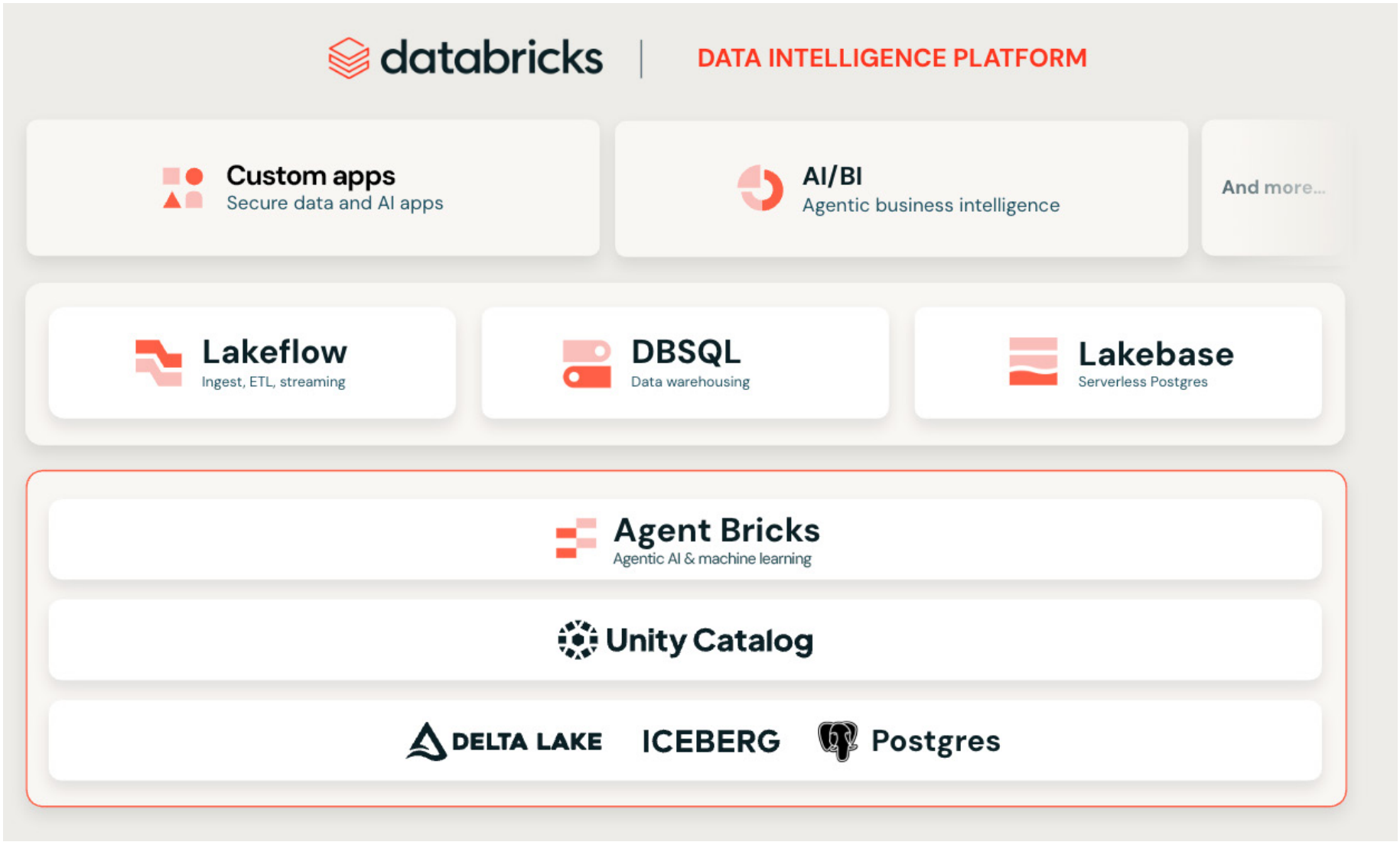
Databricks Apps provides a serverless application hosting platform for running web applications built with open source frameworks like Streamlit, Dash, Flask, FastAPI and React. Applications inherit the platform's built-in security, compliance and resource management features. There's no infrastructure to provision, no containers to manage and no scaling policies to configure. Apps automatically integrate with Unity Catalog for governance and support both service principal authentication for app-level access and on-behalf-of-user authorization for user-level permissions.
Lakebase is a fully managed PostgreSQL database deeply integrated with the lakehouse. It provides the transactional, low-latency data access that interactive applications require while automatically synchronizing data from Unity Catalog tables. With Lakebase, you can:
- Serve analytical insights to applications in real time
- Store application state and user inputs
- Maintain full atomicity, consistency, isolation and durability (ACID) transaction support
All of this is possible without building custom extract, transform, load (ETL) pipelines or managing database infrastructure.
Together, these capabilities transform what's possible:
| TRADITIONAL APPROACH | MODERN DATABRICKS APPS AND LAKEBASE APPROACH |
|---|---|
| Separate hosting infrastructure | Serverless compute and zero infrastructure management |
| Custom authentication systems | Built-in OAuth and Unity Catalog integration |
| Manual data synchronization pipelines | Automated synced tables from Unity Catalog |
| Fragmented governance across systems | Unified governance through Unity Catalog |
| Complex, multi-tool deployment | Single-command deployment with Databricks Asset Bundles (DABs) |
Historically, bridging OLTP and OLAP systems involved complex data engineering and bespoke integration layers. Deploying applications required separate DevOps teams, disparate CI/CD pipelines and manual security configurations. With Lakebase and Databricks Apps together, these complexities are significantly reduced. Developers can access real-time analytical data directly from the transactional layer and deploy interactive applications in minutes rather than months.
What this Guide Covers
This guide provides hands-on instruction for building production-ready data and AI applications on Databricks. Rather than focusing on isolated features, each chapter walks through a complete application pattern using working code you can adapt to your own use cases.
You'll see how to:
- Move from notebooks and prototypes to real applications
- Serve analytical data and application state through a transactional layer
- Build secure, governed applications without custom infrastructure
- Deploy and operate applications using repeatable, production-ready patterns
By the end of this guide, you should clearly understand how to build, deploy and manage intelligent applications on the Databricks Platform with confidence.
02 | From Notebooks to Production Applications
by Pascal Vogel, Evan Pandya and Christopher Pries
The Challenge of Production Data Applications
Building production-ready data applications is complex. You often need separate tools to host the app, manage the database and move data between systems. Each layer adds setup, maintenance and deployment overhead.
Databricks Data Intelligence Platform simplifies this by consolidating everything on a single platform — the Databricks Data Intelligence Platform. Databricks Apps runs web applications on serverless compute. Lakebase provides a managed Postgres database that syncs with Unity Catalog, giving apps fast access to governed data. And with Databricks Asset Bundles (DABs, you can package code, infrastructure and data pipelines together and deploy them with a single command.
This chapter shows how these three pieces work together to build and deploy a real data application, from syncing Unity Catalog data to Lakebase to running a web app on the Databricks Platform and automating deployment with DABs.
Architecture and how it Works
We'll walk through a taxi trip application that demonstrates the entire pattern: a React and FastAPI application that reads from Lakebase synced tables, with automatic data updates from Unity Catalog Delta tables happening within seconds.
The following diagram provides a simplified view of the solution architecture.
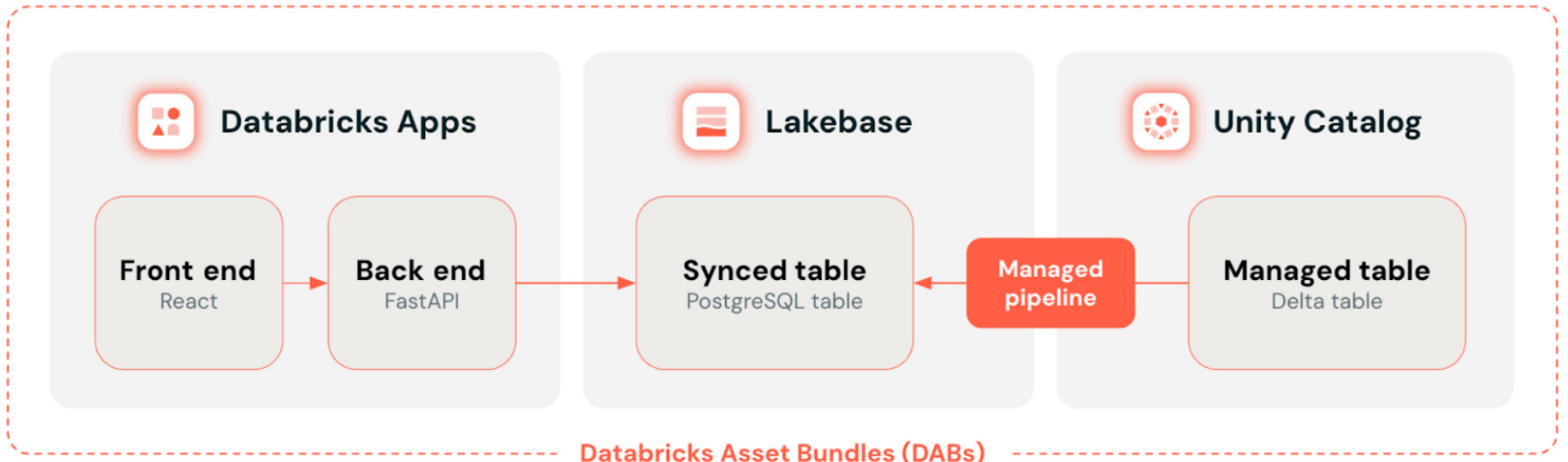
At a high level, Databricks Apps serves as the front end where users explore and visualize data. Lakebase provides the Postgres database that the app queries, keeping it close to live data from Unity Catalog with synced tables. DABs tie everything together by defining and deploying all resources — app, database and data synchronization — as one version-controlled unit.
Main solution components:
- Databricks app: Users interact with a web application built using React, TypeScript, Vite and FastAPI. The app reads data from a Unity Catalog synced table stored in a Lakebase Postgres database.
- Unity Catalog synced table: A read-only Postgres table that's automatically synced with a Unity Catalog table via a managed synchronization pipeline and runs on a Lakebase database instance
- Lakebase database instance: Manages Lakebase storage and compute and provides Postgres endpoints for the Databricks app to connect to
- Unity Catalog table: A Delta table containing data about taxi rides in New York City cloned from the samples.nyctaxi.trips sample table available in every database workspace
- Databricks Asset Bundles (DABs): A bundle in which all key elements of the architecture are defined in code
The example app displays recent taxi trips in table and chart format and automatically polls for new trips. It reads data from a Lakebase synced table, which mirrors a Delta table in Unity Catalog.
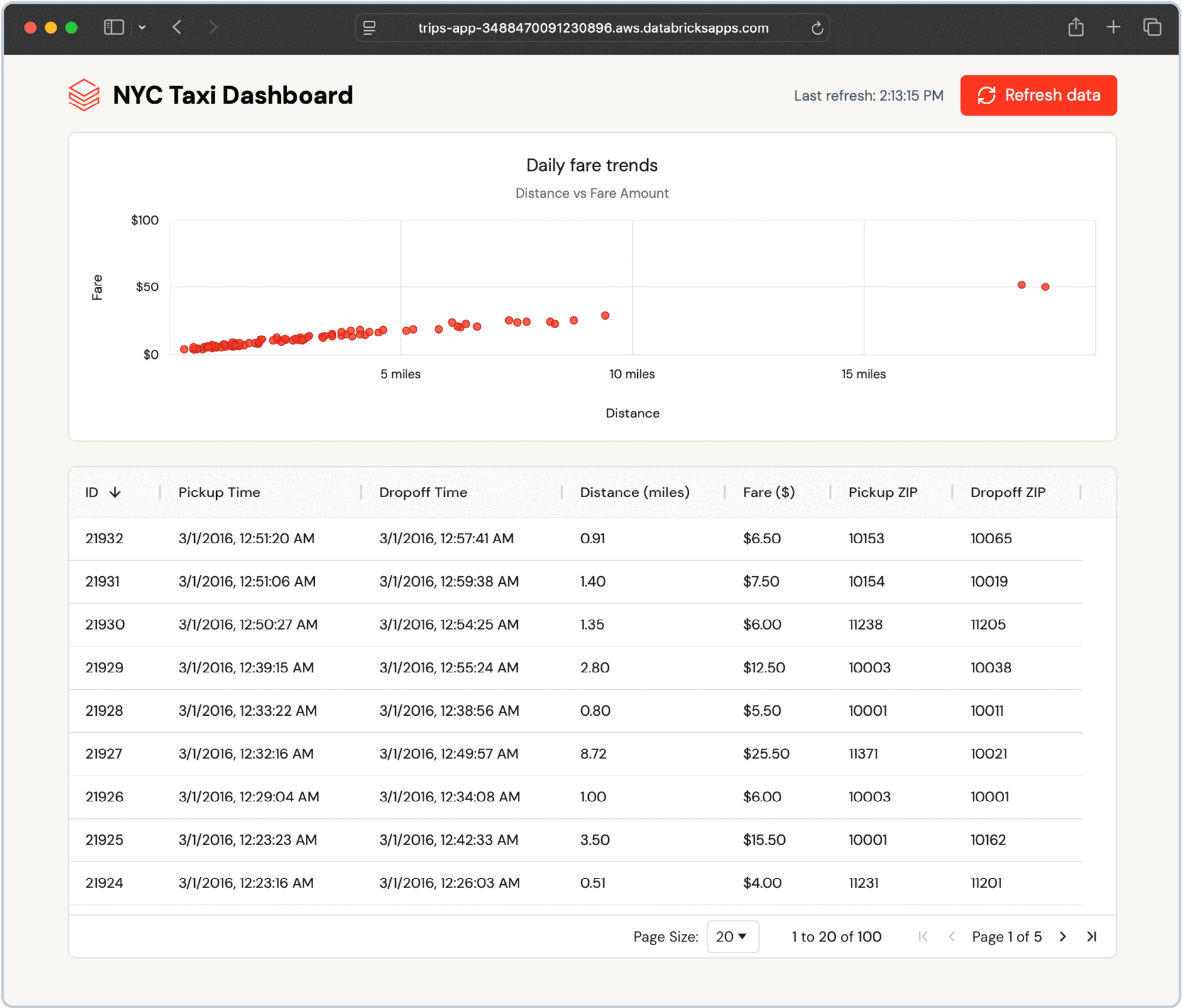
Because the synced table updates automatically, any change in the Unity Catalog table appears in the app within seconds — no custom ETL needed.
You can test this by inserting new data into the source Delta table and then refreshing the synced table:
Then trigger a refresh of the synced trips_synced table:
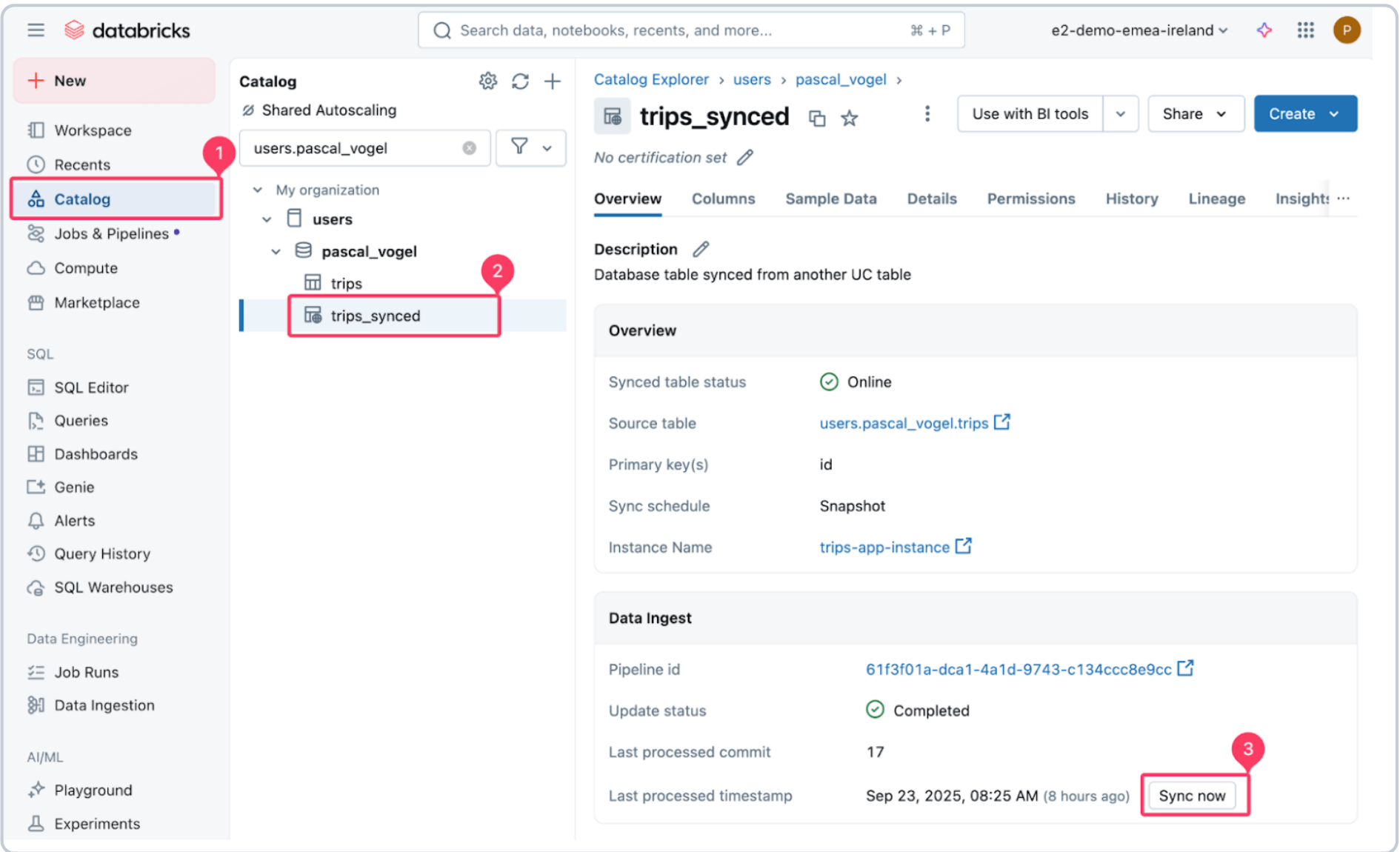
The managed pipeline that powers the sync creates a snapshot copy of the source Delta table and writes to the target Postgres table.
Within a few seconds, the new records appear in the dashboard. The app polls for updates and allows users to refresh on demand, demonstrating how Lakebase keeps operational data current without requiring additional engineering.
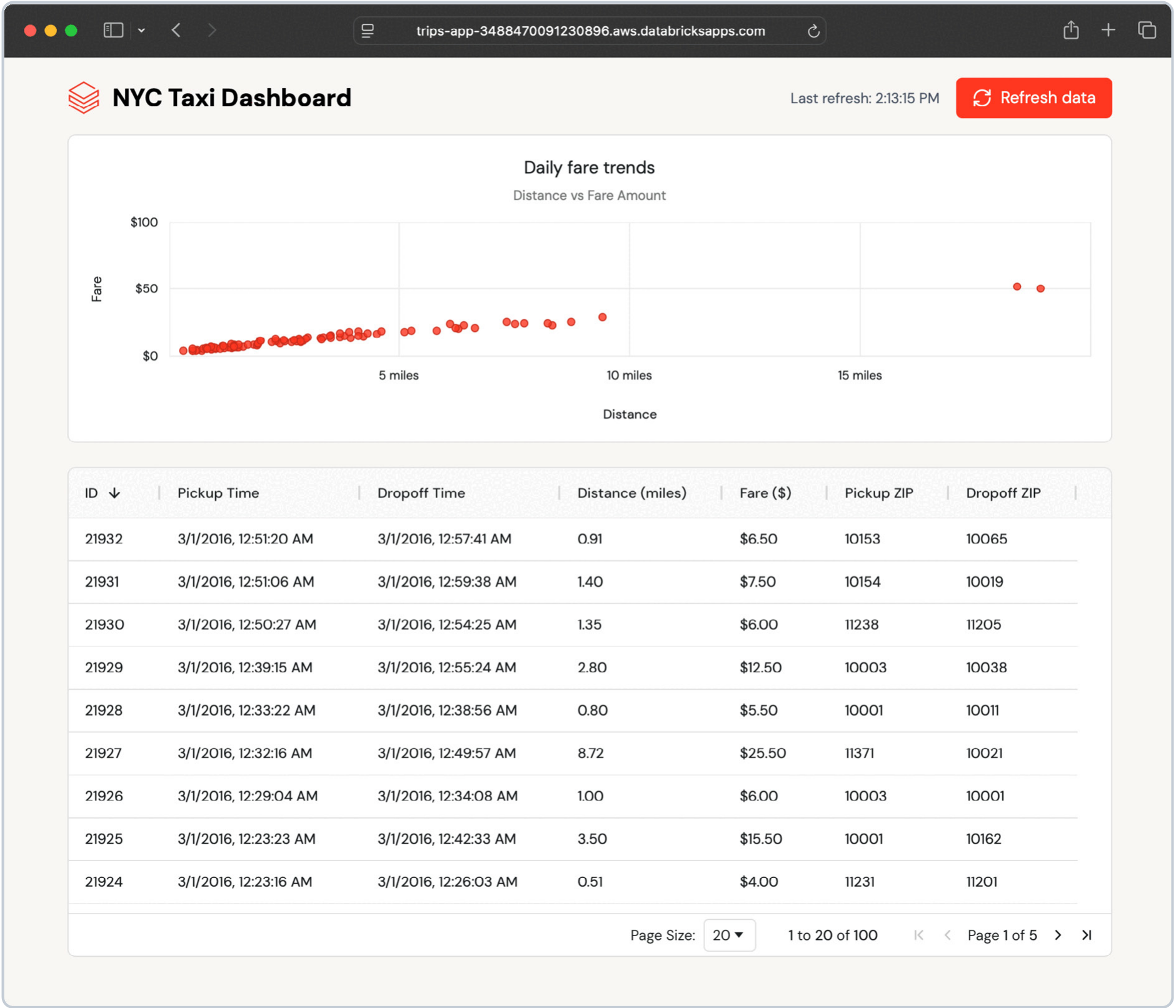
This seamless data flow happens because Lakebase synced tables handle all synchronization automatically.
Anatomy of the app
Let's examine how the various elements of the solution come together in the Databricks app.
Authentication and database connection
Each Databricks app has a unique service principal identity assigned on creation that it uses to interact with other Databricks resources, including Lakebase.
Lakebase supports OAuth machine-to-machine (M2M) authentication. An app can obtain a valid token using the WorkspaceClient in the Databricks SDK for Python along with its service principal credentials. The WorkspaceClient handles refreshing the short-lived OAuth token, which expires in an hour.
The app then uses this token when establishing a connection to Lakebase using the Psycopg Python Postgres adapter:
The Postgres host and database name are automatically set as environment variables for the Databricks app when using the Lakebase resource for apps.
The Postgres user is either the app service principal — when deployed to Databricks Apps — or the Databricks username of the user running the app locally.
RESTful FastAPI back end
The app's FastAPI back end uses this connection to query Lakebase and fetch the latest trips data from the synced table:
In addition to serving API endpoints, FastAPI can also serve static files using the StaticFiles class. By bundling our React front end using Vite's build process, we can generate a set of static files that we can serve using FastAPI.
React front end
The React front end calls the FastAPI endpoint to display the data:
The example application uses ag-grid and ag-charts for visualization and automatically checks for new data every few seconds:
Defining Databricks Asset Bundles Resources
All the Databricks resources and application code shown above can be maintained as a DAB in a single source code repository. This also means that all resources can be deployed to a Databricks workspace with a single command. See the GitHub repository for detailed deployment instructions.
This simplifies the software development lifecycle and enables deployments via CI/CD best practices across development, staging and production environments.
The following sections explain the bundle files in more detail.
Bundle configuration
The databricks.yml contains the DABs bundle configuration in the form of bundle settings and included resources:
In our example, we only define a development and a staging environment.
For a production use case, consider adding additional environments. See the Databricks DAB examples repository and the DABs documentation for more advanced configuration examples.
Lakebase setup and sync with Unity Catalog
To define a Lakebase instance in DABs, use the database_instance resource. At a minimum, we need to define the capacity field of the instance.
Additionally, we define a synced_database_table resource, which sets up a managed synchronization pipeline between a Unity Catalog table and a Postgres table.
For this, define a source table via source_table_full_name. The source table in Unity Catalog requires a unique (composite) primary key to process updates defined in the primary_key_columns field.
The location of the target table in Lakebase is determined by the target database object (logical_database_name) and the table name (name).
A synced table is also a Unity Catalog object. In this resource definition, we place the synced table in the same catalog and schema as the source table using DABs variables defined in databricks.yml. You can override these defaults by setting different variable values.
For our use case, we use the SNAPSHOT sync mode. Refer to the "Considerations and best practices" section of this chapter for a discussion of the available options.
Databricks Apps resource
DABs allow us to define both the Databricks Apps compute resource as an app resource and the application source code in one bundle. This allows us to keep both the Databricks resource definition and the source code in a single repository. In our case, the app source code, based on FastAPI and Vite, is stored in the top-level app directory of the project.
The configuration dynamically references the database_name and instance_name defined in the database.yml resource definition.
Database is a supported app resource that can be defined in DABs. By defining the database as an app resource, we automatically create a Postgres role to be used by the app service principal when interacting with the Lakebase instance.
Considerations and Best Practices
Create modular and reusable bundles
While this example deploys to development and staging environments, DABs make it easy to define multiple environments to fit your development lifecycle. Automate deployment across these environments by setting up CI/CD pipelines with Azure DevOps, GitHub Actions or other DevOps platforms.
Use DABs substitutions and variables to define environment-specific configurations. For instance, you can define different Lakebase instance capacity configurations for development and production to reduce costs. Similarly, you can define different Lakebase sync modes for your synced tables to meet environment-specific data latency requirements.
Choose Lakebase sync modes and optimize performance
Choosing the right Lakebase sync mode is key to balancing cost and data freshness.
| SNAPSHOT | TRIGGERED | CONTINUOUS | |
|---|---|---|---|
| Update method | Full table replacement on each run | Initial full copy and incremental changes | Initial load and real-time streaming updates |
| Performance | 10x more efficient than other modes | Balanced cost and performance | Higher cost — continuously running |
| Latency | High latency — scheduled or manual | Medium latency — on demand | Lowest latency — real time, ~15 sec |
| Best for |
|
|
|
| Limitations |
|
|
|
Set up notifications for your managed sync pipeline to be alerted in case of failures.
To improve query performance, right-size your Lakebase database instance by choosing an appropriate instance capacity. Consider creating indexes on the synced table in Postgres that match your query patterns and use the pre-installed pg_stat_statements extension to investigate query performance.
Prepare your app for production
The example application implements a polling-based approach to get the latest data from Lakebase. Depending on your requirements, you can also implement a push-based approach using WebSockets or server-sent events to use server resources more efficiently and increase the timeliness of data updates.
To scale to a larger number of app users by reducing the need for the FastAPI back end to trigger database operations, consider implementing caching, such as fastapi-cache, for in-memory caching of query results.
Authentication and authorization
Use OAuth 2.0 for authorization and authentication — don't rely on legacy personal access tokens (PATs). During development on your local machine, use the Databricks command-line interface (CLI) to set up OAuth U2M authentication to seamlessly interact with live Databricks resources such as Lakebase.
Similarly, your deployed app uses its associated service principal for OAuth M2M authentication and authorization with other Databricks services. Alternatively, set up user authorization for your app to perform actions on Databricks resources on behalf of your app users.
See also Best Practices for Databricks Apps in the Databricks Apps documentation for additional general and security best practices.
Conclusion
Building production data applications shouldn't mean juggling separate tools for deployment, data synchronization and infrastructure management. Databricks Apps gives you serverless compute to run your Python and Node.js applications without managing infrastructure. Lakebase synced tables automatically deliver low-latency data from Unity Catalog Delta tables to Postgres, eliminating custom ETL pipelines. DABs tie it all together by allowing you to package your application code, infrastructure definitions and data sync configurations into a single, version-controlled bundle that deploys consistently across environments.
Deployment complexity kills momentum. When you can't ship changes quickly and confidently, you slow down iteration, introduce environment drift and waste time coordinating between teams. By treating your entire application stack as code with DABs, you:
- Enable CI/CD automation
- Ensure consistent deployments across dev, staging and production
- Allow your team to focus on building features instead of fighting deployment pipelines
This is how you move from prototype to production without the usual deployment headaches.
The complete example is available in the GitHub repository with step-by-step deployment instructions.
Get Started
Learn more about Lakebase, Databricks Apps and DABs by viewing the Databricks documentation. For more developer resources on Databricks Apps, take a look at the Databricks Apps Cookbook and Cookbook resource collection.
03 | The Transactional Foundation for Intelligent Applications
By Jasper Puts and Antonio Javier Samaniego Jurado
Introduction
Building internal tools or AI‑powered applications the traditional way throws developers into a maze of repetitive, error‑prone tasks. First, they must spin up a dedicated Postgres instance, configure networking, backups and monitoring, and then spend hours — or days — plumbing that database into the front-end framework they're using. Additionally, they must write custom authentication flows, map granular permissions and keep those security controls in sync across the UI, API layer and database. Each application component lives in a different environment, from a managed cloud service to a self‑hosted VM. This forces developers to juggle disparate deployment pipelines, environment variables and credential stores. The result is a fragmented stack where a single change, such as a schema migration or a new role, ripples through multiple systems, demanding manual updates, extensive testing and constant coordination. All of this overhead distracts developers from the real value add — building the product's core features and intelligence.
With Databricks Lakebase and Databricks Apps, the entire application stack sits together, alongside the lakehouse. Lakebase is a fully managed Postgres database that offers low-latency reads and writes, integrated with the same underlying lakehouse tables that power your analytics and AI workloads.
Databricks Apps supplies a serverless runtime for the UI, along with built-in authentication, fine-grained permissions and governance controls that are automatically applied to the same data that Lakebase serves. This makes it easy to build and deploy apps that combine transactional state, analytics and AI without stitching together multiple platforms, synchronizing databases, replicating pipelines or reconciling security policies across systems.
Why Lakebase and Databricks apps
Lakebase and Databricks Apps work together to simplify full-stack development on the Databricks Platform:
- Lakebase provides a fully managed Postgres database with fast reads, writes and updates, plus modern features such as branching and point-in-time recovery
- Databricks Apps provides the serverless runtime for your application front end, with built-in identity access control and integration with Unity Catalog and other lakehouse components
By combining the two, you can build interactive tools that store and update state in Lakebase, access governed data in the lakehouse and serve everything through a secure, serverless UI — all without managing separate infrastructure. In the next example, we'll show how to build a simple holiday request approval app using this setup.
Getting Started: Build a Transactional app with Lakebase
This walkthrough demonstrates how to create a simple Databricks app that helps managers review and approve holiday requests from their team. The app is built using Databricks Apps and uses Lakebase as the back-end database to store and update the requests.
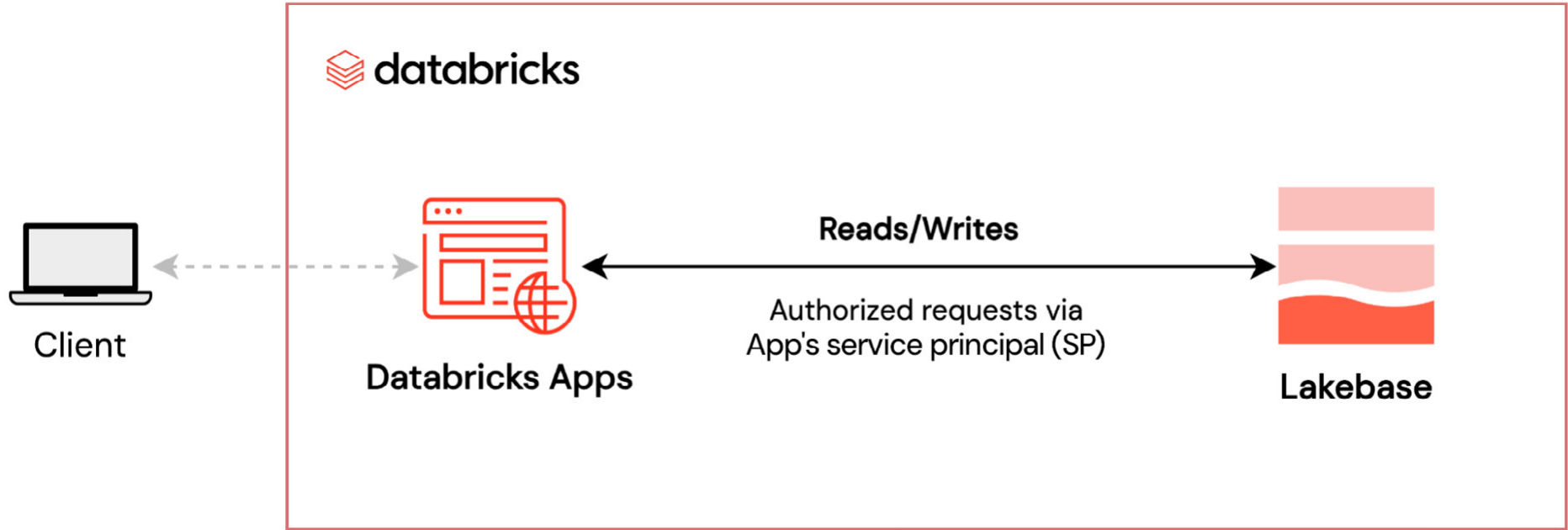
Here's what the solution covers:
- Provision a Lakebase database
Set up a serverless, Postgres OLTP database with a few clicks. - 2. Create a Databricks app
Build an interactive app using a Python framework — such as Streamlit or Dash — that reads from and writes to Lakebase. - Configure schema, tables and access controls
Create the necessary tables and assign fine-grained permissions to the app using the app’s client ID. - Securely connect and interact with Lakebase
Use the Databricks SDK and SQLAlchemy to securely read from and write to Lakebase from your app code.
The walkthrough is designed to get you started quickly with a minimal working example. Later, you can extend it with a more advanced configuration.
Step 1: Provision Lakebase
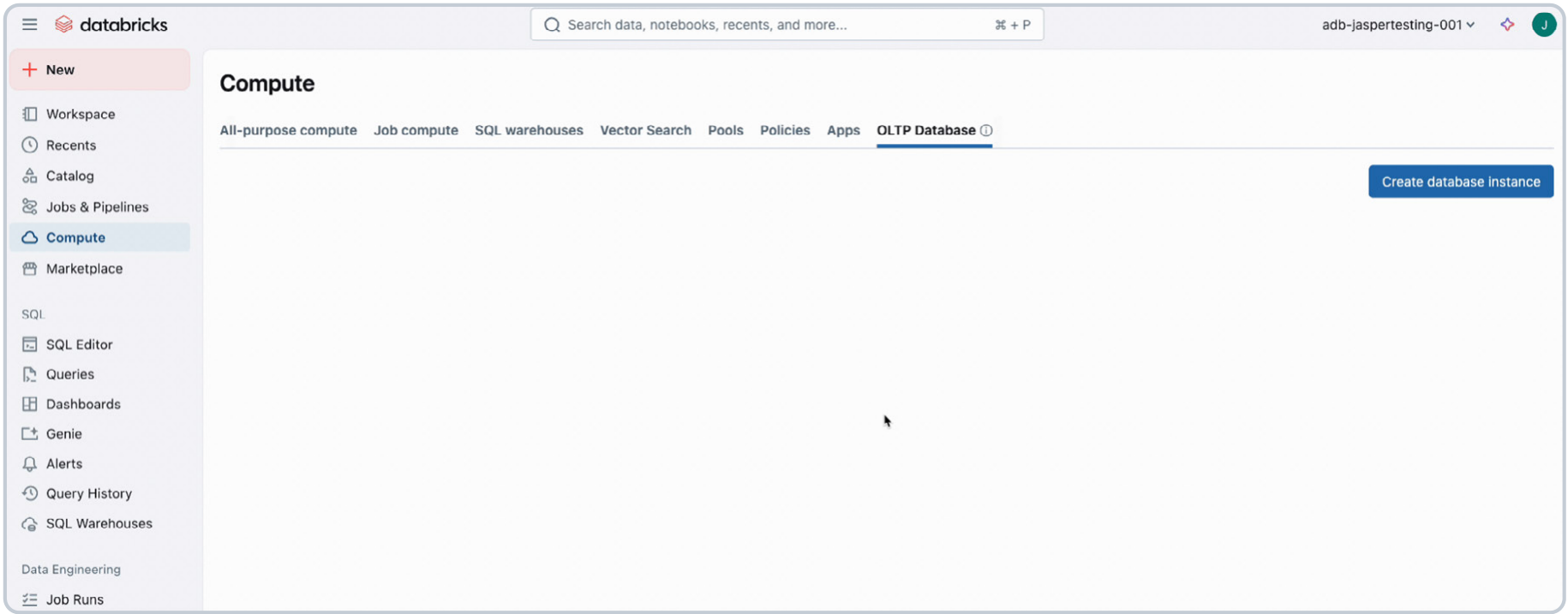
Before building the app, you'll need to create a Lakebase database. To do this, go to the Compute tab, select OLTP Database and provide a name and size. This provisions a serverless Lakebase instance. In this example, our database instance is called lakebase-demo-instance.
Step 2: Create a Databricks app and add database access
Now that we have a database, let's create the Databricks app that will connect to it. You can start from a blank app or choose a template — e.g., Streamlit or Flask. After naming your app, add the database as a resource. In this example, the pre-created databricks_postgres database is selected.
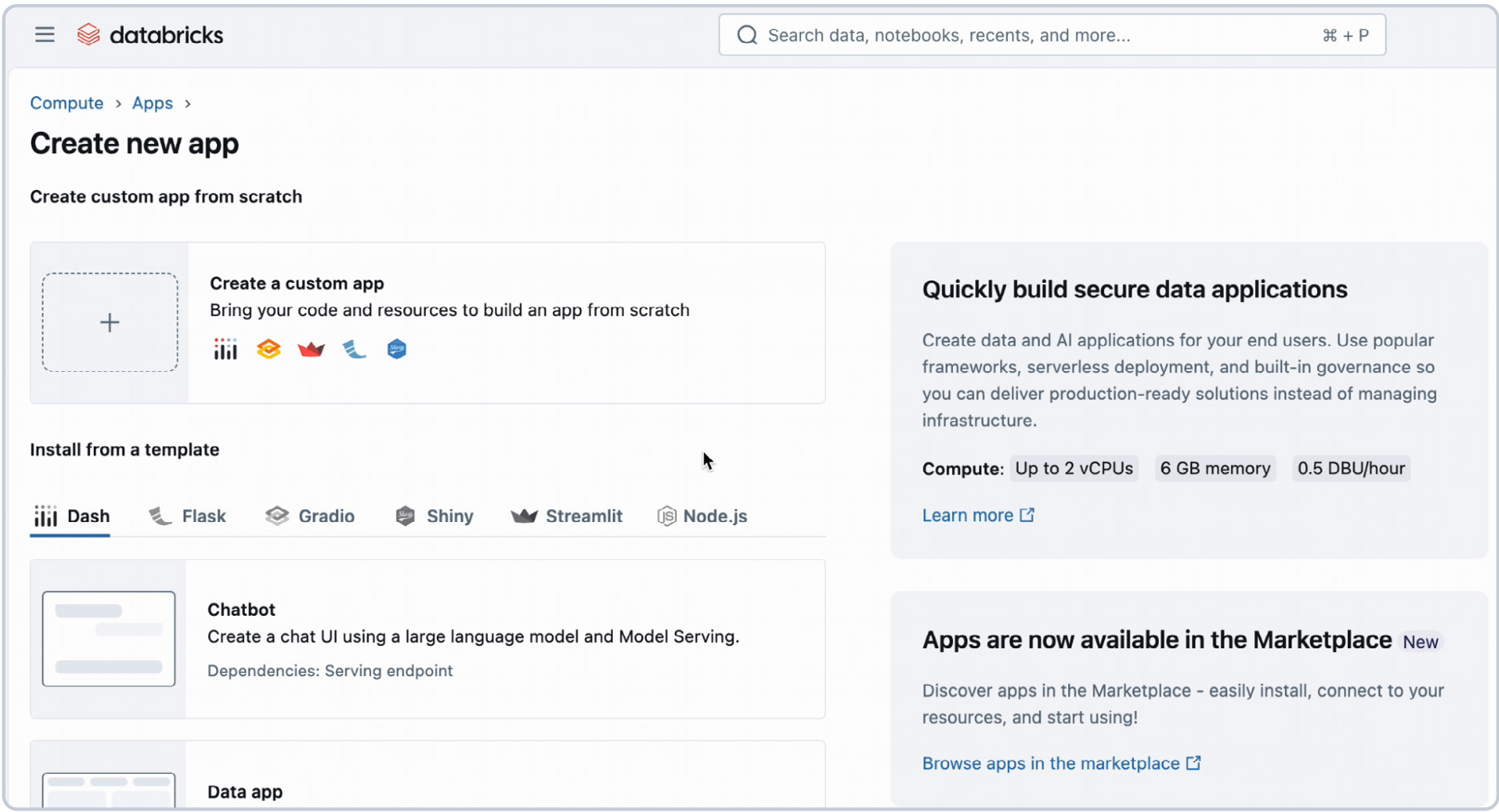
Adding the database resource automatically:
- Grants the app CONNECT and CREATE privileges
- Creates a Postgres role tied to the app’s client ID
This role will later be used to grant table-level access.
Step 3: Create a schema, define a table and set permissions
With the database provisioned and the app connected, you can create the schema and define the table the app will use.

- Retrieve the app’s client ID
From the app’s Environment tab, copy the value of the DATABRICKS_CLIENT_ID variable. You’ll need this for the GRANT statements. - Open the Lakebase SQL editor
Go to your Lakebase instance and click New Query. This opens the SQL editor with the database endpoint already selected.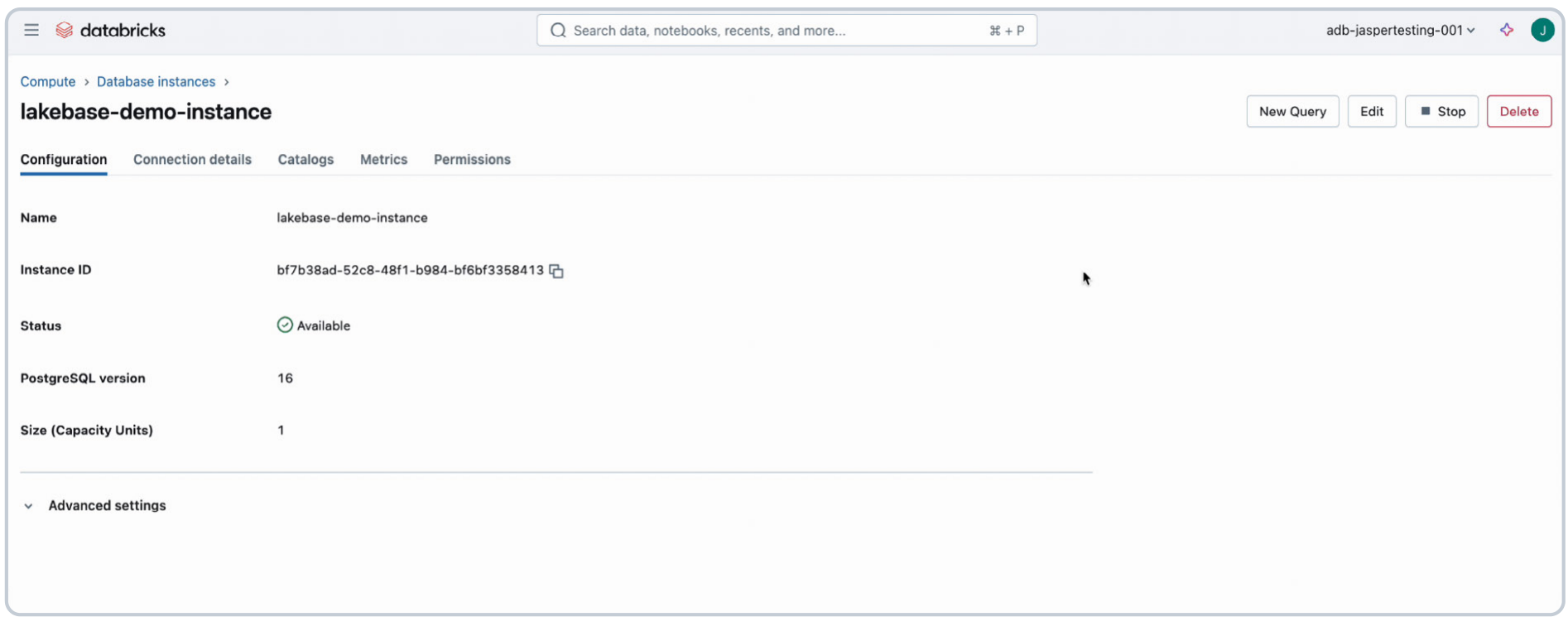
Run the following SQL:
Although using the SQL editor is a quick and effective way to perform this process, managing database schemas at scale is best handled by dedicated tools that support versioning, collaboration and automation. Tools like Flyway and Liquibase allow you to track schema changes, integrate with CI/CD pipelines and ensure your database structure evolves safely alongside your application code.
Step 4: Build the app
With permissions in place, you can now build your app. In this example, the app fetches holiday requests from Lakebase and allows a manager to approve or reject them. Updates are written back to the same table.
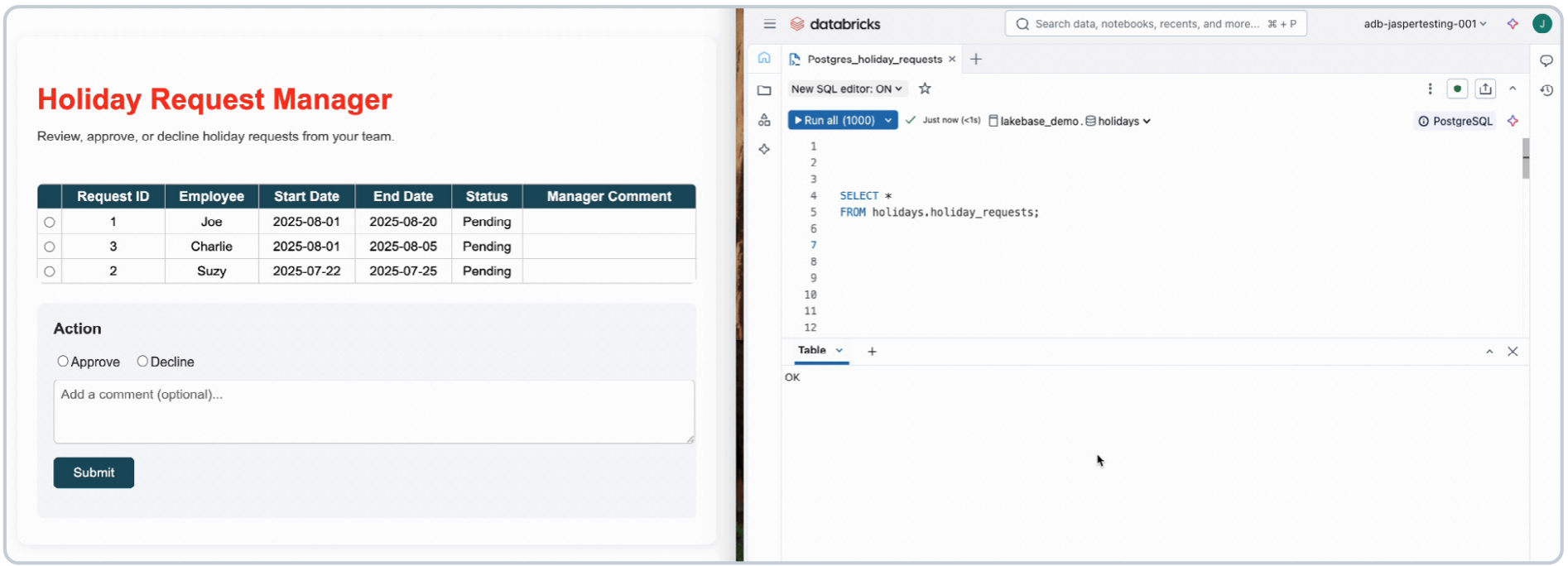
Step 5: Connect securely to Lakebase
Use SQLAlchemy and the Databricks SDK to connect your app to Lakebase with secure, token-based authentication. When you add the Lakebase resource, PGHOST and PGUSER are exposed automatically. The SDK handles token caching.
Step 6: Read and update data
The following functions read from and update the holiday request table:
These code snippets can be used in combination with frameworks such as Streamlit, Dash and Flask to pull the data from Lakebase and visualize it in your app. To ensure all necessary dependencies are installed, add the required packages to your app's requirements.txt file. The following packages are used in the code snippets:
Extending the Lakehouse with Lakebase
Lakebase adds transactional capabilities to the lakehouse by integrating a fully managed OLTP database directly into the platform. This reduces the need for external databases or complex pipelines when building applications that require reads and writes.
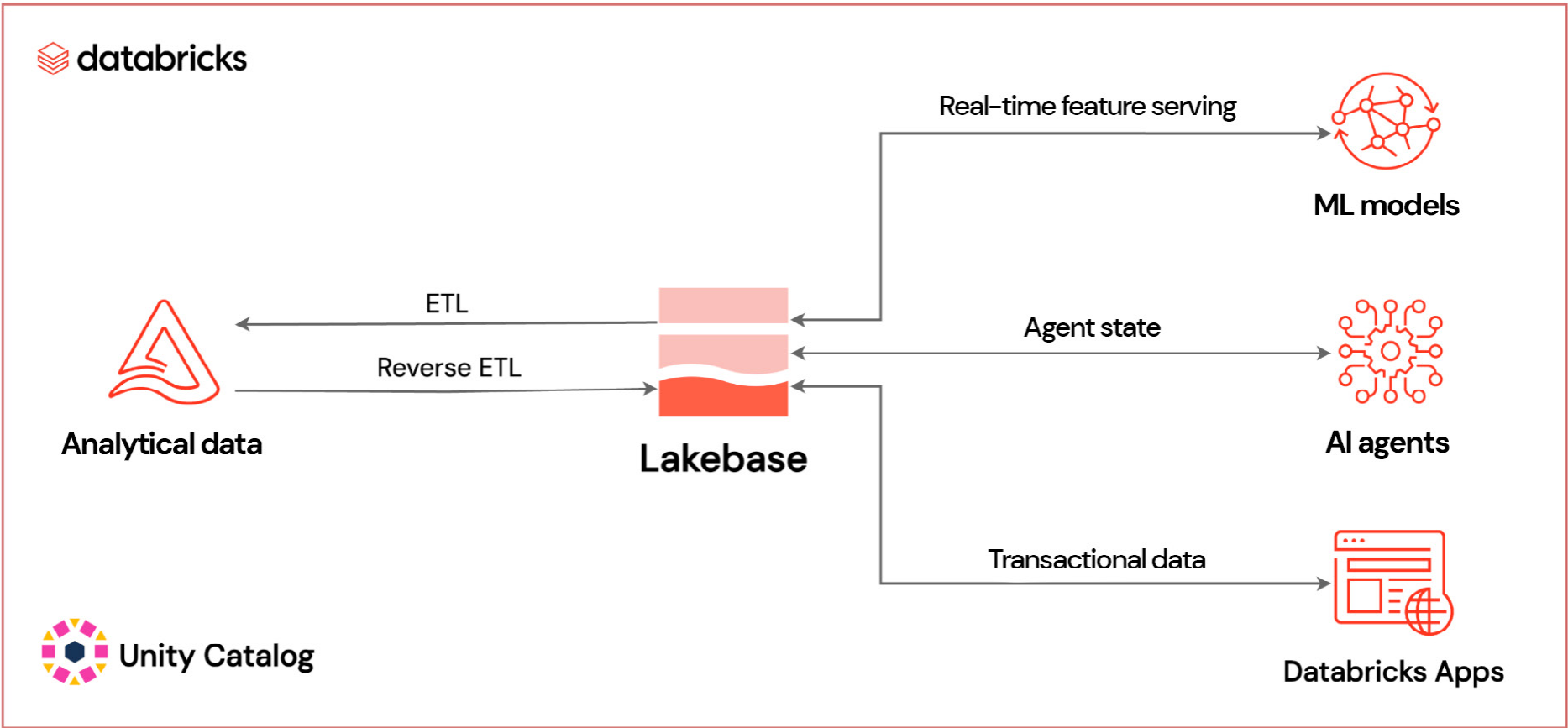
Lakebase is natively integrated with Databricks, including data synchronization, identity authentication and network security — just like other data assets in the lakehouse. As a result, you don't need custom ETL or reverse ETL to move data between systems. For example:
- You can serve analytical features back to applications in real time using the Online Feature Store and synced tables
- You can synchronize operational data with a Delta table — e.g., for historical data analysis
These capabilities make it easier to support production-grade use cases like:
- Updating state in AI agents
- Managing real-time workflows — e.g., approvals, task routing
- Feeding live data into recommendation systems or pricing engines
Lakebase is already being used across industries for applications such as personalized recommendations, chatbot applications and workflow management tools.
Summary
Lakebase provides a transactional Postgres database that works seamlessly with Databricks Apps and provides easy integration with Lakehouse data. It simplifies the development of full-stack data and AI applications by eliminating the need for external OLTP systems or manual integration steps.
If you're already using Databricks for analytics and AI, Lakebase makes it easier to add real-time interactivity to your applications. With support for low-latency transactions, built-in security and tight integration with Databricks Apps, you can go from prototype to production without leaving the platform.
In this example, we showed you how to:
- Set up a Lakebase instance and configure access
- Create a Databricks app that reads and writes to Lakebase
- Use secure, token-based authentication with minimal setup
- Build a basic app for managing holiday requests using Python and SQL
For details on usage and pricing, see the Lakebase and Databricks Apps documentation.
04 | Turning Analytics Into Applications
By Firas Farah and Yatish Anand
Introduction: Analytics and Operations are Converging
Today's applications can't rely solely on raw events. They need curated, contextual and actionable data from the lakehouse to power personalization, automation and intelligent user experiences.
Delivering that data reliably with low latency has been a challenge, often requiring complex pipelines and custom infrastructure.
What is Reverse ETL?
Reverse ETL syncs high-quality data from a lakehouse into the operational systems that power applications. This ensures that trusted datasets and AI-driven insights flow directly into applications that power personalization, recommendations, fraud detection and real-time decisioning.
Without reverse ETL, insights remain in the lakehouse and don't reach the applications that need them. The lakehouse is where data gets cleaned, enriched and turned into analytics, but it isn't built for low-latency app interactions or transactional workloads. That's where Lakebase comes in. It delivers trusted lakehouse data directly into the tools where it drives action.
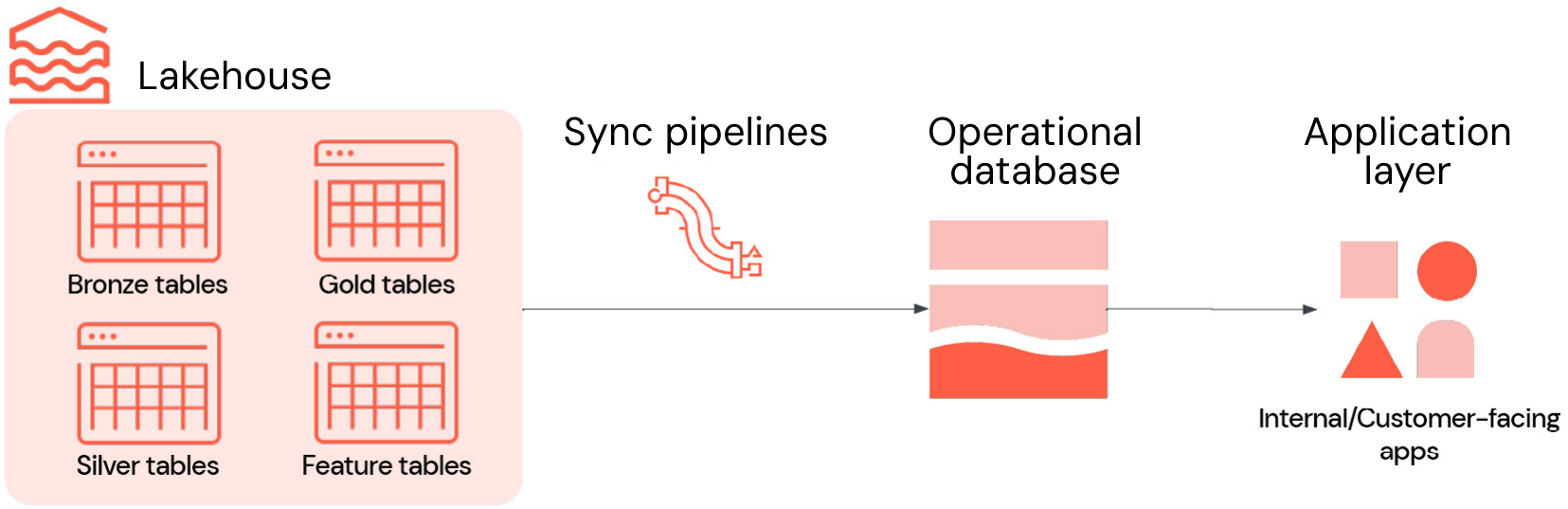
In practice, reverse ETL typically involves four key components, all integrated into Lakebase:
- Lakehouse: Stores curated, high-quality data used to drive decisions, such as business-level aggregate tables (also known as Gold tables), engineered features and ML inference outputs
- Syncing pipelines: Move relevant data into operational stores with scheduling, freshness guarantees and monitoring
- Operational database: Is optimized for high concurrency, low latency and ACID transactions
- Applications: Serve as the final destination where insights become action, whether in customer-facing applications, internal tools, APIs or dashboards
Challenges of Reverse ETL
Reverse ETL looks simple, but in practice, most teams run into the these challenges:
- Brittle, custom-built ETL pipelines: Often require streaming infrastructure, schema management, error handling and orchestration. They’re brittle and resource intensive to maintain.
- Multiple, disconnected systems: Separate stacks for analytics and operations result in more infrastructure to manage, additional authentication layers and a higher risk of format mismatches
- Inconsistent governance models: Analytical and operational systems often reside in different policy domains, making it challenging to apply consistent quality controls and audit policies
These challenges create friction for both developers and the business, slowing efforts to reliably activate data and deliver intelligent, real-time applications.
Lakebase : Integrated by Default for Easy Reverse ETL
Lakebase removes these barriers and transforms reverse ETL into a fully managed, integrated workflow. It combines a high-performance Postgres engine, deep lakehouse integration and built-in data synchronization, allowing fresh insights to flow into applications without additional infrastructure.
These capabilities of Lakebase are especially valuable for reverse ETL:
- Deep lakehouse integration: Syncs data from lakehouse tables to Lakebase on a snapshot, scheduled or continuous basis, without building or managing external ETL jobs. This replaces the complexity of custom pipelines, retries and monitoring with a native, managed experience.
- Fully managed Postgres: Built on open source Postgres, Lakebase supports ACID transactions, indexes, joins and extensions such as PostGIS and pgvector. You can connect with existing drivers and tools, such as pgAdmin or JDBC, thereby avoiding the need to learn new database technologies or maintain separate OLTP infrastructure.
- Scalable, resilient architecture: Lakebase separates compute and storage for independent scaling, delivering sub-10 ms query latency and thousands of QPS. Enterprise-grade features include multi-AZ high availability, point-in-time recovery and encrypted storage, which remove the scaling and resiliency challenges associated with self-managed databases.
- Integrated security and governance: Register Lakebase with Unity Catalog to bring operational data into your centralized governance framework, covering audit trails and permissions at the catalog level. Access via the Postgres protocol still utilizes native Postgres roles and permissions, ensuring authentic transactional security while aligning with your broader Databricks governance model.
- Cloud-agnostic architecture: Deploy Lakebase alongside your lakehouse in your preferred cloud environment without rearchitecting your workflows.
With these capabilities in the Databricks Data Intelligence Platform, Lakebase replaces the fragmented reverse ETL setup that relies on custom pipelines, standalone OLTP systems and separate governance. It delivers an integrated, high-performance and secure service, ensuring that analytical insights flow into applications faster, with less operational effort and with governance preserved.
Sample use Case: Building an Intelligent Support Portal with Lakebase
As a practical example, let's walk through how to build an intelligent support portal powered by Lakebase. This interactive portal helps support teams triage incoming incidents using ML-driven insights from the lakehouse, such as predicted escalation risk and recommended actions. It does this while allowing users to assign ownership, track status and leave comments on each ticket.
Lakebase makes this possible by syncing predictions into Postgres while also storing updates from the app. This creates a support portal that combines analytics with live operations. The same approach applies to many other use cases, including personalization engines and ML-driven dashboards.
Step 1: Sync predictions from the lakehouse to Lakebase
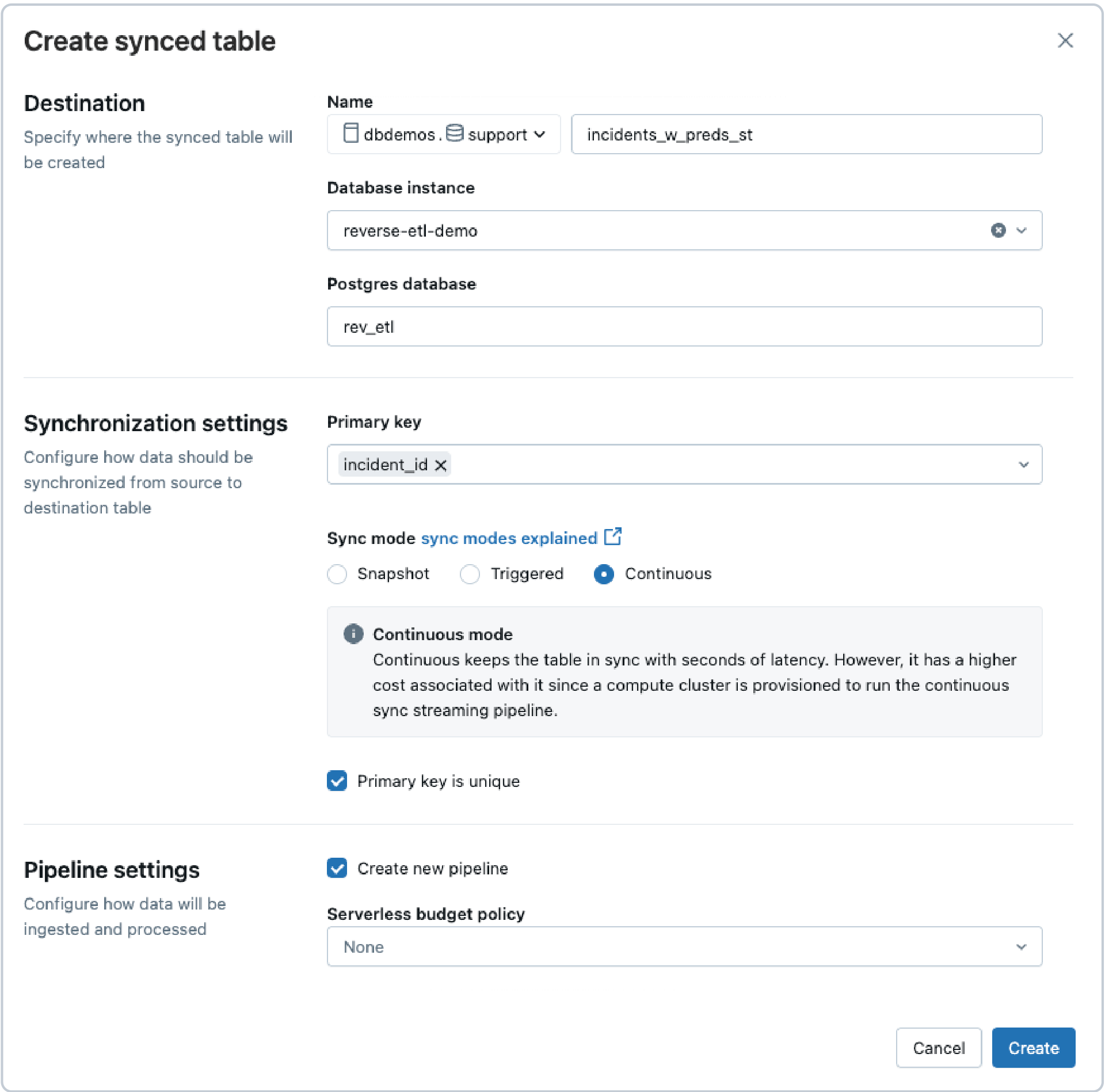
The incident data, enriched with ML predictions, lives in a Delta table and is updated in near real time via a streaming pipeline. To power the support app, we use Lakebase reverse ETL to continuously sync this Delta table to a Postgres table.
In the UI, we select:
- Sync mode: Continuous for low-latency updates
- Primary key: incident_id
This ensures the app reflects the latest data with minimal delay.
Note: You can also create the sync pipeline programmatically using the Databricks SDK.
Step 2: Create a state table for user inputs
The support app also requires a table to store user-entered data, such as ownership, status and comments. Since this data is written from the app, it should be stored in a separate table in Lakebase — rather than the synced table.
Here's the schema:
Step 3: Configure Lakebase access in Databricks Apps
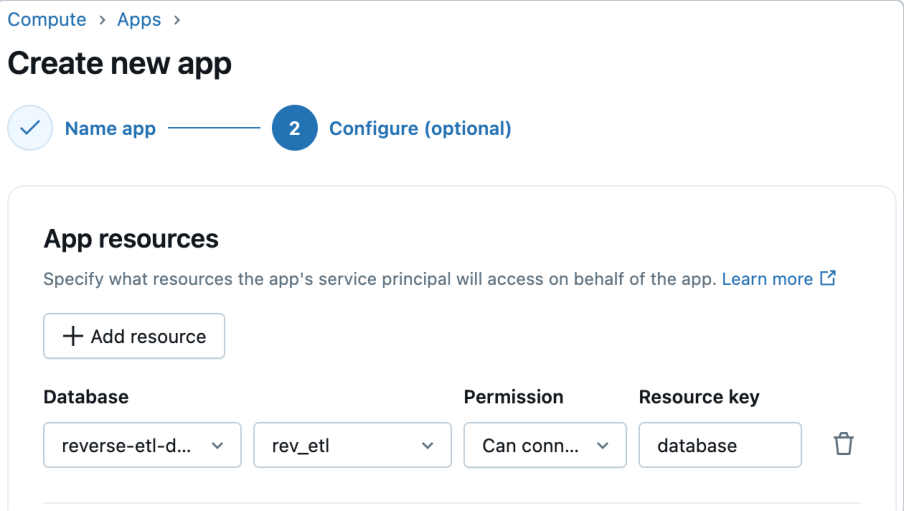
Databricks Apps supports first-class integration with Lakebase. When creating your app, simply add Lakebase as an app resource and select the Lakebase instance and database. Databricks automatically provisions a corresponding Postgres role for the app's service principal, streamlining app-to-database connectivity. You can then grant this role the required database, schema and table permissions.
Step 4: Deploy your app code
With your data synced and permissions in place, you can now deploy the Flask app that powers the support portal. The app connects to Lakebase via Postgres and serves a rich dashboard with charts, filters and interactivity.
Conclusion
Bringing analytical insights into operational applications no longer requires a complex, brittle process. With Lakebase, reverse ETL becomes a fully managed and integrated capability. It combines the performance of a Postgres engine, the reliability of a scalable architecture and the governance of the Databricks Platform. Whether you're powering an intelligent support portal or building other real-time, data-driven experiences, Lakebase reduces engineering overhead and speeds up the path from insight to action.
To learn more about how to create synced tables in Lakebase, check out our documentation and get started today.
05 | Delivering Secure, Real-Time Applications on Databricks
By Sylvia Christin Schumacher
Introduction
Databricks Lakebase significantly enhances the ability to streamline operational databases for building intelligent applications. Databricks Apps enables the quick deployment of these data and AI apps into production, with out-of-the-box governance and auth.
As a fully managed Postgres service that integrates seamlessly with the Databricks Platform, Lakebase allows developers to work with transactional data natively — no custom ETL pipelines, connectors or middleware required. Databricks Apps takes this further by eliminating infrastructure management entirely, providing managed, serverless compute that automatically inherits your workspace's security policies and Unity Catalog permissions.
Historically, bridging OLTP and OLAP systems involved complex data engineering and bespoke integration layers, while deploying applications required separate devops and infrastructure teams, disparate CI/CD pipelines and manual security configurations. With Lakebase and Databricks Apps together, these complexities are significantly reduced. Developers can now access real-time analytical data directly from the transactional layer and deploy interactive applications in minutes rather than months, making it dramatically easier to incorporate live data into production-ready applications.
In the GenAI context, this combination is particularly powerful. Databricks Apps uniquely combines lakehouse data with interactive AI interfaces, such as Streamlit or Gradio, running directly on the Databricks Data Intelligence Platform — where your data and models already live. Transactional data from Lakebase becomes a key enabler powering real-time, context-aware applications that bring GenAI into production faster with built-in enterprise security and governance.
By surfacing this data directly in app interfaces, enterprises unlock new capabilities:
- AI assistants reference live business data while obeying easily configured access controls
- Users make data-driven decisions with up-to-date AI-driven guidance
- Retrieval augmented generation (RAG) models ground outputs in current facts
- Workflows stay aligned with evolving transactions through always-available, managed applications
This integration ensures GenAI operates with full enterprise context — exactly when and where it's needed, with the production reliability and simplified deployment that modern teams require.
In this chapter, we'll walk through how to build a secure, CI/CD-enabled Streamlit app and deploy it as a Databricks app that connects to Lakebase. The app enables users to explore synchronized campaign metrics from Unity Catalog in a read-only interface. This can power use cases such as business dashboards, campaign monitoring or ad hoc exploration.
Key Technologies
- Streamlit: Interactive UI framework for Python
- SQLAlchemy: SQL toolkit and ORM for database access
- Databricks SDK: Secure OAuth token management
- Postgres (Lakebase): Managed OLTP back end
- DABs: Declarative app deployment and CI/CD integration
- GitHub: Source control and pipeline automation
Solution Overview
The process consists of two major steps:
- Set up Lakebase
- Create a Lakebase instance (Databricks-managed Postgres)
- Sync a Unity Catalog table into the Postgres instance via Snapshot mode
- Build a Databricks app
- Use Streamlit for the UI
- Securely connect to Lakebase using SQLAlchemy and Databricks OAuth
- Add interactive filters and views on the relational table
- Use Databricks Asset Bundles (DABs) and GitHub for version control, deployment and automation
Check out the GitHub repository for full source code and deployment instructions.
Step-by-step Guide
To streamline development, we recommend setting up Cursor with Databricks Connect for local testing and iterations.
1. Set up Lakebase
If you don't already have a Lakebase instance with synced tables, follow these steps:
1. Create a Lakebase instance
Follow steps 1–7 in the Lakebase documentation to create a Lakebase instance named postgres-campaigns.
2. Clone the GitHub repository
The repository contains the following files for app deployment:
- app.py — The main Streamlit application
- config.yaml — Centralized configuration for database and table parameters
- generate_campaign_data.ipynb — Notebook to generate campaign performance data
- requirements.txt — All Python dependencies, including Streamlit, SQLAlchemy and the Databricks SDK
- databricks.yml — Declarative deployment configuration for DABs
- README.md — Clear documentation for setup and usage
- gitignore — Local and environment-specific file exclusion to keep the repository clean
3. Create a Unity Catalog table
Open the generate_campaign_data.ipynb script from the cloned GitHub repository. Within the notebook widgets, provide the catalog, schema and table name, and run the script to generate synthetic campaign performance data.
4. Sync the Unity Catalog table
Use the Synced Tables feature to create a read-only table in Postgres that automatically synchronizes data from a Unity Catalog table. Follow the steps here to create a synced table. Sync the table to your Lakebase instance from step 1.
- Postgres database: campaign_db
- Table name: campaign_metrics_synced
- Mode: Snapshot
You should now have:
- A Lakebase instance: postgres-campaigns
- A synced relational table: campaign_metrics_synced
2. Deploy app
We'll now create a Streamlit app that connects to your Lakebase instance and surfaces the data interactively.
1. Update configuration
In your cloned GitHub repository, edit config.yaml with your database details. You can find the required information under the Connection details tab of your database.
2. Install dependencies
3. Set Databricks environment variables
Go to Settings > Developer > Access tokens > Manage > Generate new token to get a new personal access token (PAT). Set environment variables as follows:
4. Configure Postgres database
To connect to your own Postgres database, update the DB_CONFIG section in app.py:
5. Update app name
The databricks.yml file defines your app as a deployable resource. Populate your app name:
6. Deploy using DABs
Your bundle source code will now be available in the Databricks workspace under the following:
You can navigate to your app through Compute > Apps > <your-app> and open the provided link. Since your app doesn't have privileges to access your database yet, you won't be able to see your data at this point.
3. Configure app privileges for the database
1. Extract CLIENT_ID from the app
- Navigate to Compute > Apps > <your-app>
- In your app, open the Environment tab and copy your DATABRICKS_CLIENT_ID value
2. Grant privileges to the app
- Back in your Postgres instance (Compute > OLTP Database > >your-instance>), click New Query
- Validate that the selected compute in the editor shows Postgres compute
- Switch the database from "postgres" to your Postgres database — e.g., postgres-campaigns
- Execute the following code:
You can navigate back to your app through Compute > Apps > <your-app>. Open the provided link and you'll see your relational table.
Highlights on Postgres Connection with Oauth
Using the Databricks SDK, the app uses OAuth tokens to securely authenticate against the managed Postgres instance.
- Requires no manual token management
- Refreshes tokens automatically every 15 minutes
- Uses your Databricks workspace credentials
Lessons Learned
- Databricks OAuth — Is seamless and production-ready for app authentication
- Streamlit — Offers rapid prototyping for business-facing tools
- Databricks Asset Bundles (DABs) — Simplify deployment and rollback — essential for CI/CD pipelines
- Synced tables — Make transactional data immediately accessible in Databricks Apps
Try it Yourself
Would you like to try it on your own data?
- Clone the GitHub repository
- Customize DB_CONFIG in app.py
- Customize your-app-name in databricks.yml
- Deploy using databricks bundle deploy
Bring operational data to life in Databricks Apps with just a few lines of code — and give your teams the insights they need, where they need them.
Create an intelligent application today. Sync your lakehouse data into Lakebase in minutes, without building a pipeline or maintaining a server.
06 | How to Build AI Agents With Conversational Memory Using Lakebase
By Yatish Anand, Bo Cheng, Cathy Zdravevski, Evan Pandya and Susan Pierce
Why Conversational Memory Matters
Many AI agents work well in single-turn interactions but struggle when applied to real operational workflows. In cybersecurity, investigations rarely conclude in a single step — analysts pivot from threat type to source IP, from IP to user and from user to device. These investigations often span multiple sessions and require continuity.
To be effective in production, agents need state. They must remember what has already happened and resume work with full context intact.
In this chapter, you'll build a cybersecurity AI agent on the Databricks Platform that persists conversational memory across interactions. The agent stores execution state in Lakebase using LangGraph checkpointing, allowing investigations to pause and resume seamlessly. You'll deploy the agent using the Databricks AI Agent Framework and expose it to end users as a Databricks app built using Streamlit.
Using Lakebase as the State Layer for Agents
Stateful agents need a transactional database that can read and write application state with minimal latency. Lakebase provides this foundation as a fully managed, Postgres-compatible OLTP service integrated fully within the Databricks Platform. Because it's Postgres-compatible, you get the reliability and ecosystem of a proven transactional database without standing up separate infrastructure.
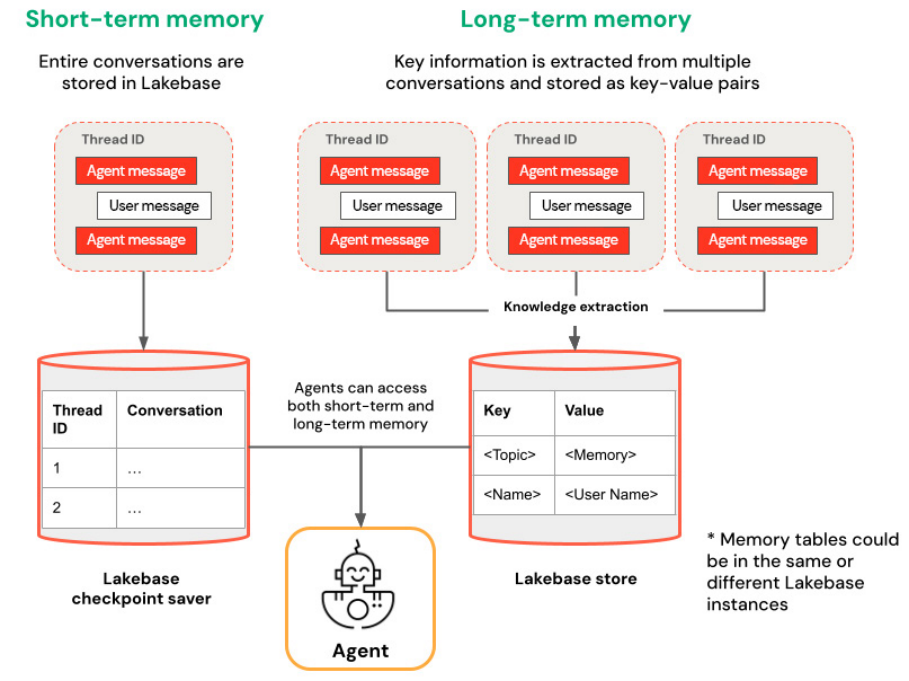
In this solution, Lakebase serves as LangGraph's checkpoint store. Each step of the agent's execution is persisted under a thread identifier, and when that thread is referenced again, the agent resumes with its full context — prior messages, tool calls and intermediate state — intact. Low-latency reads mean the agent can retrieve this context quickly, keeping conversations responsive.
This approach enables real conversational memory without introducing a separate database or managing additional operational complexity. Agent logic, tools, memory and deployment all live on the same platform where your data and AI workloads already run.
Memory Patterns for AI Agents
This chapter focuses on short-term memory implemented through thread-level checkpointing. Each conversation is associated with a unique thread identifier, and the agent's state is saved incrementally as the workflow progresses. This allows investigations to be resumed at any point without losing context.
Lakebase also supports longer-lived memory patterns that persist information across threads and users. These patterns enable agents to accumulate knowledge over time but introduce additional design considerations around scope, retention and governance. For long-term memory that persists user preferences or accumulated findings across sessions, see the long-term memory section in the Databricks documentation.
Architecture Overview
The solution consists of the following components:
- A chat model served on Databricks that performs reasoning
- Unity Catalog functions that expose governed security data as tools
- LangGraph orchestration to manage control flow and tool invocation
- Lakebase Provisioned as a transactional checkpointer for agent state
- Databricks AI Agent Framework for packaging and deployment
- A Streamlit-based Databricks app for end user interaction
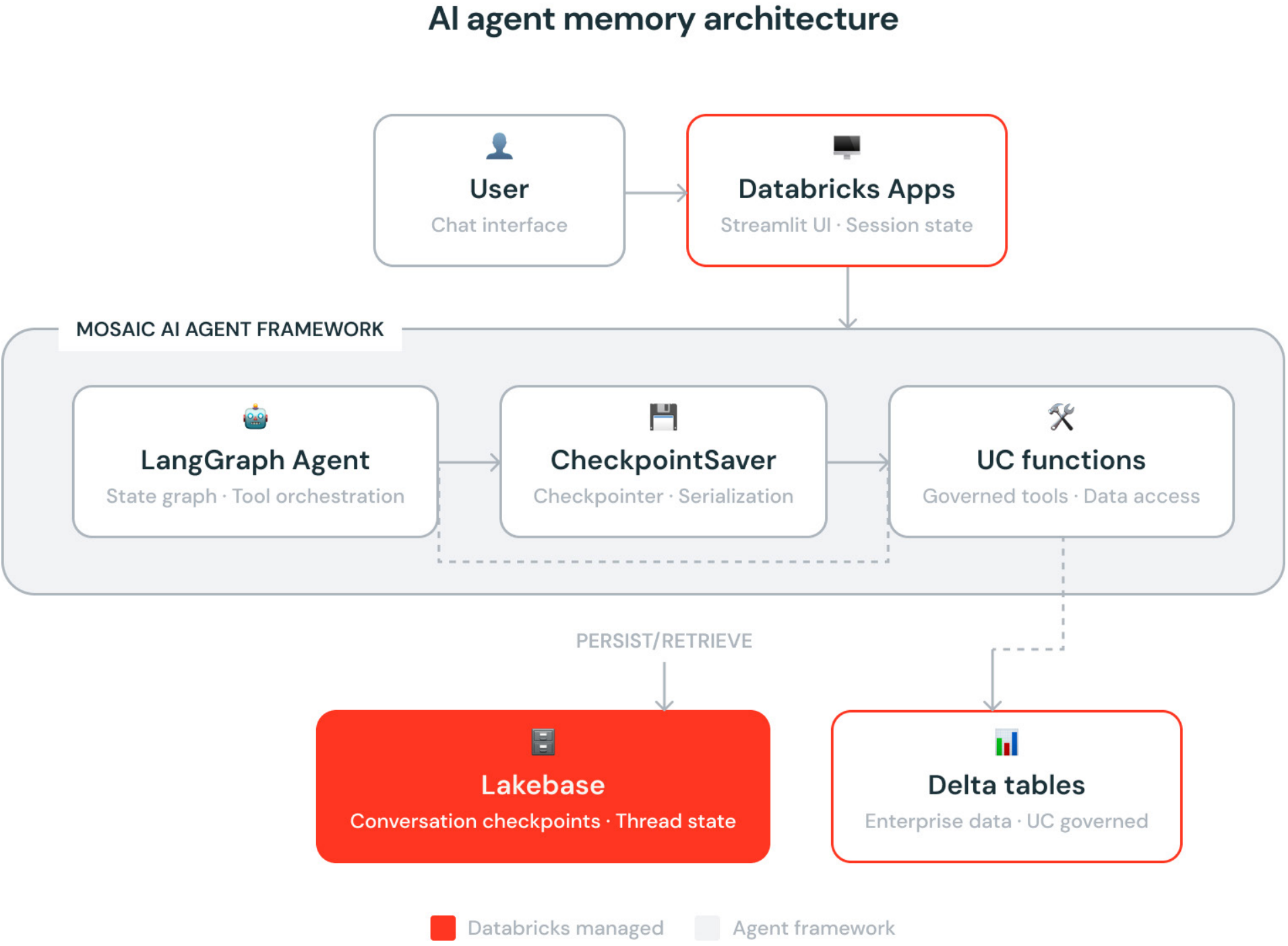
Together, these components form a production-ready, stateful agent architecture that runs entirely on the Databricks Platform.
Implementation Guide
Prerequisites
This guide assumes familiarity with building AI applications on the Databricks Platform and focuses on agent architecture rather than environment bootstrapping.
Before you begin, ensure you have:
- A Databricks workspace with access to serverless compute
- Permissions to create Unity Catalog functions
- Permissions to create a Lakebase-provisioned instance
- Access to Databricks Model Serving and Databricks Apps
You'll use the following libraries in this demo. Run the setup on Databricks serverless compute in a notebook, then follow along step by step. The GitHub repository with the full working solution can be found here.
Step 1: Add governed security context with Unity Catalog functions
Agents depend on trusted context to make decisions. In cybersecurity workflows, this context often resides in structured event and identity tables. Unity Catalog functions provide a secure mechanism to expose this data to agents as callable tools.
In this example, you create two SQL functions:
- get_cyber_threat_info retrieves the most recent threat event for a given threat type
- get_user_info retrieves user details associated with a source IP address
These functions are authored in Databricks SQL (DBSQL) and governed by Unity Catalog, ensuring consistent access control, auditing and lineage.
Once you create the functions, you should see them in your designated catalog and schema, under the Functions tab.

Step 2: Create a Lakebase instance for checkpointings
To persist agent state, create a Lakebase instance that serves as a LangGraph checkpointer. Rather than managing an external Postgres database, Lakebase provides a managed transactional service that integrates directly with Databricks security and identity.
Each execution step of the agent is written to Lakebase. Because Lakebase is optimized for low-latency transactional workloads, these writes add minimal overhead to the agent's response time. By associating checkpoints with a thread identifier, the agent can reliably resume conversations across sessions without sacrificing the responsiveness users expect.
This implementation uses the langgraph-checkpoint-postgres integration so LangGraph can persist agent state directly into Lakebase using standard Postgres semantics.
You can create the Lakebase instance using the Databricks SDK for Python or manage it declaratively with Databricks Asset Bundles (DABs), depending on how you standardize infrastructure.
In addition, by creating the database catalog, you can now query your checkpoint history using DBSQL.


Step 3: Orchestrate with LangGraph and trace with MLflow
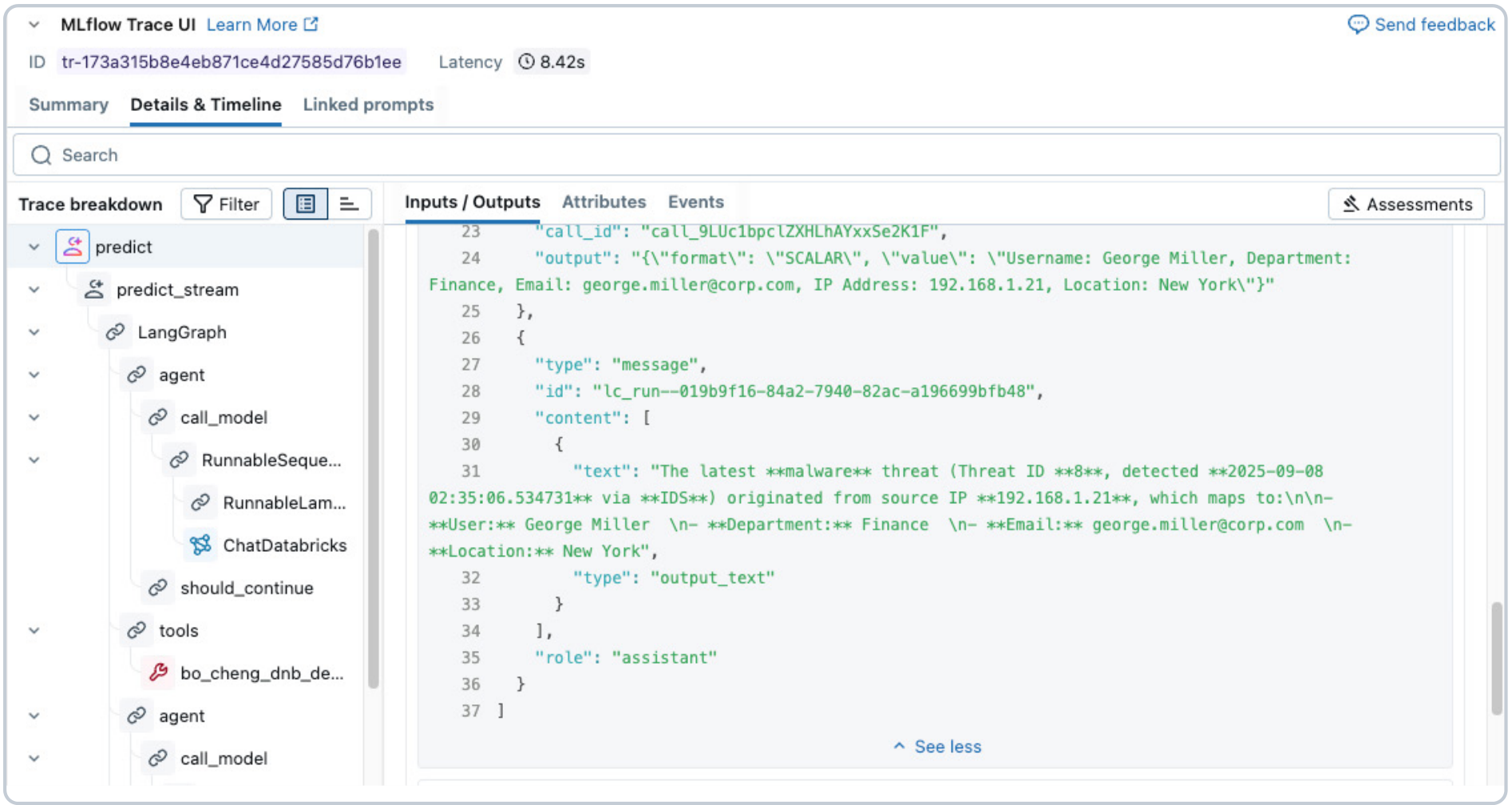
Databricks integrates directly with the LangGraph orchestration framework. If you're following along, select the LangGraph option. LangGraph provides the control plane for agent behavior — when to call the model, when to call tools and how to persist state between turns. In this implementation, you bind Unity Catalog tools to the chat model and use a Lakebase-backed checkpointer to save and restore thread-level state.
Before deployment, validate behavior with MLflow Tracing. Tracing makes it easier to audit inputs, outputs, tool calls and intermediate steps, which is essential for debugging and for understanding agent behavior in production.
Step 4: Deploy the agent with the Databricks AI Agent Framework
Once validated, the agent is packaged and deployed using the Databricks AI Agent Framework. This simplifies registration, versioning and serving while preserving authentication passthrough to governed resources.
When logging the agent with MLflow, explicitly declare dependent resources, including model serving endpoints, Unity Catalog functions and the Lakebase instance. This ensures the deployment has clear visibility into the assets it relies on. The following code shows only the relevant parts of the predict and predict_stream functions, which demonstrate the databricks_langchain short-term memory CheckpointSaver, which integrates with Lakebase. Feel free to check our GitHub repository for the full model code.
Subsequently, you must log and register your agent using the models from code approach in MLflow.
After the model is logged, you can use the catalog to view versions, artifacts and even get an overview of lineage showing relevant Unity Catalog objects.
![],](https://www.databricks.com/sites/default/files/doc-importer/14/figure-556.png)
Finally, you can use a simple agents.deploy() function call to create the model serving endpoint and instantiate the Review App for SME evaluation. Here, you log any necessary environment variables that your agent needs for authentication, such as a service principal client id and client secret designated for authentication to the Lakebase-provisioned instance.
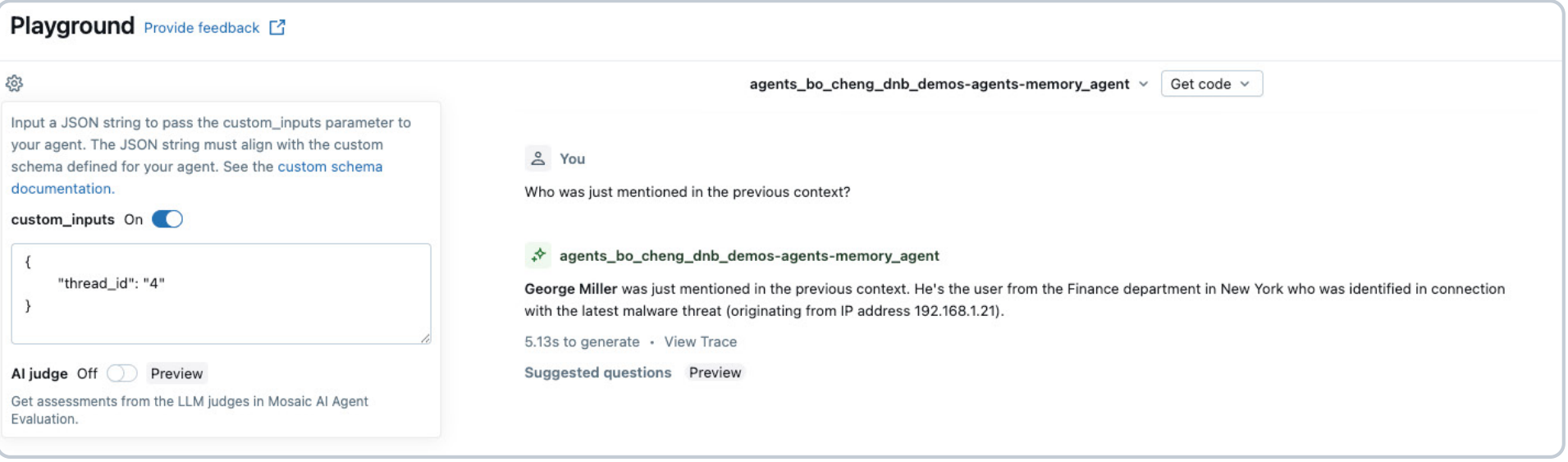
After deployment, the agent can be tested using the AI Playground or Review App before being exposed to end users. The Review App is a built-in chat UI to vibe-check your AI app before integrating with your front-end Databricks app.
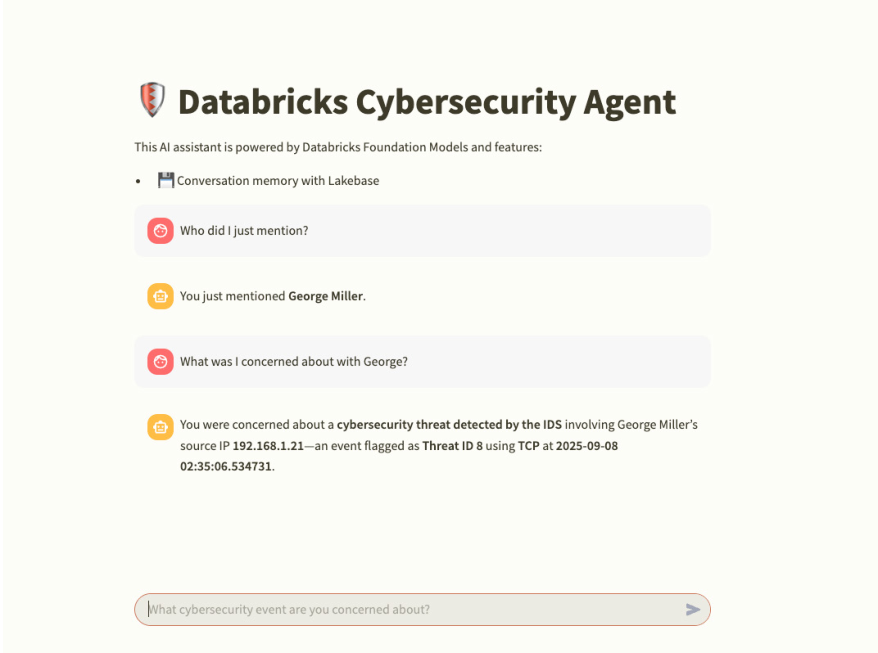
Now you can integrate the model serving endpoint with a Databricks app — the most secure way to build AI apps on the Databricks Platform — with out-of-the-box support for Python frameworks like Streamlit, Gradio, Plotly Dash, Shiny and Flask. For this cybersecurity analyst agent, we're using Streamlit.
Databricks Apps offers two authentication modes: app authorization (using a provided service principal) or user authorization (on-behalf-of-user, where the app acts with the identity of the logged-in user). Either way, you use the MLflow deployments client to interact with your agent's model serving endpoint.
The key to conversational memory is the thread_id — a unique identifier that ties a conversation's checkpoints together in Lakebase. In your Streamlit app, users can enter an existing thread_id in the sidebar to resume a previous conversation exactly where they left off. In the next figure, the thread_id is 4, so if the user closes the app and later returns with that same identifier, the agent picks up with full context of the prior conversation.
If no thread_id is provided, the app generates a new one for the session, starting a fresh conversation. This is a simple implementation to demonstrate how short-term memory works. In production, your app would typically handle thread_id persistence automatically, associating each user with their conversation threads so they don't have to track identifiers manually.
Conclusion
Stateful memory is essential for production AI agents. In domains like cybersecurity, investigations span multiple turns and sessions and agents must retain context to be effective.
In this guide, you built a stateful cybersecurity agent on Databricks using Lakebase as a transactional memory layer for LangGraph checkpointing. Unity Catalog functions provide governed access to data, MLflow enables tracing and lifecycle management and the Databricks AI Agent Framework simplifies deployment. Together, these components deliver an end-to-end agent architecture that runs entirely on the Databricks Platform.
This pattern applies broadly to any multistep workflow that requires continuity. With Lakebase, you can add conversational memory to agents without external databases, keeping state, governance and deployment unified in a single platform.
Resources
What's next?