Announcing Lakeflow Designer: No-Code ETL, Powered by the Data + AI Platform
Bring business analysts and engineers together with unified tooling, production-ready pipelines, and AI that understands your data
by Bilal Aslam and Ryan Lippert
- Lakeflow Designer is a visual, no-code pipeline builder with drag-and-drop and natural language support for creating ETL pipelines.
- Business analysts and data engineers collaborate on shared, governed ETL pipelines without handoffs or rewrites because Designer outputs are Lakeflow Declarative Pipelines.
- Designer uses data intelligence about usage patterns and context to guide the development of accurate, efficient pipelines.
We’re excited to announce Lakeflow Designer, an AI-powered, no-code pipeline builder that is fully integrated with the Databricks Data + AI Platform. With a visual canvas and built-in natural language interface, Designer lets business analysts build scalable production pipelines and perform data analysis without writing a single line of code–all in a single, unified product.
Every pipeline built in Designer creates a Lakeflow Declarative Pipeline under the hood. Data engineers can review, understand, and improve these pipelines without switching tools or rewriting logic because it’s the same ANSI SQL standard used across Databricks. This lets no-code users participate in data work without creating additional overhead for engineers.
Lakeflow Designer will be available in Private Preview in the coming months, following the General Availability of Lakeflow announced today. We’re excited for you to see the impact it can make.
Existing no-code tools live outside the Data + AI Platform, creating silos, causing production gaps, and limiting AI productivity
Data teams and business analysts want the same thing: to turn raw data into insights fast. But the tools they use and the environments they work in often pull them in different directions.
Business analysts bring valuable domain knowledge and insight into the questions that drive an organization’s decisions. To move fast, they often create quick solutions using spreadsheets or, when those aren't enough, they turn to legacy no-code tools. These tools are easy and straightforward, but the pipelines they create live outside the data platform in different environments, separated from the pipelines engineers create and maintain.
This separation creates three persistent challenges:
- Siloed workflows: Analysts and engineers build in different tools, leading to redundant work and coordination overhead. When workflows need to cross over to the data platform, engineers often have to re-build them entirely, starting from scratch.
- Production challenges: External pipelines run without platform governance or observability, making them fragile and more difficult to maintain.
- Limited AI productivity: AI assistants lack access to metadata, lineage, and usage patterns, so their suggestions are often generic, similar to using a language model without access to your data’s context.
Lakeflow Designer unifies no-code tooling within the Data + AI Platform
Lakeflow Designer solves these problems by bringing business and data teams into a single, unified environment where pipelines are created, managed, and governed on Databricks. With all pipelines built natively within the platform, teams gain built-in observability, governance, and scale from day one: no rewrites required.
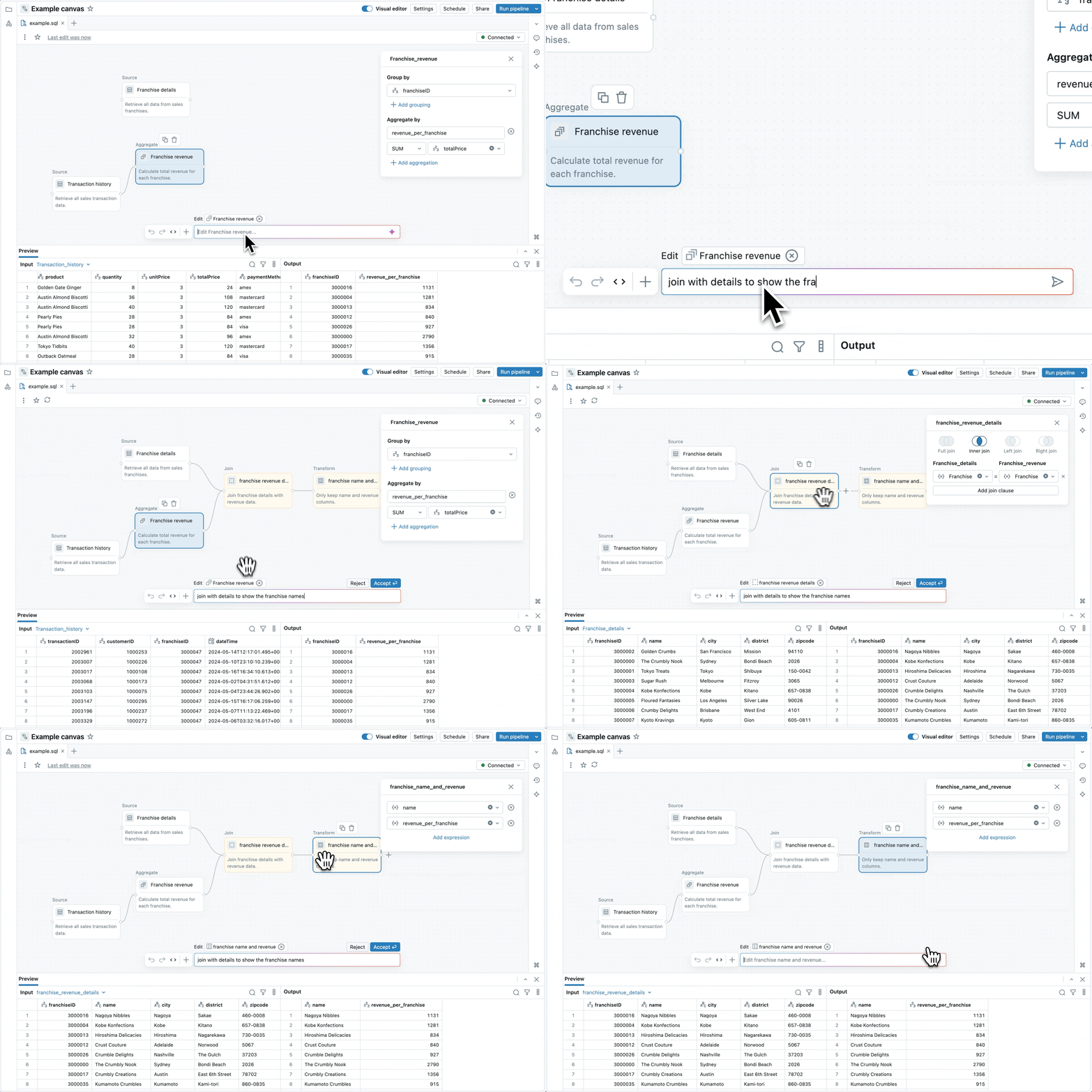
Lakeflow Designer lets business analysts and data engineers collaborate on the same pipelines
Lakeflow Designer directly addresses siloed workflows by providing a unified platform where teams can build together. Business users create pipelines in a visual, no-code environment that’s familiar and intuitive. Behind the scenes, visual pipelines are implemented as Lakeflow Declarative Pipelines. They use the same scalable, reliable runtime as pipelines developed directly within Lakeflow Declarative Pipelines.
Since Designer’s output is the same as if it were coded, data engineers can inspect and edit the pipelines just like any other Lakeflow pipeline. That means if business analysts run into issues, engineers can jump in to help without needing to learn a new tool because it’s the same Declarative Pipelines they’re used to. This all results in smoother handoffs and less rebuilds that take up engineering cycles.
Lakeflow Designer pipelines are production-ready from the start
Lakeflow Designer pipelines are deployed as Lakeflow Declarative Pipelines–full stop. This means they’re immediately ready for production use. They’re versioned, governed by Unity Catalog, and fully observable with Lakeflow monitoring tools.
Everything is built for production from the start, so there’s no need to rebuild pipelines for scale and reliability. You get scheduling, testing, and alerting from day one.
How Lakeflow Designer's AI uses your data's structure and usage patterns
Designer delivers an AI-first development experience, helping users move from idea to pipeline with natural language prompts. Unique to Designer’s AI is that it is grounded in the structure, semantics, and usage patterns of your data, made possible by the unified Databricks Intelligence Platform. It knows how data is actually talked about and used across the business, including table definitions, column names, and query history.
Other tools may offer AI features, but because they live outside the platform, they operate without this rich context. Designer’s AI is different: deeply integrated with Databricks, trained on your data's structure and semantics, and built to generate trustworthy, production-grade pipelines that align with your existing workflows and governance standards.
When will Lakeflow Designer be available in Private Preview?
Lakeflow Designer will be available in Private Preview in the coming months. We’re collaborating closely with early users across industries to refine the experience and expand access.
If your team wants to give more users the ability to build trusted pipelines without increasing risk or adding new tools, get in touch with your Databricks account team to request access.
Frequently Asked Questions
What is Lakeflow Designer, exactly?
Lakeflow Designer is an AI-powered, no-code pipeline builder integrated with the Databricks Data + AI Platform that lets business analysts create production-ready ETL pipelines using a visual canvas and natural language, without writing code. Under the hood, every pipeline it creates is a Lakeflow Declarative Pipeline, the same technology data engineers already use. This design lets analysts move from idea to production pipeline without handoffs or rewrites.
What underlying technology powers pipelines created in Lakeflow Designer?
Lakeflow Designer pipelines run on the same engine that powers Lakeflow Declarative Pipelines, so they use the same ANSI SQL standard and scalable runtime used elsewhere in Databricks. This means a pipeline built visually in Designer executes identically to one written by hand, with no separate runtime or translation layer required. Because of this shared foundation, data engineers can inspect, edit, and extend Designer-authored pipelines just like any other Lakeflow pipeline.
Can data engineers modify or extend a pipeline that a business analyst built in Designer?
Yes, data engineers can open, edit, and extend any pipeline built in Lakeflow Designer without learning a new tool, since the output is standard Lakeflow Declarative Pipeline code. Databricks session materials on Designer describe engineers adding custom Python logic, defining data quality expectations stored in Unity Catalog, and layering on data quality monitoring with anomaly detection on top of a Designer-authored pipeline. This lets visual and code-based development coexist on the same pipeline instead of requiring a separate rebuild.
What data sources can Lakeflow Designer pipelines connect to?
Lakeflow Designer pipelines can draw on data ingested through Lakeflow Connect, which includes connectors for sources such as Salesforce and PostgreSQL. Because Designer pipelines are Lakeflow Declarative Pipelines under the hood, they can incorporate any data already brought into Databricks through Lakeflow Connect. This lets business analysts build transformations on top of existing enterprise data sources without setting up separate ingestion tooling.
How can I get early access to Lakeflow Designer?
You can request early access by contacting your Databricks account team directly. Databricks is currently collaborating with early users across industries to refine the Designer experience ahead of its Private Preview launch. Reaching out lets your team be considered for access without needing to adopt a separate tool in the meantime.
Get the latest posts in your inbox
Subscribe to our blog and get the latest posts delivered to your inbox.