Genie One MCP: Give any AI Agent the Right Business Context
Genie One MCP operationalizes trusted business context across the AI cowork tools your teams already use, enabling more reliable decisions and greater productivity.
• General-purpose AI assistants can access data, but without business context they can’t reliably interpret metrics, trust the right sources, or respect user access.
• Genie Ontology gives Genie One a governed understanding of the business: approved definitions, data relationships, source authority, and permissions.
• Genie One MCP brings that context to any MCP-compatible AI assistant, delivering reliable, governed, permission-aware answers in the tools teams already use.
Business leaders often have access to plenty of data, but still can’t get a reliable answer to a seemingly simple question like: Why did net revenue decline 8% at our largest account last week? The answer may span sales, finance, promotions, inventory, and account data, with each source potentially correct in isolation, yet different in its definitions, detail, relationships, and authority.
Without the right business context, general-purpose agents can’t reliably determine what your metrics mean, which sources are authoritative, how data should connect, or what each user is allowed to see.
Genie One MCP gives governed context to any MCP-compatible AI agent. It connects assistants such as ChatGPT, Claude, Microsoft Copilot, and coding agents to Genie One, so they can answer business questions using approved definitions, trusted data relationships, and permission-aware access controls. Instead of asking agents to infer meaning from raw tables or overloaded prompts, organizations can define business context once in Genie Ontology and make it available across every approved AI agent.
The context problem with general-purpose agents
General-purpose AI agents inherit the fragmentation and ambiguity of the systems they connect to. Three gaps make reliable business answers difficult:
- Fragmented facts: Relevant data is spread across systems, refreshes at different times, spans functional boundaries, and changes over time. A consolidated view may already be incomplete or stale.
- Inconsistent meaning: Terms such as net sales, active promotion, and on-time can have different definitions across teams. Those definitions often live in spreadsheets, documentation, or institutional knowledge, not in a form an agent can reliably use.
- Missing authority and lineage: When numbers conflict, it is often unclear which source is authoritative, how data was transformed, or which definition produced the result.
Reliable analysis requires more than retrieving data. An agent needs to understand how business facts relate, which definitions apply, and which sources should take precedence.
Direct data access is not business context
Connecting an AI agent directly to structured and unstructured sources provides access, but not the shared business context needed to deliver reliable, governed answers. Without that context, direct access introduces four challenges:
- Accuracy: Direct access does not tell an agent which sources, definitions, or SQL joins are approved. Those choices determine the quality of the answer.
- Cost and latency: Agents must repeatedly inspect schemas, documentation, and relationships, consuming more tokens and slowing responses.
- Governance: Direct connections across source systems can make it difficult to enforce access controls consistently in the end user’s context.
- Consistency: Without shared context, each client, model, or session can interpret definitions differently, producing inconsistent answers.
Building the context layer with Genie Ontology
Genie Ontology is the governed context layer in Databricks that helps Genie One understand your business. It combines approved metrics, business definitions, relationships, ownership, and access policies with context inferred from trusted enterprise assets such as notebooks, queries, dashboards, documentation, and Genie Agents.
Genie One uses that context to identify the right definitions and sources, reconcile conflicts based on authority and certification, and enforce each user’s permissions. The result is traceable, permission-aware answers grounded in governed business context.
Applied to our first question: Why did net revenue decline 8% at our largest account last week? Genie Ontology:
- Grounds net revenue in its approved metric definition,
- Connects sales, finance, promotion, inventory, and account assets through governed relationships, and
- Prioritizes certified context if those sources disagree.
This results in not only a high-quality answer but also a full explanation that users can trace back to the governed definitions and assets behind it.
One shared context layer across every AI agent
A governed context layer becomes more valuable when it can be used consistently across the places people work. Genie One provides a native AI cowork experience in Databricks, while the Genie One MCP server extends the same governed business context to other approved AI assistants, coding agents, and client interfaces. Together, they allow organizations to build business meaning once in Genie Ontology and apply it across an evolving AI ecosystem.

Genie One: A data-smart coworker
Genie One is Databricks’ data-smart AI coworker for business users. Powered by Genie Ontology, it helps teams answer data-intensive business questions, synthesize information across enterprise sources, and turn insights into follow-on work such as documents, tasks, and scheduled actions, both in Databricks and in third-party tools like Google Drive, Microsoft 365, Atlassian, Slack, GitHub, and Glean.
Genie One MCP: Bring business context to the agents you already use
Genie One MCP extends the same governed context to popular AI assistants and coding agents. If you already use Claude, ChatGPT, Microsoft Copilot, or a coding agent such as Claude Code, Genie One MCP exposes Genie as a tool to any of them, with the same ontology and the same permission enforcement as a native surface.
Genie One MCP can immediately provide deep enterprise context to AI assistants, significantly improving the quality of engagement with business users. Some examples include:
Campaign performance review: A marketing leader asks ChatGPT Business which campaigns generate qualified pipeline and where to reallocate budget. Genie One connects approved attribution, campaign, spend, lead, and opportunity data; ChatGPT turns the findings into a campaign action plan.
Monthly business review: A finance leader asks Claude Cowork what is driving the gap between forecast and actual margin, and which regions require action. Genie One identifies the official forecast, approved margin definition, and relevant operational drivers; Claude turns the findings into an operating review narrative and action list.
Customer retention review: A customer success leader asks Microsoft Copilot Cowork which customers show declining adoption, rising support volume, and renewal risk. Genie One connects governed customer, product usage, support, and contract context; Copilot then prioritizes at-risk accounts and prepares targeted follow-up.
Setting up Genie One MCP
Setup starts in a workspace with the preview toggle plus a client connection. The steps differ by client, so follow the instructions in our AI assistants and coding agents documentation for more detail. Once the connection is established, you should be able to see the Genie One MCP connection in your AI assistant (see below for an example from Claude Cowork).

The Genie One MCP experience
Once set up, Claude can then invoke Genie One MCP when asked any question that requires enterprise context. In response, Genie One returns a fully reasoned and formulated response by fully respecting the access controls to the underlying data assets (see below for examples from Claude Cowork and ChatGPT).
The Genie One MCP server provides MCP Apps, an extension that lets a server return an interactive view instead of plain text. On clients that support MCP apps, the server returns an interactive view, rendering visuals, summary metrics, and Genie Ontology citations inside the AI assistant interface (see below). Note: Clients that support MCP Apps automatically get the interactive view, while clients without MCP Apps support continue to get text-only results.

ChatGPT with Genie One MCP

Claude Cowork with Genie One MCP
Calling Claude with MCP is easy with the simple command ug claude, which will connect to the Claude instance in the Databricks workspace. Once the Claude model serving endpoint is open, it can be used directly via command line. With the Genie One MCP integration, Claude has context to answer accurately.

Claude code (CLI) with Genie One MCP
How Genie One MCP works
Tool contract
Genie One MCP lets external AI agents use the power of Genie One’s governed conversational analytics capabilities by sending a natural-language question. Genie interprets the business terminology, searches permitted enterprise data, generates and runs SQL, and returns a grounded answer with Databricks source links.
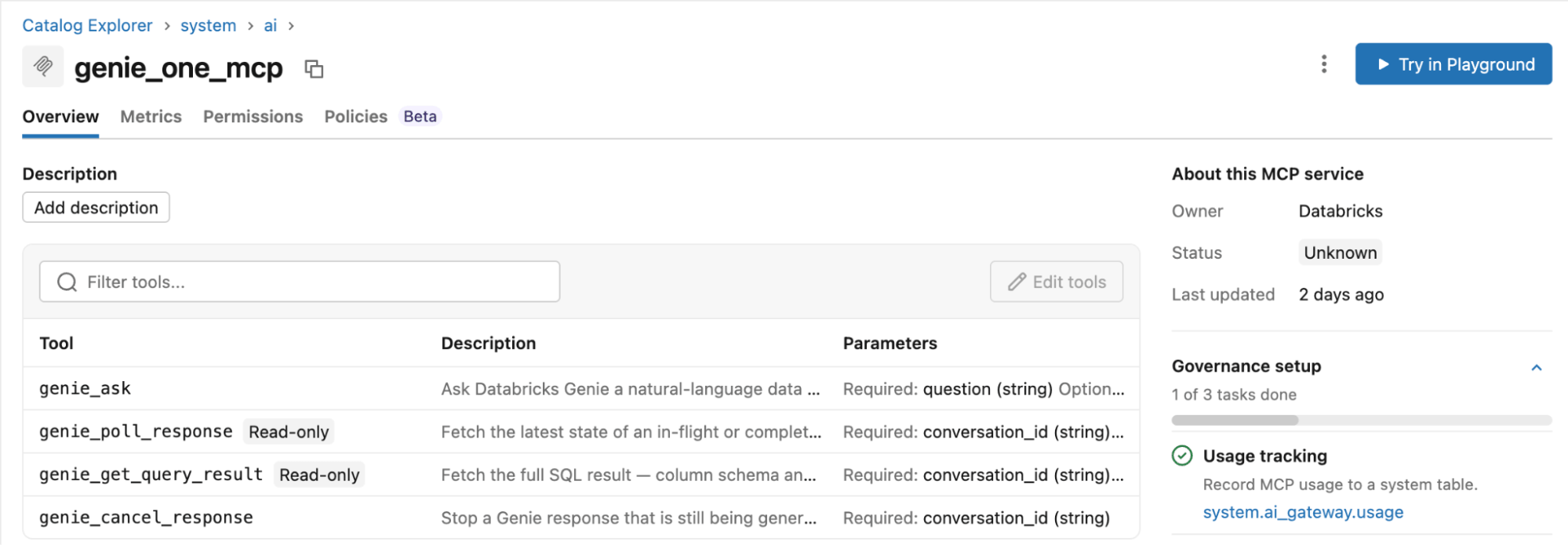
To enable this, the Genie One MCP server exposes five tools:
genie_askstarts a response and returns aconversation_idandresponse_id genie_poll_responsereturns progress steps and, on completion, the answer with an Explore in Databricks deep linkgenie_get_query_resultreturns the full result set when the truncated response is insufficientgenie_cancel_responsestops an in-flight turnview_askreplacesgenie_askon clients that support MCP Apps, rendering an interactive panel with progress, visualizations, and ontology citations inlinewarehouse_id _metaparameter pins execution to a specific SQL warehouse
Identity and access control
When agents query through Genie One rather than underlying tables, it determines which metrics users can access and how they are computed. User identity must therefore flow through the request. The recommended approach is on-behalf-of (OBO) user authentication. The external assistant passes the end user’s OAuth token, and Genie evaluates Unity Catalog privileges, row filters, and column masks in that user’s context. Users receive only authorized results, and deep links open only assets they can access.
Two users can ask the same question in the same client and receive appropriately scoped answers without per-user prompt logic. Machine-to-machine authentication with a service principal is available for external-facing integrations, but represents every caller as one identity, removing per-user permission enforcement and potentially limiting personalization and memory.
Access Genie everywhere covers U2M, M2M, and OBO patterns and their governance implications. External MCP connections are Unity Catalog objects governed through standard grants.
Management and monitoring
Managed MCP servers are listed under Agents > MCPs in the workspace and are visible in Unity Gateway. Genie One chat events appear in audit logs, SQL execution in Query History, and consumption in billing system tables. Here are practices that hold up in production:
- Tune Genie One in one place. The MCP server honors workspace instructions, certification, and Genie Agents curation configured in Databricks. Don’t attempt to steer Genie One from the client's system prompt.
- Prefer the Genie Agent MCP server at
/api/2.0/mcp/genie/{genie_space_id}when a use case maps to one curated domain. It exposes a single read-only agent with its own instructions and trusted SQL, which is easier to benchmark and to scope. - Register one OAuth application per client platform with minimum scope and token lifetimes matching your identity policy.
- Account for the 90-second SQL execution timeout and the workspace Genie QPM limit when sizing a rollout; questions routed to Genie Agents count against the latter.
- Validate governance by impersonation: ask the same question as members of different groups through the external client and confirm the answers diverge as expected.
Get started with Genie One MCP
Agents, client interfaces, and integration protocols will continue to change. General-purpose AI assistants can still benefit from shared and governed business context.
Use Genie Ontology to establish that shared context, then deploy Genie One MCP to bring Genie One’s data-aware capabilities to the agents and workflows your teams already use.
For more information, review these resources:
Get the latest posts in your inbox
Subscribe to our blog and get the latest posts delivered to your inbox.