Introducing the Databricks Connector for Google Sheets: Real-Time, Governed Lakehouse Data in the Sheets Users Love
Democratize Databricks to every user in your organization by enabling them to explore governed Databricks data directly in Google Sheets.
- Maintain governance: Power your planning, analysis, and reporting in Sheets with governed Databricks SQL data, backed by Unity Catalog controls.
- Reduce data duplication: Eliminate manual CSV exports and stale copies by querying your lakehouse directly from Google Sheets.
- Seamless usage: Easily pull data using a no-code UI and set up scheduled refreshes to keep information current.
Organizations run on spreadsheets. Every day, business users plan, analyze, and report in Google Sheets. Yet, the most accurate and governed business data increasingly lives in lakehouses, creating friction between where data-driven decisions happen and where trusted data resides.
The Databricks connector for Google Sheets closes this gap by bringing governed, live Databricks data directly into the Sheets experience users already know. Built on the performance and security of Databricks SQL and Unity Catalog, this connector lets teams explore, analyze, and collaborate on real data at scale, without needing to export CSVs.
The challenge before: CSVs, copies, and conflicting numbers
Until now, connecting governed data to Sheets meant using CSV exports, snapshots, or custom pipelines, all of which quickly fell out of sync and wasted valuable analyst time. Business teams worked from siloed copies while data teams struggled to maintain governance and consistency.
The result was slower decision-making, inconsistent metrics, and frustrated data teams fielding one-off data requests.
What’s now possible: Live, governed Databricks data in Sheets
The Databricks connector for Google Sheets changes this by turning Sheets into a live window into the lakehouse. Instead of exporting snapshots, users can connect Sheets directly to Databricks SQL, run queries against Unity Catalog–governed data, and refresh results on demand.
With this connector, teams can:
- Query governed datasets, like Unity Catalog Metric Views, from Sheets using the no-code GUI interface or SQL, with all permissions automatically managed by Unity Catalog.
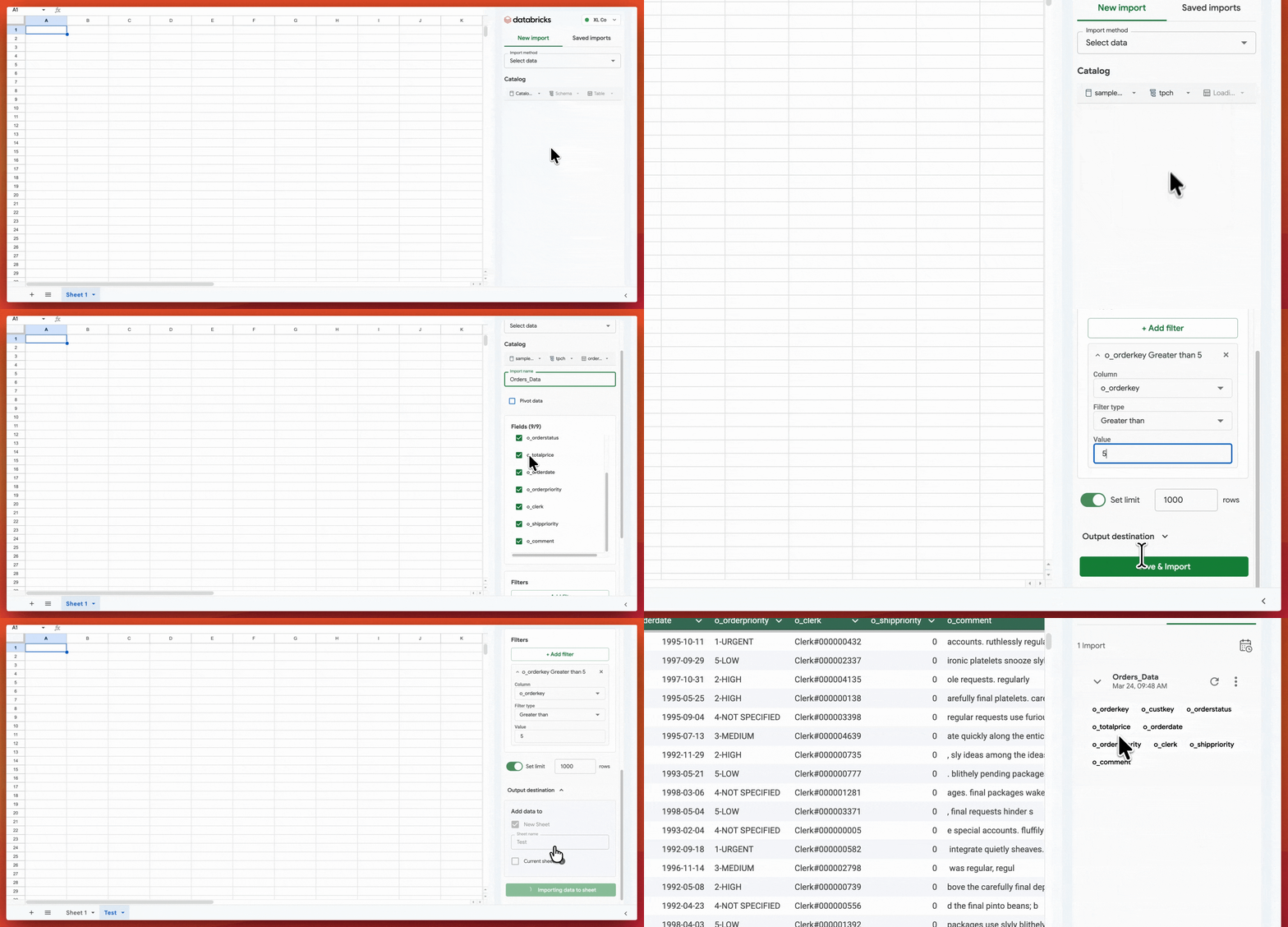
- Set up schedules or refresh data manually to ensure your sheet always reflects the latest information
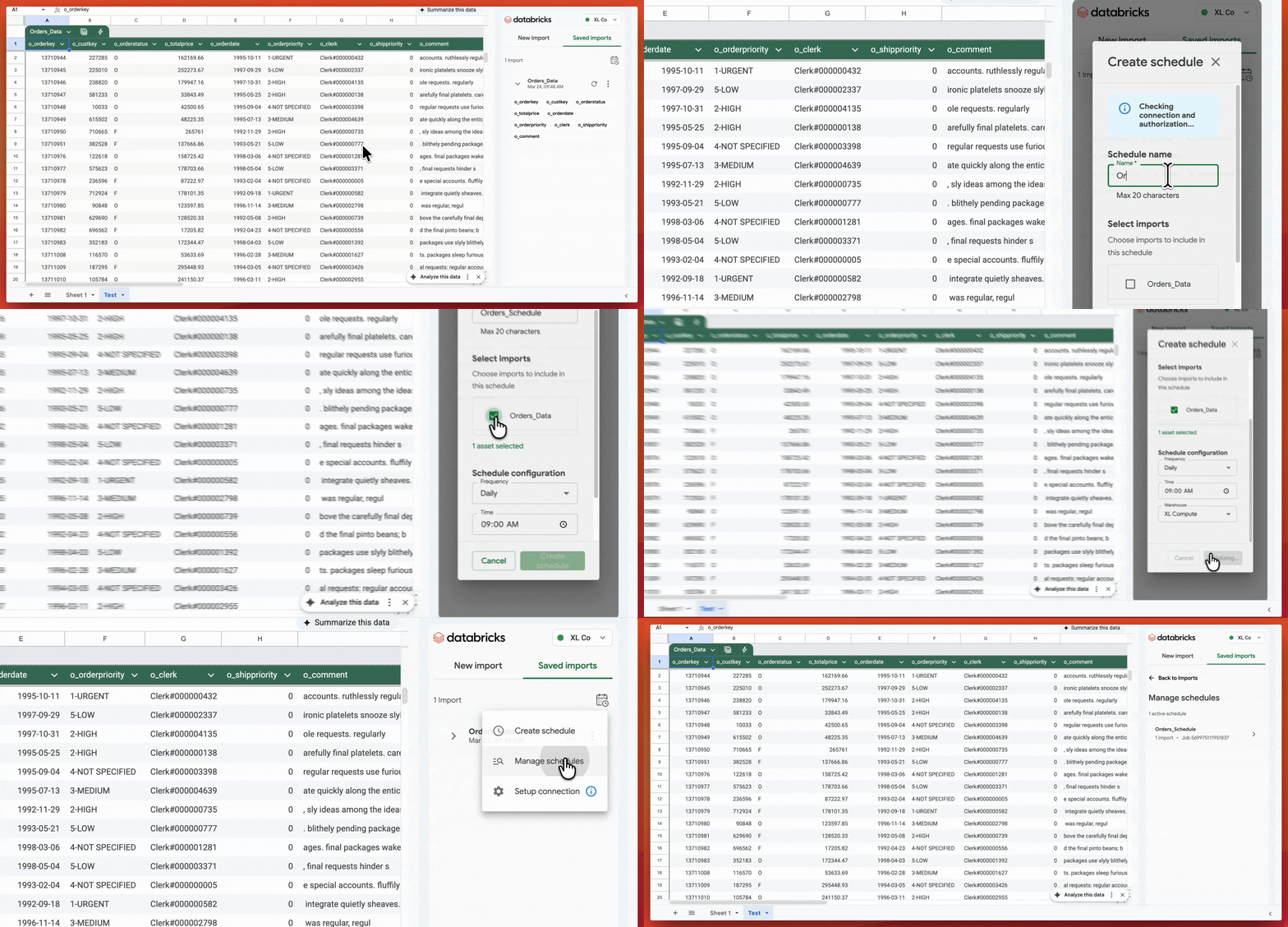
This enables data leaders to maintain strong governance while empowering business users to work in their preferred productivity tool.
Customer spotlight: Nubank democratizes data in Google Sheets
Nubank, one of the world’s largest digital banking platforms, uses Databricks as the backbone of its lakehouse architecture. As the company scaled, the data team needed a way to bring governed, high-quality data closer to business stakeholders without sacrificing control.
“With the seamless integration between Google Sheets and Databricks, we have effectively bridged the gap between our data lakehouse and everyday business operations. This connector has unblocked core working processes by allowing our non-technical users to perform data exploration within a familiar interface. We can now empower the entire organization to drive data-backed decisions without leaving their preferred productivity tools.” —Henrique Lopes, Data Products Director at Nubank
This combination of governed data in Databricks and flexible analysis in Sheets helps Nubank maintain a strong data culture while meeting teams where they work.
How to get started: Simple setup for all
The Databricks connector for Google Sheets is now Generally Available for all Databricks customers. To get started, open Google Marketplace and install the “Databricks Connector for Google Sheets.” Then, open Google Sheets and access the connector from the Extensions menu.
For more details check out our technical documentation.
Looking for a new data warehouse? Try Databricks SQL
The best data warehouse is a lakehouse! To learn more about Databricks SQL, visit the product page or read the documentation. If you want to migrate a data warehouse to a high-performance, serverless data lakehouse with a great user experience and lower total cost, Databricks SQL is the solution – try it for free.
Get the latest posts in your inbox
Subscribe to our blog and get the latest posts delivered to your inbox.