The New Way to Build Pipelines on Databricks: Introducing the IDE for Data Engineering
A new developer experience purpose-built for authoring Lakeflow Spark Declarative Pipelines
by Adriana Ispas, Lennart Kats, Camiel Steenstra and Monica Alvarez Vicente
- Spark Declarative Pipelines now have a dedicated IDE developer experience in the Databricks Workspace.
- The new IDE improves productivity and debugging with features like dependency graphs, previews, and execution insights.
- The IDE supports both quick onboarding and advanced use cases such as Git integration, CI/CD, and observability.
At this year’s Data + AI Summit, we introduced the IDE for Data Engineering: a new developer experience purpose-built for authoring data pipelines directly inside the Databricks Workspace. As the new default development experience, the IDE reflects our opinionated approach to data engineering: declarative by default, modular in structure, Git-integrated, and AI-assisted.
In short, the IDE for Data Engineering is everything you need to author and test data pipelines - all in one place.
With this new development experience available in Public Preview, we’d like to use this blog to explain why declarative pipelines benefit from a dedicated IDE experience and highlight the key features that make pipeline development faster, more organized, and easier to debug.
Declarative data engineering gets a dedicated developer experience
Declarative pipelines simplify data engineering by letting you declare what you want to achieve instead of writing detailed step-by-step instructions on how to build it. Although declarative programming is an extremely powerful approach for building data pipelines, working with multiple datasets and managing the full development lifecycle can become hard to handle without dedicated tooling.
This is why we built a full IDE experience for declarative pipelines directly in the Databricks Workspace. Available as a new editor for Lakeflow Spark Declarative Pipelines, it enables you to declare datasets and quality constraints in files, organize them into folders, and view the connections through an automatically generated dependency graph displayed alongside your code. The editor evaluates your files to determine the most efficient execution plan and allows you to iterate quickly by rerunning single files, a set of changed datasets, or the entire pipeline.
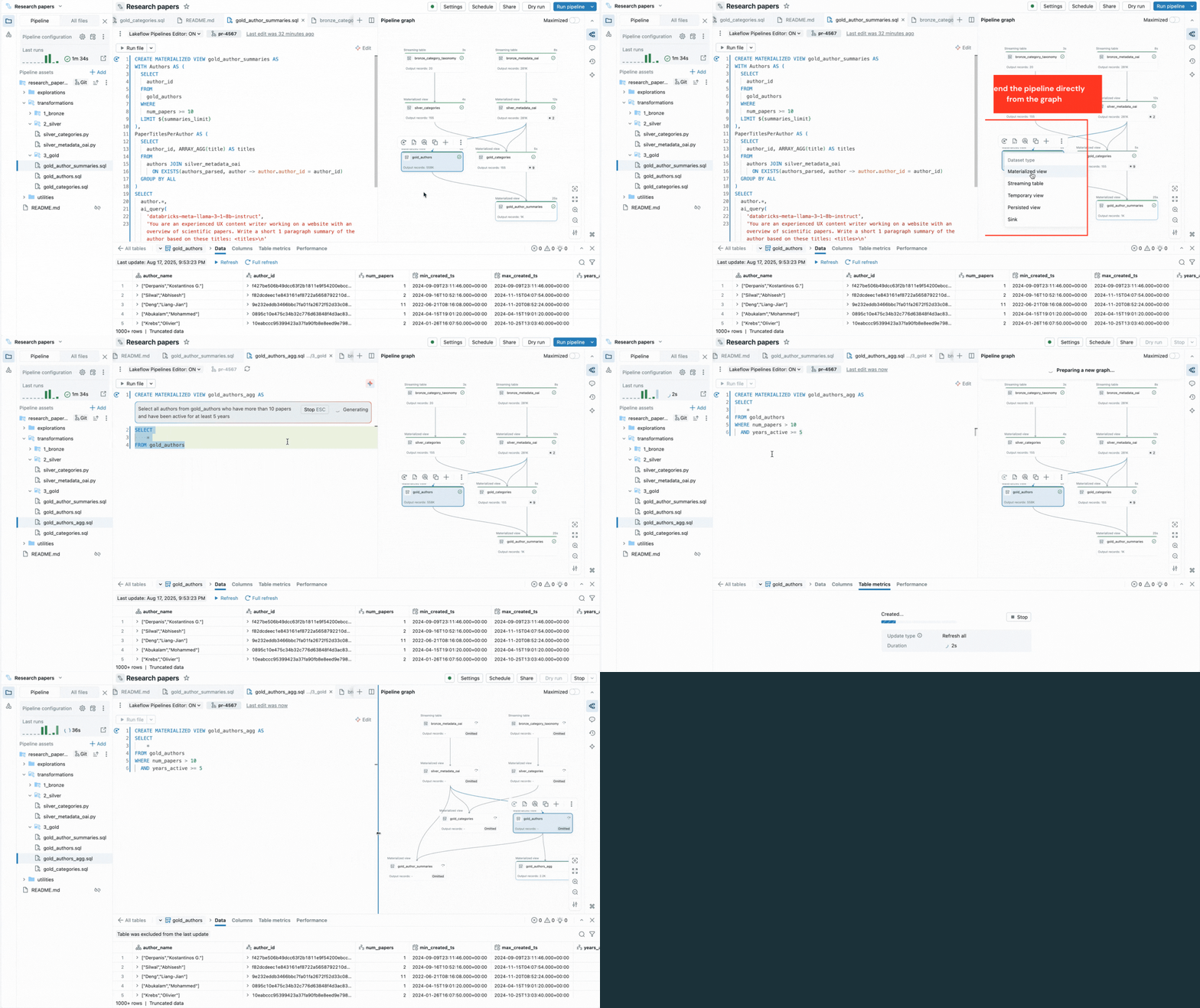
The editor also surfaces execution insights, provides built-in data previews, and includes debugging tools to help you fine-tune your code. It also integrates with version control and scheduled execution with Lakeflow Jobs. Thus, you can perform all tasks related to your pipeline from a single surface.
By consolidating all these capabilities into a single IDE-like surface, the editor enables the practices and productivity data engineers expect from a modern IDE, while staying true to the declarative paradigm.
The video embedded below shows these features in action, with further details covered in the following sections.
"The new editor brings everything into one place - code, pipeline graph, results, configuration, and troubleshooting. No more juggling browser tabs or losing context. Development feels more focused and efficient. I can directly see the impact of each code change. One click takes me to the exact error line, which makes debugging faster. Everything connects - code to data; code to tables; tables to the code. Switching between pipelines is easy, and features like auto-configured utility folders remove complexity. This feels like the way pipeline development should work."—Chris Sharratt, Data Engineer, Rolls-Royce
"In my opinion, the new Pipelines Editor is a huge improvement. I find it much easier to manage complex folder structures and switch between files thanks to the multi-soft tab experience. The integrated DAG view really helps me stay on top of intricate pipelines, and the enhanced error handling is a game changer-it helps me pinpoint issues quickly and streamlines my development workflow."—Matt Adams, Senior Data Platforms Developer, PacificSource Health Plans
What features make it easy to get started with the new editor?
We designed the editor so that even users new to the declarative paradigm can quickly build their first pipeline.
- Guided setup allows new users to start with sample code, while existing users can configure advanced setups, such as pipelines with integrated CI/CD via Declarative Automation Bundles.
- Suggested folder structures provide a starting point to organize assets without enforcing rigid conventions, so teams can also implement their own established organizational patterns. For example, you can group transformations into folders for each medallion stage, with one dataset per file
- Default settings let users write and run their first code without heavy upfront configuration overhead, and adjust settings later, once their end-to-end workload is defined.
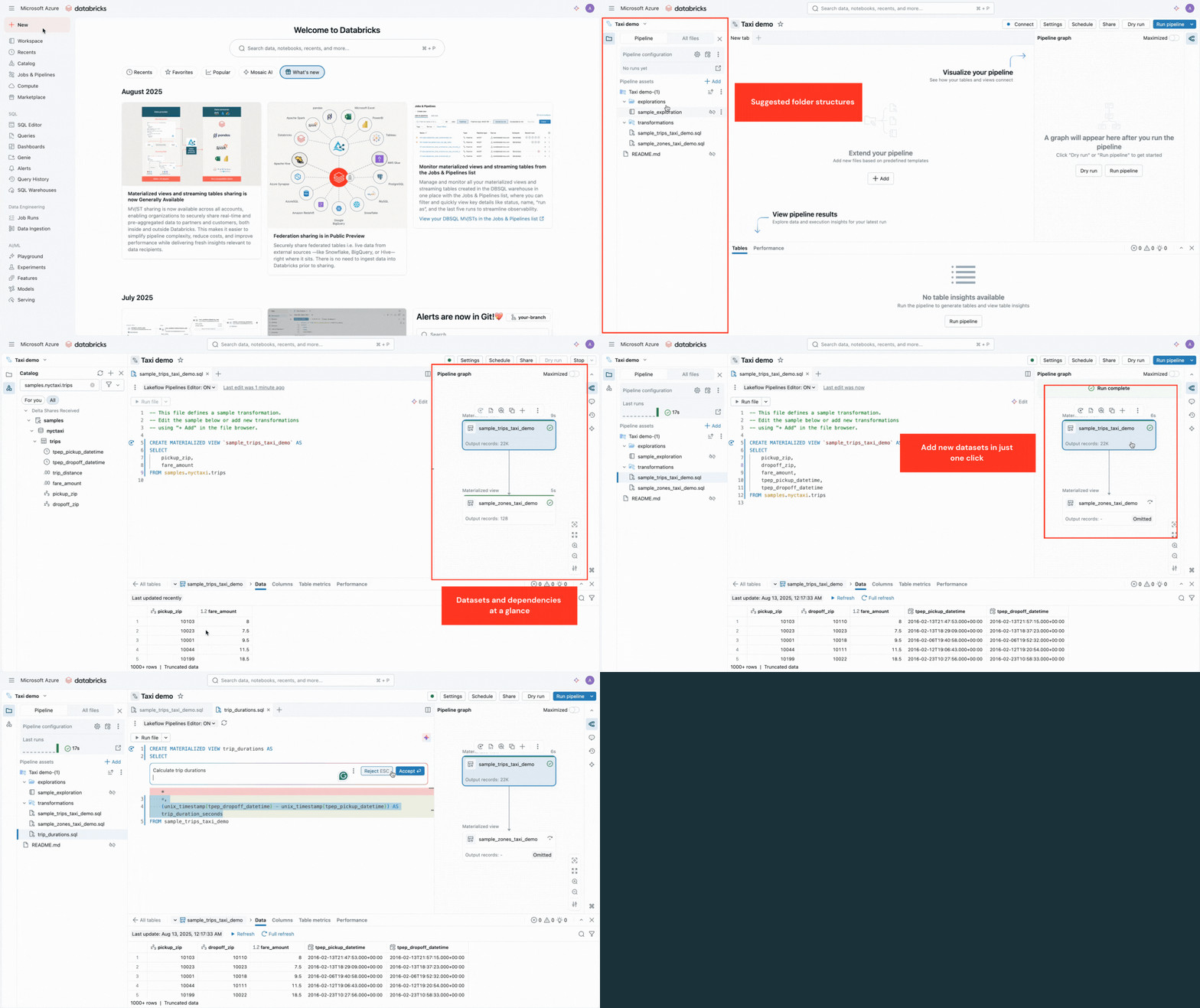
These features help users get productive fast, and transition their work into production-ready pipelines.
What features improve efficiency in the inner development loop?
Building pipelines is an iterative process. The editor streamlines this process with features that simplify authoring and make it faster to test and refine logic:
- AI-powered code generation and code templates speed up code dataset definitions and data quality constraints, and remove repetitive steps.
- Selective execution lets you run a single table, all tables in a file, or the entire pipeline.
- Interactive pipeline graph provides an overview of dataset dependencies and offers quick actions such as data previews, reruns, navigation to code, or adding new datasets with auto-generated boilerplate.
- Built-in data previews let you inspect table data without leaving the editor.
- Contextual errors appear alongside the relevant code, with suggested fixes from the Databricks Assistant.
- Execution insights panels display dataset metrics, expectations, query performance, with access to query profiles for performance tuning.
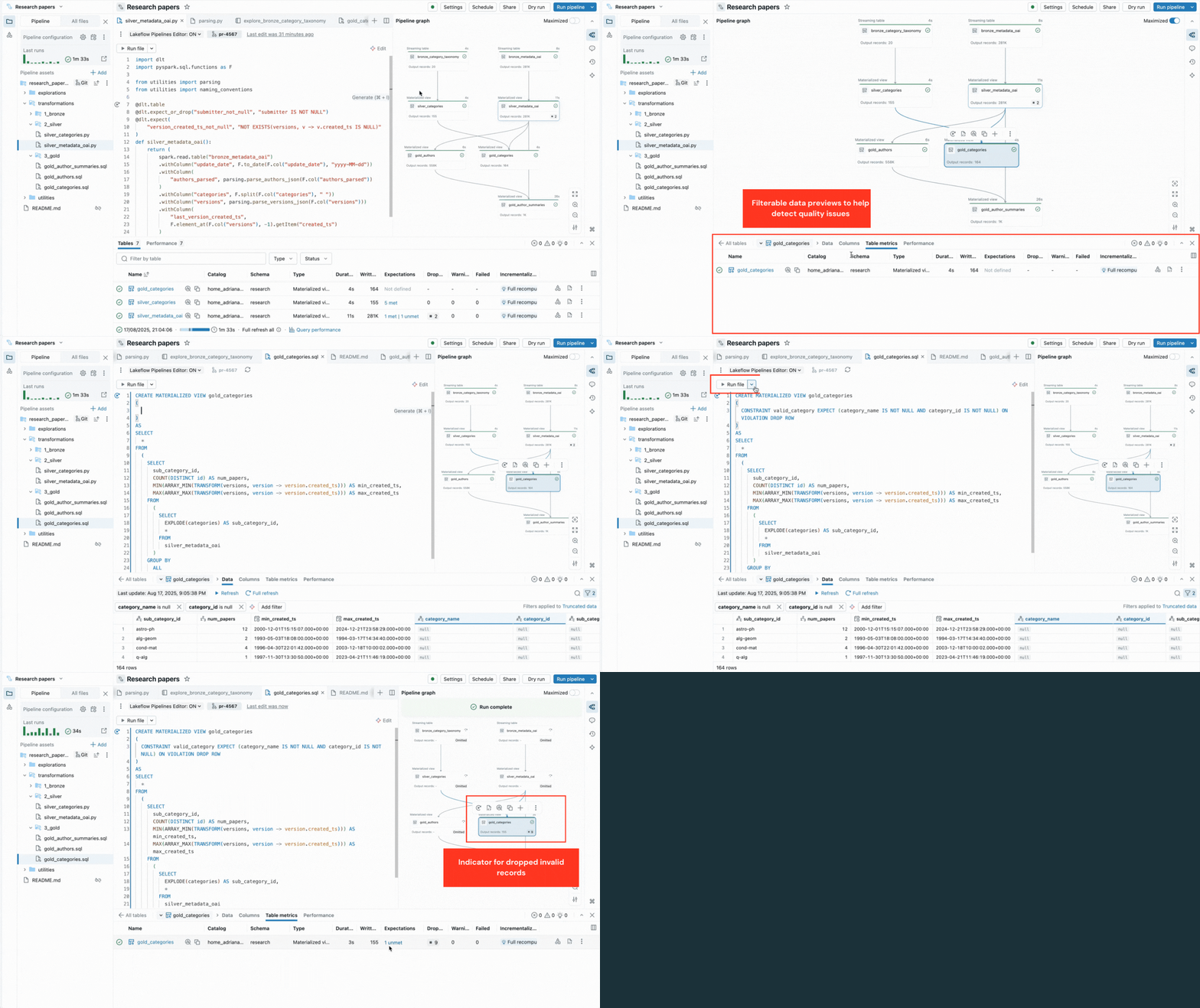
These capabilities reduce context switching and keep developers focused on building pipeline logic.
How does the editor bring pipeline tasks onto a single surface?
Pipeline development involves more than writing code. The new developer experience brings all related tasks onto a single surface, from modularizing code for maintainability to setting up automation and observability:
- Organize adjacent code, such as exploratory notebooks or reusable Python modules, into dedicated folders, edit files in multiple tabs and run them separately from the pipeline logic. This keeps related code discoverable and your pipeline tidy.
- Integrated version control via Git folders enables safe, isolated work, code reviews, and pull requests into shared repositories.
- CI/CD with Declarative Automation Bundles support for pipelines connects the inner-loop development to deployment. Data admins can enforce testing and automate promotion to production using templates and configuration files, all without adding complexity to a data practitioner’s workflow.
- Built-in automation and observability enable scheduled pipeline execution and provide quick access to past runs for monitoring and troubleshooting.
By unifying these capabilities, the editor streamlines both day-to-day development and long-term pipeline operations.
Check out the video below for more details on all these features in action.
What upcoming features are planned for the pipelines editor?
We’re not stopping here. Here’s a preview of what we are currently exploring:
- Native support for data tests in Lakeflow Spark Declarative Pipelines and test runners in the editor
- AI-assisted test generation to speed up validation
- Agentic experience for Lakeflow Spark Declarative Pipelines.
Let us know what else you’d like to see — your feedback drives what we build.
How do you enable the new pipelines editor?
The IDE for data engineering is available in all clouds. To enable it, open a file associated with an existing pipeline, click the ‘Lakeflow Pipelines Editor: OFF’ banner, and toggle it on. You can also enable it during pipeline creation with a similar toggle, or from the User Settings page.
Learn more using these resources:
- Check out the documentation.
- Watch the Authoring Data Pipelines With the New Editor talk at the Data + AI Summit 2025.
- Check out Lakeflow in Production: CI/CD, Testing and Monitoring at Scale at the Data + AI Summit 2025.
Frequently Asked Questions
What is Lakeflow Spark Declarative Pipelines, and how does the new editor relate to it?
Lakeflow Spark Declarative Pipelines is the underlying product that lets you declare what you want a pipeline to accomplish—covering batch and streaming ETL, automated data quality, change data capture, and governance—rather than writing step-by-step transformation code. The new IDE is a dedicated editor built specifically for authoring these Spark Declarative Pipelines, giving you a single workspace to declare datasets and constraints in files while the pipeline logic itself stays declarative.
Which cloud platforms support the new pipelines editor?
The IDE for data engineering is available on all clouds that Databricks supports. You don't need to request access to a specific cloud region or provider to use it, since it ships as a standard part of the Databricks Workspace experience for Lakeflow Spark Declarative Pipelines.
What is the automatically generated dependency graph shown in the editor?
The dependency graph is a visual map of how your declared datasets connect to one another, displayed alongside your code as you work. It's generated automatically from the files you write, so as the editor evaluates your pipeline to determine the most efficient execution plan, you can see those relationships update without manually diagramming them yourself.
How does selective execution work in the new pipelines editor?
Selective execution lets you rerun just a single table, all tables in one file, or the entire pipeline instead of always re-running everything from scratch. This is part of the inner development loop tooling, and it's designed to let you iterate quickly by testing only the datasets affected by a given change.
What are users saying about the new pipelines editor experience?
Early users have highlighted the editor's ability to bring code, the pipeline graph, results, and troubleshooting into one place instead of juggling browser tabs. Chris Sharratt, a Data Engineer at Rolls-Royce, said one click takes him to the exact error line, making debugging faster and switching between pipelines easier. Matt Adams, Senior Data Platforms Developer at PacificSource Health Plans, said the integrated DAG view and enhanced error handling help him pinpoint issues quickly and manage complex folder structures with the multi-tab experience.
Get the latest posts in your inbox
Subscribe to our blog and get the latest posts delivered to your inbox.