Expanding agent governance with Unity Gateway
Control and audit AI agents and coding assistants with unified governance, visibility and guardrails
by David Nasi
- Now supporting MCP governance: Control which agents can access external systems with fine-grained permissions, including on-behalf-of (OBO) access.
- End-to-end observability for agents: Monitor LLM and MCP calls, monitor usage, and attribute costs across models, teams, and workflows.
- More flexible and reliable model access: Use a unified API across models with built-in fallbacks, rate limits, and guardrails.
Today, we are announcing major enhancements to AI Gateway. As part of this release, AI Gateway is now part of Unity Catalog as Unity Gateway. This extends Unity Catalog’s governance model to agentic AI, so you can apply the same permissions, auditing, and policy controls to how agents access LLMs and interact with tools like MCP servers and APIs.
Here’s what happens when an AI agent answers a customer question: it calls an LLM to interpret the query, pulls order history from Salesforce via an MCP server, checks real-time shipping data through an internal API, and then calls the LLM again to draft a response. Total time: under a second. Total visibility into who accessed what data, which systems were called, and whether policies were followed: almost none.
What’s changed isn’t just the tools—it’s the architecture. AI agents now orchestrate multi-step workflows across models and systems, often touching sensitive data at every step. That could mean querying a database, calling an external API, or using coding agents like Cursor, Codex, or Claude Code to generate or modify code.
And that raises new questions: Who authorized each action? What data was shared with which model? Were policies enforced consistently? If something breaks, can you trace the full chain?
Traditional governance tools weren’t built for this world. They operate in silos and can’t provide a unified view across the full lifecycle of an agent’s actions.
With this release, we’re expanding Unity Catalog’s governance capabilities to cover AI agents. Unity Gateway lets you control LLM access, govern how agents use MCP servers and APIs, and apply consistent policies across models and tools. This includes new support for MCP governance, so you can control which agents can access which external systems and track how that data is used. For a deeper look, read our how-to blog on connecting agents to external MCPs securely.
You also get detailed observability across both LLM and MCP calls, along with granular cost tracking across models, teams, and workflows. In addition, Unity Gateway provides a unified way to work across models, with built-in fallbacks, rate limits, and guardrails to help you run agents reliably in production.
Some of the capabilities described below are available in Beta
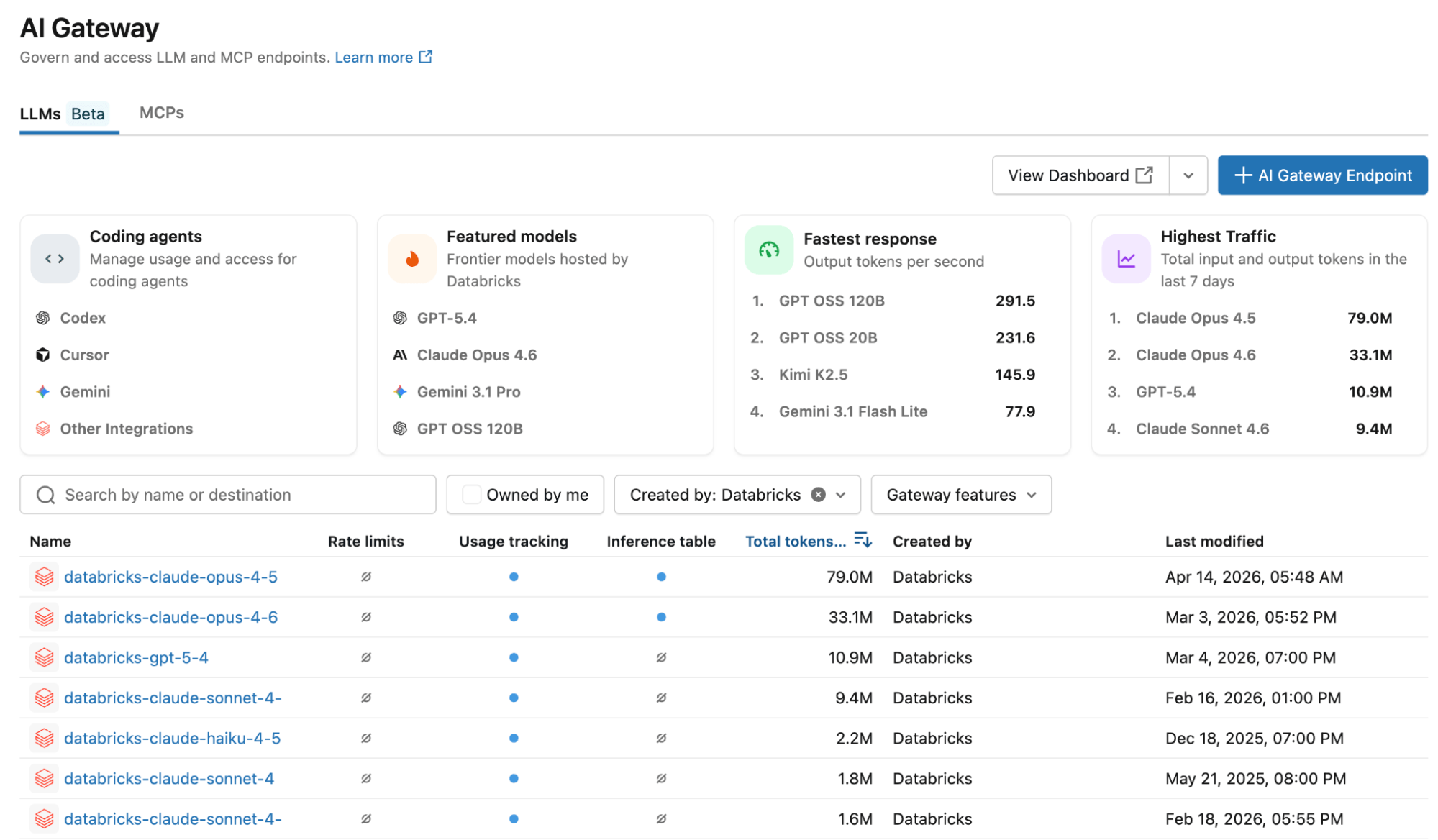
You can now set up a new LLM endpoint or MCP server in seconds—choose your model (Claude Opus 4.6, GPT-4, Gemini, Llama, or any provider-native API) and configure governance once. The same framework applies across Anthropic, OpenAI, Google, and open-source models.
Give your support team a Claude endpoint for conversational AI. Use GPT-4 for structured data extraction. Equip your engineers with Codex or Claude for coding agents. Bring in Gemini for multimodal workflows. You can choose the right model for each task without reworking governance each time. Policies stay consistent across providers—no duplicate setup, no separate configurations to manage.

How does Unity Gateway enforce fine-grained permissions and guardrails for agents?
Fine-grained permissions and guardrails prevent what shouldn't happen in the first place.
Granular access control for tools
When agents call MCP servers to access internal systems, Unity Gateway supports on-behalf-of user execution. The MCP executes with the requesting user's exact permissions, not a shared service account. If a user can't access a Salesforce record, neither can the agent—even with elevated privileges.
Flexible guardrails powered by LLM judges (Beta)
Unity Gateway's guardrails use a prompt + model approach—configure them to run on requests, responses, or both:
- PII Detection & Redaction: Detects and masks emails, SSNs, phone numbers before they reach external models
- Content Safety: Block toxic, harmful, or inappropriate content with customizable filters
- Prompt Injection Detection: Catch jailbreak attempts trying to override system instructions
- Data Exfiltration Prevention: Prevent exposure of training data or proprietary content
- Hallucination Guard: Validate responses against grounding sources
- Custom Guardrails: Define your own with a custom prompt and model
Each guardrail is backed by an editable prompt and configurable model—not rigid pre-built logic. When violated, Unity Gateway can reject the request or mask sensitive data. All actions get logged for audit. This capability is currently rolling out and will be available in all supported regions within the next week.
What observability does Unity Gateway provide for AI agents?
Three teams need answers when AI agents hit production: FinOps wants to know what's costing money, engineering needs to debug failures, security needs audit trails. Unity Gateway gives each team what they need from the same unified logging infrastructure.
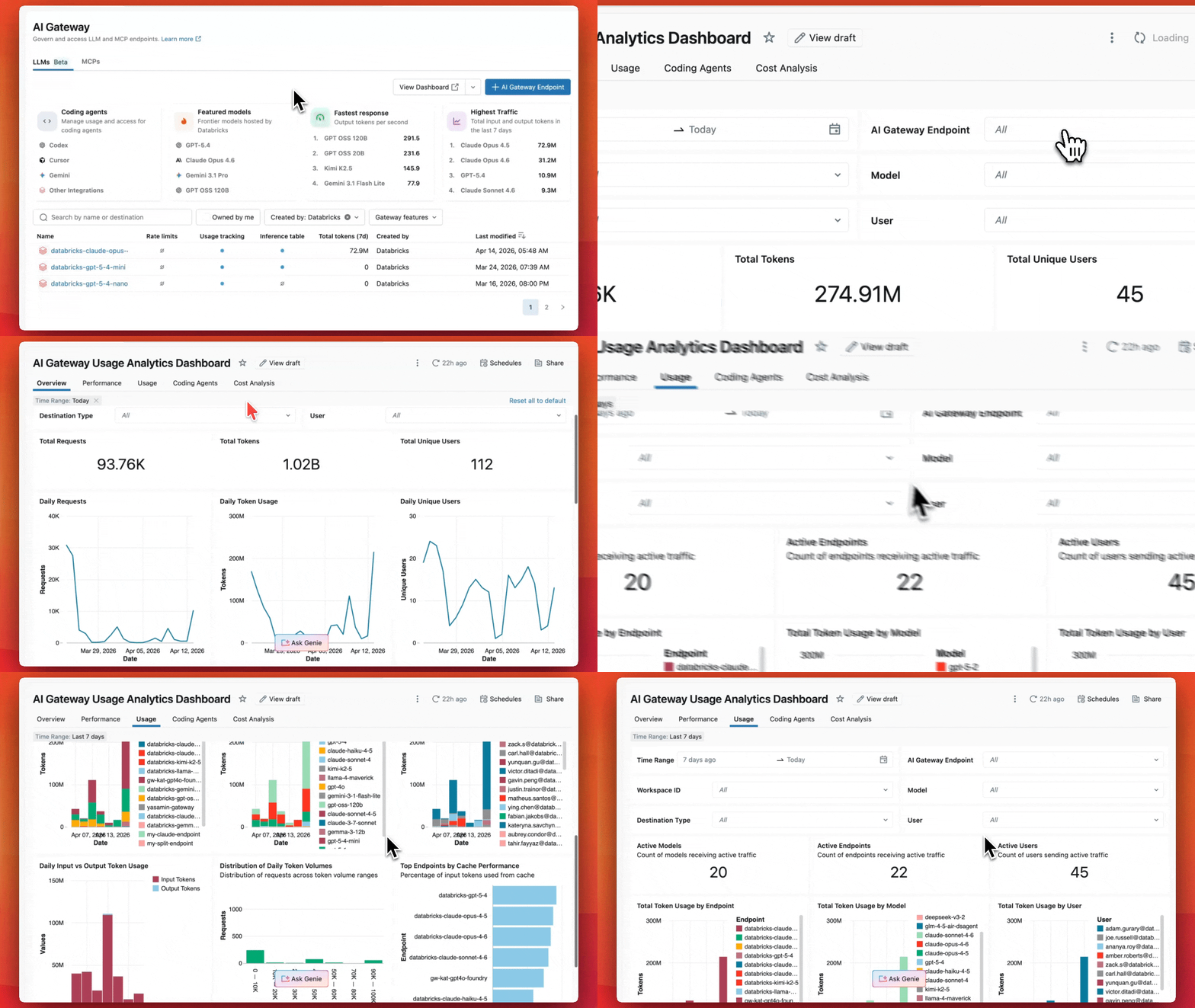
For FinOps: Track costs by what matters to you
Every request gets logged to Unity Catalog system tables with actual dollar costs—not just token counts. Provisioned throughput uptime, pay-per-token usage, and external model pricing all calculated automatically. Slice costs however your organization budgets:
- Endpoint tags: Group by team, environment, or cost center
- Request tags: Dynamic attribution for SaaS platforms proxying to end customers
- Identity: Aggregate by user or service principal—map spend to budget owners
- Model and provider: Track which models (Opus vs Sonnet) and providers (Anthropic vs OpenAI) drive costs
For Engineering: Full payloads for debugging
Enable inference tables that capture complete request/response payloads, latency, status codes, and errors to Delta tables. When an agent fails, trace exactly what prompt was sent, what the model returned, and where it broke—and use tools like Genie Code and MLflow to quickly debug and resolve issues.
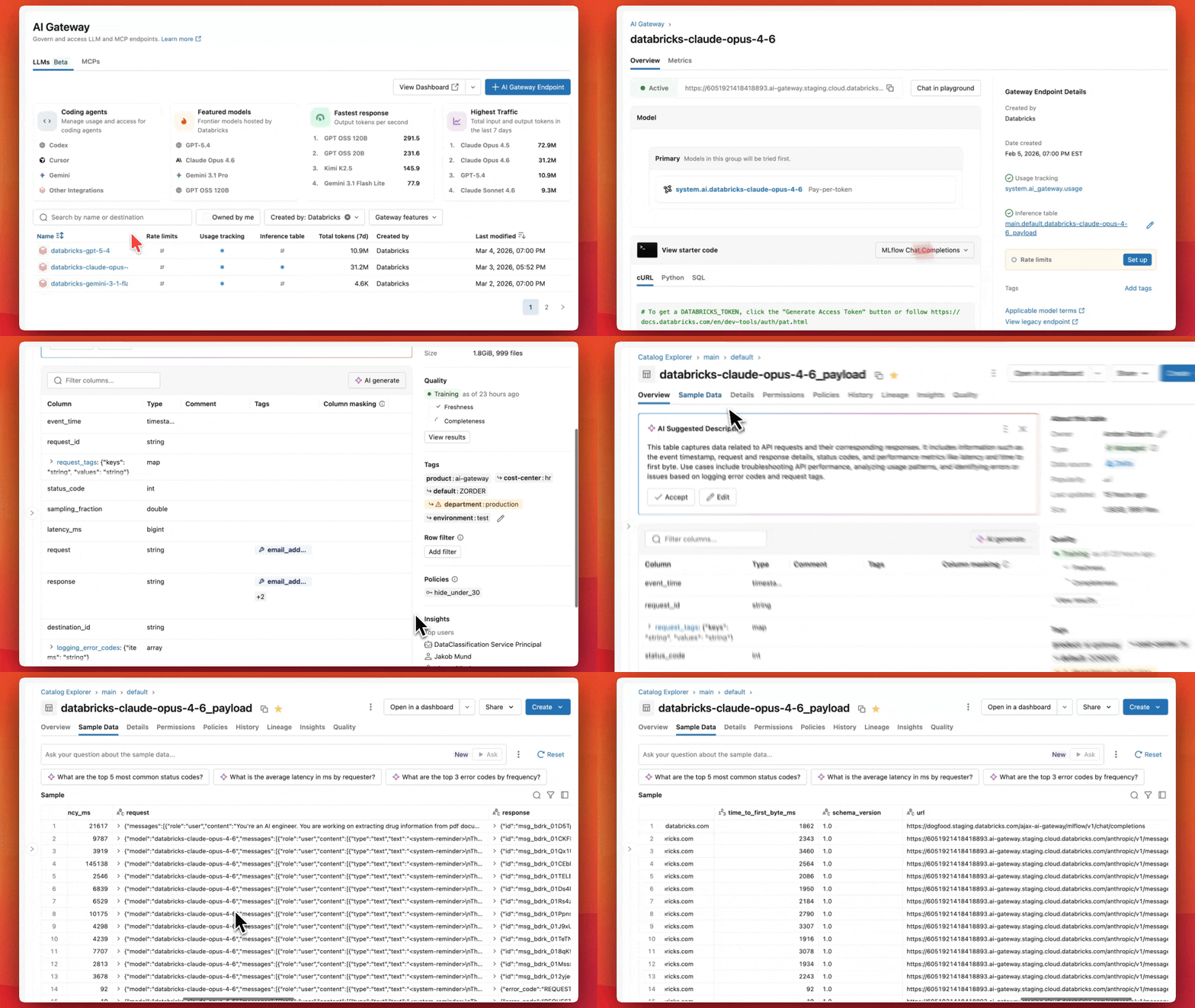
For Security: Complete audit trails
Every request logs the requesting identity, timestamp, and—for MCP calls—connection name, HTTP method, and whether the call was on-behalf-of user. Unity Catalog permissions control who sees what.
A single logging infrastructure powers three critical use cases—built on Delta tables you own and control.
How does Unity Gateway support reliable, flexible model access in production?
Unity Gateway gives you flexibility in how you call models, depending on what your application needs.
Unified APIs for seamless provider switching (Beta)
If portability matters—and it should—use Unity Gateway's OpenAI-compatible API. Your code stays the same across every provider. Write your application once, then switch between any model by updating the endpoint configuration. No code changes, no redeployment.
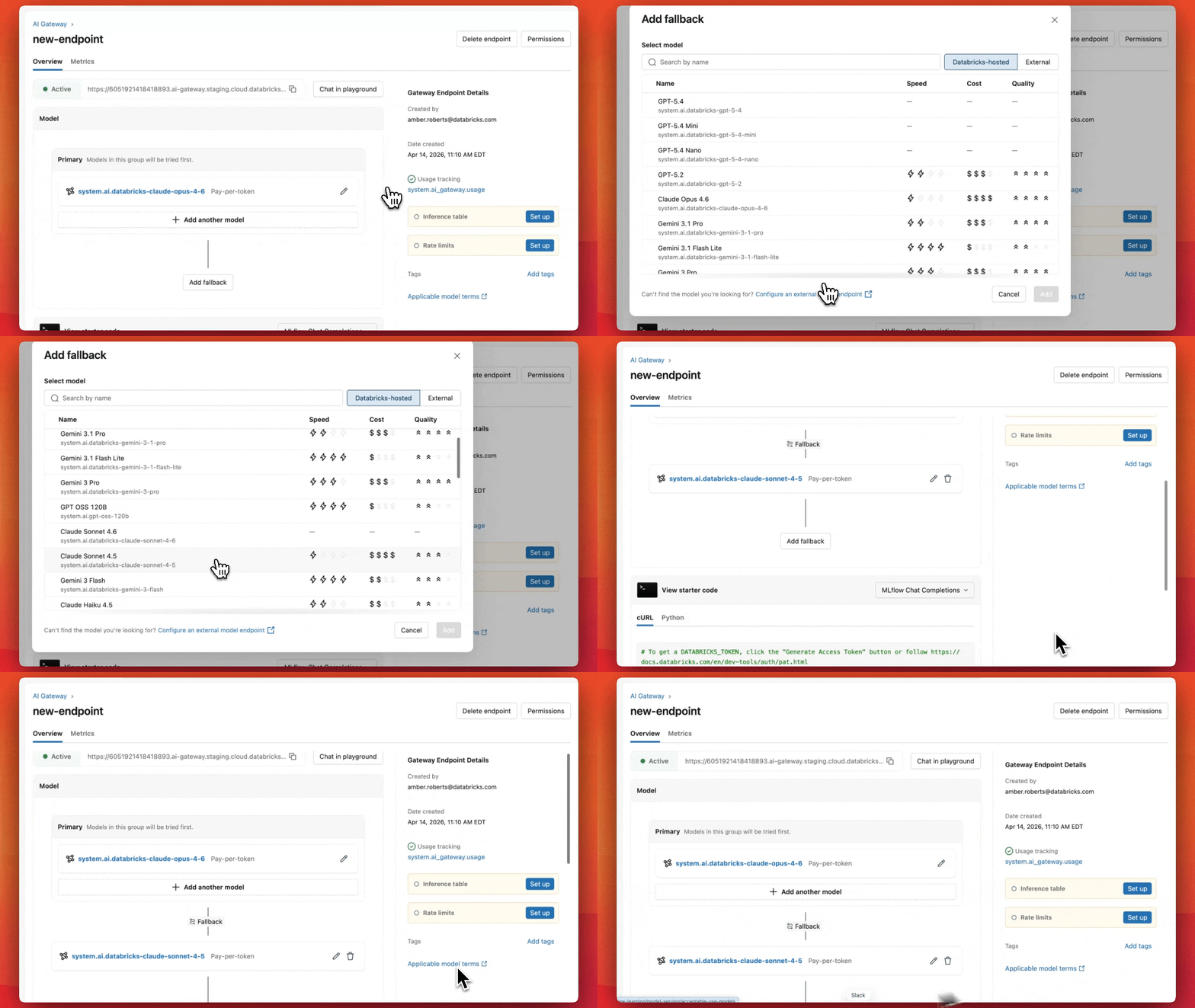
Automatic failover keeps systems running (Beta)
Configure fallback models, and Unity Gateway handles failures automatically. If your primary model hits rate limits or returns errors, requests route to your backup model in sequence until one succeeds. Opus quota exhausted? Traffic falls back to Sonnet. Provider experiencing an outage? Your application routes to an alternative. No manual intervention, no downtime.
Finally, Unity Gateway enables you to set rate limits at the endpoint, user, or group level to prevent runaway costs and protect your SLA before problems start.
How do you get started with Unity Gateway?
The new capabilities described above are available in supported Databricks regions. Open your workspace, navigate to Unity Gateway in the sidebar, and start governing your GenAI stack—LLMs and MCPs—from one place. Learn more in the documentation and the how-to blog on connecting agents to external MCPs securely.
Frequently Asked Questions
What is Unity Gateway, and how does it relate to Unity Catalog?
Unity Gateway is the new name for AI Gateway now that it has become part of Unity Catalog. This integration extends Unity Catalog's existing governance model—permissions, auditing, and policy controls—to how AI agents access LLMs and interact with tools like MCP servers and APIs. Rather than being a separate system, Unity Gateway lets you apply the same catalog-level policies you already use for data governance to AI agents and the models and tools they call.
Why can't traditional governance tools handle AI agent workflows?
Traditional governance tools operate in silos and can't provide a unified view across the full lifecycle of an agent's actions. Modern AI agents orchestrate multi-step workflows that can touch an LLM, an MCP server, and an internal API within the same request, often completing in under a second. Without a unified layer, it becomes difficult to answer basic questions like who authorized an action, what data was shared with which model, or whether policies were enforced consistently at every step.
What does on-behalf-of (OBO) access mean for MCP calls?
On-behalf-of (OBO) access means an MCP server executes with the exact permissions of the requesting user rather than a shared service account with broader access. If a user can't access a particular Salesforce record, for example, an agent acting on their behalf can't access it either, even if the underlying service account has elevated privileges. This keeps agent actions scoped to what the human user is already authorized to see and do, as described in Databricks' on-behalf-of user documentation.
What is MCP, and why does it need its own governance?
MCP, or Model Context Protocol, standardizes how AI agents discover and use external tools and systems dynamically. Because agents use MCP servers to reach sensitive systems—like pulling order history from Salesforce or checking shipping data through an internal API—Unity Gateway extends governance specifically to MCP calls, controlling which agents can access which external systems and tracking how that data is used, in addition to governing LLM calls. More detail on securing these connections is available in the how-to blog on connecting agents to external MCPs securely.
Which AI models and coding agents can I use through Unity Gateway?
Unity Gateway works across major model providers, including Claude Opus 4.6, GPT-4, Gemini, Llama, and any provider-native API, applying the same governance framework to all of them. It also supports coding agents such as Cursor, Codex, and Claude Code, so engineering teams can route coding workflows through the same policies applied to other agents. This makes it possible to pick the right model for each task—such as Claude for conversational AI or GPT-4 for structured data extraction—without reworking governance each time.
Get the latest posts in your inbox
Subscribe to our blog and get the latest posts delivered to your inbox.