Announcing the Public Preview of Lakeflow Designer
A no-code, AI-native, fully governed experience for data preparation on Databricks
by Jason Messer, Emanuel Zgraggen, V Maharajh, Matt Jones and Tracy Yang
- Lakeflow Designer is now in Public Preview, giving Databricks users a visual, no-code, AI-native way to prepare and analyze data.
- Built directly on Databricks and governed by Unity Catalog, Lakeflow Designer keeps data in place while providing lineage, permissions, and production-ready code from day one.
- Lakeflow Designer helps make AI-generated transformations easier to review and trust by breaking work into visual operators with step-by-step previews of how data changes.
Note: As of June 2026, Lakeflow Designer is now Generally Available. See the release notes and documentation for more info.
We first introduced Lakeflow Designer at Data and AI Summit last year. Since then, we’ve worked closely with early customers to refine the product and better understand where it is most useful. Today, we’re excited to announce the Public Preview of Lakeflow Designer. Lakeflow Designer removes one of the biggest bottlenecks in data today: the technical barrier to entry.
What is Lakeflow Designer?
Lakeflow Designer is a visual, no-code, AI-native experience for data preparation and analytics. Built directly in Databricks, it lets analysts, domain experts, and other less technical users prepare and explore data through a drag-and-drop canvas and natural language.
Each step in Lakeflow Designer is represented as an operator, giving users a clear picture of how data changes throughout the workflow. This makes it easier to build, validate, and understand transformations as you go.
Lakeflow Designer extends the power of Databricks Lakeflow to a broader set of users, enabling no-code data preparation while still generating production-ready code under the hood. Workflows can be scheduled and operationalized through Lakeflow Jobs, making it easy to move from interactive data prep to production pipelines.
Lakeflow Designer expands autonomy for business teams, enabling the efficient creation of data views through natural language and best practices, while ensuring data consistency, governance, and reliability. —Phelipe Naman, Data & Analytics Architecture Tech Lead, Sabesp
What makes Lakeflow Designer different?
Self-service data prep is not a new idea, but existing tools sit outside your central data platform. That comes with tradeoffs:
- Disconnect between the data prep tool and the data platform creates governance gaps and additional IT overhead
- AI is bolted on and suggestions are generic because the tool has no real understanding of the data
- Visual workflows are difficult to productionize, with logic often trapped in domain-specific languages or the UI
- Per-user licensing is expensive and limits who has access
Lakeflow Designer takes a different approach.
1. Built natively on Databricks for governance and simplicity
Lakeflow Designer runs directly where your data already lives - on Databricks. There’s no need to move data into a separate tool or onto your local machine. Data remains in place, governed by Unity Catalog from the start, while simplifying the overall data stack. Instead of managing a separate low-code tool with its own licensing, permissions, and administration model, organizations can enable self-service work directly within Databricks.
KPMG UK delivers audit and assurance services to thousands of companies - each with a different data landscape. Equipping our practitioners with Lakeflow Designer enables a visual, low-code and AI assisted workflow that scales and democratises our ability to translate complex and varied data sets into meaningful insights. —Mark Wallington, Audit Data and AI Partner, KPMG UK
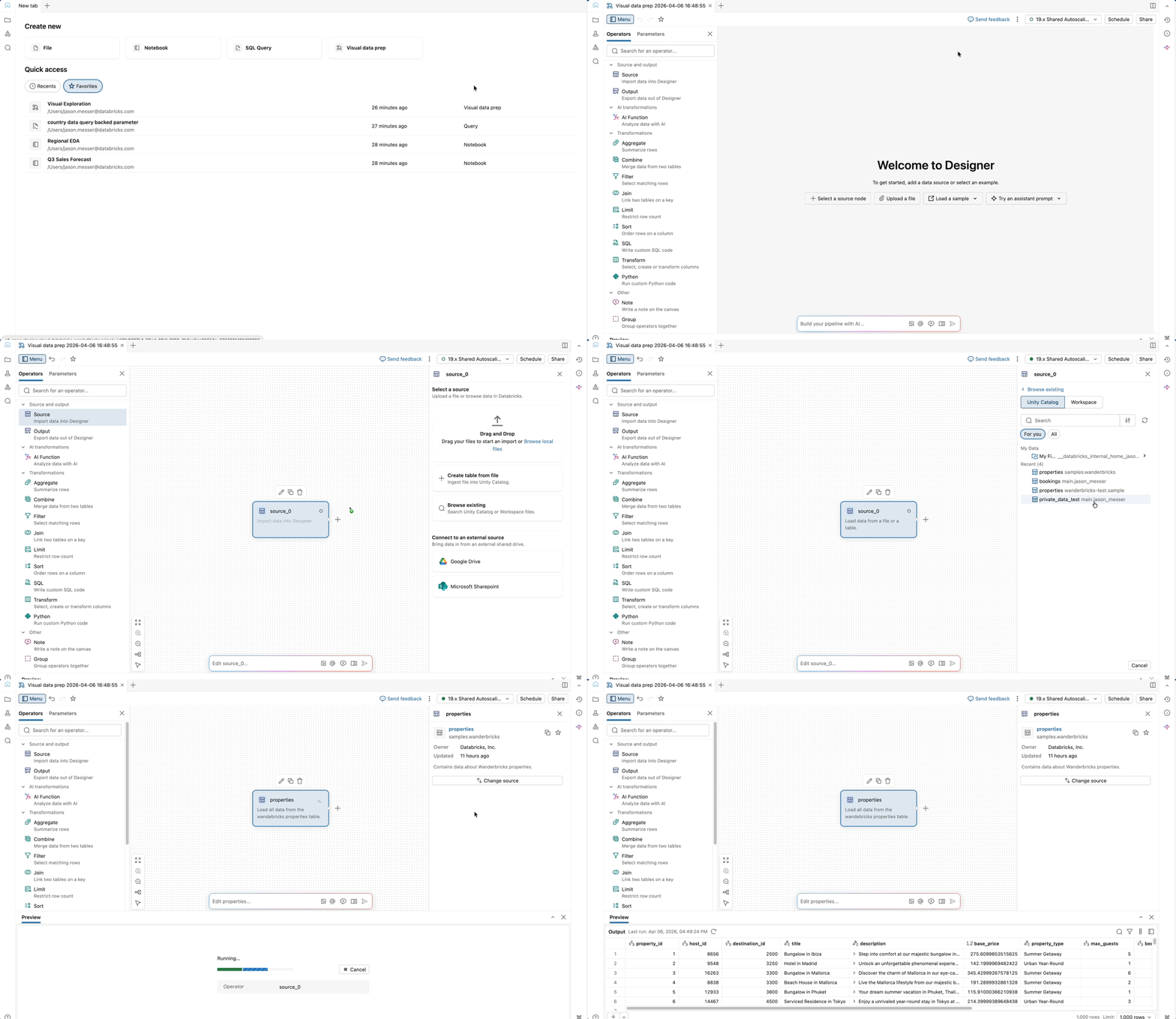
Start working with native source data right away
2. Built from the ground up for AI, and designed to make AI reviewable
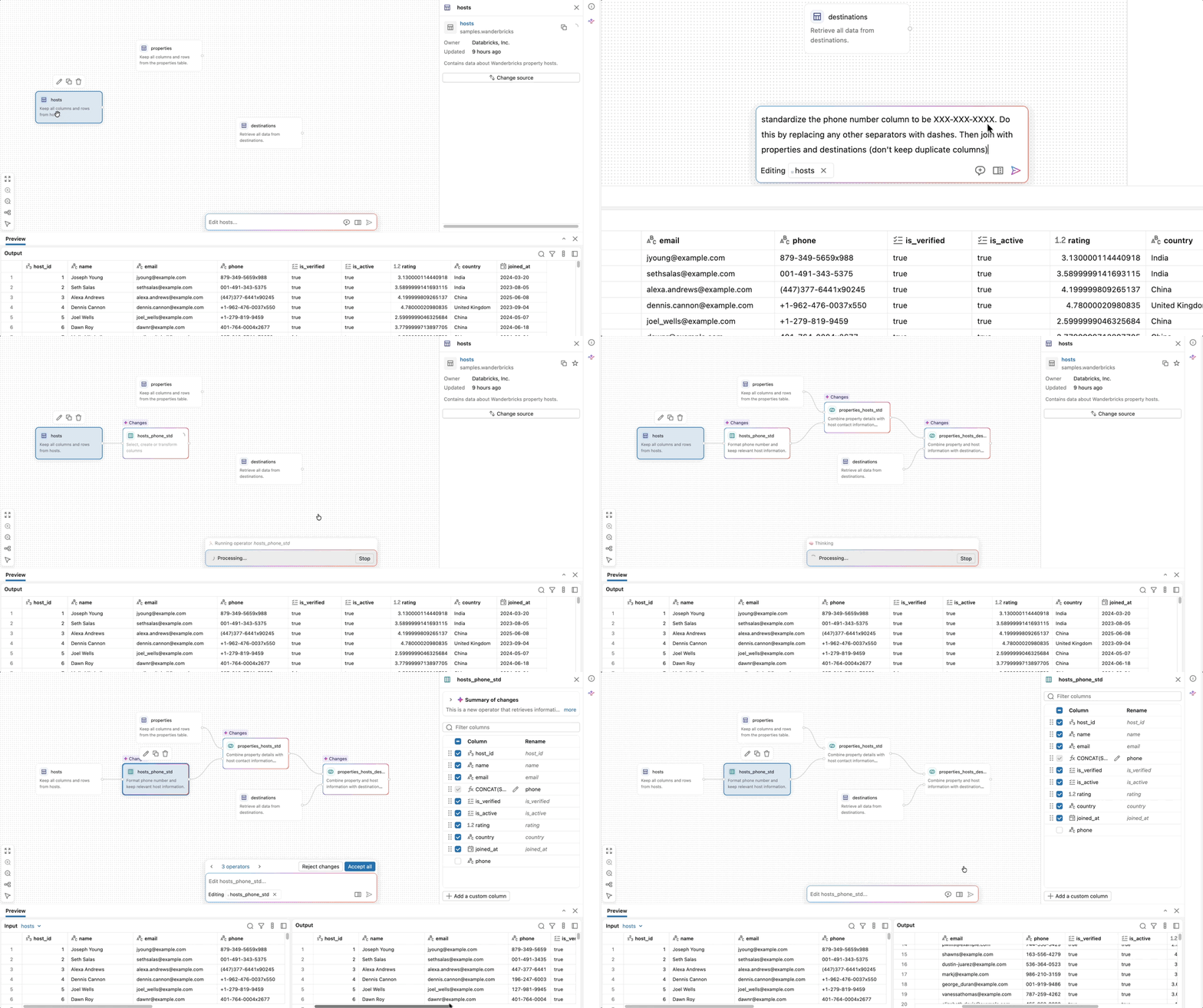
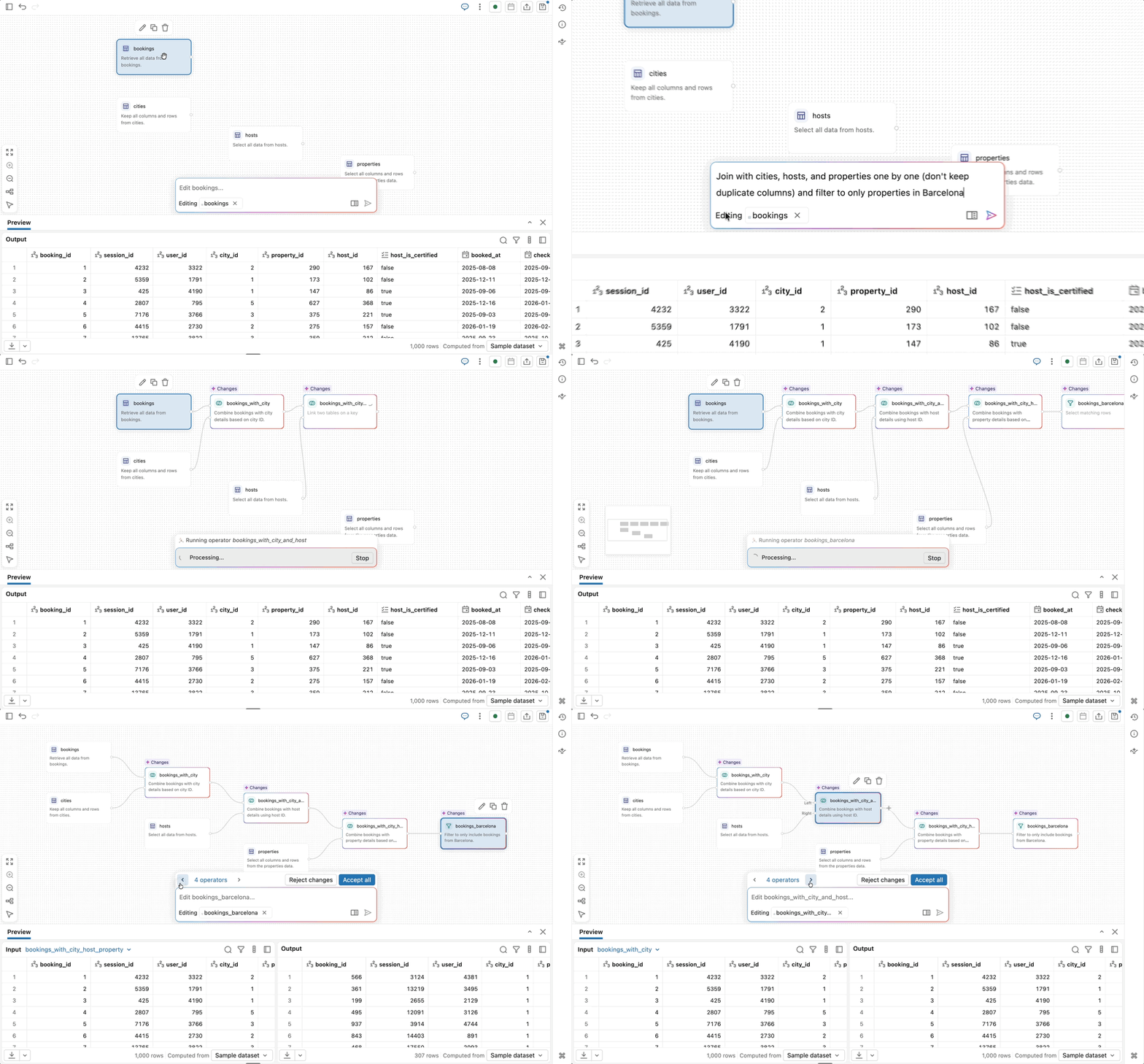
Lakeflow Designer is built on Genie Code, Databricks’ native agentic coding assistant. AI is not an add-on here. It is core to how the product works. Simply describe what you want in plain English, and Genie Code can generate or modify the workflow directly.
AI-native authoring that just works
Because Lakeflow Designer is embedded directly in the Databricks workspace, Genie Code can reason over more than just column names. It can use Unity Catalog metadata, table descriptions, lineage, popularity, and example queries to understand the semantic meaning of data and identify the right assets for a task. This leads to more context-aware and accurate suggestions than tools that only see the schema.
This architecture also opens the door to more agentic behavior. Rather than generating a static result once, the system can execute a transformation, inspect the output, and iterate when needed. For example, if a join fails or returns no rows, Genie Code can evaluate the result and try an alternative approach.
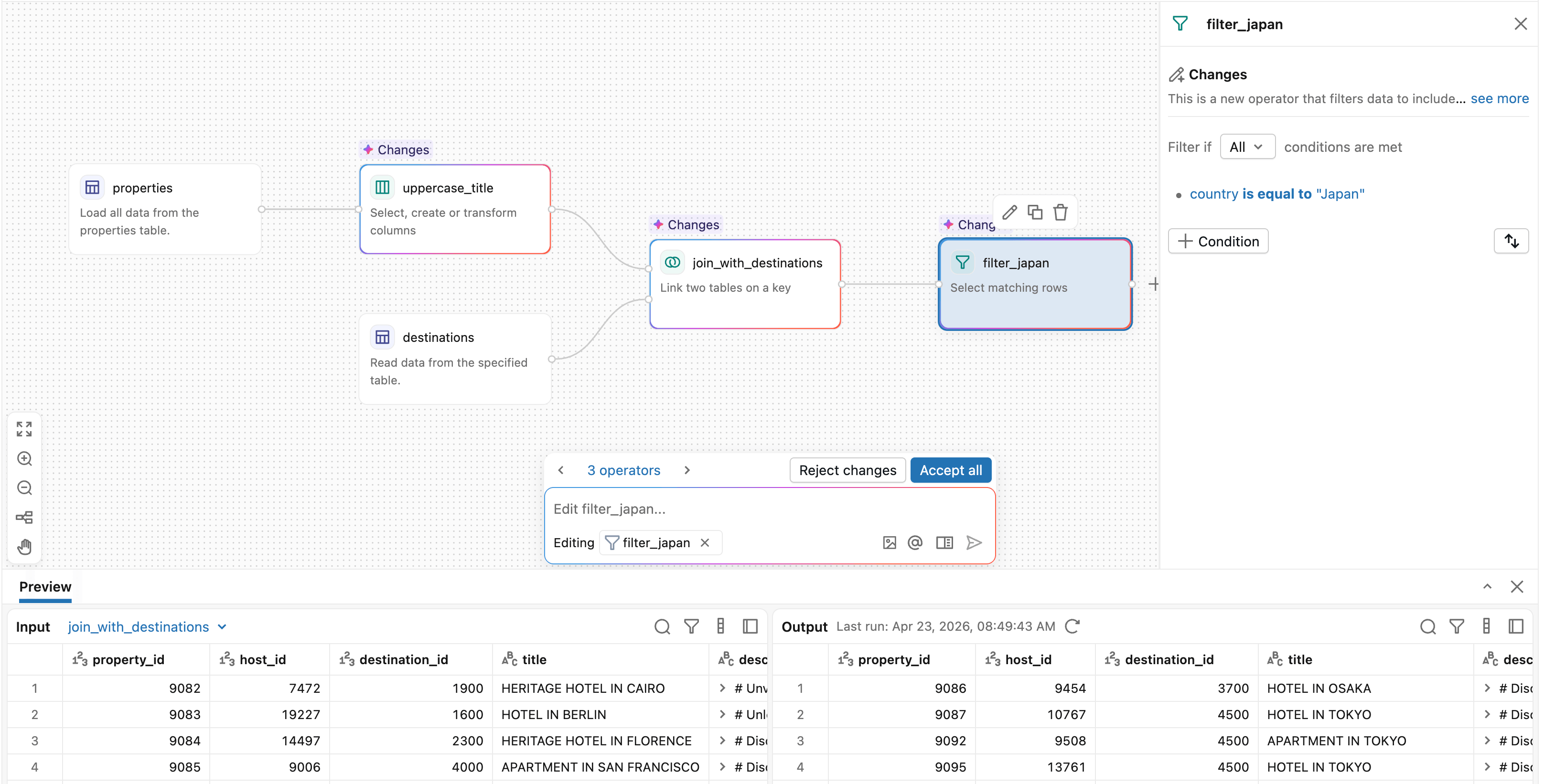
Perhaps just as importantly, Lakeflow Designer makes AI-generated transformations easy to understand and validate by breaking them into discrete visual operators with data previews at every step. You can see exactly what changed, where rows were filtered, how a join was resolved, and what the output looks like before moving on.
Lakeflow Designer is a key enabler for scaling data engineering beyond the core technical team on Databricks. By providing a visual interface integrated with natural language capabilities, it helps reduce the “SQL bottleneck,” allowing business teams to prototype and iterate on pipelines with greater autonomy. This goes beyond ease of use - it’s about organizational alignment. When transformations are visual and accessible, the gap between business intent and technical execution narrows, accelerating the journey from raw data to actionable insights. —Matheus Polycarpo, Data Engineering Leader, Serasa Experian
3. Every visual transformation generates real, production-ready code
Every transformation in Lakeflow Designer generates production-ready Python code under the hood. That code can be reviewed, versioned in Git, and integrated directly into larger production workflows. Over time, Designer will also support more native production outputs, such as materialized views. This ultimately reduces one of the biggest costs of self-service tools: handing off work to engineering to rebuild for production. Instead of redoing the work in another system, central data teams can build on what users have already created.
4. No per-user licenses
One of the biggest adoption barriers we’ve seen in traditional low-code tools is pricing. Seat-based licensing forces teams to decide upfront which users are worth giving access to, slowing adoption and limiting self-service before it even starts.
With Lakeflow Designer, there is no per-user license model. You only pay for the compute you use. Everyone across the business can participate in data work without creating a new procurement bottleneck.
How teams are using Lakeflow Designer
We’re already seeing hundreds of teams across industries use Lakeflow Designer to prepare and work with data in ways that were previously difficult to scale without engineering support.
For example:
- Consulting and professional services teams use Lakeflow Designer to clean client data from spreadsheets, PDFs, and shared files, then apply repeatable audit or analytics workflows to produce reports.
- Financial services organizations use Lakeflow Designer for self-service data preparation, regulatory reporting, and risk analysis.
- Business teams across marketing, operations, and logistics use it to combine data from multiple sources, answer operational questions, and prepare data for dashboards.
We’re also seeing Lakeflow Designer play an important role across the broader Databricks platform. Teams are using it to prepare data that flows into Metric Views and AI/BI dashboards, creating a complete self-service loop. Analysts can go from raw tables to polished dashboards without writing code.
With the adoption of Lakeflow Designer, we simplified the construction of data pipelines and elevated the quality of analyses through low-code development and AI capabilities powered by natural language. Non-technical teams began creating complex analytical processes autonomously-generating real business value and accelerating decision-making. More than that, the platform enabled us to scale a data-driven culture across the company, expanding the reach of advanced analytics to more areas and democratizing access to data intelligence throughout the organization. —Carlos Gumz, Data Lead, Hering
Getting started
Designer is currently available in all workspaces To get started, click the + New button in the top left of the workspace and select Visual data prep. If you do not see the Visual data prep option, Designer may need to be enabled by an admin in the preview portal.
Here are some other next steps you can take with Lakeflow Designer:
- Watch an 8-minute demo video of Lakeflow Designer
- Check out the documentation page for more detailed resources on getting started with Lakeflow Designer.
- Customer feedback continues to shape the product and play a key role in our roadmap. If you have any feedback or questions, we would love to hear from you at designer-feedback@databricks.com.
Get the latest posts in your inbox
Subscribe to our blog and get the latest posts delivered to your inbox.