Beyond Provisioning: The Developer’s Guide to Databricks Lakebase Autoscaling
by Bryan Clark and Susan Pierce
- Databricks Lakebase autoscaling eliminates the traditional over or under provisioning tradeoff by dynamically adjusting Compute Units based on CPU load, memory usage, and working set size.
- Developers define minimum and maximum CU guardrails to balance performance and cost, with scaling happening automatically and without database restarts.
- Combining autoscaling with scale to zero dramatically reduces idle compute spend while still delivering instant performance for AI, dev, and bursty workloads.
You only have 2 choices when provisioning databases:
- Over-provision: set your compute high for the worst case scenario and over-pay for idle CPU
- Under-provision: save cash now by setting compute low but a workload spike will cripple your system later
This is the “provisioning paradox”, and if you’ve ever managed a production database, you’ve faced this challenge.
For years, we’ve just accepted this as the cost of doing business with relational databases. But with the introduction of Databricks Lakebase, serverless Postgres integrated with the Databricks Data + AI Platform, the game has changed. We’ve moved away from fixed-size, always-on instances and toward a more intelligent, elastic model: Autoscaling.
In this post, we’re going to dive into how Lakebase autoscaling actually works, why it’s a lifesaver for modern developer workflows, and how to configure your guardrails so you can focus on building features instead of managing infrastructure.
What is Lakebase Autoscaling?
Lakebase Autoscaling is an intelligent compute model that ensures your database size matches your application's immediate requirements.
The correct sizing for your database is whatever your application requires. Database compute should be reactive, not static and constrained to a t-shirt size. With autoscaling, you define the range of resources that you want to allocate to the database. The system then dynamically adjusts the amount of compute available to your database based on the current load.
In Lakebase, this is handled through an abstraction called Compute Units (CUs). Autoscaling uses a granular approach where 1 CU allocates 2 GB of memory. This allows the system to scale in smaller, more precise increments, giving you tighter control over both performance and cost.
Spec | Value |
Memory per Compute Unit | 2 GB |
Max autoscaling range | 32 CU |
Max min-to-max CU spread | 8 CU |
Scale to zero inactivity timeout | User-defined (e.g., 15 min) |
Estimated cost savings (scale to zero) | 70%+ for bursty/dev workloads |
Database restart required to scale | Not within the configured min/max CU range |
The Mechanics: How the Scaling Algorithm Thinks
It’s easy to assume that autoscaling just looks at raw CPU usage, but Lakebase is smarter than that. To ensure your application performance doesn't degrade, the autoscaling algorithm monitors three key technical pillars:
1. CPU Load
The most intuitive metric. If your application starts executing complex joins or the volume of concurrent requests increases, the system detects the spike in processor utilization and adds more CUs to ensure query latency remains low.
2. Memory Usage
Relational databases are notoriously memory-hungry. This metric tracks how much memory your active processes and buffers are consuming. By monitoring memory, Lakebase can scale up to prevent Out of Memory (OOM) issues before they crash your session, ensuring consistent availability even under heavy load.
3. Working Set Size
This is perhaps the most important pro-level metric. The working set is the portion of your data that is frequently accessed and should ideally stay “hot” in the cache. If your working set grows larger than your currently allocated RAM, the database has to "swap" data to disk, which is orders of magnitude slower. Lakebase estimates your working set size and scales your compute up to ensure your "hot" data stays in high-speed memory.
The beauty of this approach is that it all happens without restarts. Your database connections stay open, and your application remains responsive while the underlying infrastructure fluidly adapts to your traffic.
Configuring the Guardrails: Min and Max CUs
Autoscaling doesn't mean infinite resources or infinite bills. As a developer, you need control over your performance floor and your cost ceiling. You do this by setting a scaling range.
Defining the Scaling Boundaries
When you configure a Lakebase compute instance, you'll set two primary values:
- Minimum CU: This is your baseline. It ensures that even during low-traffic periods, your database has enough "snappiness" to respond to administrative tasks or background jobs.
- Maximum CU: This is your budget safety net. It prevents a runaway process, a recursive query bug, or an unexpected traffic surge from scaling your costs beyond what you've authorized.
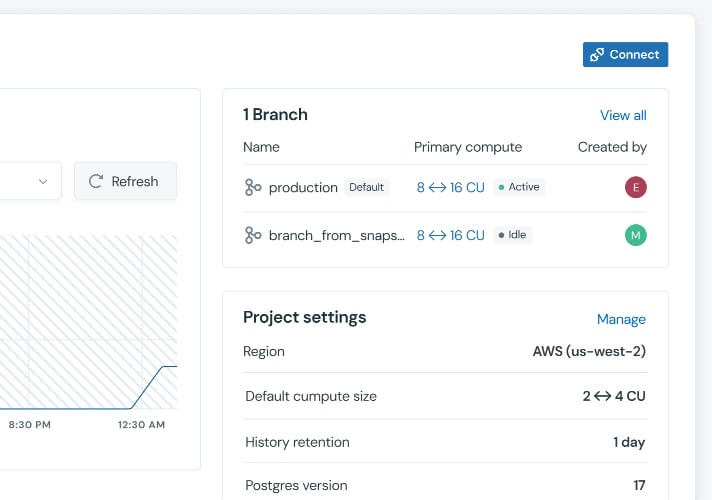
Important Boundary Note: To keep scaling predictable and highly responsive, Lakebase requires that the difference between your maximum and minimum compute size does not exceed 8 CU (for example, a range of 2 to 10 CU). Lakebase Autoscaling supports ranges up to 32 CU. For workloads that consistently require more power, larger fixed-size computes are available as well.
Real-World Scenarios: When Autoscaling Wins
1. AI Agent and Interactive App Workloads
If you’re building AI-driven applications or autonomous agents on Databricks, your traffic patterns are almost never linear. An agent might sit idle for hours and then suddenly trigger a massive chain of queries as it processes a complex prompt or ingests a new dataset.
Autoscaling ensures the database handles these sudden bursts of activity without requiring you to "pre-warm" the infrastructure. When the agent finishes its task, the database scales back down automatically, protecting your project's budget.
2. Development, Testing, and Branching
Modern database workflows in Lakebase often involve database branching, which is the ability to create isolated, copy-on-write environments for specific features or PRs.
Most of these dev branches sit idle 90% of the time. With autoscaling, these environments stay at their minimum CU when they aren't being used. However, the second a CI/CD pipeline starts running a heavy integration test or a developer begins a manual data validation, the environment instantly scales up to provide production-grade performance.
The Scale to Zero Advantage
Autoscaling handles the active hours, but what happens when the workday ends?
This is where scale to zero becomes the ultimate cost-optimization tool. When enabled alongside autoscaling, Lakebase can detect periods of total inactivity. After a user-defined timeout, such as 15 minutes of no queries, the compute instance suspends entirely.
- Zero compute cost: While the instance is suspended, your compute bill drops to zero.
- Instant restart: The moment a new connection or query arrives, the database instantly resumes at your defined minimum autoscaling size.
For development environments or internal dashboards used only during business hours, this combination can reduce monthly compute costs by 70% or more.
Why Modern Developers are Moving to Lakebase
The shift to autoscaling is as much about operational simplicity as it is about dollars and cents.
- No manual resizing: You don't have to watch Grafana boards and manually resize instances when you hit 80% CPU usage.
- Predictable performance: By monitoring the working set and memory usage, Lakebase scales before your users notice a slowdown.
- Granular control: The 2 GB-per-CU model allows for much finer tuning than traditional cloud providers that force you to double your instance size and your bill just to get a little more RAM.
Conclusion
The era of best-guess database sizing is over. By leveraging Databricks Lakebase Autoscaling, you can stop acting as a part-time sysadmin and start focusing on what matters: your code and your data.
Set your boundaries, enable scale to zero for your dev branches, and let the Lakebase algorithm handle the heavy lifting. Your users and your stakeholders will thank you.
Ready to get started?
Dive deeper into the Lakebase Autoscaling Documentation to learn how to configure your first autoscaling compute instance today.
Frequently Asked Questions (FAQ)
What is autoscaling? Autoscaling is an intelligent compute model that ensures your database size matches your application requirements. It moves away from fixed-size instances to an elastic model that adjusts the compute available to your database based on current load.
What is the primary goal of autoscaling? The primary goal is to solve the provisioning paradox where developers traditionally had to choose between overpaying for idle CPU or risking system failure during workload spikes. It allows database compute to be reactive and precisely sized rather than constrained to a static size.
What are the benefits of using autoscaling? Benefits include operational simplicity by removing the need for manual resizing and predictable performance through proactive monitoring of memory and working sets. Additionally, the granular 2 GB per CU model offers finer cost and performance tuning compared to providers that require doubling instance sizes for more RAM.
How does autoscaling manage capacity dynamically? Capacity is managed through a granular abstraction called Compute Units, where one unit allocates 2 GB of memory. The system adds or removes these units without requiring database restarts, ensuring connections stay open while the underlying infrastructure adapts.
How does autoscaling enhance cloud scalability? Autoscaling enhances scalability by allowing databases to handle sudden bursts of activity without requiring manual pre-warming. This elasticity ensures that infrastructure can scale up for production-grade performance during heavy tasks and automatically scale back down to protect budgets when finished.
What metrics does Lakebase Autoscaling monitor? The algorithm monitors three key technical pillars: CPU load to maintain low query latency, memory usage to prevent out of memory issues, and working set size to ensure frequently accessed data stays in the cache.
What is a Compute Unit (CU) in Lakebase? A Compute Unit is a granular resource abstraction used in Lakebase to define the scaling range. Each individual unit provides exactly 2 GB of memory.
What is the maximum CU range supported by Lakebase Autoscaling? Lakebase Autoscaling supports ranges up to a maximum of 32 CU. Within that range, the system requires that the spread between the user-defined minimum and maximum CU does not exceed 8 CU.
How does scale to zero work in Lakebase? Scale to zero detects periods of total inactivity and suspends the compute instance entirely after a user-defined timeout. Once a new connection or query arrives, the database resumes at the defined minimum autoscaling size.
What is the difference between autoscaling and scale to zero in Lakebase? Autoscaling handles active hours by adjusting compute size within a set range to match fluctuating demand. Scale to zero handles inactive periods by suspending the instance entirely to eliminate compute costs when there are no queries.
Can I use Lakebase Autoscaling with database branching? Autoscaling is highly beneficial for database branching because it allows isolated environments for features to sit at a minimum CU while idle. These branched environments then scale up to provide production-grade performance whenever a developer begins validation or a CI/CD pipeline runs tests.
Does autoscaling require a database restart? Your database connections remain active and open while Lakebase fluidly scales the underlying resources within your configured range. However, changing the minimum or maximum CU configuration may cause a brief interruption to active connections.
What is the RAM-to-CU ratio in Lakebase? Each Compute Unit (CU) provides exactly 2 GB of memory.
How much can I save using scale to zero? For workloads that are only active during certain parts of the day, such as dev branches or internal dashboards, users often see compute cost reductions of 70% or more.
Get the latest posts in your inbox
Subscribe to our blog and get the latest posts delivered to your inbox.