Database Branching: A Developer's Guide to Git-Style Workflows
Learn how database branching brings Git-style workflows to databases—using copy-on-write to create isolated, disposable environments for developers, CI, and AI agents.
- Database branching creates isolated environments via copy-on-write, sharing unchanged data and storing only differences—no full copies needed.
- It supports production-like testing, per-PR CI isolation, and easy recovery, with migrations (not merges) as the source of truth.
- It's critical for AI agents running many short-lived branches; safe use requires protected parents, mock data, TTLs, and access controls.
Git made isolated development a baseline for software teams. Each developer can create a branch, work independently, and merge changes when they're ready.
Database branching brings this same isolation to the database. It lets developers, continuous integration (CI) jobs, and AI agents create isolated database environments from a shared database state and make changes without affecting the parent database or each other.
That means less time waiting for shared environments, fewer test failures caused by other people's changes, and faster feedback on schema migrations. When something goes wrong, you can throw away the branch instead of repairing or restoring a shared database.
TL;DR
- Database branching creates isolated environments without full database copies. Copy-on-write makes this possible by sharing unchanged data and storing only what changes.
- Database branching is increasingly important for AI agents. It gives agents isolated environments to test changes and experiment without putting the parent database at risk.
- Operating database branches safely requires clear controls. Protect parent branches, restrict access to sensitive data, automate cleanup, and keep disposable environments reproducible.
What Is Database Branching?
Database branching gives you an isolated database environment based on another database's state at a specific point in time. The branch starts with the parent database's schema and data, but changes you make to the branch do not affect the parent or any sibling branches.
If you're familiar with Git, the basic idea should feel familiar. A code branch gives you a private line of development from a known commit. A database branch gives you an isolated database environment from a known database state.
One important difference is that you usually don't merge changes from a database branch back into the parent database. Instead, migration files remain the durable source of truth. You can test a migration on your branch, make sure it works against realistic data, and then let your deployment pipeline apply that same migration to the target database. In this way, database branching makes long-standing practices such as evolutionary database design, database-per-developer environments, and version-controlled migrations practical even when you're working with production-scale data.
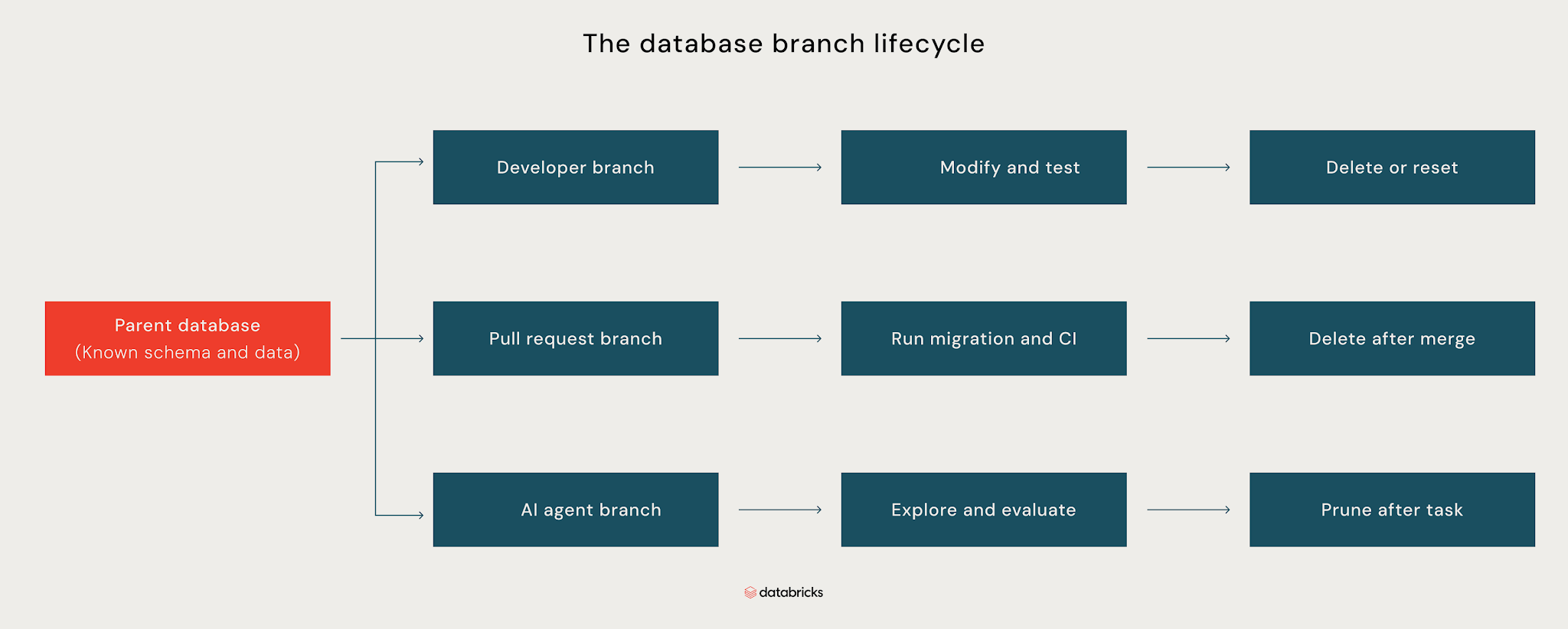
As shown above, a parent database provides the known schema and data for multiple isolated branches. You can use a developer branch to modify and test changes, a pull request branch to run migrations and CI, or an agent branch to explore and evaluate changes. When the work is done, each branch can be reset, deleted, or pruned without affecting the parent database or the other branches. Database branching makes this level of isolation possible through copy-on-write.
How Copy-on-Write Database Branching Works
Copy-on-write (CoW) makes database branching practical by avoiding an upfront full copy of the database. When you create a branch, it initially shares the parent’s existing data instead of duplicating it. Both can read the same underlying data, while changes made to one remain isolated from the other. But when the branch modifies data, the storage layer creates a new version of the affected data for that branch, while unchanged data remains shared with the parent.
Lakebase uses this copy-on-write approach to create database branches without duplicating the entire parent database. As a result, each branch requires additional storage only for the data that diverges from its parent.
Consider a 40 GB database. With a traditional full copy, creating a developer branch and a pull request branch requires an additional 80 GB of storage. However, with copy-on-write, both branches initially share the parent’s data and consume additional storage only when they diverge.
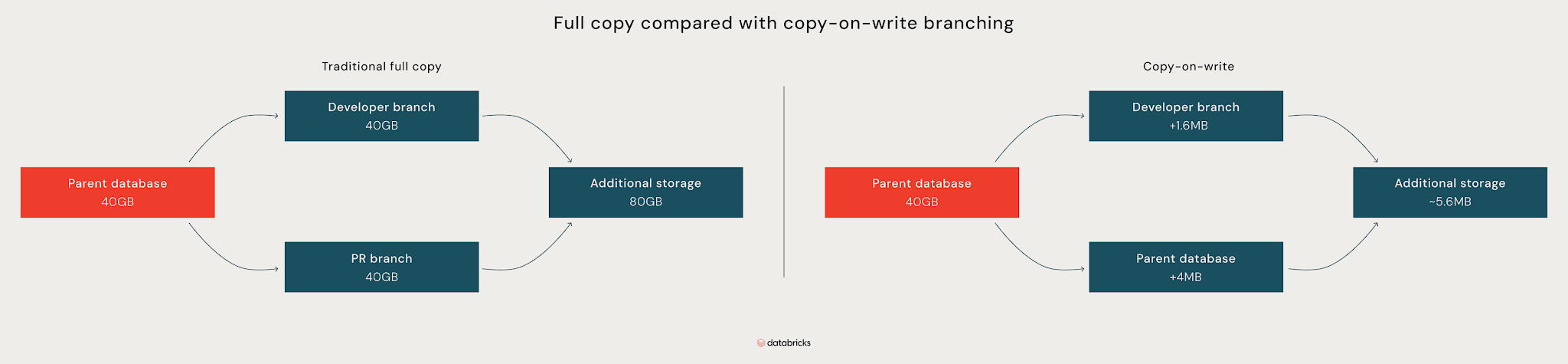
As shown in the diagram above, if the changes in the developer branch are just 1.6 MB and the changes in the PR branch are just 4 MB, the two branches add only about 5.6 MB of storage. Traditional copies duplicate the entire database for each branch, while copy-on-write branches share unchanged data and store only their changes.
The same principle applies when the parent changes after a branch is created. The branch continues to reference the original version of unchanged data, while the parent writes new versions of the pages it modifies. This allows the two branches to change independently without duplicating unchanged data.
What Database Branching Makes Possible
Once you have database branching, several development workflows become much easier to implement:
Production-like baselines
You can create database branches from a protected production snapshot so every developer and CI job starts from the same known state. That lets you test migrations against realistic data, existing constraints, and production-scale tables instead of an empty local database or stale staging environment.
For example, a migration like ALTER TABLE orders ADD COLUMN customer_id UUID NOT NULL may work on an empty database but fail against millions of existing orders. Testing it on a production-like branch exposes that problem before the migration reaches staging or production. When the branch becomes stale, you can delete it and create a fresh one from the same baseline.
Per-PR isolation
You can give every pull request its own database environment. CI creates the branch when the PR opens, applies the proposed migrations, and runs integration tests against it. When the PR closes, the pipeline deletes the branch.
This means two developers can make conflicting schema changes without affecting each other's tests. A PR that adds a column, changes a constraint, or modifies an index gets its own database state, so CI tests the change in isolation rather than against whatever another developer is doing in staging.
Easier failure recovery
Branches also make it easier to isolate failed migrations and experiments. If a backfill produces unexpected results, a test corrupts data, or a migration leaves a branch in a bad state, you can discard the affected branch and create a fresh one from the parent instead of continuing to work with a contaminated development environment.
For example, you can safely test a destructive operation such as DELETE FROM orders WHERE created_at < ... on a branch, inspect the results, and discard the branch when you're done. The parent database remains untouched throughout.
For developers and DevOps teams, these benefits are already compelling. However, if you're building or running AI agents, database branching becomes important at an entirely different scale.
Your compact guide to modern analytics

Why AI Agents Make Branching Infrastructure-Critical
AI agents may need their own database environments to test different approaches to a task. They can create a branch for each approach, compare the results, and discard the ones they don't need. Across an agent fleet, that can mean hundreds or thousands of short-lived environments running at once.
At that scale, full database copies become expensive and slow to provision. Database branching avoids that overhead, making it practical for agents to create and discard environments as they work.
Branching can also reduce the blast radius of agent mistakes by giving agents an isolated environment for testing changes. Instead of granting an agent write access to a production database, you can give it access to a branch where it can test destructive operations without affecting the parent.
How to Operate Database Branches Safely
Database branches are easiest to manage when you treat them as disposable environments and automate their lifecycle. A few practices keep that workflow safe and predictable:
- Protect production and parent branches: Restrict who can write to, reset, or delete production and other important parent branches. Agents and developers should work on child branches instead.
- Use safe data for ephemeral branches: Avoid copying sensitive production data into short-lived development or agent branches unless it is required and appropriately protected. Where possible, use mock data so that disposable environments do not become a path for exposing production information.
- Set a time to live (TTL) for branches: Give short-lived branches an expiration time so abandoned PRs, failed CI runs, and terminated agent tasks do not leave environments running indefinitely.
- Keep migrations as the source of truth: Treat migration files as the source of truth. Test migrations on a branch, review them in version control, and apply the approved migration to the target database rather than promoting changes made directly on a branch.
- Make environments reproducible: Treat branches as disposable rather than long-lived environments that require manual repair. Keep the configuration needed to recreate an environment in version control so a stale or corrupted branch can be deleted and recreated from its parent.
- Control access and resource usage: Give developers and agents only the permissions they need, and monitor branch age, compute, storage, and the number of active environments. Use tools like Unity Catalog to govern access to the data available within these environments.
With these guardrails in place, teams can use database branches as disposable environments across development, continuous integration and continuous delivery (CI/CD), and agent workflows. Each branch provides an isolated environment for testing changes and can be automatically removed when the work is complete.
Wrapping Up
Database branching gives you a practical way to create isolated database environments without the cost and overhead of full copies. You can use branches to test migrations against realistic data, give every pull request its own database, recover from failed experiments, and run database-backed workloads in parallel.
Start with a simple workflow, such as one branch per pull request, and automate creation and cleanup. From there, you can extend branching to developer environments and agent workloads as your needs grow. Ready to try it? Explore database branching with Databricks Lakebase or follow a hands-on tutorial for implementing database branching in Postgres.
Frequently Asked Questions
What is database branching?
Database branching creates an isolated database environment from a parent database at a specific point in time. The branch starts with the parent's schema and data, but changes made to the branch remain isolated. With copy-on-write, branches share unchanged data with the parent, which makes them fast to create and inexpensive to discard.
How is database branching different from Git branching?
The idea is similar: both let you create an isolated environment from a known state and make changes without affecting the original. Git branches isolate source code, while database branches isolate database schema and data.
The workflows differ after that. Git branches are typically merged back into the main branch, while database branches usually aren't. Instead, you test your migration on the database branch and then apply the reviewed migration to the target database through your deployment process.
What is the purpose of database branching?
Database branching gives developers, CI jobs, and AI agents isolated environments for testing changes without affecting production or other workloads. You can use branches to test migrations against realistic data, create per-PR environments, recover from failed experiments, and run multiple database-backed workloads in parallel.
What are the two types of database branching?
The two common approaches are full-copy branching and copy-on-write branching. Full-copy branching duplicates the database for each branch, so creation time and storage requirements grow with database size. Copy-on-write branching shares unchanged data with the parent and stores only changes made to each branch.
What types of databases support branching?
Branching depends more on the database's storage architecture than on its data model. Relational, document, key-value, and graph databases can all theoretically support branching, but the implementation and capabilities vary by platform.
How do I implement database branching?
Implementation depends on your database platform and storage architecture. In general, you need a parent database and a way to create isolated branches from a known database state. Databricks Lakebase provides database branching for development, CI, and agent workflows, with branches that can be created and removed as needed. For a practical implementation, see the Databricks branch-based development tutorial.
Get the latest posts in your inbox
Subscribe to our blog and get the latest posts delivered to your inbox.