Debunking 8 data layout myths: why Liquid Clustering outperforms partitioning
The data layout for the modern lakehouse
by Jeffrey Gong, Yu Xu and Rahul Mahadev
- Liquid Clustering is the data layout for open table formats that outperforms partitioning while sidestepping its limitations
- 8 common myths keep teams tied to partitioning, and none of them hold up anymore
- Customers using Liquid Clustering report dramatic improvements in query latency, write throughput, storage efficiency, and data freshness, with the largest gains compounding at petabyte scale
Introduction
Laying out data is one of the oldest problems in computing.
For over 15 years, since the advent of Hadoop and Hive, partitioning has been the standard way to physically organize data for processing and analysis. However, today’s Lakehouses serve agents, real-time pipelines, and query patterns that shift faster than any human can re-partition for.
Liquid Clustering is the modern standard and customers are running it at every scale, including dozens with petabyte scale tables in production. In this blog, we’ll cover why Liquid Clustering wins in the Lakehouse. Along the way, we’ll debunk 8 common data layout myths, walk through 3 success stories of teams converting partitioned tables to Liquid Clustering, preview what’s coming next, and show how to get started.
Why Liquid Clustering wins in the modern lakehouse
Hive-style partitioning forces users to commit, at table-creation time, to a physical organization of data that manifests in the file structure. Pick a column with too high cardinality and you get billions of tiny files. Pick the wrong column and queries may get slower, not faster. Either way, you’re stuck rewriting the table. It’s common to get wrong: in our analysis, Hive-style partitioning leads to over-partitioning and small-file problems in more than 75% of cases.
Liquid treats clustering keys as input that the engine uses to guide optimal file organization. Keys can be changed at any time, or intelligently selected through Automatic Liquid Clustering. Cardinality isn’t a constraint, and the layout can evolve over time without unnecessary rewrites.
The benefits of Liquid Clustering all derive from the above principle: better skew handling, row-level concurrency, no small-file problems, multi-dimensional clustering, and lower write amplification.
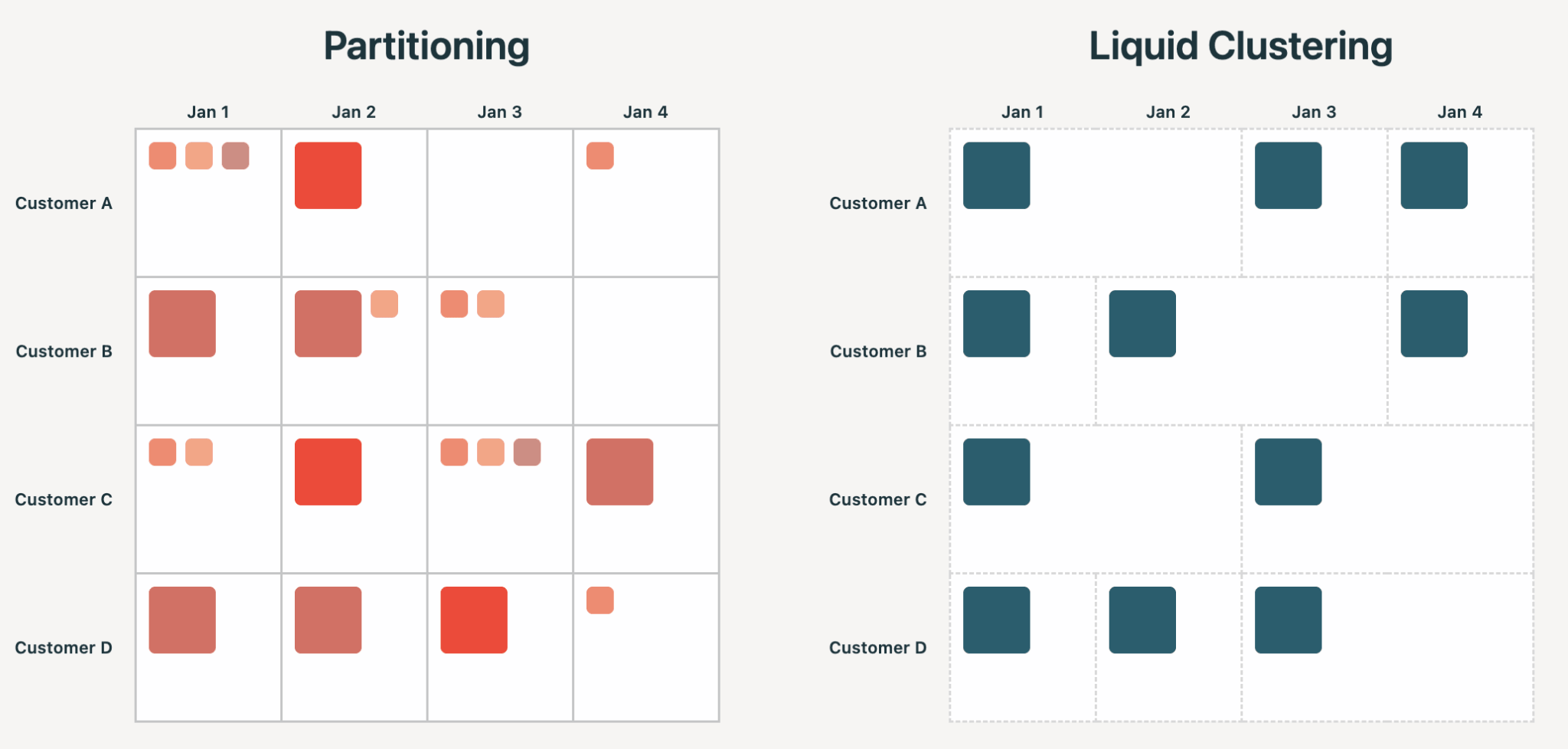
In 2026, the layout should be an implementation detail of the table, with every engine that reads or writes benefitting from it. This is increasingly important as agents enter the Lakehouse, generating and consuming more data than ever. Humans and agents need forgiving interfaces, free of the potential side-effects of Hive-style partitioning.
Debunking 8 common data layout myths
Liquid Clustering became Generally Available in 2024. Since then, we’ve iterated on it non-stop with customers running it at scale. In that time, some common myths about Liquid Clustering and partitioning have persisted, and today we want to debunk them.
Myth #1: Partitioning is faster because it can prune directories instead of files
The myth goes: With partitioning, Spark or other engines can prune whole directories without opening any files inside of them.
Reality: Directory-pruning does not exist on modern open table formats like Delta and Iceberg. Delta, for example, uses a transaction log to track every data file along with per-column statistics, and pruning happens against those statistics, not the directory structure. The engine never lists directories to plan a query. It reads the transaction log, evaluates filters against statistics, and skips files that don’t match. Liquid Clustering uses the same mechanism. Whether your data lives in `date=x/hour=y/` or a flat directory of clustered files, the engine prunes at file granularity. There is no directory-level shortcut to lose.
Myth #2: Partitioning is better when filtering on a low-cardinality column
The myth goes: For a column with a small number of distinct values, partitioning gives you perfect data separation and good file sizes.
Reality: Liquid Clustering automatically detects when to apply low-cardinality optimizations. For example, if you cluster by (date, user_id), and date has low cardinality, the system aims for each file to contain rows from only a single date. Higher-cardinality columns, like user_id, are then automatically used for finer-grained sorting within each date's files, without having to rely on other sorting techniques like Z-Ordering.
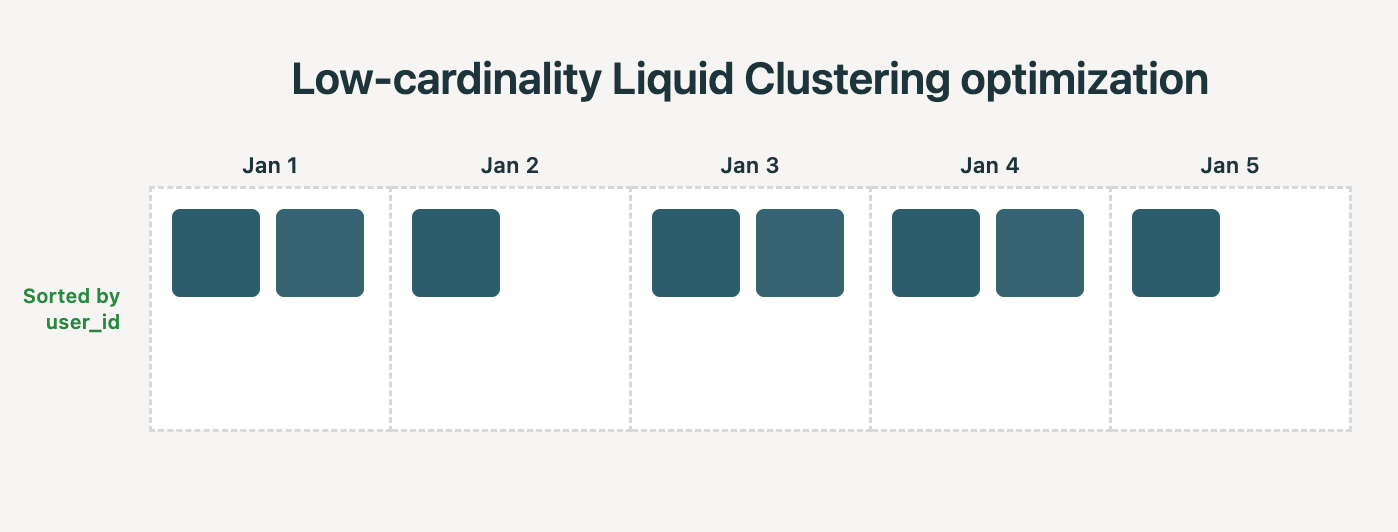
We saw the following improvements while benchmarking this Liquid optimization on a real-world data warehousing benchmark: 35% lower time for clustering and 22% faster query times.
Additionally, Liquid Clustering is designed to be better than partitioning when clustering on a high-cardinality column, as it always tries to create files of a good size.
Myth #3: Liquid Clustering doesn’t support metadata-only operations
The myth goes: Metadata-only operations are uniquely supported by partitioning. A DELETE aligned with partition boundaries only updates the table’s metadata, and aggregates on partition columns can be computed without scanning files. Liquid Clustering can’t do the same.
Reality: Liquid Clustering also supports metadata-only operations including DELETEs, COUNT, DISTINCT, and GROUP BY queries. The engine uses the same per-file min/max stats it uses for data skipping to determine when a query’s answer can be computed from metadata alone. In our benchmarks, metadata-only DELETEs on Liquid Clustered tables ran ~90% faster than full-rewrite DELETEs. Other metadata-only aggregate queries saw up to 27x speedups.
Myth #4: Liquid Clustering doesn’t work well at petabyte scale
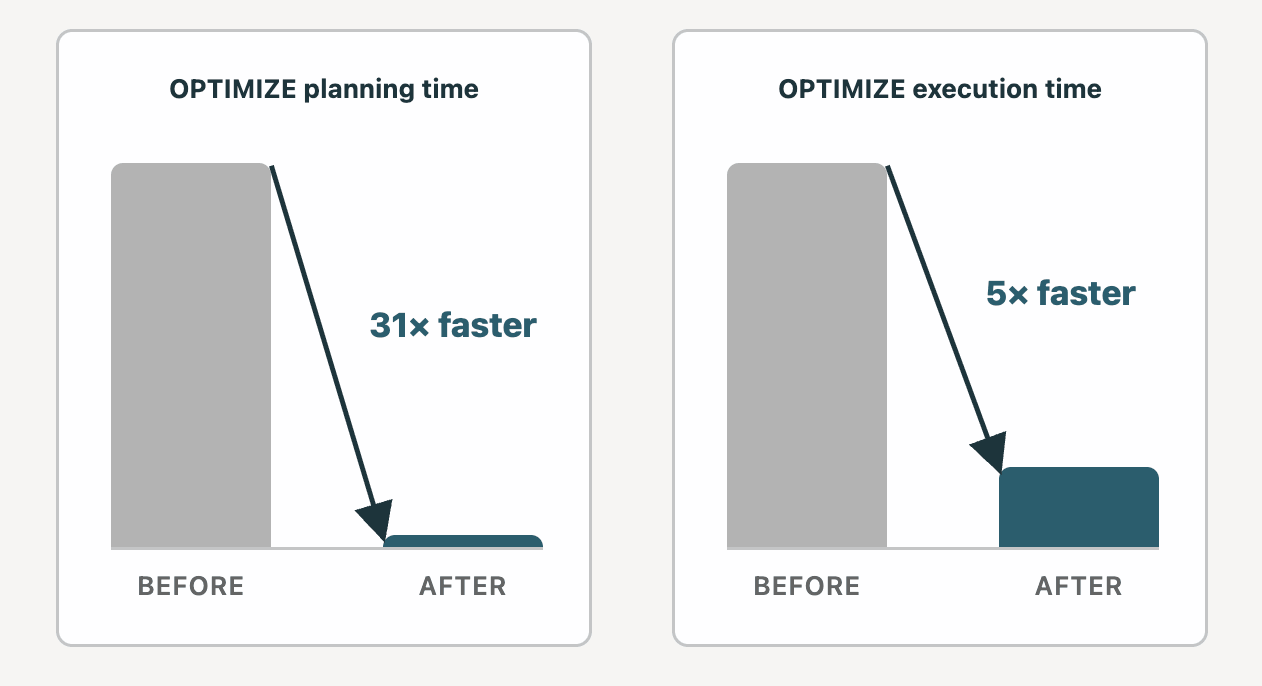
The myth goes: OPTIMIZE on a PB-size table can run for hours, and the cost of maintenance is too high.
Reality: We’ve made a number of significant improvements to OPTIMIZE, and dozens of customers now have PB-scale Liquid Clustered tables in production. Two years ago, planning, the first phase of OPTIMIZE, could take up to 12 hours on a 10 PB Liquid table in some cases. We’ve spent the time since reducing planning time down to 23 minutes. Execution, the second phase of OPTIMIZE, got 5x faster on a Medium DBSQL cluster.
Myth #5: Liquid Clustering only benefits a subset of readers
The myth goes: Liquid Clustering is only beneficial for Databricks readers to UC managed Delta tables.
Reality: Liquid Clustering is a write-side optimization. It’s how the engine organizes files for efficient data skipping. The output is standard Parquet files with min/max stats, written into open table formats like Delta/Iceberg. Any compatible reader (e.g. open-source Apache Spark, DuckDB, etc.) can use those stats to skip files. Liquid Clustering is available on both external / managed and Delta / Iceberg tables, and the benefit is applicable regardless of the reader.
Myth #6: Partitioning is necessary for concurrent ETL
The myth goes: Concurrent ETL needs write boundaries. Without partitioning, two writers updating the same table risk colliding, and Delta/Iceberg concurrency control forces one of them to retry or fail. Partition and give each writer its own slice of the table, so two pipelines never touch the same files.
Reality: Operating at partition granularity was a workaround for an older concurrency model. Unlike partitioning which only has file-level concurrency, Liquid provides row-level concurrency. Two writers updating different rows no longer conflict, even if those rows live in the same file. This removes one of the main reasons teams partitioned tables: maintaining write boundaries to avoid serialization. With Liquid Clustering, ETL can easily operate concurrently against the same table.
Myth #7: Z-Ordering makes up for partitioning’s shortcomings
The myth goes: Partitioning handles the partition column’s filters, and Z-Ordering handles the rest. By running OPTIMIZE ZORDER BY, the engine sorts data for optimal skipping on filters that don’t align with the partition scheme.
Reality: Z-Ordering doesn’t save partitioning. In fact, it has its own structural problems.
- The first is poor clustering quality. Z-Order doesn’t maintain a true ordering across the table. Values for the same column can get spread across many files, so per-file min/max ranges are wider and queries skip fewer files than they would with Liquid.
- The second is unnecessary rewrites. Z-Order has to be rerun periodically as new data lands, and each rerun rewrites large amounts of old, possibly already-clustered data to restore clustering quality. With continuous ingestion, the cost of keeping data well-clustered with Z-Order grows along with the table.
Liquid clusters incrementally, including at write time, so the layout stays optimal without unnecessary rewrites.
Myth #8: Partitioning is necessary for selective data overwrites
The myth goes: Being able to selectively overwrite data is only available through Dynamic Partition Overwrites.
Reality: Selective overwrites work on Liquid tables natively. Databricks supports REPLACE USING and REPLACE ON, two SQL syntaxes for selectively overwriting data on any data layout: Liquid Clustered, partitioned, or plain unclustered tables. Unlike Dynamic Partition Overwrite which requires a Spark config, REPLACE USING and REPLACE ON can be used on any compute: classic clusters, SQL warehouses, and Serverless. The operation is atomic and matches on any column you choose.
Success stories: migrating from partitioning to Liquid Clustering
7.7x query speedup on Arctic Wolf’s 3.8 PB security telemetry table
Arctic Wolf runs a 3.8+ PB security telemetry table ingesting 1+ trillion events per day, where threat hunters depend on fresh data to detect active attacks.
After migrating from partitioning to Liquid Clustering on Unity Catalog managed tables with Predictive Optimization, Arctic Wolf saw:
- 90-day queries drop from 51 seconds to 6.6 seconds
- File count dropped from 4M to 2M
- Data freshness improved from hours to minutes
Read and write improvements on critical CDC tables for Bolt
Bolt recently tried Liquid Conversion (currently in Private Preview), which converts partitioned tables to Liquid in-place using ALTER TABLE .. REPLACE PARTITIONED BY WITH CLUSTER BY. They observed the following read and write benefits on a TB-scale CDC table after converting to Liquid Clustering:
- Write throughput (rows/sec) increased by 138%
- Read times were reduced by up to 63%, with an average of 21% reduction across 9 representative queries
Liquid Clustering dramatically reduced the work that each write was doing, increasing our throughput significantly on our most critical CDC table. Reads also improved across the board. The best thing was: we ran the conversion from partitioning alongside live ingestion with zero downtime. With this, Liquid Clustering provided us exactly the kind of performance and reliability we needed at platform scale. —Marcin, a senior platform engineer at Bolt
5.9x speedup in query time on a petabyte-scale internal workload
We run a 1.1 PB table internally that's queried thousands of times a day, mostly by engineers running production investigations and observability dashboards. Originally it was partitioned by date and hour, assuming time-range scans would dominate. However, that assumption turned out to be incomplete. While time-range scans were common, the table was also frequently queried by source and id, forcing the engine to scan every file in the relevant date and hour partitions to find a handful of rows.
Adding source and id as partitions wasn’t viable, because there were too many distinct values. This would have created billions of tiny files. Liquid Clustering removed the trade-off, allowing clustering on time and the additional identifier columns simultaneously, while maintaining good file sizes.
| Layout | |
|---|---|
| Before | Partitioned by date, hour |
| After | Clustered by date, hour, source, id |
Benchmarks showed massive improvements across 16 representative production queries:
| Metric | Before (partitioned) | After (Liquid) | Improvements |
|---|---|---|---|
| Wall Clock Time | 406s | 70s | 5.9x speedup |
| Bytes Read | 3.5 TB | 0.48 TB | 86% fewer bytes read |
The table itself got smaller too. Total size dropped from 1.1 PB to 0.8 PB, a 27% reduction with no change in the underlying data. Better-clustered files compress more efficiently, and the small-file tax that comes with over-partitioning disappears.
What’s coming next for Liquid Clustering
Optimizing Liquid-to-Liquid joins: up to 51% faster with 87% less shuffle
Today, joining Liquid tables on their clustering columns can require a full data shuffle, even when the data is already organized by those columns. Co-clustered joins (now in Private Preview) remove that shuffle automatically. On a real-world data warehousing benchmark, a Liquid-to-Liquid join ran ~51% faster (28 minutes → 14 minutes) and shuffled 87% less data (1.2 TiB → 150 GiB) than the same query without the optimization.
Easy Liquid Conversion of partitioned tables
Before, converting a partitioned table to Liquid Clustering required a full table rewrite and downstream breaking changes with REPLACE TABLE or a cutover with dual writes and planned downtime. We’re introducing a new command (now Generally Available) that makes this conversion easier, minimizing both downtime and rewrites.
Getting started with Liquid Clustering
Create a table with Liquid Clustering:
Or, if you’re using UC managed tables with Predictive Optimization, use Automatic Liquid Clustering to intelligently select clustering keys based on your workload and query patterns:
Liquid Clustering is the layout for the modern Lakehouse. Convert your partitioned tables to Liquid Clustering using the new conversion command. Try Liquid on your next table, or reach out to your account team today to try the Private Preview for Co-Clustered joins!
Don’t forget to catch us at DAIS!
Get the latest posts in your inbox
Subscribe to our blog and get the latest posts delivered to your inbox.