Introducing AI spend controls with Unity Gateway
Set AI budgets and hard spend caps at the user, workspace, or organization level, and stop runaway AI spend early
by Kevin Stumpf
• AI workloads create new cost management challenges, such as runaway retry loops to uncontrolled agent experimentation, making traditional cloud budget controls insufficient for modern AI adoption
• Unity Gateway AI Spend Controls introduce proactive budget alerts across users, workspaces, use cases, and entire accounts, helping organizations monitor and contain AI costs before they become business risks
• Combined with Unity Catalog system tables and Databricks budgets, Unity Gateway provides unified governance for AI usage, cost visibility, and operational accountability across models, agents, MCPs, and providers
Today, we're announcing AI Spend Controls in Unity Gateway. This release extends Unity Gateway's existing cost visibility with proactive budget alerts to give you full control over your organization's AI spend across all your models - from the coding agents your developers use every day, to the production agents serving your customers, to the batch jobs running overnight:
AI workloads deliver disproportionate value - but their cost profile is fundamentally more challenging to manage than your traditional cloud spend:
- Your nightly batch job translating call transcripts may run perfectly for a month, then start failing halfway through and trigger retry logic that multiplies its cost 10x overnight.
- Your engineering org's coding agents save thousands of developer hours a week - but the same agents make it easy for one engineer to kick off an accidental multi-agent experiment Friday night that burns through the team's monthly budget by Sunday.
- And with AI leaderboards popping up across orgs, "tokenmaxxing" is encouraging engineers to burn through tokens to top the charts. What’s impressive on the leaderboard is less so on the invoice.
Employees across engineering, support, sales, and ops are onboarding to AI faster than any technology in the last decade, unlocking net-new use cases week over week. But that adoption brings a management challenge: foundation model usage now spans dozens of teams, hundreds of users, and thousands of agents with a shifting mix of providers and model tiers. Spend controls need to apply uniformly across all AI workloads, so your organization can confidently lean into AI without worrying about surprises on the bill.
Configure Budget Alerts at Every Granularity
While spend controls need to apply uniformly, different parts of your organization need different cost controls. A platform team cares about workspace-wide totals. A FinOps lead cares about the org-level monthly burn. An engineering manager cares about per-developer experimentation budgets. AI Spend Controls let you set them all from one place and is deeply integrated with Databricks’ existing budgets:
- Per user: Set budgets for individual experimentation — for example, $2000 per user per month for the engineering org. Catch the developer whose agent is stuck in a loop before it shows up on the P&L.
- Per use case: Get alerted if your organizations’ spend on coding agents like codex or claude code exceeds $1000 per user per month
- Per workspace: Hold each unit to its own budget. Production gets $50,000/month; sandbox gets $5,000.
- Per account: Set a top-line ceiling — say, $200,000/month across every model, every provider, every workspace — and get alerted long before you approach it.
And when alerting isn't enough, you can enforce hard spend caps: once a budget is exceeded, Unity Gateway automatically stops further requests until you raise the limit or the next billing period begins.
Get Started with Unity Gateway Budgets Today
To track your organization’s AI spend, follow these steps:
Create your Unity Gateway Budget
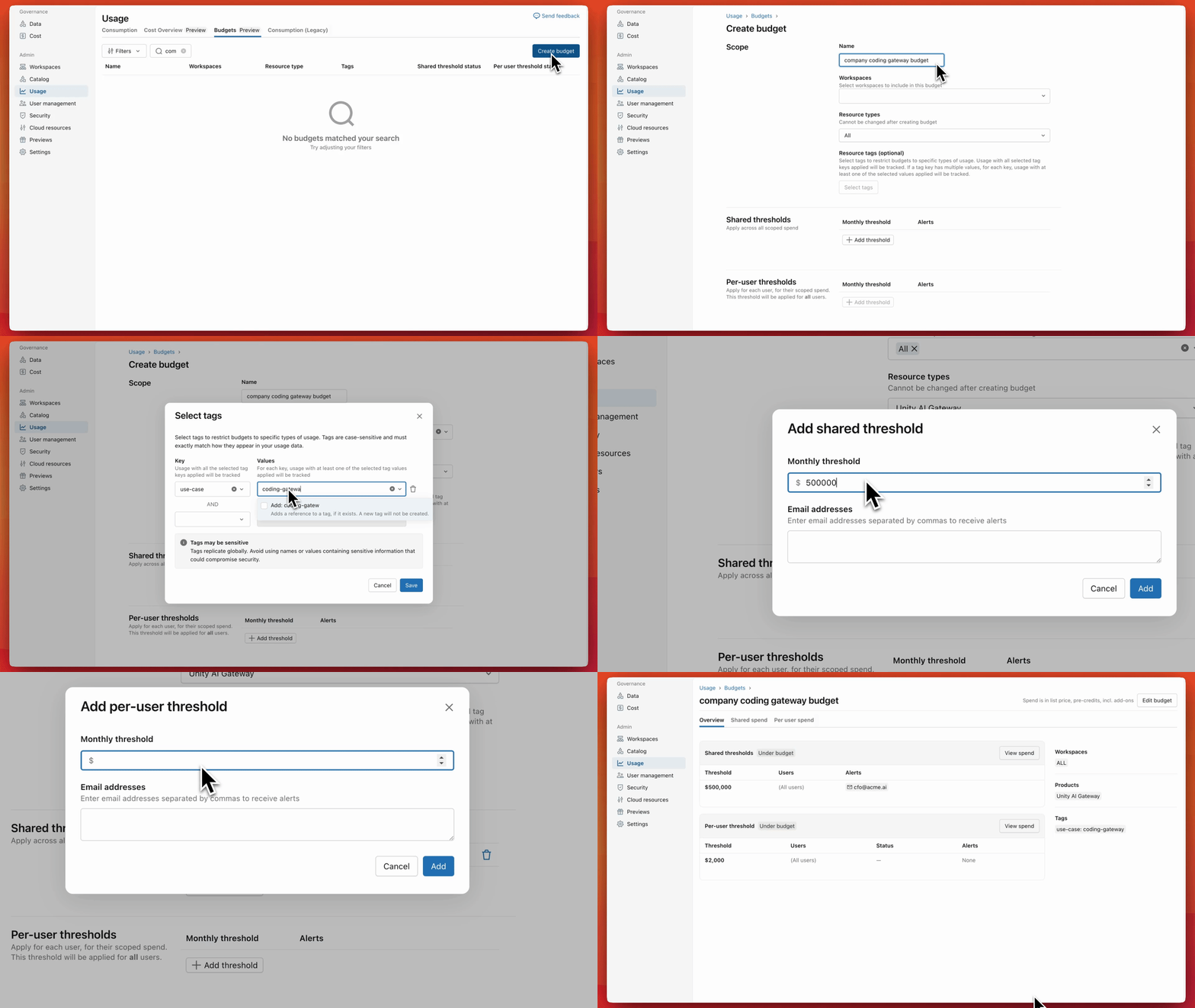
- Open your account settings, navigate to Usage in the sidebar and open the Budgets tab
- Create a Budget and select “Unity Gateway” as the Resource type
- Optionally apply the budget only to a subset of workspaces
- Optionally apply “Resource tags” to configure budgets for a subset of your AI Gateway LLMs. Only AI Gateway LLMs whose tags match your budget tags will count towards the budget. This is useful to configure use-case specific budgets.
- Configure a “Shared threshold” that sets the monthly spend limit globally across all resources in your selected workspace(s) that match the resource tags
- Configure a “Per-user threshold” that sets a monthly spend limit per user in your account
- Configure email addresses that receive alerts when the thresholds are exceeded
Once created, look out for budget alerts
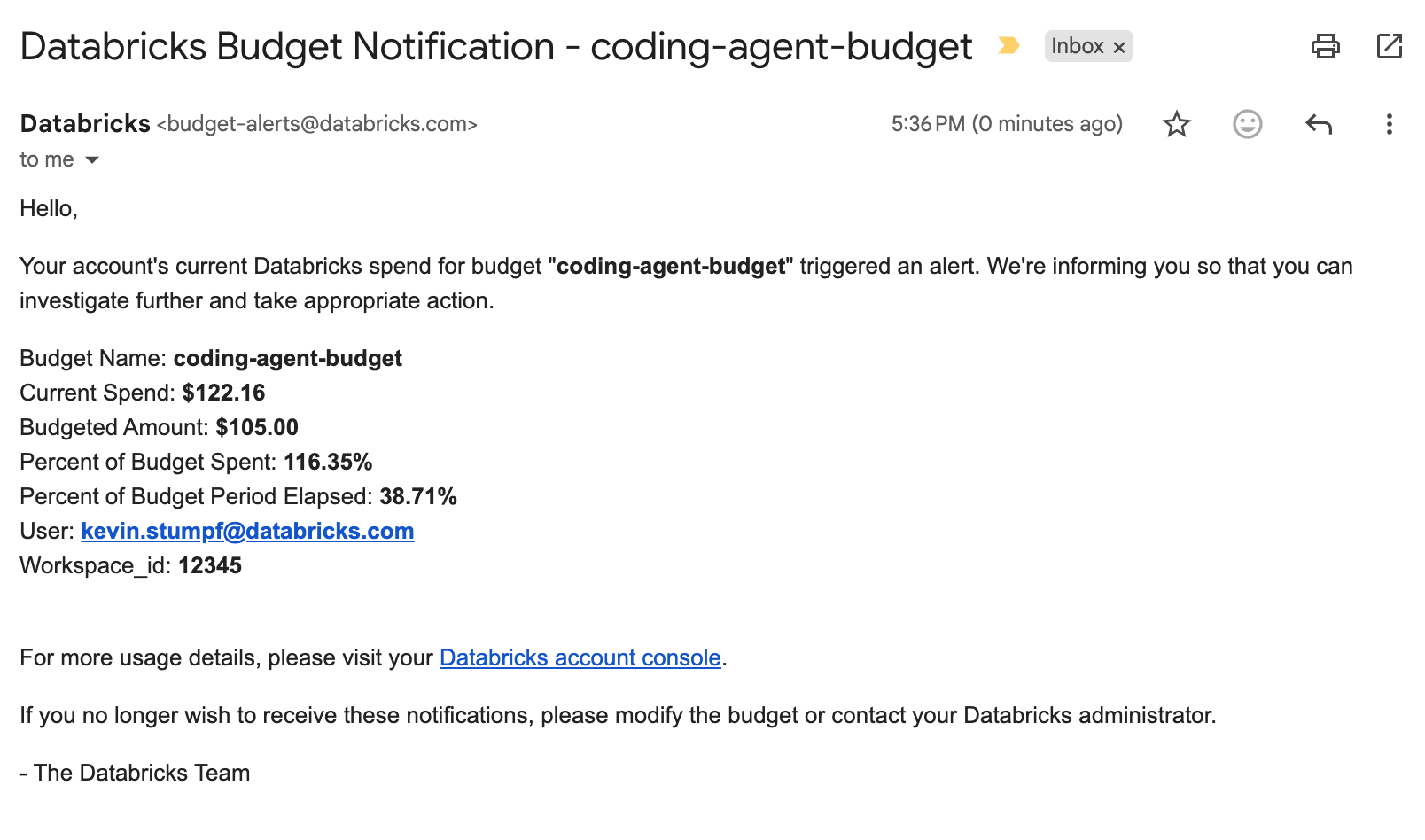
When one of your budgets is exceeded you will receive a notification email:
Analyze your active budgets
The Cost section of your account console lets you respond to budget alert emails or proactively monitor the status of your live budgets. On the Budgets page, you see at a glance how your budgets are trending:
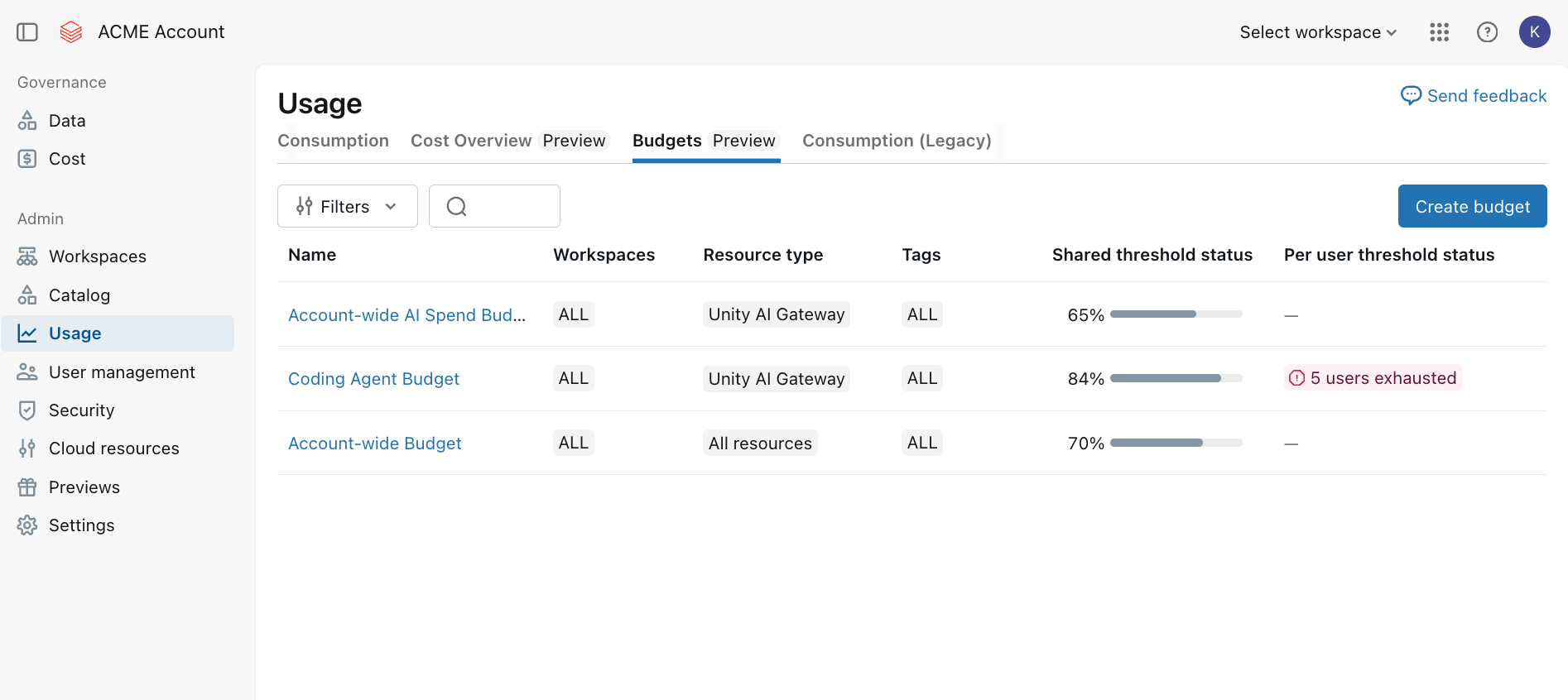
Open up any budget to see how your AI spend is trending:
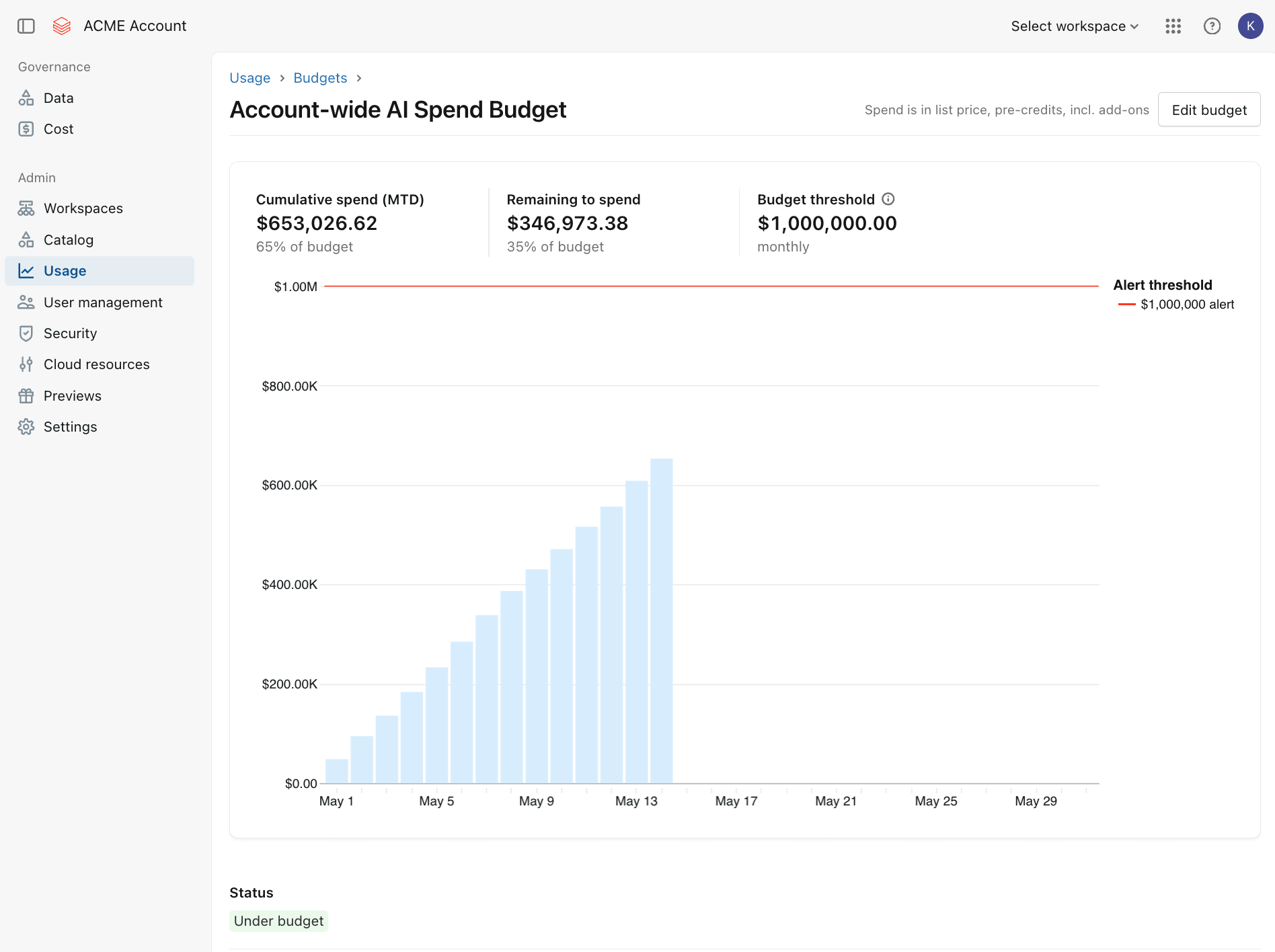
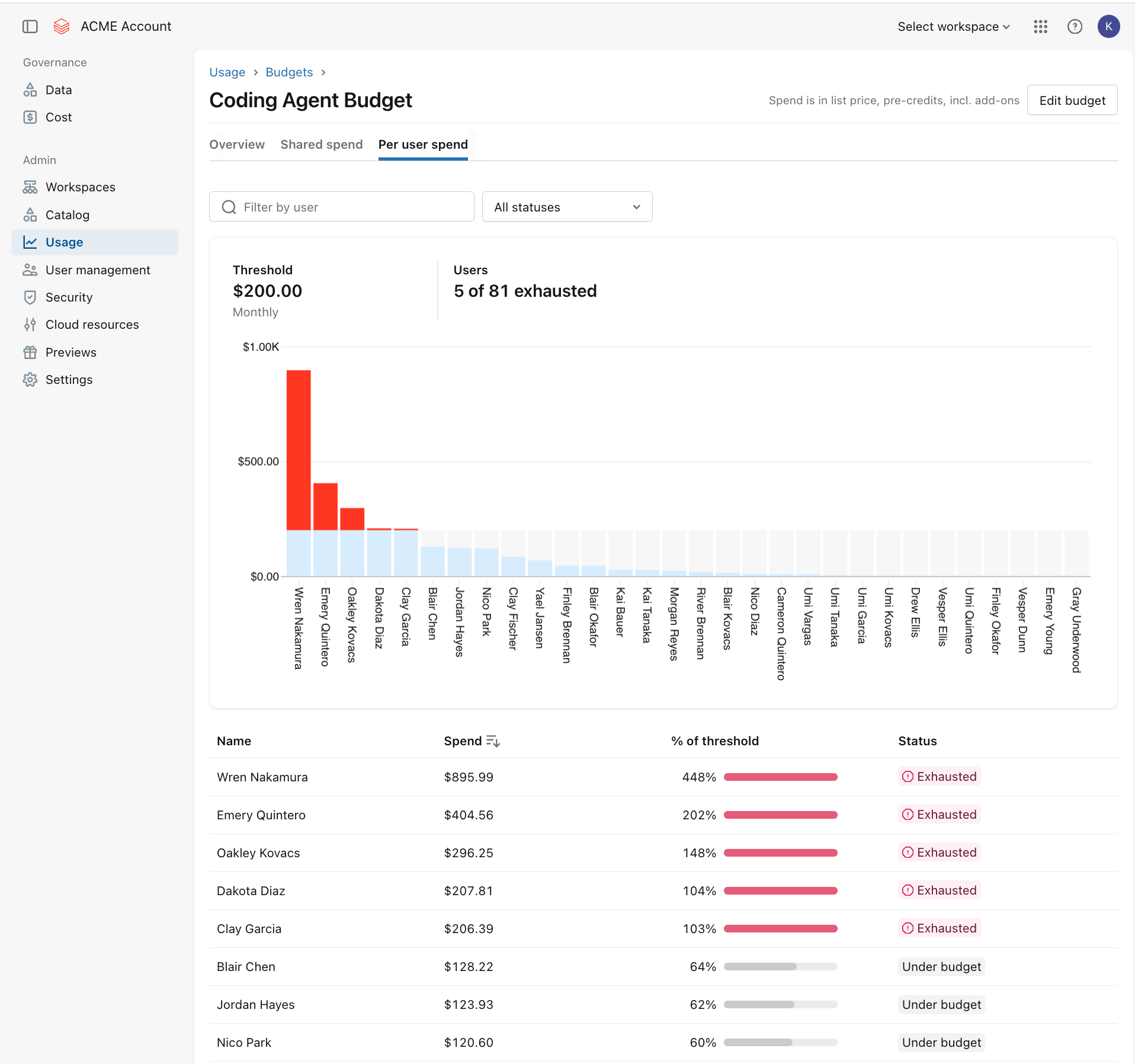
If you configured per-user level budget thresholds, the Budget detail page will show you how your organization’s users' individual AI spend is trending. When users exceed their individual threshold, their status and spend are clearly surfaced so you can act quickly:

To increase a budget’s threshold, you can simply edit the Budget and modify its spend limits.
Analyze your organization’s AI Spend in detail
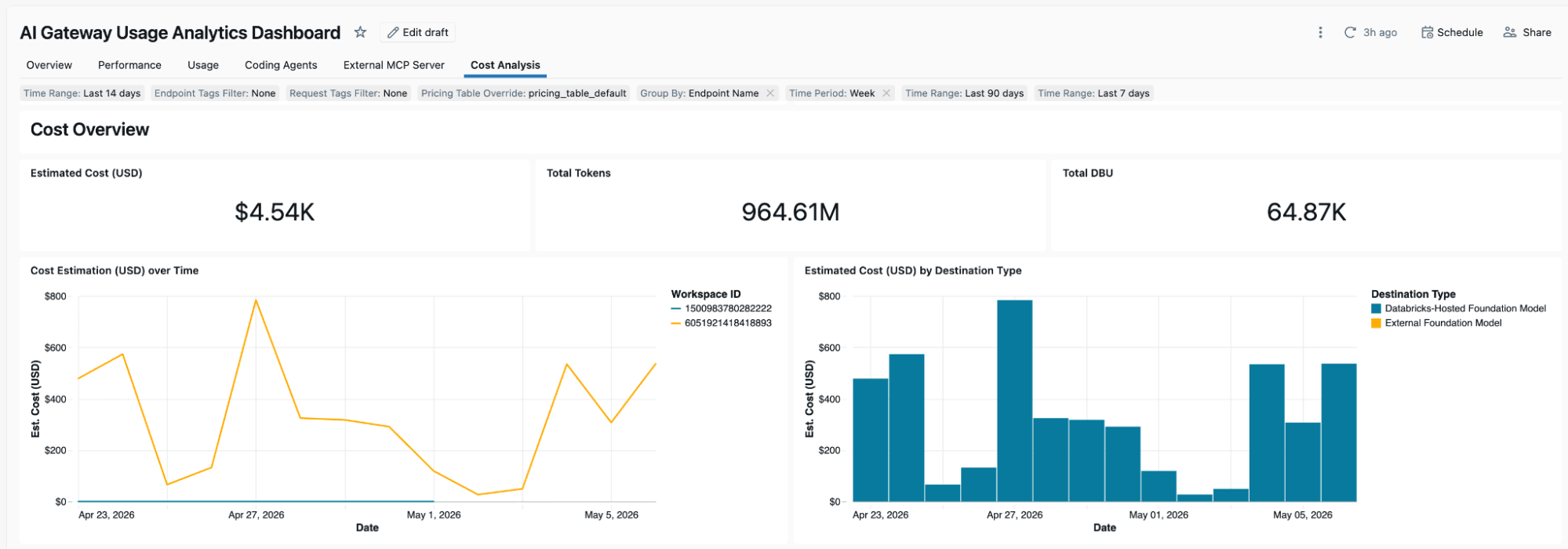
Unity Gateway Budgets give you a high-level overview of per-user and per-budget spend. To further analyze which users, models or use cases are driving your spend, you can use Unity Gateway’s existing cost tracking capabilities. Every request gets logged to Unity Catalog system tables with DBU costs and not just token counts. Provisioned throughput, uptime, pay-per-token usage, and even the token costs of external model providers are all automatically calculated. You can slice the data however your organization tracks spend:
- Identity: Aggregate by user or service principal — map spend to the people and systems driving it.
- Workspace, endpoint and tags: Group by team, environment, or cost center.
- Model and provider: See which models (Opus vs. Sonnet) and providers (Anthropic vs. OpenAI vs. open source) are driving costs.
- Request tags: Dynamic attribution for SaaS platforms proxying to end customers.
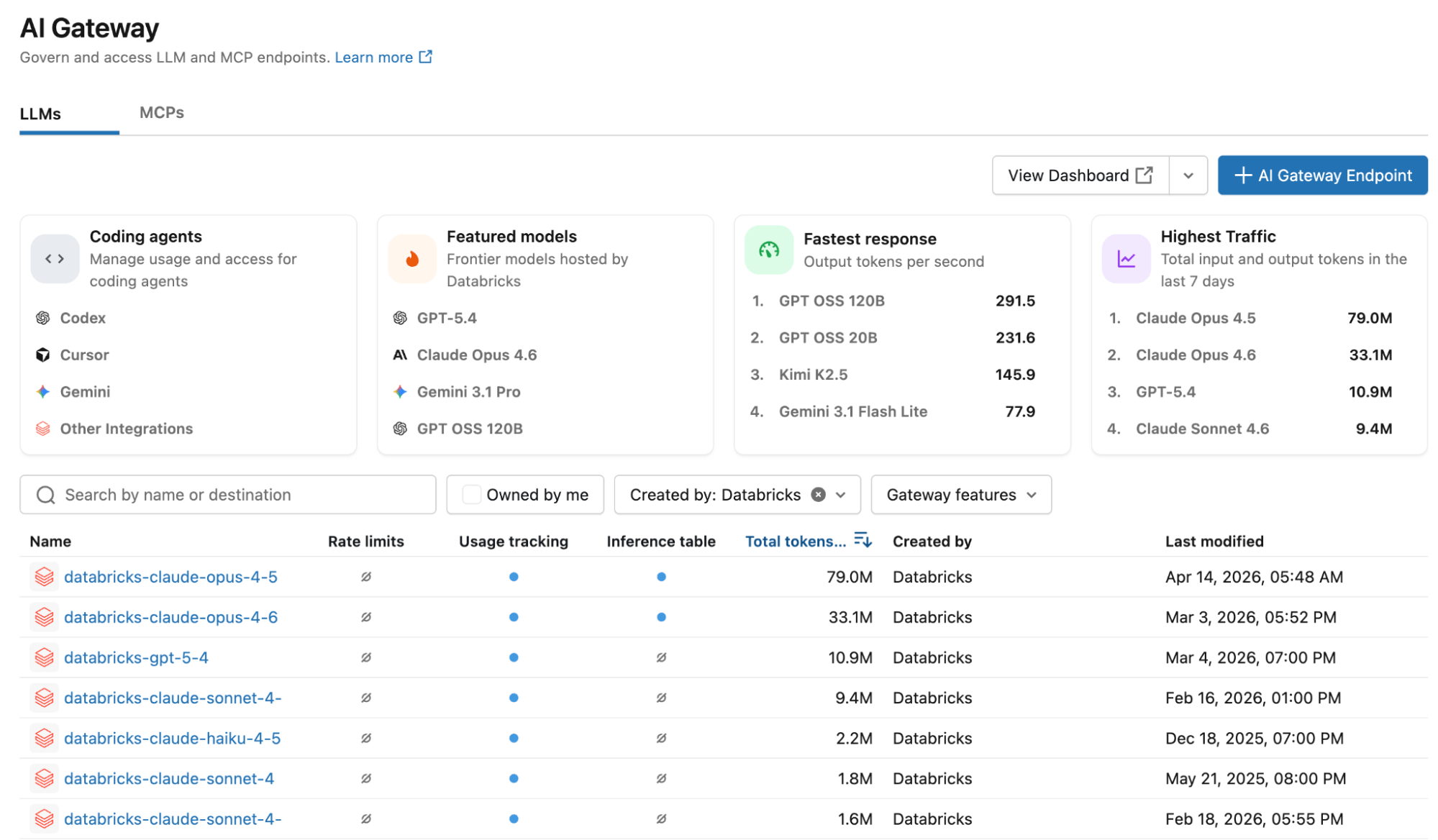
Access the Cost Analytics dashboard by navigating to the Unity Gateway page in your Databricks workspace and click on “View Dashboard”:
This opens up a usage & cost analytics dashboard that you can fully customize:
One platform to govern data and AI
AI Spend Controls are a natural extension of the governance capabilities you already use in Databricks:
- Unity Gateway is your organization’s central AI Gateway to manage and access LLMs and MCPs.
- Unity Catalog is your central catalog to register and discover your organization’s data and AI assets. Access permissions, audit logs and usage data all live in Unity Catalog.
- Databricks budgets provide the foundation for cost monitoring and alerting. With this release, Databricks budgets now allow you to configure AI-tailored budgets for your organization’s AI workloads.
Databricks provides you with a single, consistent system for governing what your agents can do, who they can do it for, and how much they can spend doing it. Get started today!
Get the latest posts in your inbox
Subscribe to our blog and get the latest posts delivered to your inbox.