Introducing Kasal
A No-Code Visual Assistant for Agentic AI in Databricks Labs
by Nehmé Tohmé, Ryuta Yoshimatsu , Anshu Roy, David Schwarzenbacher and Simone Finelli
- Introduce Kasal as the Databricks Labs project
- Low code way of building and orchestrating agents
- Short video on how to get started with Kasal on Databricks Marketplace
Agentic AI systems are being adopted by a growing number of organizations. They boost productivity and free people from repetitive tasks. As these systems continue to mature and move into production, companies will gain tremendous value from their ability to operate autonomously and make better decisions on our behalf.
However, as Agentic AI adoption grows, new challenges are emerging. One is the shortage of skilled talent. Building and managing effective agentic systems requires in-depth technical expertise, and the demand for experienced AI engineers is increasing rapidly. Another challenge is for experts to keep up with the constant evolution of technologies, frameworks, and tools in this field is increasingly difficult.
Kasal was created to address these challenges. It is an agent powered platform that allows users of different skill levels to design, develop, and deploy effective agentic AI systems through an intuitive visual interface. Non-experts can utilize Kasal’s intuitive UI to build sophisticated agentic AI systems tailored to their specific needs. Experts can use Kasal to get started quickly and later export their agents to code for deeper customization and development.
Kasal’s goal is to democratize agentic AI for both experts and non-experts within enterprise environments.
What is Kasal
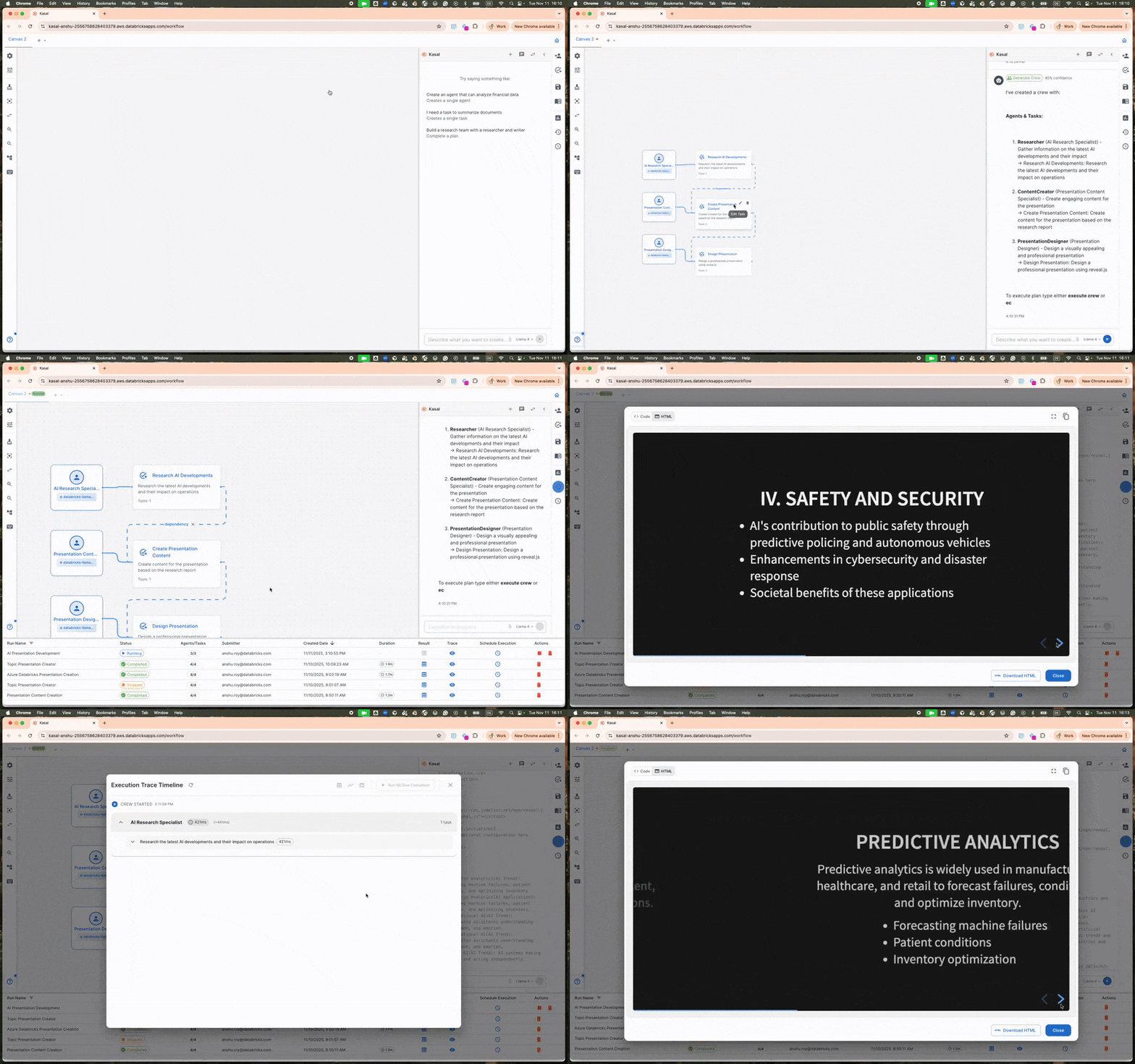
Kasal is a UI-first framework for designing, running, and observing single and multi-agent workflows. Instead of manually writing complex orchestration code, you can drag and drop agents on a visual canvas or simply describe what you want through a conversational assistant. Kasal will automatically build the workflow for you. You can then connect tools, run agents, and observe their behavior in real time. Behind the scenes, Kasal uses CrewAI, an open-source python framework for creating and orchestrating AI agents, but wraps it in a Databricks friendly application layer that manages authentication, deployment, and monitoring. This means the same flow you design visually can be moved to production with minimal effort. The generated flow can also be exported as code, allowing AI engineers to further refine or extend it as needed.
Why Kasal Matters
Kasal brings three core capabilities to the table: a visual workflow designer powered by agents, deep integration with Databricks, and an extensible toolkit that includes MCP servers, Genie, custom APIs, and data connectors.
- Visual orchestration makes agents, handoffs, and branching logic clear and tangible, making it easier to review with non-developers and to audit later. Moreover, the agents embedded within Kasal understand the user’s intent when defining what kind of agent they want to build and propose an optimized design that aligns with industry best practices.
- Databricks native: Kasal can be installed as a Databricks App or accessed through the Marketplace, allowing users to inherit workspace authentication and governance instead of managing their own. Furthermore, the flows generated by Kasal natively leverage Databricks features, making them enterprise-ready and production-grade from the start. These include MLflow for tracing and tracking, AI Search for memory, Databricks Apps for serving, Lakebase for transaction logging, on-be-half-of-user authentication and more.
- Extensibility: Kasal offers first-class support for MCP servers, Genie spaces, Agent Bricks, as well as custom APIs and data connectors. It can also export the flow as a notebook, providing full transparency into its internal logic and allowing AI engineers to extend and refine the solution beyond the initial version with full flexibility.
Kasal’s live observability provides dual layer monitoring for multi-agent AI workflows. Through the Kasal frontend, business users can view execution timelines that track workflow status, agent interactions, and task progress. At the same time, MLflow tracing integration allows AI engineers to debug model performance, LLM calls, and agent behaviors. When deployed on Databricks Apps, Kasal uses Databricks OBO authentication for user isolation and production ready SQLite or Lakebase persistence for transparent agentic operations.
Getting started with Kasal
A typical user journey begins by prompting Kasal with the specification of the agent you want to build. For example, you might ask: “Create a plan that will generate a pitch deck for our sales reps to sell our different products tailored to customers.” Kasal will then generate a structured plan, often hierarchical, using its prompts and large language models.
In this example, if the plan is in sequential mode, the agents will run one after the other in a set order. However, if the plan is in a hierarchical mode, it will include a manager agent and several subagents, each responsible for specific tasks: for instance, one that retrieves and analyzes customer data, another that retrieves product data, one that combines both to craft a storyline for the pitch, and another that generates a presentation reflecting the detailed information and the storyline.
You can then execute the plan to generate a product presentation for a specific customer. If you wish to modify the workflow, such as experimenting with different models or tools, this can easily be done through the Kasal user interface.
If you think the plan you created in Kasal could be valuable to others, you can register it in Kasal’s catalog, making it available for reuse and prompting in future sessions. If you wish to industrialize the plan outside of Kasal, you can export its code and build a production pipeline around it. You have complete flexibility to extend and integrate the plan into your broader solution architecture.
What you can build with Kasal
We are already seeing users build a wide range of agents and multi-agentic AI systems with Kasal. Below are some examples:
- Data Analysis Pipelines: agents that query, analyze, and visualize data
- Content Generation Systems: collaborative agents for research, writing, and content creation
- Business Process Automation: intelligent workflows that adapt and make decisions
- Research and Development: agents that gather, synthesize, and present insights.
Today, there are two easy paths to get started with Kasal:
- Install from the Marketplace directly into your Databricks workspace (recommended): a one click setup that adds Kasal as a Databricks App. This approach lets you take advantage of the managed interface, built in governance, and automatic updates. See more details here.
- Deploy from source: clone the Databricks Labs GitHub repository and run the provided deployment script. This option is ideal if you want to customize or extend Kasal to fit your specific needs.
- Watch the Kasal series for new features and announcements.
Get the latest posts in your inbox
Subscribe to our blog and get the latest posts delivered to your inbox.