Apache Spark™
Tutorial: DataFrames
This module focuses on the object that your jobs are built from: the DataFrame. This is the object you'll use most in Spark. It carries a schema, named columns, and a plan describing the source and transformations applied so far, while its data is organized into partitions that can be distributed across a cluster. Building one is cheap, because it records the plan rather than the data, and nothing runs until you ask for a result.
In this module, you will create a DataFrame, inspect it, transform it, aggregate and join it, and read and write it as a governed table. You'll use the same samples.nyctaxi.trips data as in the Quick Start module.
Learning objectives
By the end of this module, you can:
- Describe what a DataFrame is and why building one is cheap.
- Create a DataFrame from Python data, a table, or a file, and declare a schema when the contract matters.
- Transform data with
select,where,withColumn, and expressions. - Aggregate with
groupByandagg, and join two DataFrames on a key. - Save results as a governed Delta table and write other file formats to a volume.
Using a coding agent? Copy this prompt to get started quickly:
What a DataFrame is
A DataFrame is a two-dimensional, labeled data structure with named columns of different types, like a table or a spreadsheet. In Apache Spark on Databricks, it is also distributed: the rows live across partitions on the cluster, and Spark processes those partitions in parallel.
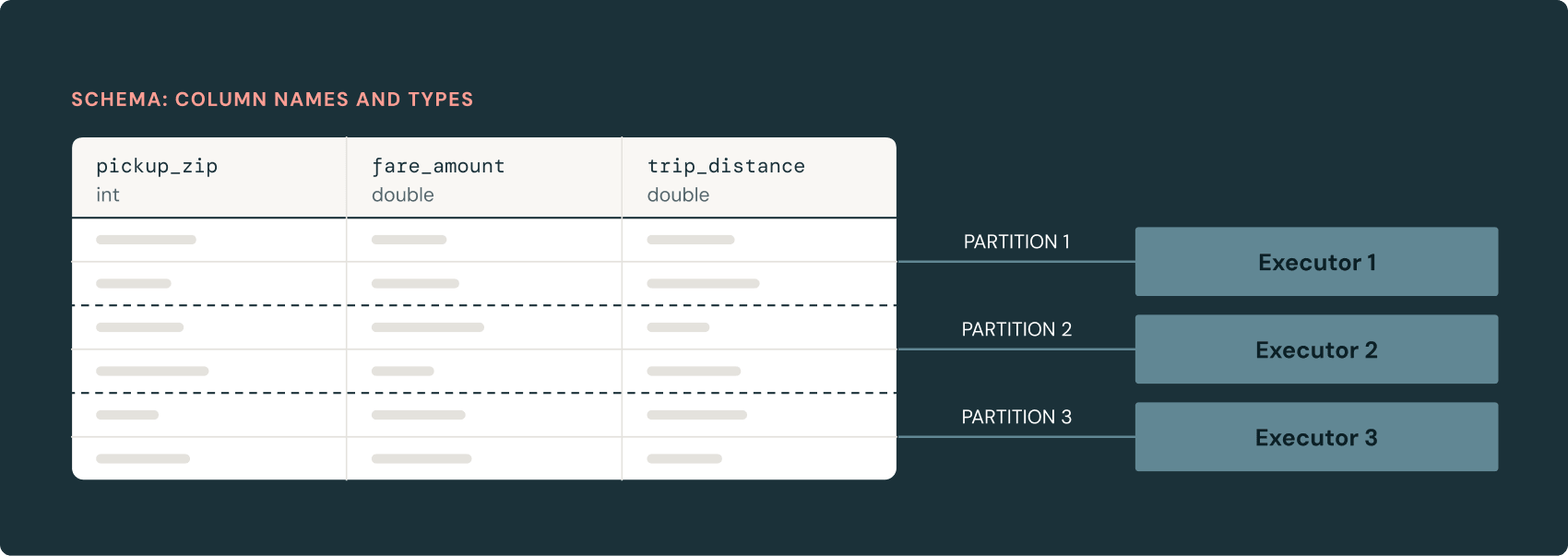
A DataFrame does not hold the rows in memory. It holds a schema, including column names and types, and a plan describing the data source and the operations to apply. Building one costs almost nothing, because the data stays where it is until an action runs.
The same abstraction appears across languages. Python, SQL, Scala, Java, and R all address the same DataFrame over the same engine, so a query written in one language can be handed to another.
How Spark builds and runs a query
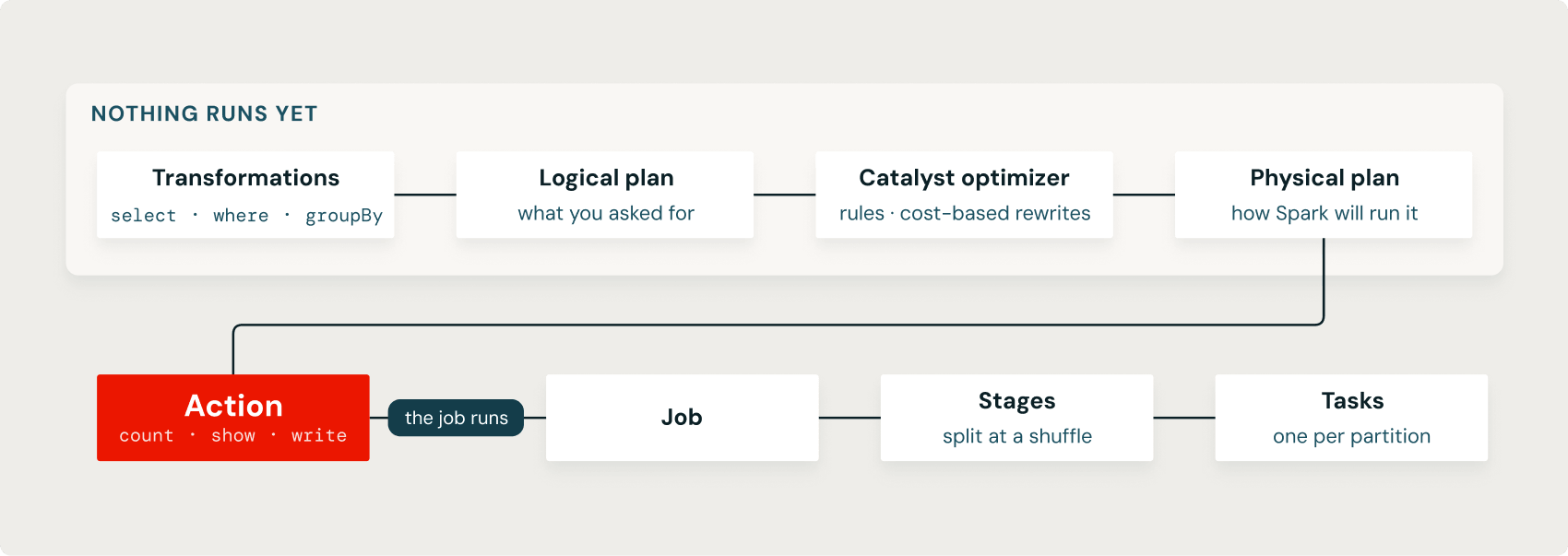
Transformations such as select, where, and withColumn build a logical plan. Spark records each step without reading the full dataset, so you can chain transformations without materializing intermediate tables.
A query optimizer called Catalyst rewrites the logical plan into a physical plan. It can push filters down to the data source, prune columns the query never uses, reorder operations, and choose a join strategy. Predicate pushdown means a filter runs close to the source; column pruning means unused columns are never read.
An action such as display, show, count, or write executes the physical plan across partitions. Because the optimizer sees the whole chain before any data moves, a chain of transformations is one plan rather than one pass per step, and the same code runs on one partition or a large cluster.
Create a DataFrame
Build one from Python data, read one from a table, or read one from a file—all three approaches produce the same kind of object. Use spark.createDataFrame to turn a local Python list into a distributed DataFrame:
Python integers become Spark bigint, which can still be joined with an int column because Spark coerces integral types.
Alternatively, read a Unity Catalog table:
Declare a schema when the source is a file and the column contract matters:
An explicit StructType sets each column's name, type, and nullability before Spark reads the data, instead of letting inference guess from a sample.
Inspect it
printSchema shows the column names and types, show prints a small grid, and display renders the interactive Databricks table, which is specific to Databricks notebooks and lets you sort, filter, and chart the result. Schema inference scans only part of a file to guess types, so an explicit schema is safer when the source is a file rather than a governed table.
display opens the Databricks visualization panel. Choose a chart type and set the axes in the UI, with no plotting code. The chart is built from the DataFrame result, so the same transformations apply.
Transform it
Result
| pickup_zip | fare_amount | miles | fare_with_fee | fare_band |
| 10103 | 8.0 | 1.4 | 10.5 | standard |
| 10023 | 7.5 | 1.31 | 10.0 | standard |
| 10001 | 9.5 | 1.8 | 12.0 | standard |
select chooses columns, where filters rows, and withColumn adds or replaces a column. F.col, F.lit, and F.expr refer to a column, add a constant, and evaluate a SQL expression inside DataFrame code, respectively. Each transformation returns a new DataFrame and leaves the original unchanged.
Aggregate and join
Group rows by a key and aggregate within each group:
groupBy does the expensive work, because every row with the same key has to move to the same partition before Spark can aggregate it. That movement is a shuffle.
Join the summary to the zone lookup to add a label:
Result
| pickup_zip | trips | avg_fare | service_zone |
| 10001 | 1227 | 10.62 | Zone A |
| 10003 | 1181 | 10.98 | Zone A |
| 10011 | 1129 | 10.91 | Zone B |
| 10021 | 1021 | 10.21 | Zone B |
| 10018 | 1012 | 11.40 | Zone C |
A join key must have the same type and meaning on both sides. Joining an integer ZIP to a string "10001" would match nothing, because the values are not equal across types. A left join keeps every row on the left and fills service_zone with null where the lookup has no match.
When one side is small enough to fit in memory, a broadcast join sends it to every executor and skips the shuffle on the large side:
Read and write open table formats
Databricks uses Delta Lake for every managed table by default, and the documentation recommends using tables over file paths for most work. saveAsTable writes a governed Delta table into Unity Catalog, so the result is discoverable and access-controlled:
This writes to your current catalog and schema, so make sure you're using ones you can write to. A managed table is always Delta: saveAsTable with format("parquet") or another format raises an error.
To write another file format, write files to a volume path instead of a managed table:
Spark reads and writes Parquet, ORC, JSON, CSV, and Avro this way, and it works with the open table formats Delta Lake and Apache Iceberg. Keep governed results in Delta tables, and reach for a volume path when you need a specific file format on disk.
Two interfaces, one engine
Register a DataFrame as a view and query it with Spark SQL:
createOrReplaceTempView exposes the DataFrame to SQL under a session-scoped name, and spark.sql returns a new DataFrame. The two interfaces share one engine and one optimizer, so you can move between them in a single notebook without copying data.
Visualize
display opens the Databricks visualization panel:
Choose a chart type and set the axes in the UI, with no plotting code. The chart is built from the DataFrame result, so the same transformations apply.
Try it yourself
Add max(fare_amount) to the agg call and sort by it.
Change the join to inner and compare the row count to the left join. Which ZIPs drop out, and why?
Save enriched as a Delta table named trips_enriched, then query it with spark.sql.
Recap
- A DataFrame is a distributed, labeled table; building one is cheap because it only records a schema and a plan.
- Transformations build a logical plan; Catalyst turns it into a physical plan; an action runs it.
groupByand joins move data across partitions, which is the expensive part.- A join key must have the same type and meaning on both sides.
saveAsTablewrites a governed Delta table; other file formats go to a volume path.
Structured Streaming
You can process real-time streaming data using the same DataFrame API with Structured Streaming. Spark treats streaming data as an unbounded table, allowing you to run continuous queries, perform windowed aggregations, and integrate seamlessly with static DataFrames.