How to get started with Spark Declarative Pipelines (SDP)

Declarative data pipelines have become a native Spark capability in Apache Spark™ 4.1. No additional frameworks. No external dependencies. No new learning curve. Millions of existing Spark users can now build production-grade ETL pipelines, using the tools they already know and love.
The example used here, a production-grade pipeline that tracks every aircraft in the sky with millions of live IoT events streaming in every second, used to be a serious engineering effort. Now it can be done in a coffee break, with a few lines of code and 100% open source.
Figure: OpenSky aircraft data visualization with Databricks Apps
What is Spark Declarative Pipelines?
Spark Declarative Pipelines (SDP) is a native declarative framework for building reliable batch and streaming data pipelines in Python or SQL.
Traditional Spark jobs are imperative — you have to code each step: read this source, apply this transformation, write to this table, as well as control the execution sequence and many other technical details yourself. SDP inverts this model. It is declarative: You describe the desired outcome, and Spark determines how to get there.
Databricks originally created SDP as Delta Live Tables (DLT) and contributed it to the Apache Spark open source project at Data + AI Summit 2025.
How does SDP work?
Spark Declarative Pipelines (SDP) define how transformations update datasets across a pipeline. SDP automatically:
- Resolves dependencies between datasets and transformations
- Determines execution order across pipeline steps
- Runs independent tasks in parallel to improve performance and efficiency
An SDP pipeline is built from key core components.
You won’t need flows or temporary views in these tutorials, but keep them in mind when your pipelines get more complex.
That’s enough to build your first SDP data pipeline. Let’s go.
Spark Declarative Pipelines (SDP) tutorials
Following is a single example, presented in two different environments. One runs locally with open source PySpark, and the other runs in the cloud on a (forever free) Databricks Free Edition account. Both SDP tutorials — the local PySpark tutorial and the Lakeflow Declarative Pipelines tutorial — walk you through the exact same use case: building a pipeline that ingests and processes live aviation data from aircraft around the world.
The OpenSky data source
Both tutorials use a custom PySpark data source that connects to the OpenSky Network REST API. The OpenSky Network aggregates air traffic surveillance data contributed by aviation enthusiasts worldwide, creating a real-time picture of global air traffic. The OpenSky REST API is free for non-commercial use, but applies rate limits. Please check the OpenSky API docs for current thresholds.
OpenSky Network data collection is crowdsourced — anyone can contribute by setting up a low-cost ADS-B receiver. The data you’ll process in these tutorials exists because thousands of volunteers around the world have done exactly that. Feed your data to the OpenSky Network if you want to become one of them.
Each SDP pipeline run ingests live position, velocity and altitude updates from aircraft currently in flight, with new data arriving every few seconds. The data source is an open source PySpark data source, so it works in plain Spark just as well as in Spark Declarative Pipelines.
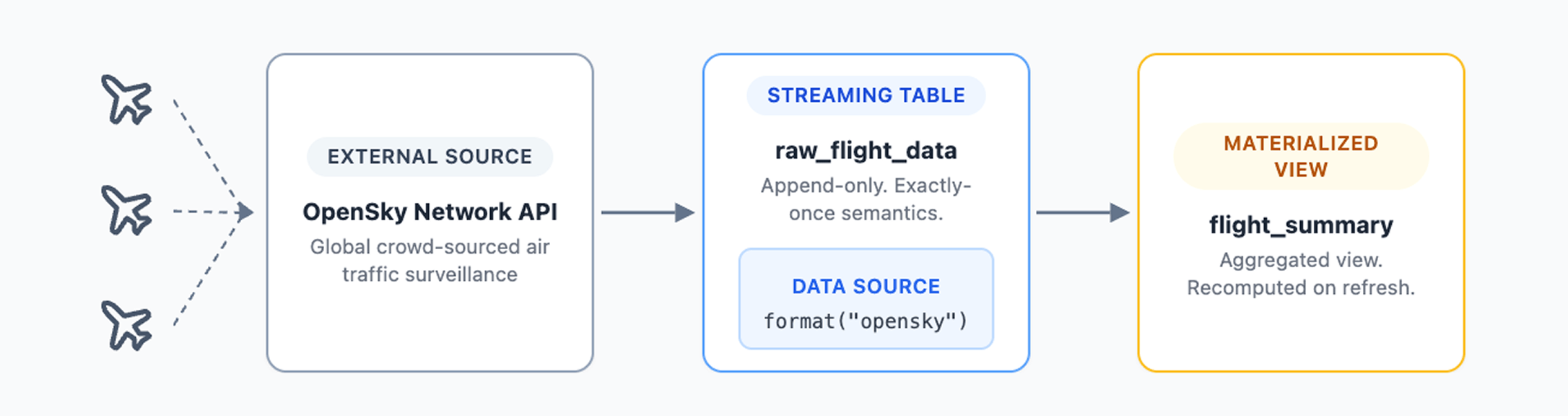
This is real production-scale IoT data. The same kind that drives logistics platforms, freight tracking systems and port monitoring operations. This isn’t a static CSV sample file — every pipeline run pulls live data from aircraft currently in the air.
The only difference between the two tutorials is where you run them.
PySpark local tutorial (open source)
The PySpark local tutorial walks you through building a declarative pipeline from scratch on your local machine using PySpark and any editor you prefer. It features:
- Full control over your development environment and choice of IDE
- Direct access to Parquet output files on your local file system
- 100% open source stack with no proprietary dependencies
Requirements: Python 3.12, Java 17, PySpark 4.1 and an IDE such as VS Code
Lakeflow tutorial (Databricks Free Edition)
The Lakeflow tutorial is the fastest path to a running pipeline. Lakeflow is the Databricks managed implementation of Spark Declarative Pipelines, built on the same open source core with additional enterprise capabilities. It features:
- Serverless compute with automatic scaling, no cluster configuration required
- Built-in pipeline editor with AI-powered data exploration
- Output tables registered in Unity Catalog with automatic lineage tracking
- Zero local setup, everything runs in the cloud
Requirements: Databricks Free Edition account (no credit card, never expires)
FAQ
Spark Declarative Pipelines (SDP) is a native declarative framework built into Apache Spark 4.1 or later for building reliable batch and streaming data pipelines in Python or SQL. You declare what data should exist, its source, its shape and how it updates, and Spark handles dependency resolution, execution order and parallel processing. Simply run your declarative pipeline, and Spark figures out the rest.
Last updated: August 2026
Author: Frank Munz