Apache Spark™ Tutorial: Getting Started with Apache Spark on Databricks

Apache Spark is an open source engine for large-scale data processing. It is capable of handling batch, streaming, SQL, and machine learning workloads over the same data, and the same code runs on a laptop or across a cluster of thousands of machines. This tutorial teaches Spark on Databricks through short, runnable examples in Python and SQL.
Welcome
This is the "Hello, World" tutorial for Apache Spark on Databricks: a self-paced path from your first Spark job through DataFrames, SQL, Structured Streaming, declarative pipelines, machine learning, and Spark Connect. Every example runs in a Databricks notebook, in Python and SQL, so your attention stays on the data instead of on setup.
It assumes no prior Spark experience. If you've written SQL, pandas, or any data pipeline, the shape of the work will look familiar. If you haven't, each module starts with the idea and then the code: read the concept, run the example, change it, and watch what happens.
Before you begin
You need a Databricks workspace and a notebook. Databricks Free Edition is enough for every module. Open a Python notebook on serverless compute, and you’re ready: the spark session and the samples tables are already there, with no installation, no cluster setup, with no installation or cluster setup required. Every example uses standard open source Spark APIs, so the same code runs on any Spark 4 cluster.
Navigating this tutorial
Start at Quick Start and follow the modules in order. Each one is self-contained, with its own sample data and standalone code examples, so you can skip ahead to a topic you already know. Every snippet runs as written in a Databricks notebook on serverless compute. If you are already familiar with a module, you can skip ahead to the next or use it as a refresher.
| Module | Objective |
|---|---|
| Quick Start | Run your first Spark job: read a table, aggregate it, and write the same query in SQL. |
| DataFrames | Use the structured API to create, inspect, transform, aggregate, and join data, and read and write open table formats. |
| Spark SQL | Query the same engine with Spark SQL, including pipe syntax and semi-structured data. |
| Structured Streaming | Turn a batch query into a continuous one over data that keeps arriving with Structured Streaming. |
| Real-Time Mode | Bring streaming latency down to sub-second when the work demands it. |
| Declarative Pipelines | Declare the tables you want and let Spark build and run the pipeline. |
| Machine Learning | Prepare features and train a model on the same engine, tracked with MLflow. |
| Spark Connect | Connect applications, IDEs, and services to Spark over a thin client using Spark Connect. |
What Apache Spark is
Apache Spark is an open source unified analytics engine for large-scale data processing. Unified means one engine covers work that used to take several systems: batch ETL, SQL analytics, streaming, and machine learning, with the same APIs across Python, SQL, Scala, Java, and R.
A single Spark job can read a stream, join it to a table, aggregate the result, and hand it to a model, without moving data between systems or rewriting it for each one. The same DataFrame API is used in every module of this tutorial for that reason.
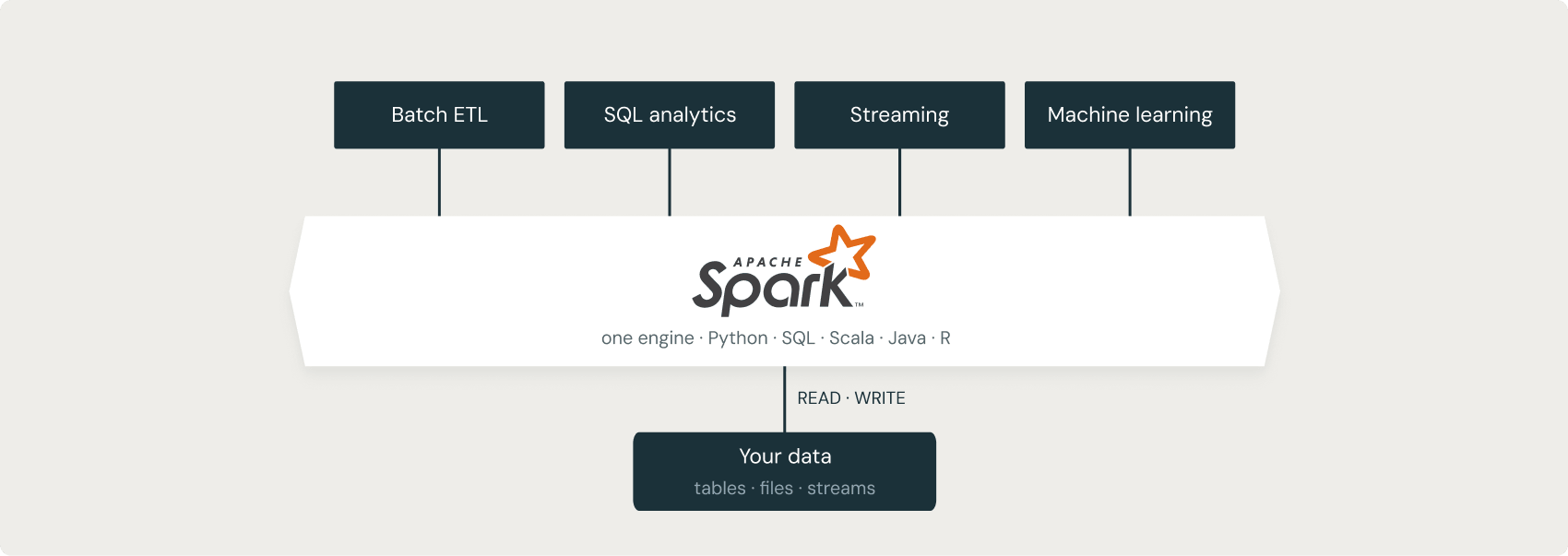
You describe the result you want, and Spark decides how to compute it. A query optimizer called Catalyst turns your transformations into an efficient execution plan and runs it in parallel across partitions of the data. This is why the same code is efficient on one machine or a large cluster: you change the compute, not the code.
This tutorial uses Spark 4 on Databricks. Along the way, you will meet the features that make Spark a modern data processing engine: ANSI SQL on by default for predictable results, the VARIANT type and pipe syntax for semi-structured data and readable queries, a Real-Time Mode that brings streaming to sub-second latency, declarative pipelines for ETL that you declare instead of wire together, and Spark Connect for driving Spark from any application. The modules introduce each of these in context.
Get started with Databricks
Databricks is a unified analytics platform built on Apache Spark by Spark's original creators. Serverless compute starts in seconds, exploration lives in one workspace, and code moves from a notebook to production without re-engineering.
A Databricks notebook gives you two things that make learning Spark easier: a spark session is already connected, so there's nothing to create and no cluster to point at, and sample tables are available to query immediately. That's why the examples in this tutorial never create a session or install anything; you just open a notebook and run them. The code itself is standard open source Spark, so it carries over to any Spark environment.
Free ways to start:
- Databricks Free Edition: a free environment for learning Spark and the Databricks platform
- Databricks Academy: self-paced courses and learning paths for data engineering, machine learning, and SQL
- Hands-on tutorials and sample notebooks for common Spark workloads
Additional resources
Frequently asked questions
Open a free Databricks notebook and run the Quick Start module. Next, work through the DataFrames and Spark SQL modules. Those three cover reading, transforming, and aggregating data, which is enough to do real work. You can run the later modules, covering streaming, pipelines, machine learning, and Spark Connect, when you need them.