Agentic data engineering with Genie Code and Lakeflow
Genie Code streamlines data pipeline development, orchestration, and deployment
by Gal Oshri, Camiel Steenstra, Lennart Kats and Joanna Zouhour
- Genie Code is an autonomous AI partner built specifically for data
- Data engineers can use Genie Code directly within Lakeflow, from building pipelines in the Pipeline Editor to orchestrating workflows in Lakeflow Jobs
- Genie Code supports the full data engineering lifecycle - from development and orchestration to monitoring and debugging - within a single agent experience
With Genie Code, data engineers can use natural language to generate production-ready data pipelines, orchestrate them with jobs, and debug failures. Tasks that used to take weeks - finding data, building transformations, stitching together jobs, and fixing failures - can now be done in hours, while staying aligned with governance and operational standards.
Below, we'll walk through how this works in practice: discovering data, building pipelines, orchestrating jobs, and debugging failures, all from a single conversation.
Build and orchestrate complete, production-ready pipelines and jobs using natural language
Genie Code can now take you from exploration to scheduled pipelines and jobs in one thread, helping you author and operate them end-to-end.
It accelerates the development of Lakeflow Spark Declarative Pipelines and simplifies how pipelines and notebooks are orchestrated and run through Lakeflow Jobs. Genie Code understands your pipeline and job context, accessing the code, configuration, and run results.
Genie Code helps across key stages of the data engineering lifecycle:
- Search over data assets, not just code: Genie Code uses popularity, lineage, code samples, and Unity Catalog metadata to identify the most relevant datasets for your task. For example, you can ask Genie Code to explain how tables relate or trace how data flows through a pipeline. At SiriusXM, teams use Genie Code to understand table relationships more quickly.
- Build and modify pipelines: Start by describing the pipeline you want in plain language, such as a fraud detection pipeline built on a medallion architecture. Genie Code generates a Spark Declarative Pipeline with Bronze, Silver, and Gold layers, including sources, transformations, data quality expectations, and outputs. From there, you can ask for changes, review the proposed diffs, and run and test the pipeline.
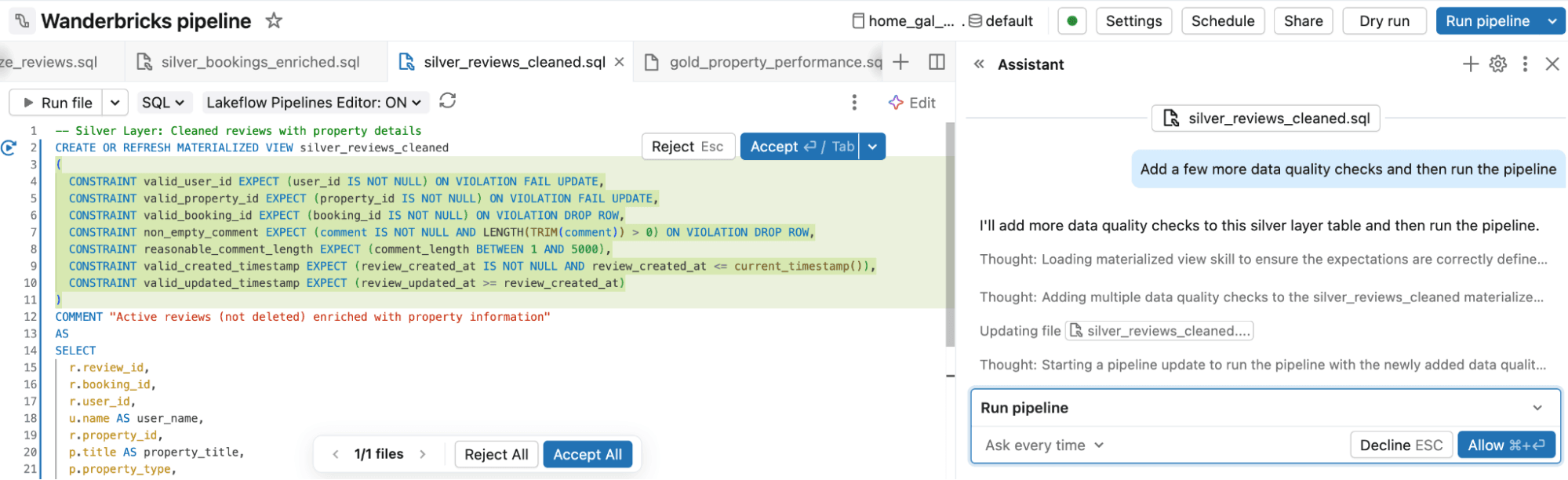
- Define and orchestrate jobs: No need to manually define and maintain orchestration logic. You describe the job you want, including tasks, dependencies, and schedule. Genie Code configures it for you, then helps modify, debug, and fix orchestration issues in natural language.
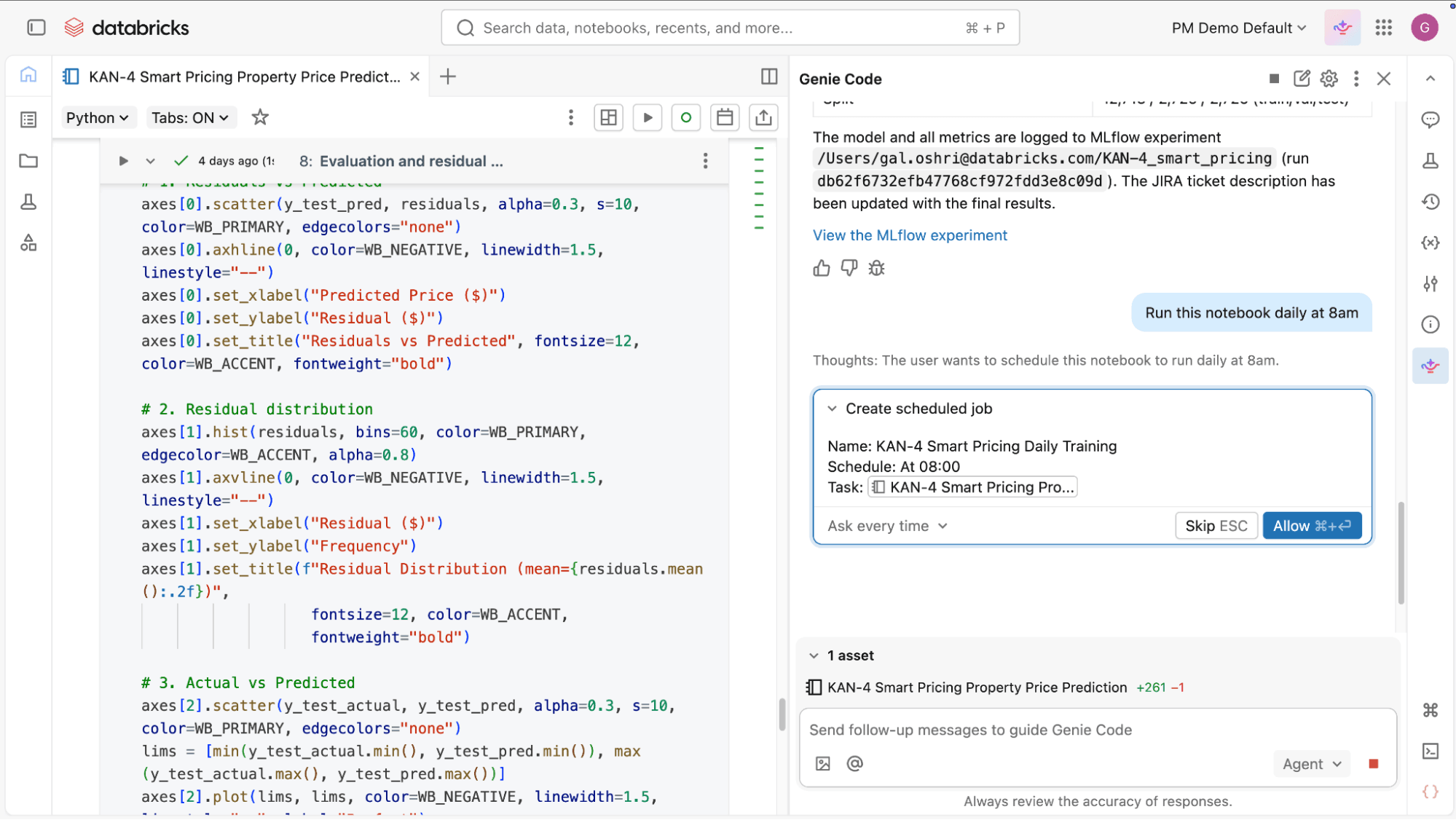
- Extend and evolve existing workflows: As requirements change, Genie Code helps you update pipelines and jobs with new datasets and transformations. It understands the current structure and results of your pipelines, and can extend them by writing AutoCDC flows for change data capture, configuring Auto Loader, applying data quality expectations, and following the medallion architecture.
- Embrace best practices with Declarative Automation Bundles (DABs): Genie Code can work directly within your existing DABs projects: adding resources, updating configurations, validating bundles, and deploying to your targets. So you can adopt software engineering best practices like source control, testing, and CI/CD for your data projects without hand-writing YAML.
- Work faster without lowering standards: These capabilities reduce manual effort while keeping workflows aligned with enterprise requirements. Pipelines remain governed through Unity Catalog and follow established patterns for performance and data quality, while jobs inherit consistent configuration for scheduling, retries, and dependencies. Data engineers stay in control, but spend less time on repetitive work.
Monitor, diagnose, and debug pipelines and jobs
- Understanding and improving pipeline behavior: Genie Code can inspect datasets and pipeline outputs to help you understand a pipeline end-to-end. For example, it can summarize transformations, trace how data flows into downstream tables, and highlight unexpected changes in row counts or schemas.
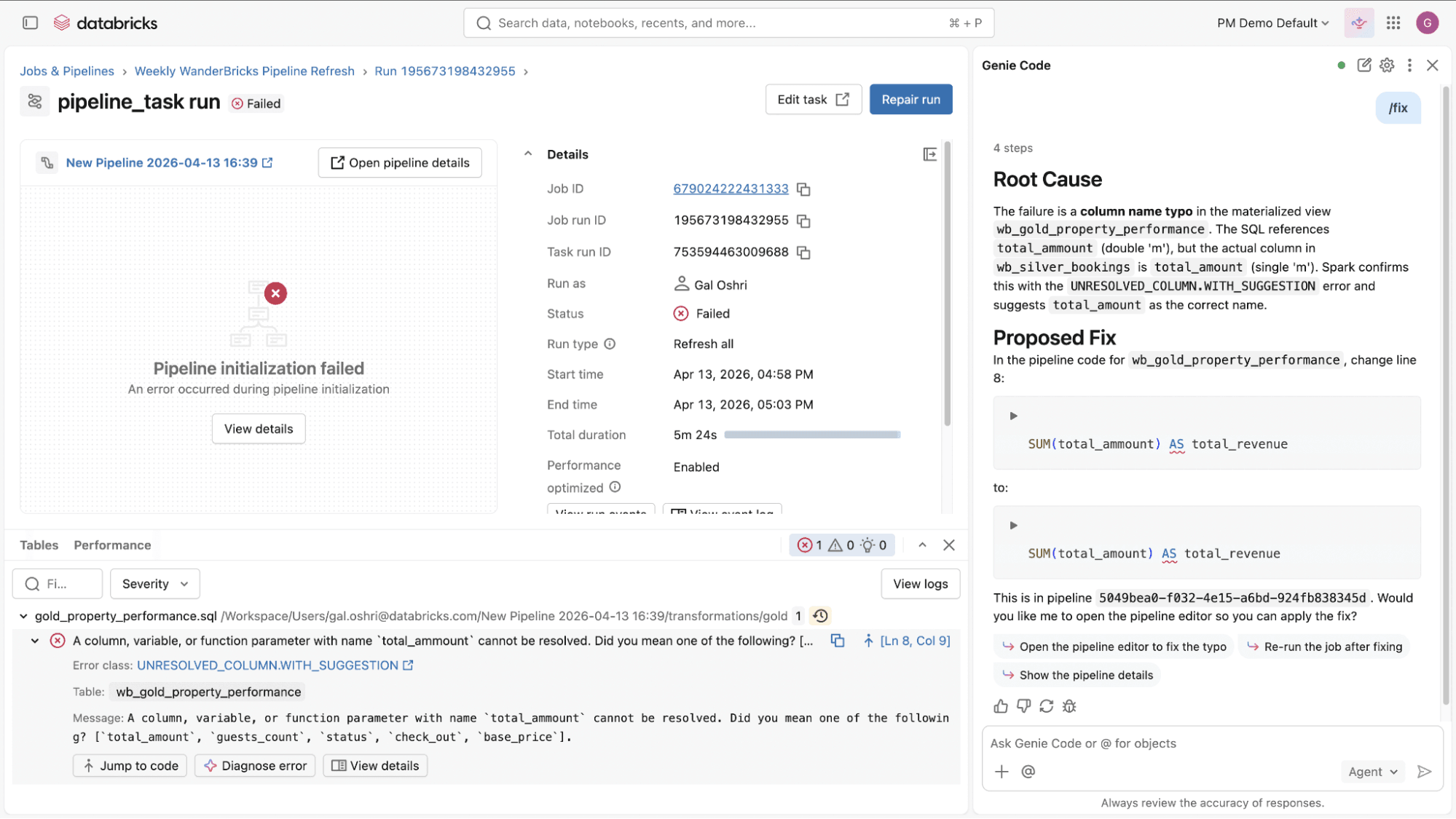
- Debug and diagnose job and pipeline failures: When a pipeline or job fails, Genie Code helps you work through the issue. It analyzes errors, proposes updates across the relevant files, and shows you the diffs before applying any changes. You can review each update and decide what moves forward. This turns long, manual debug cycles into faster guided iterations.
- Extend and customize Genie Code: Genie Code is not limited to built-in capabilities. Teams can extend it with custom instructions, agent skills and integrate external systems through MCP servers, allowing Genie Code to operate on domain-specific logic, internal tools, and custom workflows. This ensures Genie Code adapts to your environment and domain knowledge.
What’s next
More capabilities are coming to extend Genie Code across pipelines, jobs, and the broader platform. One exciting feature on the horizon is AI-optimized workloads. In the future, you can allow Genie Code to also run in the background to keep your platform working efficiently, so you can hand off those repetitive and time-consuming tasks. This includes responding to job failures and managing routine upgrades, but also automatically right-sizing cluster use.
Curious to learn more about these updates and best practices? Make sure to register for Data+AI Summit where we have hundreds of sessions covering Genie Code, Lakeflow and much more!
Try Genie Code’s data engineering capabilities
Open Genie Code in agent mode and ask it to help you build or update your pipelines and jobs. Check out the demo for more details .
Review the documentation to learn more.
Get the latest posts in your inbox
Subscribe to our blog and get the latest posts delivered to your inbox.