Automate Data & KPI Monitoring with SQL Alerts
Turn manual data checks into automated monitoring that catches issues the moment they happen
In many organizations, data monitoring is still a manual, repetitive routine: open the same dashboard every morning, rerun the same queries, scan for anomalies. By the time anyone asks "Why is this metric down?", it has often been wrong for hours or even days, usually flagged by a stakeholder, or a downstream report that already shipped bad numbers. The fix is another manual ritual. This works until it doesn't: it can’t scale across teams, environments, or production workloads, and the cost of monitoring keeps climbing.
Today we're announcing that Databricks SQL Alerts is Generally Available (GA), with more than 4,000 customers already using Alerts in production. SQL Alerts turns that manual routine into reliable, automated monitoring: define a metric or condition once in SQL, evaluate it on a schedule (or inline with the Jobs pipeline that produces the data), and notify the right owners when it crosses your guardrails. Whether you're tracking business KPIs like revenue, or operational health like pipeline freshness, or data quality issues, SQL Alerts helps you catch issues early, reduce manual spot-checks, and keep monitoring consistent as usage grows.
“The implementation of SQL Alerts for our anomaly detection services has made observability a lot simpler. Instead of maintaining monitoring infrastructure, we can now rely on Alerts to scan for issues and notify users. Its simplified interface and customizable experience has reduced manual effort for our team and helped us identify problems faster.” —Enrique Olivares, Big Data Software Development Engineer, Zillow
Overview of SQL Alerts
What are SQL Alerts?
A SQL Alert bundles a SQL query, an evaluation condition, a schedule, and a set of notification destinations. When the query result crosses the condition on its scheduled run, Databricks notifies the right owners through the channels you configure.
What teams can do with SQL Alerts:
- Catch business-metric drift early. Alert when revenue drops more than 5% week-over-week, when daily conversion rate falls below a target, or when daily active users drop in a key region.
- Keep pipelines trustworthy. Alert when a table hasn't been refreshed in the last hour, when row counts fall below the expected baseline, or when a job loads partial data.
Detect custom data quality issues before dashboards break. Alert when null rates exceed a threshold, when duplicate keys appear, or when a distribution shifts outside of expected bounds.
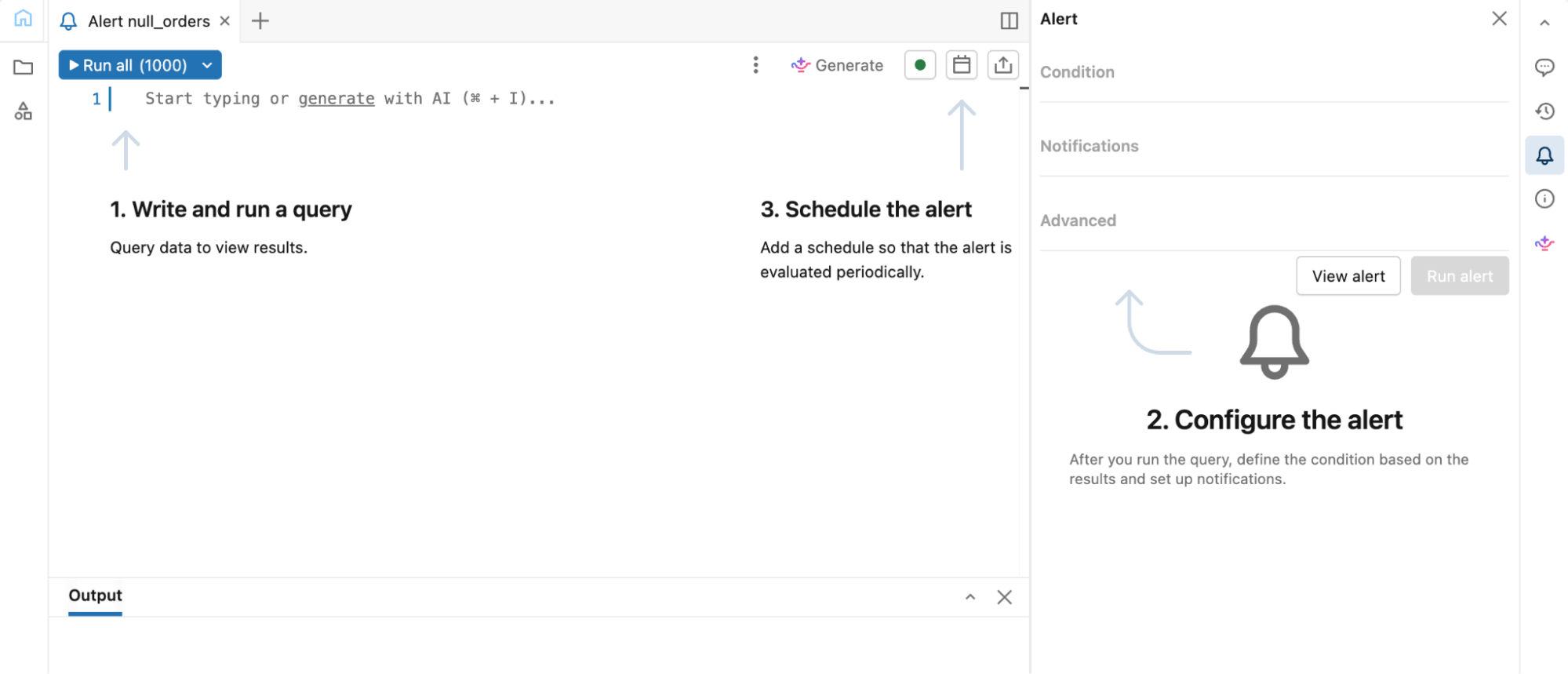
What’s available in GA?
SQL Alerts GA includes everything you need to author, operate, and scale alerts in production:
- Author alerts in the SQL editor. Define the query, evaluation condition, schedule, and notifications in one flow. You get the full power of Databricks SQL with Genie Code to help you write queries.
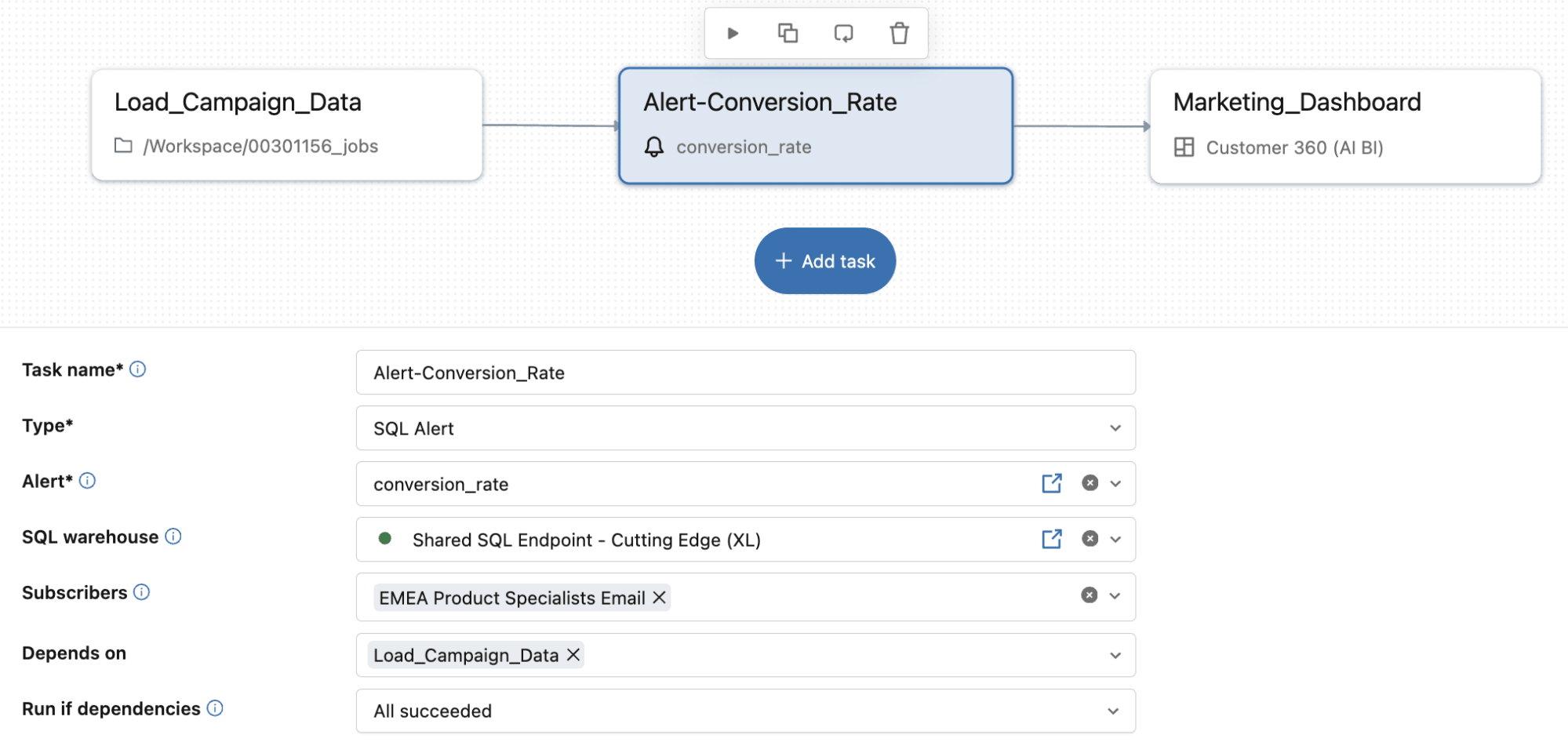
- Run alerts where you need them. Use standalone SQL Alerts to run on their own schedule, or add a SQL Alert task to a Lakeflow Job to evaluate conditions inline with the pipeline that produces the data.
- Reach the right people the right way. Send notifications to email, Slack, PagerDuty, Microsoft Teams, or webhooks, with rich templates that include Alert evaluation history so recipients can triage faster.
- Manage alerts as production code. Version alert definitions in Git, deploy them through Declarative Automation Bundles, and automate creation and updates through APIs, Terraform, and SDKs.
- Observe alerts at scale. New Alerts System Tables (in Private Preview) – `system.alert.alerts` and `system.alert.alert_evaluation_history` – surface configuration and evaluation data across your workspace, so teams can audit alerts, analyze trends, and manage workloads at scale.
“The native Databricks integration makes Alerts simple to define and reliable to operate. Having Alert logic, scheduling, and notifications managed in one place - and versioned through Git - helped us standardize monitoring and catch issues quicker, with much less manual effort.” —Tom Potash, Software Engineering Manager at DoubleVerify
Example of using SQL Alerts
Now let's walk through an example to demonstrate the value of SQL Alerts. A common business-monitoring need is detecting unexpected drops in revenue against recent baselines. This example shows how to create an alert that compares yesterday's revenue against the seven-day average and notifies the right people when the drop exceeds 5%.
Step 1: Write the query in the SQL editor
This query computes yesterday's revenue and compares it to the seven-day average.
Output: A single column, `revenue_pct_change`, that the alert evaluates. This alert would get triggered because the revenue drop exceeds 5%.
Step 2: Configure the condition and notifications
In the editor, set the condition to revenue_pct_change < -5 and add notification recipients. You can also customize the notification template using the rich markdown editor to add more context or next steps in your notification.
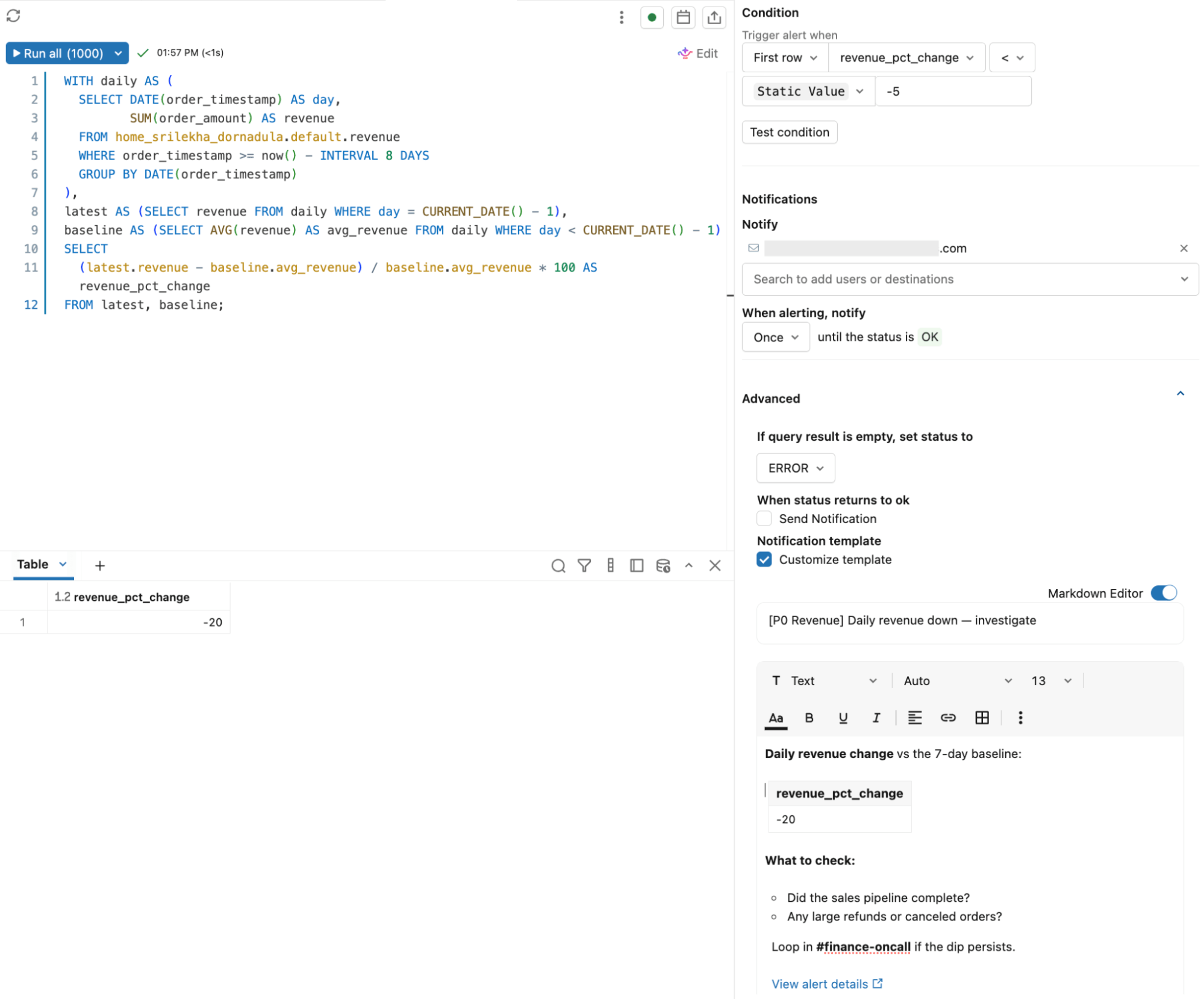
Step 3: Schedule it
Pick a cadence for evaluation. For example, for a business-critical KPI, daily evaluation ensures changes are caught within 24 hours.
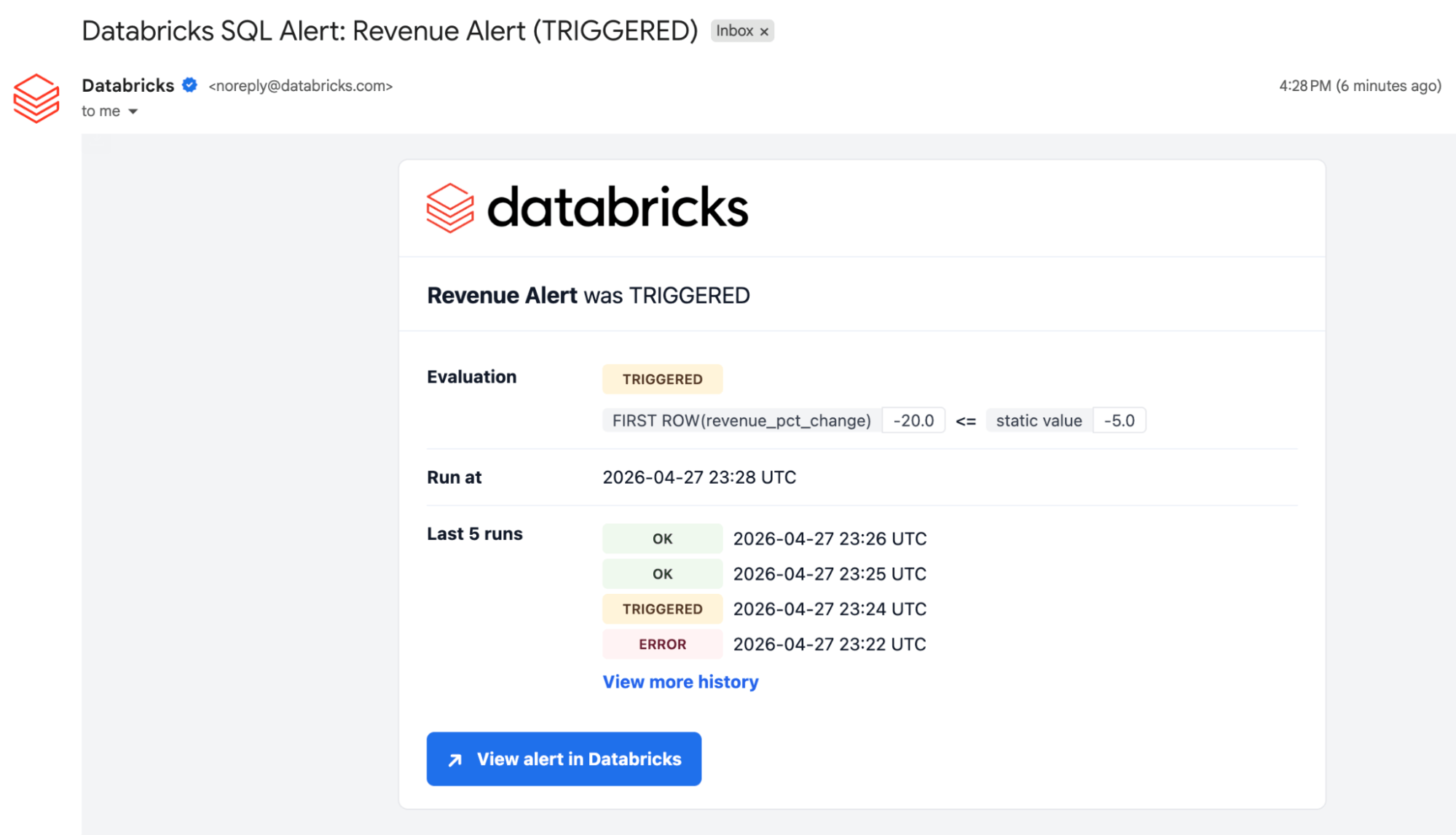
When the alert triggers, recipients get a notification with the alert evaluation status, the result, link to the alert, and recent run history. You can start investigating right away.
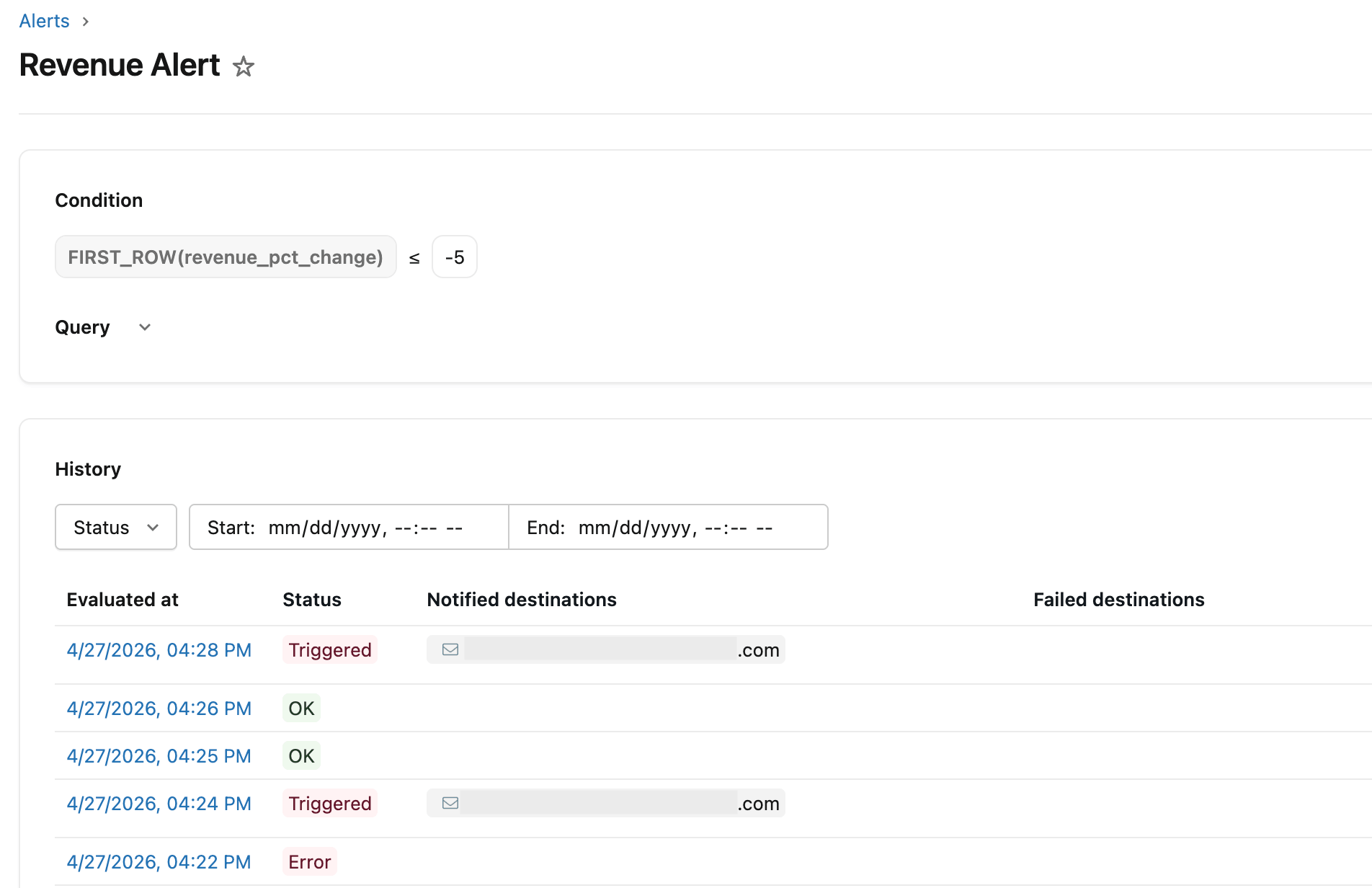
SQL Alerts also includes a comprehensive alert details page with full run history, showing when each evaluation ran, whether the alert was triggered, and notified destinations. This helps teams confirm monitoring is running as expected and triage faster by showing when the alert began triggering.
Create Alerts with Genie Code (Coming Soon)
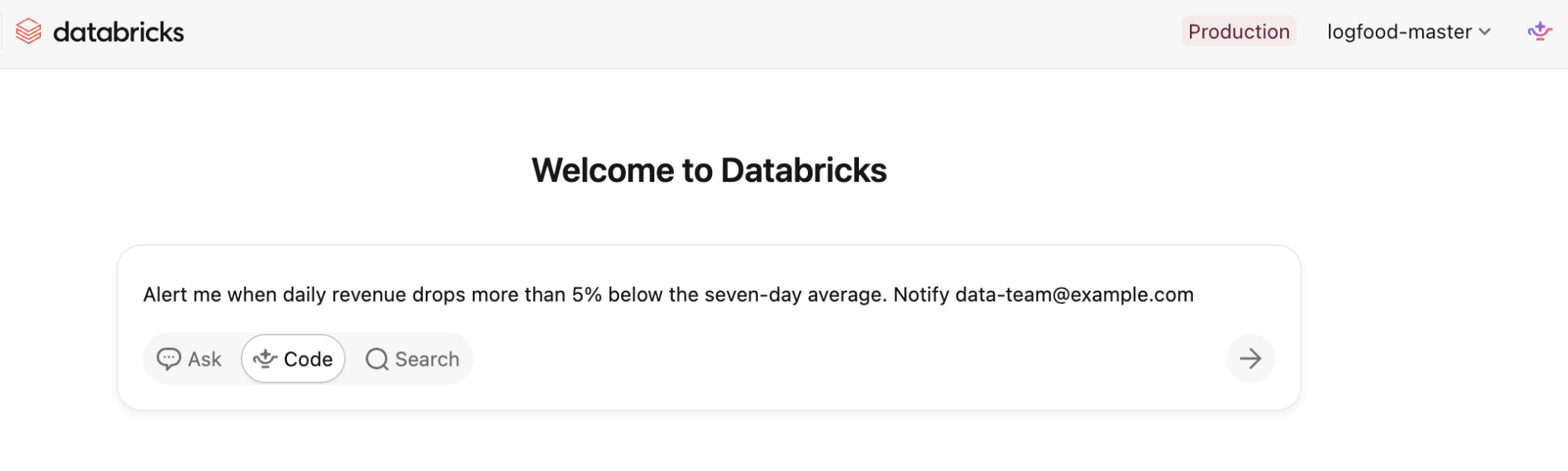
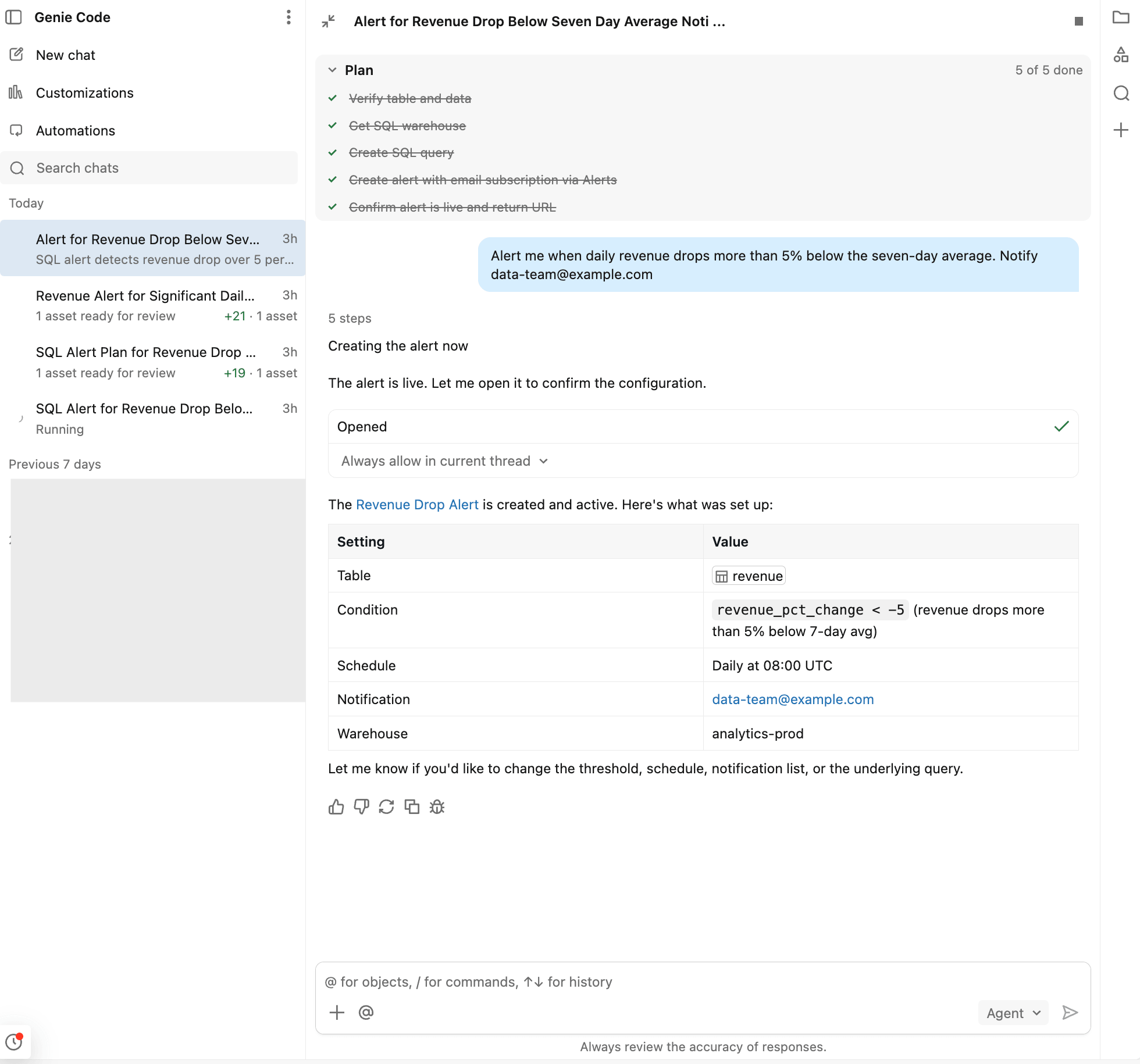
With Genie Code, the walkthrough above becomes a one-prompt experience. Describe the alert you want in natural language ("alert me when daily revenue drops more than 5% week-over-week"), and Genie Code builds an Alert for you end-to-end. You can always ask Genie to make edits, or open the Alerts UI to edit directly.
Run Alerts inside Lakeflow Jobs
Standalone SQL Alerts run on their own schedule, independent of any pipeline. That fits a lot of monitoring use cases: anything that doesn't care when upstream data lands.
But some checks belong inside the pipeline that produces the data: Did this load land complete data? Is this metric sane before we publish it? Should the next step even run? Running those as standalone scheduled alerts means the alert runs on its own schedule, separate from the pipeline that produces the data, and its result can't influence what happens next in the pipeline.
With the new SQL Alert task in Lakeflow Jobs (in Public Preview), you can do exactly that. The same alert object can now run inside your pipelines as a task. It also exposes the evaluation state (OK, TRIGGERED, or ERROR) as a task output value you can reference downstream.
Example: Detect fraud spikes the moment transaction data lands
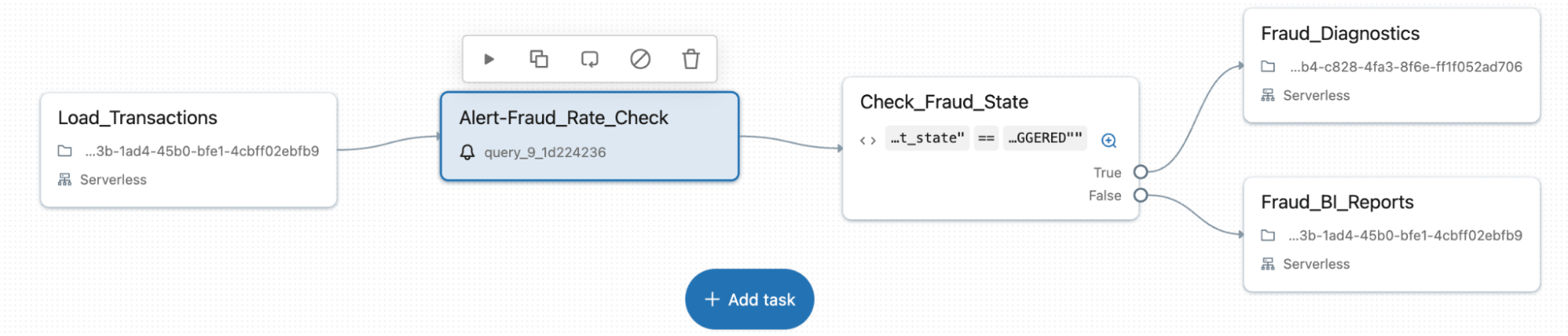
A pipeline loads credit card transactions every hour. If the fraud rate spikes after a load, the fraud ops team needs to know immediately to investigate the spike.
Add a SQL Alert task right after the load step to check whether the fraud-flag rate exceeds your threshold. Then add an If/Else task with the condition {{tasks.Alert-FraudRateCheck.output.alert_state}} == "TRIGGERED". If the alert returns OK, the pipeline continues to regular BI reporting. If TRIGGERED, it routes to a diagnostic notebook that generates a breakdown by merchant category and region, and emails the fraud ops team. The same alert object can drive your pipeline flow!
Operate Alerts reliably in production
As alerting scales across teams and environments, the challenge shifts from creating alerts to managing them reliably over time. SQL Alerts is built to handle production workflows through:
- Git integration: Alert definitions live in Git, versioned and reviewed alongside the rest of your production code.
- Declarative Automation Bundles: Provide a structured way to define and deploy alerts alongside other workspace resources, supporting repeatable promotion from development to production.
- APIs, Terraform, and SDKs: Create and manage alerts programmatically through APIs and the Databricks SDK.
Join the 4,000+ customers already using SQL Alerts. Your first alert just takes five minutes to set up. Read through the SQL Alerts documentation and start with a monitoring query you already periodically check manually!
Get the latest posts in your inbox
Subscribe to our blog and get the latest posts delivered to your inbox.