Building real-time product search on Databricks
by Jiayi Wu, Luke Lefebure and Adam Gurary
- How to build a real-time product search system on Databricks, covering ingestion, retrieval, and ranking components required to power modern search experiences.
- A reference architecture using Databricks AI Search, Lakeflow, and Lakebase to process product data, retrieve relevant results, and incorporate real-time operational signals such as pricing, inventory, and user preferences.
- Best practices and metrics for operating search at scale, including retrieval quality evaluation, latency monitoring, and how agents and applications can build on top of search systems.
Imagine you're designing a search system for an online marketplace selling cars. In milliseconds, users expect results that fit their budget, match their preferences, are available near them, and feel relevant.
That's what modern web product search looks like. It's not just a lookup tool, but a real-time decision engine that must retrieve, filter, rank, and respond almost instantly — all while balancing business and technical metrics like revenue, click-through rate, latency, and relevance.
Databricks provides the end-to-end platform for building these systems — from scalable data ingestion (Lakeflow) to vector-powered retrieval (AI Search) to real-time operational data (Lakebase) to agent-powered search experiences (Agent Bricks). This blog walks through how these pieces come together to power real-time product search.
Components for Product Search
Product search isn't simply about answering a question or surfacing information via a chatbot. It's a discovery and decision process — dynamic, personalized, and deeply tied to revenue. Buyers expect to browse, compare, and explore. The goal isn't to generate a single answer, but to present a ranked set of choices that feel relevant, trustworthy, and worth considering.
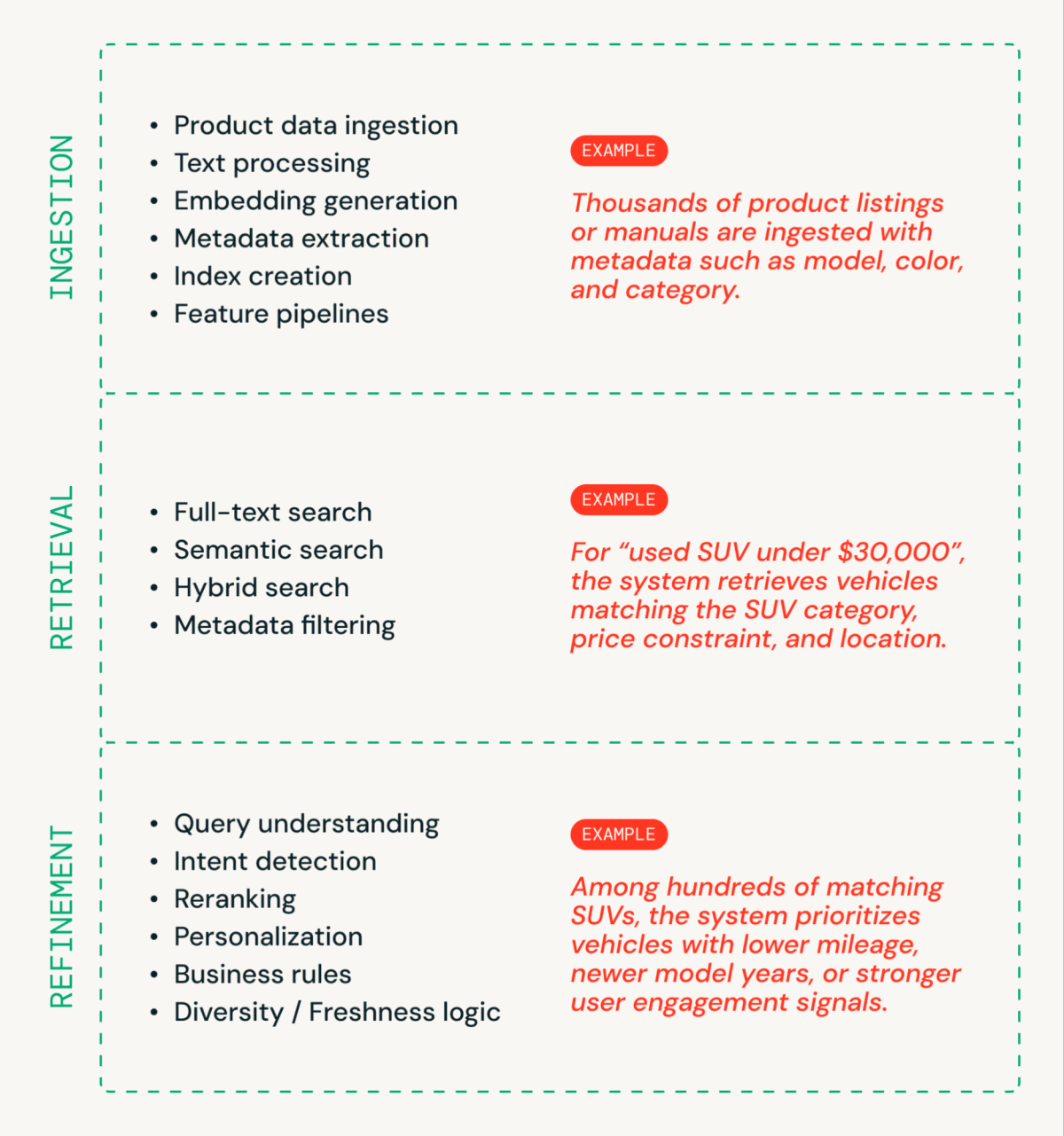
A real-time product search system generally has 3 segments (Figure 1).
- Ingestion prepares product data for search. Product titles, descriptions, and attributes are processed, converted into embeddings, enriched with metadata, and indexed for fast retrieval.
- Retrieval finds what could be relevant by generating a candidate set using full-text, semantic, or hybrid search combined with structured filtering.
- Refinement determines how results should be interpreted and ordered by applying query understanding, ranking logic, personalization, and business rules.
Behind the Search Bar
None of that experience exists without strong infrastructure and meaningful metrics.
- Infrastructure makes speed and relevance possible.
- Metrics prove that your system is actually fast and relevant — not just on paper.
Modern product search requires both: the engineering foundation to deliver results, and the metrics discipline to continuously validate that those results are good enough.
Architecture Walkthrough
First, let's look at the architecture. Figure 2 shows a detailed example of a real-time product search architecture.
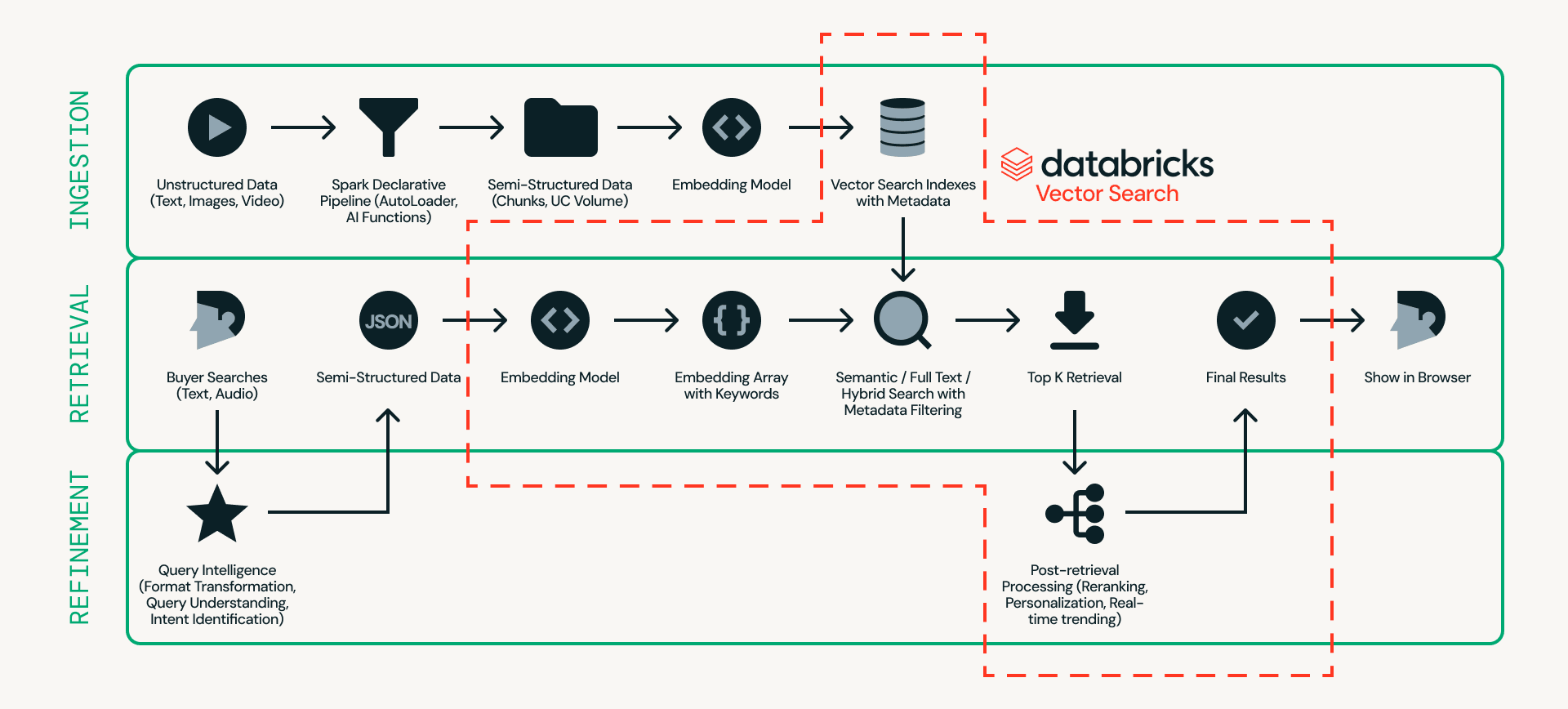
At the center of this design is Databricks AI Search, which handles ingestion, retrieval, and refinement in a single platform — eliminating the need to stitch together multiple external systems.
- Ingestion prepares product data so it can be searched efficiently. Unstructured sources such as product listings and images are processed through scalable pipelines using Databricks Auto Loader, Lakeflow Spark Declarative Pipeline and AI Functions (e.g., ai_parse_document). The data can then be chunked and converted into embeddings with metadata (e.g., car model, color, or price) in Databricks AI Search.
- Retrieval handles real-time queries. User input is transformed into embeddings and structured filters, and Databricks AI Search retrieves the top candidates using semantic search, full-text search, or hybrid search with metadata filtering.
- Refinement enhances retrieved candidates into final results. While retrieval provides a strong baseline, this layer refines outcomes by interpreting intent, applying ranking logic, and incorporating personalization and business rules when needed. Real-time operational context, such as session state, inventory, pricing, and user preferences, can be served via Lakebase, enabling sub-10ms low-latency signals to influence final ordering.
A few practical guidelines when building search systems on Databricks:
- Experiment with models easily. Swap embedding models with minimal friction and leverage native reranking capabilities. Future updates will enable one-click fine-tuning of reranking models directly within the platform, simplifying relevance optimization.
- Serve application state at the speed of search. Use Lakebase to store real-time application state — session context, inventory, pricing, user preferences — with sub-10ms latency. Managed CDC syncs Lakebase to Delta automatically, so ranking models and analytics always reflect current operational data without custom pipelines.
- Test for scale before production. Validate latency and throughput under realistic traffic, including high-QPS scenarios. You can simulate production workloads today using search load testing notebook, with native one-click load testing support coming in a future release. For sustained traffic, leverage high QPS endpoints to handle concurrency at scale, and monitor performance through endpoint observability to track latency, throughput, and system health.
- Build agent-ready search from day one. Every AI Search index with managed embeddings automatically gets a managed MCP server. Use it for zero-config agent integration, the VectorSearchRetrieverTool for code-first control, or point a Knowledge Assistant at your index for instant Q&A with citations — powered by Instructed Retriever, which delivers 70% better accuracy than standard RAG systems.
Metrics that Matter
A search system isn't successful because it looks elegant on a diagram. It's successful because it delivers fast, relevant results that drive business outcomes.
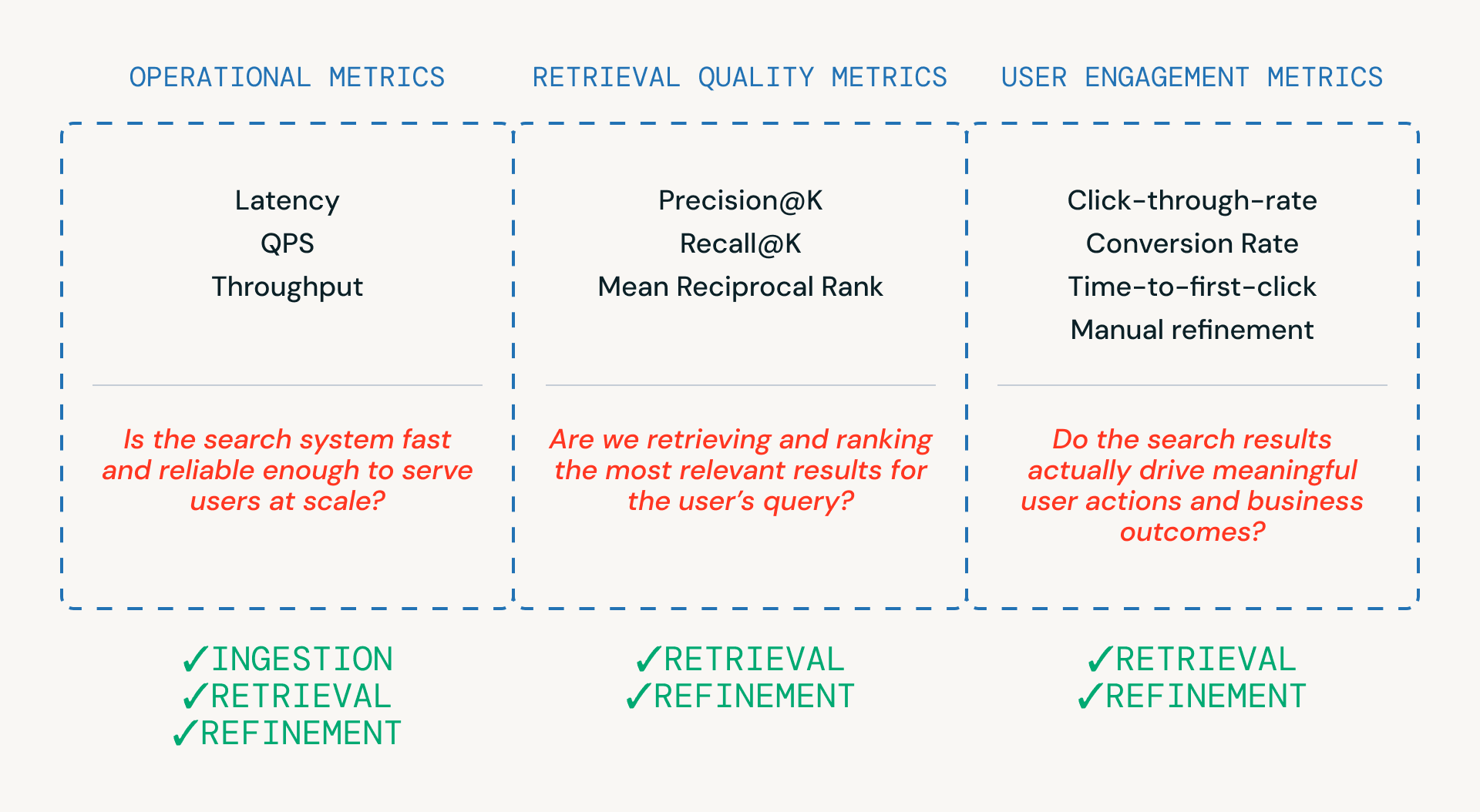
As shown in Figure 3, three categories of metrics help teams evaluate a search pipeline — each tied to a different layer of the system.
- Operational metrics ensure the system is fast and reliable enough to serve users at scale. These are critical across ingestion, retrieval and refinement steps.
- Retrieval quality metrics measure whether the system is actually retrieving and ranking relevant candidates, and are most closely tied to the retrieval and refinement stages where ranking and reranking occur.
- User engagement metrics capture real-world behavior — whether users click, refine, or ultimately convert - providing feedback that informs improvements in retrieval and refinements over time.
A few practical guidelines when evaluating search systems on Databricks:
- Balance metrics, not just optimize one. Effective search systems must balance multiple metrics — you rarely win on all metrics at once. For example, aggressively optimizing precision may increase latency or hide relevant results, ultimately leading to frustrated buyers.
- Monitor real-time latency carefully. Break down latency by pipeline stages and track tail latency such as p95/p99 to quickly identify bottlenecks. Techniques such as caching may help meet strict latency SLA.
- Track metrics systematically. Use MLflow to log and evaluate retrieval and engagement metrics across experiments. Native retrieval quality evaluation is coming soon to Databricks AI Search, making this even easier.
Search in Production at Scale — FOX Sports
FOX Sports built their AI-powered search bar on Databricks AI Search, handling thousands of QPS with a 2x improvement in query success rate. Launched for Super Bowl LIX, their architecture demonstrates several patterns covered in this blog:
- Real-time ingestion. Spark Structured Streaming continuously ingests content into Delta Sync Indexes as it's published
- Two-phase retrieval. Exact entity matching for players and teams, plus time-weighted semantic search for articles and videos, orchestrated by Databricks Model Serving
- Production optimization. A caching layer and trending searches feature — driving over 25% of all search requests — handle high-traffic spikes during live events
From Search to Intelligent Applications
Product search doesn't exist in isolation — it's one layer in a broader application stack. Here's how the rest of the Databricks platform extends what you can build on top of AI Search.
Real-Time Applications with Lakebase
For customer-facing search applications — marketplaces, product catalogs, media platforms — the search index is only part of the story. Applications also need a transactional database for operational state: inventory levels, pricing, user sessions, personalization preferences. Lakebase provides this as a fully managed, PostgreSQL-compatible database natively integrated with the Databricks platform. Managed bidirectional sync with Delta Lake means ranking models train on the freshest operational data, and analytical insights flow back to the application layer — all governed by Unity Catalog.
Agent-Powered Search with Agent Bricks
Databricks automatically provides a managed MCP server for every AI Search index, unlocking multiple integration patterns:
- Knowledge Assistant. A question-and-answer chatbot over your documents. Point it at a AI Search index and get production-ready document search with citations. Uses Instructed Retriever under the hood — 70% better accuracy than vanilla RAG and 30% better than agentic RAG.
- Custom agents. Use the VectorSearchRetrieverTool or MCP with any framework (OpenAI Agents SDK, LangGraph, LlamaIndex). Full control over retrieval parameters, embeddings, and filters. Deploy as Databricks Apps with MLflow tracing.
- Supervisor Agent. Orchestrate multiple subagents: a Knowledge Assistant for document Q&A, a Genie space for structured data queries, and UC Functions for custom business logic — all coordinated by a single supervisor.
Conclusion
Building a modern product search system requires more than a search index. It requires infrastructure designed to handle real-world scale, performance, and observability:
- Low-latency execution. Query understanding, retrieval, filtering, and reranking must be completed within strict p95/p99 latency budgets.
- Hybrid retrieval capability. Combine semantic similarity (embeddings) with structured filtering such as price, category, or availability.
- Scalability under load. Sustain high QPS and concurrency during peak traffic without degrading performance.
- Observability. Maintain clear visibility into latency breakdowns, ranking performance, and overall system health.
- Agent-ready by default. Every AI Search index is an MCP tool, immediately usable by Knowledge Assistant, custom agents, and Supervisor Agents.
- Full-stack operational support. Lakebase provides the transactional database for real-time application state, synced to Delta without ETL.
Ready to build? Follow the retrieval quality guide to benchmark and optimize your search pipeline, see how FOX Sports built AI-powered search at scale, and dive into the AI Search documentation to get started.
Get the latest posts in your inbox
Subscribe to our blog and get the latest posts delivered to your inbox.