From Data to Dialogue: A Best Practices Guide for Building High-Performing Genie Spaces
Self-Service Analytics Best Practices - AI-Powered BI with Genie Spaces
by Noah Solomon
- Build on a Strong Foundation: Start with curated data to improve accuracy, performance, and consistency at scale.
- Teach Genie Your Organisation: Configure metadata, joins, and SQL patterns to teach Genie your organization’s logic and language.
- Test, Refine, and Maintain: Use benchmarks and feedback loops to maintain quality as data and usage evolve.
Across most organizations, there is a growing expectation that anyone should be able to ask questions of their data in plain English and receive accurate answers instantly. Large language models are not designed for this purpose alone; they do not understand internal acronyms, custom metrics, or how business entities relate to one another. Without that context, even simple questions can produce misleading results.
Implementing self-service analytics best practices transforms how organizations query data. Databricks AI/BI Genie addresses this gap by combining language models with governed data and explicit configuration on the Databricks Data + AI Platform. A Genie Space is where you encode your organization’s logic, vocabulary, and rules so that natural language questions resolve into correct queries.
Building a reliable Genie Space takes more than pointing AI at a database. It requires deliberate preparation across data modeling, metadata, and ongoing validation. This guide provides a practical, step-by-step approach to doing that work in a scalable manner.
Step 1: Engineer a strong data foundation
The quality of a Genie Space depends heavily on the quality of the underlying data. When the data is already curated and consistent, Genie’s job becomes simpler, faster, and more accurate. The goal is to expose curated data that a human analyst would trust without additional cleanup.
- Denormalise and Pre-Join: Start by denormalizing your data models where it makes sense. Pre-joining tables removes complexity from generated queries and reduces the risk of incorrect joins or aggregations.
- Pre-Calculate Common Fields: You should pre-calculate commonly used fields, such as fiscal periods or standardized status flags, so there is no ambiguity in how those values are derived.
- Filter Irrelevant Data: If certain rows or columns should never be queried, remove them during the data engineering process. Do not rely on instructions or prompts to compensate for poor modeling choices. When a rule applies universally, enforce it in the data itself.
Metric views play a key role in enforcing consistent definitions across teams. They allow you to encode shared business logic, such as revenue or active user calculations, in one place. Genie inherits these definitions automatically, which guarantees that every query relies on the same approved logic. This eliminates ambiguity and ensures a single source of truth.
Step 2: Define expectations with benchmarks
Before configuring metadata or SQL examples, you need to define what success looks like. A Genie Space should not only answer questions, but answer them correctly, consistently, and in the expected format. Benchmarks make this measurable.
- Inventory Your Key Questions: Collaborate with subject matter experts to gather a representative sample of questions. These should include both simple lookups and more complex analytical queries. For each question, define the "ground truth" response to serve as your success criteria. This allows you to verify that Genie not only calculates the numbers correctly but also implicitly respects your formatting standards. For example, when verifying the total approved revenue by merchant, the benchmark should ensure that the result is grouped correctly, not just that the total sum is accurate.
- Specify the Desired Output: For each question, define the expected output. Does the answer need to be in a specific format? Should values be aggregated in a particular way? Specifying the desired format ensures the query is evaluated fairly and that Genie learns your organization's presentation standards.
- Establish Your Initial Score: Run benchmarks early and expect failures. Initial failures are useful because they highlight exactly where Genie lacks context. As you refine metadata and logic, you should rerun these benchmarks to track improvements and catch regressions when data or configuration changes occur.
By utilizing the benchmarking tool, you can re-run your set of common queries through an automated process. This provides a consistent and repeatable system for evaluating the state of your Genie Space at every stage, allowing you to measure progress and quickly spot regressions.
Step 3: Teach Genie your organisation’s logic
With a solid data foundation, you must now teach Genie the specific context and rules of your organisation. This involves three distinct layers of configuration: enriching metadata, defining relationships, and codifying SQL patterns.
- Enrich Metadata and Vocabulary Genie pulls basic schema info from Unity Catalog, but you need to add the "human" context.
- Table Descriptions: Treat these as "mission statements." Briefly explain what data the table contains and the specific business questions it answers.
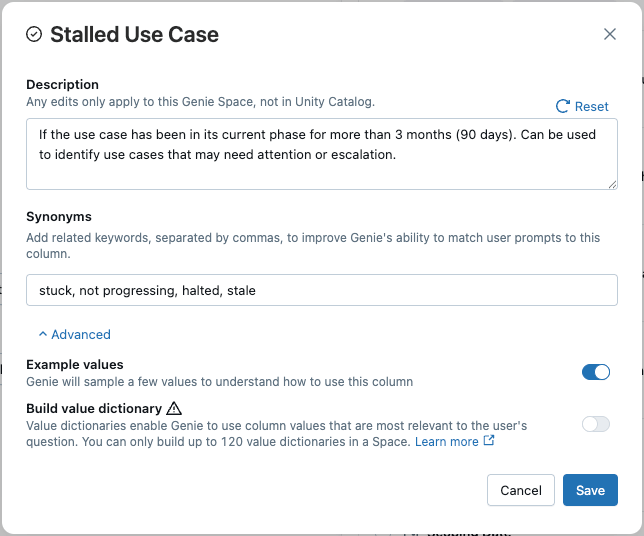
- Column Descriptions: Clarify ambiguous fields. If a column name like
created_atorstatusis vague, add a description to specify exactly what it represents (e.g., "The timestamp when the order was placed, in UTC"). - Synonyms: Bridge the gap between business jargon and technical column names. Use synonyms to map acronyms (e.g., "ARR") or internal terms directly to the relevant columns.
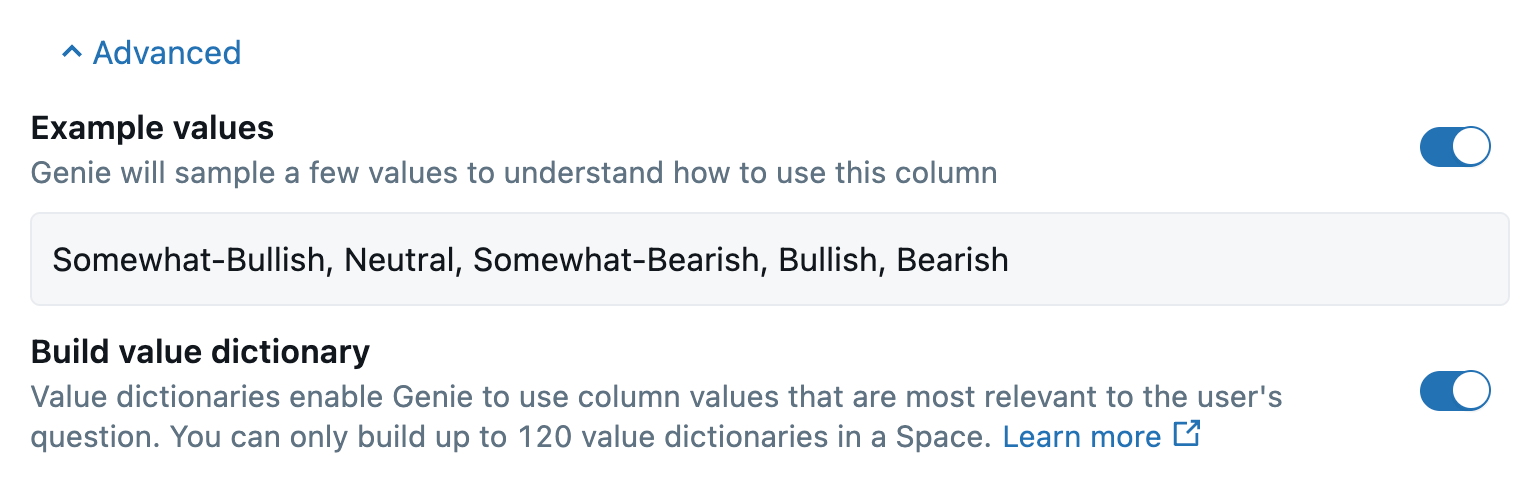
- Value Dictionaries: Give Genie a peek at your actual data. Enable Example Values or Value Dictionaries for categorical columns so Genie can perform exact matches (e.g., mapping "Australia" to "AUS") without having to guess naming conventions.
- Define Relationships Genie respects primary and foreign keys defined in Unity Catalog, but you must manually configure any missing links in the Joins tab.
- Define Cardinality: Explicitly stating if a relationship is One-to-One, One-to-Many, or Many-to-Many is critical. This prevents Genie from generating queries that explode row counts or accidentally double-count metrics.
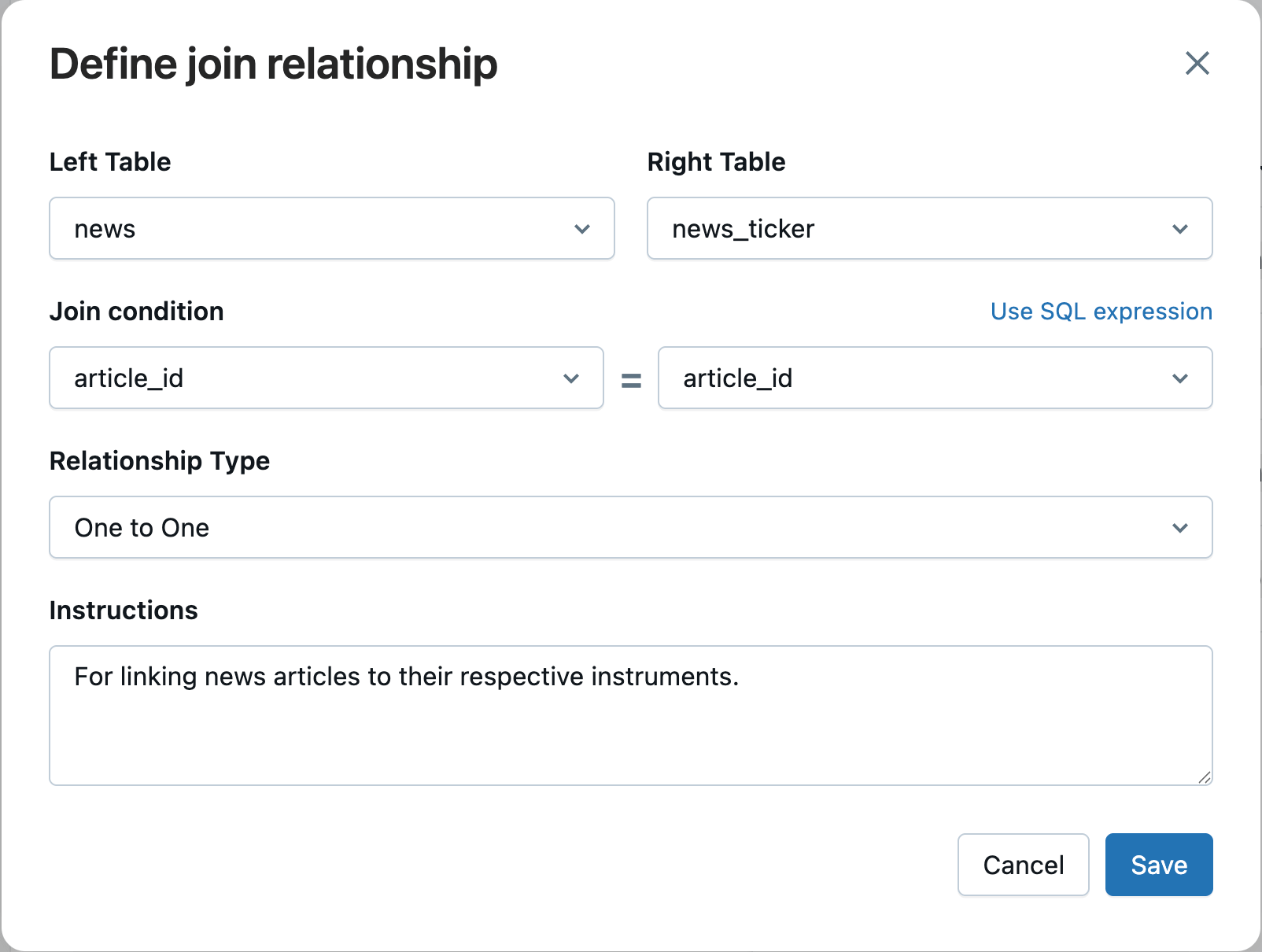
- Define Cardinality: Explicitly stating if a relationship is One-to-One, One-to-Many, or Many-to-Many is critical. This prevents Genie from generating queries that explode row counts or accidentally double-count metrics.
- Codify Logic with SQL While metadata teaches Genie what your data is, provided SQL teaches it how to query it.
- Example Queries: Add "gold standard" queries for your most common or involved questions. This is where you demonstrate how to handle complex logic - tricky calculations, specific filters, or re-used multi-step aggregations - that metadata alone cannot explain. You should also incorporate parameters to teach Genie how to handle variable inputs dynamically. Usage guidelines allow you to explicitly tell Genie when to apply a specific query. This disambiguates similar metrics and ensures Genie picks the right template for the right scenario. Beyond the logic, Genie treats example queries as style templates, learning your preferred formatting and coding conventions.
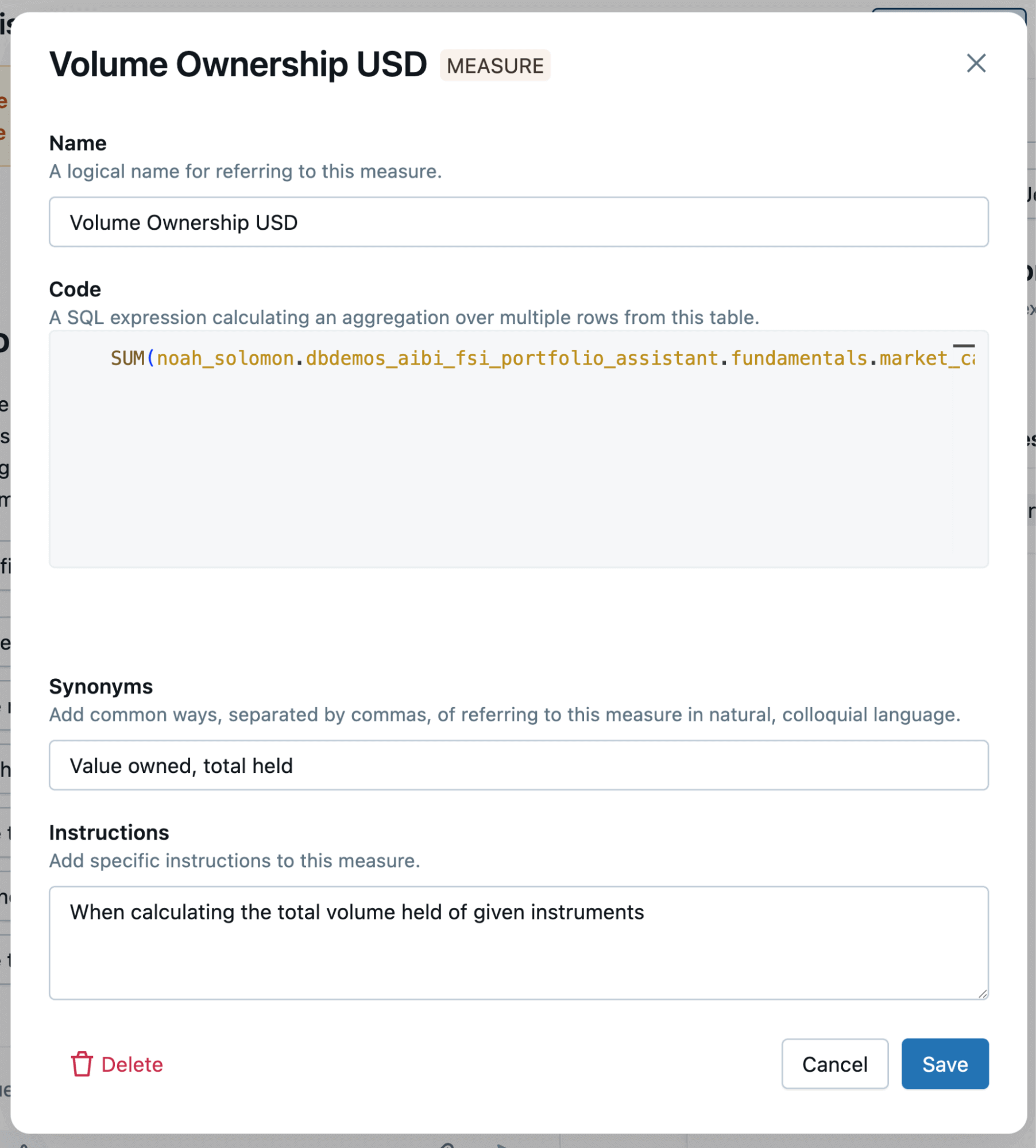
- SQL Expressions: Define reusable snippets specifically for filters, dimensions, or measures. These act as modular building blocks for your queries. Crucially, you must provide instructions on when to use them (e.g., "Apply this filter whenever the user asks for 'Active Accounts'"), ensuring Genie uses the tool correctly rather than just guessing.
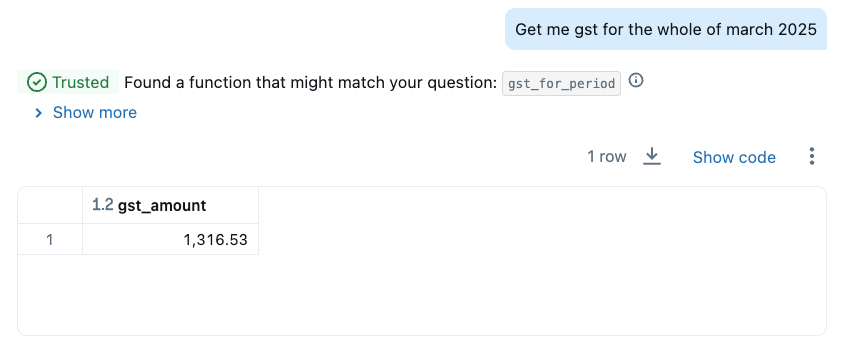
- Trusted Functions (UDFs): Use User Defined Functions for logic that must be reused exactly as-is, with no variation in the underlying formula (e.g., a standardized tax calculation). These are strict functions where Genie simply passes in the necessary parameters. Because the logic is locked down, when Genie executes these functions, it displays a "Trusted" badge on the result, indicating to the user that they can have confidence in the answer.
Step 4: Apply general instructions
General instructions provide high-level context, but they should be used sparingly. They are less precise than metadata or SQL examples and should never be used to compensate for missing configuration elsewhere.
Before adding a general instruction, check whether the issue can be resolved through table descriptions, field metadata, joins, example values, or example queries. Use general instructions only when none of the specific tools apply.
Effective instructions describe the business narrative in plain language. They explain key entities, lifecycles, and relationships without dictating specific SQL behavior. Avoid instructions that force table selection, hardcode filters, or specify output formatting.
Use the decision matrix below to diagnose common issues. Before adding a general instruction, verify that you have addressed the gap using the primary configuration tools:
| Identified Gap Area / Problem | First Feature to Check and Change |
|---|---|
| Genie is not using the correct table. | Table Descriptions: Have you clearly explained what each table is for and when it should be used? |
| Genie is not using the right field for a filter, aggregation, or calculation. | Field Descriptions & Synonyms: Does the field have clear synonyms for the organisation’s terms? Is its purpose well-described? |
| Genie is failing to match a user's input to a specific value in the data (e.g., mapping "Australia" to "AUS"). | Example Values / Value Dictionaries: Are these features enabled for the relevant fields to give Genie context on the column's contents? |
| Genie is creating incorrect joins or failing to join tables. | Joins Tab: Have you explicitly defined the relationship and its cardinality (e.g., One to Many)? |
| The query logic is wrong, or the output format (selected columns, aliases) is incorrect. | Example SQL Queries: Have you provided a complete, correct example of the query that Genie can learn from as a template? |
| A core calculation must always be performed in a specific, unchanging way. | SQL Functions (UDFs): Have you encapsulated this logic in a function to ensure it is always applied correctly and consistently? |
This section is your opportunity to speak to Genie in broad, conceptual terms.
Good General Instructions provide a narrative
The most effective general instructions provide a high-level, human-readable narrative of the entire organisational context. Think of it as writing an executive summary or a mission brief for the Genie Space. This is where you explain the purpose of the data, define the key entities, and describe how they relate to one another in plain English.
This context should guide Genie towards the correct behavioral patterns without dictating specific SQL commands. It fills in the conceptual gaps that remain after all the more specific tools have been used.
Here is a comparative example of a high-level instruction that sets the stage for a cashback and transactions dataset:
| Good General Instructions | Bad General Instructions | |
|---|---|---|
This covers analysis of transactions and cash-back rewards given to consumers for making purchases with relevant merchants.Customers receive cash-back on their purchase for making purchases with given vendors. A single customer can make multiple purchases with multiple vendors. A customer has associated account and demographic information. A customer needs to be accepted on the platform in order to receive cash-back on their purchases.A merchant will have an associated industry and base cash-back rate. A single merchant can have multiple customers, each making multiple purchases.A transaction will have associated purchase and in-house processing progression information. A transaction will progress from pending, to either rejected or approved. Each individual transaction will have a single associated customer and vendor. | ** CRITICAL: ALWAYS JOIN LOWER(merchants.id) = LOWER(transactions.merchant_id) **1ACRONYMS:MAU: Monthly active users AU: Activated usersCB: Cash back2If rejected is not specified as a condition, please only use approved. similar for accepted.3Use these fiscal quarter range definitions for dates q1: July–September (E.g., fy-2024 q1 = Jul–Sep 2023) q2: October–December (E.g., fy-2024 q2 = Oct–Dec 2023) q3: January–March (E.g., fy-2024 q3 = Jan–Mar 2024) q4: April–June (E.g., fy-2024 q4 = Apr–Jun 2024)4For cash back percent, this is defined as sum(cash_back) / sum(purchase_amount)5Always exclude merchants.status = ‘deactivated’6 | 1This join should be covered in the Joins section, instead of in the General Instructions. The key join condition should be fixed during data modeling.2Acronyms should be included in the field descriptions and synonyms where they are relevant. These ones also don’t have any context as to what they apply to or represent.3It’s not clear as to which columns these rules apply to, or under what conditions. They would almost certainly be better off entirely re-worked as metrics, or at a minimum given in the column descriptions themselves.4These should instead be engineered fields in the underlying data, to remove any ambiguity or accountability from the generated queries. These would be a well-suited use case for a dimension in a metric view.5These should be given as measures in a metric view. At a minimum, these should be covered as example queries.6This exclusion should be done at the data engineering level, rather than a condition to always be added in to generated queries. |
Bad General Instructions
Ineffective instructions try to do the job of a more specific tool. They are often too rigid, telling Genie exactly how to write a query, which can confuse it or conflict with the context it has learned from other configuration areas. Avoid instructions that:
- Dictate which tables or columns to use. This is the job of Table/Field Descriptions and Synonyms.
- Instead of: "When a user asks about sales, use the transactions table and the revenue column."
- Do this: Ensure the transactions table description says it is used for sales analysis and the revenue column has relevant synonyms.
- Specify formatting, aliases, or fields to return. This is the job of Example SQL Queries.
- Instead of: "When showing revenue, rename the column to 'Total Revenue' and format it as a currency."
- Do this: Provide an example query that correctly calculates and formats a revenue output.
- Hardcode specific values. This logic belongs in the data layer or in a specific Example Query.
- Instead of: "Always filter for transactions where the country is 'AUS'."
- Do this: Handle this in the right place. If this is a universal rule, filter it out in the Gold Layer data. If it's a common request, add an example query showing how to filter for Australian transactions.
Step 5: Maintain quality through continuous feedback
Launching a Genie Space is not the end of the project; it's the beginning of a living, evolving analytics tool. The most successful Genie Spaces are those that are actively monitored, maintained, and improved in partnership with the users they serve. This final step transforms your Genie Space from a static configuration into a dynamic asset that adapts to your organization's changing needs.
Engage Your Subject Matter Experts as Partners
Your best source of intelligence for improving your Genie Space is your expert users. Empower a small group of SMEs to act as champions and provide them with direct access. Encourage them to use the built-in feedback tools, marking responses as "Good" or "Bad".
This creates a powerful, continuous feedback loop. When an SME works with Genie to refine a question and arrive at a correct answer, that interaction is a valuable learning opportunity. Capture their final "Good" query and the original question, and add it to your Example Queries. This process of iterative refinement, driven by real-world usage, is the single most effective way to improve your Space's accuracy and relevance over time.
Use the Monitoring Tab to Understand User Behavior
The Monitoring Tab is your direct line of sight into how users are engaging with your data. Regularly reviewing this dashboard provides invaluable insights into user behavior and helps you identify areas for improvement. Look for:
- Common Questions: What are the most frequent queries? This helps you understand what your users value most.
- Struggling Points: Are there topics where Genie consistently produces incorrect or inconsistent queries?
- Unexpected Usage: Are people asking questions you didn't anticipate?
This data provides a clear, evidence-based guide for where to focus your efforts—whether that means adding new metadata, refining joins, creating more targeted example queries, or adjusting the general instructions to better support your users' needs.
Validate Changes with Your Benchmark Suite
As you make improvements and your data evolves, your benchmark suite becomes your primary tool for quality assurance and regression testing. Any significant change to the Genie Space—such as adding a new data source—should be immediately followed by a benchmark run.
This is the fastest and most reliable way to verify if a change has had a positive or negative impact. If you see a drop in performance, the benchmark results will tell you exactly which queries have regressed, allowing you to pinpoint the source of the new ambiguity and resolve it quickly. This disciplined approach ensures that as your Genie Space grows, its quality and reliability remain consistently high.
From Configuration to Collaboration
Building a high-performing Genie Space is a product of ongoing refinement, not a one-time configuration. Do not attempt to map your entire data estate at once. Instead, select a single, high-value use case, such as a specific sales dashboard or an operational report, and apply this methodology.
Start by engineering a clean slice of data, then immediately establish your "golden" benchmark questions. Use the failures in that initial benchmark to guide your configuration of metadata and SQL logic. By focusing on this iterative loop - test, configure, verify - you will build a system that users trust. This disciplined approach delivers immediate self-service capabilities.
To get started with Genie in their workspace
https://docs.databricks.com/aws/en/genie/set-up
https://learn.microsoft.com/en-gb/azure/databricks/genie/set-up
https://docs.databricks.com/gcp/en/genie/set-up
Get the latest posts in your inbox
Subscribe to our blog and get the latest posts delivered to your inbox.