How to Build Production-Ready Genie Spaces, and Build Trust Along the Way
A journey of building a Genie space from scratch to production-ready, improving accuracy through benchmark evaluation and systematic optimization
by Pulkit Pareek and Eric Lind
- Leverage benchmarks to measure the readiness of your Genie space objectively, rather than subjectively.
- Follow an end-to-end example of developing a production-ready Genie space, covering many common troubleshooting scenarios.
- Build trust with end users by sharing final accuracy results on questions they need to be answered correctly.
The Trust Challenge in Self-Service Analytics
Genie is a Databricks feature that allows business teams to interact with their data using natural language. It uses generative AI tailored to your organization's terminology and data, with the ability to monitor and refine its performance through user feedback.
A common challenge with any natural language analytics tool is building trust with end users. Consider Sarah, a marketing domain expert, who’s trying out Genie for the first time instead of her dashboards.
Sarah: "What was our click-through rate last quarter?"
Genie: 8.5%
Sarah's thought: Wait, I remember celebrating when we hit 6% last quarter...
This is a question Sarah knows the answer to but isn’t seeing the correct result. Perhaps the generated query included different campaigns, or used a standard calendar definition for “last quarter” when it should be using the company’s fiscal calendar. But Sarah doesn't know what’s wrong. The moment of uncertainty has introduced doubt. Without proper evaluation of the answers, this doubt about usability can grow. Users return to requesting analyst support, which disrupts other projects and increases the cost and time-to-value to generate a single insight. The self-service investment sits underutilized.
The question isn't just whether your Genie space can generate SQL. It's whether your users trust the results enough to make decisions with them.
Building that trust requires moving beyond subjective assessment ("it seems to work") to measurable validation ("we've tested it systematically"). We will demonstrate how Genie's built-in benchmarks feature transforms a baseline implementation into a production-ready system that users rely on for critical decisions. Benchmarks provide a data-driven way to evaluate the quality of your Genie space and aid in how you address gaps when curating the Genie space.
In this blog, we will walk you through an example end-to-end journey of building a Genie space with benchmarks to develop a trustworthy system.
The Data: Marketing Campaign Analysis
Our marketing team needs to analyze campaign performance across four interconnected datasets.
- Prospects - Company information, including industry and location
- Contacts - Recipient information, including department and device type
- Campaigns - Campaign details, including budget, template, and dates
- Events - Email event tracking (sends, opens, clicks, spam reports)
The workflow: Identify target companies (prospects) → find contacts at those companies → send marketing campaigns → track how recipients respond to those campaigns (events).
Some example questions users needed to answer are:
- "Which campaigns delivered the best ROI by industry?"
- "What's our compliance risk across different campaign types?"
- "How do engagement patterns (CTR) differ by device and department?"
- "Which templates perform best for specific prospect segments?"
These questions require joining tables, calculating domain-specific metrics, and applying domain knowledge about what makes a campaign "successful" or "high-risk." Getting these answers right matters because they directly influence budget allocation, campaign strategy, and compliance decisions. Let’s get to it!
The Journey: Developing from Baseline to Production
It should not be expected that anecdotally adding tables and a handful of text prompts will yield a sufficiently accurate Genie space for end users. A thorough understanding of your end-user needs, combined with knowledge of the datasets and Databricks platform capabilities, will lead to the desired outcomes.
In this end-to-end example, we evaluate the accuracy of our Genie space through benchmarks, diagnose context gaps causing incorrect answers, and implement fixes. Consider this framework for how to approach your Genie development and evaluations.
- Define Your Benchmark Suite (aim for 10-20 representative questions). These questions should be determined by subject matter experts and the actual end users expected to leverage Genie for analytics. Ideally these questions are created prior to any actual development of your Genie space.
- Establish Your Baseline Accuracy. Run all benchmark questions through your space with only the baseline data objects added to the Genie space. Document the accuracy and which questions pass, which fail, and why.
- Optimize Systematically. Implement one set of changes (ex. adding column descriptions). Re-run all benchmark questions. Measure the impact, improvements, and continue iterative development following published Best Practices.
- Measure and Communicate. Running the benchmarks provides objective evaluation criteria that the Genie space sufficiently meets expectations, building trust with users and stakeholders.
We created a suite of 13 benchmark questions that represent what end users are seeking answers for from our marketing data. Each benchmark question is a realistic question in plain english coupled with a validated SQL query answering that question.
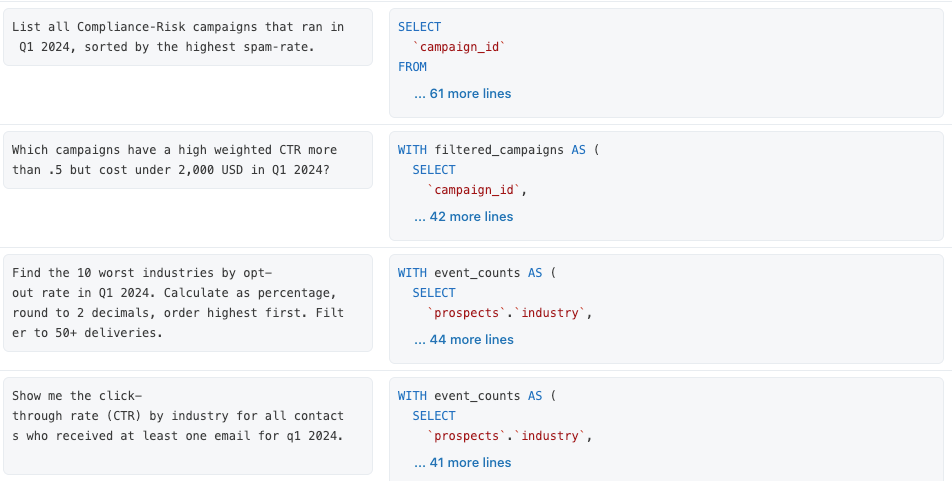
Genie does not include these benchmark SQL queries as existing context, by design. They are purely used for evaluation. It is our job to provide the right context so those questions can be answered correctly. Let’s get to it!
Iteration 0: Establish the Baseline
We intentionally began with poorly table names like cmp and proc_delta, and column names like uid_seq (for campaign_id), label_txt (for campaign_name), num_val (for cost), and proc_ts (for event_date). This starting point mirrors what many organizations actually face - data modeled for technical conventions rather than business meaning.
Tables alone also provide no context for how to calculate domain specific KPIs and metrics. Genie knows how to leverage hundreds of built-in SQL functions, but it still needs the right columns and logic to use as inputs. So what happens when Genie doesn’t have enough context?
Benchmark Analysis: Genie couldn't answer any of our 13 benchmark questions correctly. Not because the AI wasn't powerful enough, but because it lacked any relevant context, as shown below.
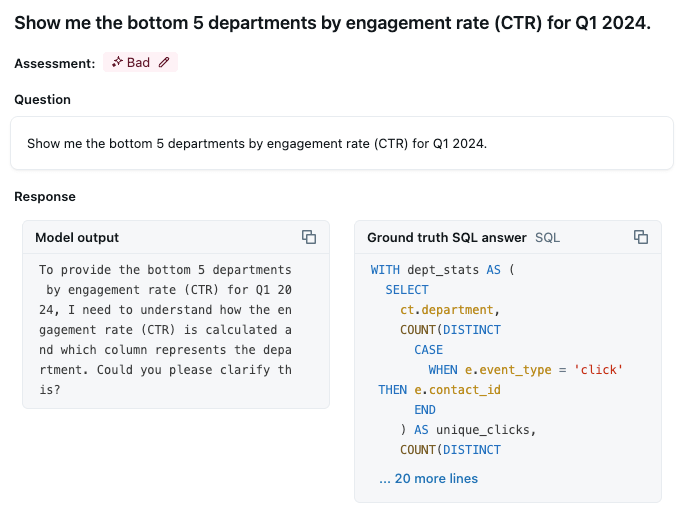
Insight: Every question that end users ask relies on Genie producing a SQL query from the data objects you provide. Poor data naming conventions will thus affect every single one of those queries generated. You can't skip foundational data quality and expect to build trust with end users! Genie does not generate a SQL query for every question. It only does so when it has enough context. This is an expected behavior to prevent hallucinations and misleading answers.
Next Action: Low initial benchmark scores indicate you should first focus on cleaning up Unity Catalog objects, so we begin there.
Iteration 1: Ambiguous Column Meanings
We improved table names to campaigns, events, contacts, and prospects, and added clear table descriptions in Unity Catalog.

However, we ran into another related challenge: misleading column names or comments that suggest relationships that don't exist.
For example, columns like workflow_id, resource_id, and owner_id exist across multiple tables. These sound like they should connect tables together, but they don't. The events table uses workflow_id as the foreign key to campaigns (not a separate workflow table), and resource_id as the foreign key to contacts (not a separate resource table). Meanwhile, campaigns has its own workflow_id column that's completely unrelated. If these columns names and descriptions aren’t appropriately notated, it can lead to inaccurate usage of those attributes. We updated column descriptions in Unity Catalog to articulate the purpose of each of those ambiguous columns. Note: if you are unable to edit metadata in UC, you can add table and column descriptions in the Genie space knowledge store.
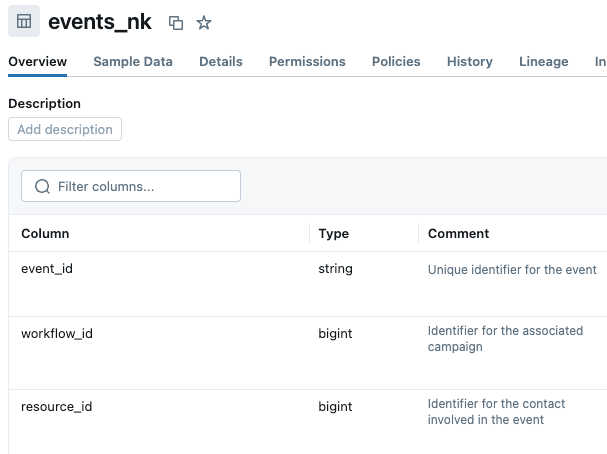
Benchmark Analysis: Simple, single-table queries started working thanks to clear names and descriptions. Questions like "Count events by type in 2023" and "Which campaigns started in the last three months?" now received correct answers. However, any query requiring joins across tables failed—Genie still couldn't correctly determine which columns represented relationships.
Insight: Clear naming conventions help, but without explicit relationship definitions, Genie must guess which columns connect tables together. When multiple columns have names like workflow_id or resource_id, these guesses can lead to inaccurate results. Proper metadata serves as a foundation, but relationships should be explicitly defined.
Next Action: Define join relationships between your data objects. Column names like id or resource_id appear all the time. Let’s clear up exactly which of those columns reference other table objects.
Iteration 2: Ambiguous Data Model
The best way to clarify which columns Genie should be using when joining tables is through the use of primary and foreign keys. We added primary and foreign key constraints in Unity Catalog, explicitly telling Genie how tables connect: campaigns.campaign_id relates to events.campaign_id, which links to contacts.contact_id, which connects to prospects.prospect_id. This eliminates guesswork and dictates how multi-table joins are created by default. Note: if you are unable to edit relationships in UC, or the table relationship is complex (e.g. multiple JOIN conditions) you can define these in the Genie space knowledge store.
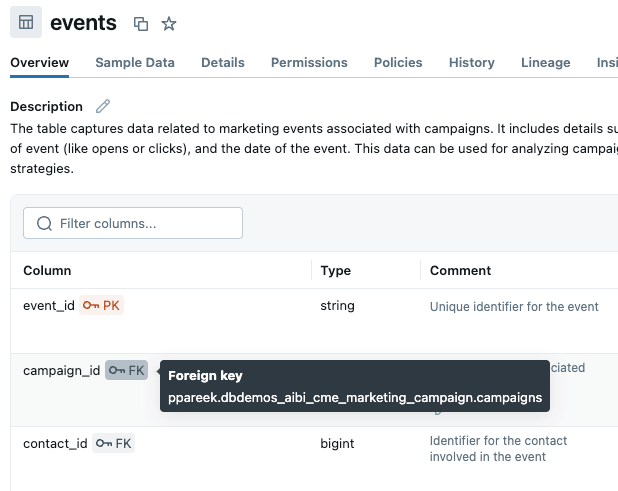
Alternatively, we could consider creating a metric view which can include join details explicitly in the object definition. More on that later.
Benchmark Analysis: Steady progress. Questions requiring joins across multiple tables started working: "Show campaign costs by industry for Q1 2024" and "Which campaigns had more than 1,000 events in January?" now succeeded.
Insight: Relationships enable the complex multi-table queries that deliver real business value. Genie is generating correctly structured SQL and doing simple things like cost summations and event counts correctly.
Action: Of the remaining incorrect benchmarks, many of them include references to values users intend to leverage as data filters. The way end users are asking questions doesn’t directly match to the values that appear in the dataset.
Iteration 3: Understanding Data Values
A Genie space should be curated to answer domain-specific questions. However, people don’t always speak using the exact same terminology as how our data appears. Users may say "bioengineering companies" but the data value is "biotechnology."
Enabling value dictionaries and data sampling yields a quicker and more accurate lookup of the values as they exist in the data, rather than Genie using only the exact value as prompted by the end user.
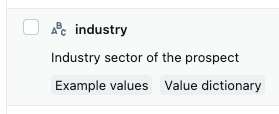
Example values and value dictionaries are now turned on by default, but it’s worth double checking that the right columns commonly used for filtering are enabled and have custom value dictionaries when needed.
Benchmark Analysis: Over 50% of the benchmark questions are now getting successful answers. Questions involving specific category values like “biotechnology” started correctly identifying those filters appropriately. The challenge now is implementing custom metrics and aggregations. For example, Genie is providing a best-guess about how to calculate CTR based on finding “click” as a data value, and its understanding of rate-based metrics. But it isn’t confident enough to simply generate the queries:
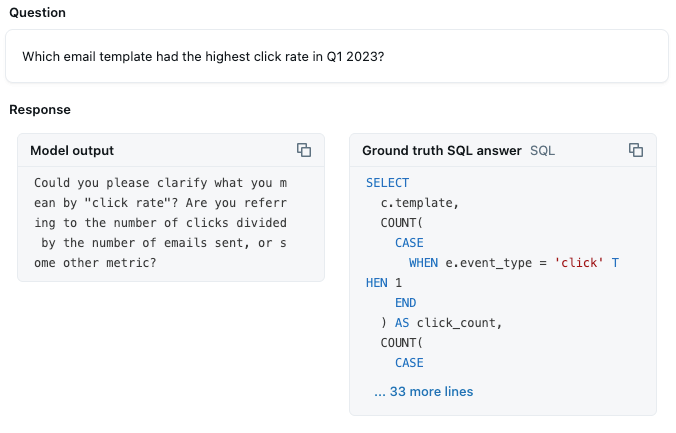
This is a metric that we want to be correctly calculated 100% of the time, so we need to clarify that detail for Genie.
Insight: Value sampling improves Genie's SQL generation by providing access to real data values. When users ask conversational questions with misspellings or different terminology, value sampling helps Genie match prompts to actual data values in your tables.
Next Action: The most common issue now is that Genie is still not generating the correct SQL for our custom metrics. Let’s address our metric definitions explicitly to achieve more accurate results.
Iteration 4: Defining Custom Metrics
At this point, Genie has context for categorical data attributes that exist in the data, can filter to our data values, and perform straightforward aggregations from standard SQL functions (ex. “count events by type” uses COUNT()). To add more clarity on how Genie should be calculating our metrics, we added example SQL queries to our genie space. This example demonstrates the correct metric definition for CTR:
Note, it is recommended to leave comments in your SQL queries, as that is relevant context along with the code.
Benchmark Analysis: This yielded the largest single accuracy improvement thus far. Consider that our goal is to make Genie capable of answering questions at a very detailed level for a defined audience. It’s expected that a majority of end user questions will rely on custom metrics, like CTR, spam rates, engagement metrics, etc. More importantly, variations of these questions also worked. Genie learned the definition for our metric and will apply it to any query going forward.
Insight: Example queries teach business logic that metadata alone cannot convey. One well-crafted example query often solves an entire category of benchmark gaps simultaneously. This delivered more value than any other single iteration step so far.
Next Action: Just a few benchmark questions remain incorrect. Upon further inspection, we notice that the remaining benchmarks are failing for two reasons:
- Users are asking questions about data attributes that don’t directly exist in the data. For example, “how many campaigns generated a high CTR in the last quarter?” Genie doesn’t know what a user means by “high” CTR because no data attribute exists.
- These data tables include records that we should be excluding. For example, we have lots of test campaigns that don’t go to customers. We need to exclude those from our KPIs.
Iteration 5: Documenting Domain-Specific Rules
These remaining gaps are bits of context that apply globally to how all our queries should be created, and relate to values that don’t directly exist in our data.
Let’s take that first example about high CTR, or something similar like high cost campaigns. It isn’t always easy or even recommended to add domain-specific data to our tables, for several reasons:
- Making changes, like adding a
campaign_cost_segmentationfield (high, medium, low), to data tables will take time and impact other processes, as table schemas and data pipelines all need to be altered. - For aggregate calculations like CTR, as new data flows in, the CTR values will change. We shouldn’t pre-compute this calculation anyway, we want this calculation to be done on-the-fly as we clarify filters like time periods and campaigns.
So we can use a text-based instruction in Genie to perform this domain-specific segmentation for us.
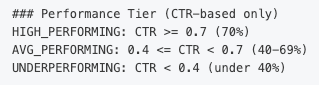
Similarly, we can specify how Genie should always write queries to align with business expectations. This can include things like custom calendars, mandatory global filters, etc. For example, this campaign data includes test-campaigns that should be excluded from our KPI calculations.


Benchmark Analysis: 100% benchmark accuracy! Edge cases and threshold-based questions started working consistently. Questions about "high-performing campaigns" or "compliance-risk campaigns" now applied our business definitions correctly.
Insight: Text-based instructions are a simple and effective way to fill in any remaining gaps from previous steps, to ensure the right queries are generated for end users. It shouldn’t be the first place or the only place that you rely on for context injection though.
Note, it may not be possible to achieve 100% accuracy in some cases. For example, sometimes benchmark questions require very complex queries or multiple prompts to generate the correct answer. If you can’t create a single example SQL query easily, simply note this gap when sharing your benchmark evaluation results with others. The typical expectation is that Genie benchmarks should be above 80% before moving on to user acceptance testing (UAT).
Next Action: Now that Genie has achieved our expected level of accuracy on our benchmark questions, we will move to UAT and gather more feedback from end users!
(Optional) Iteration 6: Pre-Calculating Complex Metrics
For our final iteration, we created a custom view that pre-defines key marketing metrics and applied business classifications. Creating a view or a metric view may be simpler in cases where your datasets all fit into a single data model, and you have dozens of custom metrics. It’s easier to fit all of those into a data object definition as opposed to writing an example SQL query for each of those specific to the Genie space.
Benchmark Result: We still achieved 100% benchmarking accuracy leveraging views instead of just base tables because the metadata content remained the same.
Insight: Instead of explaining complex calculations through examples or instructions, you can encapsulate them in a view or metric view, defining a single source of truth.
What We Learned: The Impact of Benchmark Driven Development
There is no "silver bullet" in configuring a Genie space which solves everything. Production-ready accuracy typically only occurs when you have high-quality data, appropriately enriched metadata, defined metrics logic, and domain-specific context injected into the space. In our end-to-end example, we encountered common issues that spanned all these areas.
Benchmarks are critical to evaluate whether your space is meeting expectations and ready for user feedback. It also guided our development efforts to address gaps in Genie’s interpretation of questions. In review:
- Iterations 1-3 - 54% benchmark accuracy. These iterations focused on making Genie aware of our data and metadata more clearly. Implementing appropriate table names, table descriptions, column descriptions, join keys, and enabling example values are all foundational steps to any Genie space. With these capabilities, Genie should be correctly identifying the right table, columns, and join conditions which impact any query it generates. It can also do simple aggregations and filtering. Genie was able to answer more than half of our domain-specific benchmark questions correctly with just this foundational knowledge.
- Iteration 4 - 77% benchmark accuracy. This iteration focused on clarifying our custom metric definitions. For example, CTR isn’t a part of every benchmark question, but it is an example of a non-standard (i.e. sum(), avg(), etc.) metric that needs to be answered correctly every time.
- Iteration 5 - 100% benchmark accuracy. This iteration demonstrated using text-based instructions to fill in remaining gaps in inaccuracies. These instructions captured common scenarios, such as including global filters on data for analytical use, domain-specific definitions (ex. what makes for a high-engagement campaign), and specified fiscal calendars information.
By following a systematic approach of evaluating our Genie space, we caught unintended query behavior proactively, rather than hearing about it from Sarah reactively. We transformed subjective assessment ("it seems to work") into objective measurement ("we've validated it works for 13 representative scenarios covering our key use cases as initially defined by end users").
The Path Forward
Building trust in self-service analytics isn't about achieving perfection on day one. It's about systematic improvement with measurable validation. It's about catching problems before users do.
The Benchmarks feature provides the measurement layer that makes this achievable. It transforms the iterative approach Databricks documentation recommends into a quantifiable, confidence-building process. Let’s recap this benchmark-driven, systematic development process:
- Create benchmark questions (aim for 10-15) representing your users' realistic questions
- Test your space to establish baseline accuracy
- Make configuration improvements following the iterative approach Databricks recommends in our best practices
- Re-test all benchmarks after each change to measure impact and identify gaps in context from incorrect questions. Document your accuracy progression to build stakeholder confidence.
Start with strong Unity Catalog foundations. Add business context. Test comprehensively through benchmarks. Measure every change. Build trust through validated accuracy.
You and your end users will benefit!
Get the latest posts in your inbox
Subscribe to our blog and get the latest posts delivered to your inbox.