Modernize your Data Engineering Platform with Lakeflow on Azure Databricks
Databricks Lakeflow on Azure provides a modern, enterprise-ready, and reliable data engineering solution
by Joanna Zouhour and Katie Cummiskey
- Lakeflow provides a unified end-to-end solution for data engineers working on Azure Databricks, including data ingestion, transformation, and orchestration
- From unified security and governance to built-in observability, serverless compute, streaming processing and a code-first UI, Azure Databricks practitioners can benefit from a wide range of Lakeflow capabilities, in combination with their Azure data platform.
- Data engineers who use Lakeflow on Azure Databricks can build and deploy production-ready data pipelines up to 25 times faster, witness higher performance and see reduction in ETL costs of up to 83%.
Data engineers are increasingly frustrated with the number of disjointed tools and solutions they need to build production-ready pipelines. Without a centralized data intelligence platform or unified governance, teams deal with many issues, including:
- Inefficient performance and long starts
- Disjointed UI and constant context-switching
- Lack of granular security and control
- Complex CI/CD
- Limited data lineage visibility
- etc.
The result? Slower teams and less trust in your data.
With Lakeflow on Azure Databricks, you can solve these issues by centralizing all your data engineering efforts on a single Azure-native platform.

A unified data engineering solution for Azure Databricks
Lakeflow is an end-to-end modern data engineering solution built on the Databricks Data + AI Platform on Azure that integrates all essential data engineering functions. With Lakeflow, you get:
- Built-in data ingestion, transformation, and orchestration in one place
- Managed ingestion connectors
- Declarative ETL for faster and simpler development
- Incremental and streaming processing for faster SLAs and fresher insights
- Native governance and lineage via Unity Catalog, Databricks’ integrated governance solution
- Built-in observability for data quality and pipeline reliability
And much more! All in a flexible and modular interface that can fit all users’ needs, whether they’d like to code or use a point-and-click interface.

Ingest, transform, and orchestrate all workloads in one place
Lakeflow unifies the data engineering experience so you can move faster and more reliably.
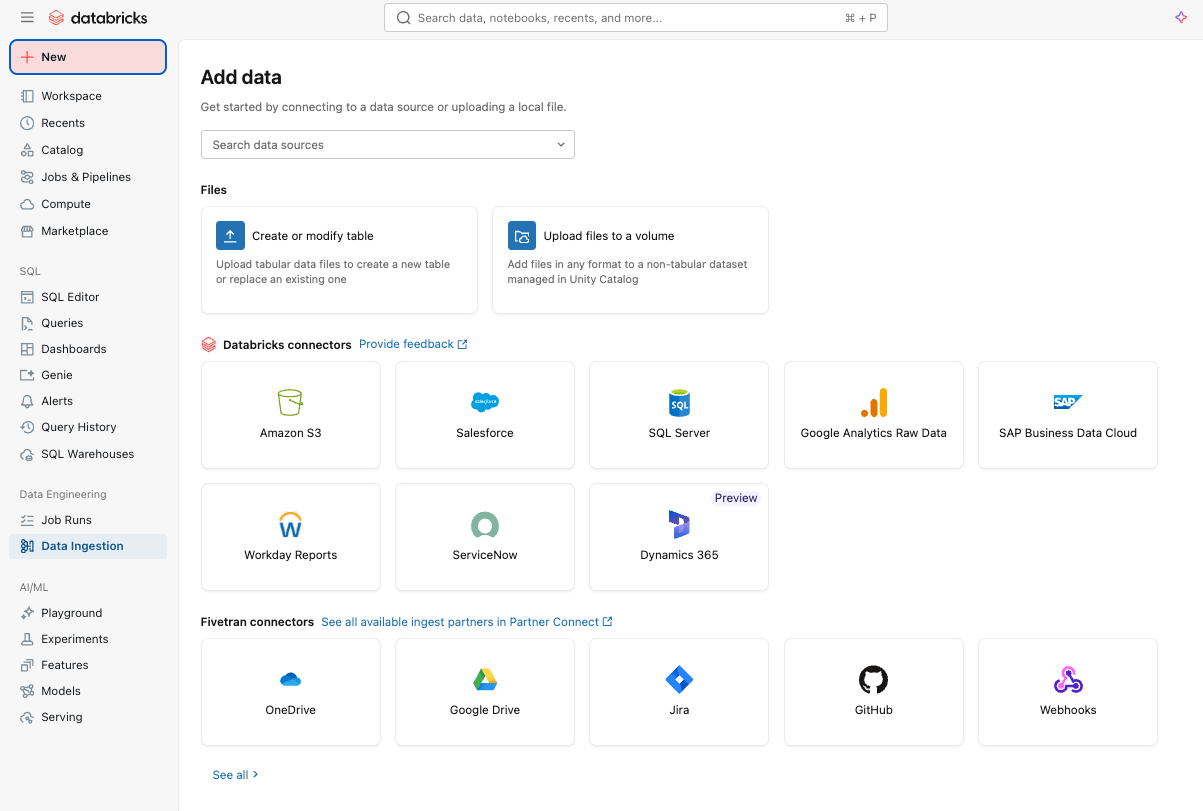
Simple and efficient data ingestion with Lakeflow Connect
You can start by easily ingesting data into your platform with Lakeflow Connect using a point-and-click interface or a simple API.
You can ingest both structured and unstructured data from a wide range of supported sources into Azure Databricks, including popular SaaS applications (e.g., Salesforce, Workday, ServiceNow), databases (e.g., SQL Server), cloud storage, message buses, and more. Lakeflow Connect also supports Azure networking patterns, such as Private Link and the deployment of ingestion gateways in a VNet for databases.
For real-time ingestion, check out Zerobus Ingest, a serverless direct‑write API in Lakeflow on Azure Databricks. It pushes event data directly into the data platform, eliminating the need for a message bus for simpler, lower‑latency ingestion.
Reliable data pipelines made easy with Spark Declarative Pipelines
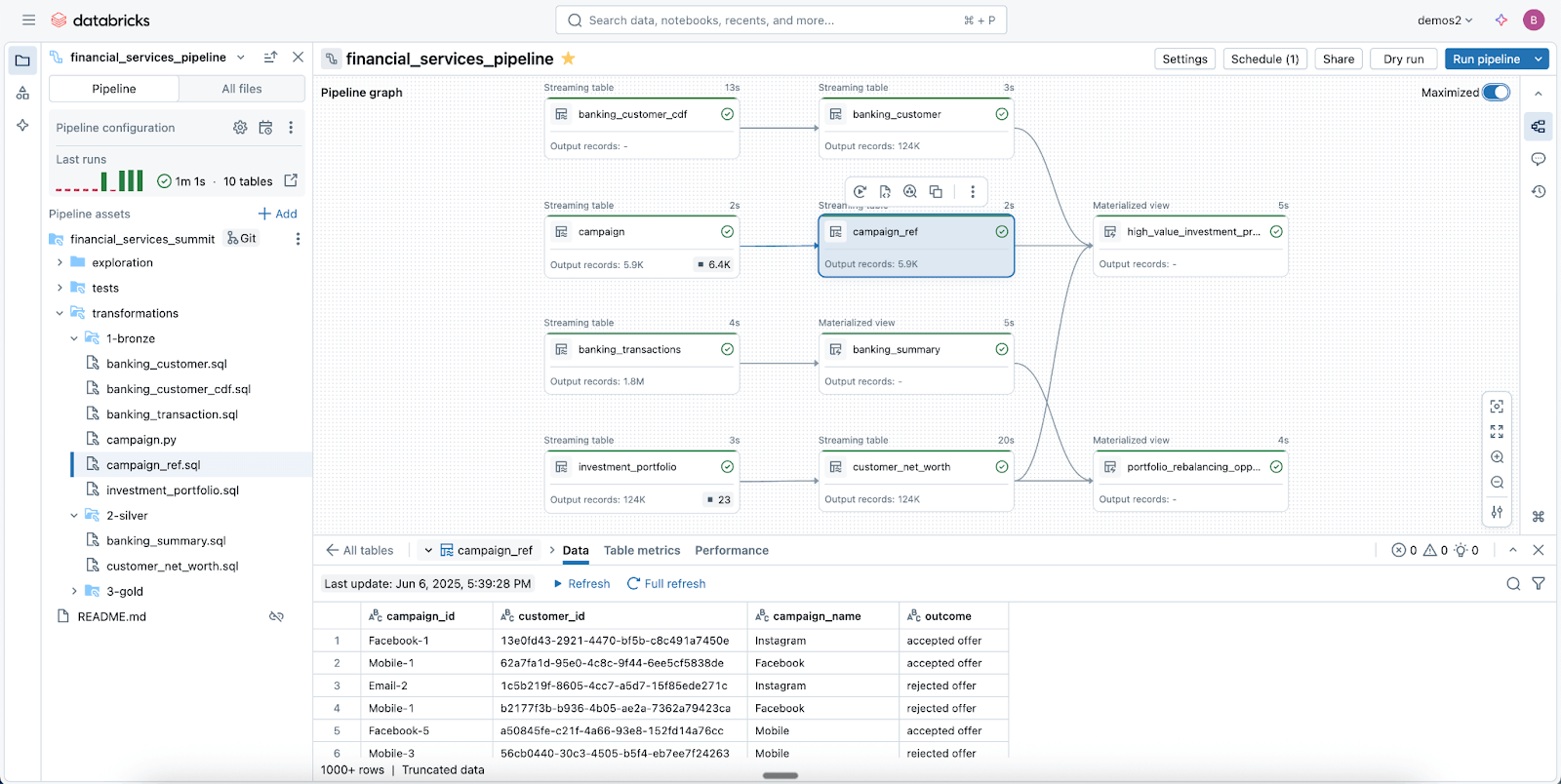
Leverage Lakeflow Spark Declarative Pipelines (SDP) to easily clean, shape, and transform your data in the way your business needs it.
SDP lets you build reliable batch and streaming ETL with just a few lines of Python (or SQL). Simply declare the transformations you need, and SDP handles the rest -including dependency mapping, deployment infrastructure, and data quality.
SDP minimizes development time and operational overhead while codifying data engineering best practices out of the box, making it easy to implement incrementalization or complex patterns like SCD Type 1 & 2 through just a few lines of code. It’s all the power of Spark Structured Streaming, made incredibly simple.
And because Lakeflow is integrated into Azure Databricks, you can use Azure Databricks tools, including Declarative Automation Bundles (DABs), Lakehouse Monitoring, and more, to deploy production-ready, governed pipelines in minutes.
Modern data-first orchestration with Lakeflow Jobs
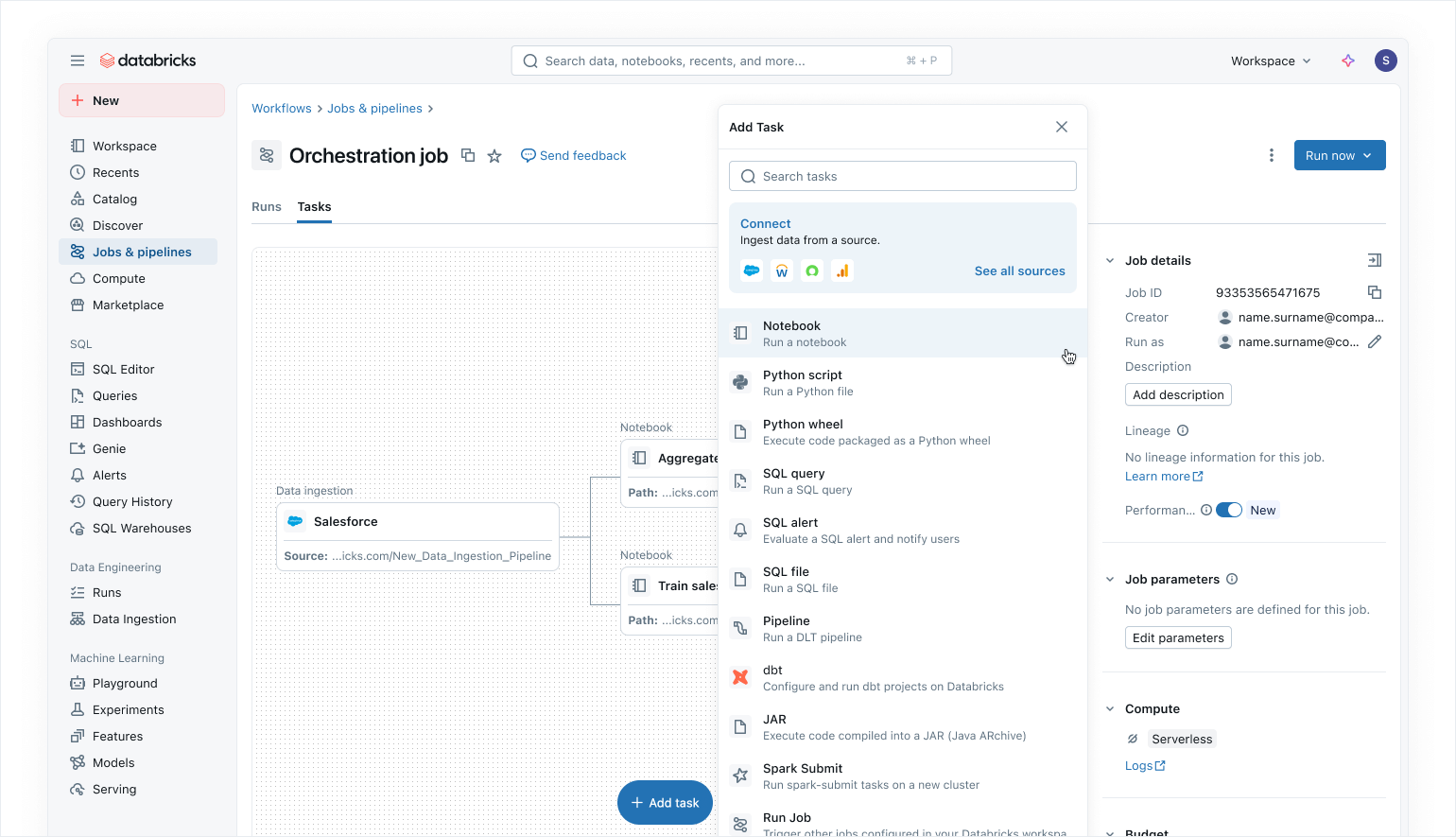
Use Lakeflow Jobs to orchestrate your data and AI workloads on Azure Databricks. With a modern, simplified data-first approach, Lakeflow Jobs is the most trusted orchestrator for Databricks, supporting large-scale data and AI processing and real-time analytics with 99.9% reliability.
In Lakeflow Jobs, you can visualize all your dependencies by coordinating SQL workloads, Python code, dashboards, pipelines, and external systems into a single unified DAG. Workflow execution is simple and flexible with data-aware triggers such as table updates or file arrivals, and control-flow tasks. Thanks to no-code backfill runs and built-in observability, Lakeflow Jobs makes it easy to keep your downstream data fresh, accessible, and accurate.
As Azure Databricks users, you can also automatically update and refresh Power BI semantic models using the Power BI task in Lakeflow Jobs (read more here), making Lakeflow Jobs a seamless orchestrator for Azure workloads.
Built-in security and unified governance
With Unity Catalog, Lakeflow inherits centralized identity, security, and governance controls across ingestion, transformation, and orchestration. Connections store credentials securely, access policies are enforced consistently across all workloads, and fine-grained permissions ensure only the right users and systems can read or write data.
Unity Catalog also provides end-to-end lineage from ingestion through Lakeflow Jobs to downstream analytics and Power BI, making it easy to trace dependencies and ensure compliance. System Tables offer operational and security visibility across jobs, users, and data usage to help teams monitor quality and enforce best practices without stitching together external logs.
Together, Lakeflow and Unity Catalog give Azure Databricks users governed pipelines by default, resulting in secure, auditable, and production-ready data delivery teams can trust.
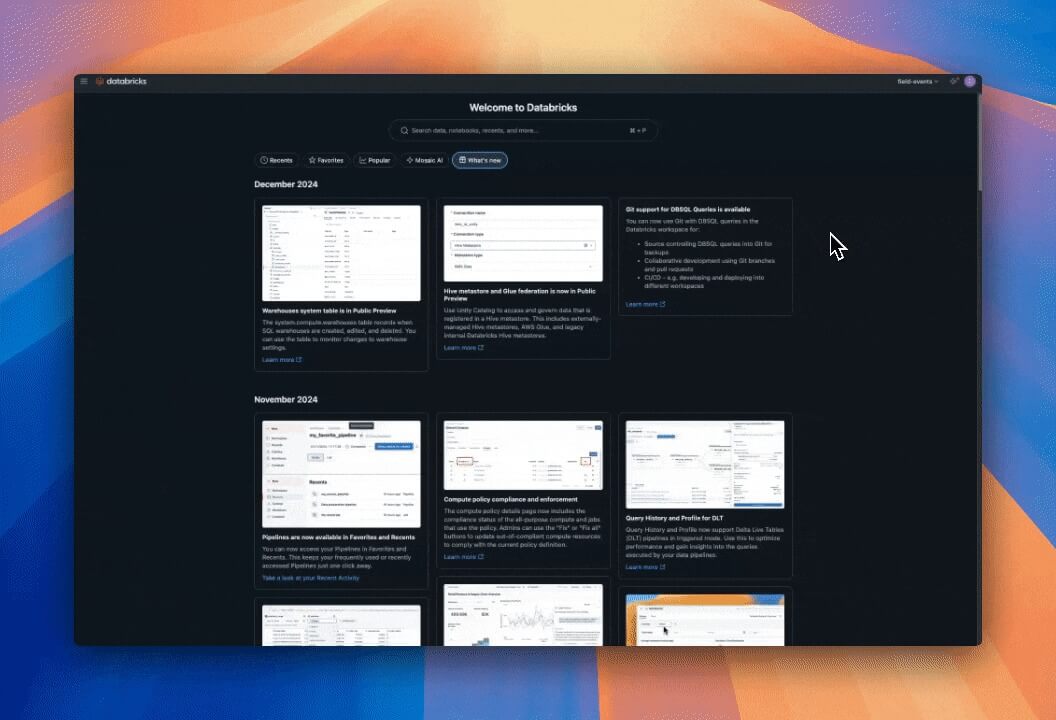
Read our blog on how Unity Catalog supports OneLake.
Flexible user experience and authoring for everyone
In addition to all these features, Lakeflow is incredibly flexible and easy to use, making it a great fit for anyone in your organization, particularly developers.
Code-first users love Lakeflow thanks to its powerful execution engine and advanced developer-centric tools. With Lakeflow Pipeline Editor, developers can leverage an IDE and use robust dev tooling to build their pipelines. Lakeflow Jobs also comes with code-first authoring and dev tooling with DB Python SDK and DABs for repeatable CI/CD patterns.
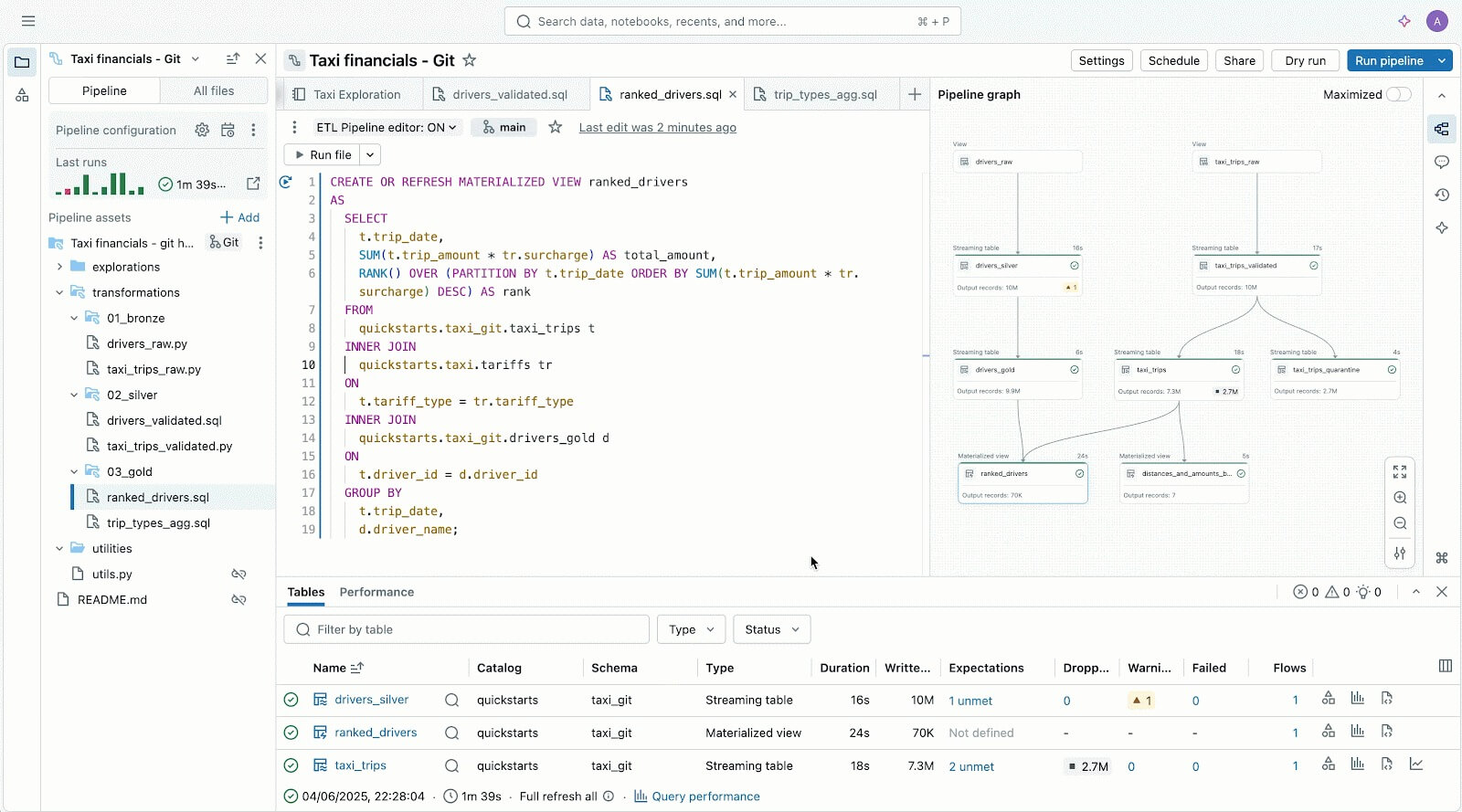
Lakeflow Pipelines Editor to help you author and test data pipelines - all in one place.
For newcomers and business users, Lakeflow is very intuitive and easy to use, with a simple point-and-click interface and an API for data ingestion via Lakeflow Connect.
Less guessing, more accurate troubleshooting with native observability
Monitoring solutions are often siloed from your data platform, making observability harder to operationalize and your pipelines more prone to breaking
Lakeflow Jobs on Azure Databricks gives data engineers the deep, end-to-end visibility they need to quickly understand and resolve issues in their pipelines. With Lakeflow’s observability capabilities, you can immediately spot performance issues, dependency bottlenecks, and failed tasks in a single UI with our unified runs list.
Lakeflow System Tables and built-in data lineage with Unity Catalog also provide full context across datasets, workspaces, queries and downstream impacts, making root-cause analysis faster. With the newly GA System Tables in Jobs, you can build custom dashboards across all your jobs and centrally monitor the health of your jobs.
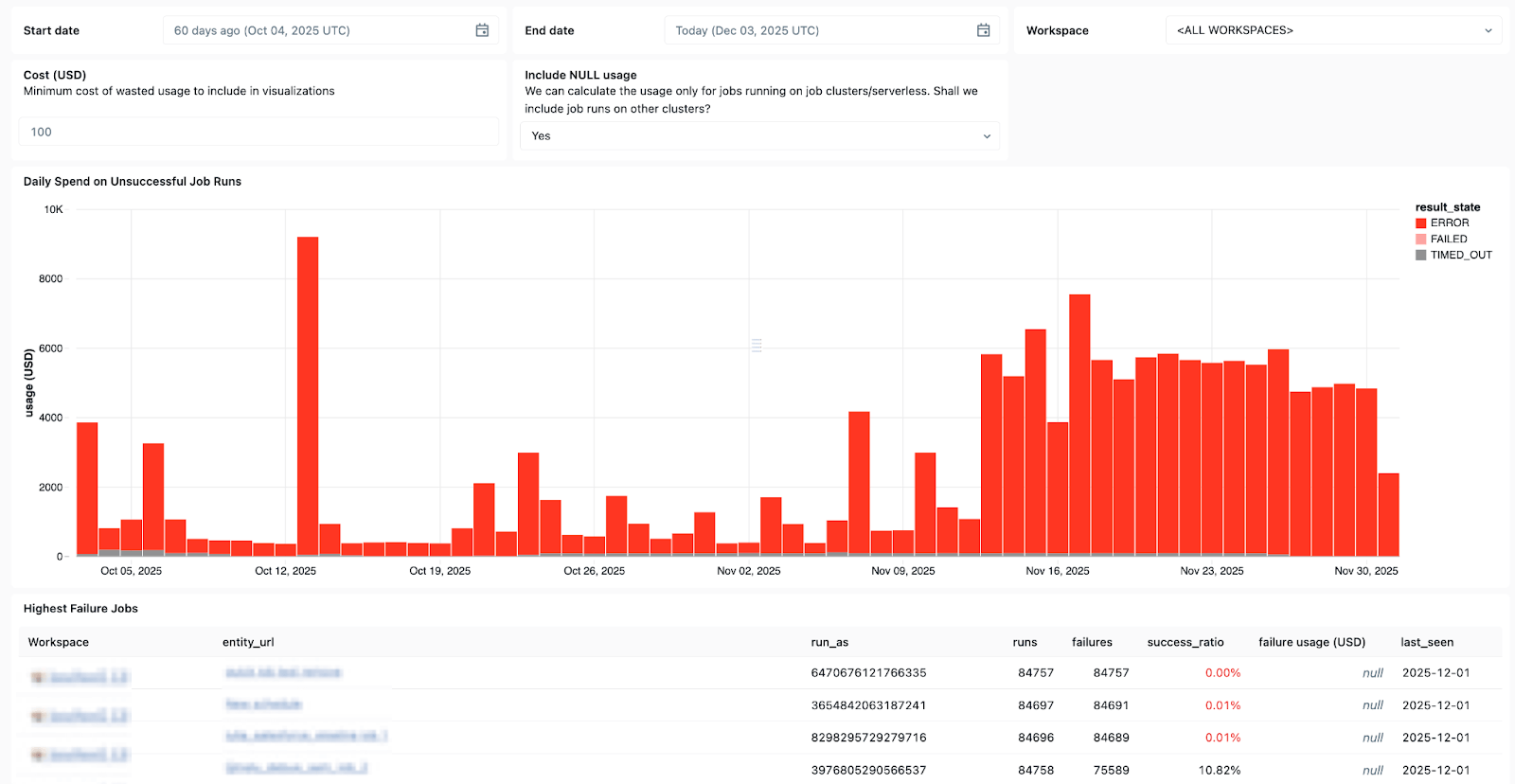
Use System Tables in Lakeflow to see which jobs fail most often, overall error trends, and common error messages.
And when issues do come up, Databricks Assistant is here to help.
Databricks Assistant is a context‑aware AI copilot embedded in Azure Databricks that helps you recover faster from failures by letting you quickly build and troubleshoot notebooks, SQL queries, jobs, and dashboards using natural language.
But the Assistant does more than debugging. It can also generate PySpark/SQL code and explain it with features all grounded in Unity Catalog, so it understands your context. It can also be used to run suggestions, surface patterns, and perform data discovery and EDA, making it a great companion for all your data engineering needs.
Your cost and consumption under control
The larger your pipelines, the more difficult it is to right-size resource usage and keep costs under control.
With Lakeflow’s serverless data processing, compute is automatically and continuously optimized by Databricks to minimize idle waste and resource usage. Data engineers can decide whether to run serverless in Performance mode for mission-critical workloads or in Standard mode, where cost is more important, for greater flexibility.
Lakeflow Jobs also allows cluster reuse, so multiple tasks in a workflow can run on the same job cluster, eliminating cold start delays, and supports fine-grained control, so every task can target either the reusable job cluster or its own dedicated cluster. Along with serverless compute, cluster reuse minimizes spin‑ups so data engineers can cut down on operational overhead and gain more control over their data costs.
Microsoft Azure + Databricks Lakeflow - A proven winning combination
Databricks Lakeflow enables data teams to move faster and more reliably, without compromising governance, scalability, or performance. With data engineering seamlessly embedded in Azure Databricks, teams can benefit from a single end-to-end platform that meets all data and AI needs at scale.
Customers on Azure have already seen positive results from integrating Lakeflow into their stack, including:
- faster pipeline development: Teams can build and deploy production-ready data pipelines up to 25 times faster, and cut creation time by 70%.
- higher performance and reliability: Some customers are seeing a 90x performance improvement and cutting processing times from hours to minutes.
- more efficiency and cost savings: Automation and optimized processing dramatically reduce operational overhead. Customers have reported savings of up to tens of millions of dollars annually and reductions in ETL costs of up to 83%.
Read successful Azure and Lakeflow customer stories on our Databricks blog.
Curious about Lakeflow? Try Databricks for free to see what the data engineering platform is all about.
Get the latest posts in your inbox
Subscribe to our blog and get the latest posts delivered to your inbox.