SAP and Salesforce Data Integration for Supplier Analytics on Databricks
Use SAP Business Data Cloud Connect and Lakeflow Connect to unify CRM and ERP data for supplier analytics.
- Connect SAP S/4HANA and Salesforce data directly in Databricks
- Use Lakeflow Connect and SAP BDC for incremental, zero-copy access
- Build a governed gold layer for analytics and conversational insights
How to Build Supplier Analytics With Salesforce SAP Integration on Databricks
Supplier data touches nearly every part of an organization — from procurement and supply chain management to finance and analytics. Yet, it’s often spread across systems that don’t communicate with each other. For example, Salesforce holds vendor profiles, contacts, and account details, and SAP S/4HANA manages invoices, payments, and general ledger entries. Because these systems operate independently, teams lack a comprehensive view of supplier relationships. The result is slow reconciliation, duplicate records, and missed opportunities to optimize spend.
Databricks solves this by connecting both systems on one governed data & AI platform. Using Lakeflow Connect for Salesforce for data ingestion and SAP Business Data Cloud (BDC) Connect, teams can unify CRM and ERP data without duplication. The result is a single, trusted view of vendors, payments, and performance metrics that supports both procurement and finance use cases, as well as analytics.
In this how-to, you’ll learn how to connect both data sources, build a blended pipeline, and create a gold layer that powers analytics and conversational insights through AI/BI Dashboards and Genie.
Why Zero-Copy SAP Salesforce Data Integration Works
Most enterprises try to connect SAP and Salesforce through traditional ETL or third-party tools. These methods create multiple data copies, introduce latency, and make governance difficult. Databricks takes a different approach.
Zero-copy SAP access: The SAP BDC Connector for Databricks gives you governed, real-time access to SAP S/4HANA data products through Delta Sharing. No exports or duplication.
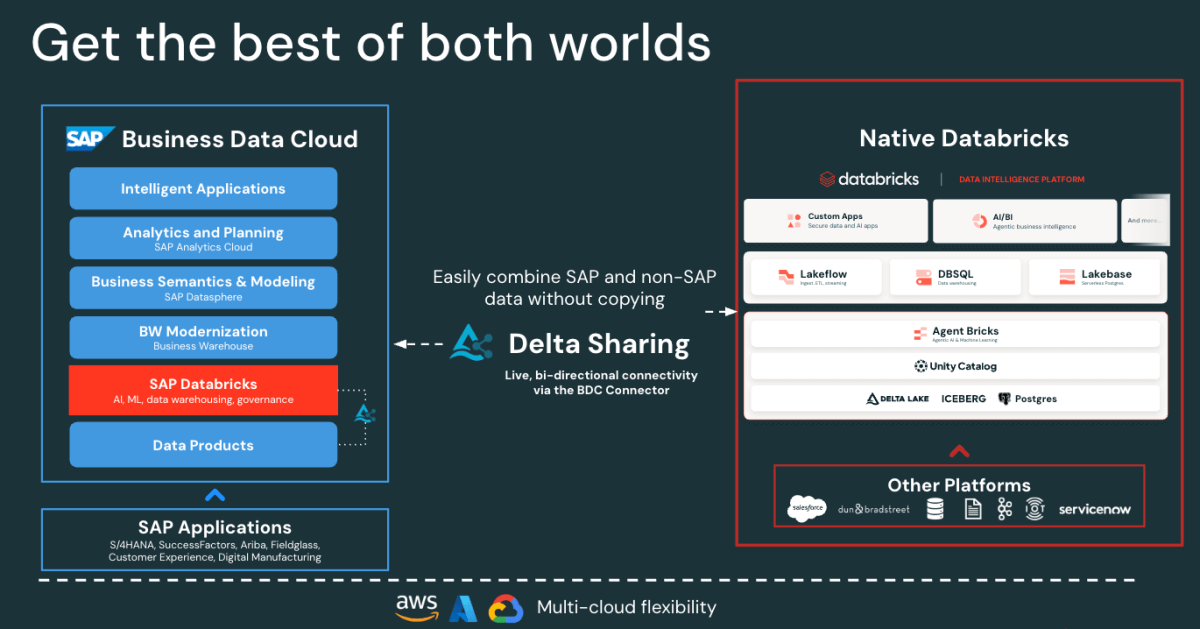
Figure: SAP BDC Connector to Native Databricks(Bi-directional) - Fast Salesforce Incremental ingestion: Lakeflow connects and ingests Salesforce data continuously, keeping your datasets fresh and consistent.
- Unified governance: Unity Catalog enforces permissions, lineage, and auditing across both SAP and Salesforce sources.
- Declarative pipelines: Lakeflow Spark Declarative Pipelines simplifies ETL design and orchestration with automatic optimizations for better performance.
Together, these capabilities enable data engineers to blend SAP and Salesforce data on one platform, reducing complexity while maintaining enterprise-grade governance.
SAP Salesforce Data Integration Architecture on Databricks
Before building the pipeline, it’s useful to understand how these components fit together in Databricks.
At a high level, SAP S/4HANA publishes business data as curated, business-ready SAP-managed data products in SAP Business Data Cloud (BDC). SAP BDC Connect for Databricks enables secure, zero-copy access to those data products using Delta Sharing. Meanwhile, Lakeflow Connect handles Salesforce ingestion — capturing accounts, contacts, and opportunity data through incremental pipelines.
All incoming data, whether from SAP or Salesforce, is governed in Unity Catalog for governance, lineage, and permissions. Data engineers then use Lakeflow Declarative Pipelines to join and transform these datasets into a medallion architecture (bronze, silver, and gold layers). Finally, the gold layer serves as the foundation for analytics and exploration in AI/BI Dashboards and Genie.
This architecture ensures that data from both systems remains synchronized, governed, and analytics and AI ready — without the overhead of replication or external ETL tools.
How to Build Unified Supplier Analytics
The following steps outline how to connect, blend, and analyze SAP and Salesforce data on Databricks.
Step 1: Ingestion of Salesforce Data with Lakeflow Connect
Use Lakeflow Connect to bring Salesforce data into Databricks. You can configure pipelines through the UI or API. These pipelines manage incremental updates automatically, ensuring that data stays current without manual refreshes.
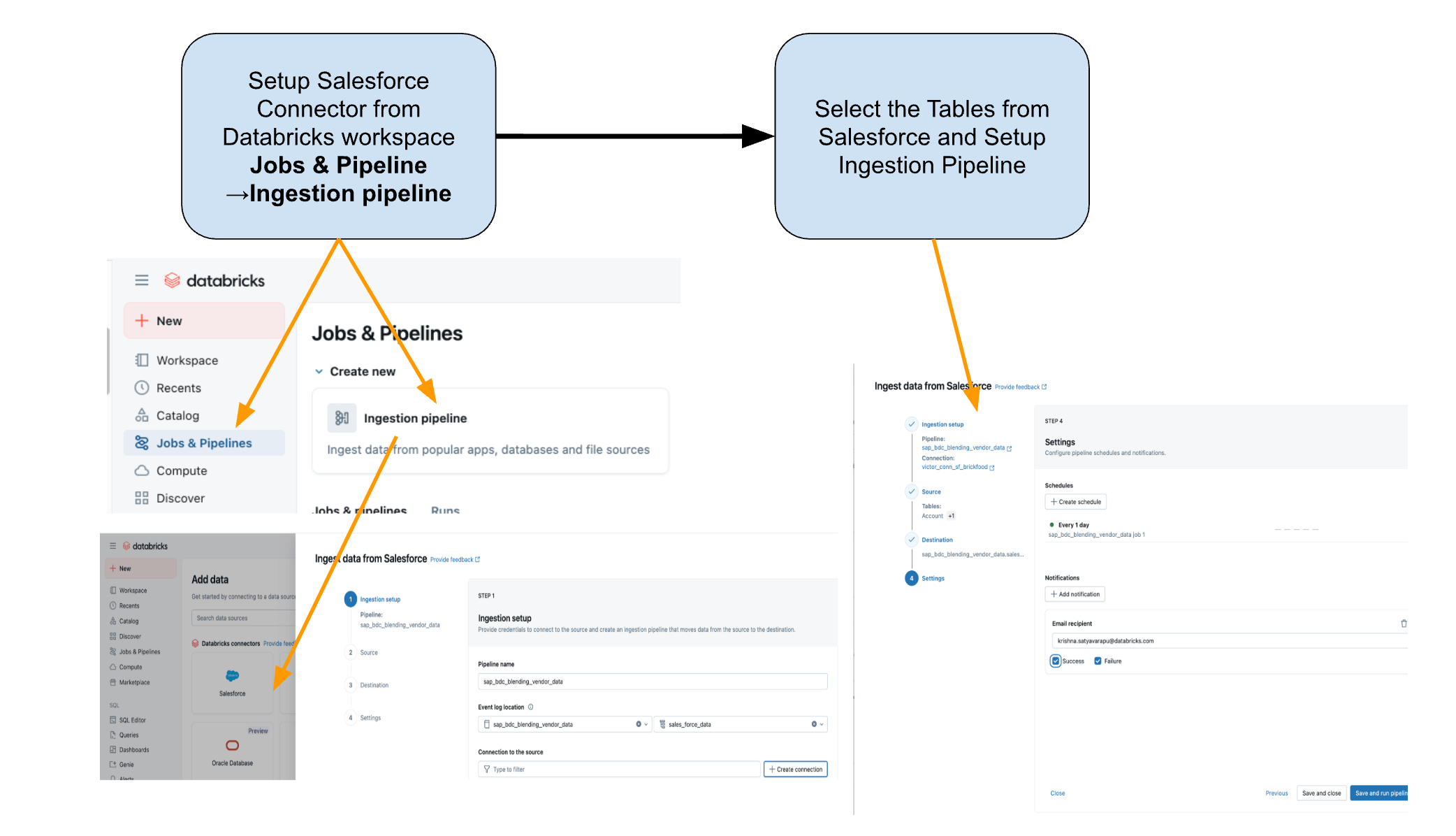
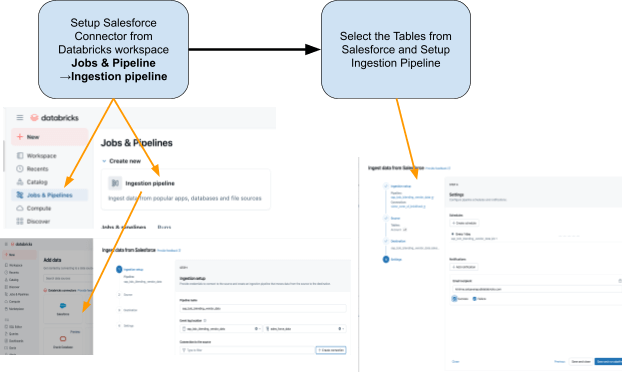
The connector is fully integrated with Unity Catalog governance, Lakeflow Spark Declarative Pipelines for ETL, and Lakeflow Jobs for orchestration.
These are the tables that we are planning to ingest from Salesforce:
- Account: Vendor/Supplier details (fields include: AccountId, Name, Industry, Type, BillingAddress)
- Contact: Vendor Contacts (fields include: ContactId, AccountId, FirstName, LastName, Email)
Step 2: Access SAP S/4HANA Data with the SAP BDC Connector
SAP BDC Connect provides live, governed access to SAP S/4HANA vendor payment data directly to Databricks — eliminating traditional ETL, by leveraging the SAP BDC data product sap_bdc_working_capital.entryviewjournalentry.operationalacctgdocitem—the Universal Journal line-item view.
This BDC data product maps directly to the SAP S/4HANA CDS view I_JournalEntryItem (Operational Accounting Document Item) on ACDOCA.
For the ECC context, the closest physical structures were BSEG (FI line items) with headers in BKPF, CO postings in COEP, and open/cleared indexes BSIK/BSAK (vendors) and BSID/BSAD (customers). In SAP S/4HANA, these BS** objects are part of the simplified data model, where vendor and G/L line items are centralized in the Universal Journal (ACDOCA), replacing the ECC approach that often required joining multiple separate finance tables.
These are the steps that need to be performed in the SAP BDC cockpit.
1: Log into the SAP BDC cockpit and check out the SAP BDC formation in the System Landscape. Connect to Native Databricks via the SAP BDC delta sharing connector. For more information on how to connect Native Databricks to the SAP BDC so it becomes part of its formation.
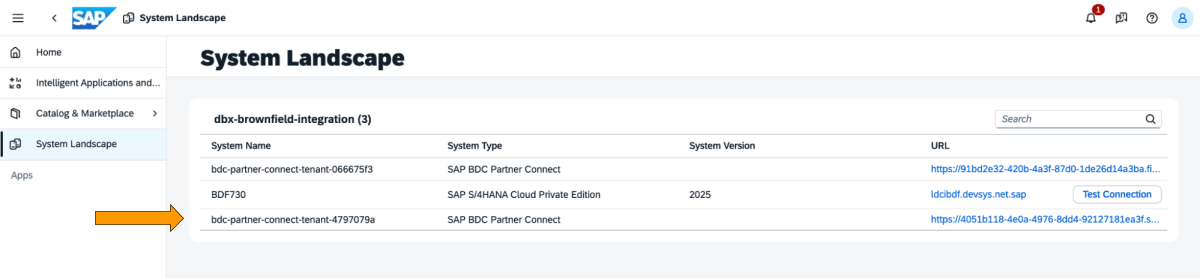
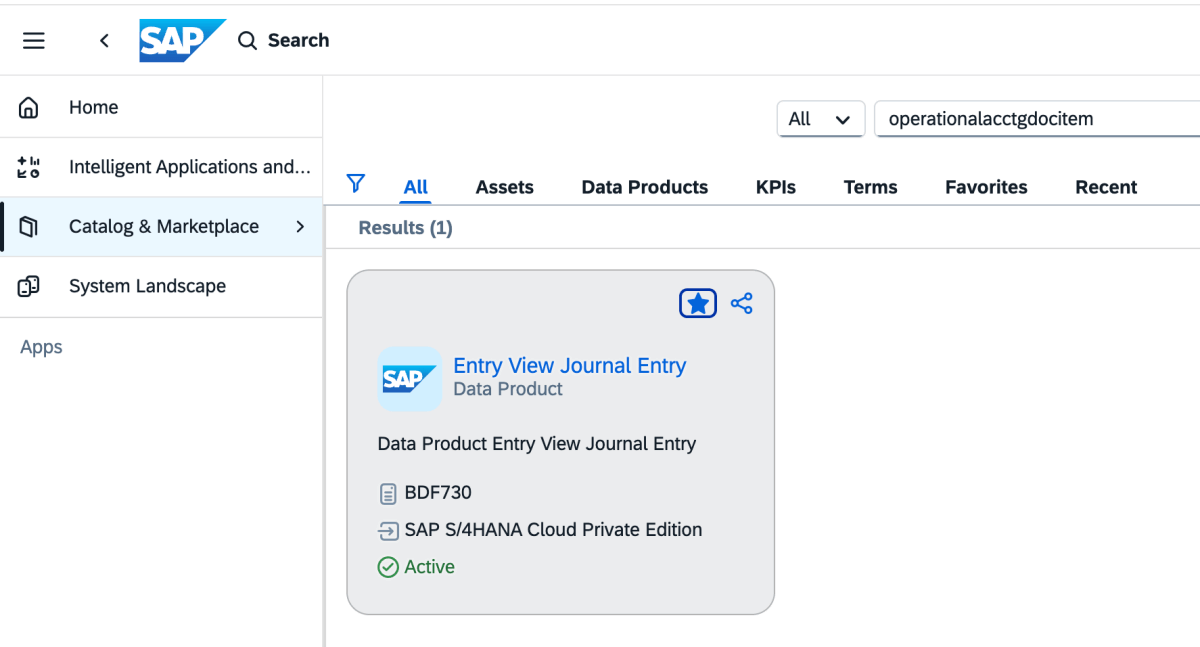
2: Go to Catalog and look for the Data Product Entry View Journal Entry as shown below
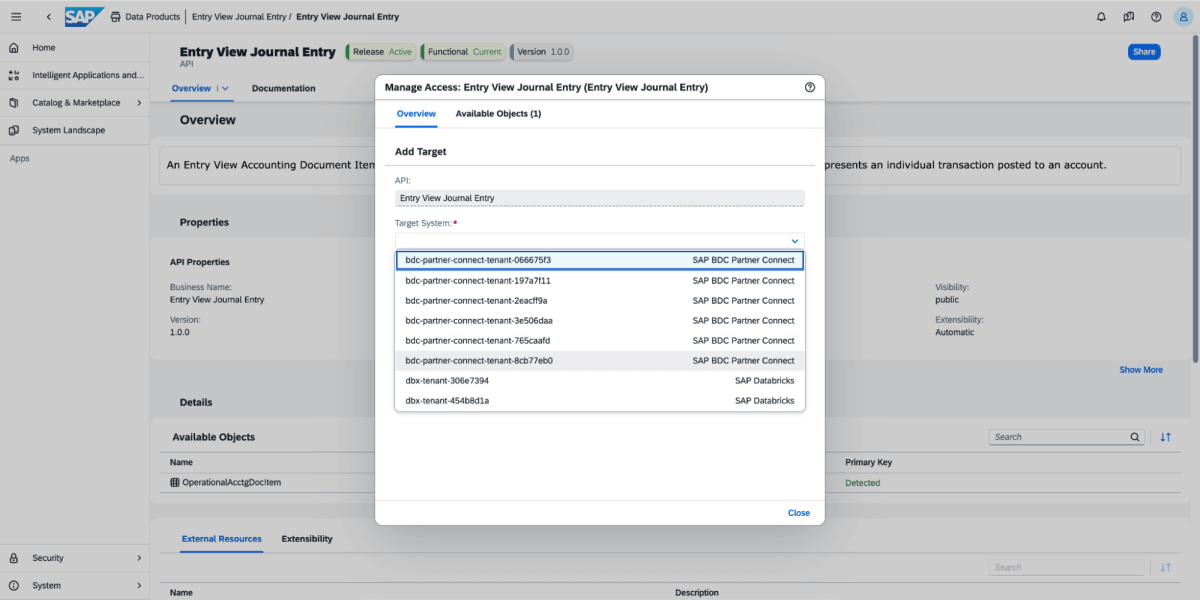
3: On the data product, select Share, and then select the target system, as shown in the image below.
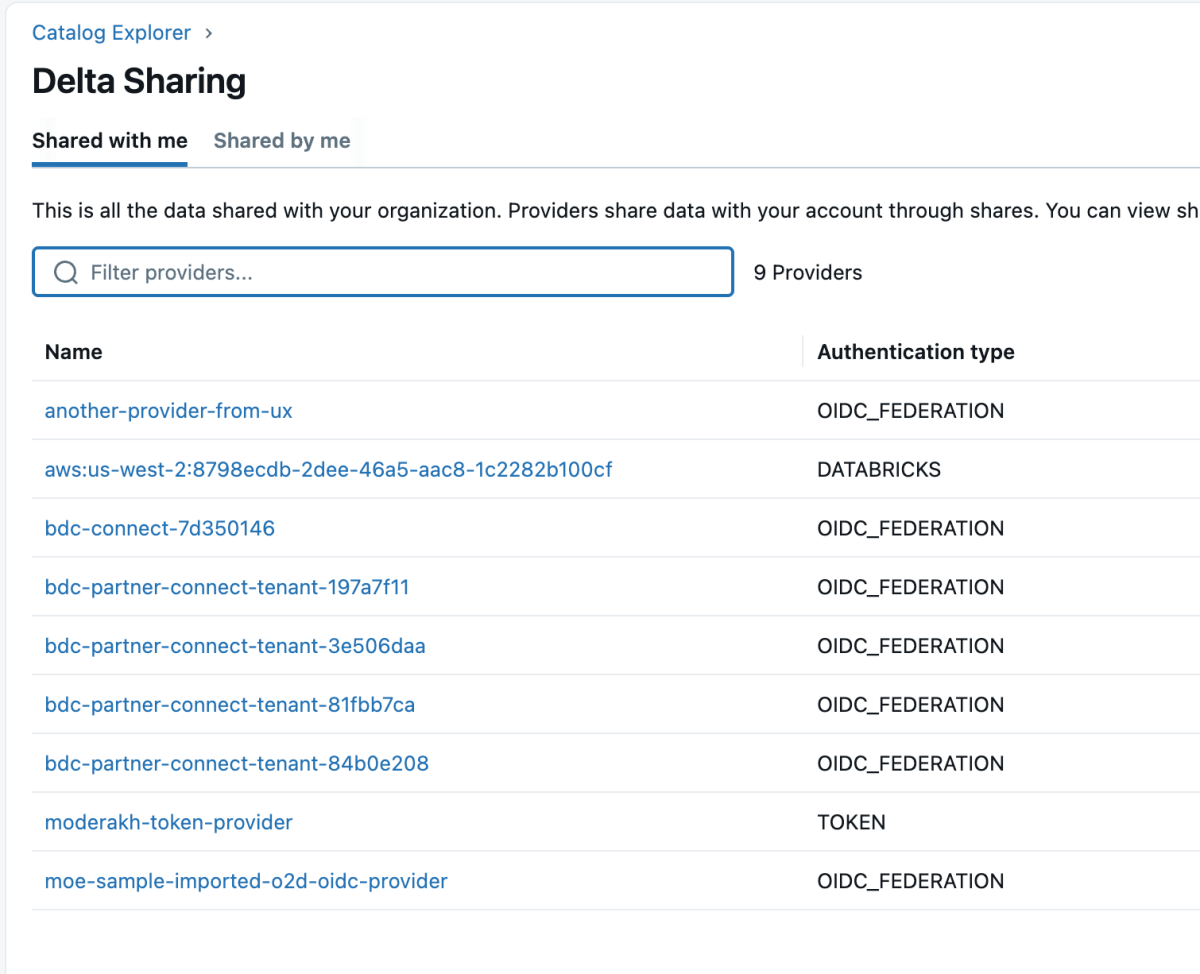
4: Once the data product is shared, it will come up as a delta share in the Databricks workspace as shown below. Ensure you have “Use Provider” access in order to see these providers.
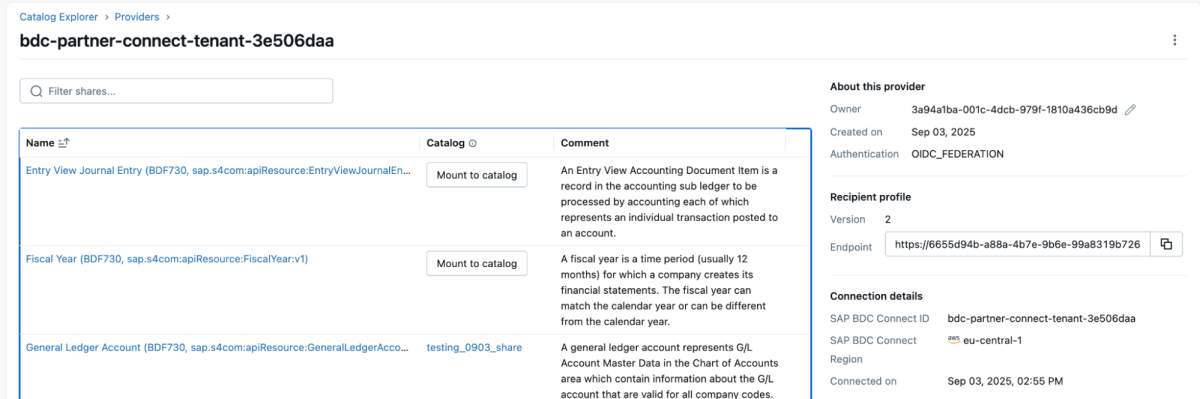
5: Then you can mount that share to the catalog and either create a new catalog or mount it to an existing catalog.
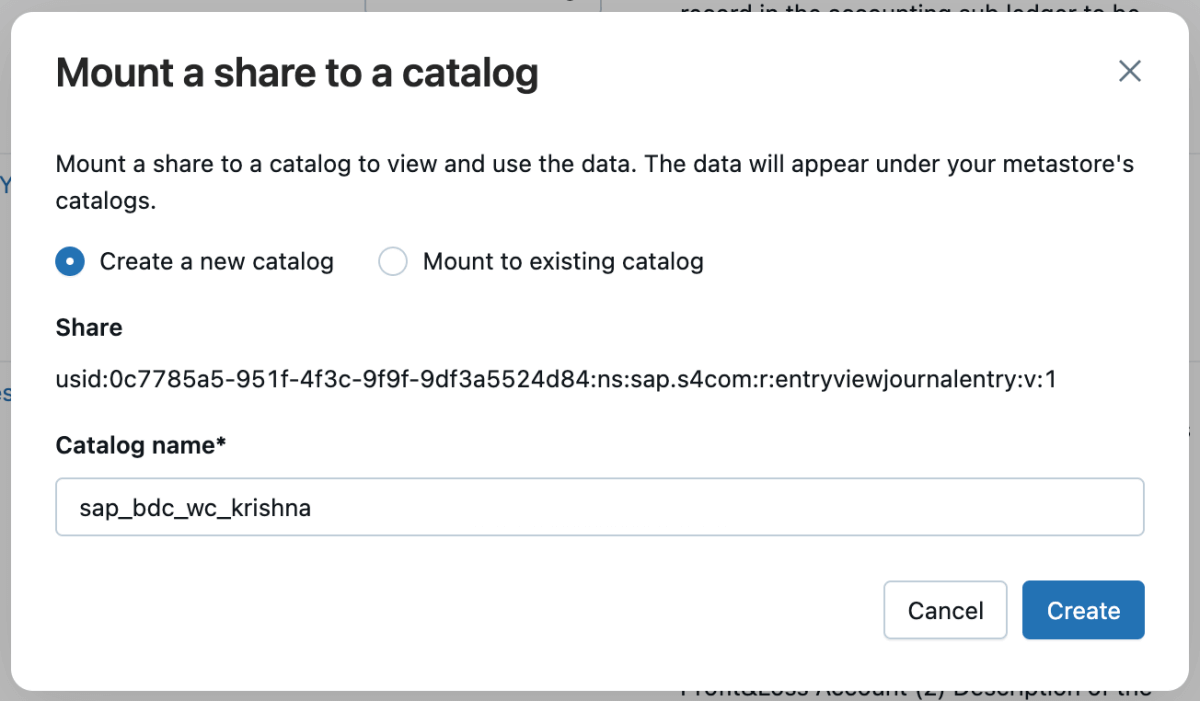
6: Once the share is mounted, it will reflect in the catalog.
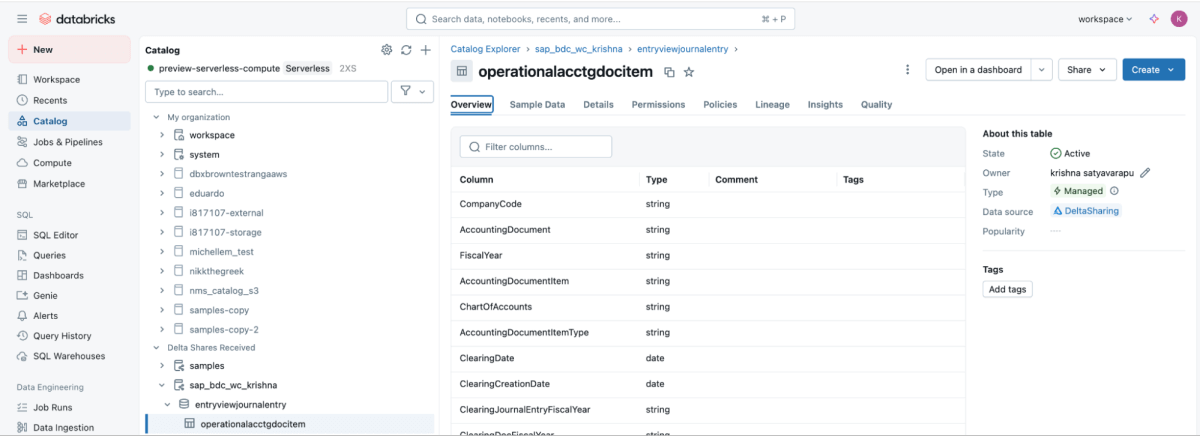
Step 3: Blending the ETL Pipeline in Databricks using Lakeflow Declarative Pipelines
With both sources available, use Lakeflow Declarative Pipelines to build an ETL pipeline with Salesforce and SAP data.
The Salesforce Account table usually includes the field SAP_ExternalVendorId__c, which matches the vendor ID in SAP. This becomes the primary join key for your silver layer.
Lakeflow Spark Declarative Pipelines allow you to define transformation logic in SQL while Databricks handles optimization automatically and orchestrates the pipelines.
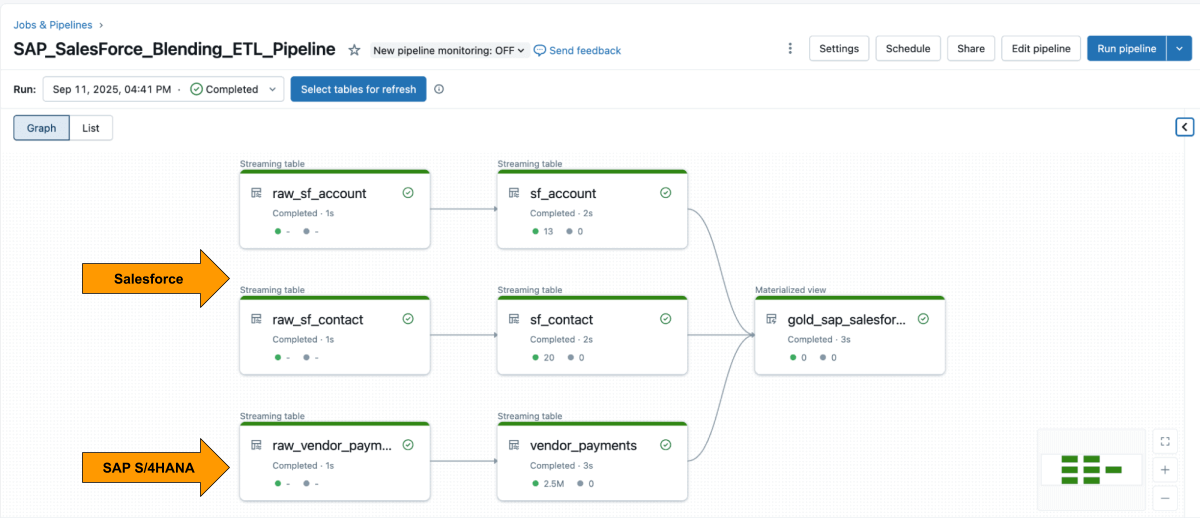
Example: Build curated business-level tables
This query creates a curated business-level materialized view that unifies vendor payment records from SAP with vendor details from Salesforce that is ready for analytics and reporting.
Step 4: Analyze with AI/BI Dashboards and Genie
Once the materialized view is created, you can explore it directly in AI/BI Dashboards let teams visualize vendor payments, outstanding balances, and spend by region.They support dynamic filtering, search, and collaboration, all governed by Unity Catalog. Genie enables natural-language exploration of the same data.
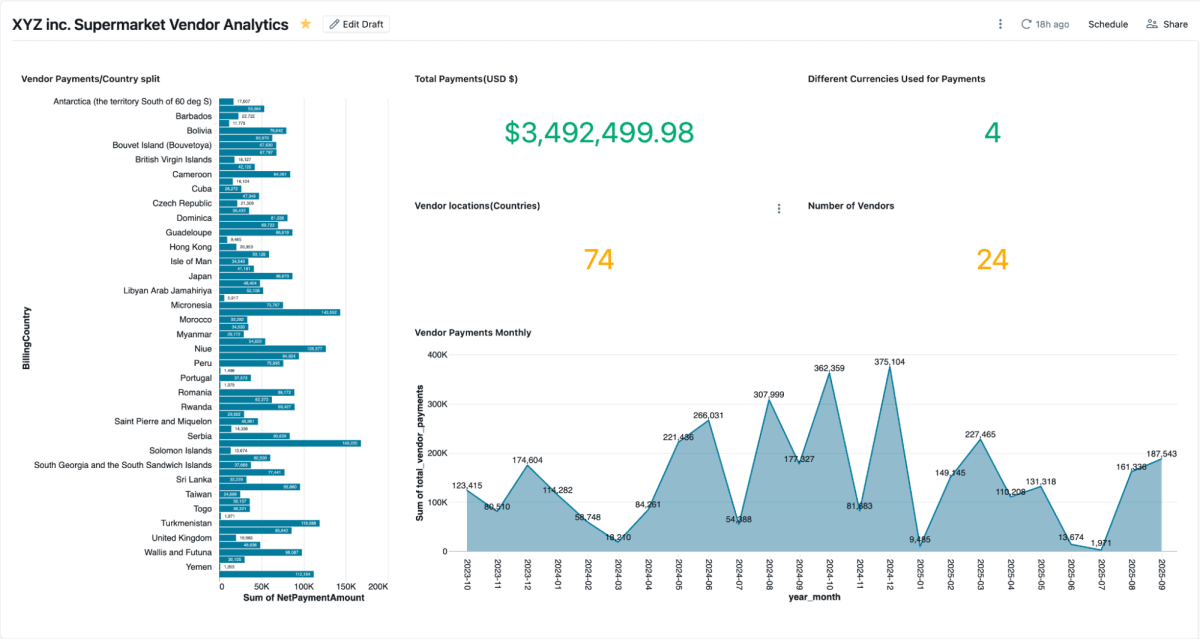
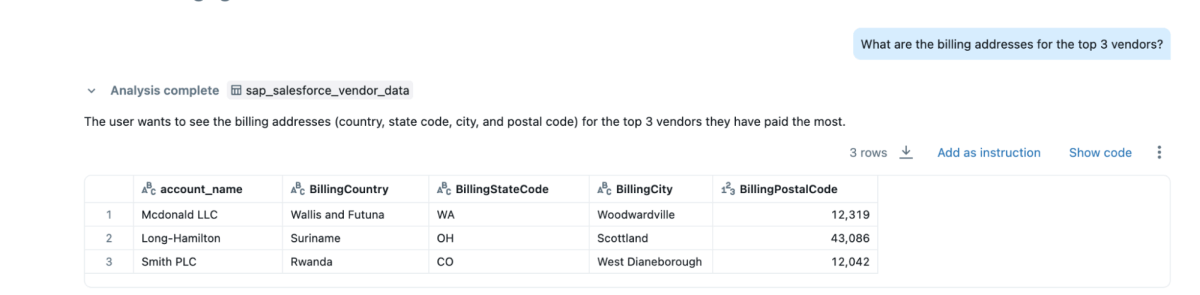
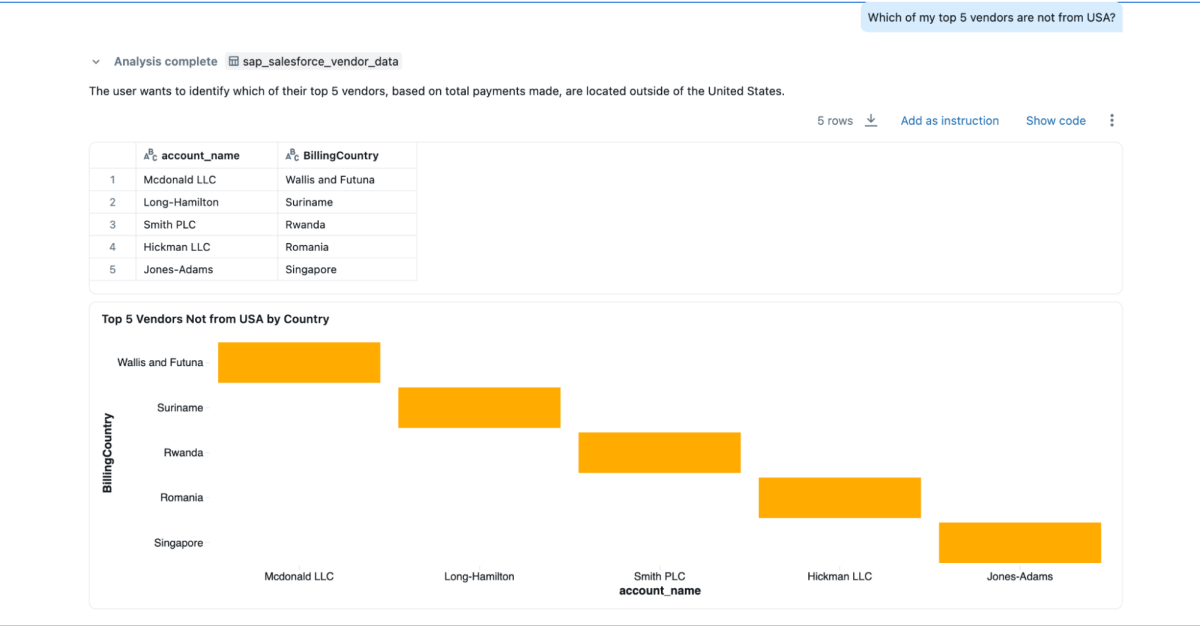
You can create Genie spaces on this blended data and ask questions, which couldn’t be done if the data were siloed in Salesforce and SAP
- “Who are my top 3 vendors whom I pay the most, and I want their contact information as well?”
- “What are the billing addresses for the top 3 vendors?”
- “Which of my top 5 vendors are not from the USA?”

Business Outcomes
By combining SAP and Salesforce data on Databricks, organizations gain a complete and trusted view of supplier performance, payments, and relationships. This unified approach delivers both operational and strategic benefits:
- Faster dispute resolution: Teams can view payment details and supplier contact information side by side, making it easier to investigate issues and resolve them quickly.
- Early-pay savings: With payment terms, clearing dates, and net amounts in one place, finance teams can easily identify opportunities for early payment discounts.
- Cleaner vendor master: Joining on the
SAP_ExternalVendorId__cfield helps identify and resolve duplicate or mismatched supplier records, thereby maintaining accurate and consistent vendor data across systems. - Audit-ready governance: Unity Catalog ensures all data is governed with consistent lineage, permissions, and auditing, so analytics, AI models, and reports rely on the same trusted source.
Together, these outcomes help organizations streamline vendor management and improve financial efficiency — while maintaining the governance and security required for enterprise systems.
Conclusion:
Unifying supplier data across SAP and Salesforce doesn’t have to mean rebuilding pipelines or managing duplicate systems.
With Databricks, teams can work from a single, governed foundation that seamlessly integrates ERP and CRM data in real-time. The combination of zero-copy SAP BDC access, incremental Salesforce ingestion, unified governance, and declarative pipelines replaces integration overhead with insight.
The result goes beyond faster reporting. It delivers a connected view of supplier performance that improves purchasing decisions, strengthens vendor relationships, and unlocks measurable savings. And because it’s built on the Databricks Data + AI Platform, the same SAP data that feeds payments and invoices can also drive dashboards, AI models, and conversational analytics — all from one trusted source.
SAP data is often the backbone of enterprise operations. By integrating the SAP Business Data Cloud, Delta Sharing, and Unity Catalog, organizations can extend this architecture beyond supplier analytics — into working-capital optimization, inventory management, and demand forecasting.
This approach turns SAP data from a system of record into a system of intelligence, where every dataset is live, governed, and ready for use across the business.
Get the latest posts in your inbox
Subscribe to our blog and get the latest posts delivered to your inbox.