Seamlessly resume sessions in Serverless notebooks
The first platform to restore both Python and Spark environments in serverless notebooks
by Samantha Banchik, Jaipreet Singh, Harsh Goyal and Boyuan Deng
- Serverless Snapshot Restoration preserves your full working state after idle disconnects.
- Databricks is the first platform to deliver both Python and Spark state restoration in serverless notebooks.
- In disconnected notebooks, a banner appears at the top and clicking Reconnect restores your full state in under five seconds.
Serverless notebooks make working with data simple and efficient, but until now, no platform has offered a way to fully preserve notebook state after an idle disconnect. Customers tell us they often step away for lunch, a meeting, or even the weekend, only to return and find their entire session has disappeared. To resume, they had to re-initialize Spark, reload data, and rerun every cell.
With Serverless Snapshot Restoration, Databricks addresses this challenge by capturing and restoring the full interactive environment, including both Python and Spark state. This makes Databricks the first platform to support complete environment restoration for serverless notebooks, enabling seamless continuity between sessions.
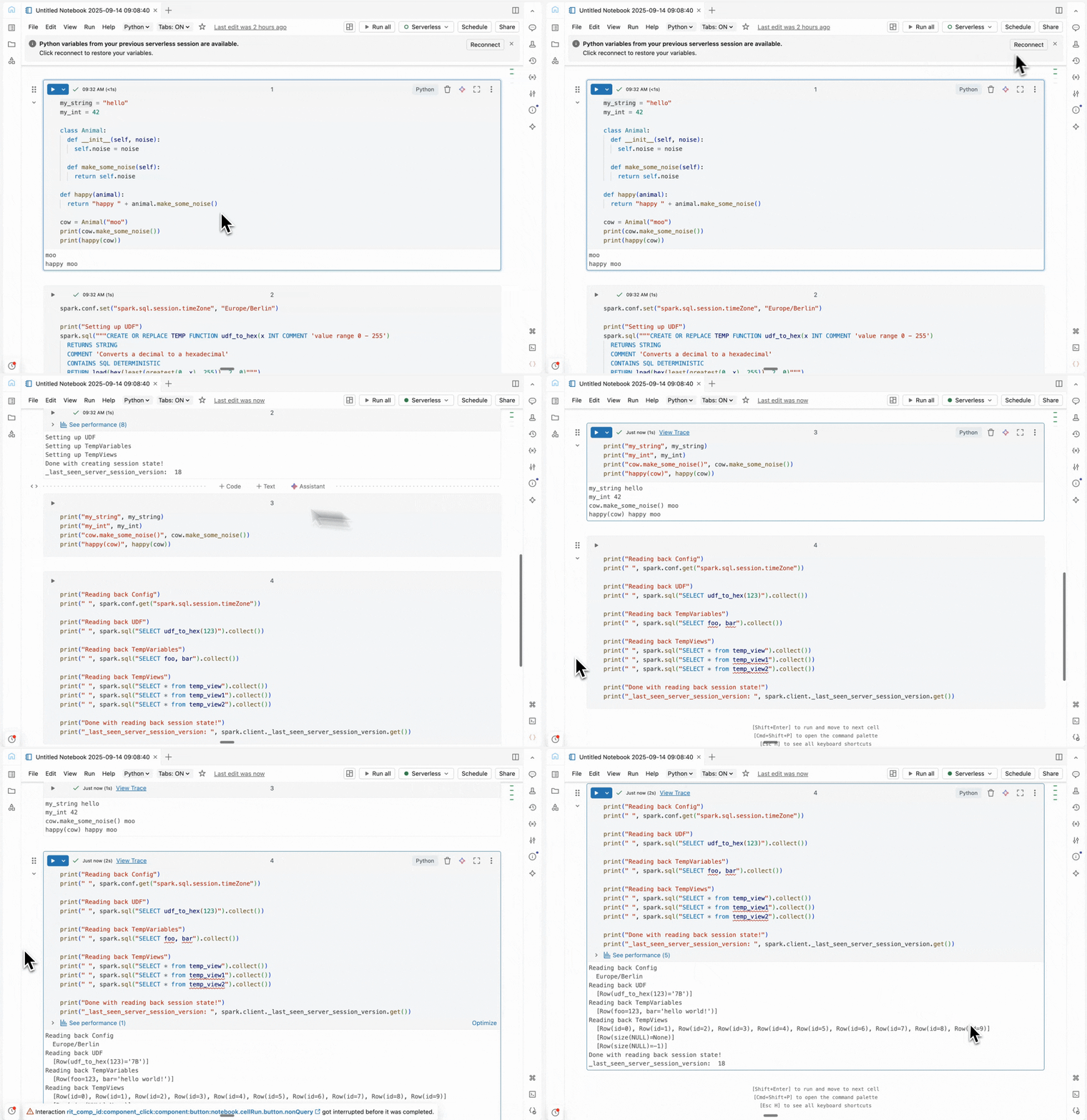
Restoring State in Serverless Notebooks
When you return to a notebook after an idle disconnect, a banner appears at the top of the page. Click Reconnect, and your full Python and Spark session state is restored, typically in seconds!

Traditionally, returning to a disconnected notebook meant re-running every setup cell: imports, class definitions, UDFs, temp views, Spark configs, and more. With Databricks serverless snapshot restoration, Databricks reinstates your entire working environment, including:
- Python variables, functions, and class definitions: The Python side of your notebook is preserved so you don’t need to re-import or redeclare.
- Spark dataframes, cached and temp views: Data you’ve loaded, transformed, or cached (including temporary views) will still be there, so you avoid costly reloading or recomputation.
- Spark session state (configs, temp variables, catalog entries): All your Spark-level settings, temporary views, and catalog modifications are kept. No need to reset configurations or worry about re-execution.
Together, this makes for a more resilient notebook experience, reducing friction and keeping you productive even after extended breaks.
Under the Hood: How Snapshot Restore Works
Serverless notebooks automatically shut down your attached compute after a period of inactivity. When this happens, Databricks captures your notebook’s environment state so it can be restored when you reconnect. Python state, including variables, functions, and imports, is serialized and stored in your workspace’s default storage. Spark session state (configs, temporary variables, catalog entries) is captured alongside it.
When you return, Databricks deserializes your Python state as soon as you connect to serverless compute, while also restoring your Spark session. Together, these snapshots reconstruct your full notebook environment in seconds and allow you to pick up exactly where you left off.
What’s Next?
Here’s what’s coming next to make serverless notebooks even better:
- Serverless Scala Support: We’re extending serverless compute to Scala workloads by allowing you to deploy fat JARs and leverage session-based Scala UDFs via Spark Connect.
- Default Base Environments: We’re introducing standardized base environments that unify pre-installed libraries, Python versions, and runtime configurations.
Try It Today!
Serverless Snapshot Restore is now enabled by default for all serverless notebooks. To learn more, check out our serverless notebook documentation.
Get the latest posts in your inbox
Subscribe to our blog and get the latest posts delivered to your inbox.