Stop hand-coding change data capture pipelines
How AutoCDC Automates CDC and Slowly Changing Dimensions
by Matt Jones, Zoé Durand, Phoebe Weiser, Bilal Aslam and Ray Zhu
- Why CDC and SCD pipelines remain fragile and complex, even as code becomes easier to generate
- How AutoCDC declaratively automates SCD Type 1, SCD Type 2, and snapshot-based CDC patterns
- Real-world gains in correctness, performance, and cost from production AutoCDC workloads
I tried AutoCDC from Snapshots in Python and was amazed at how 4 lines of code could replace what I was doing in 1,500 lines of code before. —Senior Data Engineer, Fortune 500 Aerospace & Defense Company
Change data capture (CDC) and slowly changing dimensions (SCD) are foundational to modern analytics and AI workloads. Teams rely on them to keep downstream tables accurate as operational data changes - whether that means maintaining a current view of the business or preserving full historical context.
Yet in practice, CDC pipelines are often some of the most painful pipelines to build and operate. Teams routinely hand-roll complex MERGE logic to handle updates, deletes, and late-arriving data: layering on staging tables, window functions, and sequencing assumptions that are difficult to reason about, and even harder to maintain as pipelines evolve. While LLMs can make this code faster to produce, they don’t reduce the complexity of getting it right or keeping it correct over time - they can generate code, but they don’t understand your data.
This is exactly what AutoCDC was designed to solve. Instead of encoding this logic directly in every pipeline, teams declare the desired semantics, and the platform implements them. Genie Code can then build on this foundation to generate pipelines that are correct by design.
In this post, we’ll walk through the CDC and SCD patterns data engineers and SQL practitioners encounter every day, why these patterns are painful to implement by hand, and how AutoCDC in Lakeflow Spark Declarative Pipelines automates them declaratively - while also delivering meaningful improvements in price and performance.
CDC and SCD are still hard for data engineers
Even for teams that understand these patterns well, getting them correct and keeping them correct over time is where things break down. As data volumes grow and use cases expand, pipelines become fragile; correctness issues surface late; and even small changes require careful rewrites to avoid corrupting downstream tables.
Maintaining SCD Type 1 tables
SCD Type 1 tables overwrite existing rows to reflect the latest state. Even this “simple” case quickly runs into challenges:
- Updates arrive out of order
- Duplicate events must be consistently deduplicated
- Deletes must be applied correctly
- Logic must remain idempotent across retries and reprocessing
What often starts as a simple MERGE INTO evolves into deeply nested logic with staging tables, window functions, and sequencing assumptions that are hard to reason about (or safely change). Over time, teams become reluctant to touch these pipelines at all.
Maintaining SCD Type 2 history
SCD Type 2 introduces additional complexity:
- Tracking row versions and validity windows
- Handling late-arriving updates without corrupting history
- Ensuring exactly one “current” version exists at any time
Mistakes here don’t always fail loudly. They often surface weeks later as subtle metric drift, or the need to rebuild historical tables entirely.
Extracting change data from different sources
Not all systems emit clean CDC logs. Some systems emit native change data feeds, while others don’t - often because the team consuming the data doesn’t control the upstream database - forcing teams to reconstruct changes by comparing successive snapshots of a source table.
Supporting both typically means separate ingestion and processing logic; different correctness assumptions; and more code paths to maintain and debug.
Operating CDC pipelines over time
Even once a CDC pipeline is correct, it still has to survive reprocessing and backfills, schema evolution, failures and restarts. Hand-rolled CDC logic tends to grow more fragile over time as these realities accumulate, increasing operational risk and maintenance cost.
Automating complex CDC patterns with declarative data engineering
AutoCDC was designed to standardize these common CDC and SCD patterns behind a declarative abstraction. Instead of hand-coding how changes should be applied, teams declare what semantics they want, and the platform manages ordering, state, and incremental processing.
| CDC workload | AutoCDC | Hand-Written MERGE / Snapshot Logic |
|---|---|---|
| Maintaining current-state tables (SCD Type 1) | Declarative pipeline definition automatically handles sequencing, deduplication, and deletes | Custom MERGE logic with window functions and sequencing rules |
| Maintaining historical tables (SCD Type 2) | Automatic version management with built-in history tracking | Multi-step MERGE logic to close and insert record versions |
| Inferring changes from snapshot sources | Built-in snapshot CDC support | Manual snapshot diff pipelines with joins and comparisons |
| Operating pipelines reliably over time (late data, retries, reprocessing) | Automatic ordering and idempotent execution | Requires custom safeguards and additional logic |
| Code footprint and operational complexity | ~6–10 lines of declarative pipeline definition | 40–200+ lines of custom pipeline logic |
This gives teams a consistent, repeatable way to implement CDC and SCD across pipelines, rather than reinventing the pattern each time (which is really the core value of declarative programming in general, and Spark Declarative Pipelines specifically). This foundation also enables Genie Code to generate and manage these pipelines using AutoCDC, ensuring AI-assisted development builds on standardized, production-ready semantics.
When processing change records from a change data feed (CDF), AutoCDC automatically handles out-of-sequence records and applies updates correctly based on a declared sequencing column. To show how this works in practice, let’s consider the sample CDC feed below:
| userId | name | city | operation | sequenceNum |
|---|---|---|---|---|
| 124 | Raul | Oaxaca | INSERT | 1 |
| 123 | Isabel | Monterrey | INSERT | 1 |
| 125 | Mercedes | Tijuana | INSERT | 2 |
| 126 | Lily | Cancun | INSERT | 2 |
| 123 | null | null | DELETE | 6 |
| 125 | Mercedes | Guadalajara | UPDATE | 6 |
| 125 | Mercedes | Mexicali | UPDATE | 5 |
| 123 | Isabel | Chihuahua | UPDATE | 5 |
Remember, you should choose SCD Type 1 to keep only the latest data, or choose SCD Type 2 to keep historical data. Let’s start with Type 1.
Automating SCD Type 1 maintenance (change data feed sources)
In this example, a change data feed contains inserts, updates, and deletes for a user table. The goal is to maintain a current view of each record, where new updates overwrite older values.
Output table for SCD Type 1
| id | name | city |
|---|---|---|
| 124 | Raul | Oaxaca |
| 125 | Mercedes | Guadalajara |
| 126 | Lily | Cancun |
User 123 (Isabel) was deleted, so it doesn't appear in the output. User 125 (Mercedes) shows only the latest city (Guadalajara) because SCD Type 1 overwrites previous values.
With a traditional approach, this requires custom MERGE logic to deduplicate events, enforce ordering, apply deletes, and ensure the pipeline remains correct across retries or late-arriving data. AutoCDC replaces this fragile logic with a declarative pipeline definition that automatically handles sequencing, deduplication, late-arriving data, and incremental processing - eliminating dozens of lines of custom merge logic.
See full code example in appendix
Automating SCD Type 2 history (change data feed sources)
In many analytical systems, keeping only the latest state is not enough - teams need a complete history of how records change over time. This is the SCD Type 2 pattern, where each version of a record is stored with validity windows indicating when it was active.
Output table for SCD type 2:
| id | name | city | __START_AT | __END_AT |
|---|---|---|---|---|
| 123 | Isabel | Monterrey | 1 | 5 |
| 123 | Isabel | Chihuahua | 5 | 6 |
| 124 | Raul | Oaxaca | 1 | NULL |
| 125 | Mercedes | Tijuana | 2 | 5 |
| 125 | Mercedes | Mexicali | 5 | 6 |
| 125 | Mercedes | Guadalajara | 6 | NULL |
| 126 | Lily | Cancun | 2 | NULL |
The table preserves complete history. User 123 has two versions (ended at sequence 6 when deleted). User 125 has three versions showing city changes. Records with __END_AT = NULL are currently active.
Implementing this manually requires multi-step MERGE logic to close out previous records, insert new versions, and ensure only one version remains active at a time. AutoCDC automates these transitions declaratively, managing history columns and versioning logic automatically while ensuring correctness even when updates arrive out of order.
See full code example in appendix
Inferring CDC from snapshot sources
Not all source systems emit change logs. In many cases, teams receive periodic snapshots of a source table and must infer what changed between runs.
Traditionally, this requires manually comparing snapshots to detect inserts, updates, and deletes before applying those changes with MERGE logic. AutoCDC treats snapshot-based CDC as a first-class pattern, automatically detecting row-level changes between snapshots and applying them incrementally without requiring custom diff logic or state management.
Implementing this manually requires detecting row-level changes between snapshots, closing out previously active records, and inserting new versions with updated validity windows. AutoCDC automatically derives these changes and applies SCD Type 2 semantics, maintaining version history without requiring multi-step merge logic or custom snapshot state tracking.
Managing ordering, state, and reprocessing
Lakeflow Spark Declarative Pipelines automatically tracks incremental progress and handles out-of-sequence data. Pipelines can recover from failures, reprocess historical data, and evolve over time without double-applying or losing changes.
Practically, this removes the need for teams to manage sequencing logic, watermark bookkeeping, or reprocessing safety themselves - the platform handles it.
What’s new: major price and performance gains
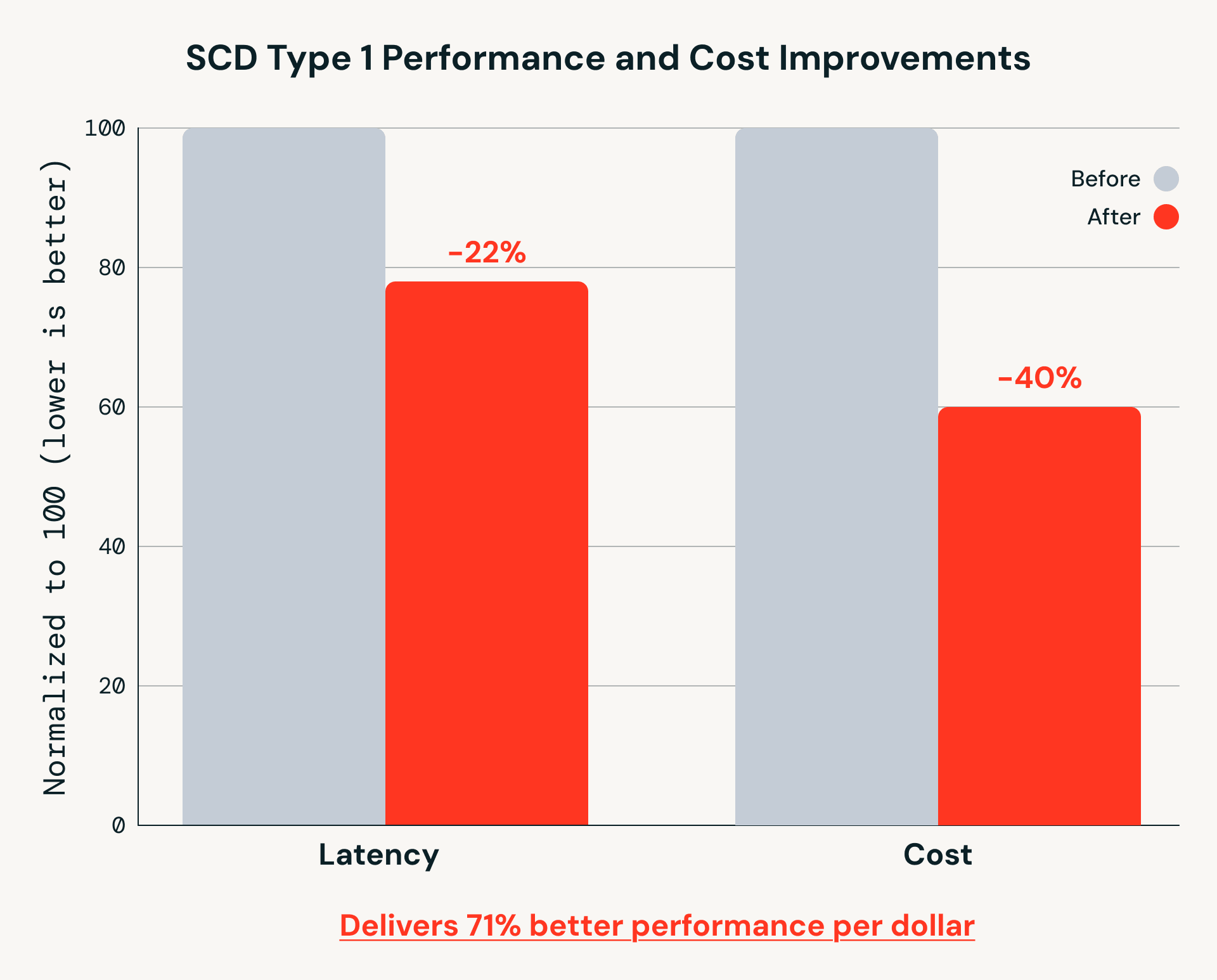
Beyond simplifying pipeline logic, recent Databricks Runtime improvements have delivered substantial gains in both performance and cost efficiency for AutoCDC workloads - just since November 2025:
SCD Type 1 Performance and Cost Improvements
SCD Type 2 Performance and Cost Improvements
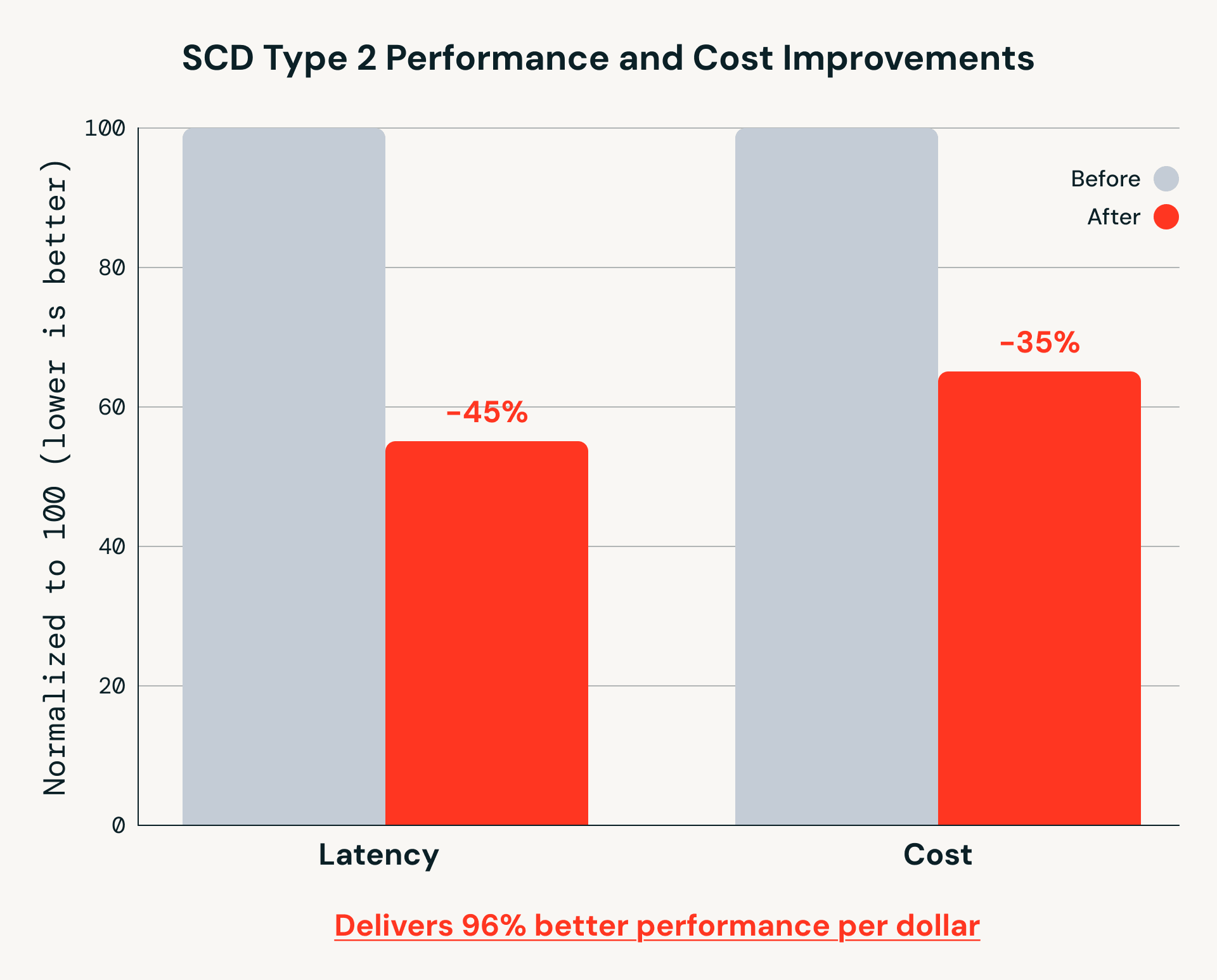
These gains matter for real-world pipelines that run continuously at scale. While MERGE INTO remains a foundational Spark primitive, AutoCDC builds on it to handle out-of-sequence data and incremental processing more efficiently as data volumes grow.
Real-world results with AutoCDC
Teams running CDC and SCD pipelines in production consistently report significant value from AutoCDC:
Navy Federal Credit Union uses AutoCDC in Lakeflow Spark Declarative Pipelines to power large-scale, real-time event processing—handling billions of application events continuously while eliminating custom CDC code and ongoing pipeline maintenance.
The simplicity of the Spark Declarative Pipelines programming model combined with its service capabilities resulted in an incredibly fast turnaround time. —Jian (Miracle) Zhou, Senior Engineering Manager, Navy Federal Credit Union
Block uses AutoCDC in Lakeflow Spark Declarative Pipelines to simplify change data capture and real-time streaming pipelines on Delta Lake, replacing hand-coded CDC and merge logic with a declarative approach that’s fast to implement and easy to operate.
With the adoption of Spark Declarative Pipelines, the time required to define and develop a streaming pipeline has gone from days to hours. —Yue Zhang, Staff Software Engineer, Data Foundations, Block
Valora Group, a leading Swiss-based “foodvenience” provider, uses AutoCDC in Lakeflow Spark Declarative Pipelines to streamline change data capture for master data and real-time retail analytics, replacing custom CDC code with a declarative approach that’s easy to implement, repeat, and scale across teams.
We gained a lot by doing CDC in SDP, because you don't write any code-it’s all abstracted in the background. AutoCDC minimizes the number of lines… it’s so easy to do. —Alexane Rose, Data and AI Architect, Valora Holding
Get started
The AutoCDC APIs are available as part of Lakeflow Spark Declarative Pipelines on Databricks, and can also be created and managed using Databricks Genie Code.
To learn more:
- Review the AutoCDC documentation (SQL and Python)
- Explore examples for SCD Type 1, SCD Type 2, and snapshot-based CDC
Try AutoCDC in your own pipelines and eliminate hand-rolled CDC logic!
Appendix
SCD Type 1 Example
| MERGE | AutoCDC |
from delta.tables import DeltaTable
from pyspark.sql.functions import max_by, struct

# Deduplicate: keep latest record per userId
updates = (spark.read.table("cdc_data.users")
    .groupBy("userId")
    .agg(max_by(struct("*"), "sequenceNum").alias("row"))
    .select("row.*"))

# Apply SCD Type 1: upsert updates, delete deletions
(DeltaTable.forName(spark, "target")
    .alias("t")
    .merge(updates.alias("s"), "s.userId = t.userId")

    .whenMatchedDelete(condition="s.operation = 'DELETE'")
    .whenMatchedUpdate(
        condition="s.sequenceNum > t.sequenceNum",
        set={"name": "s.name", "city": "s.city", "sequenceNum": "s.sequenceNum"}
    )
    .whenNotMatchedInsertAll(condition="s.operation != 'DELETE'")
    .execute())
| from pyspark import pipelines as dp
from pyspark.sql.functions import col, expr
@dp.view
def users():
return spark.readStream.table("cdc_data.users")
dp.create_streaming_table("target")
dp.create_auto_cdc_flow(
target="target",
source="users",
keys=["userId"],
sequence_by=col("sequenceNum"),
apply_as_deletes=expr("operation = 'DELETE'"),
stored_as_scd_type=1
)
|
SCD Type 2 Example
| MERGE | AutoCDC |
from delta.tables import DeltaTable
from pyspark.sql.functions import col, lit, max_by, struct

# Deduplicate: keep latest record per userId
updates = (spark.read.table("cdc_data.users")
    .groupBy("userId")
    .agg(max_by(struct("*"), "sequenceNum").alias("row"))
    .select("row.*"))

# Step 1: close out active rows for records being updated or deleted
(DeltaTable.forName(spark, "target")
    .alias("t")
    .merge(
        updates.alias("s"),
        "s.userId = t.userId AND t.__END_AT IS NULL AND s.sequenceNum > t.__START_AT"
    )

    .whenMatchedUpdate(set={"__END_AT": "s.sequenceNum"})
    .execute())

# Step 2: insert new rows for inserts and updates (not deletes)
new_rows = (updates
    .filter("operation != 'DELETE'")
    .withColumn("__START_AT", col("sequenceNum"))
    .withColumn("__END_AT", lit(None).cast("long"))
    .drop("operation"))

new_rows.write.mode("append").saveAsTable("target")
| dp.create_auto_cdc_flow(
target="target",
source="users",
keys=["userId"],
sequence_by=col("sequenceNum"),
apply_as_deletes=expr("operation = 'DELETE'"),
stored_as_scd_type=2
)
|
Get the latest posts in your inbox
Subscribe to our blog and get the latest posts delivered to your inbox.