Unlock seamless and cost-effective marketing campaigns with Lakebase
How Databricks Lakebase Postgres delivers low-latency customer segment serving for omnichannel marketing platforms like SAP Engagement Cloud, while drastically reducing TCO through serverless autoscaling and native Lakehouse integration.
- Lakebase Postgres is a serverless OLTP database that scales to zero between marketing campaign spikes, eliminating the cost of underutilized database resources typical of personalization workloads.
- Native Synced Tables remove the burden of building and maintaining Lakehouse-to-OLTP pipelines, letting marketing teams ship new customer segments to platforms like SAP Engagement Cloud in just a few clicks.
- Because Lakebase separates storage from compute, customer attribute breadth and depth can grow without scaling compute linearly, keeping costs flat while enabling richer personalization.
Recently, Deichmann published a customer story describing how Lakebase enabled seamless omnichannel marketing. This blog covers the technical side of the story.
Every retail company needs to leverage data to deliver personalized, high-performance marketing campaigns. Nevertheless, we see some inefficiencies across the industry:
- Companies pay for underutilized database resources: customer segments used for personalized campaigns are often stored in an OLTP database from which marketing tools read them. When marketing campaigns are launched, there is a spike in database requests, but otherwise, database utilization is low.
- Marketing teams’ changing needs add an operational burden to data teams: data practitioners create new customer segments in the Lakehouse, and every new request from Marketing results in a package of synchronization Lakehouse-to-OLTP pipelines to create, maintain, and monitor.
A lakebase is a new, open architecture that combines the best elements of transactional databases with the flexibility and economics of the data lake. Databricks Lakebase Postgres, our implementation of the lakebase architecture, solves these problems:
- By separating storage from compute, data can be stored cheaply in object stores without scaling compute linearly. It means the number and diversity of customer attributes can increase significantly without requiring additional compute resources. As data grows but database traffic does not, Lakebase costs remain lower than those of traditional OLTP databases.
- Powered by an elastic, serverless Postgres compute, Lakebase scales up instantly with demand and scales down when idle in less than a second. Costs align directly with usage, making it ideal for bursty workloads like scheduled marketing campaigns. Lakebase customers pay only for the resources they need, reducing costs and eliminating the need to size and plan their compute ahead of time.
- By integrating seamlessly with the Lakehouse, the synchronization between Lakebase and the Lakehouse is fully managed, reliable, and efficient, taking the burden of pipeline creation and maintenance off Data Practitioners.
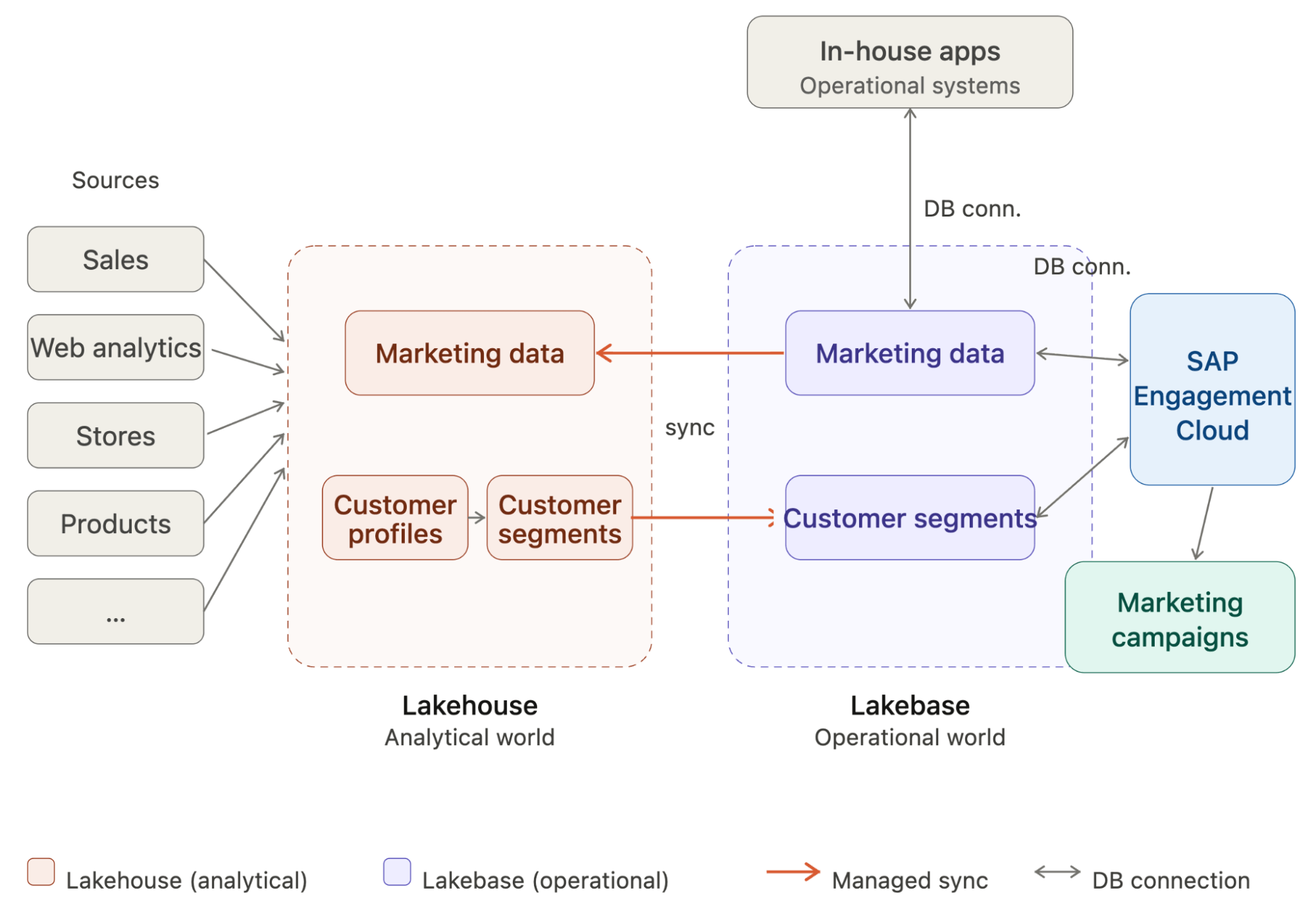
Integrating Lakebase with SAP Engagement Cloud
To illustrate the benefits of using Lakebase as the backend database for our marketing campaign platform, we will show how to integrate Lakebase with SAP Engagement Cloud, an omnichannel marketing platform, and launch a personalized marketing campaign based on customer segments previously created in the Lakehouse.
Step 1: Create and configure a new Lakebase project
We set up our Postgres instance by creating a new Lakebase Autoscaling project. A project is the top-level container for our database resources. A newly created project includes a production database, which will be the PostgreSQL instance that SAP Engagement Cloud connects to.
Marketing campaigns rely on time-based triggers. When a campaign is triggered, SAP Engagement Cloud queries the database to retrieve prospects that meet the specified criteria. These mechanics induce periodic spikes within extended lows. For this reason, for compute, we scale to 0 for the extended lows, eliminating compute costs for these periods, and set a medium capacity of 16 CU (~32 GB RAM) as the maximum for the spikes. Even if the chosen memory range is relatively large, Lakebase autoscaling speed and reactivity eliminate the risk of resource underutilization, which lowers TCO and reduces the need for sizing and provisioning our database.
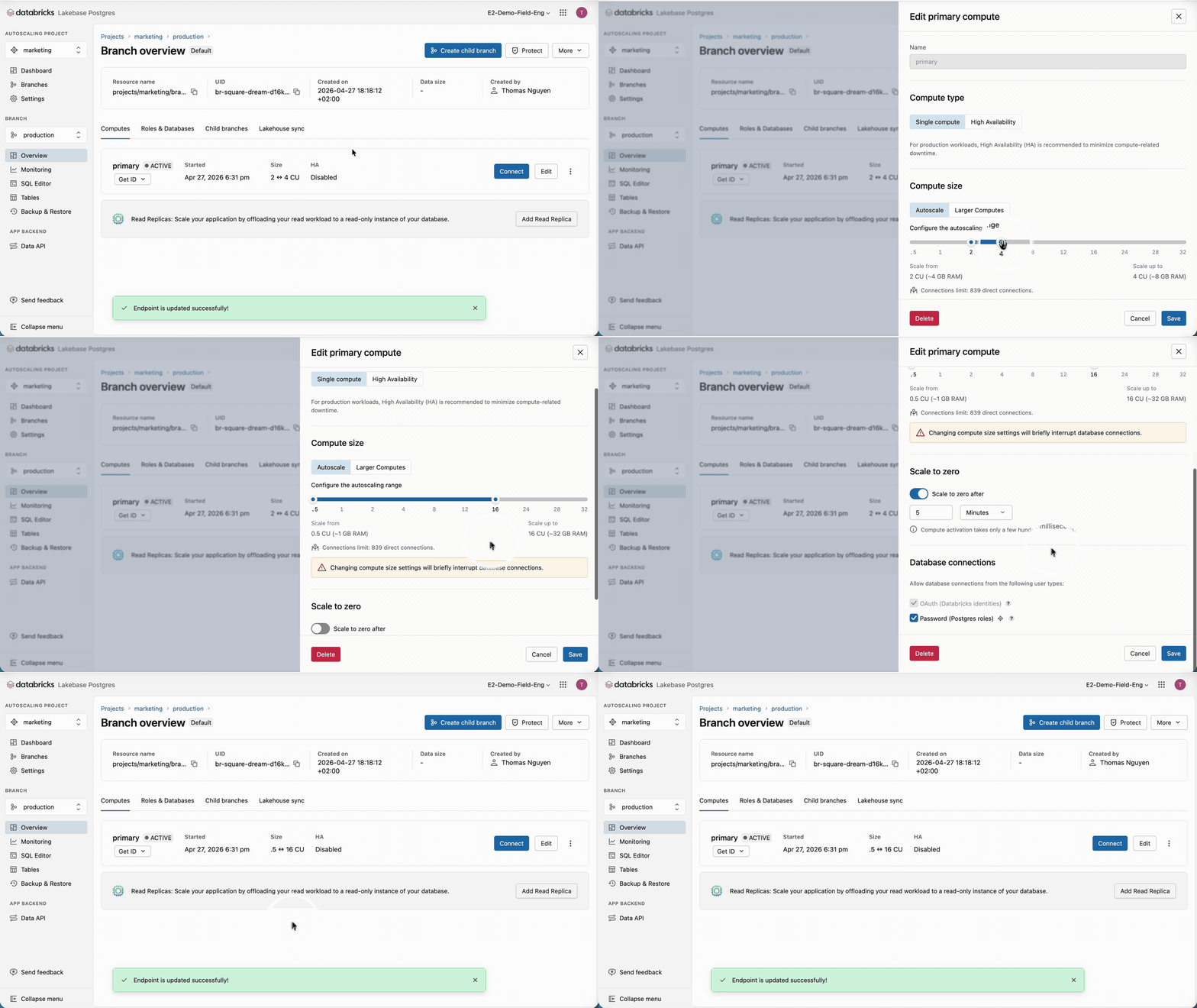
Once the Lakebase compute has been set, we need to create the necessary roles for SAP Engagement Cloud. Lakebase supports OAuth roles for Databricks identities and Native Postgres password roles. Because Engagement Cloud can’t handle the hourly token rotation happening for OAuth roles, we will use native Postgres roles. Postgres roles can be created in various ways; we will use the Lakebase UI to generate a high-entropy password. Capture the password immediately and store it in a secret manager. We recommend rotating passwords by generating new ones on a regular schedule.
We then grant the necessary permissions to the newly created SAP Engagement Cloud Postgres role for our schema used for our synchronized customer segments by running these commands in the Lakebase SQL console.
Step 2: Connect SAP Engagement Cloud to Lakebase
SAP Engagement Cloud requires a CA certificate to connect to a PostgreSQL instance. Lakebase uses certificates issued by Let's Encrypt, so the required root certificate is ISRG Root X1.
We can obtain the root certificate with:
We can inspect the exported certificate to confirm it's correct:
When configuring our new PostgreSQL connection in SAP Engagement Cloud, we will paste the contents of this file when prompted for a CA certificate.
Step 3: Synchronize the customer segments with Lakebase
With the connection and role created, we can synchronize our customer segments from the Lakehouse to Lakebase. For this, we need to create a synced table from the table to synchronize. Databricks Synced Tables create a managed copy of our Unity Catalog data in Lakebase, making it available to applications that need OLTP-style, low-latency queries.
Several synchronization modes are available: snapshot, triggered, and continuous. In our case, and very often, customer segments are recomputed nightly in batch, replacing a significant portion of the dataset. When more than 10% of the data is updated, we recommend snapshot mode, which delivers 10x better performance than triggered mode. From there, a managed pipeline is created, and the data is synchronized. Making new customer segments available to Engagement Cloud now takes just a few clicks, accelerating time to market and reducing operational burden.
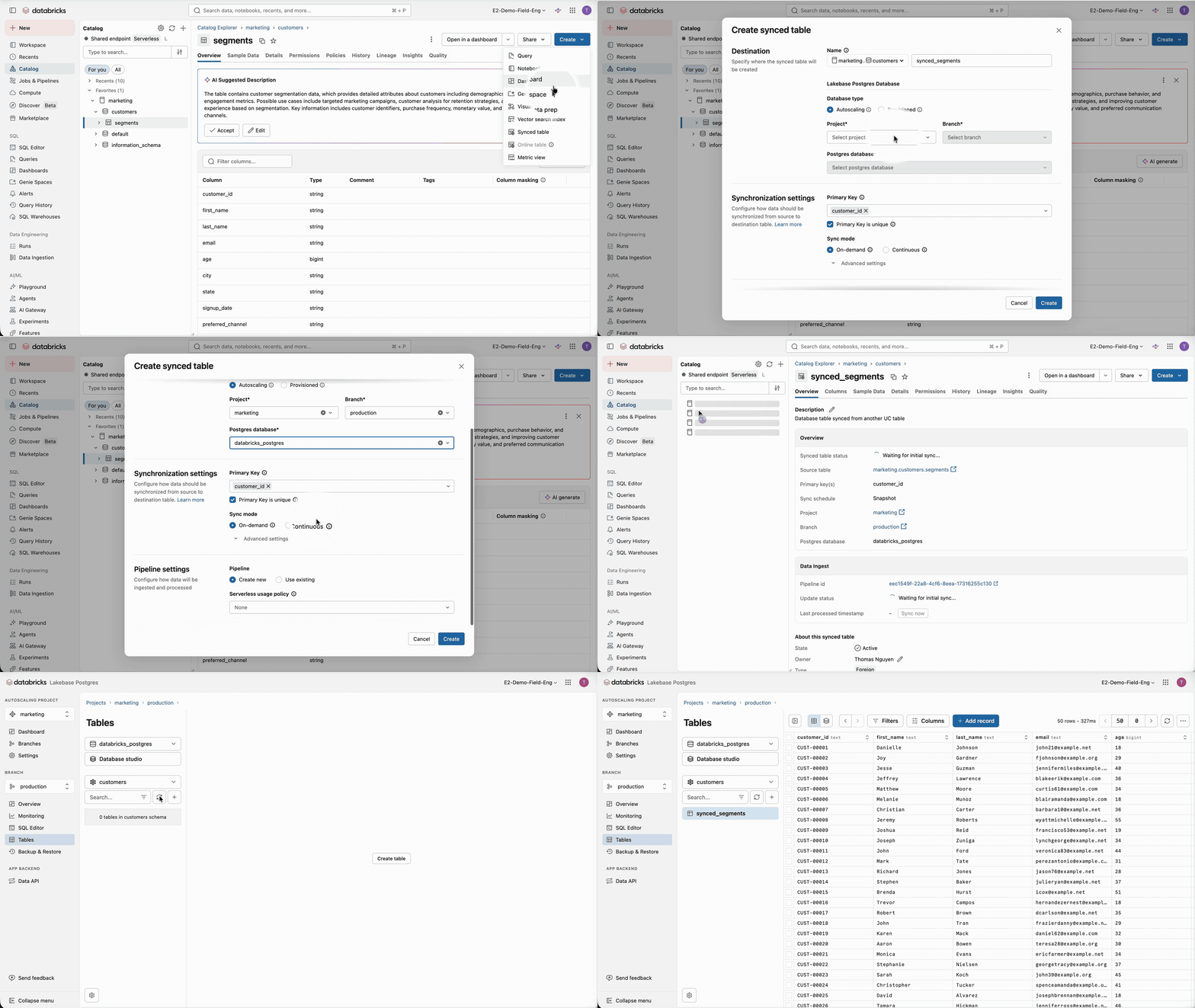
Additionally, due to Lakebase separation of compute and storage, the size and diversity of the available data for Engagement Cloud can grow without having to scale compute resources like in classical databases, keeping costs low. Nevertheless, it’s important to keep in mind that Databricks Lakebase is optimized for high-concurrency point lookups and short OLTP queries, not for large scans or classic OLAP.
Synchronize Operational Data to the Lakehouse
Beyond the generated customer segments, marketing campaigns can incorporate data from other applications. For instance, customers might sign up to receive notifications about product restocks or new arrivals in a specific category or brand. Applications can use Lakebase as a standard Postgres database to store this notification data, making it available to Engagement Cloud for campaign targeting. Any data written to Lakebase can then be synchronized to the Lakehouse for analytics via Lakehouse Sync—a native, continuous CDC-based pipeline from Lakebase Postgres to Unity Catalog Delta tables that makes operational data available for richer analytics and AI.
Performance Optimization
Lakebase is Postgres, and we can optimize performance similarly to a classical Postgres database.
Building indexes is one of the easiest, most impactful, and common optimizations. When marketing campaigns are triggered, SAP Engagement Cloud fires queries to retrieve customer IDs filtered by a WHERE clause.
Create an index based on this filtering condition. Indexes can be created in Lakebase by writing in the Lakebase SQL console:
In the case of SAP Engagement Cloud, indexes should already give us the performance we need. If additional optimizations are required, we should first identify the longest and most frequent queries using pg_stat_statements or using the Databricks Lakebase UI, which provides the queries' performance and a set of metrics to monitor the database.
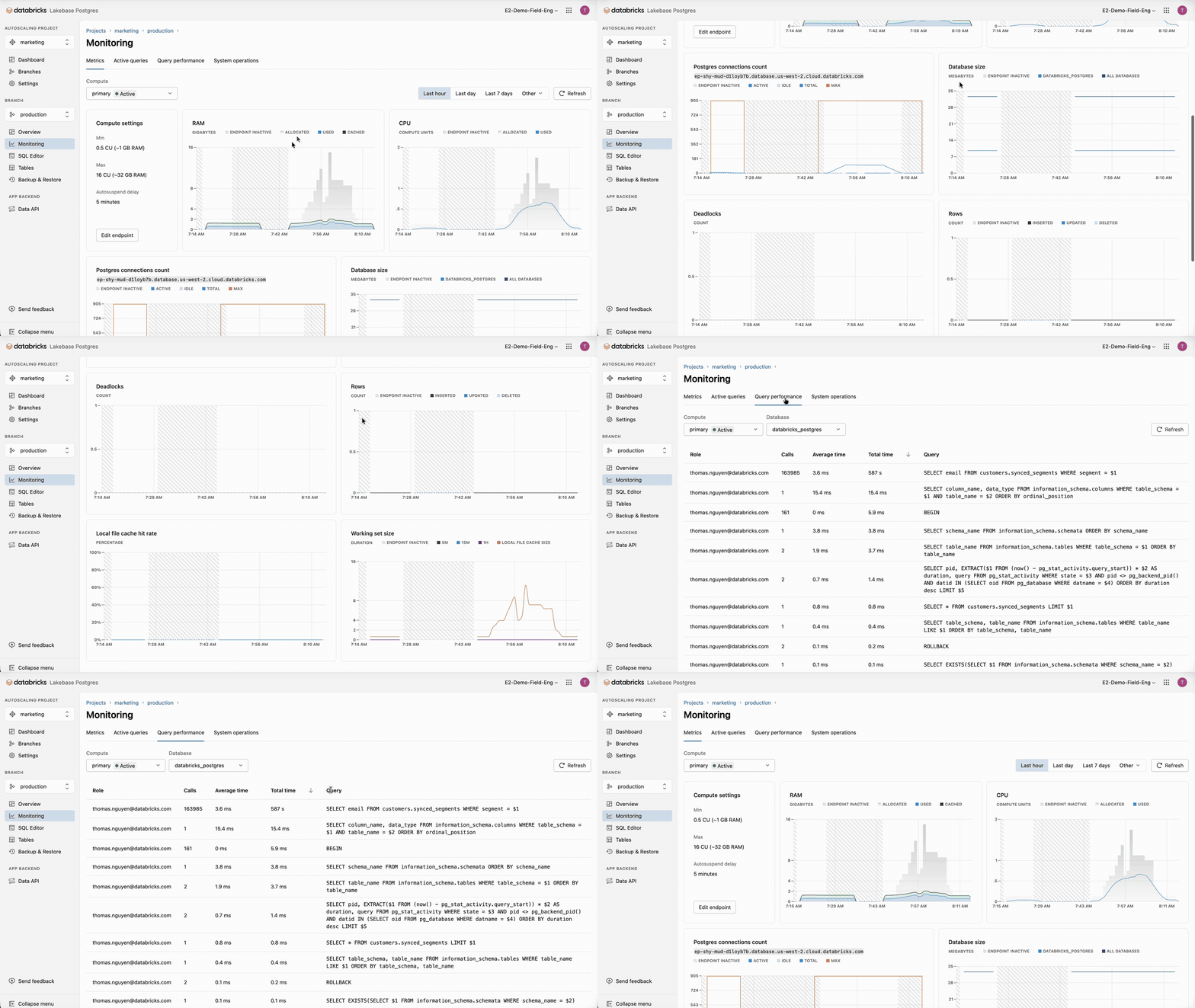
The longest and most problematic queries can be analyzed using:
PREFETCH and FILECACHE are specific to Lakebase and show, respectively, how many prefetch requests were issued/hit/wasted and what were the hits/misses against the Local File Cache (LFC). Databricks Lakebase UI also provides a handy interface to run these analyses.
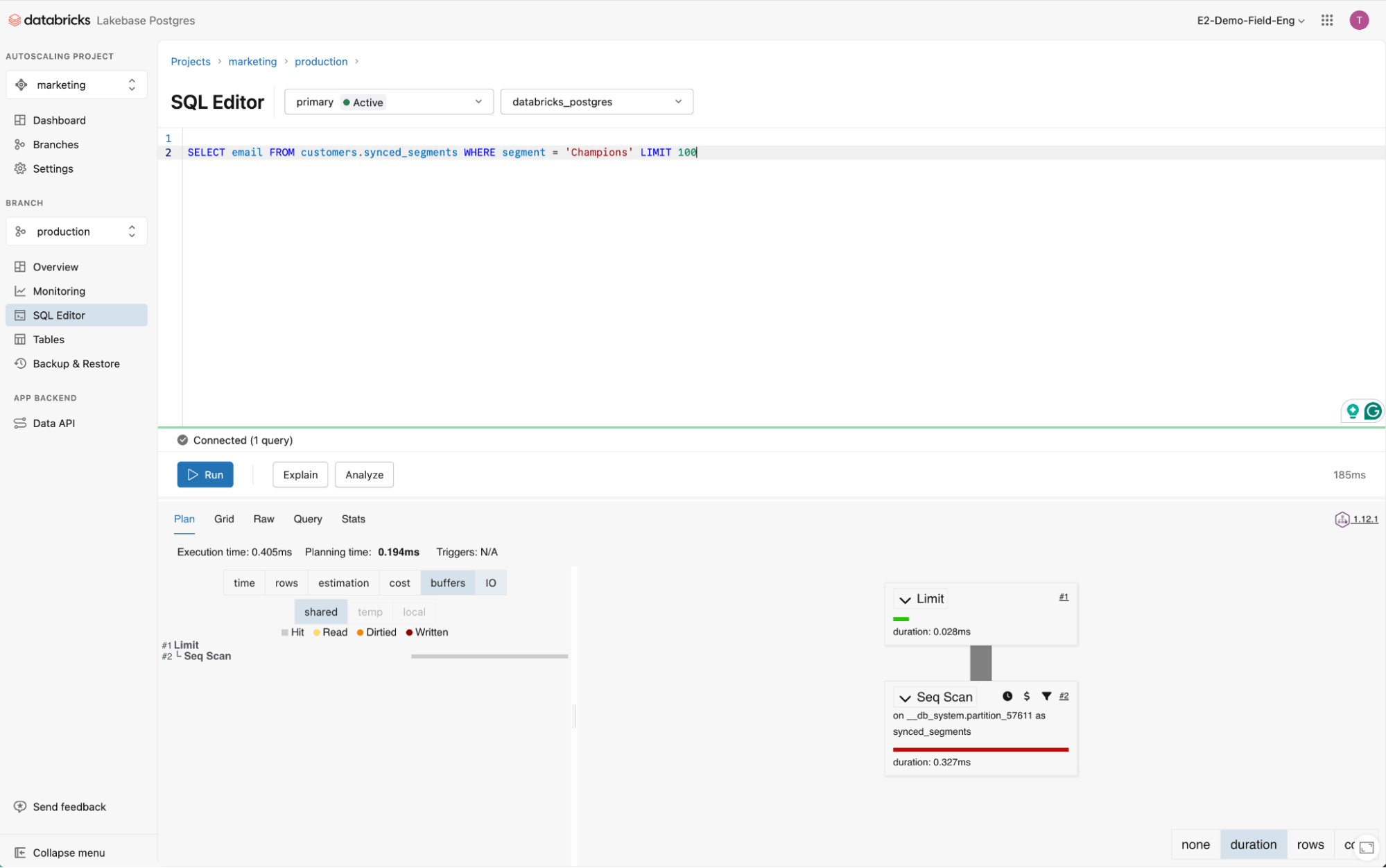
From there, we could explore additional optimization options like:
- Changing the configuration of work_mem - bumping it up to 256 MB for larger compute can be beneficial.
- Tune autovacuum_vacuum_scale_factor lower on tables with a high churn rate, watch for bloat with pg_stat_user_tables.
Conclusion
Lakebase, with its unique technology and tight integration with the Lakehouse, can provide low-latency serving of customer segments created by analytical and AI workloads.
Lakebase drastically reduces TCO by aggressively autoscaling and scaling to zero when resources are unused, eliminating costs for idle resources.
Lakebase’s integration with the Lakehouse removes the operational burden of maintaining synchronization pipelines, slashes the time to market for new customer segments, and enables more personalized marketing campaigns, driving greater engagement in a shorter period of time.
Ready to modernize your marketing stack? Try Databricks Lakebase Postgres today and see how serverless OLTP combined with the Lakehouse can cut your TCO and accelerate campaign delivery. Visit the Databricks Lakebase product page, read the Deichmann customer story, or contact your Databricks account team to scope a proof of concept tailored to your marketing campaign workloads.
Get the latest posts in your inbox
Subscribe to our blog and get the latest posts delivered to your inbox.