What is a Relational Database (RDBMS)?
Store and manage structured data in tables with defined relationships, ensuring data integrity through ACID properties
- A relational database stores structured data in tables of rows and columns and uses keys to relate tables so applications can query connected information in a consistent way.
- Core principles include defined schemas, constraints, indexes and ACID transactions, which together protect data integrity and support reliable SQL based querying.
- Relational databases remain central for transactional systems and analytics that need strong consistency, standard SQL and mature tooling, even as they now interoperate with data lakes and lakehouse architectures.
What Is a Relational Database?
A relational database is a type of database that stores and provides access to data in tables that can be linked to each through shared columns and rows, called relations, with unique identifiers (keys) that show the different relationships between tables.
This relational model is similar to a spreadsheet model in that rows represent the individual records, such as customer, accounts or transactions, while columns represent the attributes of those records, such as customer ID, account number or transaction amount. Using this model, rows in one table can be linked to rows in another table using common keys which establish the relationships between tables.
This model provides a standard way to represent and query data that can be used by a multitude of applications.
A relational database management system (RDBMS) is a software system (sometimes referred to as a database engine) that implements the relational database model and manages relational data, not just tables, from writes and reads to/from disks, to maintaining indexes, executing queries and enforcing data integrity.
Core concepts of the relational model
Tables, rows and columns
The foundational structure of the relational model is the organization of data into tables, rows and columns. Tables are two-dimensional data structures created to show a collection of related data organized logically to enable structured query execution.
Rows represent specific entities or records (tuples) in a relational database table and contain the value for every column.
Columns represent the categories of attributes for each record in a row.
In essence, columns define the structure and rows provide the actual data. A simple product table might include the following rows of specific products with columns of associated attributes:
| Product ID | Product name | Product type | Price ($) |
|---|---|---|---|
| PSHL16 | Chuck’s Hot Pork Sausage | Hot Pork Links (1lb) | 5.99 |
| PSML16 | Chuck’s Mild Pork Sausage | Mild Pork Links (1lb) | 5.99 |
| GTS16 | Chuck’s Ground Turkey Sausage | Seasoned Ground Turkey (1lb) | 6.59 |
| GT48 | Chuck’s Ground Turkey | Ground Turkey (3lb) | 18.59 |
Schema and structured data
The schema of a relational database describes the structure of the database. It defines a blueprint for what the data should look like and the rules it must follow. The structured data is stored in a consistent and predictable format according to that schema (rows and columns with consistent relationships that define what data types can go where and how they must be represented).
A good schema provides integrity and consistency of data types. With a known structure, you can optimize storage and queries to maintain performance and enhance understanding since every table and column has the same meaning.
Constraints and indexes
There can be constraints and rules when writing to a table. For instance, in the above example, every product must be associated with a real product ID and each product type will describe cased (links) or ground products along with weight in a consistent manner. It can further set guardrails such as each column must contain values (NOT NULL) with no duplicates (UNIQUE) except for price.
This means every row has the same fields and every field has the same meaning. With a strict scheme, the data stays clean, the relationships stay valid and queries stay predictable.
Relational databases can also have indexes that make finding rows faster without a full table scan. An index stores the column values and provides pointers to the rows in the table where those values appear. Performance can slow down when querying large tables and indexing avoids scanning every row in a table.
Databases store indexes in several types of optimized structures to improve the speed of data retrieval:
- B-Tree indexing is a common data structure designed to handle large datasets efficiently by reducing the height of the tree. Each node in a B-Tree can store multiple keys and have multiple children, which minimizes the number of disk I/O operations required for data access. By allowing more children under one node than a regular self-balancing binary search tree, the B-Tree reduces the height of the tree and puts the data in fewer separate blocks.
- Hash tables are data structures that map keys to values and use a hash function to convert a key into an index where the corresponding value is stored. Hash-based indexes are effective for exact-match lookups but are not universally supported or used as the default index type in all RDBMSs and do not preserve ordering like B-Trees.
Keys and relationships
Keys are essential for ensuring uniqueness, integrity and efficient retrieval of data. They uniquely identify rows, establish relationships between tables and prevent duplication, forming the backbone of relational schema design. Data points in tables can be joined with common keys, making it possible to query tables to produce reports. Using common keys, relationships can be one-to-one, one-to-many and many-to-many.
Tables connect with several types of keys:
- Super keys are sets of one or more attributes that can uniquely identify a record
- A candidate key is a minimal set of attributes that can uniquely identify a record
- A primary key is a unique key that identifies a row in its table. For instance, in a customer table, customer ID would be a primary key.
- An alternate key is a candidate key that is not chosen as a primary key
- A foreign key is a column that points to a primary key in another table. For instance, a transaction table might reference customer ID from the customer table with Orders.customer_id.
- A composite key is required when a combination of two or more attributes are needed to identify all records of a table
Key properties of relational databases
Relational databases are groups of operations (transactions) that work together and have several defining features to make them reliable. These transactions follow a set of rules referred to as ACID which stands for:
- Atomicity: All updates must be finished completely
- Consistency: Rules are always enforced
- Isolation: Concurrent transactions do not interfere with each other’s intermediate states
- Durability: Once committed, the data can survive crashes or outages
These rules help ensure data integrity at the transactional level, guaranteeing that database operations complete reliably and correctly. Schema design, data types and constraints are responsible for ensuring that values in columns are atomic and consistent in meaning.Constraints are used to maintain consistency across multiple tables.
Another key property of relational databases is the Structure Query Language (SQL), the most common language for extracting data. Since data is stored in predictable tables with relationships, SQL is used to efficiently answer complex questions to help analyze the data. It offers a standard method for executing queries, retrieving data, inserting/updating/deleting records, creating new databases or new tables and setting permissions on tables, procedures and views.
Relational databases also must ensure security/access control to protect data along several dimensions:
- Authentication – Those who access the database are who they say they are
- Authorization – You are doing what you are allowed to do
- Auditing – Confirmation of what you did and when
Database security also involves features such as encryption to protect data if it is intercepted or stolen and backup and recovery so that data is not lost during system failures.
Relational databases have become the default “systems of record” due to their standardization and maturity. Standard features, structures and capabilities keep an RDBMS predictable, reliable, safe and scalable over time. For example, with SQL as a standard way to query, core concepts and skills can be transferred from one RDBMS to another, and data applications and tools can be maintained through migrations. Standardization also increases vendor competition and choice.
Relational databases have been around for a long time. This maturity means they are battle tested for real-world loads and optimized for extremely refined transactions.
Relational vs. non-relational databases
The most obvious difference between relational and non-relational databases is that non-relational databases do not store structured data in tables. They have the flexibility to store data in containers in the format that is the best format for data being stored. This loosely defined, unstructured data can comprise emails, business documents, videos and images. But they can also store a mix of structured transactional data and unstructured data.
Non-relational databases are often referred to as NoSQL databases, a term that originally meant “not only SQL,” reflecting that these systems do not rely on SQL as their primary interface, even though many now support SQL-based querying.
Relational databases use a fixed schema with rows and columns and relationships with keys and SQL joins, while non-relational databases store data in flexible structures that don’t require a pre-set schema like key-value pairs, nodes/edges and documents. With relational databases the data must match the schema when written while the shape of data can vary with non-relational databases where the data is interpreted when it’s read and relationships are usually handled in applications, not the database.
Relational databases also employ strong ACID transactions by default while NoSQL databases are traditionally designed for eventual consistency and prioritize availability and speed over correctness.
Relational databases are chosen when a clear structure with strong rules is needed along with an abundance of relationships among data points. A relational model is best suited for reporting and analytics with transactions that must always be correct. Relational databases are great for ad-hoc analytics and complex filtering and grouping, while non-relational ones are often optimized for a narrow query set. Relational databases typically scale vertically, with modern systems supporting horizontal scaling through replicas, sharding or distributed execution, often with added complexity, while non-relational databases are designed to scale horizontally and are usually chosen for large, distributed networks.
Non-relational databases are chosen for flexible or rapidly evolving data on a huge scale with simple query patterns.
Common RDBMS Examples
- MySQL – An open-source RDBMS, now owned by Oracle Corp., that implements the SQL standard. It is often the preferred choice for web applications, business systems and critical data-driven services that require high performance. It is commonly used for web applications, online stores and catalogs, user accounts and authentication systems, logging and analytics, SaaS apps and dashboards.
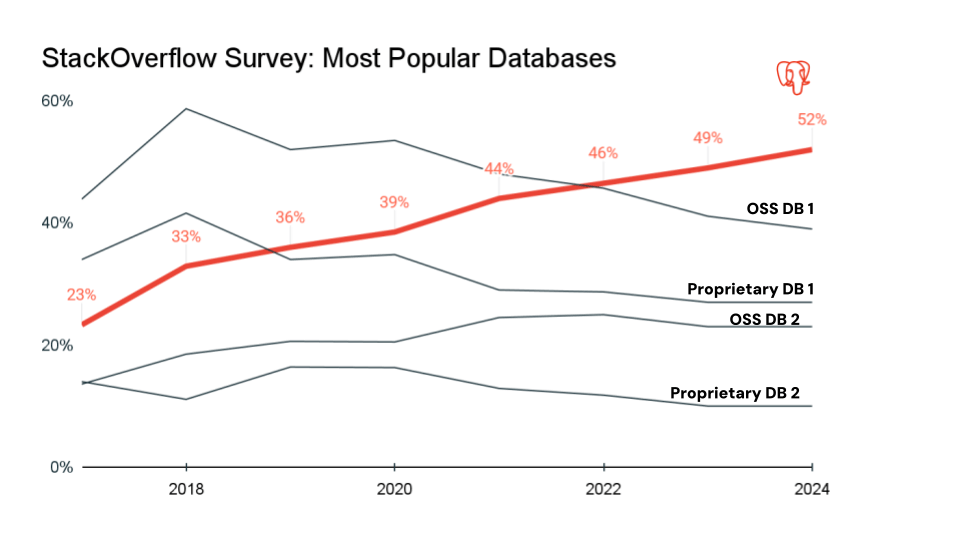
- PostgreSQL – A highly extensible open-source RDBMS known for strong standards and ACID compliance with a good balance between reliability and flexibility. It supports both SQL and semi-structured JSON/JSONB storage and uses Multi-Version Concurrency Control. PostgreSQL is used for web apps, SaaS multi-tenant platforms, financial transactions, analytics and reporting, scientific data and OLTP workloads. It is popular with online-only businesses. Over the last seven years, Postgres has become the most popular database in the developer community and is the de facto database choice for modern applications.
- SQLite – A serverless, cross-platform, open-source relational database that uses SQL and runs inside an application via a lightweight C library. It requires no setup or administration. SQLite is used primarily for embedded systems and small applications of personal devices.
- Oracle – A proprietary, enterprise-grade RDBMS developed by Oracle Corp. Known for its scalability, clustering and reliability, it is optimized for both transactional (OLTP) and analytical (OLAP) workloads and used for banking, airline, healthcare, telecommunications, government and large scale ERP/CRM systems.
- Microsoft SQL Server – Microsoft’s proprietary enterprise-grade RDBMS based on Transact-SQL (T-SQL), Microsoft’s SQL extension. Available on Windows and Linux, SQL Server is known for its management and administration tools and its strong integration with Microsoft Azure and other Microsoft technologies. Typical use cases include ERP, CRM, HR, E-commerce, business intelligence and analytics. SQL Server is strong in finance, banking and healthcare.
- IBM Db2 – A proprietary family of RDBMS systems developed by IBM for high performance, reliability and enterprise-scale data processing. Db2 RDBMS versions run multiple platforms, including Linux, UNIX, Windows, IBM AS/400 and IBM mainframes. It is SQL-based but supports JSON documents, XKL storage, time-series data, columnar storage and Graph capabilities in some versions. It is widely used in finance, government, healthcare and insurance, retail, airline and enterprise IT environments.
- MariaDB – An open-source RDBMS created as a community-driven, drop-in replacement for MySQL and managed by the MariaDB Foundation. It is widely used for both OLTP and OLAP workloads in web apps, SaaS platforms, cloud systems and enterprises, and is a frequent choice for Linux systems and open-source stacks. Common use cases include web apps and websites, SaaS platforms, content management, E-commerce and analytics.
The agentic AI playbook for the enterprise

SQL, RDBMS and related FAQs
Is SQL a relational database?
No, SQL is a query language used to interact with a relational database, not a database system.
Is MySQL a relational database?
Yes, MySQL is an RDBMS with a table-based structure supporting relationships between tables.
Is Excel relational?
No, Excel is Microsoft’s spreadsheet program, not an RDBMS. While Excel uses a table format, there is no enforced schema with a consistent structure and constraints. Excel cannot run SQL queries on its own and there are no ACID transactions.
What is the difference between relational database vs. RDBMS terminology?
While closely related and often used interchangeably, relational databases refer to the data model itself, while an RDBMS is a software system that manages that data model.
Benefits and Limitations
Benefits of using relational databases include:
- Strong data integrity and consistency enforced by ACID transactions to ensure no partial updates, no corrupted data and reliable operations. Structured, well-defined data ensure clean, predictable data.
- Standardized querying capabilities and tooling with SQL provide filtering, grouping, aggregation, indexing and complex joins to make relational databases ideal for analytics, reporting and complex business logic.
- With decades of maturity, relational databases are well-supported with reliable performance, strong security and availability models and an ecosystem of tools to reduce risk.
Limitations include:
- The rigid, fixed schema of relational databases reduces agility and are not suited for unstructured or semi-structured data and frequently changing record shapes.
- Relational databases are great at vertical scaling, but horizontal scaling is complex.
- Performance may degrade with very large datasets and complex joins, which can slow down distributed workloads.
- Commercial RDBMSs can be expensive, especially at scale.
- OLTP is not meant for complex analytics queries.
- Easy to create data silos, increasing storage costs.
- ETL complexity (in the case of moving data back and forth between operational and analytical stores).
- Handling semi-structured data (Delta, Iceberg, Parquet -- what you find in the lakehouse).
- Difficulty with non-standard data types for ML/AI integration
- Not designed to handle xtreaming data
- Cloud vendor lock-in
Evolution Beyond Traditional RDBMS
- Data warehouse era: RDBMSs are designed for using current data and are optimized for many small reads/writes for Online Transaction Processing (OLTP). As such, they can struggle with analytics at scale. To overcome that limitation, data warehouses use denormalized schemas that can handle huge, complex queries against current and historical data for Online Analytical Processing (OLAP).
- Big data challenge: RDBMSs struggle when dealing with massive, fast, diverse and distributed data. Their rigid schema, vertical scaling and ACID transaction overhead left them less suited for large-scale, distributed analytics. Traditional RDBMSs rely on joins executed against locally managed storage, which limits scalability in distributed environments.
- Cloud-native requirements: Traditional relational database systems struggle in cloud-native architectures that favor object storage. They are designed for block storage with tightly coupled hardware and low-latency disk access. Historically, object storage did not provide the low-latency guarantees required for classic ACID transaction processing, making it challenging for traditional RDBMS designs. Object storage is optimized for throughput rather than latency.Cloud-native applications also scale horizontally, while traditional RDBMS designs rely on tightly coupled compute and storage, often centered around a primary server.
- Modern data lakes: Lakehouse architectures evolved to address the limitations of traditional data lakes by combining the scalability and low cost of data lakes with the structure, governance and performance characteristics of data warehouses and relational systems.
A lakehouse uses cloud-native object storage for data persistence while introducing managed table formats, metadata layers and transaction logs that enable schema enforcement, SQL access and ACID transactions directly on that storage. This allows structured, semi-structured and unstructured data to coexist in a single system.
Unlike early data lakes that relied heavily on schema-on-read and external processing logic, lakehouses support schema-on-write or managed schema evolution at the table level. This enables consistent data definitions, data quality enforcement and reliable analytics.By decoupling storage from compute, lakehouse architectures allow multiple compute engines to operate on the same data for analytics, data engineering, streaming and machine learning. This flexibility makes lakehouses well suited for large-scale analytics, business intelligence and advanced data workloads while maintaining cost efficiency and openness through open file and table formats. - Lakebase architecture: A lakebase is a new category of operational database designed for modern, intelligent applications. While RDBMS excel at transactional consistency and structured schemas, they are isolated from the analytical data, machine learning pipelines, and real time intelligence that applications increasingly depend on. A Lakebase combines core database capabilities like transactions, indexing, and low latency access with native integration to the lakehouse, enabling applications to operate directly on fresh, shared, analytical and AI ready data. This allows a single system to support both operational workloads and intelligent, data driven application behavior without duplicating data or splitting architectures.
Addressing Common Myths
- All databases are relational
There are many non-relational databases that do not follow the relational model (storing data in tables and using SQL to define and query relationships). - Relational databases are SQL only
Most relational databases do use SQL as the primary language. SQL was built for the relational model, but some databases use other relational languages, such as Quel, Tutorial D, Rel and Datalog. - Relational databases are obsolete
Relational databases are far from obsolete. They remain unmatched for complex, structured data and are still the backbone of today’s mission-critical systems. And SQL is still one the most widely used languages. Today, relational databases coexist with NoSQL, data lakes and lakehouses as data use cases continue to evolve.
Conclusion
Relational databases with structured schema that organize data into tables, rows and columns, with keys and joins for fast data retrieval and reliable ACID transactions, remain a staple architecture for secure, enterprise mission-critical applications. With a structure designed for fast, reliable queries, relational databases provide the integrity and consistency of data types, and you can optimize storage and queries to maintain performance. They can also coexist with non-relational databases in modern distributed data lake and lakehouse environments.
The standardization and maturity of RDBMSs mean they are battle-tested for real-world loads and optimized for extremely refined transactions. Modern architectures such as a lakebase extend these proven relational foundations into cloud-native environments, allowing relational reliability and SQL-based analytics to coexist with scalable object storage and distributed compute.
Additional Resources
- Beginner-friendly introduction covering tables, relationships, and basic concepts
- Comprehensive overview of RDBMS architecture, features, and enterprise applications
- Comprehensive explanation of 1NF through 5NF with examples
- Detailed breakdown of Atomicity, Consistency, Isolation, and Durability
- Comprehensive coverage including Codd's rules and theoretical foundations
- Lakehouse: A New Generation of Open Platforms that Unify Data Warehousing and Advanced Analytics
Get the latest posts in your inbox
Subscribe to our blog and get the latest posts delivered to your inbox.