Managing and Analyzing Game Data at Scale
by Duncan Davis
Game development is a complex process that requires the use of a wide range of tools and technologies throughout the lifecycle of a game. One of the most important components is the ability to manage and analyze data generated by the game. For many teams, this is challenging because of the sheer volume and variety of data generated, the quality of that data, the level of technical expertise on the team, and the tools and services used to collect, store, and analyze said data.
For games running as a service, it’s critical that the data estate and backend services work in concert to help teams effectively collect and analyze vast amounts of game data in real-time, enabling data-driven decisions that optimize player engagement and monetization.
Azure PlayFab and Azure Databricks: A better-together story
Azure PlayFab is a robust backend game platform for building and operating live-connected games. It offers a suite of cloud-based services for game developers, including player authentication, matchmaking, leaderboards, and more. With PlayFab, developers can easily manage game servers, store and retrieve game data, and deliver updates to players.
Databricks is a unified data, analytics, and AI platform that allows developers and data scientists to build and deploy data-driven applications. With Databricks, studios can ingest, process, and analyze large volumes of data from a variety of sources, including PlayFab.
Together, game developers can use Azure PlayFab to collect real-time data on player behavior, such as player actions, in-game events, and spending patterns. They can then use Databricks to process and analyze this data in real-time, identify patterns and trends, and generate insights that can be used to improve game design, optimize player engagement, and increase revenue.
The combination of Azure PlayFab and Databricks can also enable game developers to build and deploy machine learning models that can help automate decision-making processes. For example, you can use machine learning models to predict player churn, identify the best monetization strategies and personalize the gamer experience at the individual level.
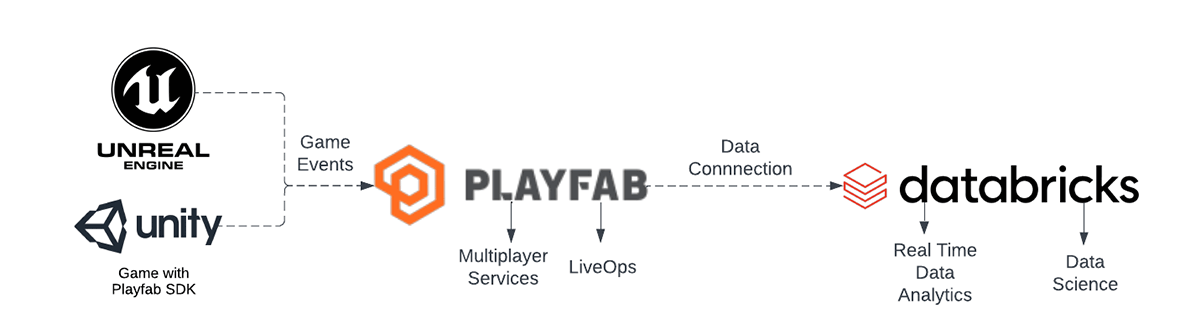
In this blog post, we're going to take a closer look at how game teams can integrate Azure PlayFab with Databricks to manage and analyze game data. We'll cover the following topics:
- Getting Started with the Game SDK
- PlayFab Configuration
- Ingest PlayFab events in Databricks
- Curate Data
- Analyze data
How to get started with the PlayFab game SDK
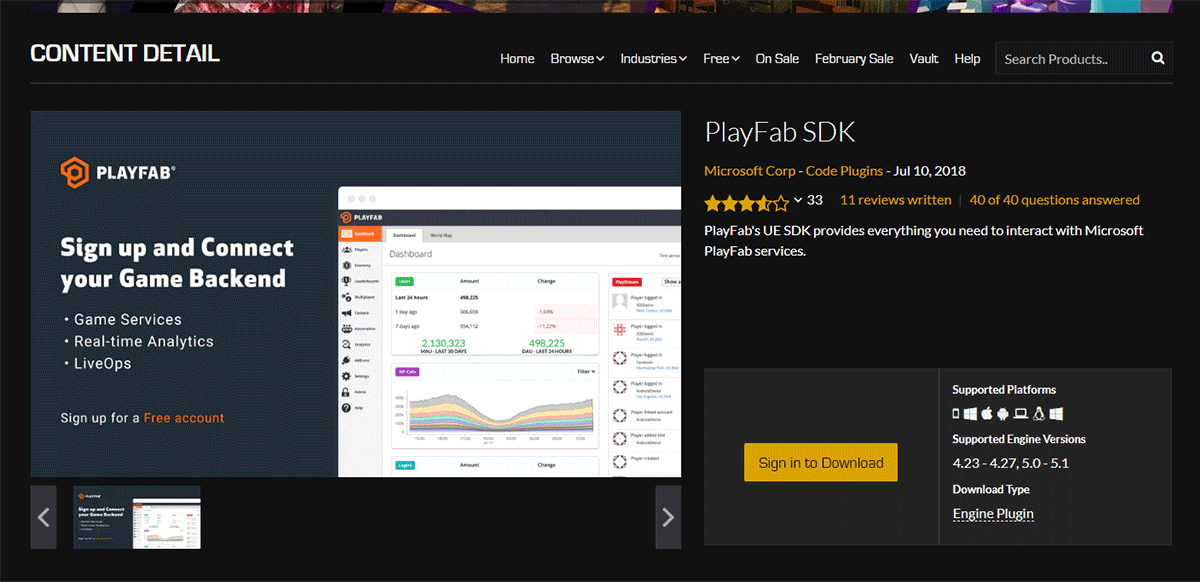
To get started with Azure PlayFab, you'll first need to add the PlayFab Game SDK plugin or call the PlayFab APIs. The Game SDK is a set of libraries that provide access to PlayFab's cloud-based services, including authentication, matchmaking, LiveOps, and more. The SDK is available for a wide range of game engines including Unity and Unreal Engine.
To use the Game SDK, you'll need to download and install it in your game engine through various methods such as github links or marketplaces. Once installed, you can use the SDK to call PlayFab's APIs and access its services. You can also use the SDK to send events to PlayFab, which can then be ingested into Databricks for analysis.
How to configure PlayFab
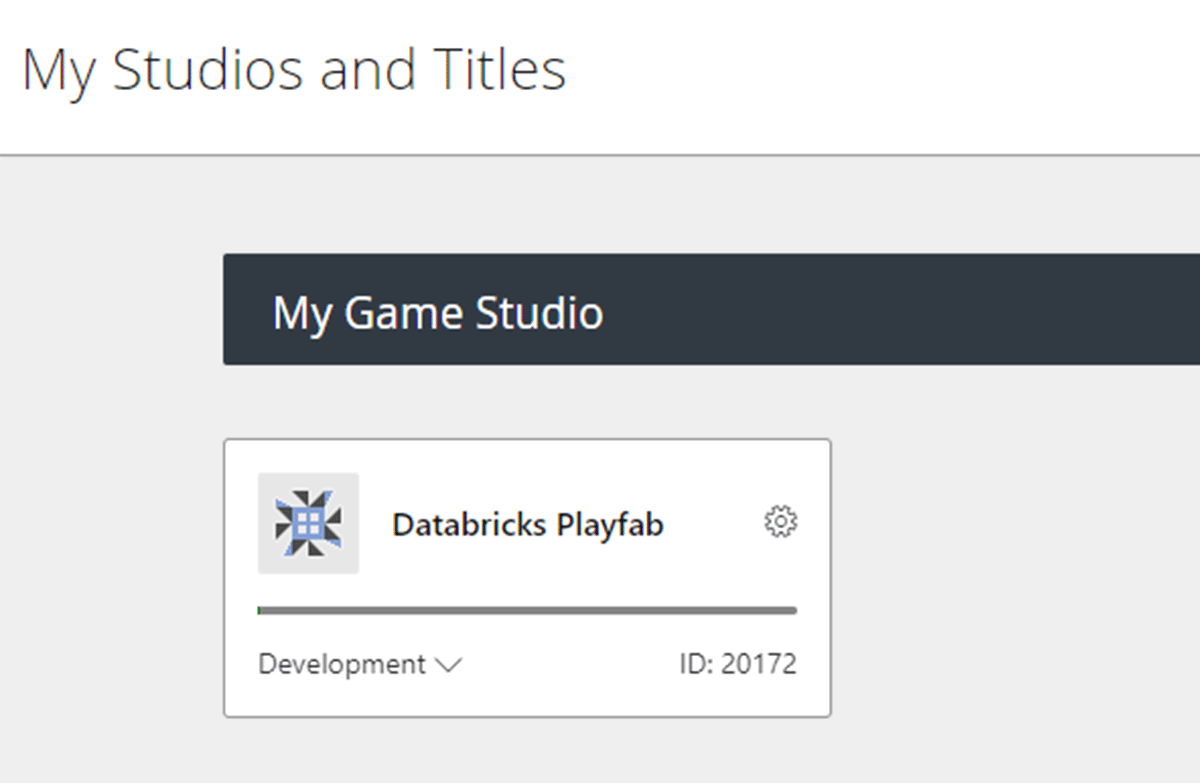
Once you’ve connected the PlayFab Game SDK to your title, you can then sign up for an Azure account if you don’t have one already. Within the PlayFab portal, you'll need to configure your game's settings. This includes setting up authentication, creating a title, and configuring game data storage. For detailed information on how to configure your game’s settings, please review the following PlayFab documentation.
Once configured, you can create a New Title, set up authentication, and configure game data storage.
How to ingest PlayFab events with Databricks
Once you've configured PlayFab, you can start ingesting events into Databricks for analysis. Here, we’ll start by creating an event pipeline that sends PlayFab events to Databricks using Data connections. Data connections is purpose-built for near real-time data ingestion and is designed to provide you with higher throughput, more flexibility, and optimized storage cost.
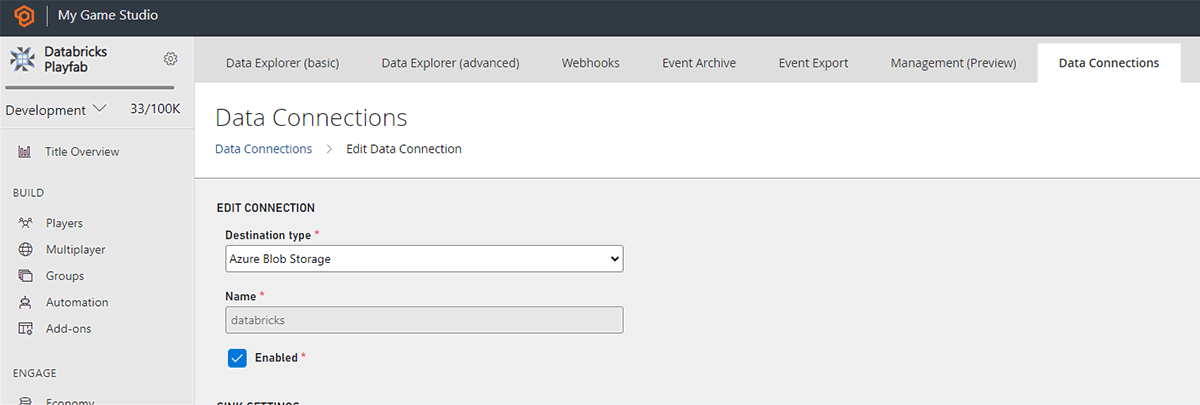
Data connections combined with Event Sampling allows precise control over which events appear in your storage account.
Tip: Filter or sample noisy events to save storage costs
The data will begin populating in the storage account within a few minutes. The Data Connection provides control of your data in your storage account with less than 5-minute data ingestion latency. The architecture is designed for better processing that facilitates Parquet files in blob storage with the highest throughput, low storage cost, and most flexibility. In case of failure in data distribution, a built-in automatic retry mechanism is in place to ensure data quality.
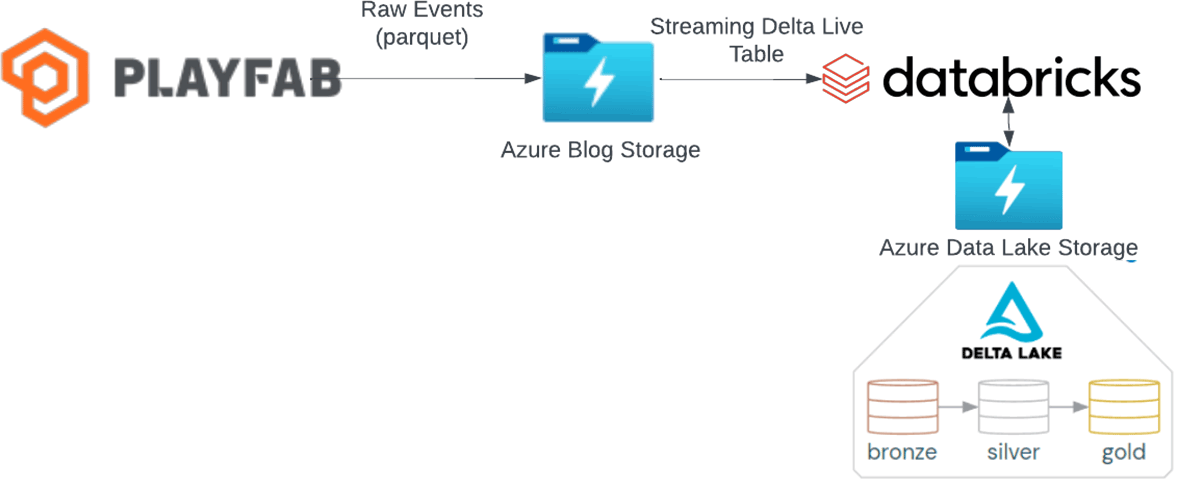
Now that we have data flowing to a storage account lets begin using databricks to ingest the events via streaming using Delta Live Tables.
First let's set up our Azure Databricks Workspace
- Create an Azure Databricks workspace: Log in to the Azure portal (portal.azure.com) and navigate to the Azure Databricks service. Click on "Add" to create a new workspace.
- Configure the workspace: Provide a unique name for the workspace, select a subscription, resource group, and region. You can also choose the pricing tier based on your requirements.
- Create a new Databricks workspace: Once you've configured the workspace, click on "Review + Create" and then click on "Create" to initiate the workspace creation process. Wait for the deployment to complete.
- Access the Azure Databricks workspace: After the deployment is finished, navigate to the Azure portal's home page and select "All resources." Find your newly created Databricks workspace and click on it.
- Launch the workspace: In the Azure Databricks workspace overview page, click on "Launch Workspace" to open the Databricks workspace in a new browser tab.
- Open Delta Live Tables via the navigation panel on the left
In Delta Live Tables we can leverage SQL or Python notebooks to build our streaming pipeline. With PlayFab funneling all events into a single location we can easily ingest via databricks’s autoloader as these events land in storage. By using a few lines of SQL, DLT can do the heavy lifting to ingest, process and scale with the data needs of your game.
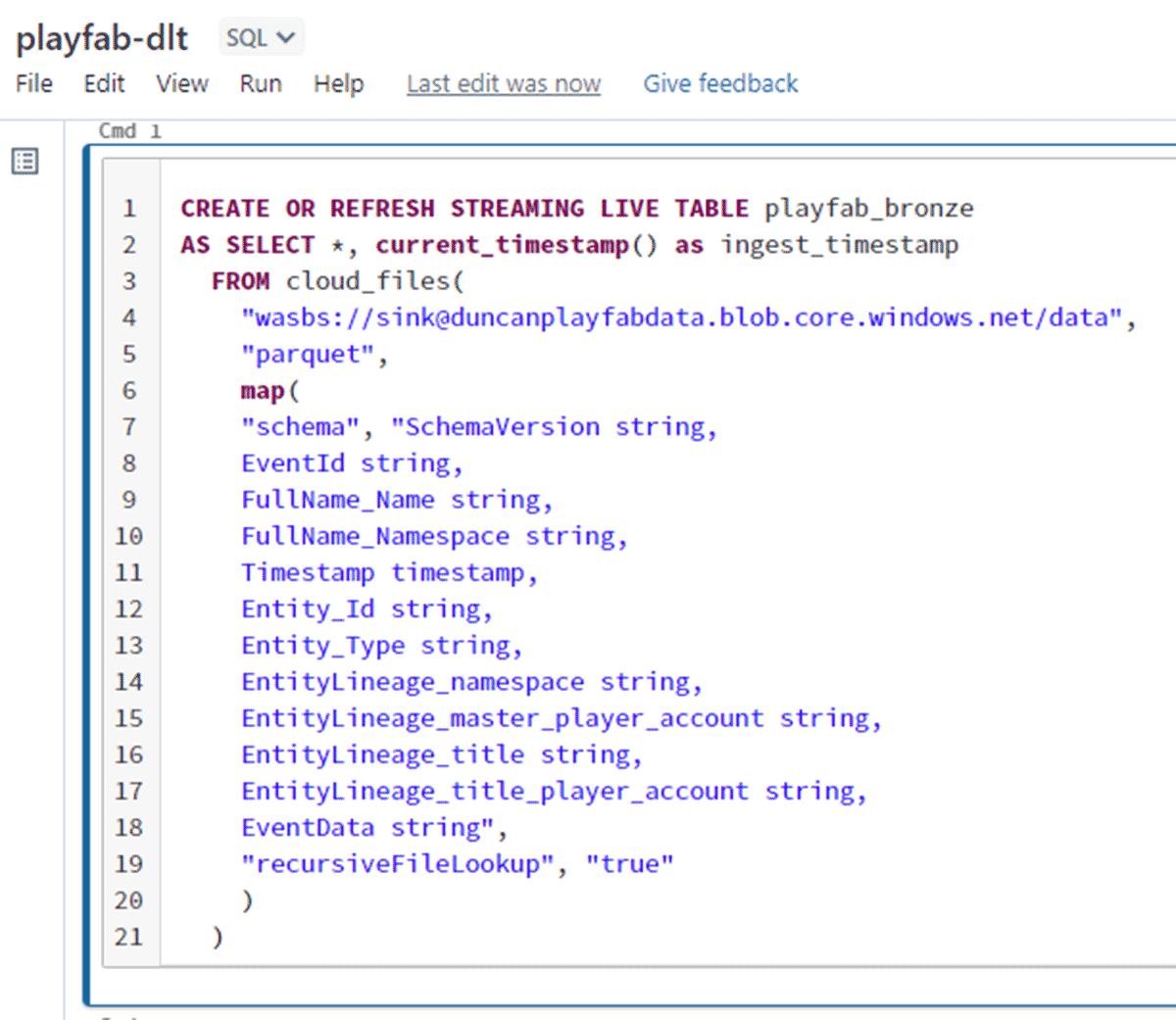
How to curate game data
Once you've ingested PlayFab events into Databricks, you can start curating the data to prepare it for analysis. This involves cleaning and transforming the data to ensure that it's accurate and relevant for your analysis.
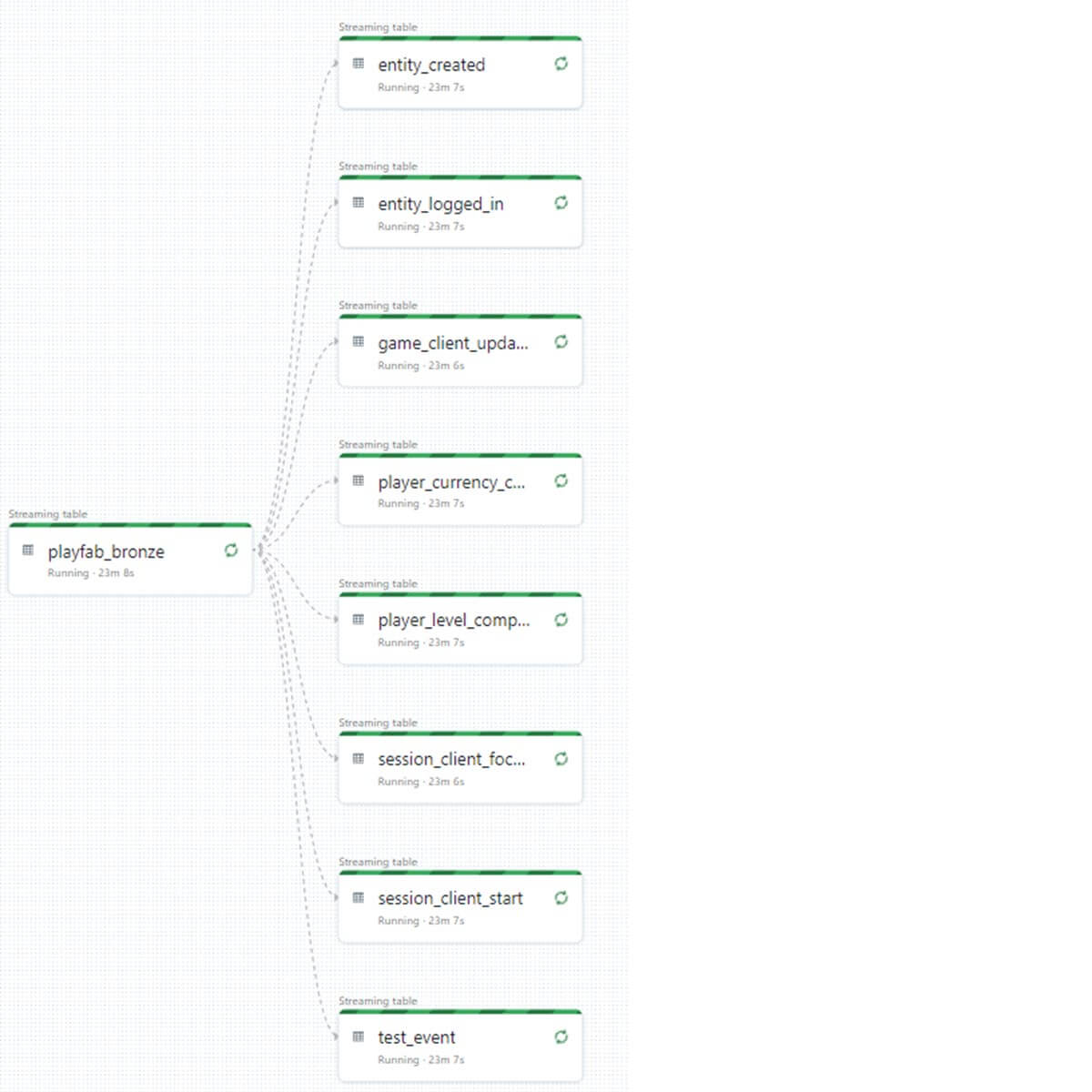
Let's break the JSON structured events into columns and rows. Depending on which of the built-in events that playfab captures or the custom events, curating these can be done with simple SQL. The cell below handles curating session start events into its own table.
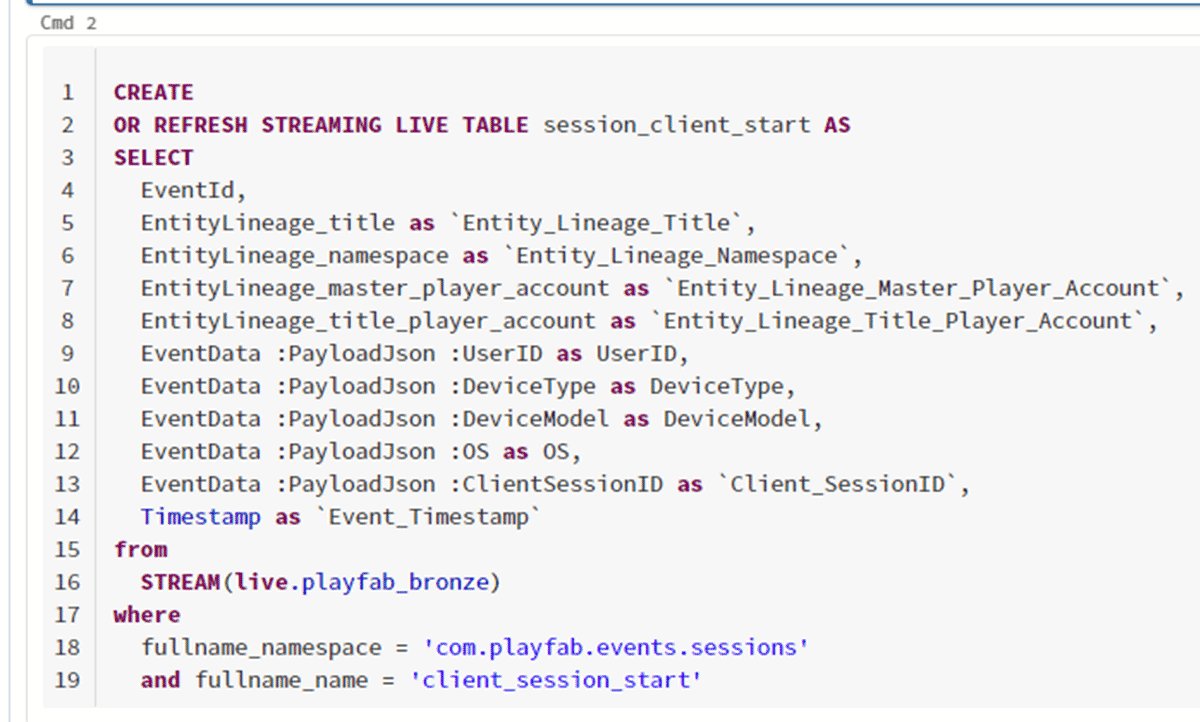
As you repeat this step for each of the events you want to curate your pipeline will start to look like the below diagram
How to analyze game data
With the data curated and prepared, you can start analyzing it to gain insights into player behavior, game performance, and other key metrics. Databricks provides a range of data analysis tools, including visualizations, SQL queries, and an optimized machine learning environment to support all the solutions studios will run into. Lets look into a few examples from our game.
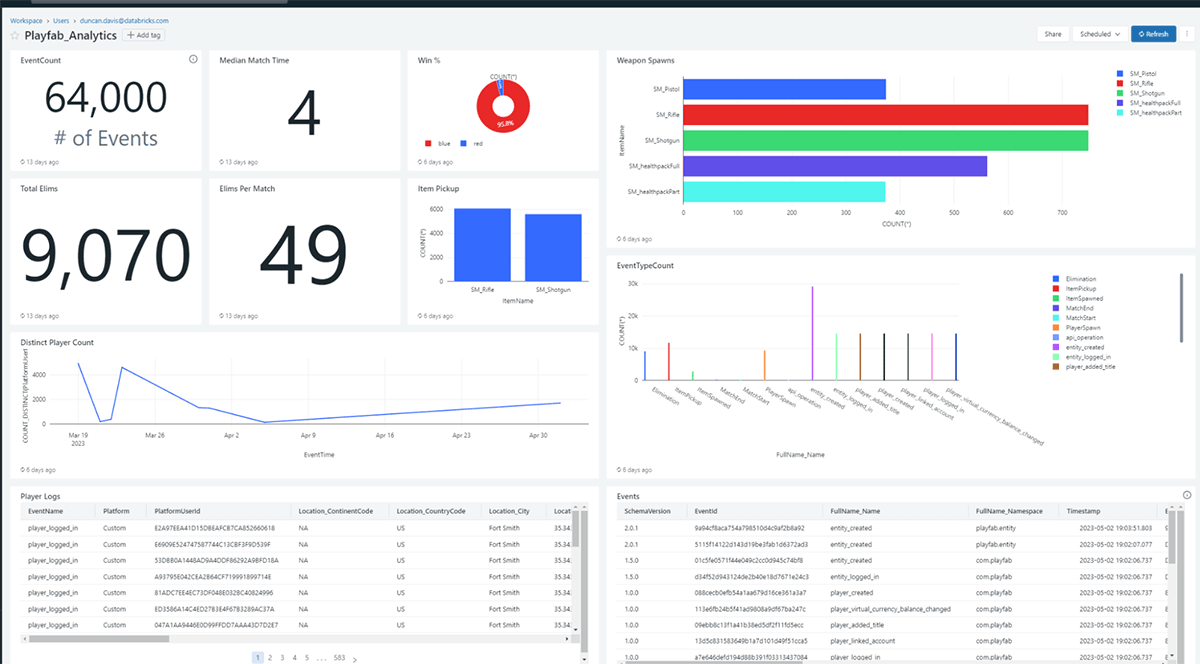
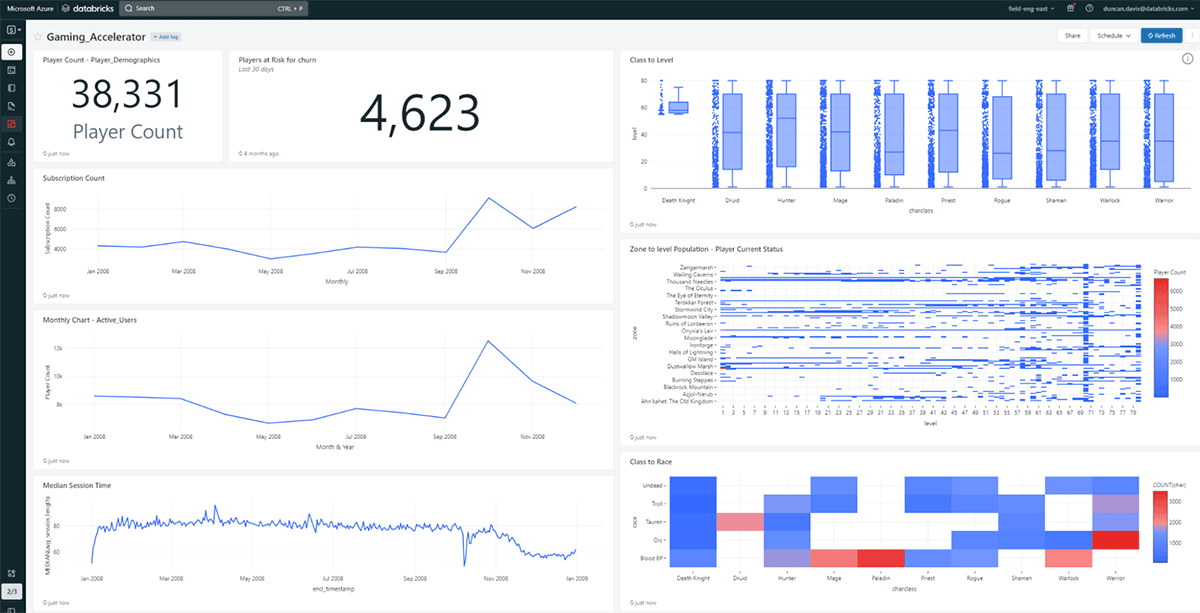
While these dashboards show the charts and tables needed to better understand operation data along with play behavior information other common types of analyses you can be performed with Databricks those include:
- Player segmentation: Group players based on behavior, demographics, or other criteria to identify patterns and trends.
- Game performance: Analyze game performance metrics such as load times, latency, and frame rate to identify areas for optimization.
- Player retention: Identify factors that influence player retention, such as engagement levels, progression, and rewards.
- Monetization Recommendation: Analyze in-game purchases and other revenue streams to identify opportunities for monetization.
The business value of game data analytics
Integrating PlayFab with Databricks requires some light weight setup and configuration, but the benefits are well worth it. With these tools, game developers can gain a deeper understanding of their games and players, and make data-driven decisions to improve their games and grow their businesses.
Many major studios are leveraging playfab such as the ones Here and many are leveraging databricks like these Here.
More game data and AI use cases
Download our Ultimate Guide to Game Data and AI. This comprehensive eBook provides an in-depth exploration of the key topics surrounding game data and AI, from the business value it provides to the core use cases for implementation. Whether you're a seasoned data veteran or just starting out, like this blog, our guide will equip you with the knowledge you need to take your game development to the next level.
Frequently asked questions
What does the PlayFab Game SDK actually do for data collection?
The PlayFab Game SDK is a set of libraries that give your game access to PlayFab's cloud-based services, including authentication, matchmaking, and LiveOps, and it's available for engines such as Unity and Unreal Engine. You install it in your game engine through methods like GitHub links or marketplaces, then use it to call PlayFab's APIs directly. The SDK also lets you send events to PlayFab, which can then be ingested into Databricks for analysis.
How quickly does PlayFab event data show up for analysis after it's generated?
PlayFab event data typically begins populating your storage account within a few minutes of being generated. This is possible because Data Connections is built for less than 5-minute data ingestion latency, writes data as Parquet files in blob storage for high throughput and low storage cost, and includes a built-in automatic retry mechanism if data distribution fails.
How does Databricks pick up and process PlayFab events once they land in storage?
Databricks ingests PlayFab events by streaming them with Delta Live Tables, which teams can build using SQL or Python notebooks. Because PlayFab funnels all events into a single storage location, Databricks' Autoloader can automatically ingest new files as they land, so a few lines of SQL handle ingestion, processing, and scaling as your game's data needs grow.
What's involved in turning raw PlayFab JSON events into usable tables?
Curating PlayFab data means breaking the JSON-structured events into columns and rows using simple SQL, one event type at a time. For example, a dedicated SQL step can curate session-start events into their own table, and repeating this process for each event type you care about builds out a full curation pipeline.
What kinds of insights can a studio get once the data is curated in Databricks?
Once data is curated, studios can build dashboards and run analyses covering player segmentation, game performance metrics like load times and frame rate, player retention factors such as engagement and progression, and monetization recommendation based on in-game purchases and other revenue streams. Databricks can also be used to build machine learning models on this data to predict player churn, identify effective monetization strategies, and personalize the player experience at the individual level.
Get the latest posts in your inbox
Subscribe to our blog and get the latest posts delivered to your inbox.