Schutz vor Datenexfiltration mit der Databricks Lakehouse Platform auf AWS
Erfahren Sie, wie Sie eine sichere Databricks-Architektur auf AWS einrichten können, um sich vor Datenexfiltration zu schützen.
von Andrew Weaver, Bhavin Kukadia und Michael Saltzman
Obwohl diese Anleitung wertvolle Cloud-spezifische technische Details enthält, empfehlen wir jetzt unseren Unified Approach to Data Exfiltration Protection on Databricks, der ein umfassendes Framework für AWS, Azure und GCP mit priorisierten Kontrollen und Implementierungsanleitungen bietet.
Die Databricks Lakehouse Platform bietet eine einheitliche Sammlung von Tools zum Erstellen, Bereitstellen, Teilen und Verwalten von unternehmensgerechten Datenlösungen in großem Maßstab. Databricks integriert sich in den Cloud-Speicher und die Sicherheit in Ihrem Cloud-Konto und verwaltet und stellt Cloud-Infrastruktur in Ihrem Namen bereit.
Das übergeordnete Ziel dieses Artikels ist es, die folgenden Risiken zu mindern:
- Datenzugriff von einem Browser im Internet oder einem nicht autorisierten Netzwerk über die Databricks-Webanwendung.
- Datenzugriff von einem Client im Internet oder einem nicht autorisierten Netzwerk über die Databricks-API.
- Datenzugriff von einem Client im Internet oder einem nicht autorisierten Netzwerk über den Cloud Storage (S3).
- Eine kompromittierte Workload auf dem Databricks-Cluster schreibt Daten in eine nicht autorisierte Speicherressource auf AWS oder im Internet.
Schutz von Daten während der Übertragung und im Ruhezustand mit nativen AWS-Tools in Databricks
Databricks unterstützt verschiedene native AWS-Tools und -Dienste, die zum Schutz von Daten während der Übertragung und im Ruhezustand beitragen.
Sicherheitsgruppen
Sicherheitsgruppen sind zustandsbehaftete virtuelle Firewalls, die an EC2-Instanzen angehängt sind. Sie ermöglichen es Ihnen zu definieren, welcher eingehende und ausgehende Datenverkehr zulässig ist. Durch die Einschränkung von Egress-Regeln (ausgehende Regeln) wird verhindert, dass EC2-Instanzen Daten an nicht autorisierte IP-Adressen oder das öffentliche Internet senden, wodurch unbeabsichtigte Datenlecks effektiv blockiert werden.
- Verhindert: Nicht autorisierte ausgehende Verbindungen von Databricks-Compute-Ressourcen.
VPC-Endpunktrichtlinien
VPC-Endpunktrichtlinien steuern den Zugriff auf AWS-Dienste über VPC-Endpunkte. Indem nur erforderliche Operationen für bestimmte AWS-Ressourcen (wie S3-Buckets) zugelassen werden, können Sie verhindern, dass Databricks-Workspaces Daten in andere AWS-Konten oder -Dienste exfiltrieren.
- Verhindert: Databricks sendet Daten an nicht autorisierte AWS-Dienste oder -Ressourcen.
VPC-Endpunkte
VPC-Endpunkte stellen private Verbindungen zwischen Ihrer VPC und anderen AWS-Diensten her, ohne das öffentliche Internet zu durchlaufen. Dies stellt sicher, dass sensible Daten niemals externen Netzwerken ausgesetzt werden, und reduziert so das Risiko der Datenexfiltration über Internetrouten.
- Verhindert: Exposition von Datenverkehr während der Dienstkommunikation gegenüber dem öffentlichen Internet.
- Dokumentation: AWS VPC Endpoints
IAM-Rollen
IAM-Rollen ermöglichen es Ihnen zu steuern, auf welche AWS-Ressourcen Databricks zugreifen kann und welche Aktionen es ausführen kann. Die sorgfältige Verwendung von Vertrauens- und Berechtigungsrichtlinien stellt sicher, dass Databricks-Benutzer und -Cluster nur mit explizit autorisierten Ressourcen interagieren können, wodurch die Verwendung von nicht autorisierten S3-Buckets oder externen Diensten blockiert wird.
- Verhindert: Datenwrites an nicht autorisierte AWS-Ressourcen unter Verwendung kompromittierter oder übermäßig permissiver Anmeldeinformationen.
Routentabellen
Routentabellen bestimmen den Netzwerkverkehrsfluss innerhalb Ihrer VPC. Indem ausgehende Routen zum Internet verhindert (oder nur notwendige Ziele zugelassen) werden, steuern Sie, wohin Daten reisen können, und reduzieren das Risiko, dass Daten an unsichere Orte geleitet werden.
- Verhindert: Netzwerkpfade zum öffentlichen Internet oder zu nicht autorisierten Netzwerken.
AWS PrivateLink
AWS PrivateLink ermöglicht private Konnektivität zwischen VPCs und AWS-Diensten über verschlüsselte, dedizierte Netzwerkschnittstellen und eliminiert die Exposition gegenüber dem öffentlichen Internet. Dies bietet einen sicheren Pfad für Databricks-Steuerungs- und Datenebenen und erschwert die Exfiltration von Daten aus AWS.
- Verhindert: Datenabfangung oder -exfiltration über öffentliche Netzwerke.
Private Subnetze
Private Subnetze haben keine direkte Route zum Internet, was bedeutet, dass Ressourcen darin keine ausgehenden Verbindungen zum Internet initiieren können. Diese architektonische Barriere blockiert Cluster und Knoten daran, Daten direkt außerhalb von AWS zu senden.
- Verhindert: Jegliche ausgehende Internetkommunikation von Compute-Ressourcen.
KMS-Schlüssel
AWS Key Management Service (KMS) ermöglicht die Verschlüsselung von Daten im Ruhezustand, einschließlich S3-Buckets. Selbst wenn auf Daten zugegriffen wird, bleiben sie geschützt, es sei denn, der Angreifer hat auch Zugriff auf die Verschlüsselungsschlüssel.
- Verhindert: Nutzbare Exfiltration von Daten ohne Kompromittierung von Schlüsselmaterial.
S3-Bucket-Richtlinien
Diese Ressourcenrichtlinien gewähren oder verweigern den Zugriff auf bestimmte S3-Buckets. Indem der Zugriff nur von genehmigten Quellen (wie von der Databricks-VPC oder bestimmten IAM-Rollen) eingeschränkt wird, wird sichergestellt, dass selbst wenn jemand eine Exfiltration versucht, er keine sensiblen Daten außerhalb kontrollierter Buckets schreiben oder kopieren kann.
- Verhindert: Schreib-/Lesezugriffe von unerwünschten S3-Speicherorten.
Jede dieser Kontrollen, einzeln und zusammen, erzwingt einen Defense-in-Depth-Ansatz gegen Datenexfiltration und stellt sicher, dass es mehrere Kontrollpunkte gibt, bevor Daten Ihre geschützte Umgebung verlassen könnten.
Verschlüsselung ist eine weitere wichtige Komponente des Datenschutzes. Databricks unterstützt verschiedene Verschlüsselungsoptionen, einschließlich kundenseitig verwalteter Verschlüsselungsschlüssel, Schlüsselrotation, Verschlüsselung im Ruhezustand und während der Übertragung. Von Databricks verwaltete Verschlüsselungsschlüssel werden standardmäßig verwendet und sind sofort einsatzbereit. Kunden können auch ihre eigenen Verschlüsselungsschlüssel mitbringen.
Audit-Protokollierung
Audit-Protokollierung ist eine grundlegende Sicherheits- und Compliance-Funktion, die es Organisationen ermöglicht, Benutzeraktivitäten, administrative Aktionen und Systemereignisse in der gesamten Databricks-Umgebung zu verfolgen. Im Kontext der Datenexfiltration spielen Audit-Protokolle eine entscheidende Rolle bei der Erkennung, Untersuchung und Reaktion auf potenzielle Bedrohungen oder unangemessenes Verhalten.
Audit-Protokolle helfen bei der Beantwortung grundlegender Fragen wie:
- Wer hat wann auf welche Daten zugegriffen?
- Welche Operationen (Lesen, Schreiben, Ändern, Löschen) wurden durchgeführt?
- Gab es Versuche, auf sensible Daten außerhalb der Richtlinien zuzugreifen oder diese zu exportieren?
Durch die Verfolgung dieser Ereignisse unterstützen Audit-Protokolle sowohl die Sicherheitsüberwachung als auch die Compliance-Berichterstattung.
Databricks Audit Logging-Funktionen
Databricks bietet robuste Audit-Logging-Funktionen auf Arbeitsbereichs- und Kontoebene. Zu den wichtigsten Funktionen gehören:
- Audit-Protokolle auf Arbeitsbereichsebene: Erfassen von Benutzer- und Systemaktionen innerhalb eines Databricks-Arbeitsbereichs.
- Audit-Protokolle auf Kontoebene: Verfolgen von Aktionen über alle Arbeitsbereiche in einem Konto hinweg.
- Ausführliche Audit-Protokolle: Optionale, granularere Erfassung von Ereignissen für tiefere Einblicke.
- Integration mit Unity Catalog Systemtabellen: Bereitstellung von Zugriffs-, Compute-, Abfrage-, Serving- und Speicherprotokollen als Teil von Data Governance- und Untersuchungsworkflows.
Audit-Protokolle können nahezu in Echtzeit an einen vom Kunden bestimmten Amazon S3-Bucket geliefert werden. Sie können direkt in SIEM- oder Sicherheitsanalysesysteme integriert werden, um kontinuierliche Überwachung und Alarmierung zu ermöglichen.
Databricks-Architektur
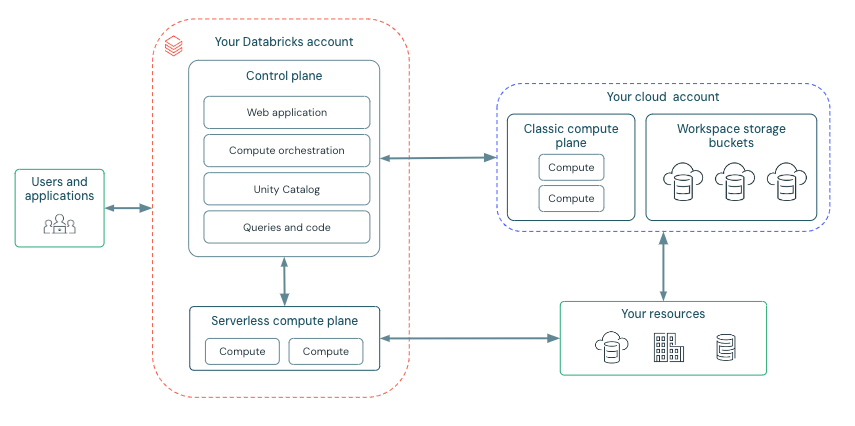
Bevor wir beginnen, werfen wir einen kurzen Blick auf die Databricks-Bereitstellungsarchitektur hier:
Databricks ist so strukturiert, dass eine sichere funktionsübergreifende Teamkollaboration ermöglicht wird, während ein erheblicher Teil der Backend-Dienste von Databricks verwaltet wird, damit Sie sich auf Ihre Data Science-, Data Analytics- und Data Engineering-Aufgaben konzentrieren können.
Databricks arbeitet mit einer Control Plane und einer Compute Plane.
- Die Control Plane umfasst die Backend-Dienste, die Databricks in seinem eigenen AWS Cloud-Konto verwaltet. Notebook-Befehle und viele andere Workspace-Konfigurationen werden in der Control Plane gespeichert und verschlüsselt im Ruhezustand.
- Die Compute Plane, in der Ihre Daten verarbeitet werden, hat je nach verwendeter Compute-Art unterschiedliche Typen. Weitere Informationen zu diesen Compute-Typen finden Sie hier.
- Bei serverloser Compute laufen die serverlosen Compute-Ressourcen in einer serverlosen Compute Plane in Ihrem Databricks-Konto.
- Bei klassischer Databricks Compute befinden sich die Compute-Ressourcen in Ihrem AWS Cloud-Konto.
High-Level-Architektur
Netzwerkkommunikationspfad
Um die Sicherheitsmaßnahmen zu verstehen, die wir implementieren wollen, betrachten wir die verschiedenen Möglichkeiten, wie Benutzer und Anwendungen mit Databricks interagieren, wie unten dargestellt.
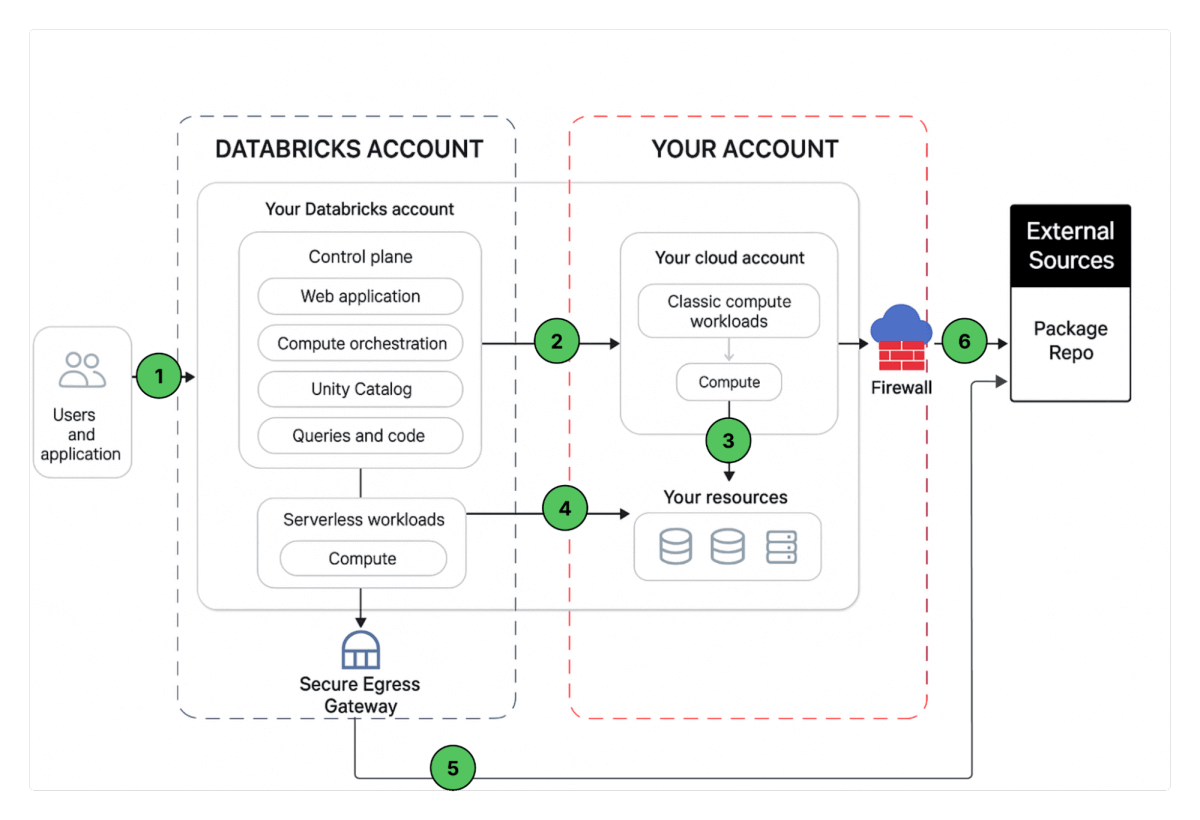
Eine Databricks Workspace-Bereitstellung umfasst die folgenden Netzwerkpfade, die Sie sichern können.
- Benutzer oder Anwendungen zur Databricks Webanwendung, auch Workspace genannt oder Databricks REST APIs.
- Databricks Classic Compute Plane VPC-Netzwerk zur Databricks Control Plane. Dies umfasst den Secure Cluster Connectivity Relay und die Workspace-Verbindung für die REST API-Endpunkte.
- Classic Compute Plane zu Ihren Speicher Diensten (z. B. S3, Kinesis usw.).
- Serverless Compute Plane zu Ihren Speicher Diensten (z. B. S3, Kinesis usw.).
- Sichere ausgehende Verbindungen von der Serverless Compute Plane über Netzwerkrichtlinien (Egress Firewall) zu externen Datenquellen, z. B. Paket-Repositories wie pypi oder maven.
- Sichere ausgehende Verbindungen von der Classic Compute Plane über eine Egress Firewall zu externen Datenquellen, z. B. Paket-Repositories wie pypi oder maven.
Aus Sicht der Endbenutzer erfordert 1 eingehende Steuerelemente und 2, 3, 4, 5, 6 ausgehende Steuerelemente.
In diesem Artikel konzentrieren wir uns darauf, ausgehende Verbindungen von Ihren Databricks-Workloads zu sichern, dem Leser eine präskriptive Anleitung zur vorgeschlagenen Bereitstellungsarchitektur zu geben und dabei auch Best Practices zur Sicherung eingehender Verbindungen (Benutzer/Client zu Databricks) zu teilen.
Vorgeschlagene Bereitstellungsarchitektur - AWS Security Reference Architecture
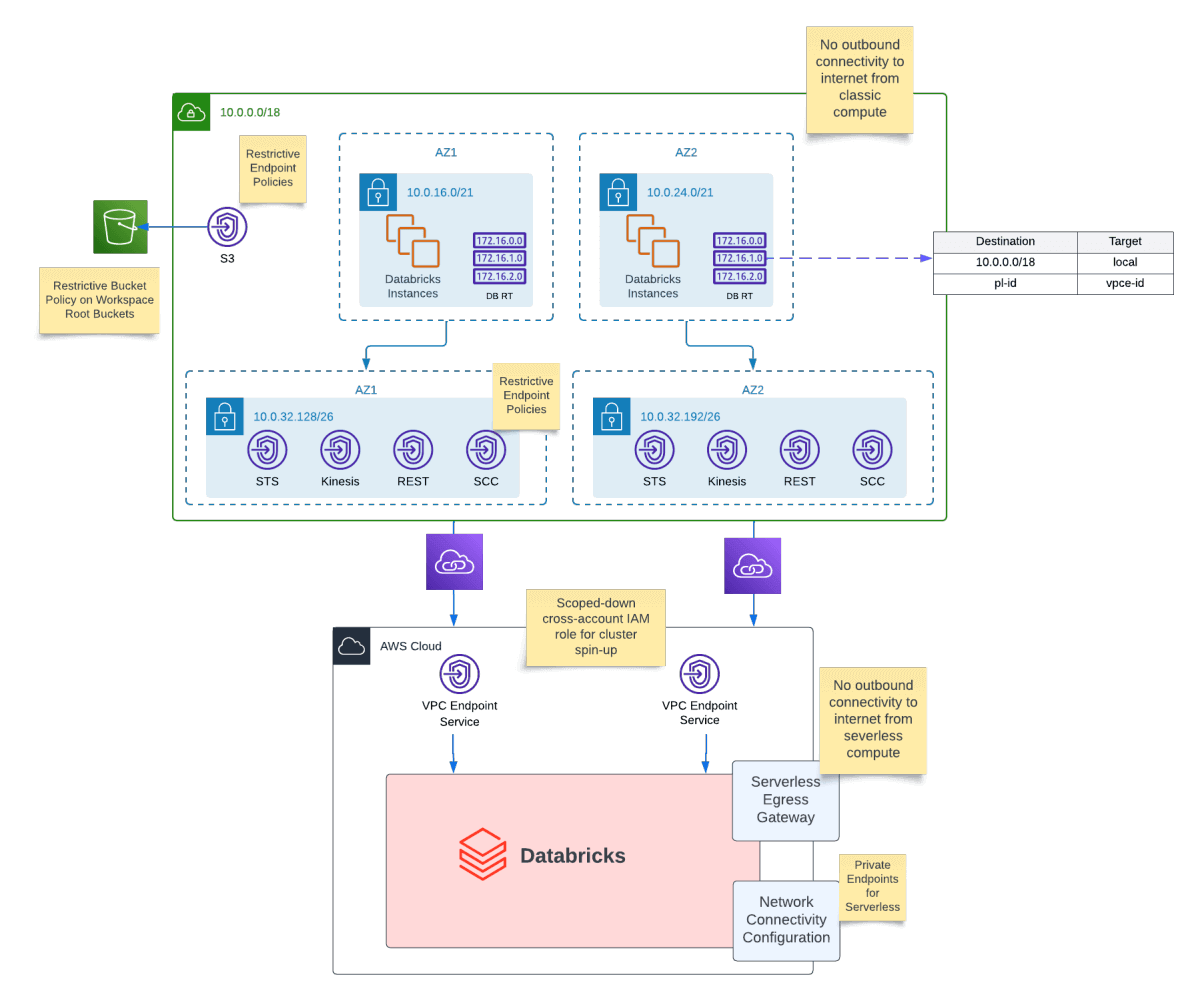
Die sichere Bereitstellung von Databricks auf AWS kann komplex sein. Sie benötigen VPCs, IAM-Rollen, private Netzwerke, Unity Catalog und Leitplanken, die den Unternehmenssicherheitsanforderungen entsprechen. Die Databricks Security Reference Architecture (SRA) für AWS bündelt diese Best Practices in sofort einsatzbereiten Terraform-Vorlagen und bietet Teams einen gehärteten Ausgangspunkt für Produktionsbereitstellungen.
Was es ist
- Meinungsbildende Terraform-Module für sicheres Databricks auf AWS.
- Umfasst standardmäßig Netzwerk, IAM, Unity Catalog, Richtlinien.
- Dient als Security-First-Blueprint zur Beschleunigung der Einführung.
Warum es wichtig ist
- Geschwindigkeit: Infrastruktur- und Workspace-Einrichtung in wenigen Minuten automatisieren.
- Sicherheit: Vorab konfigurierte VPCs, private Netzwerke, Audit-Protokollierung.
- Skalierbarkeit: Wiederverwendbare Muster für Konten/Workspaces.
Struktur des High-Level-Repos
- aws/ → AWS-Infrastruktur + Workspace-Erstellung.
- /modules/databricks_account/unity_catalog_metastore_creation/ → Metastore-Erstellung
- aws/tf/modules/sra/credential.tf → Cross-Account-Rolle unter Verwendung der externen ID
- template.tfvars.example → Füllen Sie Ihre Variablen aus
Was Sie erhalten
- AWS-VPCs, Subnetze, IAM-Rollen.
- Databricks-Workspaces, die mit Unity Catalog verbunden sind.
- Gehärtete Optionen: eingeschränkte ausgehende Verbindungen, Protokollierung, Überwachung.
Anwendung
- Klonen Sie das Repository.
- Füllen Sie Ihre Variablen in template.tfvars.example aus
- Ändern Sie bei Bedarf die VPC-, Subnetz- und Namensparameter
- Erweitern Sie dies in CI/CD für wiederholbare Enterprise-Bereitstellungen.
Hinweise
- Momentaufnahme, überprüfen Sie vor Upgrades.
- Nicht „verwaltet“ → Teams sind für Tests und Anpassungen verantwortlich.
- Erfordert Kenntnisse von Terraform + AWS + Databricks-Provider.
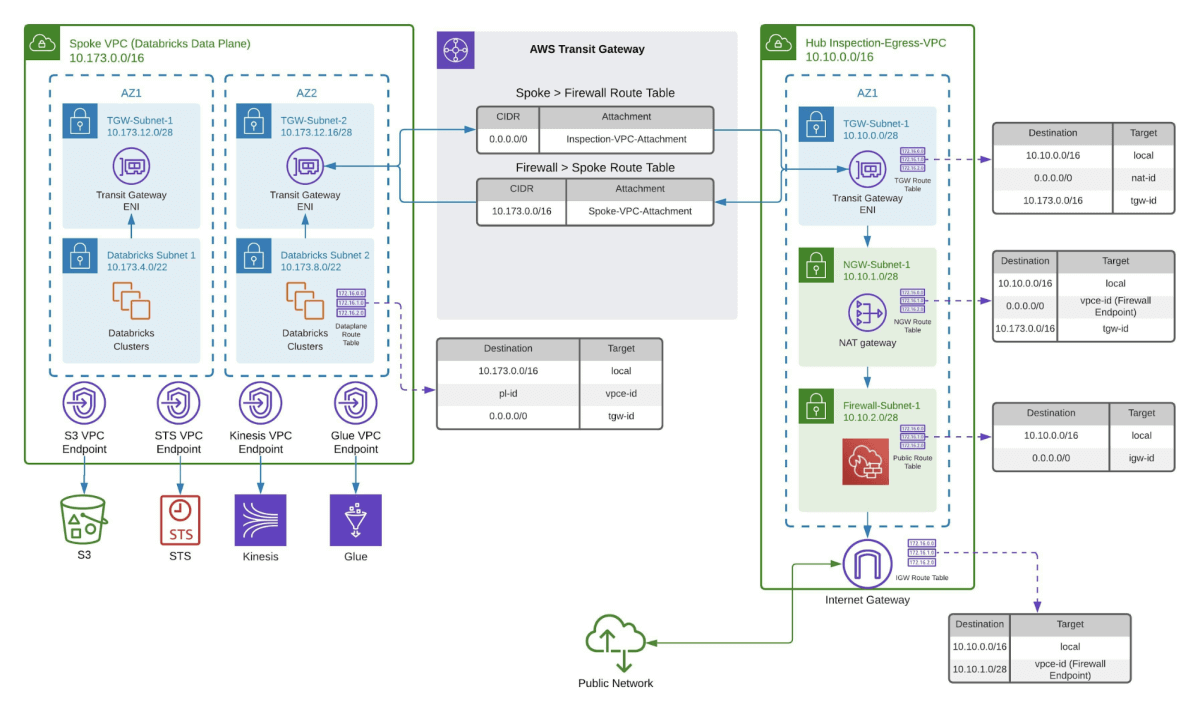
Wenn Sie Internetzugang für pypi oder maven benötigen, empfehlen wir die folgende Architektur, damit Sie jeglichen Datenverkehr, der Ihre VPC verlässt, scannen können. Eine Reihe von AWS-Diensten kann verwendet werden, um ausgehenden Datenverkehr zu Ihrer VPC zu scannen. Zum Beispiel AWS Network Firewall oder Gateway Load Balancer. Wir empfehlen, die AWS-Dokumentation zu befolgen, zum Beispiel hier, um mit Ihrer AWS Network Firewall-Einrichtung zu beginnen.
Databricks Data Exfiltration Protection Controls
Implementieren Sie zusätzlich zur Überwachung des ausgehenden Datenverkehrs die folgenden Steuerelemente, um Ihre Databricks-Umgebung gegen Datenexfiltration zu härten. Bitte beachten Sie, dass einige Funktionen, wie z. B. Private Link, nur in der Enterprise-Version von Databricks unterstützt werden:
SCIM-Bereitstellung
Automatisieren Sie die Verwaltung des Benutzer- und Gruppenlebenszyklus von Ihrem IdP in Databricks.
SCIM Provisioning Guide
Single Sign-On (SSO)
Erfordern Sie eine zentralisierte Authentifizierung über Ihren Identitätsanbieter (SAML oder OIDC).
SSO-Konfiguration
Multi-Faktor-Authentifizierung (MFA)
Erzwingen Sie MFA auf IdP-Ebene, um eine zusätzliche Sicherheitsebene für die Anmeldung zu schaffen.
Multi-Faktor-Authentifizierung
Account Console IP Access Control Lists (ACLs)
Beschränken Sie den Zugriff auf die Databricks-Account-Konsole, indem Sie zulässige IP-Bereiche definieren.
IP-Zugriffslisten
Private Endpunkte in der Netzwerkkonnektivitätskonfiguration
Stellen Sie sicher, dass der Workspace-Datenverkehr nur über private Endpunkte fließt (kein öffentliches Internet).
Netzwerkkonnektivitätskonfiguration
Serverless Egress Controls
Wenden Sie Beschränkungen an, um externe Ziele von Databricks Serverless Compute einzuschränken.
Serverless Compute Security
Vermeiden Sie die Speicherung von Produktionsdaten in DBFS
Speichern Sie keine sensiblen Datensätze in DBFS; verwenden Sie sichere Speicher (z. B. S3, ADLS).
DBFS Übersicht
Delta Sharing Empfänger-Token-Lebensdauer
Verkürzen Sie die Token-Gültigkeit für Delta Sharing, um die Exposition bei Leckage zu reduzieren.
Delta Sharing Security
Isolieren Sie sensible Workloads in verschiedenen Netzwerken
Verwenden Sie separate VPCs/Subnetze, um Workloads logisch und physisch zu isolieren.
Isolieren Sie sensible Workloads in verschiedenen Workspaces
Stellen Sie mehrere Workspaces (Produktion, Entwicklung, Test) bereit, um die Umgebungs trennung zu erzwingen.
Multi-Workspace-Strategie
OIDC Token Federation für CI/CD
Verwenden Sie OIDC-Federation, um kurzlebige Tokens sicher auszutauschen, wenn CI/CD-Pipelines mit Databricks interagieren.
OIDC Token Federation
Die Anwendung dieser Steuerelemente bietet eine mehrschichtige Verteidigung und minimiert das Risiko einer versehentlichen oder böswilligen Datenleckage.
Add-Ons mit verbesserter Sicherheitskonformität und Überwachung:
Wenn Ihre Organisation erhöhte Sicherheitsanforderungen hat, z. B. die Unterstützung von HIPAA, PCI oder ähnlich strengen Standards, sollten Sie die Aktivierung von Enhanced Security Monitoring für Ihre Databricks-Workloads in Betracht ziehen.
Diese erweiterte Funktion baut auf den Kern-Sicherheitsfunktionen von Databricks auf und bietet tiefere Einblicke, proaktive Bedrohungserkennung und zusätzliche Härtung für klassische und serverlose Compute-Umgebungen. Enhanced Security Monitoring bietet Vorteile wie Canonical Ubuntu mit CIS Level 1 Härtung, kontinuierliche verhaltensbasierte Malware- und Dateiintegritätsüberwachung, umfassendes Malware- und Antiviren-Scanning sowie detaillierte Schwachstellenberichte für das Host-Betriebssystem.
Wenn diese Funktionalität aktiviert ist (über das Compliance-Sicherheitsprofil), werden Sicherheitsprotokolle, einschließlich Warnungen bei Privilegienerweiterungen, verdächtigen interaktiven Shells, nicht autorisierten ausgehenden Verbindungen, unerwarteten Systemdateiänderungen oder potenziellen Exfiltrationsversuchen, automatisch aufgezeichnet. Diese Protokolle werden zusammen mit den Standard-Databricks-Auditprotokollen geliefert und liefern Ihrer SIEM-Lösung oder innerhalb von Databricks selbst umfangreiche, kontextbezogene Informationen. Dies ermöglicht es Sicherheitsexperten, anomales oder riskantes Verhalten schnell zu verfolgen und darauf zu reagieren, was eine sofortige Erkennung und eine schnelle Reaktion auf Vorfälle ohne umfangreiche Untersuchungen ermöglicht.
Fazit und nächste Schritte
Eine starke Abwehr gegen Datenexfiltration für Databricks auf AWS ist keine einmalige Einrichtung, sondern erfordert kontinuierliche Verbesserung. Über die Implementierung von Architekturkontrollen hinaus sollten Sie kontinuierliche Überwachung, strenge Audits und proaktives Änderungsmanagement zu einem zentralen Bestandteil Ihrer Sicherheitspraxis machen. Regelmäßige Überprüfung von Auditprotokollen, Aktualisierung von Zugriffs- und Netzwerkrichtlinien sowie die Zusammenarbeit mit Sicherheits- und Compliance-Teams helfen sicherzustellen, dass Schutzmaßnahmen weiterentwickelt werden, um aufkommenden Bedrohungen entgegenzuwirken. Um Ihre Strategie zu vertiefen, lesen Sie anerkannte Ressourcen zu Best Practices für Cloud-Monitoring und Audit-Protokollierung. Diese Referenzen helfen Ihnen, Wachsamkeit und Widerstandsfähigkeit zu bewahren, während Ihre Datenlandschaft und Ihre Risiken wachsen.
(Dieser Blogbeitrag wurde mit KI-gestützten Tools übersetzt.) Originalbeitrag
Erhalten Sie die neuesten Beiträge in Ihrem Posteingang
Abonnieren Sie unseren Blog und erhalten Sie die neuesten Beiträge direkt in Ihren Posteingang.