A Compact Guide to Fine-Tuning and Building Custom LLM's
Build custom LLMs in days
Imagine if you could fine-tune or create your own LLM — customized completely to your specific business context and enterprise data to meet your specific needs. Read this guide to learn about fine-tuning and pretraining. It will cover:
- Motivation: Why and when should you build a custom GenAI model?
- Techniques: How can you fine-tune or train your own custom models? What techniques and gotchas should you know for data preparation, training and evaluation?
- Databricks: How do you fine-tune or build custom models using Databricks?
Introduction
Generative AI (GenAI) has the potential to democratize AI, to transform every industry, to support every employee and to engage every customer. To be most useful, GenAI models need a deep understanding of an organization’s enterprise data. To date, the most popular techniques to give GenAI models knowledge of your enterprise are prompt engineering, retrieval augmented generation (RAG), chains and agents. However, those techniques hit limits when using general models not tailored to specific domains and applications. To improve generated results and lower costs, GenAI application developers must turn to building custom models via fine-tuning or pretraining.
Fine-tuning specializes an existing AI model to a specific domain or task by training it further on a smaller set of custom data. Techniques include supervised fine-tuning for instruction-following or chat, as well as continued pretraining. Pretraining creates an entirely new model by training it from scratch on fully customizable data. All of these techniques allow developers to build intellectual property and differentiation for their domain or application, with the potential to create better, more accurate models and to use smaller, lower-cost model architectures.
In this guide to creating custom models, we cover:
- Motivation: Why and when should you build a custom GenAI model?
- Principles: What high-level practices should guide your strategy and implementation when building custom models?
- Techniques: How can you build custom models? What techniques and “gotchas” should you be aware of for data preparation, training and evaluation?
This guide is targeted at practitioners planning to build custom models. We assume an understanding of GenAI and large language models (LLMs), including terms such as prompt engineering, RAG, agents, fine-tuning and pretraining. For primer material, please see more about generative AI and LLMs.
About Databricks
Databricks provides unified tooling to build, deploy and monitor AI and ML solutions — from building predictive models to the latest GenAI and LLMs. Built on the Databricks Data + AI Platform, Databricks enables organizations to securely and cost-effectively integrate their enterprise data into the AI lifecycle with any GenAI model. We let customers deploy, govern, query and monitor models fine-tuned or predeployed by Databricks, like Meta Llama 3, DBRX or BGE, or from any other model providers like OpenAI GPT-4, Anthropic Claude, AWS Bedrock and AWS SageMaker. To customize models with enterprise data, Databricks provides every architectural pattern from prompt engineering, RAG, fine-tuning and pretraining.
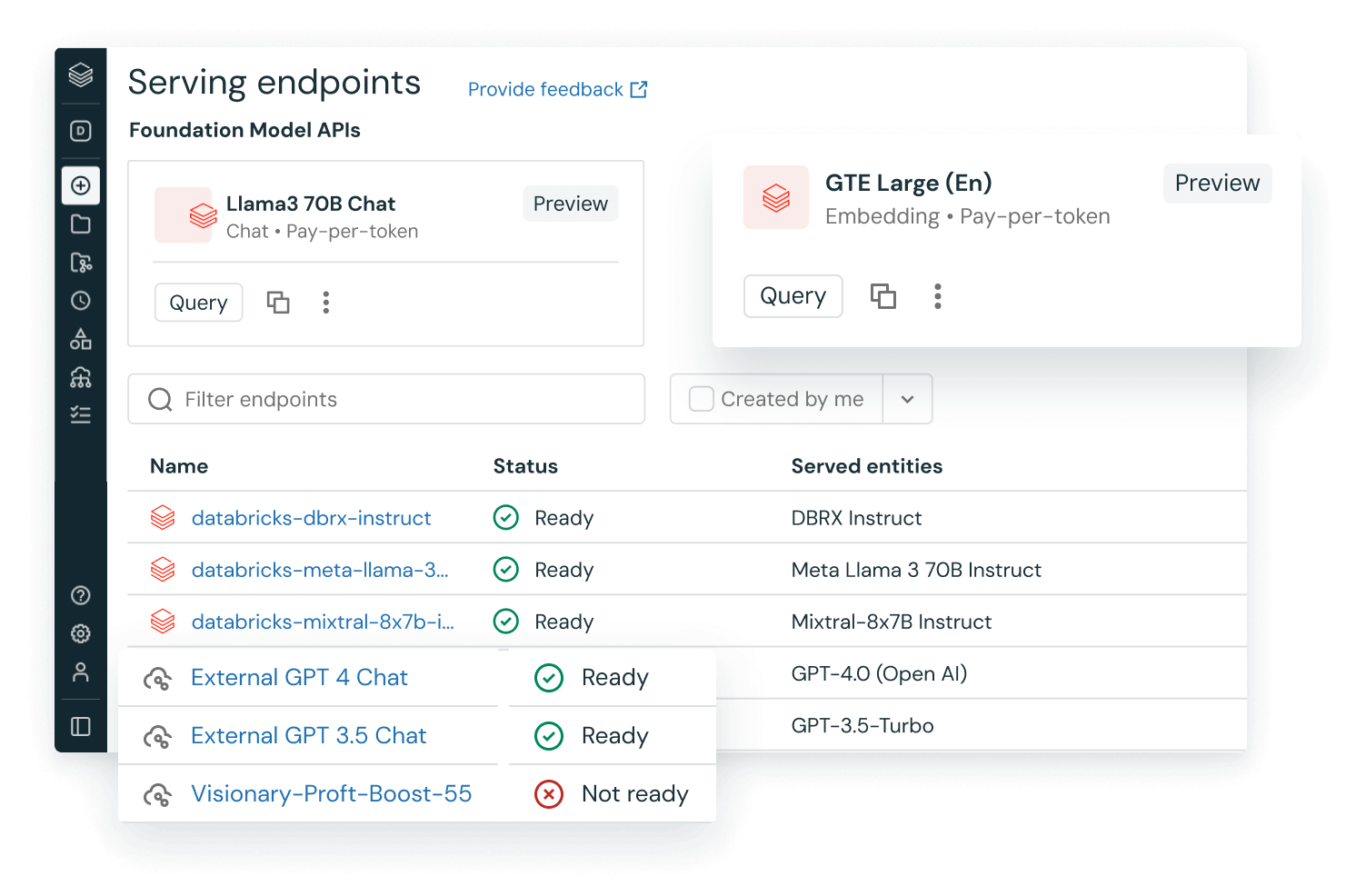
Databricks provides GenAI fine-tuning and pretraining capabilities unmatched by any other AI platform. As of June 2024, Databricks customers had built over 200,000 custom AI models in the previous year. Additionally, Databricks has pretrained models that can be used by customers directly. In March 2024, Databricks released DBRX, a new top-performing open source LLM that was pretrained from scratch, under a commercially viable license. In June 2024, Databricks and Shutterstock released another pretrained model, Shutterstock ImageAI, Powered by Databricks, a cutting-edge text-to-image model.
The infrastructure and technology we used to build these top-performing models is the same infrastructure and technology provided to our customers. See our Databricks customer stories to read about successes in data and AI across every industry.
Motivation: Why Fine-Tune or Build Custom LLMs?
Customers generally begin to build custom GenAI models when existing models have painful limitations in quality, cost or latency. Specifics are different for every use case, but examples include:
- “I need a model to generate my product’s special query language. I can do it using model APIs and few-shot prompting, but it’s very slow and expensive.”
- “My RAG bot works well, but it’s using a big, powerful model API that’s too expensive for my high-throughput use case. I don’t need such a general model, so I want to fine-tune a small, targeted, cheap model.”
- “I can’t find an open source model good at language X, so I want to build a model tailored to understand X.”
The most famous GenAI models are general models meant to do (almost) everything. While impressive, these models are overly large and expensive for most use cases, and they know nothing about your proprietary data or application. In every example above, building a custom, specialized model increased quality or decreased cost and latency. The custom model became intellectual property and provided a competitive edge for the customer’s product.
A less common but more pressing motivation for building custom models comes from legal or regulatory concerns, especially in more regulated industries. Some customers want or need full control over their models in order to manage risks, such as accusations of illegal use of content for model training. By pretraining a fully custom model, you can know and prove exactly how the model was created.
So, how can you get started? Although GenAI is a complex field of research, it can be simple to get started with customizing GenAI models. There’s a natural path from basic fine-tuning to complex pretraining, and the Databricks platform supports this entire workflow. As you follow this path, you’ll build up expertise and data that will feed into future, more complex types of model customization.
Principles: When and How Should You Fine-Tune or Build Custom Models?
When, why and how should you build custom models?
At a high level, GenAI systems can be customized in two ways:
- Compound AI: Given one or more existing models, you can build RAG, agents and other compound AI systems around those models
- Custom models: You can customize an existing model (fine-tuning) or build an entirely new model (pretraining)
These two options can be combined, such as RAG using a fine-tuned LLM. Such combinations — and the speed of GenAI development — can make planning and building GenAI applications become complex. To simplify your approach, we recommend three guiding principles.
Principle 1: Start small and work your way up
For any GenAI application, we recommend that you start simple and add complexity as needed. That may mean starting with an existing model (such as Databricks Foundation Model APIs) and doing simple prompt engineering. Then, add techniques as needed to improve your metrics around quality, cost and speed.
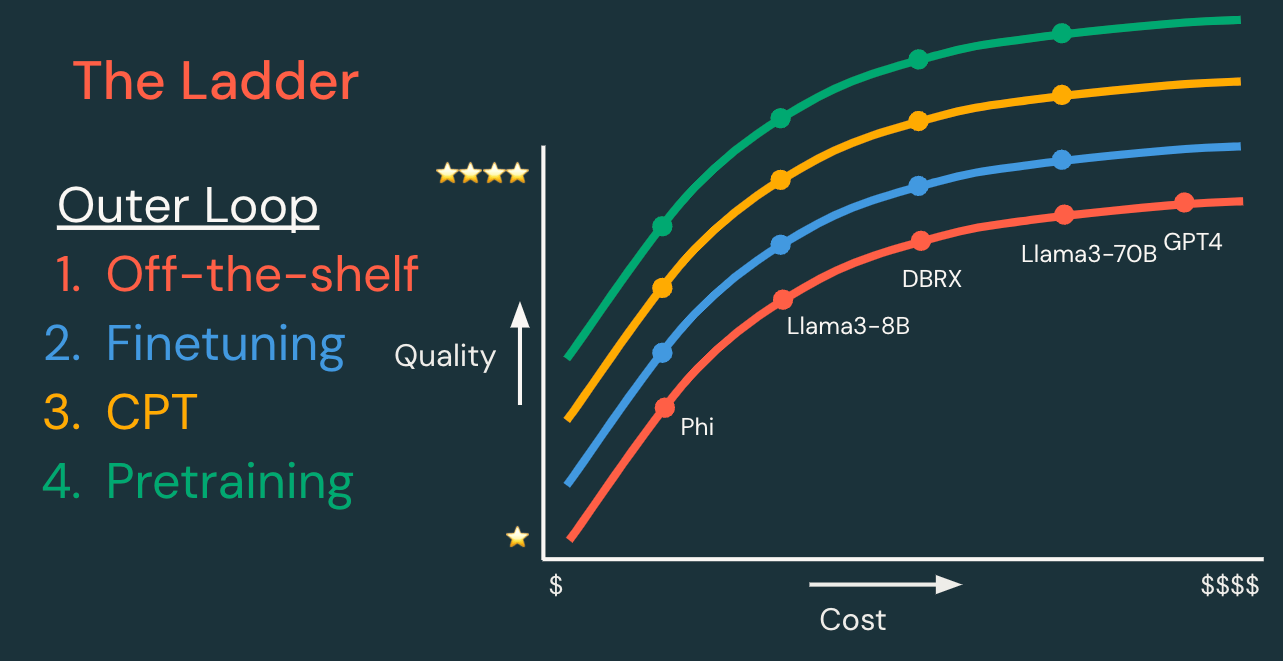
The “ladder” of techniques can be divided into inner and outer development loops, outlined below.
| Outer loop: Model customization ladder | ||||
| Each step has the potential to create a model which is higher quality, lower cost and/or lower latency. | Data required | Dev time | Dev cost | |
| Existing model | Start with an existing model or model API, and iterate on the inner loop first. | None, or data for RAG | Hours | $ |
| Supervised fine-tuning | Customize a model to handle your specific task better. “Expect queries like this, and return responses like that.” | 100s–10,000s of examples | Days | $$ |
| Continued pretraining | Customize a model to understand your domain better. “Learn the language of this niche application domain.” | Millions to billions of tokens | Weeks | $$$ |
| Pretraining | Create a new model to have full control, customization and ownership. “Learn everything from scratch!” | Billions to trillions of tokens | Months | $$$$$$ |
| Inner loop: Compound AI techniques | |
| Each technique below may improve generation quality for a given model. These techniques are listed in (rough) order of complexity, but they can be mixed and matched. | |
| Prompt engineering | Build task-specific prompts to guide model behavior. |
| Few-shot prompting | Provide data in prompts to teach models at inference time. |
| RAG | Provide query-specific data to models as extra context. |
| Agents | Provide models with callable tools and/or complex control flow. |
Adopting a technique from the inner loop is relatively cheap and fast, compared to moving up a step in the outer loop. Therefore, whenever you move up in the outer loop, it’s worthwhile to iterate on some or all techniques in the inner loop. This “inner” versus “outer” designation is the reverse of what you would expect from system architecture — the “inner” loop of compound AI wraps around the “outer” loop of your model. We call model customization the “outer” loop because it is the outer loop in terms of your workflow, as mandated by the relative costs of the inner and outer loops.
Principle 2: Be data-driven
Before you invest seriously in any project, carefully define your measuring stick for success and follow popular evaluation-driven development practices.
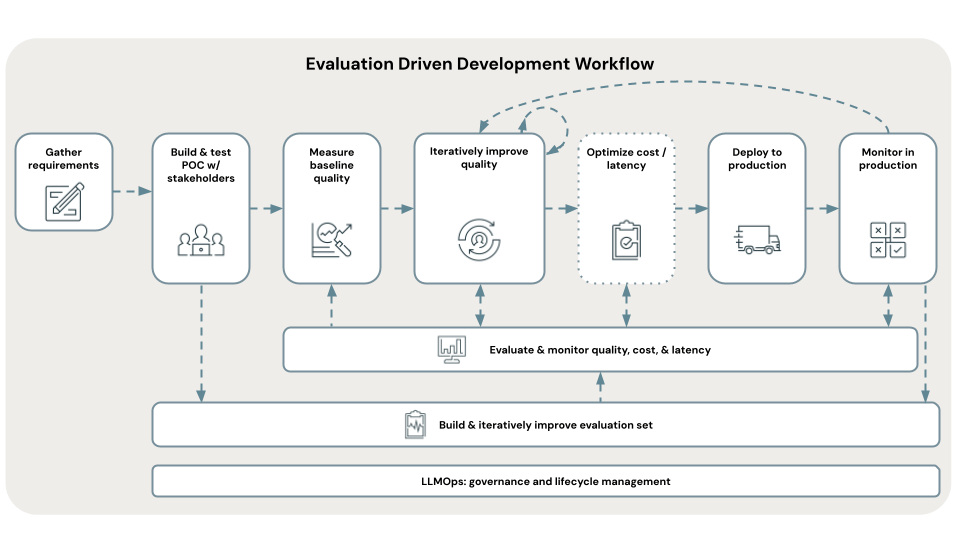
At the AI systems level, consider metrics for quality, cost and latency.
- Quality will likely involve several metrics: accuracy, user feedback, toxicity, etc.
- Costs for systems in production generally center on model inference and data serving
- Latency may mean end-to-end latency, or time to first token for more interactive applications
What numbers must these metrics hit to declare success? What hard constraints do you have on these metrics to ensure a good user experience, positive return on investment or other business requirements? See this talk from our chief AI scientist for more discussion.
At the project and business level, analyze return on investment.
- Costs (investment) should be split into two phases:
- Development costs might include compute and human costs for data preparation, model training and system development
- Ongoing costs might include model and data serving and maintenance person-hours
- Business impact (return)
- Revenue or other business objectives and key results (OKRs) might range from human time-savings (for a GenAI support bot) to direct revenue (for a GenAI-powered product)
- IP creation, such as new models or data, may be the hardest impact to measure but the largest long term. Everyone can use the same model provider APIs, but only you can use your proprietary models and data.
Your data-driven objectives will inform your choices around model customization (principle 1). For example, if you meet your quality metrics but exceed your cost constraints using an expensive model API, you might move to fine-tuning a smaller, more efficient model tailored to your specific task in order to lower costs while maintaining quality. Fine-tuning will incur extra development cost but reduce ongoing costs — and reduce overall cost long term.
Principle 3: Stay practical
Evaluating GenAI models and systems is challenging. Fine-tuning and pretraining techniques are a hot research area. Academic and industry excitement (and LLMs) are generating far more content than one can read. These sources of confusion make it challenging to know when you should use which techniques. (“Do I need LoRA? What’s curriculum learning? Which model architecture is best?”)
Many people new to GenAI have heard that you can throw mounds of data at GenAI and it will learn amazing things. Temper these expectations. Data quantity matters, but data quality, training techniques and evaluation matter as well.
Databricks customers can partly rely on guidance built into Databricks during their journey up the ladder of GenAI customization. This guidance ranges from simple APIs for general models to Agent Bricks Custom Agents for RAG and agents to a UI and API for fine-tuning and even to a guided API for pretraining.
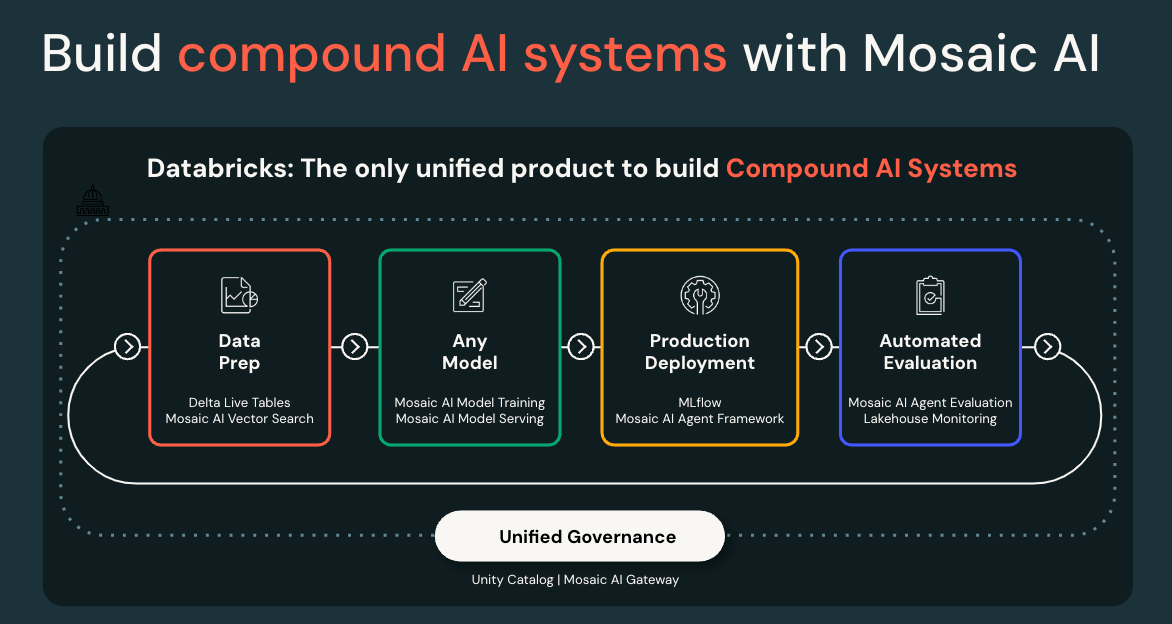
However, the further you take customization, the more possible techniques and decisions you’ll need to make. We recommend that you stay practical. Techniques which worked in research may not work in real-life applications. Models good for one task may be bad at another task. The best techniques will change over time. To navigate this complexity, keep principles 1 and 2 in mind: Define your north star and follow it based on data and metrics.
We also recommend partnering with us. Beyond your immediate Databricks team, our Professional Services team can guide you from initial proofs of concept to full pretraining runs. Our Databricks AI Research team partners with many customers for pretraining runs, giving them access to cutting-edge knowledge and advice.
Techniques for Building Custom LLMs
Given that you want to climb the outer loop of model customization, how should you approach the techniques introduced with principle 1? This section discusses evaluation and then dives into major customization techniques.
Note: This guide doesn’t focus on the inner loop of iterating on a fixed model. For more background on those techniques, see the Generative AI Fundamentals and Generative AI Engineering With Databricks courses.
This section develops the customization techniques outlined earlier in the outer loop of principle 1. We list them here and note that your choice of technique will largely be driven by the data you have available (principle 2).
| Outer loop: Model customization ladder | ||
| Data type required | Data size guidance | |
| Existing model | NA | None, or data for RAG |
| Supervised fine-tuning | Query-response data (or otherwise “labeled” data) | At least 100s–10,000s of examples |
| Continued pretraining | “Raw” text for next-token prediction | Millions to billions of tokens, or 1%+ of original training set |
| Pretraining | “Raw” text for next-token prediction | Billions to trillions of tokens |
In the next section, we cover each technique in more detail, starting with guidance that remains constant across all techniques.
Data
Your data must match your use case. If you’re fine-tuning a model to respond a certain way, then your training data must demonstrate “good” responses. If you’re doing continued pretraining to understand a specific domain, your data must represent that domain.
Address legal and licensing issues from the outset. When using public data, especially for pretraining, be aware that some public datasets are well curated to avoid legal complications and some datasets aren’t. When using your own enterprise data, make sure you’re certain of provenance, particularly whether the data came from customers or from GenAI models with restrictive licenses.
Collect data early and often. Queries, responses and user feedback from your applications today can become inputs to your GenAI model tuning and training in the future — but only if you’re careful about it. Many proprietary and open source models come with usage restrictions, so track the provenance of generated responses carefully. To give yourself future flexibility, avoid mixing models and data with incompatible licenses and bias towards open licenses.
Use synthetic data carefully. Synthetic data can be helpful, but genuine enterprise data is almost always more valuable. “Real” data can be used to inform LLMs about how to generate synthetic data, which you’ll learn about later in this guide. . Synthetic data is still an active research area.
Models
Be aware of base vs. instruct/chat models. Most major LLM releases include both base models (pretrained but not fine-tuned) and instruction-following or chat variants (fine-tuned). See our recommendations on which type to use in following sections.
Use the models suggested by Databricks features. Databricks AI Research studies cutting-edge model architectures, shares some top recommendations for GenAI models and prioritizes those top models in Databricks Model Training and other features.
Drop down to more custom code as needed. If default models or training methods don’t fit your needs, then you can always “drop down the stack” and use more customized code. Databricks GPU-accelerated clusters (general compute) and Databricks Model Training (specialized deep learning compute) both support arbitrary training code for GenAI and other deep learning models.
Identify models which show promise for your use case. Before tuning, examine whether the generic model shows promise for your application. “Promise” might be measured by ad hoc, manual testing using the AI Playground or a more rigorous test using a benchmark dataset or your custom evaluation dataset. Testing might require small-scale training. For fine-tuning, does the model improve after fine-tuning on a small set of 100 examples? For pretraining, does the model improve from continued pretraining on a specific dataset?
Remember your constraints. Choose your model size based on your cost and latency constraints at inference time. Also remember that building custom models is only the outer loop; you can also optimize costs and latency in the inner loop, such as by routing simpler requests to smaller models.
Tip: Your work on simpler techniques won’t be wasted, since these techniques form a sequence. For example, after you pretrain a model, you usually do supervised fine-tuning next.
Evaluation
Principle 2 recommends being data-driven, with metrics. Before we dive into specifics about building custom models, we’ll address metrics around evaluation and quality that can guide your work.
As with software engineering, we recommend following a testing pyramid.
| Software test analogy | Speed/cost vs. fidelity | Examples |
| Unit tests | Fast and cheap proxy measures | Tests with right/wrong answers |
| Integration tests | Medium speed/cost tests | LLM-as-a-judge metrics on benchmark datasets |
| End-to-end tests | Slow but realistic tests | Human feedback |
The examples in the testing pyramid above are written generically and avoid the question of testing models (the outer loop from principle 1) vs. compound AI systems (inner loop). When building a custom model, you’ll want to test both the model itself and the AI systems that will use it. For example, “LLM-as-a-judge metrics” could be used to test a model’s instruction-following ability, and they could be used to test a RAG system’s retrieval metrics and question-answering metrics.
Specific vs. general models and tasks
Your testing pyramid will look very different when fine-tuning a model for a specific task compared to pretraining a general-purpose model. Being data- and metric-driven means tailoring your testing pyramid to your model’s downstream use cases.
If you’re fine-tuning a model for a specific task, remember to start small (principle 1). For example, you might:
- Build a “golden” query-response dataset for evaluation. Make sure it’s balanced across potential queries and topics.
- Use LLM-as-a-judge metrics to scale up evaluation. Pick or customize metrics for your specific task.
- Use human or user evaluation as a final test
As you begin continued pretraining or full pretraining, your evaluations may become more complex. As you plan your testing pyramid, break down your evaluation along the different skill sets you believe your model needs so that you can focus on the important areas. That may mean:
- Skills such as general knowledge, logic or reading comprehension
- Domains such as finance, law or healthcare
- Languages, including natural languages or programming languages
- Other dimensions, from context length to built-in guardrails
Tips:
- Tailor your evaluation to your use cases. For example, if you’re modifying a model to handle longer context lengths, remember that continued pretraining perplexity metrics are not sufficient. Your evaluation dataset must include long-context tasks as well.
- Test both learning and forgetting. If you’re doing continued pretraining to improve a model’s understanding of a specific language (e.g., Malay), consider whether your use cases require that model to maintain its existing understanding of languages (e.g., English). If so, then your evaluation should test both Malay and English.
- Test what your customers will actually use. If you’re pretraining a new (base) model, you’ll likely do instruction fine-tuning to create the model version which your customers will actually use. Your final (end-to-end) evaluation should be on the fine-tuned model, not the base model.
Examples from building DBRX
In May 2024, Databricks released DBRX, a state-of-the-art (at the time) open source LLM. Its evaluation suite provides a nice example of a testing pyramid, which is outlined below.
| Software test analogy | Example metrics from building DBRX | |
| Unit tests | Mosaic Evaluation Gauntlet | 39 publicly available benchmarks split across six core competencies: language understanding, reading comprehension, symbolic problem-solving, world knowledge, common sense and programming |
| Integration tests | MT-Bench | Multi-turn conversation and instruction-following benchmark data |
| IFEval | Instruction-following benchmark data | |
| Arena Hard | Chatbot Arena–based generator for human preference benchmark data | |
| End-to-end tests | Internal and customer feedback and A/B testing | Iterative testing with internal and external users to collect both A/B test metrics and human annotations |
| Red-teaming | Expert testing to generate undesirable outputs (offensive, biased or otherwise insecure) |
For more background on evaluation metrics, we recommend this Generative AI Engineering course. For tooling, we recommend Databricks MLflow, which supports automated (LLM-as-a-judge) metrics, evaluation datasets and a human evaluation app. Agent Evaluation uses open source MLflow APIs for LLM evaluation. For more involved evaluation for pretraining, we can work with you to develop your custom evaluation plan.
Supervised fine-tuning
The first technique for model customization used by most practitioners is supervised fine-tuning (SFT), in which a model is trained on labeled data to optimize it for a specific task or behavior.
Common use cases include:
- Named entity recognition: Fine-tune a model to recognize domain-specific entities
- Chat completion and question answering: Fine-tune a model to respond in a specific tone
- Output formatting: Fine-tune a model to respond with specific, structured outputs
- Instruction following: After pretraining a general model, it’s common to use instruction fine-tuning to teach the model to respond to instructions and queries, rather than simply generate completion text
Terminology: “Fine-tuning” is often used to mean “supervised fine-tuning,” but technically, “fine-tuning” is any adaptation of an existing model. Continued pretraining and reinforcement learning from human feedback (RLHF) are also types of fine-tuning.
Fine-tuning is by far the fastest and cheapest type of model customization. For example, for the MPT-7B model released in May 2023, instruction fine-tuning cost $46 to process 9.6 million tokens, whereas pretraining cost $250,800 to process 1 trillion tokens.
Data
When preparing your data, content and formatting are key. A big part of fine-tuning is teaching the model what inputs to expect and what outputs you expect. What do you expect your users’ queries to look like, in terms of format, tone, topic coverage or other aspects? Your training data should represent these expectations.
Data size is a common question topic and is ultimately dependent on the use case. In some cases, we’ve seen good results fine-tuning on tiny datasets of hundreds or thousands of examples, but some applications demand 10,000s or 100,000s of examples. Start small to validate your plan, and then iteratively scale up, building out your training dataset if needed.
Synthetic data can be useful for SFT, most commonly for expanding a too-small set of “real” data. An LLM can be prompted to generate synthetic SFT data similar to examples from your real data.
Also see the documentation on preparing data for Databricks Model Training.
Models
Earlier in this guide, we recommended using the models supported by Databricks Model Training by default and to test models for promise for your use case. A nice example of this came from MPT. Although MPT was not trained with Japanese in mind, a quick fine-tuning test with 100 Japanese prompt-response examples resulted in a surprisingly effective model for a customer. That quick test validated the approach and paved the way for larger-scale fine-tuning.
When choosing a model size, consider starting with an oversized model. When tuning with a small dataset, a larger model is more likely to produce good results than a smaller model. Starting with a large model may inform you of the potential in your data and use case, and SFT is relatively cheap. After seeing potential, you can test with smaller models and more data.
You can run SFT on either base or instruct/chat variants of models. By default, we recommend that you use an instruct/chat variant, especially if you have a small dataset. If you’ve run continued pretraining to create a custom base model, then you can run SFT on your custom base model.
Databricks Model Training
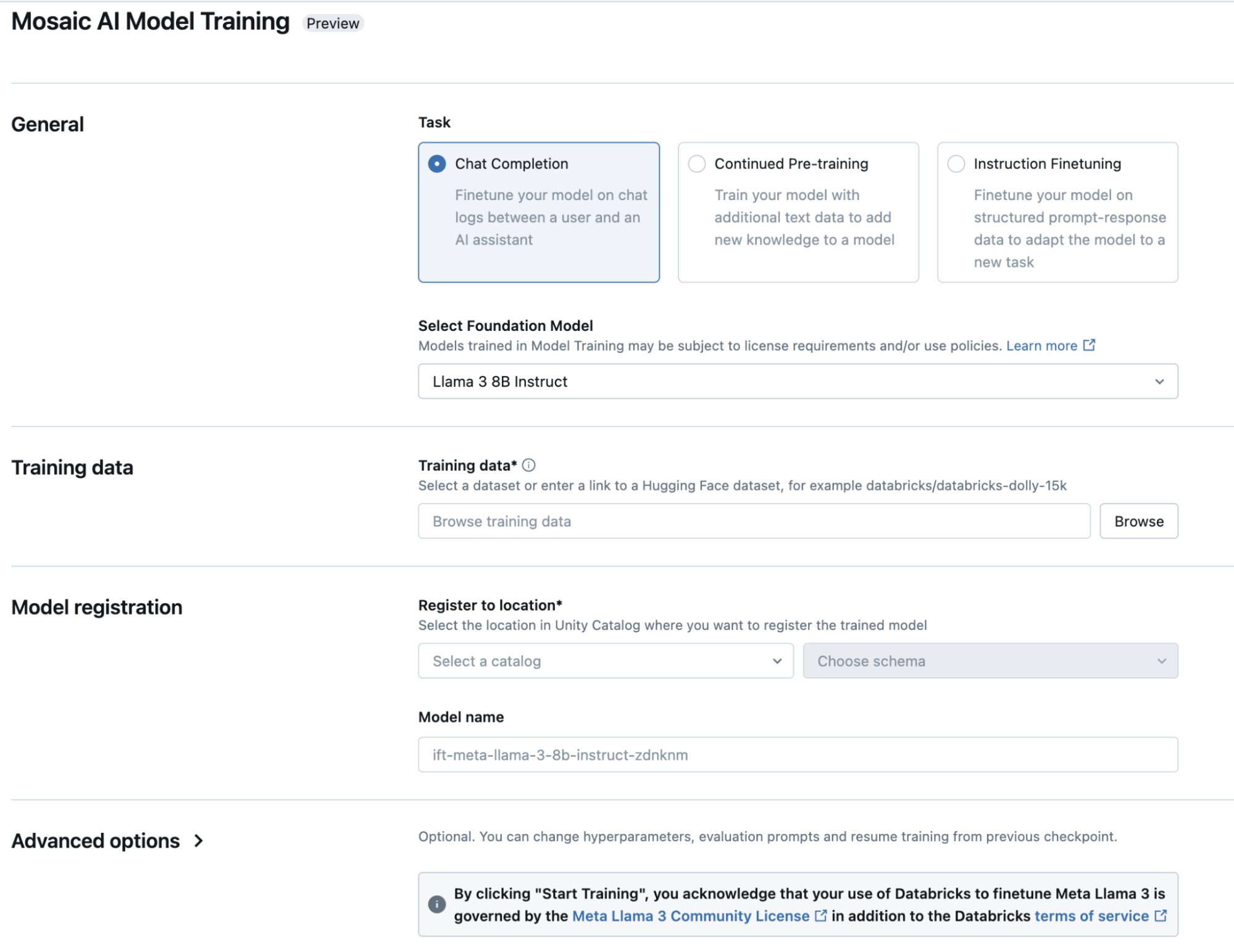
Databricks Model Training provides simple interfaces (UI and API) for supervised fine-tuning tasks. Beyond the tips on data and models already presented in this guide, consider:
- Task: SFT tasks can be specified in different ways, depending on your expected query format. Note that we recommend chat completion formatting by default, even for instruction-following tasks, to fit with common standards.
- Configuration: As you iterate, the first hyperparameter to optimize is the learning rate. Try a grid of rates, and then zoom in to a grid of finer-grained learning rates centered around the best initial rates, similar to adjusting learning rates in traditional machine learning (ML) algorithms. Also consider adjusting training duration (epochs or tokens) based on plots of learning progress. Some fine-tuning tasks require few epochs, and some benefit from 50+ epochs.
- Evaluation: Specify an evaluation dataset to let Databricks Model Training compute initial evaluations (“unit tests”). Even a tiny dataset of 50 query-response pairs can get you a signal, though larger and more varied datasets are better. Use Databricks MLflow for more thorough evaluations, especially since training-time evaluation loss (or accuracy) may not correlate well with end user evaluations.
More on supervised fine-tuning
We recommend Databricks Model Training for a simple, efficient workflow by default. However, if you need to use an unsupported model architecture or need more customized tuning methods, you can run fully custom code on Databricks GPU-accelerated clusters (general compute) and Databricks Model Training.
This guide does not delve into parameter-efficient fine-tuning (PEFT), a family of techniques such as low-rank adaptation (LoRA) for making fine-tuning and inference more efficient. See this blog, this blog or Hugging Face PEFT for descriptions and examples of these techniques.
Continued pretraining
Supervised fine-tuning (SFT) is not designed to teach a model how to understand a new domain. To customize a model to understand a new language, a niche industry or other specific area, practitioners can turn to continued pretraining (CPT). CPT is similar to pretraining, except that you take an existing pretrained model and then continue the pretraining process using new data. After CPT to adapt to a new domain, the model is generally adapted to specific tasks via supervised fine-tuning.
Common use cases include:
- Languages: General models have often seen many natural languages in their training data, but they may be weak at all but the top languages. CPT can boost a model’s understanding of a specific language.
- Programming: General models have often seen at least a few programming languages in their training data, but the models may not be primarily designed for coding or may not understand a specific programming language well. CPT can teach a model how to code in a specific programming language.
- Industry domains: General models may not have in-depth knowledge of specific topic areas, such as molecular biology, environmental law or financial regulations. CPT can boost a model’s knowledge and understanding of a specific domain.
To improve my RAG Q&A bot’s instruction-following model, should I use supervised fine-tuning (SFT) or continued pretraining (CPT)?
Both techniques can be applicable, but it depends on what training data you have and what you want to improve about the model. If you want to teach the model to respond in a certain way, use SFT — if you have query-response data for training. If the model doesn’t understand your domain or language, use CPT — if you have a sizable amount of text data for training. Keep in mind that after CPT, you’ll likely need to run SFT to reteach the model how to respond to queries.
Can I use SFT or CPT to teach my model new knowledge and facts?
Yes, both techniques can impart some knowledge, but CPT is more applicable. Regardless, you may need to use RAG to make your AI system robust by grounding answers with source data.
Data
When considering what data you need for CPT, remember principle 2 (“data-driven”). What do you want to improve about the original model? Your data should represent the domain, language, knowledge, etc. that you want to instill into the model. For a specific use case, this will likely translate to running CPT on your proprietary enterprise data relevant to the use case — your internal knowledge base documents, relevant research papers from the last 20 years, etc. For a more general model, our guidance for data becomes more similar to that for pretraining , where you may select several datasets to represent the different skill sets important for your use case.
Tip: Forgetting vs. learning. As you test CPT, keep in mind that there are trade-offs between forgetting past knowledge and learning new knowledge. Your goal is to shift model behavior to mimic your CPT training data, but that may mean forgetting aspects of the original pretraining data. Therefore, make sure that both your CPT training data and your evaluation suite cover the domains you care about.
For data format, your data will be “raw” text. That is, you’ll run CPT doing next-token prediction, just like in pretraining.
For data size, CPT can span a range from tweaking a model using fewer tokens to significantly changing a model using many tokens. “Fewer” and “many” will depend on the model size, but a reasonable estimate is billions of tokens for modern medium-sized LLMs. One rule of thumb is that CPT will require at least ~1% of the original training set size.
Do I need both raw data for CPT and prompt-response data for SFT?
If you’re running CPT followed by SFT, then yes. However, if you have data for CPT but little data for SFT, then you can augment your small SFT dataset with query-response data using other SFT datasets or synthetic data.
Synthetic data can be useful for CPT, especially for distillation, in which a large, powerful model is used to generate data to train a smaller model. Distillation can help to create smaller, faster, cheaper models and can supplement your nonsynthetic data specific to your use cases.
Also see the documentation on preparing data for Databricks Model Training.
Models
Just as for SFT, we recommend using the models supported by Databricks Model Training by default and to test models for promise for your use case.
Our recommendations around tuning a base model vs. an instruct/chat variant, and around running SFT after CPT, are intertwined. The most common path, and our default recommendation, is to run CPT on a base model, followed by SFT for instruction or chat fine-tuning. However, there are nuances:
- Base vs. instruct/chat variant: It’s most common to run CPT on the base model. Running CPT on a large dataset on an instruct or chat variant may cause that model to lose some instruction-following or chat ability.
- SFT after CPT: If you run CPT on a large amount of data, then you’ll likely follow it up with SFT. However, if you run CPT on an instruction-following or chat model using a small amount of data, you may not need SFT afterwards. We’ve seen some customers do this and then use the resulting model directly in their applications.
Databricks Model Training
Databricks Model Training provides simple interfaces (UI and API) for CPT. The tips for SFT mentioned earlier in this guide mostly apply to CPT as well. Conveniently, the Model Training feature can be used to run both CPT and SFT.
Your testing pyramid from the previous evaluation discussion will need more robust and general tests, since CPT may change the model more fundamentally than SFT. As you scale up CPT, your testing pyramid may start to look more like a pretraining test suite.
More on CPT
As your CPT workloads become more customized and larger, you may also wish to explore the pretraining stack discussed below.
CPT is useful for testing data for pretraining. If your CPT data covers a new domain (such as a new coding language), then showing success with CPT indicates that the data may be useful as part of a pretraining dataset.
Pretraining
Say your GenAI application has progressed up through continued pretraining, and you believe that pretraining a fully custom model is the next step needed to improve your application. This section sketches the process and best practices at a high level, but in practice, you should go through the pretraining process with your Databricks team.
Should you ever jump right to pretraining?
No. Even if regulatory or other constraints require that you create a new model that you fully own, it’s better to prototype on lower rungs of the customization ladder first. This allows you to de-risk more costly and complex pretraining runs.
What are the steps for pretraining?
The reality is that pretraining is an iterative, adaptive process, but high-level, common steps in pretraining include:
- Work up through fine-tuning and continued pretraining first. Do due diligence!
- Prepare datasets. This happens during step 1, in which CPT helps you to test the utility of certain datasets.
- Pretrain a base model that can do text completion. This involves monitoring training, tweaking the run along the way and adaptive techniques like curriculum learning to adjust the data mix.
- Run instruction or chat fine-tuning to create an instruct/chat variant.
- Possibly use techniques like reinforcement learning from human feedback (RLHF) to further tweak the model.
- During every step above, evaluate your models along the way.
This brief procedural summary emphasizes due diligence and evaluation because of the relatively high cost of full pretraining. Recall the example cited earlier of the MPT-7B model, for which pretraining cost 5452x more than instruction fine-tuning.
Data
Your choice and treatment of data will play a huge role in determining the success of your pretraining runs.
What data?
Your data mix should be chosen carefully to represent your target application.
- Just as evaluations need to be broken down by the skill sets you want your model to have, consider what each dataset you bring to pretraining will teach the model. You can test the impact of these datasets beforehand using continued pretraining.
- Few top-performing models come with published details on their data mixes. Some older models have published lists (e.g., MPT, LLaMA, OLMo). See this data mix discussion too.
- You’ll likely mix public and proprietary datasets. Properly vetted, public datasets can fulfill some of your training needs, such as teaching language ability, general knowledge and some specific skill sets. Proprietary datasets give your models a competitive edge unavailable to anyone else.
Data quantity and quality matter, but at different times. It’s common to start pretraining on “all of the data” with looser quality controls. Initially, more tokens translates to more learning of basic language ability. However, later, during pretraining, it’s common to change the data mix to a smaller, higher quality set. “High-quality” does not have an academic definition, but intuitively it means curated using commonsense techniques. See the following for more on data preparation.
How much data?
- Your data size should be chosen with model size and architecture in mind.
- The “Chinchilla” rule of thumb is the most famous rule: # tokens = 20 * # parameters. To lower inference costs, we recommend that you train a smaller model with more data to achieve similar generation quality, per the results of this LLaMA paper.
- Mixture of experts (MoEs) architectures can change this calculus, often requiring less data for a given model size. For MoEs, use the number of active parameters (not total parameters) to make this calculation.
- Keep in mind that some tasks are harder than others. For example, 7B-parameter models generally require at least 2 trillion tokens of training data to tackle the HumanEval coding benchmark.
How should data be prepared?
- Downloading and parsing: You generally need to acquire data by yourself. Few providers offer internet-scale data predownloaded, and regulatory requirements may vary per customer.
- Cleaning: While pretraining can take advantage of large quantities of low-quality data, it’s worthwhile to improve data quality. For example, this RefinedWeb paper estimates that about 11% of Common Crawl is useful. Data cleaning for pretraining is a big, messy topic with lots of active research. See this paper for an excellent survey of common steps, including:
- Language filtering to pare text down to the primary languages of interest
- Heuristic filtering to remove boilerplate text, overly short or long documents, non-natural language text, etc.
- Quality filtering to identify text more likely to have been written or reviewed by humans
- Domain filtering to identify text about the domains of interest
- De-duplication of content within or across datasets
- Filtering toxic and explicit content based on origin or text
- Note that all of these techniques come with caveats. For each, filter strictness must be tuned to trade off precision and recall. For some, the filter may be misguided: Duplication may indicate text is more valid or important, and a model that has never seen toxic content may not recognize toxicity and so readily repeat toxic user inputs.
- As mentioned, early pretraining may use more data with looser quality controls, whereas later pretraining may focus on more carefully cleaned subsets of data.
- Precomputing: Pretokenizing and concatenating data to optimize its format for pretraining can improve efficiency.
Data processing is the original Databricks forte. Make use of the following:
- Workflows for defining jobs and orchestration, with Apache Spark™ and Delta optimizations for scale-out processing
- Delta Lake as your data storage format
- Unity Catalog for data management
- Notebooks, IDE integration and Databricks SQL for development and data exploration
- Lakehouse Monitoring for long-term monitoring of data pipelines and sources
Models
While researchers naturally tout new model architectures as great breakthroughs, there’s a reason that the Transformer architecture still dominates, despite dating back to 2017 — it works really well. Similarly, we generally recommend adhering to tried-and-true architectural choices, such as:
- Use standard attention mechanisms such as quadratic attention or FlashAttention-2, rather than less tested methods from research
- Consider mixture of experts (MoEs) architectures for more efficient training and inference, as well as lower-precision arithmetic
- Train your transformer using next-token prediction
Databricks supports pretraining on arbitrary architectures, but we provide simpler pretraining setups for top recommended architectures through Databricks Model Training, which provides managed, optimized versions of tools such as Mosaic LLM Foundry and Mosaic Diffusion. This tooling can simplify choices by providing standard, well-tested defaults. For example, as of July 2024, LLM Foundry recommends FlashAttention-2 as a standard attention mechanism, and it supports MoEs architectures such as DBRX. For your particular application, we can advise on architecture specifics.
As far as model size, remember to start small (principle 1). Training a 7B-parameter model costs about 10x less than a 70B model, and it can inform your modeling choices for when you scale up. Also, consider the latency and cost constraints of your use case as caps on potential model size.
Training stack and infrastructure
With your data and modeling choices prepared, you may now be ready to pretrain. This may be the most costly step you take with GenAI, hence the careful preparation in earlier steps. During this step, it’ss critical to use robust tooling and expert advisors to make pretraining run smoothly.
Pretraining runs include plenty of challenges. The Databricks platform handles many of these challenges automatically for the user.
| Challenge | Databricks |
| Data loading: You may need to load trillions of tokens. | Databricks provides fast startup and recovery times. |
| Scaling and optimization: You may need to scale from 10s to 1000s of GPUs. There are many, many techniques for optimizing training performance. | Databricks provides seamless scale-out via data parallelism and FSDP, and a library of composable optimizations. It achieves top-of-the-line model FLOPS utilization (MFU). |
| Failure recovery: You can expect ~1 infrastructure failure every 1000 GPU-days on most clouds. Pretraining jobs may see loss spikes or divergence. | Databricks automatically detects failures and does fast restarts. The training stack also reduces loss spikes. |
| Determinism: Distributed data loading and training make determinism difficult, but it’s valuable for recovery and reproducibility. | Databricks data loading and training algorithms make pretraining much more reproducible. |
The Databricks Training stack spans from hardware to workload management. The following table lists key pieces to learn first.
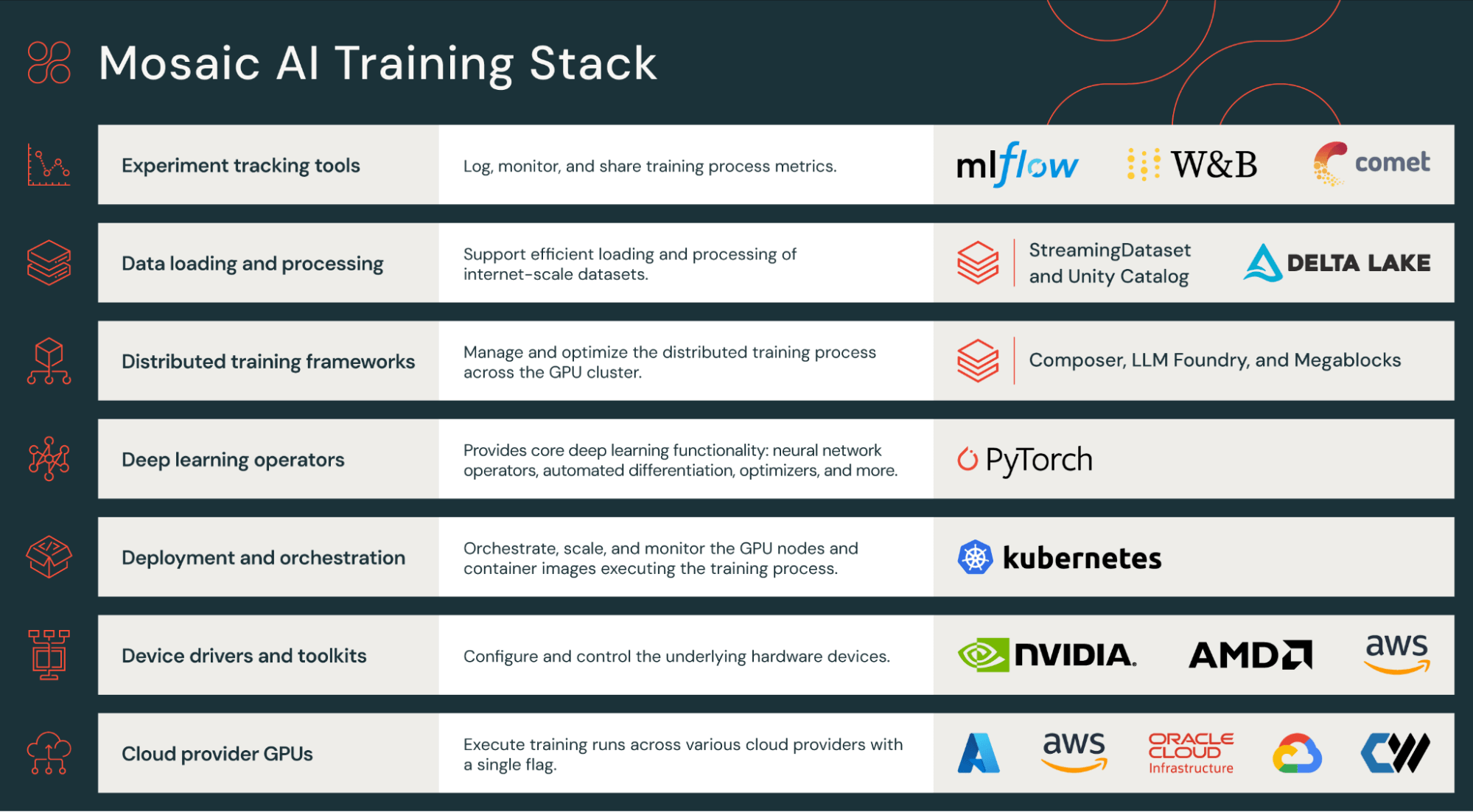
| Stage | Databricks component | Details |
| Data loading | StreamingDataset | Provides fast, reproducible streaming of training data from cloud storage, including fast starts and restarts. |
| Training | Composer | Provides composable best practices and techniques for efficient, distributed training. |
| Workflow configuration | LLM Foundry | Allows simple definition of workflows, including data preparation, training, fine-tuning and evaluation. Databricks can provide standard configurations to help you get started pretraining common architectures. |
| Experiment tracking | MLflow | Tracks evaluation and other metrics during pretraining runs. Databricks also supports Weights & Biases. |
Your use case may follow the well-trodden paths laid out as configuration “recipes” by LLM Foundry, in which case your workflow may be very configuration-driven. Or, if you require more custom architectures or code, you may focus on lower-level parts of the stack such as MCLI, working more directly with Databricks infrastructure.
Computation and costs
Before you pretrain a model, it’s important to estimate costs. Pretraining compute cost is often straightforward to estimate since it boils down to estimating GPU hours, based on data and model size. Your Databricks team can provide accurate estimates, but for any provider, make sure you understand two key calculations:
FLOPS = 6 x parameters x tokens
This rule of thumb tells you that compute (and cost) will scale linearly with model size and with data size. Note that “parameters” will translate to “active parameters” for sparse architectures like MoEs.
Model FLOPS utilization (MFU) = average GPU utilization in practice
MFU is never 100% in practice, and it’s often far below. Different models and data types may achieve different MFUs. The Databricks stack is optimized to achieve top-performing MFU.
What about epochs?
Training for N epochs will cost N times as much as 1 epoch. However, for pretraining, it’s common to use a single epoch, though you may repeat some key high-quality data in your training. This is different from the many epochs used in more traditional deep learning. See this paper for more background.
Beyond pretraining compute costs, also make estimates for:
- Data costs, including purchasing, curation and labeling
- Inference costs
During pretraining
Once you kick off pretraining, it may well “just work” on Databricks, but it’s still important to monitor training and know how to debug or improve learning. Your Databricks team can help you monitor and debug issues.
Monitoring involves two main areas:
- Infrastructure: Databricks Training handles most infrastructure issues for you. For example, it will automatically checkpoint and resume training when GPUs, networking or other infrastructure fails. It’s valuable to monitor utilization though, especially when using nonstandard configurations.
- Learning progress: Loss and other metrics on training and evaluation data should be monitored to check for data and configuration problems. The most common symptoms to watch for are loss spikes and divergence. In Databricks Training, we recommend logging to MLflow Experiments by default for live monitoring and post hoc review.
Debugging most frequently requires adjusting:
- Configurations: If your configurations are set badly, these issues often show up early during training. Learning rate is the most common configuration requiring adjustments.
- Data: For example, one common training issue is seeing loss spikes from improperly shuffled datasets. Databricks Training makes shuffling simple via the Mosaic Streaming library, but shuffling incurs a cost, so Streaming supports different shuffling settings to support quality-cost trade-offs. If you see loss spikes, it’s possible that setting stronger shuffling settings in Streaming will prevent spikes. For example, if your data comes from different buckets (domains, languages, etc.) and isn’t properly shuffled, you’re more likely to see loss spikes.
Curriculum learning: Pretraining will often not run on a single, homogenous dataset. The final model can often be improved by varying the data mix during the training process, and the most common technique for that is curriculum learning, in which higher quality and more targeted datasets are emphasized in the data mix later during training. The data mixes may be specified beforehand, or the data mix can be adjusted manually to strengthen the model in certain areas.
After pretraining
After pretraining, there may be further steps to prepare a model for end applications, such as:
- Further curriculum learning or continued pretraining to tweak the model
- Supervised fine-tuning, such as for instruction-following or chat
- Reinforcement learning from human feedback (RLHF), an advanced technique for tweaking a model to match human preferences. This can be very powerful but complex to get right, and it’s not necessary for all applications. For many applications, supervised fine-tuning or guardrails can suffice.
- Iterating on the above, based on end-user evaluations of the model or application
The Future
The pace of GenAI development isn’t slowing down. GPUs and other specialized hardware will get faster and cheaper. Software stacks will improve. New model architectures and training techniques will move from research to practice. What can you do to be prepared?
With Databricks, you’ll be able to leverage many developments by default. Databricks Model Training, Model Serving and other features will continue to add support for the latest top models. New training and inference techniques will be integrated under the hood. For larger, more complex workloads, Databricks will support full customization, and the most cutting-edge workloads will be done hand in hand with the Databricks AI Research team.
At your organization, focus on supporting flexible, customizable workloads now and in the future:
- Develop your AI infrastructure. Set up model API governance via an AI gateway. Set up security processes using an AI security framework. Standardize and unify data and AI governance under Unity Catalog. Develop both the inner loop using Agent Framework and the outer loop using Model Training. Develop your MLOps practice, including robust Model Serving and Monitoring.
- Develop your AI expertise. Work with your Databricks team to develop a center of excellence (CoE) for AI. Leverage Databricks Training to guide teams along learning paths tailored to their roles.
- Develop your intellectual property. This IP will include not just custom models but, more importantly, your enterprise data. Collect data from current applications and users, track provenance and be careful about regulation and licenses. This data will power all of your GenAI customization — both RAG in the inner loop and tuning and pretraining in the outer loop.
Resources
Courses
- Take the Get Started With Generative AI self-paced tutorial and earn a Databricks certificate
- Generative AI Fundamentals (Databricks Academy)
- Generative AI Engineering with Databricks (Instructor-led training and Databricks Academy)
- Look to Databricks Training and Databricks Academy for new courses
Reading
- The Big Book of Generative AI for a collection of blog posts deep diving into different aspects of developing generative AI models and systems
- A Compact Guide to Retrieval Augmented Generation (RAG) for a deep dive on building generative AI applications using LLMs that have been augmented with enterprise data
- Databricks AI Research blog posts
- The Big Book of MLOps: Second Edition for a deep dive on MLOps with Databricks, including LLMOps
- Databricks page for a product overview, details on features and links to many resources
- Databricks documentation for GenAI for AWS, Azure and GCP
Data + AI Summit 2024 talks
- Customizing Your Models: RAG, Fine-Tuning and Pretraining
- In the Trenches with DBRX: Building a State-of-the-Art Open-Source Model
About Databricks
Databricks is the data and AI company. More than 10,000 organizations worldwide — including Block, Comcast, Condé Nast, Rivian, Shell and over 60% of the Fortune 500 — rely on the Databricks Data + AI Platform to take control of their data and put it to work with AI. Databricks is headquartered in San Francisco, with offices around the globe, and was founded by the original creators of Lakehouse, Apache SparkTM, Delta Lake and MLflow. To learn more, follow Databricks on LinkedIn, X and Facebook.
Contact us for a personalized demo:
databricks.com/contact
